tires LEXUS LX570 2019 User Guide
[x] Cancel search | Manufacturer: LEXUS, Model Year: 2019, Model line: LX570, Model: LEXUS LX570 2019Pages: 632, PDF Size: 10.34 MB
Page 258 of 632

258
LX570_OM_OM60R07U_(U) 4-5. Using the driving support systems
WARNING ■
When to disable the pre-collision system
In the following situations, di sable the system, as it may not operate properly, possibly
leading to an accident resultin g in death or serious injury:●
When the vehicle is being towed ●
When your vehicle is towing another vehicle ●
When transporting the vehicle via truck, bo at, train or similar means of transportation●
When the vehicle is raised on a lift with the engine running and the tires are allowed to
rotate freely ●
When inspecting the vehicle using a drum tester such as a chassis dynamometer or
speedometer tester, or when using an on vehicle wheel balancer ●
When a strong impact is applied to the fron t bumper or front grille, due to an accident
or other reasons ●
If the vehicle cannot be driven in a stable manner, such as when the vehicle has been
in an accident or is malfunctioning ●
When the vehicle is driven in a sporty manner or off-road●
When the tires are not properly inflated ●
When the tires are very worn ●
When tires of a size other than specified are installed ●
When tire chains are installed ●
When a compact spare tire or an emergency tire puncture repair kit is used ●
If equipment (snow plow, etc.) that may obstruct the radar sensor or camera sensor is
temporarily installed to the vehicle
Page 265 of 632

LX570_OM_OM60R07U_(U) 2654-5. Using the driving support systems
4
Driving • When driving on a hill
• If the radar sensor or ca mera sensor is misaligned●
In some situations such as the following, sufficient braking forc e may not be obtained,
preventing the system from performing properly:
• If the braking functions cannot operate to their full extent, such as when the brake
parts are extremely cold, extremely hot, or wet
• If the vehicle is not properly maintained (brakes or tires are excessively worn,
improper tire inflation pressure, etc.)
• When the vehicle is being driven on a gravel road or other slippery surface●
Some pedestrians such as the following may not be detected by the radar sensor and
camera sensor, preventing the system from operating properly:
• Pedestrians shorter than approximately 3.2 ft. (1 m) or taller than approximately
6.5 ft. (2 m)
• Pedestrians wearing oversized clothing (a ra in coat, long skirt, etc.), making their sil-
houette obscure
• Pedestrians who are carrying large baggage, holding an umbrella, etc., hiding part
of their body
• Pedestrians who are bending forward or squatting
• Pedestrians who are pushing a stroller , wheelchair, bicycle or other vehicle
• Groups of pedestrians which are close together
• Pedestrians who are wearing white and look extremely bright
• Pedestrians in the dark, such as at night or while in a tunnel
• Pedestrians whose clothing appears to be nearly the same color or brightness as
their surroundings
• Pedestrians near walls, fences , guardrails, or large objects
• Pedestrians who are on a metal object (manhole cover, steel plate, etc.) on the road
• Pedestrians who are walking fast
• Pedestrians who are changing speed abruptly
• Pedestrians running out from be hind a vehicle or a large object
• Pedestrians who are extremely close to the side of the vehicle (outside rear view
mirror, etc.)
Page 332 of 632
332
LX570_OM_OM60R07U_(U) 4-5. Using the driving support systems●
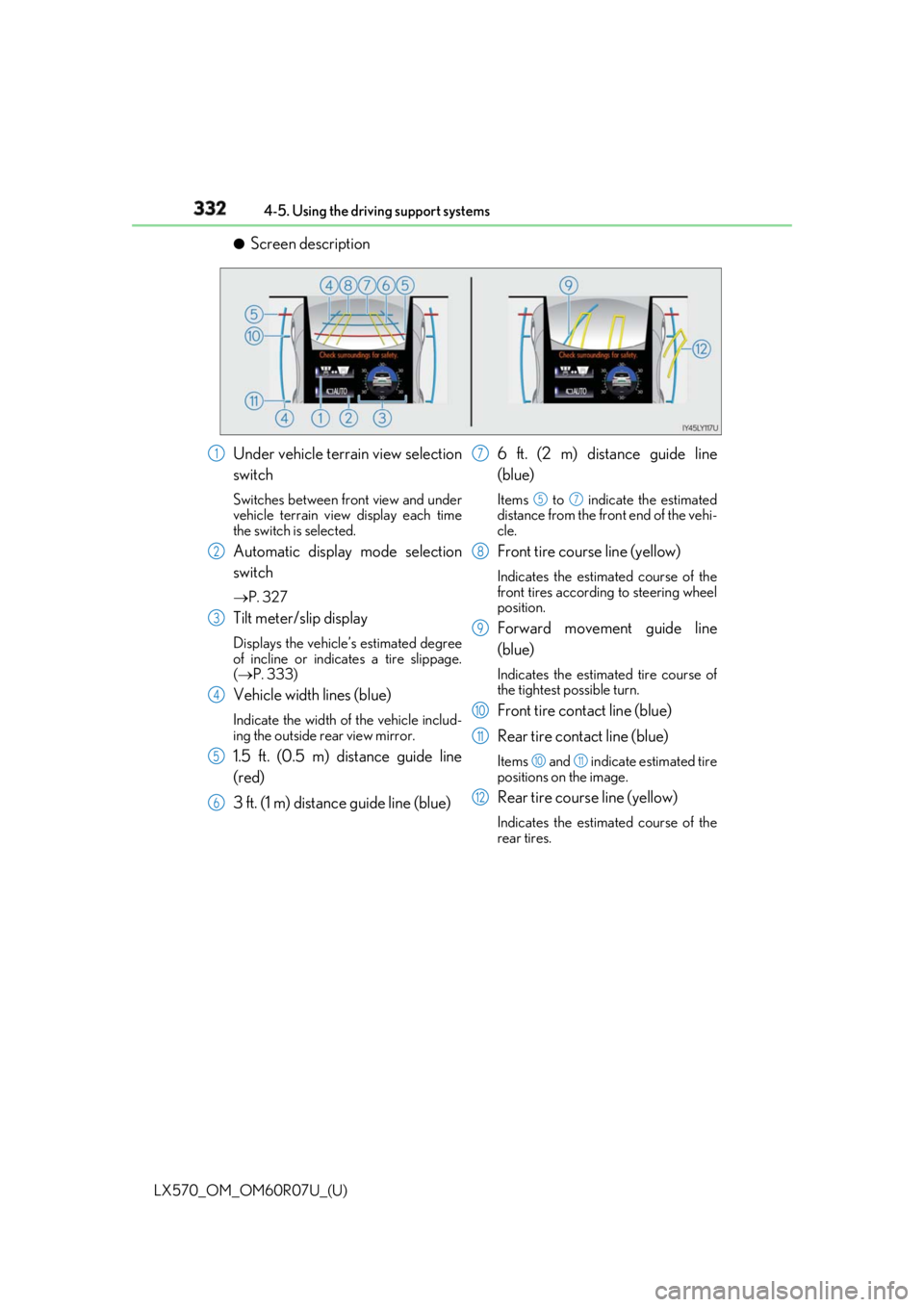
Screen description
Under vehicle terrain view selection
switch Switches between front view and under
vehicle terrain view display each time
the switch is selected.
Automatic display mode selection
switch P. 327
Tilt meter/slip display Displays the vehicle’s estimated degree
of incline or indicates a tire slippage.
( P. 333)
Vehicle width lines (blue) Indicate the width of the vehicle includ-
ing the outside rear view mirror.
1.5 ft. (0.5 m) distance guide line
(red)
3 ft. (1 m) distance guide line (blue) 6 ft. (2 m) distance guide line
(blue) Items to indicate the estimated
distance from the front end of the vehi-
cle.
Front tire course line (yellow) Indicates the estimated course of the
front tires according to steering wheel
position.
Forward movement guide line
(blue) Indicates the estimated tire course of
the tightest possible turn.
Front tire contact line (blue)
Rear tire contact line (blue) Items and indicate estimated tire
positions on the image.
Rear tire course line (yellow) Indicates the estimated course of the
rear tires.1
2
3
4
5
6 7 5 7
8
9
10
11 10 11
12
Page 334 of 632
334
LX570_OM_OM60R07U_(U) 4-5. Using the driving support systems●
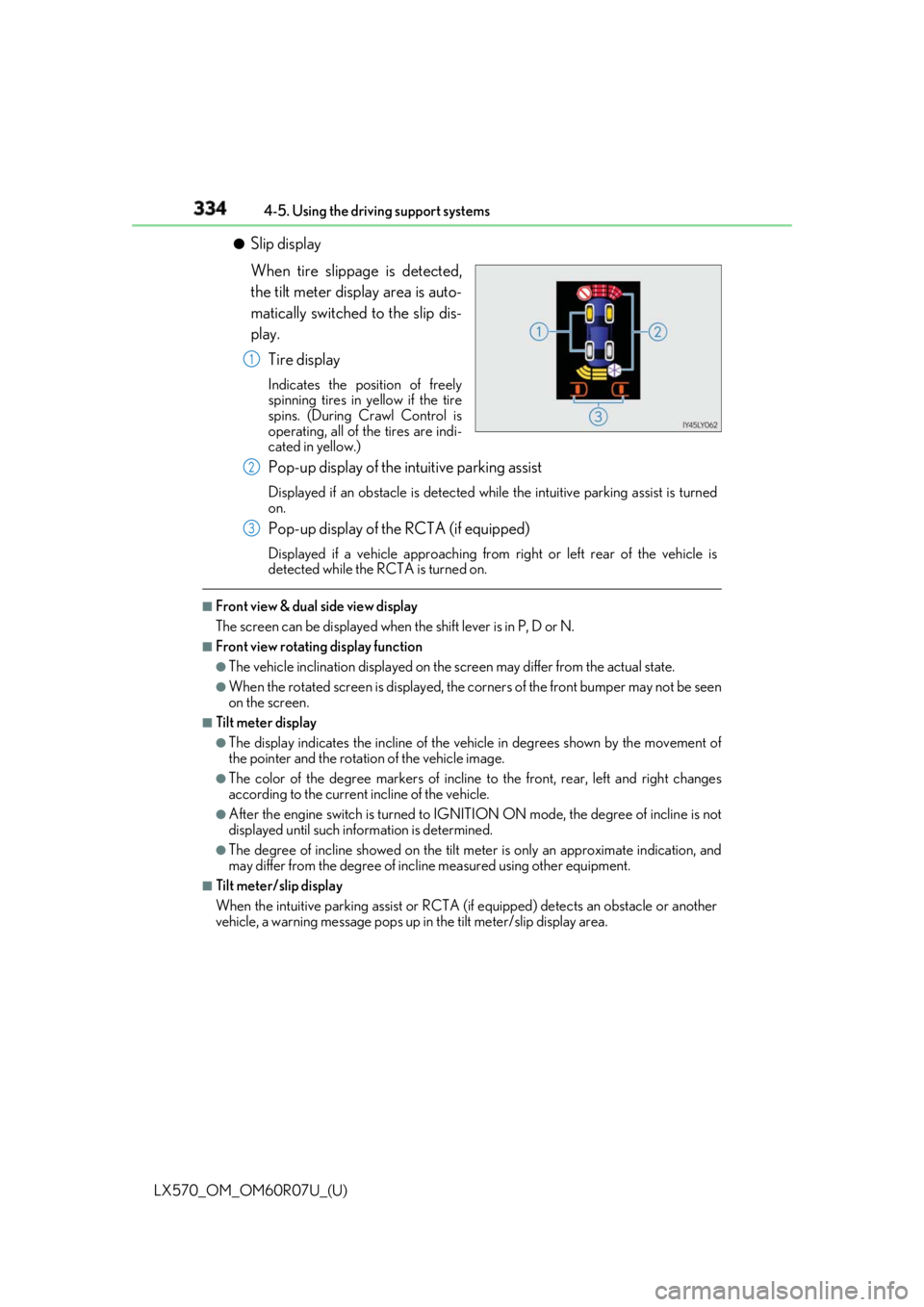
Slip display
When tire slippage is detected,
the tilt meter display area is auto-
matically switched to the slip dis-
play.
Tire display Indicates the position of freely
spinning tires in yellow if the tire
spins. (During Crawl Control is
operating, all of the tires are indi-
cated in yellow.)
Pop-up display of the intuitive parking assist Displayed if an obstacle is detected wh ile the intuitive par king assist is turned
on.
Pop-up display of the RCTA (if equipped) Displayed if a vehicle approaching from right or left rear of the vehicle is
detected while the RCTA is turned on.■
Front view & dual side view display
The screen can be displayed when the shift lever is in P, D or N.■
Front view rotating display function ●
The vehicle inclination displayed on the screen may differ from the actual state. ●
When the rotated screen is displayed, the corners of the front bumper may not be seen
on the screen. ■
Tilt meter display ●
The display indicates the incline of the vehicle in degrees shown by the movement of
the pointer and the rotation of the vehicle image. ●
The color of the degree markers of incline to the front, rear, left and right changes
according to the current incline of the vehicle. ●
After the engine switch is turned to IGNITI ON ON mode, the degree of incline is not
displayed until such info rmation is determined.●
The degree of incline showed on the tilt meter is only an approximate indication, and
may differ from the degree of incline measured using other equipment. ■
Tilt meter/slip display
When the intuitive parking assi st or RCTA (if equipped) dete cts an obstacle or another
vehicle, a warning message pops up in the tilt meter/slip display area.1
2
3
Page 335 of 632
LX570_OM_OM60R07U_(U) 3354-5. Using the driving support systems
4
Driving ■
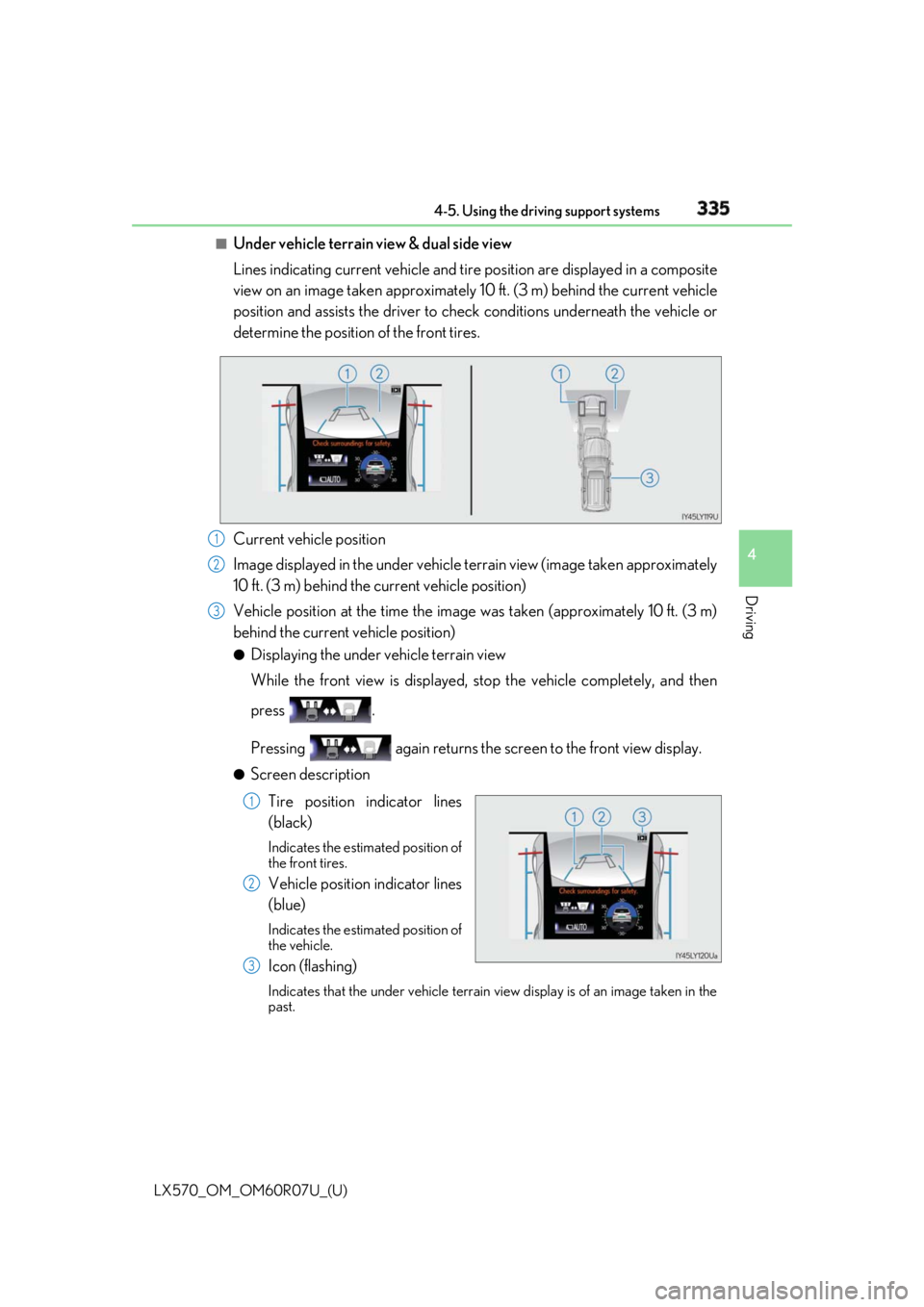
Under vehicle terrain view & dual side view
Lines indicating current vehicle and tire position are displayed in a composite
view on an image taken approximately 10 ft. (3 m) behind the current vehicle
position and assists the driver to chec k conditions underneath the vehicle or
determine the position of the front tires.
Current vehicle position
Image displayed in the under vehicle terrain view (image taken approximately
10 ft. (3 m) behind the current vehicle position)
Vehicle position at the time the image was taken (approximately 10 ft. (3 m)
behind the current vehicle position) ●
Displaying the under vehicle terrain view
While the front view is displayed, stop the vehicle completely, and then
press .
Pressing again returns the scr een to the front view display.●
Screen description
Tire position indicator lines
(black) Indicates the estimated position of
the front tires.
Vehicle position indicator lines
(blue) Indicates the estimated position of
the vehicle.
Icon (flashing) Indicates that the under vehicle terrain view display is of an image taken in the
past. 1
2
3
1
2
3
Page 353 of 632

LX570_OM_OM60R07U_(U) 3534-5. Using the driving support systems
4
Driving Observe the following precautions. Failure to do so may result in an unexpected
accident. Also, when driving, make sure to directly confirm the safety of your sur-
roundings and the area to the rear of the vehicle.
When using the Multi-terrain Monitor WARNING ■
Conditions under which the Multi-te rrain Monitor should not be used
Do not use the Multi-terrain Monitor in the following situations. The system may not
operate properly, resulting in an unexpected accident.●
When driving on an icy, snow-covered or otherwise slip pery road surface●
When using tire chains or a spare tire ●
When either front door or the back door is not completely closed ●
When driving on an uneven road, such as a hill ●
When tires or suspension parts othe r than those specified are equipped
When the tires are replaced, the position indicated by the guide lines displayed on the
screen may differ. ■
Guide lines
The tire position indicator lines and vehicl e position indicator lines may differ from
actual vehicle positions depending on the number of passengers, cargo weight, road
grade, road surface conditions, brightness of the surrounding environment, etc. Always
drive the vehicle while confirming the safety of your surroundings.
Page 366 of 632

366
LX570_OM_OM60R07U_(U) 4-5. Using the driving support systems■
Using under vehicle terrain view ●
The images displayed were prev iously taken approximately 10 ft. (3 m) behind the cur-
rent vehicle position.
Therefore, actual conditions may differ from those shown on the sc reen in the following
situations.
• An obstacle has appeared after the image was taken
• Loose material like sand or snow has crumbled or shifted
• An obstacle has moved
• There is a puddle, tract of mud, etc., within the display range
• The vehicle slips ●
In the following situations, actual tire posi tions and vehicle position may differ from
those indicated by the tire position indicator lines and vehicle position indicator lines.
• Tires have been replaced
• Optional equipment has been installed
WARNING ■
Guide lines
The displayed guide lines are composed with the image that was previously taken and
may differ from the actual state.
Always drive the vehicle while confirming your surroundings.
Page 376 of 632

376
LX570_OM_OM60R07U_(U) 4-5. Using the driving support systems■
Conditions under which the BSM function may not function correctly ●
The BSM function may not detect vehicles correctly in the following situations:
• When the sensor is misaligned due to a stro ng impact to the sensor or its surround-
ing area
• When mud, snow, ice, a sticke r, etc. is covering the sensor or surrounding area on
the rear bumper
• When driving on a road surf ace that is wet with standi ng water during bad weather,
such as heavy rain, snow, or fog
• When multiple vehicles are approaching wi th only a small gap between each vehicle
• When the distance between your vehicle and a following vehicle is short
• When there is a significant difference in speed between your vehicle and the vehicle
that enters the detection area
• When the difference in speed between your vehicle and another vehicle is changing
• When a vehicle enters a detection area traveling at about the same speed as your
vehicle
• As your vehicle starts from a stop, a vehicle remains in the detection area
• When driving up and down cons ecutive steep inclines, such as hills, dips in the road,
etc.
• When driving on roads with sharp bends, consecutive curves, or uneven surfaces
• When vehicle lanes are wide, or when driving on the edge of a lane, and the vehicle
in an adjacent lane is far away from your vehicle
• When a bicycle carrier or other accessory is installed to the rear of the vehicle
• When there is a significant difference in height between your vehicle and the vehicle
that enters the detection area
• Immediately after the BSM function is turned on ●
Instances of the BSM function unnecessarily detecting a vehicle and/or object may
increase in the following situations:
• When the sensor is misaligned due to a stro ng impact to the sensor or its surround-
ing area
• When the distance between your vehicle and a guardrail, wall, etc. that enters the
detection area is short
• When driving up and down cons ecutive steep inclines, such as hills, dips in the road,
etc.
• When vehicle lanes are narrow, or when driv ing on the edge of a lane, and a vehicle
traveling in a lane other than the ad jacent lanes enters the detection area
• When driving on roads with sharp bends, consecutive curves, or uneven surfaces
• When the tires are slipping or spinning
• When the distance between your vehicle and a following vehicle is short
• When a bicycle carrier or other accessory is installed to the rear of the vehicle
Page 386 of 632

386
LX570_OM_OM60R07U_(U) 4-5. Using the driving support systems
WARNING
Any of the following conditions may result in an accident which could cause death or seri-
ous injury: ■
The Multi Terrain ABS does not operate effectively when ●
The limits of tire gripping performance have been exceeded (such as excessively
worn tires on a snow covered road). ●
The vehicle hydroplanes while driving at high speed on a wet or slick road.■
Stopping distance when the Multi Terrain ABS is operating may exceed that of nor-
mal conditions
The Multi Terrain ABS is not designed to shorten the vehicle’s stopping distance.
Always maintain a safe distance from the vehicle in front of you, especially in the follow-
ing situations. ●
When driving on dirt, grav el or snow-covered roads●
When driving with tire chains ●
When driving over bumps in the road ●
When driving over roads with potholes or uneven roads■
Active TRAC may not operate effectively when
Directional control an d power may not be achievable wh ile driving on slippery road
surfaces, even if the Acti ve TRAC is operating.
Do not drive the vehicle in conditions where stability and power may be lost.■
If the hill-start assist control does not operate effectively
Do not overly rely on the hill-start assist control. The hill-start assist control may not
operate effectively on steep inclines and roads covered in ice. ■
When Active TRAC, VSC and Tr ailer Sway Control are off
Be especially careful and drive at a speed appropriate to the road conditions. As these
are systems to help to ensure vehicle stability and driving force, do not turn off Active
TRAC, VSC and Trailer Sway Control unless necessary. ■
When the VSC and Trailer Sway Control are activated
The slip indicator light flas hes. Always drive carefully.
Reckless driving may cause an accident. Exercise particular care when the indicator
light flashes.
Page 387 of 632

LX570_OM_OM60R07U_(U) 3874-5. Using the driving support systems
4
Driving WARNING ■
Replacing tires
Make sure that all tires are of the same si ze, brand, tread pattern and total load capac-
ity. In addition, make sure that the tires are inflated to the specified tire pressure level.
The Multi Terrain ABS, Active TRAC, VSC an d Trailer Sway Control will not function
correctly if different tires are fitted on the vehicle.
Contact your Lexus dealer for further in formation when replacing tires or wheels.■
Handling of tires and suspension
Using tires with any kind of problem or modi fying the suspension w ill affect the driving
assist systems, and may caus e the system to malfunction.■
Trailer Sway Control precaution
The Trailer Sway Control system is not able to reduce trailer sway in all situations.
Depending on many factors such as the condit ions of the vehicle, trailer, road surface,
and driving environment, the Trailer Sway Control system may not be effective. Refer to
your trailer owner’s manual for information on how to tow your trailer properly. ■
If trailer sway occurs
Observe the following precautions.
Failing to do so may cause death or serious injury. ●
Firmly grip the steering wh eel. Steer straight ahead.
Do not try to control trailer sway ing by turning the steering wheel.●
Begin releasing the accelerator pedal immediately but very gradually to reduce
speed.
Do not increase speed. Do not apply vehicle brakes.
If you make no extreme correction with the steering or brakes, your vehicle and trailer
should stabilize. ( P. 207)