park assist LEXUS LX570 2019 Owner's Manual
[x] Cancel search | Manufacturer: LEXUS, Model Year: 2019, Model line: LX570, Model: LEXUS LX570 2019Pages: 632, PDF Size: 10.34 MB
Page 346 of 632
346
LX570_OM_OM60R07U_(U) 4-5. Using the driving support systems
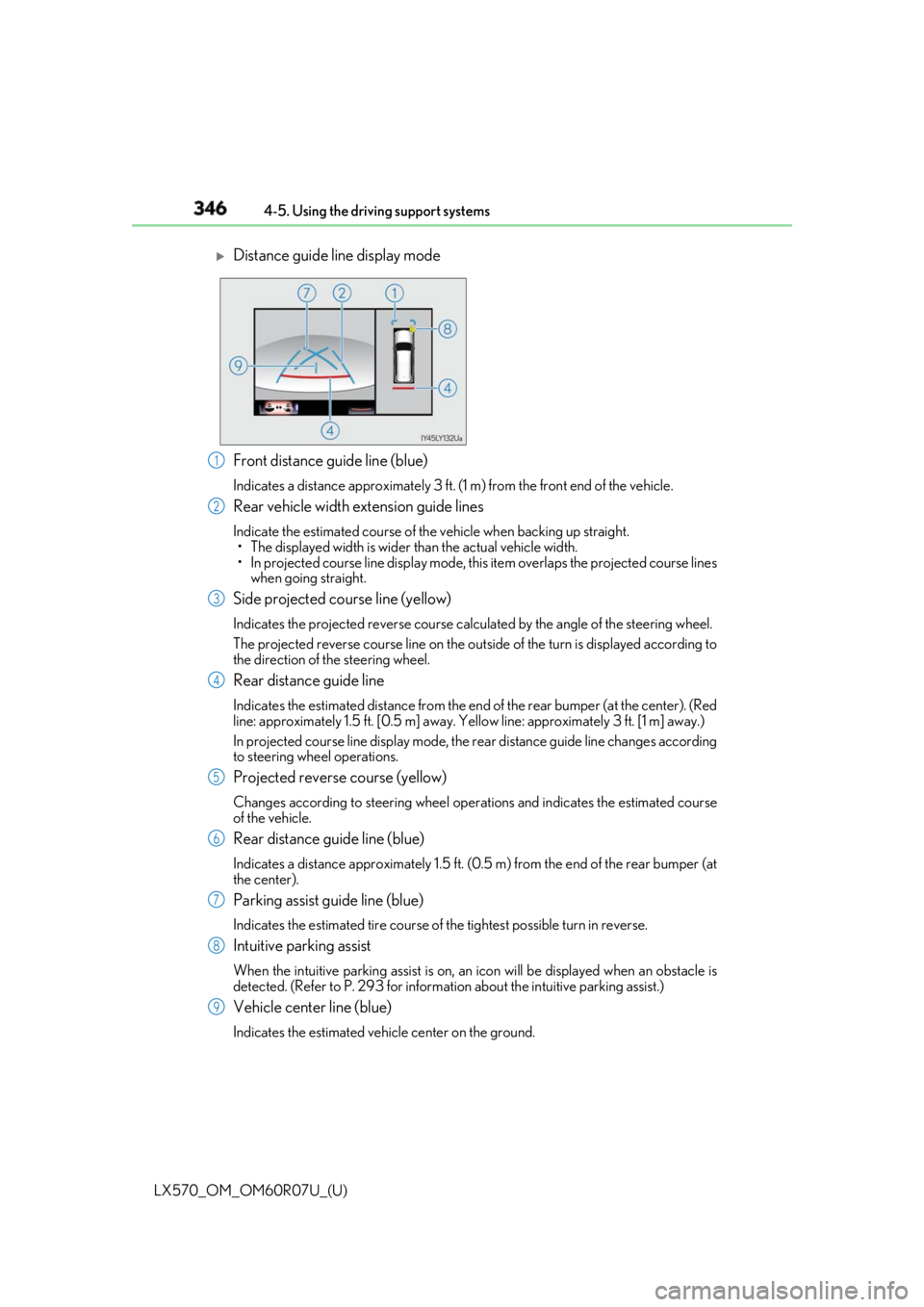
Front distance guide line (blue) Indicates a distance approximately 3 ft. (1 m) from the front end of the vehicle.
Rear vehicle width extension guide lines Indicate the estimated course of the vehicle when backing up straight.
• The displayed width is wider than the actual vehicle width.
• In projected course line disp lay mode, this item overlaps the projected course lines
when going straight.
Side projected course line (yellow) Indicates the projected reverse course calcu lated by the angle of the steering wheel.
The projected reverse course line on the outside of the turn is displayed according to
the direction of the steering wheel.
Rear distance guide line Indicates the estimated distance from the end of the rear bumper (at the center). (Red
line: approximately 1.5 ft. [0.5 m] away. Ye llow line: approximately 3 ft. [1 m] away.)
In projected course line display mode, the re ar distance guide line changes according
to steering wheel operations.
Projected reverse course (yellow) Changes according to steering wheel operations and indicates the estimated course
of the vehicle.
Rear distance guide line (blue) Indicates a distance approximately 1.5 ft. (0.5 m) from the end of the rear bumper (at
the center).
Parking assist guide line (blue) Indicates the estimated tire course of the tightest possible turn in reverse.
Intuitive parking assist When the intuitive parking assist is on, an icon will be displaye d when an obstacle is
detected. (Refer to P. 293 for informat ion about the intuitive parking assist.)
Vehicle center line (blue) Indicates the estimated vehicle center on the ground.
Distance guide line display mode
1
2
3
4
5
6
7
8
9
Page 348 of 632
348
LX570_OM_OM60R07U_(U) 4-5. Using the driving support systems
Once the vehicle width extension gu ide lines and the parking space lines
are parallel, straighten the steering wh eel and back up slowly until the vehi-
cle has completely entered the parking space.
Stop the vehicle in an approp riate place, and finish parking.●
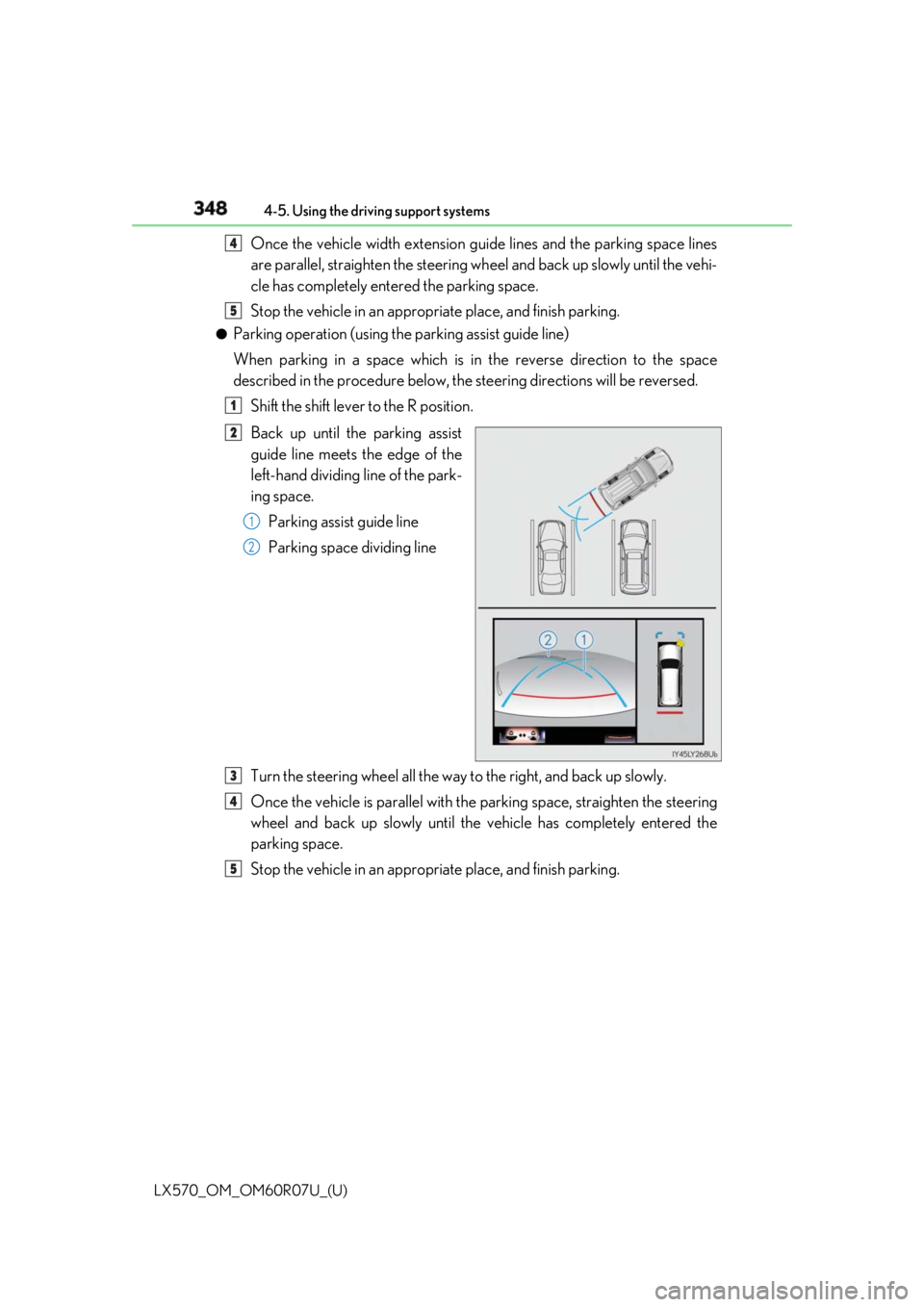
Parking operation (using the parking assist guide line)
When parking in a space which is in the reverse direction to the space
described in the procedure below, the steering directions will be reversed.
Shift the shift lever to the R position.
Back up until the parking assist
guide line meets the edge of the
left-hand dividing line of the park-
ing space.
Parking assist guide line
Parking space dividing line
Turn the steering wheel all the way to the right, and back up slowly.
Once the vehicle is parallel with the parking space, straighten the steering
wheel and back up slowly until the vehicle has completely entered the
parking space.
Stop the vehicle in an approp riate place, and finish parking.4
5
1
2
1
2
3
4
5
Page 350 of 632
350
LX570_OM_OM60R07U_(U) 4-5. Using the driving support systems■
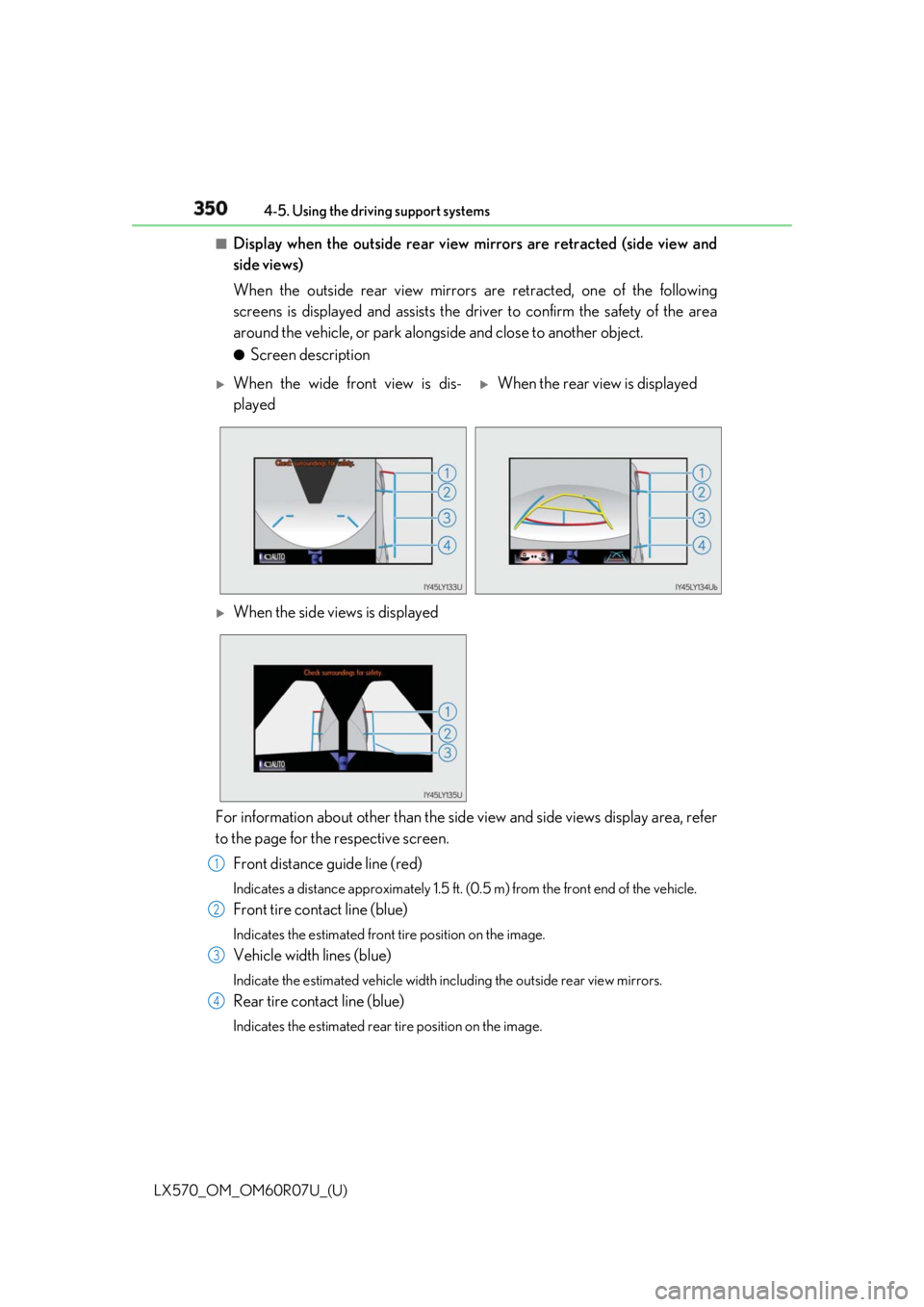
Display when the outside rear view mirrors are retracted (side view and
side views)
When the outside rear view mirrors are retracted, one of the following
screens is displayed and assists the driv er to confirm the safety of the area
around the vehicle, or park alongside and close to another object. ●
Screen description
For information about other than the side view and side views display area, refer
to the page for the respective screen.
Front distance guide line (red) Indicates a distance approximately 1.5 ft. (0.5 m) from the front end of the vehicle.
Front tire contact line (blue) Indicates the estimated front tire position on the image.
Vehicle width lines (blue) Indicate the estimated vehicle width including the outside rear view mirrors.
Rear tire contact line (blue) Indicates the estimated rear tire position on the image.
When the wide front view is dis-
played
When the rear view is displayed
When the side views is displayed
1
2
3
4
Page 352 of 632
352
LX570_OM_OM60R07U_(U) 4-5. Using the driving support systems■
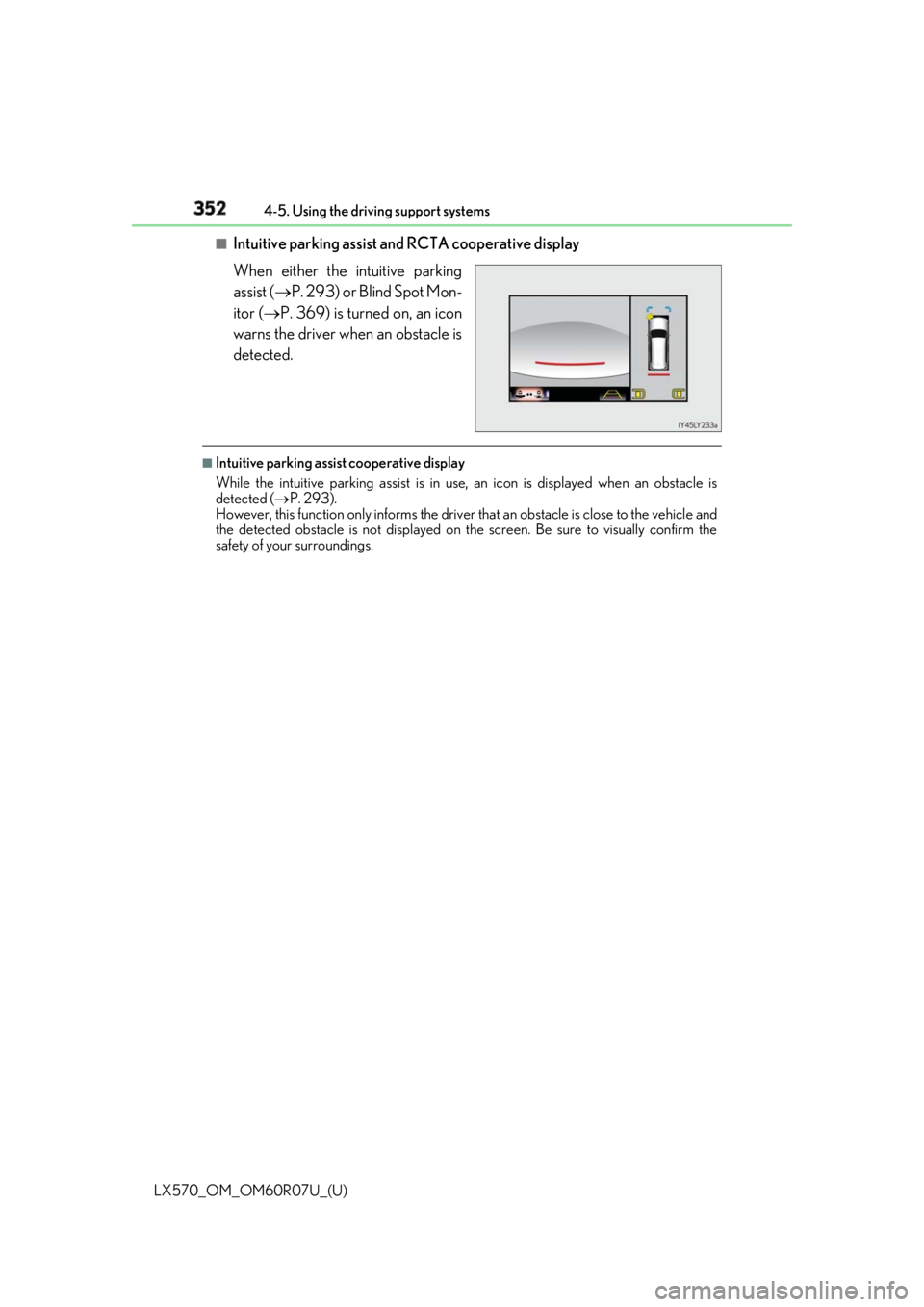
Intuitive parking assist and RCTA cooperative display
When either the intuitive parking
assist ( P. 293) or Blind Spot Mon-
itor ( P. 369) is turned on, an icon
warns the driver when an obstacle is
detected. ■
Intuitive parking assist cooperative display
While the intuitive parking assi st is in use, an icon is displayed when an obstacle is
detected ( P. 293).
However, this function only informs the driver that an obstacle is close to the vehicle and
the detected obstacle is not displayed on th e screen. Be sure to visually confirm the
safety of your surroundings.
Page 362 of 632
362
LX570_OM_OM60R07U_(U) 4-5. Using the driving support systems■
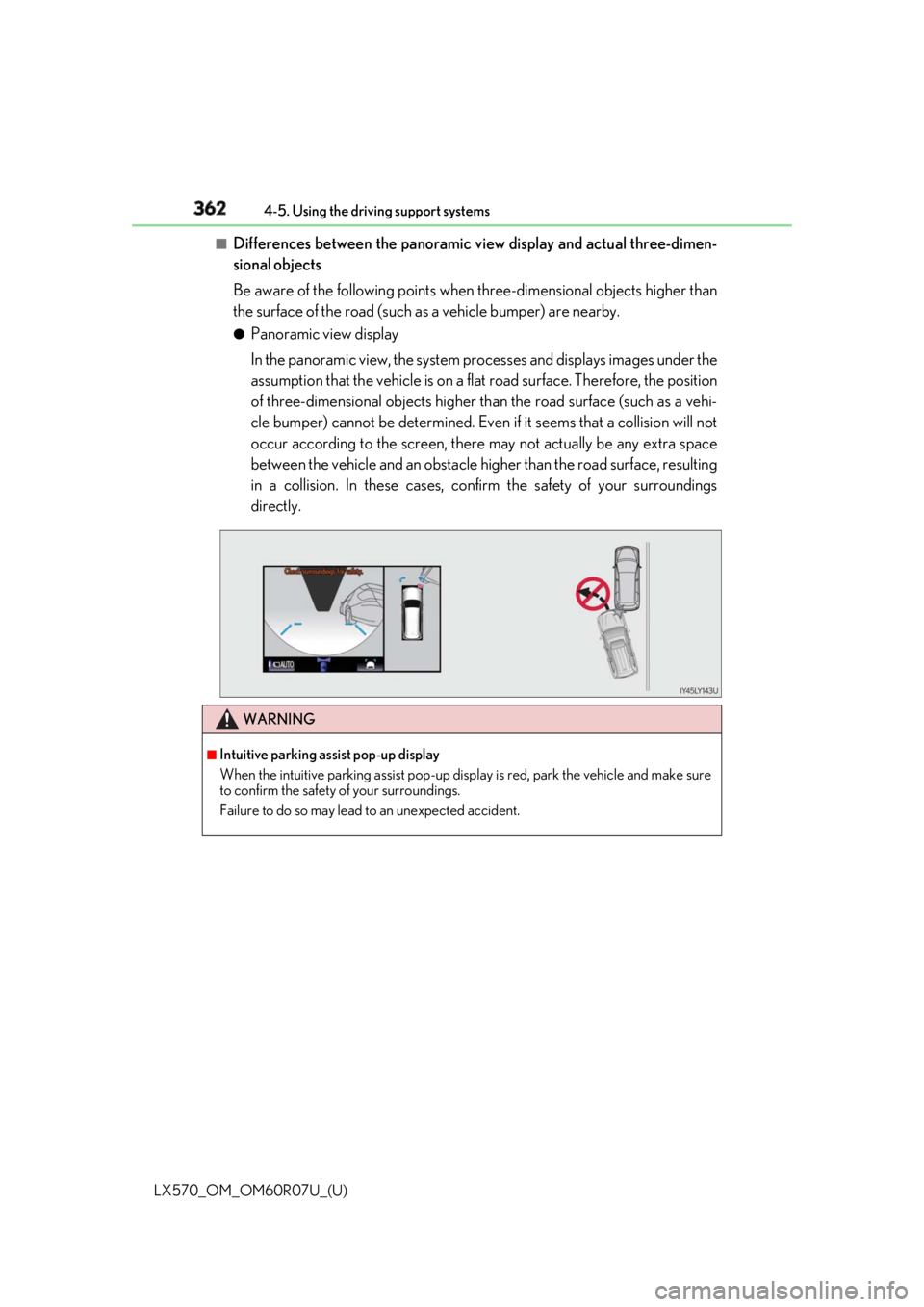
Differences between the panoramic vi ew display and actual three-dimen-
sional objects
Be aware of the following points when three-dimensional objects higher than
the surface of the road (such as a vehicle bumper) are nearby.●
Panoramic view display
In the panoramic view, the system processes and displays images under the
assumption that the vehicle is on a fl at road surface. Therefore, the position
of three-dimensional objects higher th an the road surface (such as a vehi-
cle bumper) cannot be determined. Even if it seems that a collision will not
occur according to the screen, there may not actually be any extra space
between the vehicle and an obstacle higher than the road surface, resulting
in a collision. In these cases, confir m the safety of your surroundings
directly.
WARNING ■
Intuitive parking assist pop-up display
When the intuitive parking assist pop-up disp lay is red, park the vehicle and make sure
to confirm the safety of your surroundings.
Failure to do so may lead to an unexpected accident.
Page 403 of 632
LX570_OM_OM60R07U_(U) 4035-1. Remote Touch screen
5
Interior features ■
Main Display
For details about the functions and operat ion of the main display, refer to the
respective section and “NAVIG ATION SYSTEM OWNER’S MANUAL”.■
Side Display
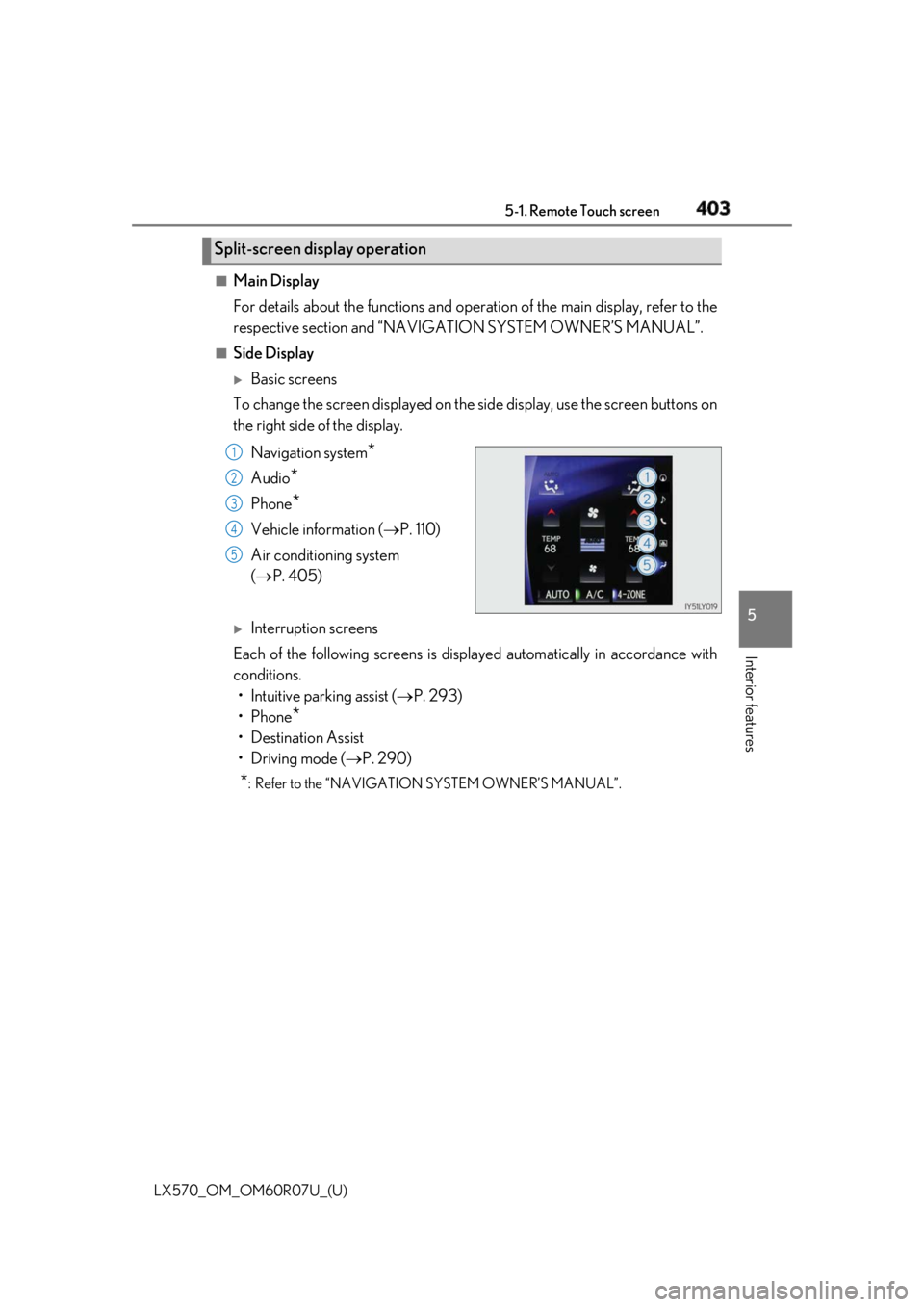
Basic screens
To change the screen displayed on the side display, use the screen buttons on
the right side of the display.
Navigation system
*Audio
* Phone
* Vehicle information ( P. 110)
Air conditioning system
( P. 405)
Interruption screens
Each of the following screens is displayed automatically in accordance with
conditions.
• Intuitive parking assist ( P. 293)
•Phone
*• Destination Assist
•Driving mode ( P. 290)
* : Refer to the “NAVIGATIO N SYSTEM OWNER’S MANUAL”.Split-screen display operation 1
2
3
4
5
Page 518 of 632
518 7-2. Steps to take in an emergency
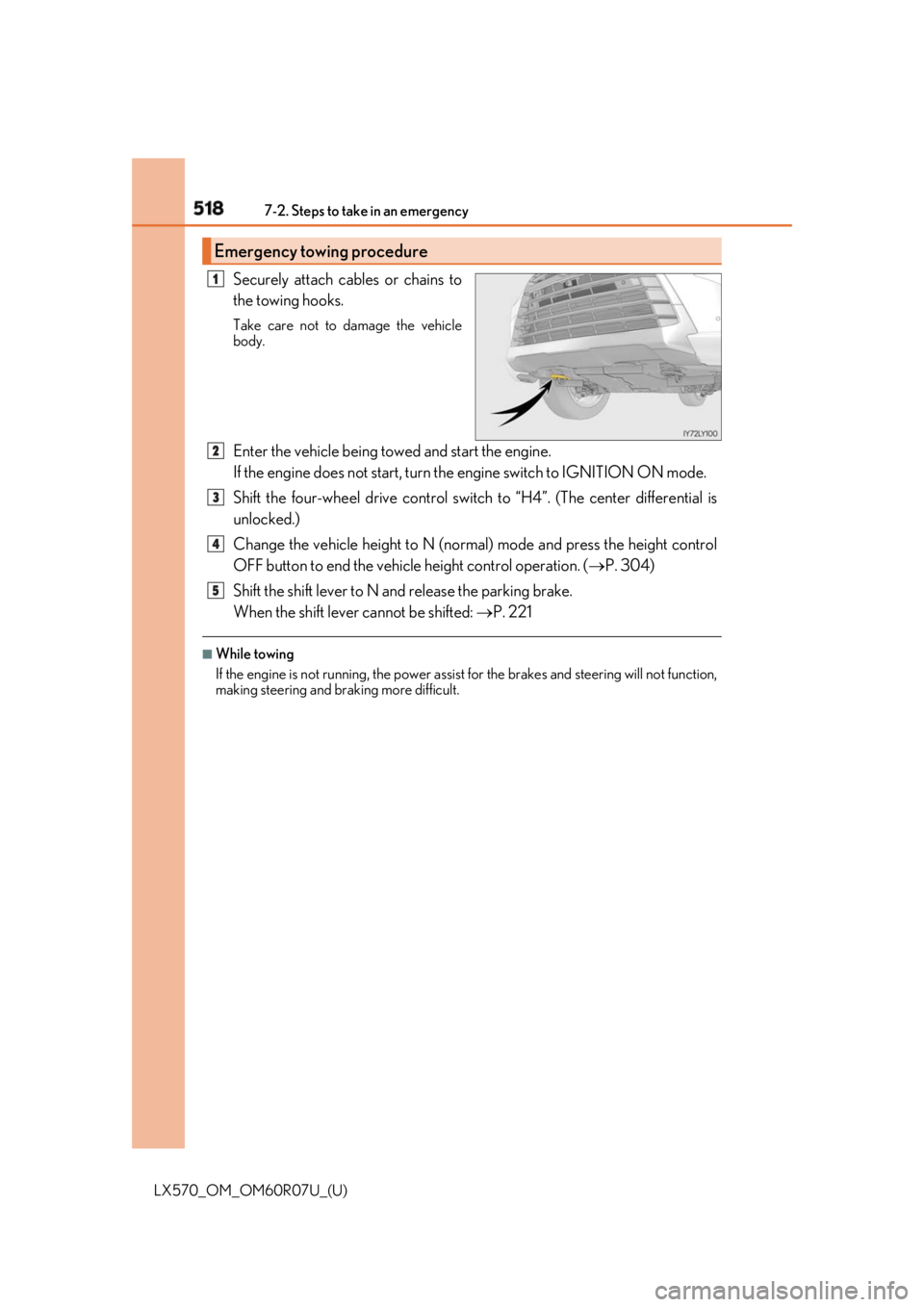
LX570_OM_OM60R07U_(U) Securely attach cables or chains to
the towing hooks. Take care not to damage the vehicle
body.
Enter the vehicle being towed and start the engine.
If the engine does not start, turn th e engine switch to IGNITION ON mode.
Shift the four-wheel drive control switch to “H4”. (The center differential is
unlocked.)
Change the vehicle height to N (norma l) mode and press the height control
OFF button to end the vehicle height control operation. ( P. 304)
Shift the shift lever to N and release the parking brake.
When the shift lever cannot be shifted: P. 221■
While towing
If the engine is not running, the power assist for the brakes and steering will not function,
making steering and br aking more difficult.Emergency towing procedure 1
2
3
4
5
Page 591 of 632
LX570_OM_OM60R07U_(U) 5918-2. Customization
8
Vehicle specifications ■
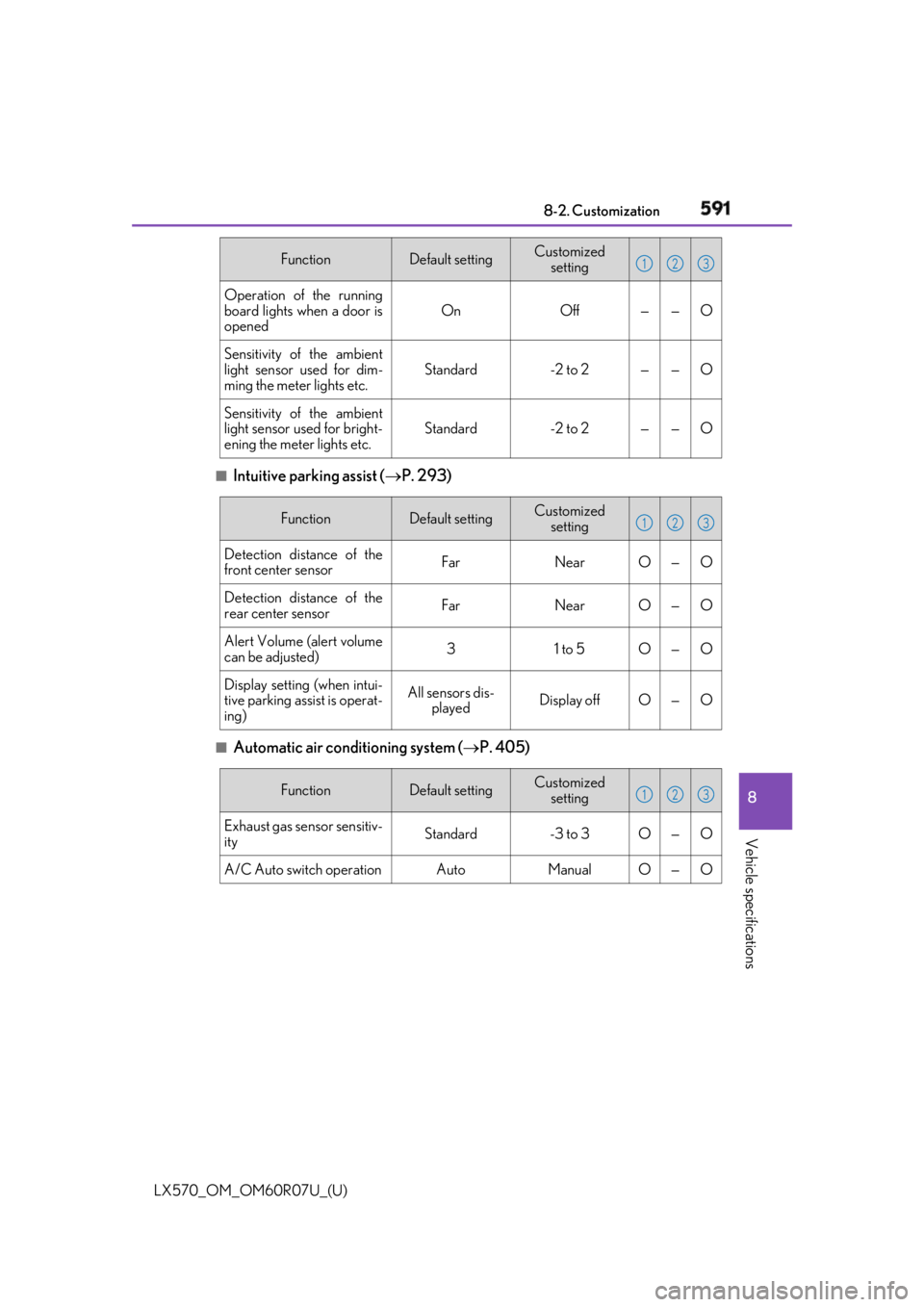
Intuitive parking assist ( P. 293)
■
Automatic air conditioning system ( P. 405)Operation of the running
board lights when a door is
opened On Off — — O
Sensitivity of the ambient
light sensor used for dim-
ming the meter lights etc. Standard -2 to 2 — — O
Sensitivity of the ambient
light sensor used for bright-
ening the meter lights etc. Standard -2 to 2 — — OFunction Default setting Customized
setting 1 2 3
Function Default setting Customized
setting
Detection distance of the
front center sensor Far Near O — O
Detection distance of the
rear center sensor Far Near O — O
Alert Volume (alert volume
can be adjusted) 3 1 to 5 O — O
Display setting (when intui-
tive parking assist is operat-
ing) All sensors dis-
played Display off O — O 1 2 3
Function Default setting Customized
setting
Exhaust gas sensor sensitiv-
ity Standard -3 to 3 O — O
A/C Auto switch operation Auto Manual O — O 1 2 3
Page 597 of 632
LX570_OM_OM60R07U_(U) 5978-2. Customization
8
Vehicle specifications ■
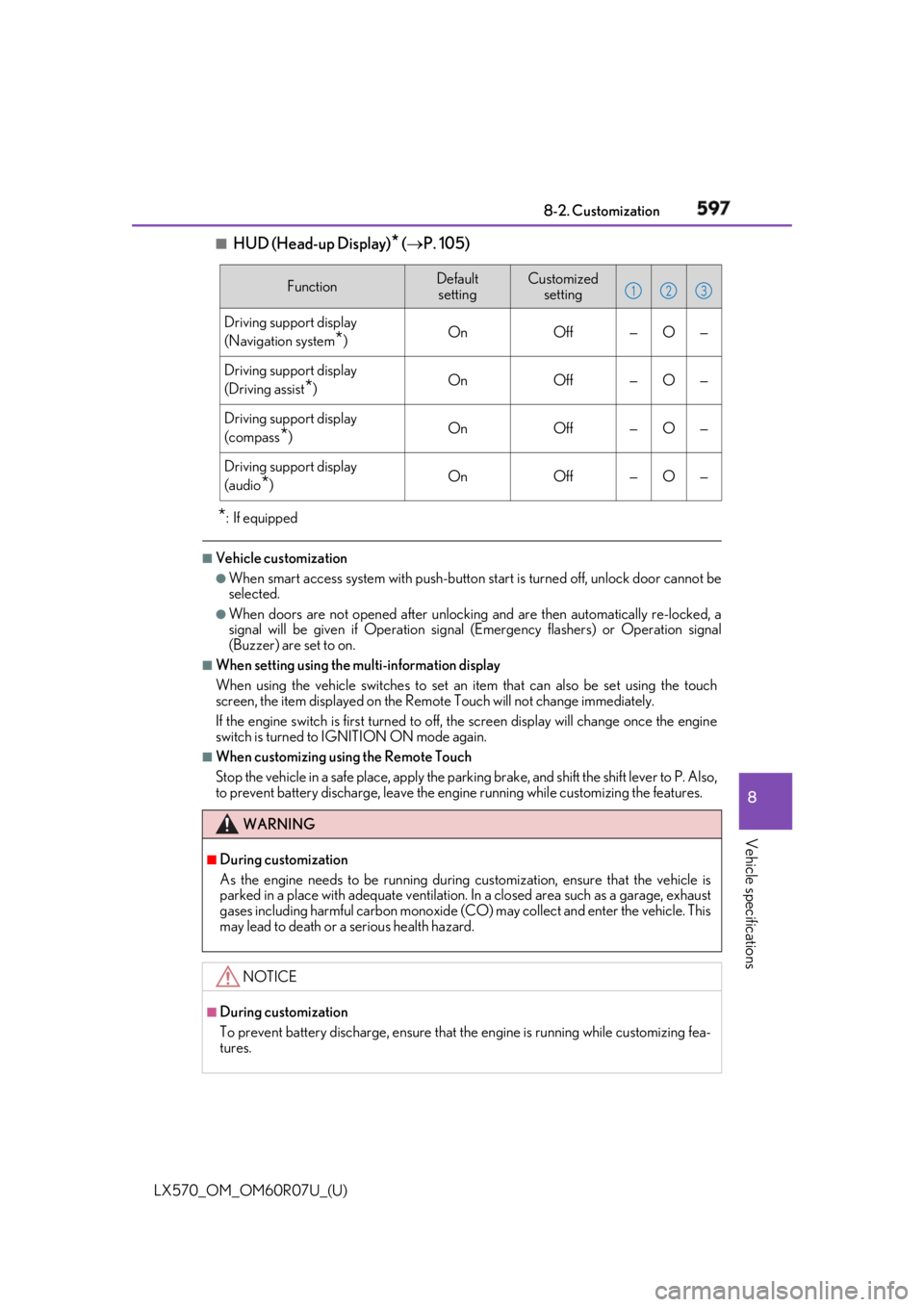
HUD (Head-up Display)
* ( P. 105)
* : If equipped ■
Vehicle customization ●
When smart access system with push-button start is turned off, unlock door cannot be
selected. ●
When doors are not opened after unlocking and are then automatically re-locked, a
signal will be given if Operation signal (Emergency flashers) or Operation signal
(Buzzer) are set to on. ■
When setting using the multi-information display
When using the vehicle switches to set an item that can also be set using the touch
screen, the item displayed on the Remote Touch will not change immediately.
If the engine switch is first turned to off, the screen display will change once the engine
switch is turned to IGNITION ON mode again. ■
When customizing usin g the Remote Touch
Stop the vehicle in a safe place, apply the parking brake, and shift the shift lever to P. Also,
to prevent battery discharge, leave the engine running while customizing the features. Function Default
setting Customized
setting
Driving support display
(Navigation system
* ) On Off — O —
Driving support display
(Driving assist
* ) On Off — O —
Driving support display
(compass
* ) On Off — O —
Driving support display
(audio
* ) On Off — O —
WARNING ■
During customization
As the engine needs to be running during customization, ensure that the vehicle is
parked in a place with adequate ventilation. In a closed area such as a garage, exhaust
gases including harmful carbon monoxide (CO) may collect and enter the vehicle. This
may lead to death or a serious health hazard.
NOTICE ■
During customization
To prevent battery discharge, ensure that the engine is running while customizing fea-
tures. 1 2 3
Page 617 of 632
617Alphabetical index
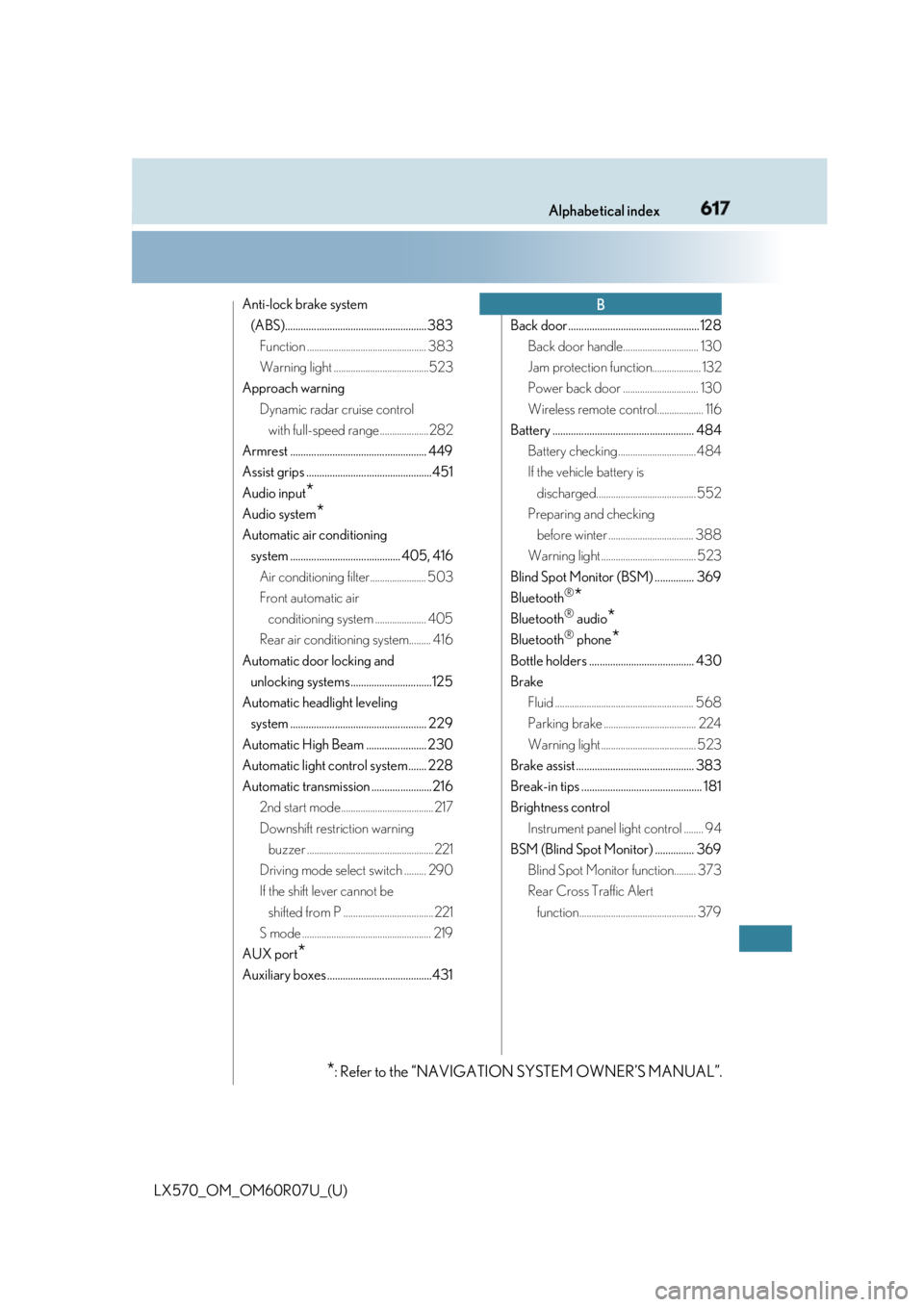
LX570_OM_OM60R07U_(U) Anti-lock brake system
(ABS)...................................................... 383
Function ................................................. 383
Warning light .......................................523
Approach warning
Dynamic radar cruise control
with full-speed range ....................282
Armrest .................................................... 449
Assist grips ................................................451
Audio input
* Audio system
* Automatic air conditioning
system .......................................... 405, 416
Air conditioning filter....................... 503
Front automatic air
conditioning system ..................... 405
Rear air conditioning system......... 416
Automatic door locking and
unlocking systems ...............................125
Automatic headlight leveling
system .................................................... 229
Automatic High Beam ....................... 230
Automatic light control system....... 228
Automatic transmission .......................216
2nd start mode...................................... 217
Downshift restriction warning
buzzer .................................................... 221
Driving mode select switch ......... 290
If the shift lever cannot be
shifted from P ..................................... 221
S mode ..................................................... 219
AUX port
* Auxiliary boxes ........................................431 Back door .................................................. 128
Back door handle............................... 130
Jam protection function.................... 132
Power back door ............................... 130
Wireless remote control................... 116
Battery ...................................................... 484
Battery checking ................................ 484
If the vehicle battery is
discharged......................................... 552
Preparing and checking
before winter ................................... 388
Warning light ....................................... 523
Blind Spot Monitor (BSM) ............... 369
Bluetooth ®
* Bluetooth ®
audio
* Bluetooth ®
phone
* Bottle holders ........................................ 430
Brake
Fluid ......................................................... 568
Parking brake ...................................... 224
Warning light ....................................... 523
Brake assist ............................................. 383
Break-in tips .............................................. 181
Brightness control
Instrument panel light control ........ 94
BSM (Blind Spot Monitor) ............... 369
Blind Spot Monitor function......... 373
Rear Cross Traffic Alert
function................................................ 379 B
* : Refer to
the “NAVIGATION SYSTEM OWNER’S MANUAL”.