brake LEXUS LX570 2019 Workshop Manual
[x] Cancel search | Manufacturer: LEXUS, Model Year: 2019, Model line: LX570, Model: LEXUS LX570 2019Pages: 632, PDF Size: 10.34 MB
Page 285 of 632
LX570_OM_OM60R07U_(U) 2854-5. Using the driving support systems
4
Driving ■
Automatic cancelation of co nstant speed control mode
Constant speed control mode is automatica lly canceled in the following situations:●
Actual vehicle speed is more than approxim ately 10 mph (16 km/h) below the set vehi-
cle speed. ●
Actual vehicle speed falls below approximately 25 mph (40 km/h).●
VSC is activated. ●
Active TRAC is activated for a period of time. ●
When the VSC or Active TR AC system is turned off.●
Pre-collision braking is activated. ●
The switching operation continues for 5 seco nds or more after the center differential
lock switch has been operated.
If constant speed control mode is automati cally canceled for any other reason, there may
be a malfunction in the system . Contact your Lexus dealer.■
Brake system operation sound
If the brakes are applied automatically while the vehicle is in vehicle-to-vehicle distance
control mode, a brake system operation soun d may be heard. This does not indicate a
malfunction. ■
Warning messages and buzzers for dynamic ra dar cruise control with full-speed range
Warning messages and buzzers are used to indicate a system malfunction or to inform
the driver of the need for ca ution while driving. If a warn ing message is shown on the
multi-information display, read the message and follow the instructions.■
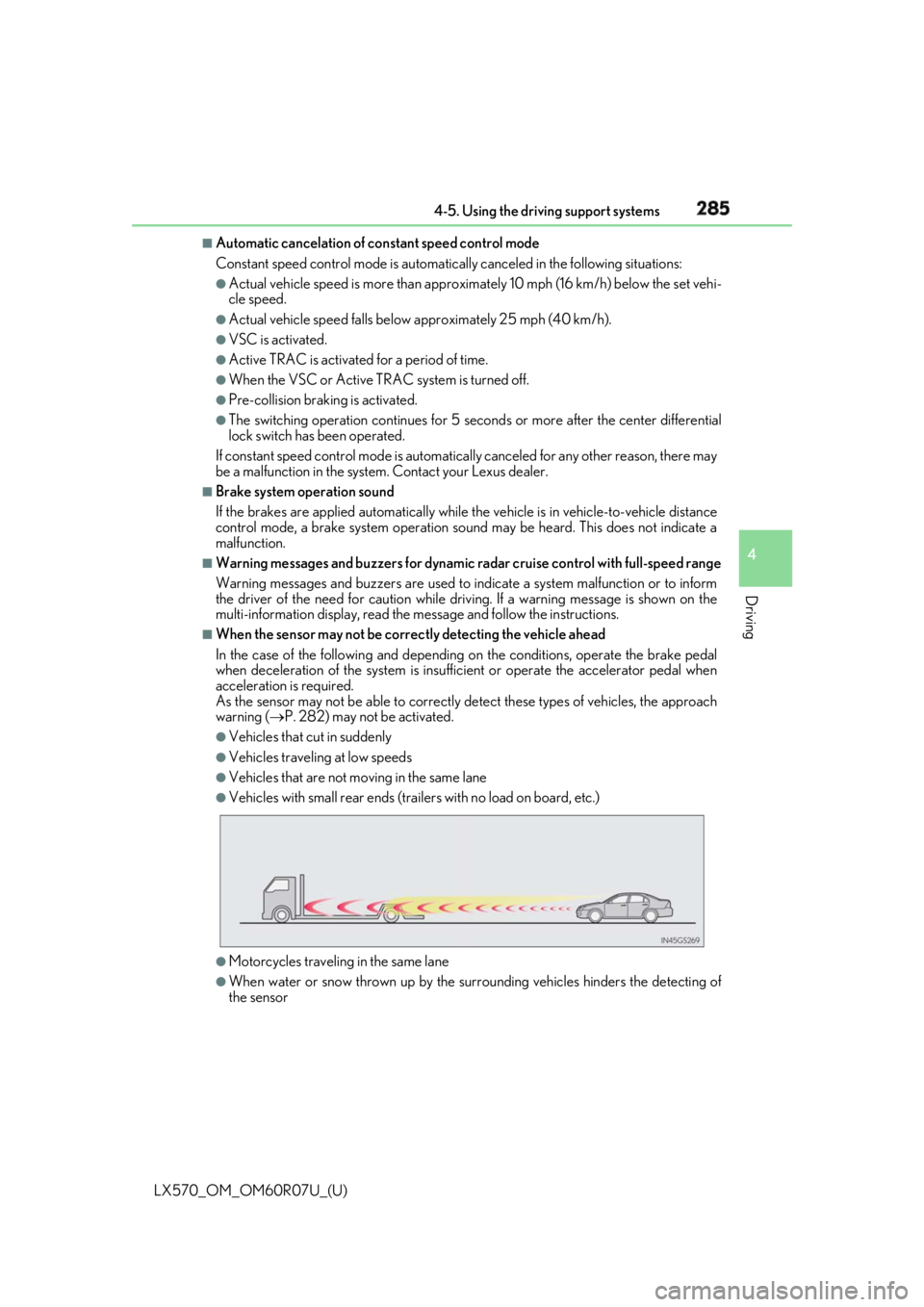
When the sensor may not be correctly detecting the vehicle ahead
In the case of the following and depending on the conditions, operate the brake pedal
when deceleration of the system is insuff icient or operate the accelerator pedal when
acceleration is required.
As the sensor may not be able to correctly detect these types of vehicles, the approach
warning ( P. 282) may not be activated.●
Vehicles that cut in suddenly ●
Vehicles traveling at low speeds ●
Vehicles that are not moving in the same lane ●
Vehicles with small rear ends (traile rs with no load on board, etc.)
●
Motorcycles travelin g in the same lane●
When water or snow thrown up by the surrounding vehicles hinders the detecting of
the sensor
Page 286 of 632
286
LX570_OM_OM60R07U_(U) 4-5. Using the driving support systems
■
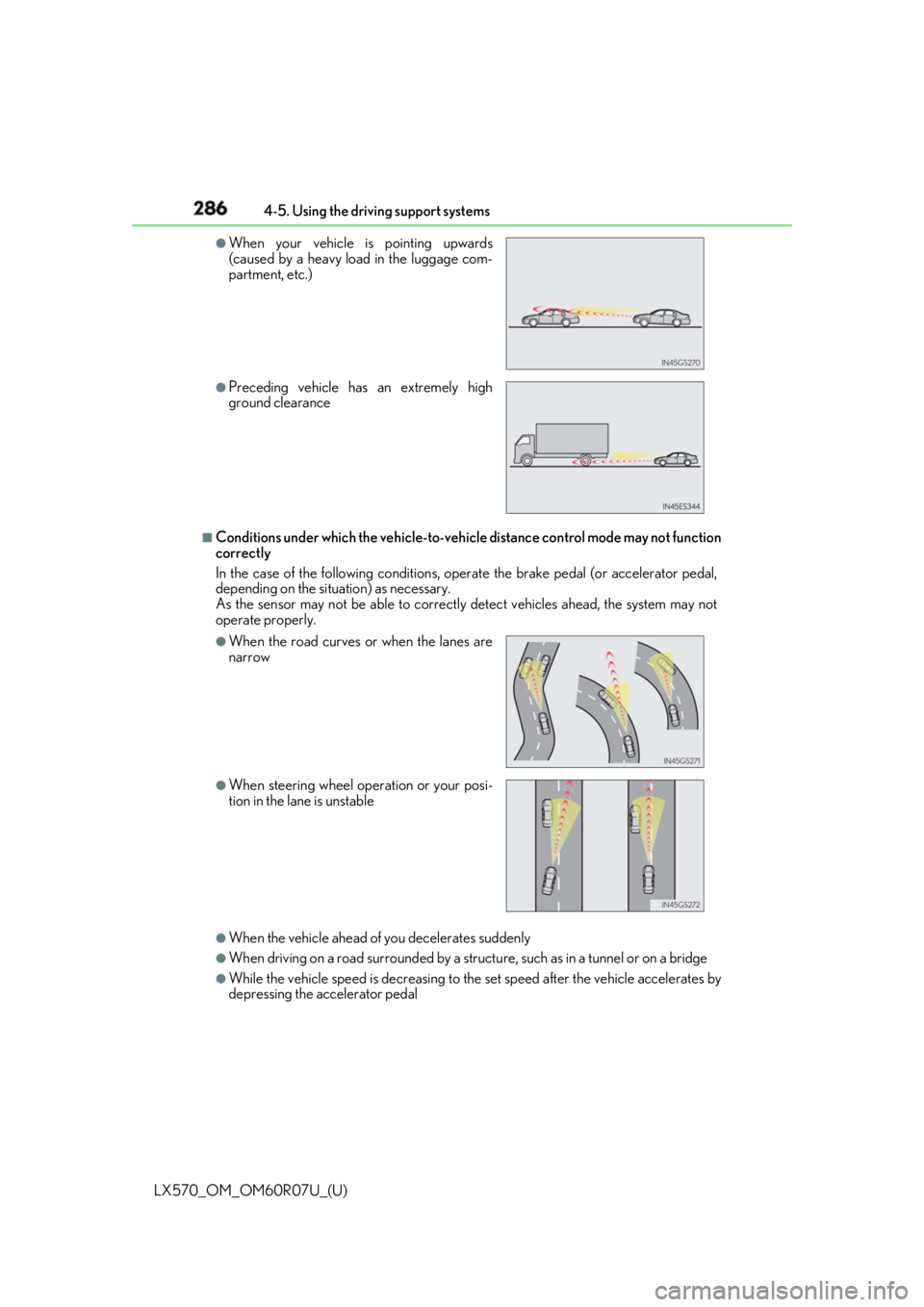
Conditions under which the ve hicle-to-vehicle distance co ntrol mode may not function
correctly
In the case of the following conditions, o perate the brake pedal (or accelerator pedal,
depending on the situ ation) as necessary.
As the sensor may not be able to correctly detect vehicles ahead, the system may not
operate properly.
●
When the vehicle ahead of you decelerates suddenly ●
When driving on a road surrounded by a struct ure, such as in a tunnel or on a bridge●
While the vehicle speed is decreasing to the set speed after the vehicle accelerates by
depressing the accelerator pedal ●
When your vehicle is pointing upwards
(caused by a heavy load in the luggage com-
partment, etc.) ●
Preceding vehicle has an extremely high
ground clearance
●
When the road curves or when the lanes are
narrow
●
When steering wheel operation or your posi-
tion in the lane is unstable
Page 288 of 632
288
LX570_OM_OM60R07U_(U) 4-5. Using the driving support systems
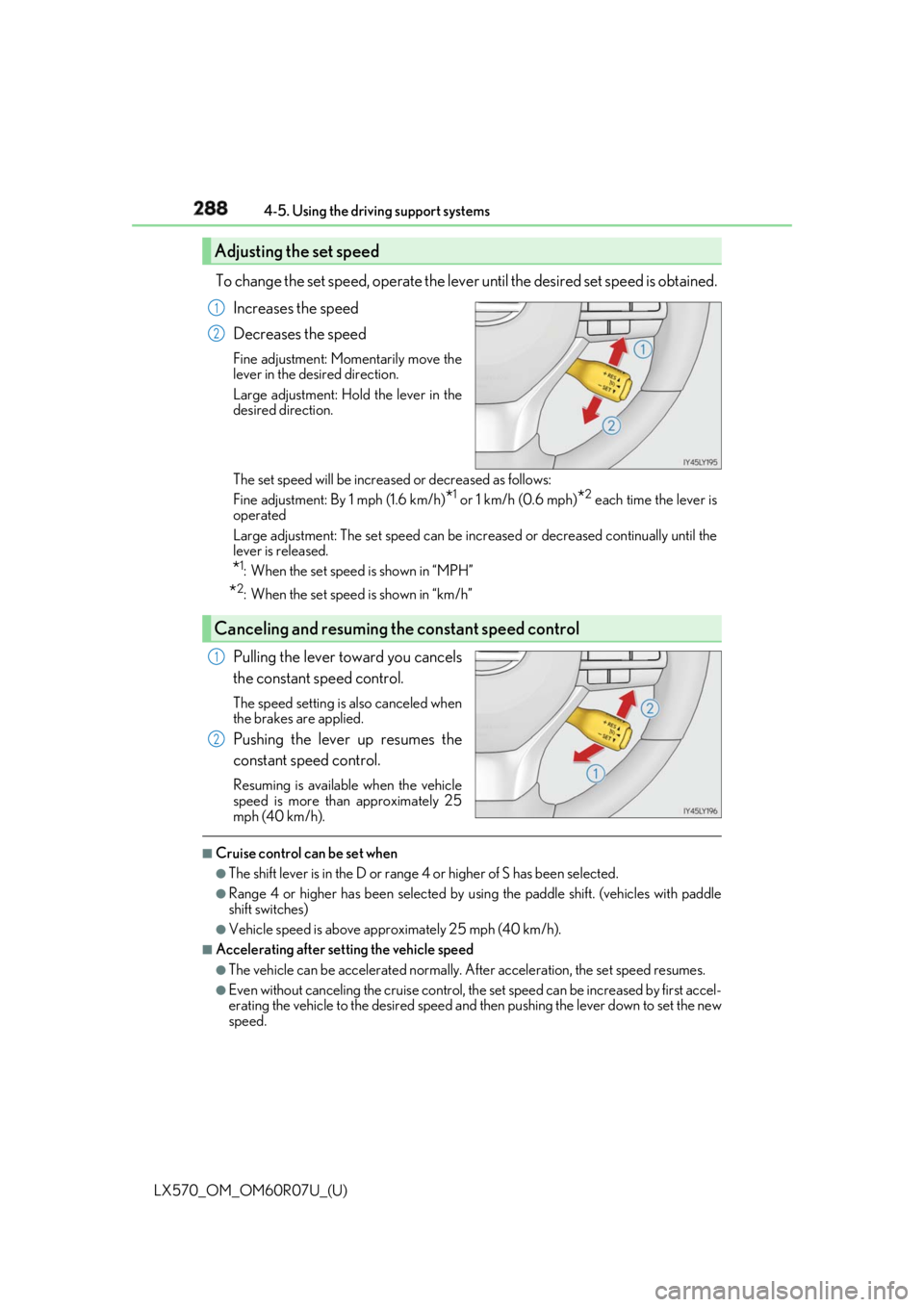
To change the set speed, operate the leve r until the desired set speed is obtained.
Increases the speed
Decreases the speed Fine adjustment: Momentarily move the
lever in the desired direction.
Large adjustment: Hold the lever in the
desired direction.
The set speed will be increased or decreased as follows:
Fine adjustment: By 1 mph (1.6 km/h)
* 1
or 1 km/h (0.6 mph)
* 2
each time the lever is
operated
Large adjustment: The set speed can be increased or decreased continually until the
lever is released.
* 1
: When the set speed is shown in “MPH”
* 2
: When the set speed is shown in “km/h”
Pulling the lever toward you cancels
the constant speed control. The speed setting is also canceled when
the brakes are applied.
Pushing the lever up resumes the
constant speed control. Resuming is available when the vehicle
speed is more than approximately 25
mph (40 km/h). ■
Cruise control can be set when ●
The shift lever is in the D or range 4 or higher of S has been selected. ●
Range 4 or higher has been selected by using the paddle shift. (vehicles with paddle
shift switches) ●
Vehicle speed is above approximately 25 mph (40 km/h). ■
Accelerating after setting the vehicle speed ●
The vehicle can be accelerated normally. After acceleration, the set speed resumes. ●
Even without canceling the cruise control, th e set speed can be increased by first accel-
erating the vehicle to the desired speed and then pushing the lever down to set the new
speed.Adjusting the set speed 1
2
Canceling and resuming the constant speed control 1
2
Page 298 of 632

298
LX570_OM_OM60R07U_(U) 4-5. Using the driving support systems■
The intuitive parking assist can be operated when ●
Front corner sensors:
• The engine switch is in IGNITION ON mode.
• The shift lever is in a position other than P.
• The vehicle speed is less than approximately 6 mph (10 km/h).
(At any speed when the shift lever is in R) ●
Front center sensors:
• The engine switch is in IGNITION ON mode.
• The shift lever is in a position other than P or R.
• The vehicle speed is less than about 6 mph (10 km/h). ●
Rear corner and rear center sensors:
• The engine switch is in IGNITION ON mode.
• The shift lever is in R. ■
Intuitive parking assist display
When an obstacle is detected while the rear view monitor system, Lexus parking assist
monitor or Multi-terrain Monitor is in use, the warning indicator will appear in the upper
corner of the screen even if the display setting has been set to off.■
Sensor detectio n information●
The sensor’s detection areas are limited to the areas around the vehicle’s bumper. ●
Certain vehicle conditions and the surrounding environment may affect the ability of a
sensor to correctly detect an obstacle. Pa rticular instances wher e this may occur are
listed below.
• There is dirt, snow or ice on the sensor . (Wiping the sensors will resolve this prob-
lem.)
• The sensor is frozen. (Thawing th e area will resolve this problem.)
In especially cold weather, if a sensor is frozen the screen may show an abnormal
display, or obstacles may not be detected.
• The sensor is covered in any way.
• The vehicle is leaning considerably to one side.
• On an extremely bumpy road, on an incline, on gravel, or on grass.
• The vicinity of the vehicle is noisy due to vehicle horns, motorcycle engines, air
brakes of large vehicles, or other loud noises producing ultrasonic waves.
• There is another vehicle equipped with parking assist sensors in the vicinity.
• The sensor is coated with a sheet of spray or heavy rain.
• The vehicle is equipped with a fender pole or wireless antenna.
• The bumper or sensor re ceives a strong impact.
• The vehicle is approaching a tall or curved curb.
• In harsh sunlight or intense cold weather.
• The area directly under the bumpers is not detected.
• If obstacles draw too close to the sensor.
• A non-genuine Lexus suspension (low ered suspension etc.) is installed.
• People may not be detected if they are wearing certain types of clothing.
In addition to the examples above, there ar e instances in which, because of their shape,
signs and other objects may be judged by a sensor to be closer than they are.
Page 300 of 632

300
LX570_OM_OM60R07U_(U) 4-5. Using the driving support systems
WARNING ■
When using the intuitive parking assist
Observe the following precautions.
Failing to do so may result in the vehicle be ing unable to be driv en safely and possibly
cause an accident. ●
Do not use the sensor at speeds in excess of 6 mph (10 km/h). ●
The sensors’ detection areas and reaction ti mes are limited. When moving forward or
reversing, check the areas surrounding the vehicle (especially th e sides of the vehi-
cle) for safety, and drive slowly, using the brake to control the vehicle’s speed. ●
Do not install accessories within the sensors’ detection areas.
NOTICE ■
When using intuitive parking assist
In the following situations, the system may not function correctly due to a sensor mal-
function etc. Have the vehicle checked by your Lexus dealer. ●
A buzzer does not sound when you tu rn the intuitive pa rking assist on.●
The intuitive parking assist operation disp lay flashes, and a buzzer sounds when no
obstacles are detected. ●
If the area around a sensor co llides with something, or is subjected to strong impact.●
If the bumper collides with something. ●
If the display shows continuously without a buzzer. ●
If a display error occurs , first check the sensor.
If the error occurs even if there is no ice, sn ow or mud on the sensor, it is likely that the
sensor is malfunctioning. ■
Notes when washing the vehicle
Do not apply intensive bursts of water or steam to the sensor area.
Doing so may result in th e sensor malfunctioning.
Page 306 of 632

306
LX570_OM_OM60R07U_(U) 4-5. Using the driving support systems■
In the following cases the 4-Wheel AHC will not operate●
The brake pedal has been depressed for a few seconds or longer while the vehicle is
stopped. ●
Vehicle height control has not been frequently used. ●
The suspension fluid temperature is lower than -22°F (-30°C). ●
There is ice on the suspension. ●
Driving on bumpy roads which may caus e the suspension to fully elongate.●
If the steering wheel is abrupt ly turned more than 3/4 of a revolution with the center dif-
ferential lock system activated. ■
Cold weather operation
It may take longer for the vehicle height to change if the suspension fluid temperature
drops below 5°F (-15°C).
The 4-Wheel AHC does not operate when the suspension fluid temperature drops
below -22°F (-30°C). ●
In this case, even if the height select switch is pressed, the vehicle height will not change.
Once the vehicle has been driven for a sh ort time and the suspension fluid has been
warmed to within normal operating limits , the 4-Wheel AHC will begin operating and
the vehicle height will automatically change to the selected mode.●
When the suspension fluid is around -22°F (-30°C), the vehicle height may not be able
to be raised, even if the 4-Wheel AHC is operating. In this case, pull the height select
switch to “ ” then push to “ ” after driving for a short time longer to select the desired
vehicle height. ■
Parking and stopping tips ●
If you immediately stop the en gine after off-road driving, the vehicle height may gradu-
ally lower. When parking, ma ke sure there is nothing un der the vehicle that may come
in contact with the underbody. The vehicle will return to th e set height when the engine
is started. ●
The vehicle height may change as the temperature changes when the engine is
stopped. The vehicle will return to the set height when the engine is started. ■
Propeller shaft noise
If the vehicle height is adjusted on a slope, or with the shift lever in a position other than P
or N while the vehicle is stopped, you may hear a sound caused by the expansion and
contraction of the propeller shaft. This does not indicate a malfunction. ■
4-Wheel AHC failure warning
If a malfunction occurs in the 4-Wheel AHC , normal mode is automatically selected.
However, the system may not switch to norm al mode depending on the location of the
malfunction.
The warning message is displa yed on the multi-informatio n display, and the 4-Wheel
AHC cannot be activated until the malfunction is corrected.
Stop the engine and start it again. If the wa rning message turns off, the system is operat-
ing correctly. If the warning me ssage continues to be displayed, have the vehicle checked
at your Lexus dealer as soon as possible.
Page 310 of 632
310
LX570_OM_OM60R07U_(U) 4-5. Using the driving support systems
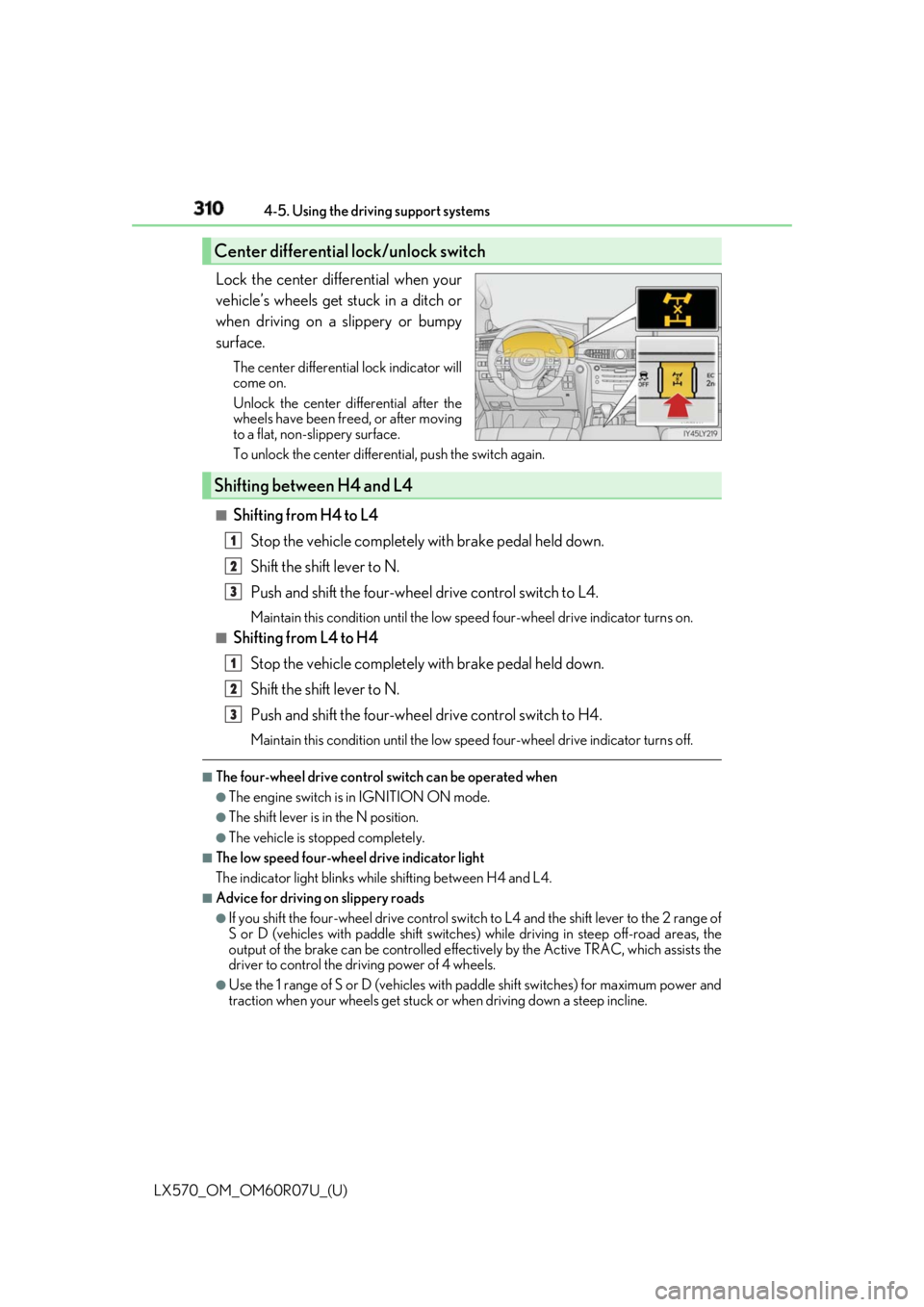
Lock the center differential when your
vehicle’s wheels get stuck in a ditch or
when driving on a slippery or bumpy
surface. The center differential lock indicator will
come on.
Unlock the center differential after the
wheels have been fr eed, or after moving
to a flat, non-slippery surface.
To unlock the center differential, push the switch again.
■
Shifting from H4 to L4
Stop the vehicle completely with brake pedal held down.
Shift the shift lever to N.
Push and shift the four-wheel drive control switch to L4. Maintain this condition until the low sp eed four-wheel drive indicator turns on.■
Shifting from L4 to H4
Stop the vehicle completely with brake pedal held down.
Shift the shift lever to N.
Push and shift the four-wheel drive control switch to H4. Maintain this condition until the low sp eed four-wheel drive indicator turns off.■
The four-wheel drive control switch can be operated when ●
The engine switch is in IGNITION ON mode. ●
The shift lever is in the N position. ●
The vehicle is stopped completely. ■
The low speed four-wheel drive indicator light
The indicator light blinks while shifting between H4 and L4.■
Advice for driving on slippery roads ●
If you shift the four-wheel drive control switch to L4 and the shift lever to the 2 range of
S or D (vehicles with paddle shift switches) while driving in steep off-road areas, the
output of the brake can be co ntrolled effectively by the Ac tive TRAC, which assists the
driver to control the driving power of 4 wheels. ●
Use the 1 range of S or D (vehicles with pa ddle shift switches) for maximum power and
traction when your wheels get stuck or when driving down a steep incline.Center differential lock/unlock switch
Shifting between H4 and L4 1
2
3
1
2
3
Page 311 of 632

LX570_OM_OM60R07U_(U) 3114-5. Using the driving support systems
4
Driving ■
The center differential lock indicator light
The indicator light blinks while locking/unlocking the center differential.■
The center differential lock/unlock switch can be operated when ●
The engine switch is in IGNITION ON mode. ●
The vehicle speed is less than 62 mph (100 km/h). ■
Locking/unlocking the center differential●
When the four-wheel drive control switch is in L4 with the center differential locked,
VSC is automatically turned off. (The center differential lock and VSC OFF indicator
lights come on.) ●
If the operation is not completed, the center di fferential lock indicato r blinks. If the indi-
cator light does not turn off when unlocking the center diff erential, drive straight ahead
while accelerating or decelera ting, or drive in reverse.●
If the center differential lock/unlock is no t completed within 5 se conds while the cruise
control system is on, cancel the cruise control system.■
If the low speed four-wheel driv e indicator light or the center differential lock indicator
light blinks ●
If the low speed four-wheel drive indicator lig ht continues to blink when using the four-
wheel drive control switch, st op the vehicle completely, move the shift lever to N and
operate the switch again. ●
If the shift lever is moved before the low speed four-wheel drive indicator turns on/off,
the transfer mode may not be shifted completely. The transfer mode disengages both
the front and rear driveshafts from the po wertrain and allows the vehicle to move
regardless of the shift position. (At this time , the indicator blinks and the buzzer sounds.)
Therefore, the vehicle is free to roll even if the automatic transmission is in P. You or
someone else could be seriously injured. You must complete the shifting of the transfer
mode.
To complete the shifting, stop the vehicle co mpletely, return the shift lever to N, and
confirm that the shift was completed (the indicator turns on/off). ●
If the engine coolant temperature is too low, the four-wheel drive control system may
not be able to shift. When the engine is warmer operate the switch again.
If the low speed four-wheel drive indicator light or the center differential lock indicator
light continues to blink even after attempting the above, there may be a malfunction in
the engine, the brake system or the four-wheel drive system. In this case, you may not be
able to shift between H4 and L4, and the cent er differential lock may not be operable.
Have the vehicle inspected by your Lexus dealer immediately.
Page 313 of 632
313
LX570_OM_OM60R07U_(U) 4-5. Using the driving support systems
4
Driving
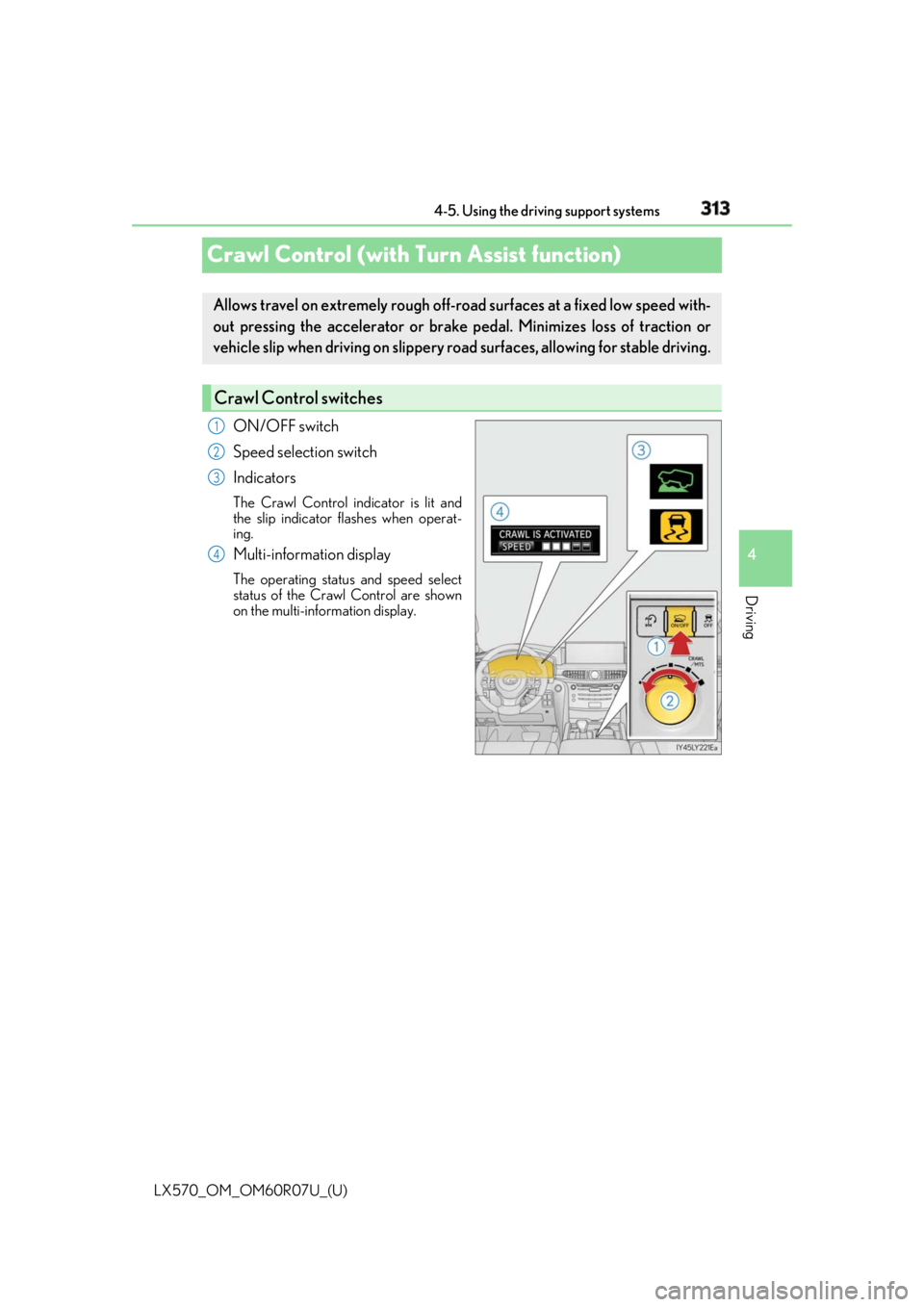
Crawl Control (with Turn Assist function) ON/OFF switch
Speed selection switch
Indicators The Crawl Control indicator is lit and
the slip indicator flashes when operat-
ing.
Multi-information display The operating status and speed select
status of the Crawl Control are shown
on the multi-information display.Allows travel on extremely rough off-ro ad surfaces at a fixed low speed with-
out pressing the accelerator or brake pedal. Minimizes loss of traction or
vehicle slip when driving on slippery ro ad surfaces, allowing for stable driving.
Crawl Control switches 1
2
3
4
Page 315 of 632

LX570_OM_OM60R07U_(U) 3154-5. Using the driving support systems
4
Driving
Crawl Control
Press the ON/OFF switch while Crawl Cont rol is operating. If the switch is
turned off, the slip indicator and the Turn Assist indicator will go off (if the Turn
Assist function is in use), the Crawl Co ntrol indicator will flash until the system
has turned off completely, and a messag e stating that Crawl Control has been
turned off will be displayed on the multi- information display fo r several seconds.
When turning off Crawl Control while driv ing, stop the vehicle before the Crawl
Control indicator turns off, or drive extremely carefully.
Turn Assist function
Press the Turn Assist switch while the Turn Assist function is operating. When the
switch is pressed, the Turn Assist indicat or will go off, and a message stating that
the Turn Assist function ha s been turned off will be di splayed on the multi-infor-
mation display for several seconds. ■
The Crawl Control and Turn Assist function can be operated when
Crawl Control ●
The engine is running. ●
The shift lever is in any gear other than P or N.●
The four-wheel drive control switch is in L4. ●
The driver’s door is closed.
Turn Assist function ●
Crawl Control is operating. ●
The center differential is not locked. ●
The accelerator and brake are not being operated. ●
The shift lever is in any ge ar other than P, R or N.●
The steering wheel is turned very far.When the system is turned off