mirror LEXUS LX570 2019 Owners Manual
[x] Cancel search | Manufacturer: LEXUS, Model Year: 2019, Model line: LX570, Model: LEXUS LX570 2019Pages: 632, PDF Size: 10.34 MB
Page 3 of 632

3 1
8765432
LX570_OM_OM60R07U_(U) 93-1. Key information
Keys .................................................... 116
3-2. Opening, closing and
locking the doors
Side doors ........................................ 121
Back door ...................................... 128
Smart access system with
push-button start...................... 138
3-3. Adjusting the seats
Front seats ......................................146
Rear seats ...................................... 148
Driving position memory ..........157
Head restraints .............................. 161
3-4. Adjusting the steering
wheel and mirrors
Steering wheel ..............................164
Inside rear view mirror ..............166
Outside rear view mirrors ...... 168
3-5. Opening, closing the
windows and moon roof
Power windows ............................. 171
Moon roof ....................................... 174 4-1. Before driving
Driving the vehicle ..................... 180
Cargo and luggage ................... 188
Vehicle load limits .......................192
Trailer towing ................................193
Dinghy towing ...............................210
4-2. Driving procedures
Engine (ignition) switch.............. 211
Automatic transmission ............ 216
Turn signal lever ......................... 223
Parking brake .............................. 224
4-3. Operating the lights
and wipers
Headlight switch .........................227
Automatic High Beam............. 230
Fog light switch ........................... 235
Windshield wipers and
washer ......................................... 237
Rear window wiper and
washer ........................................... 241
Headlight cleaner switch........ 244
4-4. Refueling
Opening the fuel tank cap ..... 2453
Operation of each
component 4
Driving
Page 5 of 632

5 1
8765432
LX570_OM_OM60R07U_(U) 95-5. Using the storage features
List of storage features ............ 426
• Glove box ................................427
• Console box ...........................427
• Overhead console .............. 428
• Cup holders ........................... 429
• Bottle holders ........................ 430
• Card holder ........................... 430
• Auxiliary boxes .......................431
Luggage compartment
features ....................................... 433
5-6. Using the other interior
features
Other interior features ............ 436
• Cool box.................................. 436
• Sun visors ................................ 437
• Vanity mirrors ....................... 437
• Clock ........................................ 438
• Power outlets ........................ 438
• Wireless charger ...................441
• Armrest.................................... 449
• Rear door sunshades ......... 450
• Coat hooks............................. 450
• Assist grips ...............................451
Garage door opener ............... 452 6-1. Maintenance and care
Cleaning and protecting
the vehicle exterior ................ 460
Cleaning and protecting
the vehicle interior.................. 463
6-2. Maintenance
Maintenance
requirements ............................ 466
General maintenance.............. 468
Emission inspection and
maintenance (I/M)
programs...................................... 471
6-3. Do-it-yourself maintenance
Do-it-yourself service
precautions ................................472
Hood ................................................474
Engine compartment ............... 475
Tires .................................................488
Tire inflation pressure .............. 497
Wheels ............................................ 501
Air conditio ning filter ............... 503
Electronic key battery..............505
Checking and replacing
fuses.............................................. 507
Light bulbs ..................................... 5106
Maintenance and care
Page 14 of 632
14 Pictorial index
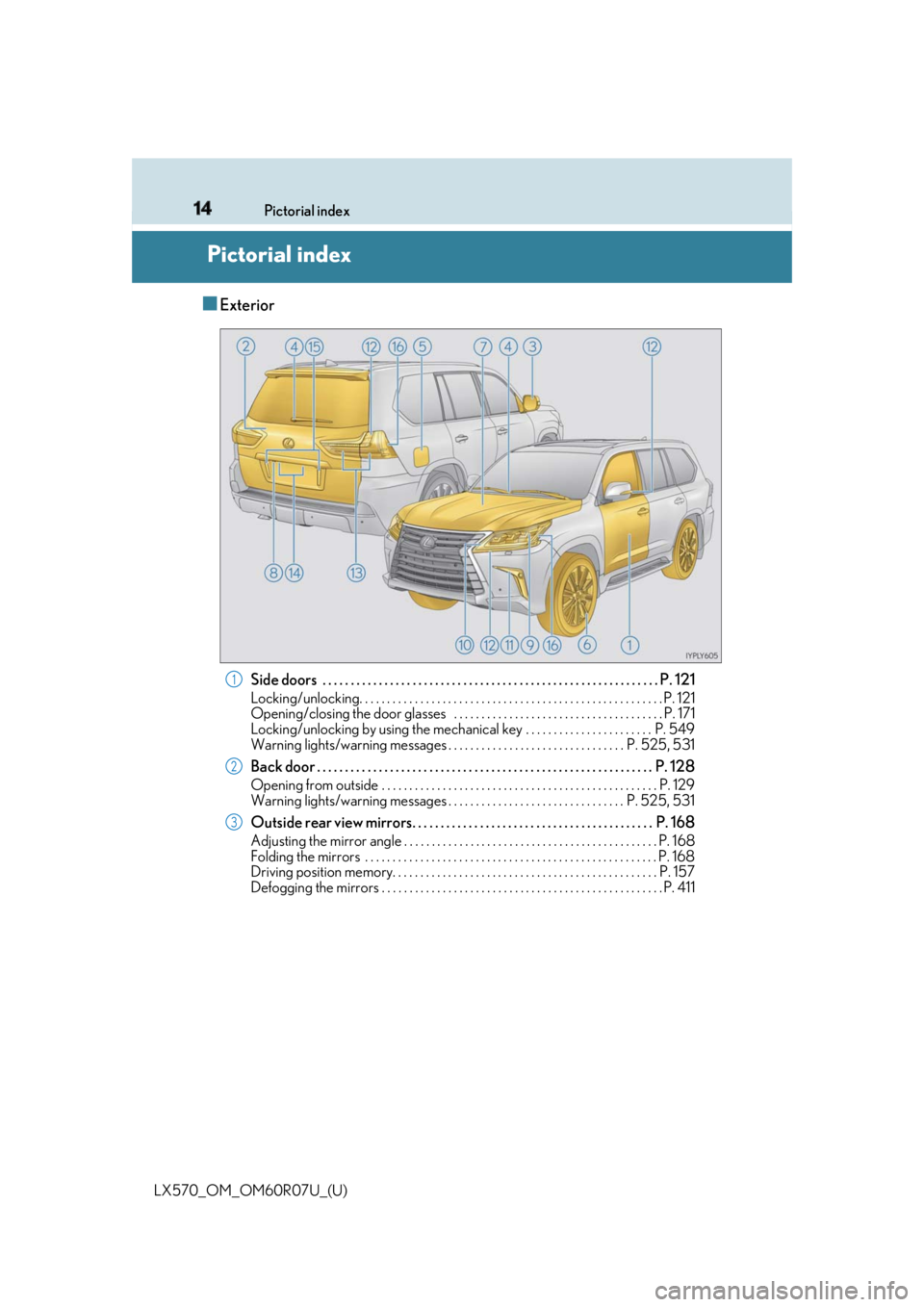
LX570_OM_OM60R07U_(U)Pictorial index ■ Exterior
Side doors . . . . . . . . . . . . . . . . . . . . . . . . . . . . . . . . . . . . . . . . . . . . . . . . . . . . . . . . . . . . P. 121Locking/unlocking. . . . . . . . . . . . . . . . . . . . . . . . . . . . . . . . . . . . . . . . . . . . . . . . . . . . . . . P . 121
Opening/closing the door glasses . . . . . . . . . . . . . . . . . . . . . . . . . . . . . . . . . . . . . . P. 171
Locking/unlocking by using the me chanical key . . . . . . . . . . . . . . . . . . . . . . . P. 549
Warning lights/warning messages . . . . . . . . . . . . . . . . . . . . . . . . . . . . . . . . P. 525, 531
Back door . . . . . . . . . . . . . . . . . . . . . . . . . . . . . . . . . . . . . . . . . . . . . . . . . . . . . . . . . . . . P. 128Opening from outside . . . . . . . . . . . . . . . . . . . . . . . . . . . . . . . . . . . . . . . . . . . . . . . . . . P. 129
Warning lights/warning messages . . . . . . . . . . . . . . . . . . . . . . . . . . . . . . . . P. 525, 531
Outside rear view mirrors. . . . . . . . . . . . . . . . . . . . . . . . . . . . . . . . . . . . . . . . . . . P. 168 Adjusting the mirror angle . . . . . . . . . . . . . . . . . . . . . . . . . . . . . . . . . . . . . . . . . . . . . . P. 168
Folding the mirrors . . . . . . . . . . . . . . . . . . . . . . . . . . . . . . . . . . . . . . . . . . . . . . . . . . . . . P. 168
Driving position memory. . . . . . . . . . . . . . . . . . . . . . . . . . . . . . . . . . . . . . . . . . . . . . . . P. 157
Defogging the mirrors . . . . . . . . . . . . . . . . . . . . . . . . . . . . . . . . . . . . . . . . . . . . . . . . . . . P. 4 111
2
3
Page 18 of 632
18 Pictorial index
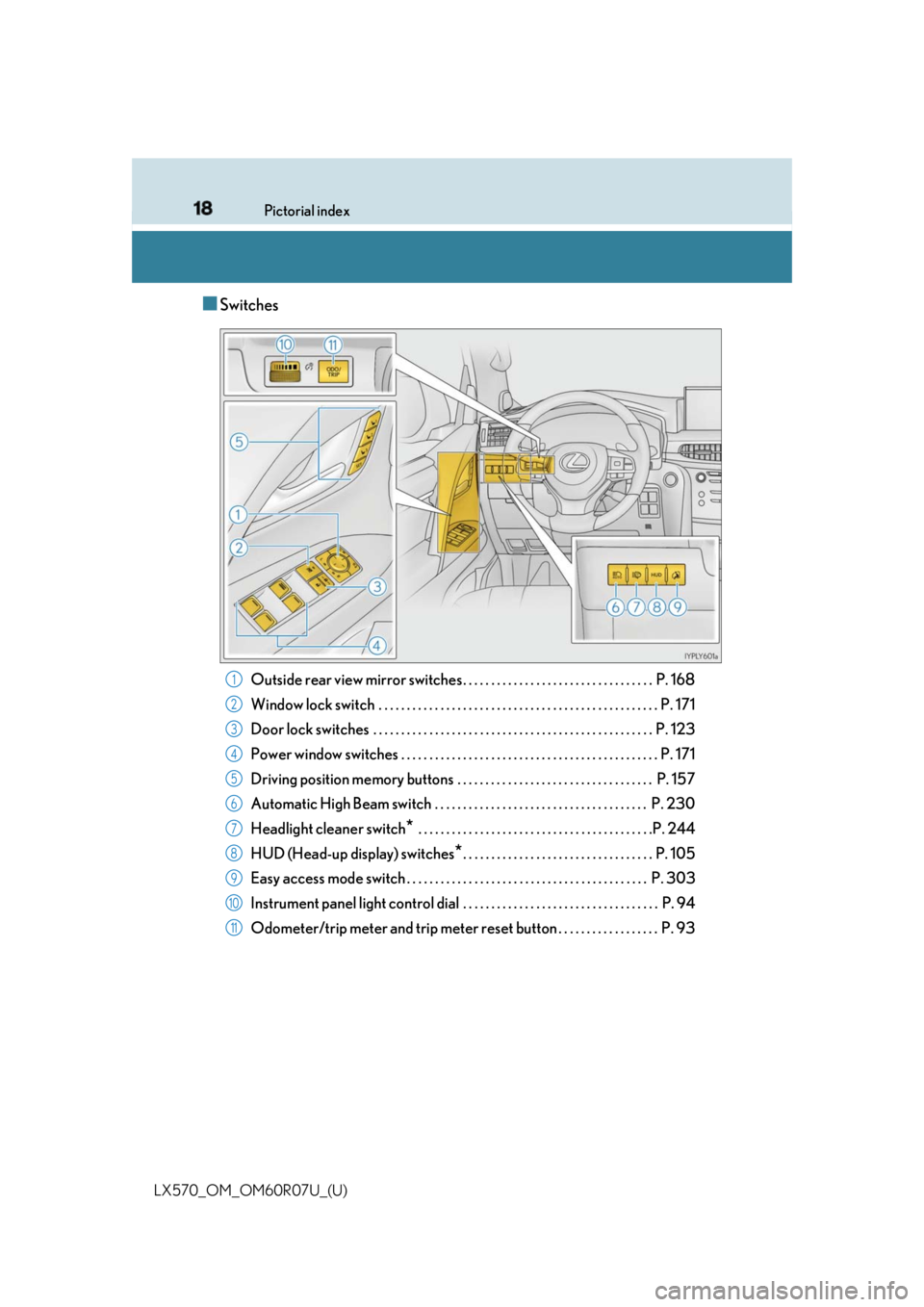
LX570_OM_OM60R07U_(U) ■ Switches
Outside rear view mirror switches . . . . . . . . . . . . . . . . . . . . . . . . . . . . . . . . . . P. 168
Window lock switch . . . . . . . . . . . . . . . . . . . . . . . . . . . . . . . . . . . . . . . . . . . . . . . . . . P. 171
Door lock switches . . . . . . . . . . . . . . . . . . . . . . . . . . . . . . . . . . . . . . . . . . . . . . . . . . P. 123
Power window switches . . . . . . . . . . . . . . . . . . . . . . . . . . . . . . . . . . . . . . . . . . . . . . P. 171
Driving position memory buttons . . . . . . . . . . . . . . . . . . . . . . . . . . . . . . . . . . . P. 157
Automatic High Beam switch . . . . . . . . . . . . . . . . . . . . . . . . . . . . . . . . . . . . . . P. 230
Headlight cleaner switch
* . . . . . . . . . . . . . . . . . . . . . . . . . . . . . . . . . . . . . . . . . .P. 244
HUD (Head-up display) switches
* . . . . . . . . . . . . . . . . . . . . . . . . . . . . . . . . . . P. 105
Easy access mode switch . . . . . . . . . . . . . . . . . . . . . . . . . . . . . . . . . . . . . . . . . . . P. 303
Instrument panel light control dial . . . . . . . . . . . . . . . . . . . . . . . . . . . . . . . . . . . P. 94
Odometer/trip meter and trip meter reset button . . . . . . . . . . . . . . . . . . P. 93 1
2
3
4
5
6
7
8
9
10
11
Page 23 of 632
23Pictorial index
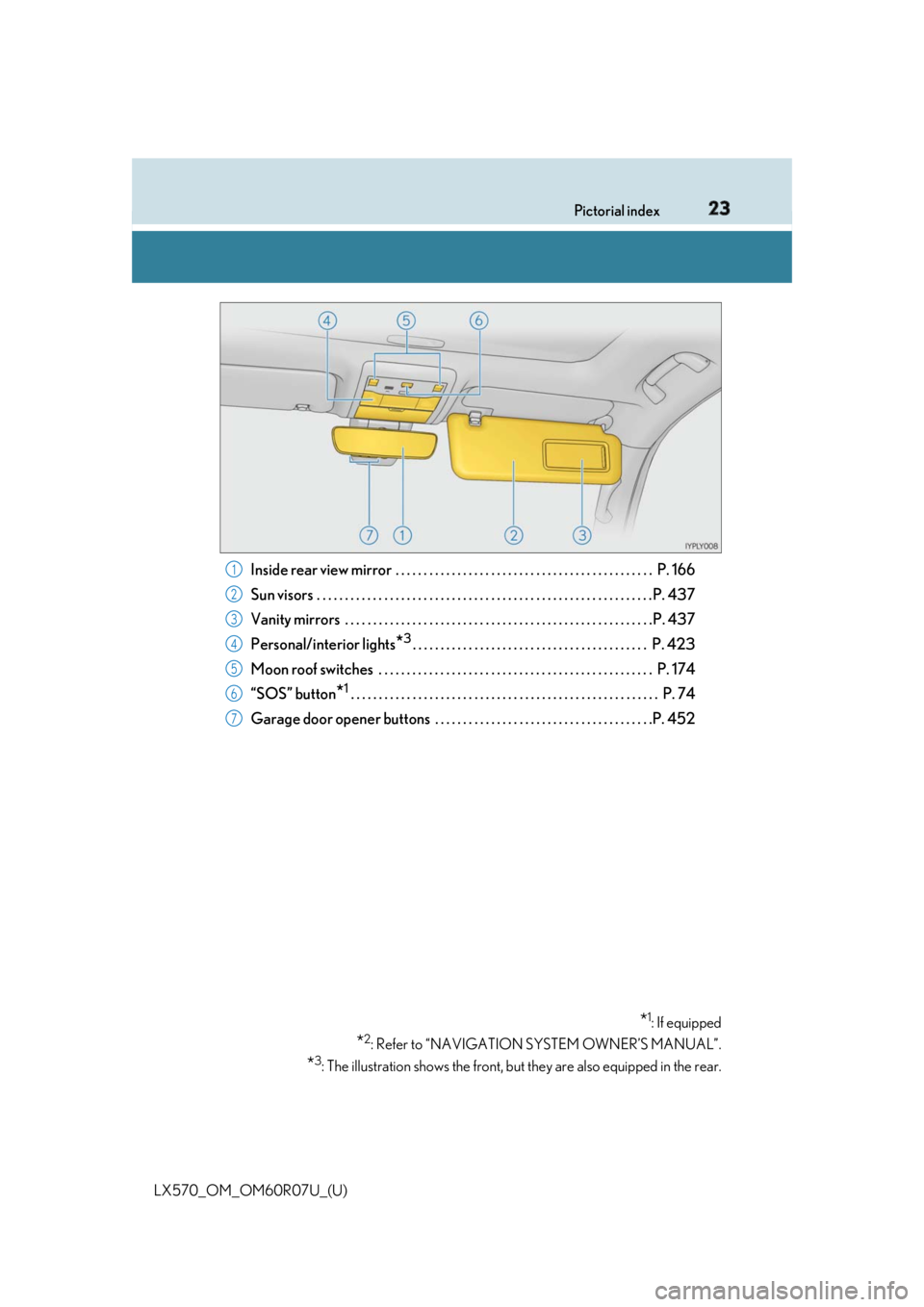
LX570_OM_OM60R07U_(U) Inside rear view mirror . . . . . . . . . . . . . . . . . . . . . . . . . . . . . . . . . . . . . . . . . . . . . . P. 166
Sun visors . . . . . . . . . . . . . . . . . . . . . . . . . . . . . . . . . . . . . . . . . . . . . . . . . . . . . . . . . . . . P. 437
Vanity mirrors . . . . . . . . . . . . . . . . . . . . . . . . . . . . . . . . . . . . . . . . . . . . . . . . . . . . . . . P. 437
Personal/interior lights
* 3
. . . . . . . . . . . . . . . . . . . . . . . . . . . . . . . . . . . . . . . . . . P. 423
Moon roof switches . . . . . . . . . . . . . . . . . . . . . . . . . . . . . . . . . . . . . . . . . . . . . . . . . P. 174
“SOS” button
* 1
. . . . . . . . . . . . . . . . . . . . . . . . . . . . . . . . . . . . . . . . . . . . . . . . . . . . . . . P. 74
Garage door opener buttons . . . . . . . . . . . . . . . . . . . . . . . . . . . . . . . . . . . . . . .P. 452
* 1
: If equipped
* 2
: Refer to “NAVIGATION SYSTEM OWNER’S MANUAL”.
* 3
: The illustration shows the front, but they are also equipped in the rear.1
2
3
4
5
6
7
Page 29 of 632
291-1. For safe use
LX570_OM_OM60R07U_(U) 1
For safety and security Make sure that you can see backward clea rly by adjusting the inside and outside
rear view mirrors properly. ( P. 166, 168)
Adjusting the mirrors WARNING
Observe the following precautions.
Failure to do so may result in death or serious injury.●
Do not adjust the position of the driver’s seat while driving.
Doing so could cause the driver to lose control of the vehicle. ●
Do not place a cushion between the dr iver or passenger and the seatback.
A cushion may prevent correct posture from being achieved, and reduce the effec-
tiveness of the seat be lt and head restraint.●
Do not place anything under the front seats.
Objects placed under the fr ont seats may become jammed in the seat tracks and stop
the seat from locking in plac e. This may lead to an accident and the adjustment mech-
anism may also be damaged. ●
Always observe the legal speed limi t when driving on public roads.●
When driving over long distances, take regular breaks before you start to feel tired.
Also, if you feel tired or sleepy while drivin g, do not force yourself to continue driving
and take a break immediately.
Page 90 of 632
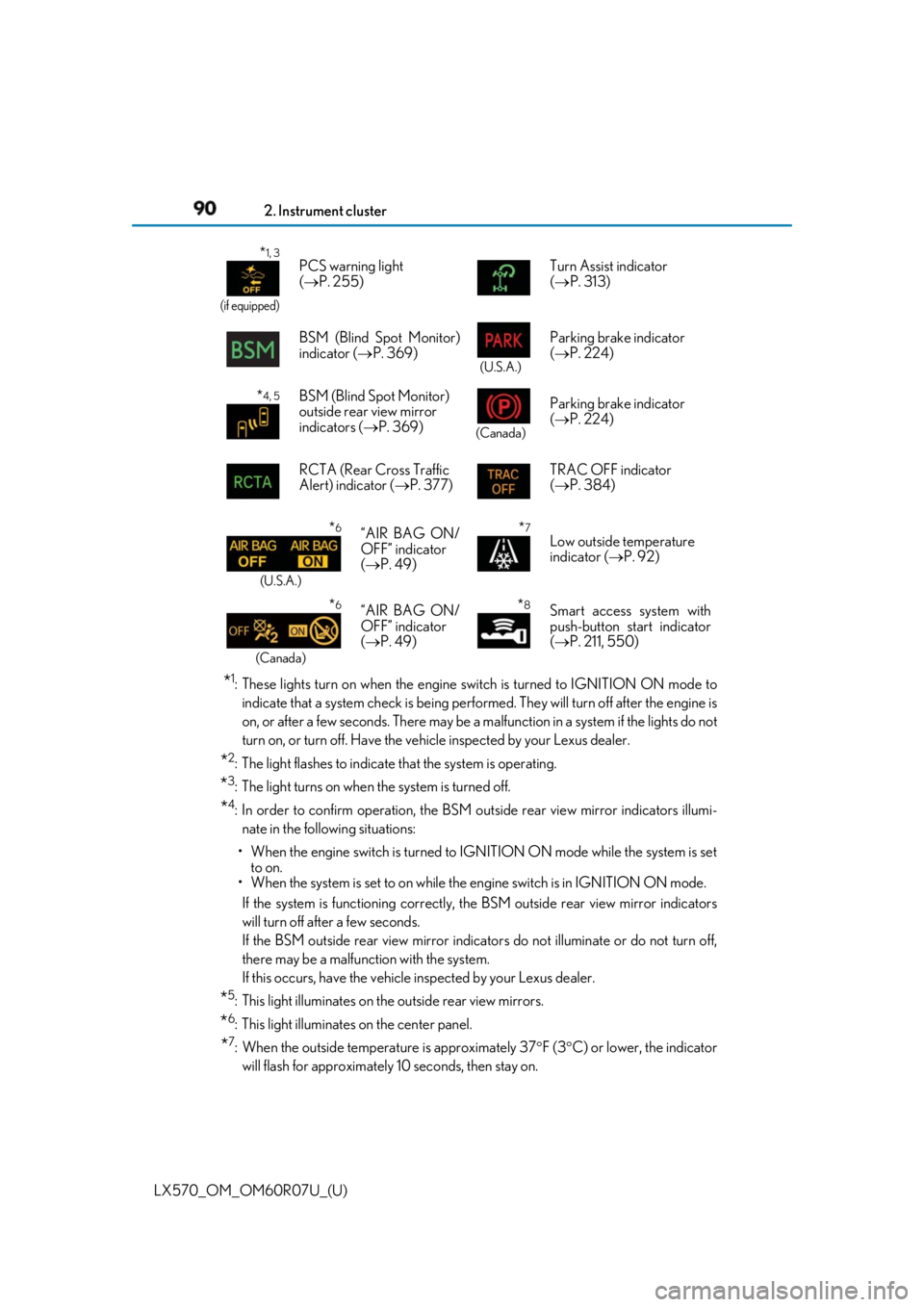
90
LX570_OM_OM60R07U_(U) 2. Instrument cluster
* 1
: These lights turn on when the engine switch is turned to IGNITION ON mode to
indicate that a system check is being perfor med. They will turn off after the engine is
on, or after a few seconds. There may be a ma lfunction in a system if the lights do not
turn on, or turn off. Have the vehi cle inspected by your Lexus dealer.
* 2
: The light flashes to indicate that the system is operating.
* 3
: The light turns on when the system is turned off.
* 4
: In order to confirm operation, the BSM outside rear view mirror indicators illumi-
nate in the following situations:
• When the engine switch is turned to IGNITION ON mode while the system is set
to on.
• When the system is set to on while the engine switch is in IGNITION ON mode.
If the system is functioning correctly, th e BSM outside rear view mirror indicators
will turn off after a few seconds.
If the BSM outside rear view mirror indicators do not illuminate or do not turn off,
there may be a malfunction with the system.
If this occurs, have the vehicle inspected by your Lexus dealer.
* 5
: This light illuminates on the outside rear view mirrors.
* 6
: This light illuminates on the center panel.
* 7
: When the outside temperat ure is approximately 37 F (3 C) or lower, the indicator
will flash for approximately 10 seconds, then stay on.* 1, 3
(if equipped)
PCS warning light
( P. 255) Turn Assist indicator
( P. 313)
BSM (Blind Spot Monitor)
indicator ( P. 369) (U.S.A.)
Parking brake indicator
( P. 224)
* 4, 5
BSM (Blind Spot Monitor)
outside rear view mirror
indicators ( P. 369) (Canada)
Parking brake indicator
( P. 224)
RCTA (Rear Cross Traffic
Alert) indicator ( P. 377) TRAC OFF indicator
( P. 384)
* 6
(U.S.A.)
“AIR BAG ON/
OFF” indicator
( P. 49) * 7
Low outside temperature
indicator ( P. 92)
* 6
(Canada)
“AIR BAG ON/
OFF” indicator
( P. 49) * 8
Smart access system with
push-button start indicator
( P. 211, 550)
Page 115 of 632

115
LX570_OM_OM60R07U_(U) 3 Operation of
each component 3-1. Key information
Keys .................................................... 116
3-2. Opening, closing and
locking the doors
Side doors ........................................ 121
Back door....................................... 128
Smart access system with
push-button start ...................... 138
3-3. Adjusting the seats
Front seats...................................... 146
Rear seats....................................... 148
Driving position memory ..........157
Head restraints .............................. 161
3-4. Adjusting the steering
wheel and mirrors
Steering wheel ............................. 164
Inside rear view mirror ............. 166
Outside rear view mirrors....... 168
3-5. Opening, closing the
windows and moon roof
Power windows ............................. 171
Moon roof .......................................174
Page 157 of 632
157
LX570_OM_OM60R07U_(U) 3-3. Adjusting the seats
3
Operation of each component
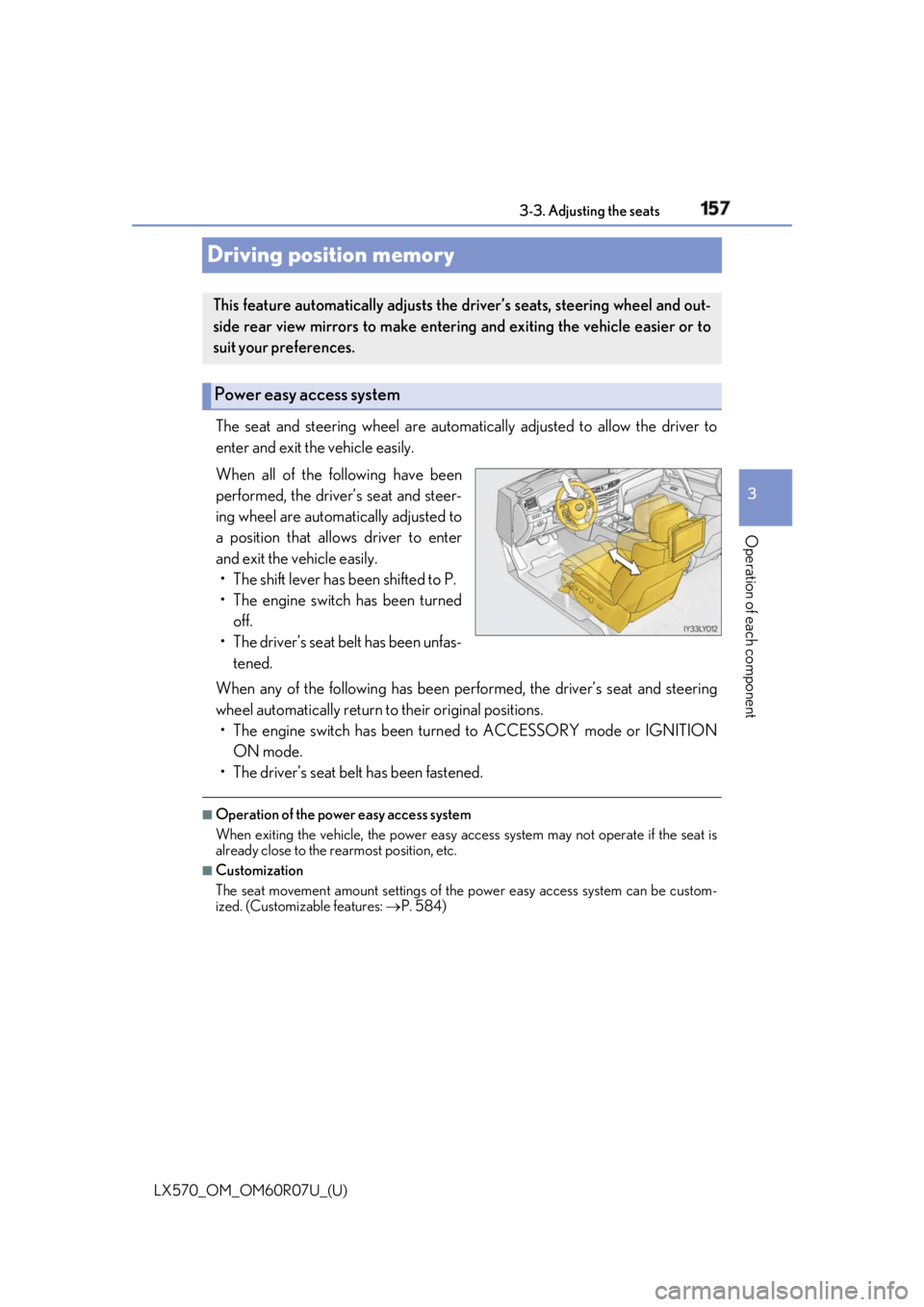
Driving position memory The seat and steering wheel are automati cally adjusted to allow the driver to
enter and exit the vehicle easily.
When all of the following have been
performed, the driver’s seat and steer-
ing wheel are automatically adjusted to
a position that allows driver to enter
and exit the vehicle easily.
• The shift lever has been shifted to P.
• The engine switch has been turned
off.
• The driver’s seat belt has been unfas-
tened.
When any of the following has been perf ormed, the driver’s seat and steering
wheel automatically return to their original positions.
• The engine switch has been turn ed to ACCESSORY mode or IGNITION
ON mode.
• The driver’s seat belt has been fastened. ■
Operation of the power easy access system
When exiting the vehicle, the power easy ac cess system may not operate if the seat is
already close to the rearmost position, etc. ■
Customization
The seat movement amount settings of th e power easy access system can be custom-
ized. (Customizable features: P. 584)This feature automatically adjusts the driver’s seats, steering wheel and out-
side rear view mirrors to make enteri ng and exiting the vehicle easier or to
suit your preferences.
Power easy access system
Page 158 of 632
![LEXUS LX570 2019 Owners Manual 158
LX570_OM_OM60R07U_(U) 3-3. Adjusting the seats
Your preferred driving position (the positi on of the driver’s seat, steering wheel,
outside rear view mirrors and HUD [head-up display] [if equipp](/img/36/58941/w960_58941-157.png "LEXUS LX570 2019 Owners Manual 158
LX570_OM_OM60R07U_(U) 3-3. Adjusting the seats
Your preferred driving position (the positi on of the driver’s seat, steering wheel,
outside rear view mirrors and HUD [head-up display] [if equipp")
158
LX570_OM_OM60R07U_(U) 3-3. Adjusting the seats
Your preferred driving position (the positi on of the driver’s seat, steering wheel,
outside rear view mirrors and HUD [head-up display] [if equipped]) can be
entered into the computer’s memory and recalled with the touch of a button. It is
also possible to set this function to activate automatically when the doors are
unlocked.
Three different driving positions can be recorded into memory.■
Recording procedure
Check that the shift lever is in P.
Turn the engine switch to IGNITION ON mode.
Adjust the driver’s seat, steering wh eel, outside rear view mirrors and HUD
(head-up display) (if equipped) to the desired positions.
While pressing the “SET” button,
or within 3 seconds after the
“SET” button is pressed, press
button “1”, “2” or “3” until the
buzzer sounds. If the selected button has already
been preset, the previously recorded
position will be overwritten.
■
Recall procedure
Check that the shift lever is in P.
Turn the engine switch to IGNITION ON mode.
Press one of the buttons for the
driving position you want to recall
until the buzzer sounds. Driving position memory 1
2
3
4
1
2
3