fuel LEXUS LX570 2020 User Guide
[x] Cancel search | Manufacturer: LEXUS, Model Year: 2020, Model line: LX570, Model: LEXUS LX570 2020Pages: 636, PDF Size: 12.73 MB
Page 99 of 636

LX570_OM_OM60R61U_(U)
992. Instrument cluster
2
Instrument cluster
■Drive information
4 of the following items can be registered and displayed as the drive informa-
tion 1 and the drive information 2 (2 items on each screen).
Refer to P. 101 for the registration method of the drive information 1 and the
drive information 2.
●Current fuel consumption (bar type/value type)
Displays the current rate of fuel consumption.
●Average fuel consumption (after reset*2/after start/after refuel)*1
Displays the average fuel consumption since the function was reset, the
engine was started, and the vehicle was refueled, respectively.
●Average vehicle speed (after reset*2/after start)
Displays the average vehicle speed si nce the function was reset and the
engine was started, respectively.
●Elapsed time (after reset*2/after start)
Displays the elapsed time since the function was reset and the engine was
started, respectively.
●Distance (driving range/after start)
Displays the estimated maximum distance that can be driven with the
quantity of fuel remaining. • This distance is computed based on your average fuel consumption.
As a result, the actual distance that can be driven may differ from that
displayed.
• When only a small amount of fuel is added to the tank, the display may not be updated.
When refueling, turn the engine switch off. If the vehicle is refueled with-
out turning the engine switch off, the display may not be updated.
*1: Use the displayed average fuel consumption as a reference.
*2: The function can be reset by pressing for longer than 1 second when the item to
reset is displayed. If there is more than on e item that can be reset, the item selection
screen will appear.
Drive information
Page 110 of 636

110
LX570_OM_OM60R61U_(U)2. Instrument cluster
Fuel consumption information
Remote Touch screen
Remote Touch knob (
P. 400)
“MENU” button
“ENTER” button
Fuel consumption information can be di splayed on the Remote Touch screen.
The fuel consumption information can be displayed and operated on the side
display.
1
2
3
4
Page 111 of 636

LX570_OM_OM60R61U_(U)
1112. Instrument cluster
2
Instrument cluster
Press the “MENU” button on the Remote Touch, then select “Info” on the “Menu”
screen, and then select “Fuel Consumption”.
■Trip information
If the “Past Record” screen is displayed, select “Trip Information”.Resetting the consumption data
Fuel consumption in the past 15
minutes
Current fuel consumption
Average vehicle speed since the
engine was started.
Elapsed time since the engine
was started.
Cruising range ( P. 112)
Average fuel consumption for the past 15 minutes is divided by color into past
averages and averages attained since the engine switch was last turned to IGNI-
TION ON mode. Use the displayed average fuel consumption as a reference.
The image is an example only, and may va ry slightly from actual conditions.
Fuel consumption
1
2
3
4
5
6
Page 112 of 636

112
LX570_OM_OM60R61U_(U)2. Instrument cluster
■Past record
If the “Trip Information” screen is
displayed, select “Past Record”.
Resetting the past record data
Best recorded fuel consumption
Average fuel consumption
Previous fuel consumption record
Updating the average fuel con-
sumption data
The average fuel consumption his-
tory is divided by color into past
averages and the average fuel con-
sumption since the last reset. Use the
displayed average fuel consumption
as a reference.
The image is an example only, and may va ry slightly from actual conditions.
■Updating the past record data
Update the average fuel consumption by selecting “Update” to measure the current fuel
consumption again.
■Resetting the data
The fuel consumption data can be deleted by selecting “Clear”.
■Cruising range
Displays the estimated maximum distance that can be driven with the quantity of fuel
remaining.
This distance is computed based on your average fuel consumption.
As a result, the actual distance that can be driven may differ from that displayed.
1
2
3
4
5
Page 113 of 636

LX570_OM_OM60R61U_(U)
1132. Instrument cluster
2
Instrument cluster
Vehicle information can be displayed on the side display (P. 405), then select
or to select the desired screen.
Fuel consumption
Displays the average fuel consumption
for the past 10 minutes in 1 minute inter-
vals, as well as the cruising range.
Past record
Displays the average fuel consumption
and highest fuel consumption.
Trip information
Displays the cruising range, average
fuel consumption and the amount of
time elapsed since the engine was
started.
The image is an example only, and may va ry slightly from actual conditions.
Using the side display
Page 179 of 636

179
LX570_OM_OM60R61U_(U)
4Driving
4-1. Before drivingDriving the vehicle ......................180
Cargo and luggage ....................188
Vehicle load limits ....................... 192
Trailer towing ................................ 193
Dinghy towing .............................. 210
4-2. Driving procedures Engine (ignition) switch ..............211
Automatic transmission............ 217
Turn signal lever.......................... 224
Parking brake ..............................225
4-3. Operating the lights and wipers
Headlight switch .........................228
Automatic High Beam .............. 231
Fog light switch ...........................236
Windshield wipers and washer......................................... 238
Rear window wiper and washer.......................................... 242
Headlight cleaner switch ........245 4-4. Refueling
Opening the fuel tank cap ..... 246
4-5. Using the driving support systems
Lexus Safety System + ............. 249
PCS (Pre-Collision System)........................................ 256
LDA (Lane Departure Alert) ............................................ 268
Dynamic radar cruise control with full-speed
range ............................................ 276
Cruise control ............................ 288
Driving mode select switch ............................................ 291
Intuitive parking assist .............. 294
4-Wheel AHC (Active Height Control
Suspension) ...............................302
Four-wheel drive system ......... 310
Crawl Control (with Turn Assist function).......................... 314
Multi-terrain Select .................... 319
Multi-terrain Monitor ............... 323
BSM (Blind Spot Monitor) ..... 370 • BSM function ......................... 374
• RCTA function...................... 378
Driving assist systems ..............384
4-6. Driving tips Winter driving tips .....................389
Off-road precautions ............... 393
Page 182 of 636

182
LX570_OM_OM60R61U_(U)4-1. Before driving
■Drum-in-disc type parking brake system
Your vehicle has a drum-in-disc type parking brake system.
This type of brake system needs bedding-down of the brake shoes periodically or when-
ever the parking brake shoes and/or drum are replaced.
Have your Lexus dealer, perform the bedding-down operation.
■Operating your vehicle in a foreign country
Comply with the relevant vehicle registration
laws and confirm the availability of the cor-
rect fuel. ( P. 566)
■When turning off the engine
Emission system operating sounds may cont inue for a short time after the engine is
turned off. This is not a malfunction, and helps to ensure optimal performance of the
emission system.
Page 193 of 636

193
LX570_OM_OM60R61U_(U)4-1. Before driving
4
Driving
Trailer towing
Your vehicle is designed primarily as
a passenger-and-load-carrying vehicle.
Towing a trailer can have an adverse im pact on handling, performance, brak-
ing, durability, and fuel consumption. Fo r your safety and the safety of others,
you must not overload your vehicle or trailer. You must also ensure that you
are using appropriate towing equipment, that the towing equipment has been
installed correctly and used properly, and that you employ the requisite driv-
ing habits.
Vehicle-trailer stability and braking pe rformance are affected by trailer sta-
bility, brake performance and setting, tr ailer brakes, the hitch and hitch sys-
tems (if equipped).
To tow a trailer safely, use extreme ca re and drive the vehicle in accordance
with your trailer’s characteri stics and operating conditions.
Lexus warranties do not apply to damage or malfunction caused by towing a
trailer for commercial purposes.
Contact your Lexus dealer for further information about additional require-
ments such as towing kits, etc.
Page 229 of 636
LX570_OM_OM60R61U_(U)
2294-3. Operating the lights and wipers
4
Driving
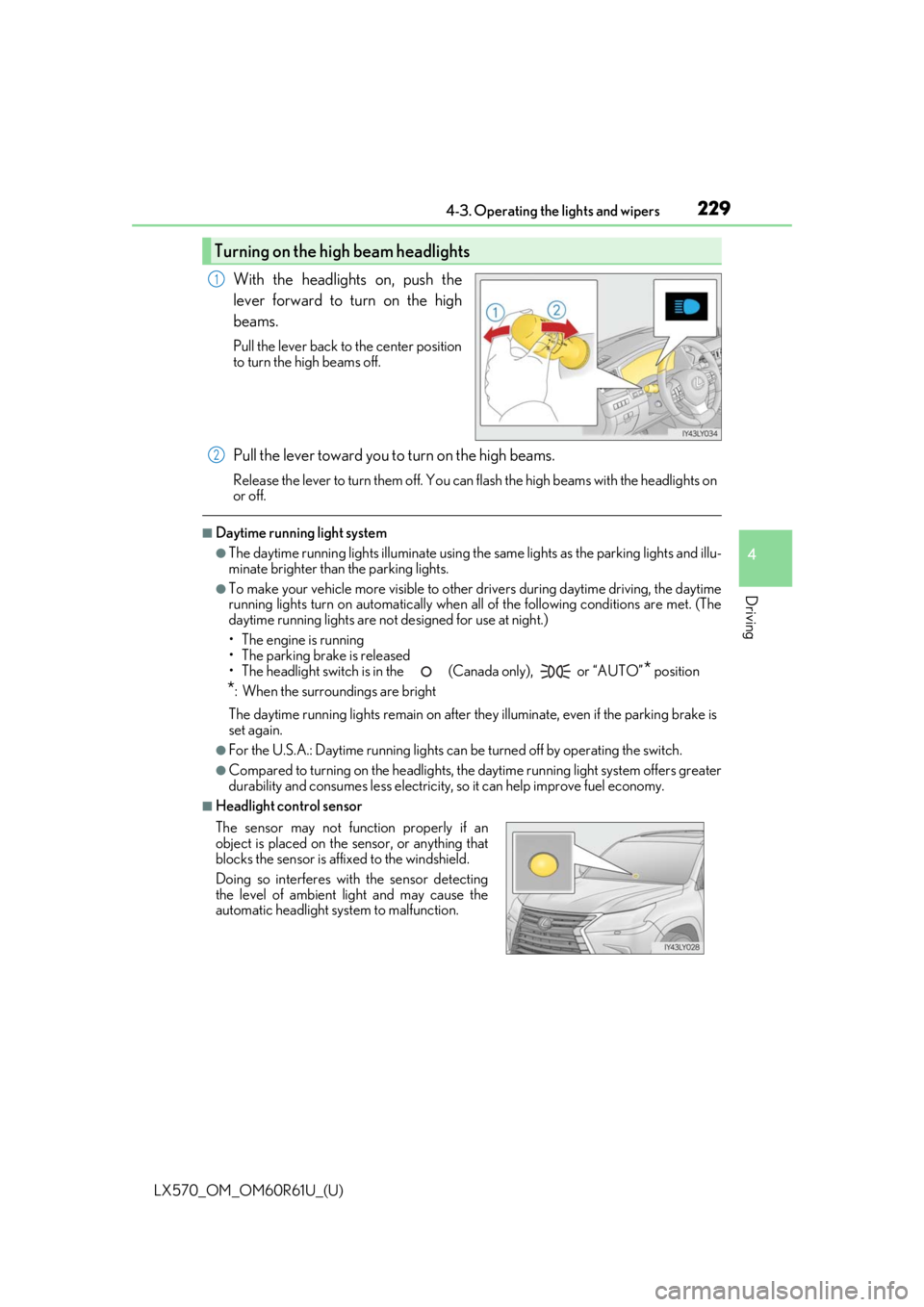
With the headlights on, push the
lever forward to turn on the high
beams.
Pull the lever back to the center position
to turn the high beams off.
Pull the lever toward you to turn on the high beams.
Release the lever to turn them off. You can flash the high beams with the headlights on
or off.
■Daytime running light system
●The daytime running lights illuminate using the same lights as the parking lights and illu-
minate brighter than the parking lights.
●To make your vehicle more visible to other drivers during daytime driving, the daytime
running lights turn on automatically when a ll of the following conditions are met. (The
daytime running lights are not designed for use at night.)
• The engine is running
• The parking brake is released
• The headlight switch is in the (Canada only), or “AUTO”
* position
*: When the surroundings are bright
The daytime running lights remain on after they illuminate, even if the parking brake is
set again.
●For the U.S.A.: Daytime running lights can be turned off by operating the switch.
●Compared to turning on the headlights, the daytime running light system offers greater
durability and consumes less electricity, so it can help improve fuel economy.
■Headlight control sensor
Turning on the high beam headlights
1
The sensor may not function properly if an
object is placed on the sensor, or anything that
blocks the sensor is affixed to the windshield.
Doing so interferes with the sensor detecting
the level of ambient light and may cause the
automatic headlight system to malfunction.
2
Page 246 of 636

246
LX570_OM_OM60R61U_(U)4-4. Refueling
Opening the fuel tank cap
●Turn the engine switch off and ensure that all the doors and windows are
closed.
●Confirm the type of fuel.
■Fuel types
P. 572
■Fuel tank opening for unleaded gasoline
To help prevent incorrect fueling, your Lexu s has a fuel tank opening that only accommo-
dates the special nozzle on unleaded fuel pumps.
■If the malfunction indicator lamp illuminates
The malfunction indicator lamp may illuminate erroneously if refueling is performed
repeatedly when the fuel tank is nearly full.
Perform the following steps to open the fuel tank cap.
Before refueling the vehicle