garage door opener LEXUS LX570 2020 Owners Manual
[x] Cancel search | Manufacturer: LEXUS, Model Year: 2020, Model line: LX570, Model: LEXUS LX570 2020Pages: 636, PDF Size: 12.73 MB
Page 5 of 636

5
1
8 7
6
5
4
3
2
LX570_OM_OM60R61U_(U)
9
5-5. Using the storage features List of storage features ............ 428• Glove box ............................... 429
• Console box .......................... 429
• Overhead console .............. 430
• Cup holders .............................431
• Bottle holders ........................ 432
• Card holder ........................... 432
• Auxiliary boxes ..................... 433
Luggage compartment features ....................................... 435
5-6. Using the other interior features
Other interior features ............ 438 • Cool box.................................. 438
• Sun visors ................................ 439
• Vanity mirrors ....................... 439
• Clock ........................................ 440
• Power outlets ........................ 440
• Wireless charger ................. 443
• Armrest......................................451
• Rear door sunshades ......... 452
• Coat hooks............................. 452
• Assist grips ............................. 453
Garage door opener ............... 454 6-1. Maintenance and care
Cleaning and protecting the vehicle exterior ................ 462
Cleaning and protecting the vehicle interior.................. 465
6-2. Maintenance Maintenance requirements ............................ 468
General maintenance.............. 470
Emission inspection and maintenance (I/M)
programs.................................... 473
6-3. Do-it-yourself maintenance Do-it-yourself service precautions ................................474
Hood ............................................... 476
Engine compartment ................477
Tires ................................................. 490
Tire inflation pressure .............. 499
Wheels ........................................... 503
Air conditio ning filter ...............505
Electronic key battery.............. 507
Checking and replacing fuses.............................................. 509
Light bulbs ......................................5126Maintenance and care
Page 23 of 636

23Pictorial index
LX570_OM_OM60R61U_(U)
Inside rear view mirror . . . . . . . . . . . . . . . . . . . . . . . . . . . . . . . . . . . . . . . . . . . . . . P. 166
Sun visors . . . . . . . . . . . . . . . . . . . . . . . . . . . . . . . . . . . . . . . . . . . . . . . . . . . . . . . . . . . .P. 439
Vanity mirrors . . . . . . . . . . . . . . . . . . . . . . . . . . . . . . . . . . . . . . . . . . . . . . . . . . . . . . .P. 439
Personal/interior lights
*3. . . . . . . . . . . . . . . . . . . . . . . . . . . . . . . . . . . . . . . . . . .P. 425
Moon roof switches . . . . . . . . . . . . . . . . . . . . . . . . . . . . . . . . . . . . . . . . . . . . . . . . . P. 174
“SOS” button
*1. . . . . . . . . . . . . . . . . . . . . . . . . . . . . . . . . . . . . . . . . . . . . . . . . . . . . . . P. 74
Garage door opener buttons . . . . . . . . . . . . . . . . . . . . . . . . . . . . . . . . . . . . . . .P. 454
*1: If equipped
*2: Refer to “NAVIGATION SYSTEM OWNER’S MANUAL”.
*3: The illustration shows the front, but they are also equipped in the rear.
1
2
3
4
5
6
7
Page 399 of 636

399
LX570_OM_OM60R61U_(U)
5Interior features
5-1. Remote Touch screenRemote Touch/12.3-inch display ......................................... 400
5-2. Lexus Climate Concierge Lexus Climate Concierge ..... 406
5-3. Using the air conditioning system and defogger
Front automatic air conditioning system ...............407
Rear air conditioning system ........................................... 418
Heated steering wheel/seat heaters/seat ve ntilators......... 421
5-4. Using the interior lights Interior lights list..........................425• Interior lights ..........................426
• Personal lights ....................... 427 5-5. Using the storage features
List of storage features ............ 428
• Glove box ............................... 429
• Console box........................... 429
• Overhead console ..............430
• Cup holders ............................ 431
• Bottle holders ........................ 432
• Card holder............................ 432
• Auxiliary boxes ..................... 433
Luggage compartment features ....................................... 435
5-6. Using the other interior features
Other interior features ............438 • Cool box..................................438
• Sun visors ................................ 439
• Vanity mirrors ....................... 439
• Clock ........................................ 440
• Power outlets......................... 440
• Wireless charger ................. 443
• Armrest ..................................... 451
• Rear door sunshades ......... 452
• Coat hooks ............................. 452
• Assist grips.............................. 453
Garage door opener ............... 454
Page 454 of 636

454
LX570_OM_OM60R61U_(U)5-6. Using the other interior features
Garage door opener
The HomeLink® wireless control system in your vehicle has 3 buttons which can
be programmed to operate 3 different de vices. Refer to the programming meth-
ods on the following pages to determine the method which is appropriate for the
device.
HomeLink
® indicator light
Garage door operation indicators
HomeLink
® icon
Illuminates while HomeLink® is operat-
ing.
Buttons
■Before programming HomeLink®
●During programming, it is possible that garage doors, gates, or other
devices may operate. For this reason, make sure that people and objects
are clear of the garage door or othe r devices to prevent injury or other
potential harm.
●It is recommended that a new batter y be placed in the remote control
transmitter for more accurate programming.
●Garage door opener motors manufa ctured after 1995 may be equipped
with rolling code protection. If this is the case, you may need a stepladder
or other sturdy, safe device to reach the “Learn” or “Smart” button on the
garage door opener motor.
The garage door opener can be programmed to operate garage doors, gates,
entry doors, door locks, home lightin g systems, security systems, and other
devices.
Programming HomeLink®
1
2
3
4
Page 456 of 636

456
LX570_OM_OM60R61U_(U)5-6. Using the other interior features
●Indicator light flashes rapidly: The garage door opener motor or other
device is equipped with a rolling co
de. To complete programming, firmly
press and hold the HomeLink
® button for 2 seconds then release it.
●If the garage door or other device does not operate, proceed to “Pro-
gramming a rollin g code system”.
Repeat the steps above to program anot her device for any of the remaining
HomeLink
® buttons.
■Programming a rolling code system
2 or more people may be necessary to complete rolling code programming.
Locate the “Learn” or “Smart”
button on the garage door
opener motor in the garage.
This button can usually be found
where the hanging antenna wire is
attached to the unit. The name and
color of the button may vary by man-
ufacturer. Refer to the owner’s man-
ual supplied with the garage door
opener motor for details.
Press and release the “Learn” or
“Smart” button.
Perform within 30 seconds
after performing .
Press and hold the desired
HomeLink
® button (inside the
vehicle) for 2 seconds and
release it. Repeat this sequence
(press/hold/release) up to 3
times to complete programming.
If the garage door opener motor
operates when the HomeLink
®
button is pressed, the garage
door opener motor recognizes
the HomeLink
® signal.
5
1
2
3
2
3
Page 457 of 636

LX570_OM_OM60R61U_(U)
4575-6. Using the other interior features
5
Interior features
■Enabling 2-way communication with a garage door (only available for com-
patible devices)
When enabled, 2-way communication allows you to check the status of the
opening and closing of a garage door through indicators in your vehicle.
2-way communication is only available if the garage door opener motor used
is a compatible device. (To check devi ce compatibility, refer to www.Home-
Link.com.)
Within 5 seconds after programming the garage door opener has been
completed, if the garage door op ener motor is trained to HomeLink
®,
both garage door operation indicator s will flash rapidly (green) and the
light on the garage door opener moto r will blink twice, indicating that 2-
way communication is enabled.
If the indicators do not flash, perform and within the first 10 presses of
the HomeLink
® button after programming has been completed.
Press a programmed HomeLink
® button to operate a garage door.
Within 1 minute of pressing the HomeLink
® button, after the garage door
operation has stopped, press the “Learn” or “Smart” button on the garage
door opener motor. Within 5 seconds of the establishment of 2-way com-
munication with the garage door opener, both garage door operation indi-
cators in the vehicle will flash rapidly (green) and the light on the garage
door opener motor will blink twice, indicating that 2-way communication is
enabled.
■Reprogramming a single HomeLink® button
When the following procedure is performed, buttons which already have
devices registered to them can be overwritten: With one hand, press and hold the desired HomeLink
® button.
When the HomeLink
® indicator starts flashing (orange), continue to hold
the HomeLink® button and perform “Programming HomeLink®” (it
takes 20 seconds for the HomeLink® indicator to start flashing).
Press the appropriate HomeLink
® button. The HomeLink® indicator light
should turn on.
Operating HomeLink®
1
23
2
3
1
2
1
Page 458 of 636
458
LX570_OM_OM60R61U_(U)5-6. Using the other interior features
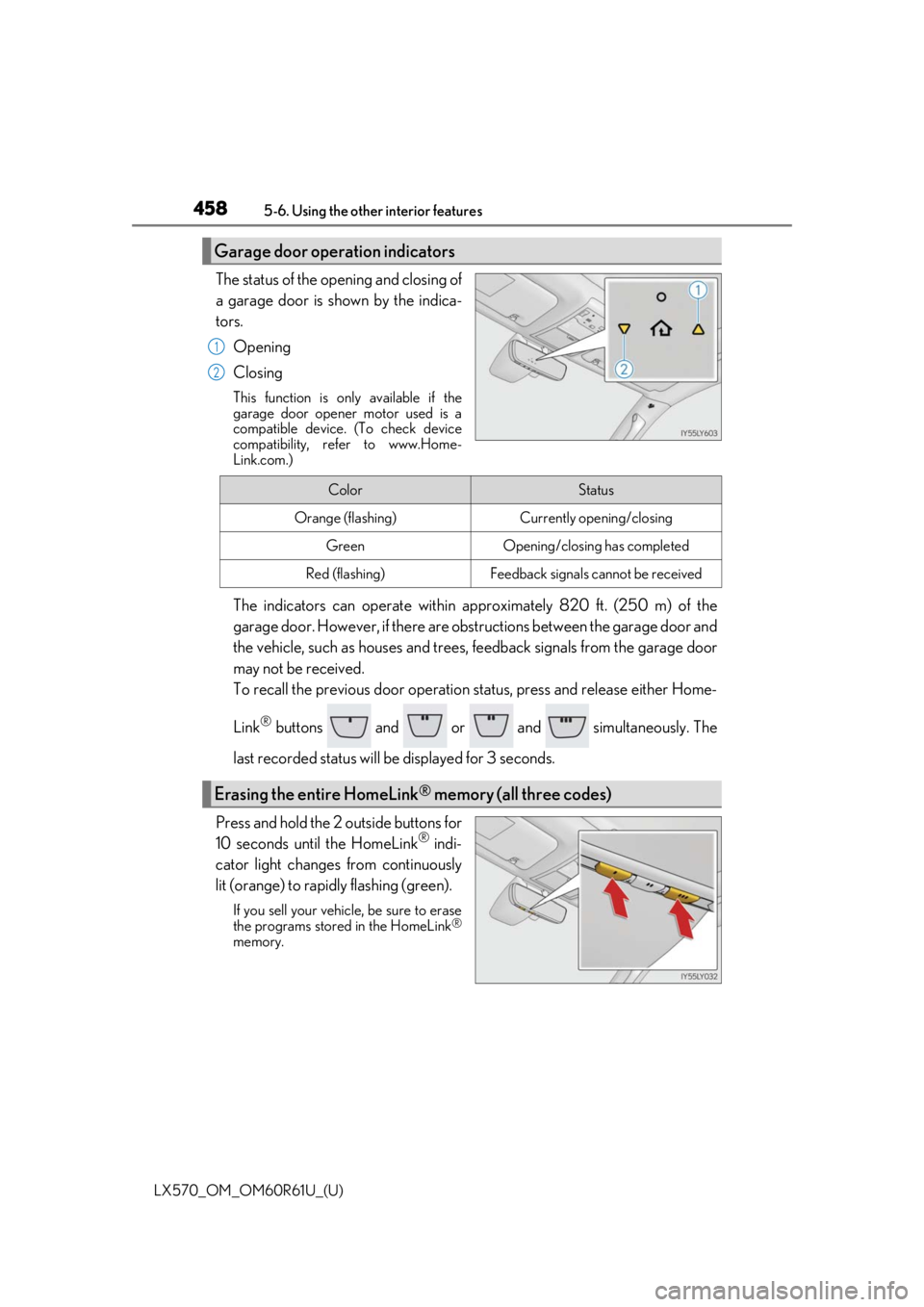
The status of the opening and closing of
a garage door is shown by the indica-
tors.
Opening
Closing
This function is only available if the
garage door opener motor used is a
compatible device. (To check device
compatibility, refer to www.Home-
Link.com.)
The indicators can operate within ap proximately 820 ft. (250 m) of the
garage door. However, if there are obst ructions between the garage door and
the vehicle, such as houses and trees, feedback signals from the garage door
may not be received.
To recall the previous door operation status, press and release either Home-
Link
® buttons and or and simultaneously. The
last recorded status will be displayed for 3 seconds.
Press and hold the 2 outside buttons for
10 seconds until the HomeLink
® indi-
cator light changes from continuously
lit (orange) to rapidly flashing (green).
If you sell your vehicle, be sure to erase
the programs stored in the HomeLink®
memory.
Garage door operation indicators
1
2
ColorStatus
Orange (flashing)Currently opening/closing
GreenOpening/closing has completed
Red (flashing)Feedback signals cannot be received
Erasing the entire HomeLink® memory (all three codes)
Page 459 of 636

LX570_OM_OM60R61U_(U)
4595-6. Using the other interior features
5
Interior features
■Codes stored in the HomeLink® memory
●The registered codes are not erased even if the battery cable is disconnected.
●If learning failed when registerin g a different code to a HomeLink® button that already
has a code registered to it, the alread y registered code will not be erased.
■Before programming
●Install a new battery in the transmitter.
●The battery side of the transmitter must be pointed away from the HomeLink®.
■Certification for the garage door opener
■When support is necessary
Visit on the web at www.homelink.com/lexus
or call 1-800-355-3515.
Page 460 of 636

460
LX570_OM_OM60R61U_(U)5-6. Using the other interior features
WARNING
■When programming a garage door
or other remote control device
The garage door or other device may operat e, so ensure people and objects are out of
danger to prevent potential harm.
■Conforming to federal safety standards
Do not use the HomeLink® compatible transceiver with any garage door opener or
device that lacks safety stop and reverse features as requ ired by federal safety stan-
dards.
This includes any garage door that canno t detect an interfering object. A door or
device without these features increases the risk of death or serious injury.
■When operating or programming HomeLink®
Never allow a child to operat e or play with the HomeLink® buttons.
Page 624 of 636
624Alphabetical index
LX570_OM_OM60R61U_(U)
Front passenger occupant classification system ............................ 49
Front passenger’s seat belt reminder light ..................................... 527
Front seats .................................................146 Adjustment ............................................. 146
Cleaning ................................................ 465
Correct driving posture .................... 28
Driving position memory ................ 157
Head restraints ....................................... 161
Power easy access system ............ 157
Seat heaters .......................................... 423
Seat ventilators .................................... 423
Front side marker lights ..................... 228 Light switch ...........................................228
Replacing light bulbs ......................... 512
Front turn signal lights ........................ 224 Turn signal lever ................................. 224
Replacing light bulbs ......................... 512
Fuel ............................................................. 572 Capacity ................................................ 566
Fuel gauge ................................................ 92
Fuel pump shut off system.............524
Gas station inform ation ................. 636
Information ............................................ 572
Refueling.................................................246
Type ......................................................... 566
Warning light ....................................... 527 Fuel consumption information........... 110
Fuel filler door.........................................246
Opener ................................................... 248
Refueling ................................................ 246
Fuel pump shut off system .................524
Fuses.......................................................... 509
Gas station information ..................... 636
Garage door opener.......................... 454
Gauges.........................................................92
Glove box ................................................429
Hands-free system (for cellular phone)
*
Head restraints......................................... 161
Headlight cleaner .................................245
Headlights ............................................... 228 Automatic headlight leveling ....... 230
Automatic High Beam system ..... 231
Light switch........................................... 228
Replacing light bulbs ......................... 512
Head-up display .....................................105
Heated steering wheel .......................422
Heaters Front automatic air conditioning system .................................................. 407
Outside rear view mirrors .............. 413
Seat heaters .......................................... 423
High mounted stoplight Replacing ................................................. 512
G
H