start LEXUS LX570 2021 User Guide
[x] Cancel search | Manufacturer: LEXUS, Model Year: 2021, Model line: LX570, Model: LEXUS LX570 2021Pages: 635, PDF Size: 10.47 MB
Page 82 of 635
821-4. Theft deterrent system
LX570_OM_OM60T33U_(U)
Alarm
The alarm uses light and sound to give an alert when an intrusion is detected.
The alarm is triggered in the following situations when the alarm is set:
●A locked door is unlocked or opened in any way other than using the entry
function or wireless remote control. (The doors will lock again automatically.)
●The hood is opened.
●The battery is reconnected.
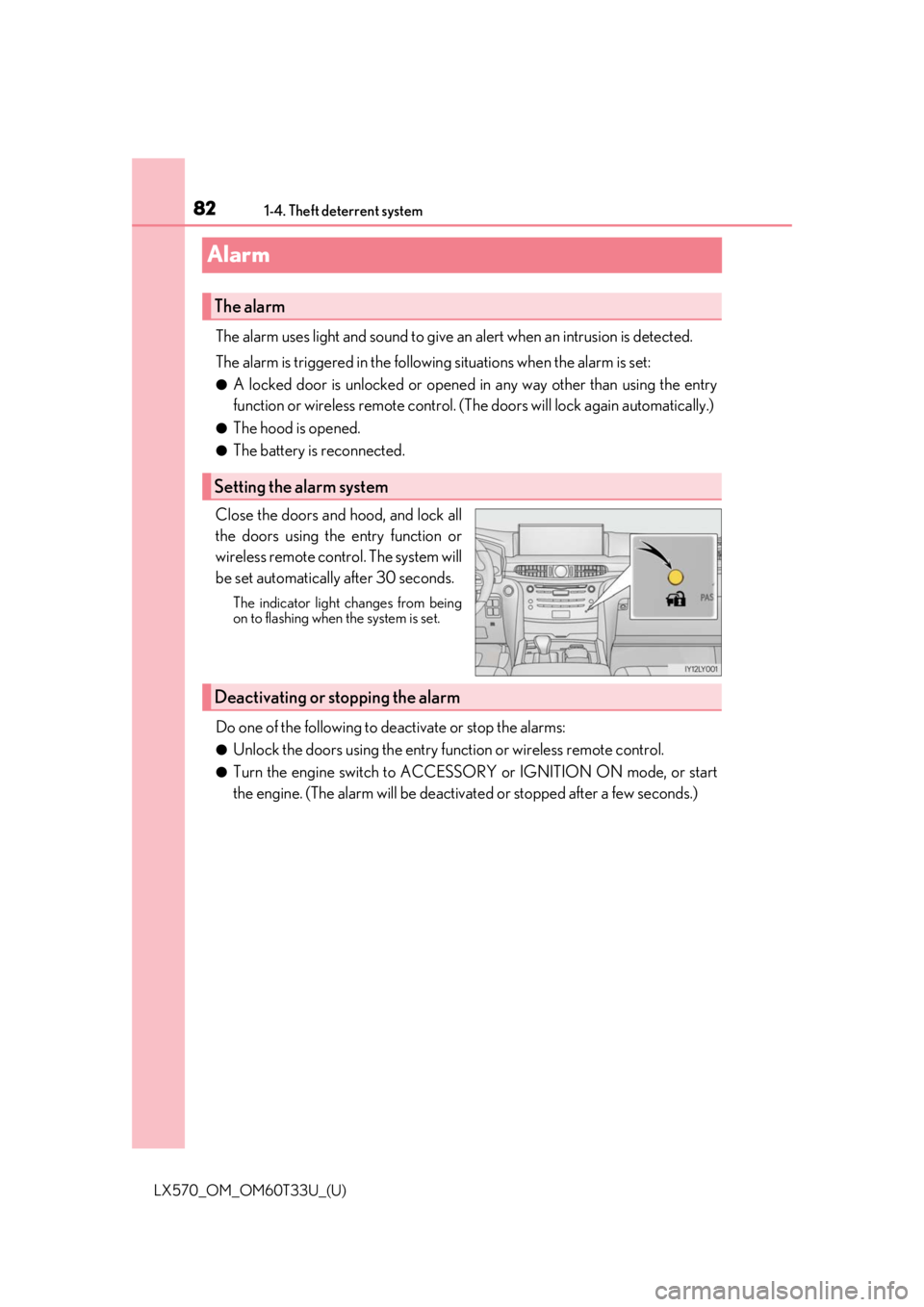
Close the doors and hood, and lock all
the doors using the entry function or
wireless remote control. The system will
be set automatically after 30 seconds.
The indicator light changes from being
on to flashing when the system is set.
Do one of the following to de activate or stop the alarms:
●Unlock the doors using the entry function or wireless remote control.
●Turn the engine switch to ACCESSOR Y or IGNITION ON mode, or start
the engine. (The alarm will be deactivat ed or stopped after a few seconds.)
The alarm
Setting the alarm system
Deactivating or stopping the alarm
Page 89 of 635

LX570_OM_OM60T33U_(U)
892. Instrument cluster
2
Instrument cluster
The indicators inform the driver of the operating state of the vehicle’s various sys-
tems.
Indicators
Turn signal indicator
( P. 224)
(if equipped)
LDA indicator ( P. 268)
(U.S.A.)
Headlight indicator
( P. 228)*1, 2
Slip indicator ( P. 386)
(Canada)
Tail light indicator
( P. 228) *1VSC OFF indicator
( P. 386)
Headlight high beam
indicator ( P. 229) Multi-terrain Select
indicator (
P. 319)
Automatic High Beam
indicator ( P. 231)
*1Crawl Control indicator
( P. 314)
Fog light indicator
( P. 236) Automatic transmission
second start indicator
(
P. 217)
*1Eco Driving Indicator
Light ( P. 91) Low speed four-wheel
drive indicator light
(
P. 310)
Cruise control indicator
( P. 288, 276) Center differential lock
indicator (
P. 311)
Cruise control “SET”
indicator ( P. 288, 276)
*1Easy access mode
indicator ( P. 302)
(if equipped)
Dynamic radar cruise
control indicator
( P. 276) Intuitive parking assist
indicator (
P. 294)
Page 90 of 635

90
LX570_OM_OM60T33U_(U)2. Instrument cluster
*1: These lights turn on when the engine switch is turned to IGNITION ON mode to
indicate that a system check is being perfor med. They will turn off after the engine is
on, or after a few seconds. There may be a ma lfunction in a system if the lights do not
turn on, or turn off. Have the vehicle inspected by your Lexus dealer.
*2: The light flashes to indicate that the system is operating.
*3: The light turns on when the system is turned off.
*4: In order to confirm operation, the BSM outside rear view mirror indicators illumi-
nate in the following situations:
• When the engine switch is turned to IGNITION ON mode while the system is set to on.
• When the system is set to on while the engine switch is in IGNITION ON mode.
If the system is functioning correctly, th e BSM outside rear view mirror indicators
will turn off after a few seconds.
If the BSM outside rear view mirror indicators do not illuminate or do not turn off,
there may be a malfunction with the system.
If this occurs, have the vehicle inspected by your Lexus dealer.
*5: This light illuminates on the outside rear view mirrors.
*6: This light illuminates on the center panel.
*7: When the outside temperat ure is approximately 37F (3 C) or lower, the indicator
will flash for approximately 10 seconds, then stay on.
*1, 3
(if equipped)
PCS warning light
( P. 256) Turn Assist indicator
(
P. 314)
BSM (Blind Spot Monitor)
indicator ( P. 370)
(U.S.A.)
Parking brake indicator
( P. 225)
*4, 5BSM (Blind Spot Monitor)
outside rear view mirror
indicators ( P. 370)
(Canada)
Parking brake indicator
( P. 225)
RCTA (Rear Cross Traffic
Alert) indicator ( P. 379) TRAC OFF indicator
(
P. 386)
*6
(U.S.A.)
“AIR BAG ON/
OFF” indicator
( P. 49)*7Low outside temperature
indicator ( P. 92)
*6
(Canada)
“AIR BAG ON/
OFF” indicator
( P. 49)*8Smart access system with
push-button start indicator
( P. 211, 551)
Page 91 of 635
LX570_OM_OM60T33U_(U)
912. Instrument cluster
2
Instrument cluster
*8: This light is displayed on the multi-information display.
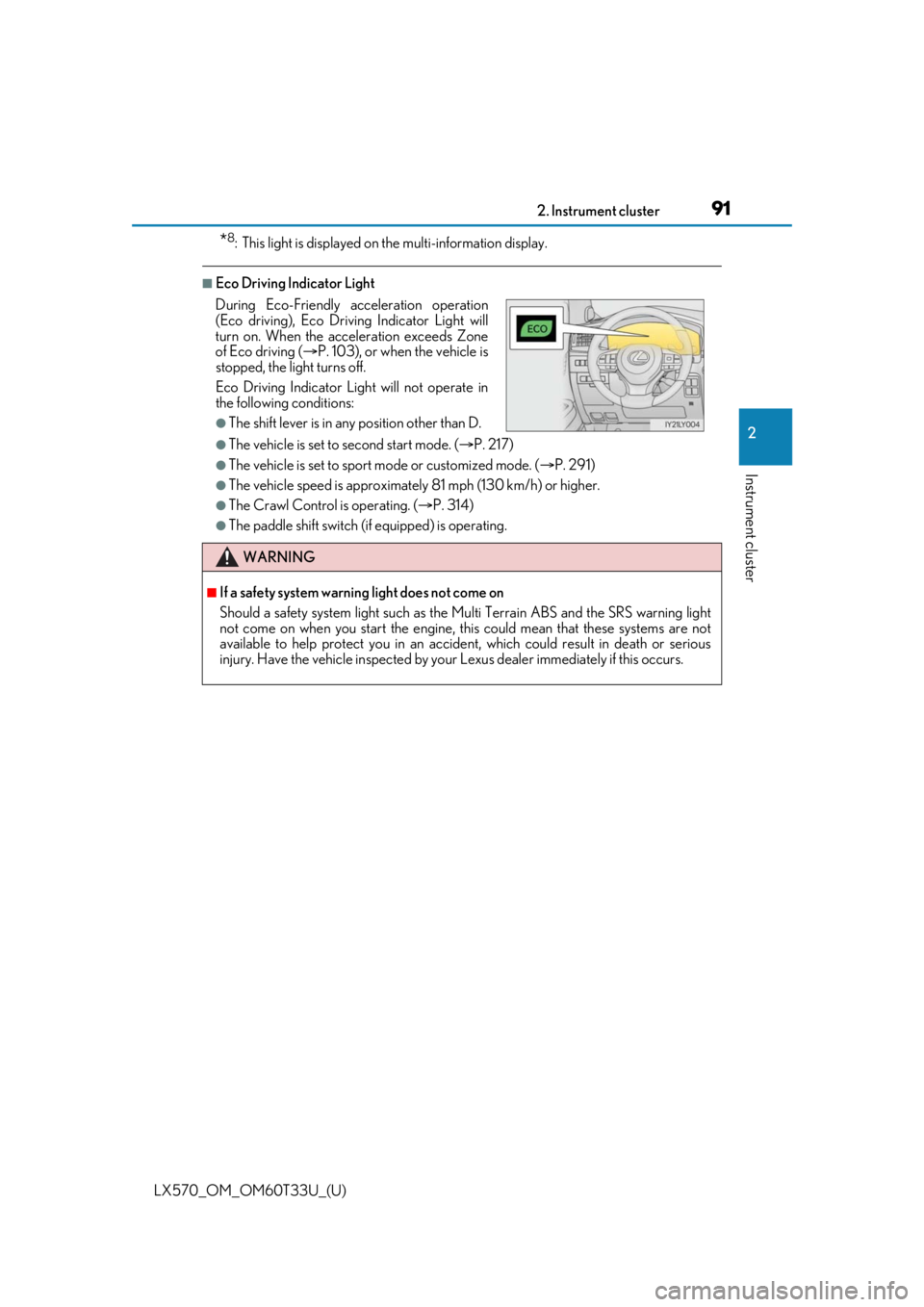
■Eco Driving Indicator Light
●The vehicle is set to second start mode. (P. 217)
●The vehicle is set to sport mode or customized mode. ( P. 291)
●The vehicle speed is approximately 81 mph (130 km/h) or higher.
●The Crawl Control is operating. ( P. 314)
●The paddle shift switch (if equipped) is operating.
During Eco-Friendly acceleration operation
(Eco driving), Eco Driving Indicator Light will
turn on. When the acceleration exceeds Zone
of Eco driving (
P. 103), or when the vehicle is
stopped, the light turns off.
Eco Driving Indicator Light will not operate in
the following conditions:
●The shift lever is in any position other than D.
WARNING
■If a safety system warnin g light does not come on
Should a safety system light such as the Multi Terrain ABS and the SRS warning light
not come on when you start the engine, th is could mean that these systems are not
available to help protect you in an accide nt, which could result in death or serious
injury. Have the vehicle inspected by your Lexus dealer immediately if this occurs.
Page 99 of 635

LX570_OM_OM60T33U_(U)
992. Instrument cluster
2
Instrument cluster
■Drive information
4 of the following items can be registered and displayed as the drive informa-
tion 1 and the drive information 2 (2 items on each screen).
Refer to P. 101 for the registration method of the drive information 1 and the
drive information 2.
●Current fuel consumption (bar type/value type)
Displays the current rate of fuel consumption.
●Average fuel consumption (after reset*2/after start/after refuel)*1
Displays the average fuel consumption since the function was reset, the
engine was started, and the vehicle was refueled, respectively.
●Average vehicle speed (after reset*2/after start)
Displays the average vehicle speed si nce the function was reset and the
engine was started, respectively.
●Elapsed time (after reset*2/after start)
Displays the elapsed time since the function was reset and the engine was
started, respectively.
●Distance (driving range/after start)
Displays the estimated maximum distance that can be driven with the
quantity of fuel remaining. • This distance is computed based on your average fuel consumption.
As a result, the actual distance that can be driven may differ from that
displayed.
• When only a small amount of fuel is added to the tank, the display may not be updated.
When refueling, turn the engine switch off. If the vehicle is refueled with-
out turning the engine switch off, the display may not be updated.
*1: Use the displayed average fuel consumption as a reference.
*2: The function can be reset by pressing for longer than 1 second when the item to
reset is displayed. If there is more than on e item that can be reset, the item selection
screen will appear.
Drive information
Page 111 of 635
LX570_OM_OM60T33U_(U)
1112. Instrument cluster
2
Instrument cluster
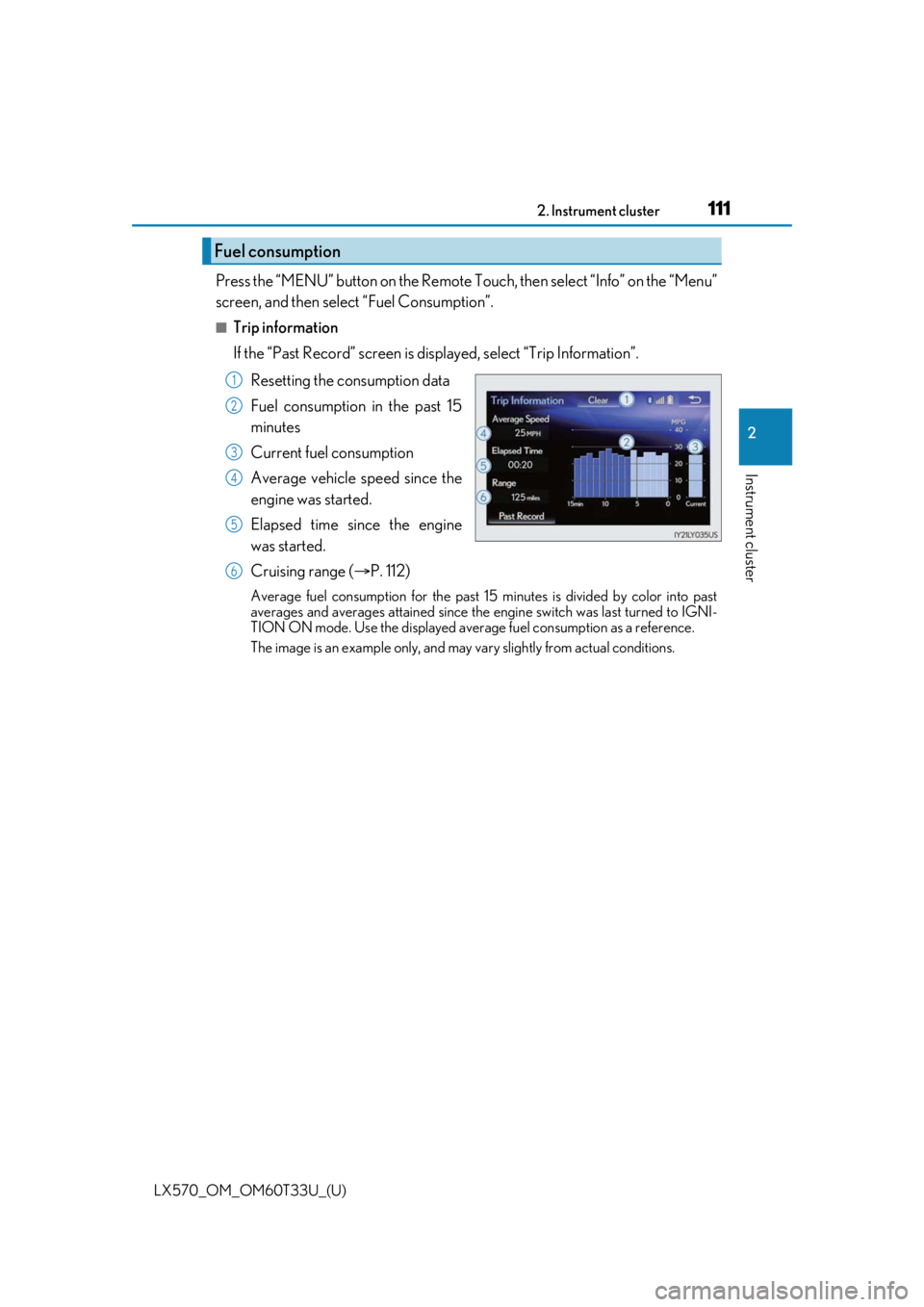
Press the “MENU” button on the Remote Touch, then select “Info” on the “Menu”
screen, and then select “Fuel Consumption”.
■Trip information
If the “Past Record” screen is displayed, select “Trip Information”.Resetting the consumption data
Fuel consumption in the past 15
minutes
Current fuel consumption
Average vehicle speed since the
engine was started.
Elapsed time since the engine
was started.
Cruising range ( P. 112)
Average fuel consumption for the past 15 minutes is divided by color into past
averages and averages attained since the engine switch was last turned to IGNI-
TION ON mode. Use the displayed average fuel consumption as a reference.
The image is an example only, and may va ry slightly from actual conditions.
Fuel consumption
1
2
3
4
5
6
Page 113 of 635
LX570_OM_OM60T33U_(U)
1132. Instrument cluster
2
Instrument cluster
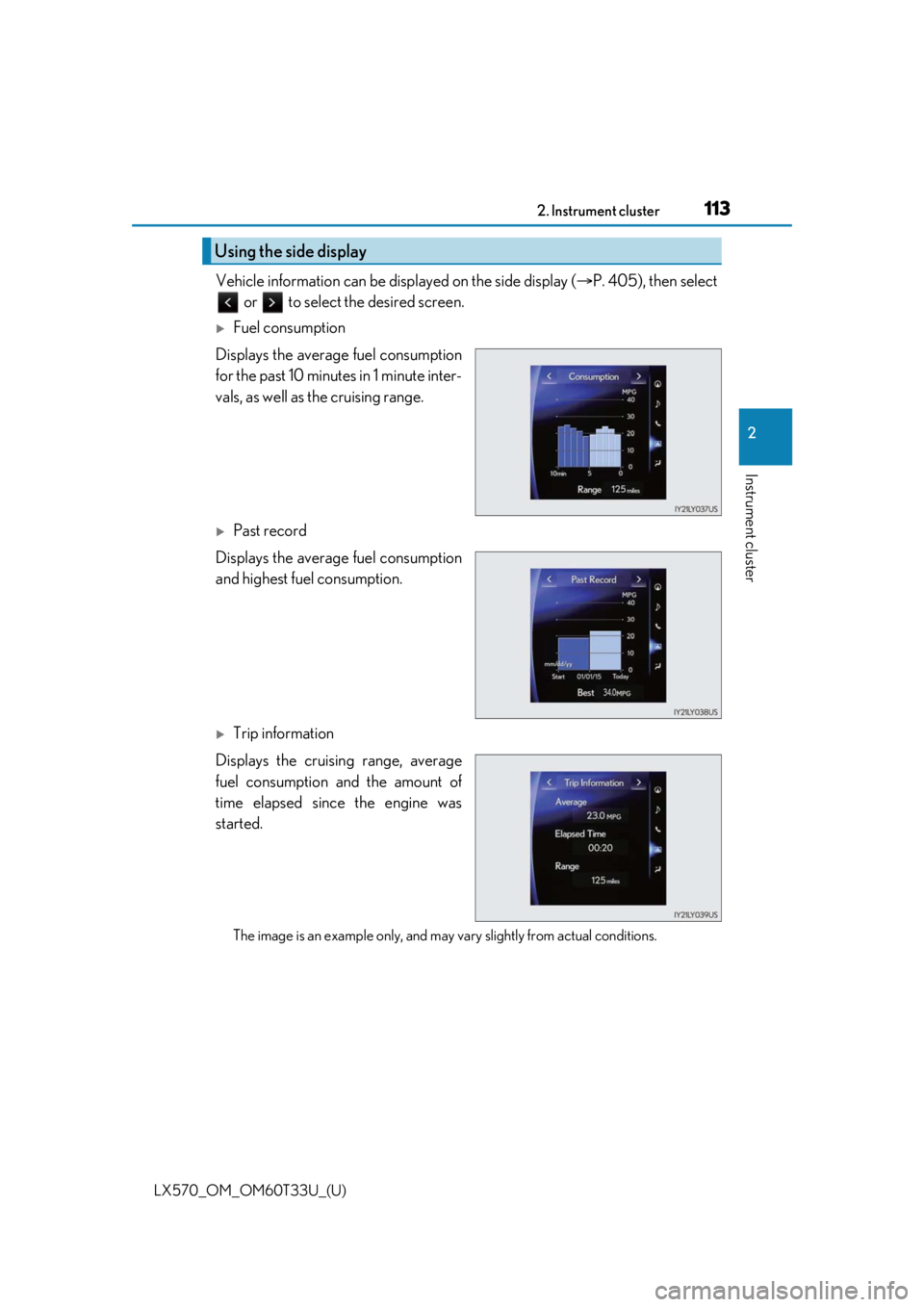
Vehicle information can be displayed on the side display (P. 405), then select
or to select the desired screen.
Fuel consumption
Displays the average fuel consumption
for the past 10 minutes in 1 minute inter-
vals, as well as the cruising range.
Past record
Displays the average fuel consumption
and highest fuel consumption.
Trip information
Displays the cruising range, average
fuel consumption and the amount of
time elapsed since the engine was
started.
The image is an example only, and may va ry slightly from actual conditions.
Using the side display
Page 115 of 635

115
LX570_OM_OM60T33U_(U)
3
Operation of
each component
3-1. Key information
Keys .................................................... 116
3-2. Opening, closing and locking the doors
Side doors ........................................ 121
Back door....................................... 128
Smart access system with push-button start ...................... 138
3-3. Adjusting the seats Front seats...................................... 146
Rear seats....................................... 148
Driving position memory ..........157
Head restraints .............................. 161
3-4. Adjusting the steering wheel and mirrors
Steering wheel ............................. 164
Inside rear view mirror ............. 166
Outside rear view mirrors....... 168
3-5. Opening, closing the windows and moon roof
Power windows ............................. 171
Moon roof .......................................174
Page 116 of 635

116
LX570_OM_OM60T33U_(U)3-1. Key information
Keys
The following keys are provided with the vehicle.
Electronic keys
• Operating the smart access systemwith push-button start ( P. 138)
• Operating the wireless remote con-
trol function
Mechanical keys
Key number plate
Card key (electronic key)
Operating the smart access system with
push-button start ( P. 138)
Locks the doors ( P. 121)
Unlocks the doors ( P. 121)
Opens the windows and moon roof
*
( P. 121)
Opens/closes the power back door
( P. 128)
Sounds the alarm ( P. 117)
*: This setting must be custom ized at your Lexus dealer.
The keys
1
2
3
4
Wireless remote control
1
2
3
4
5
Page 118 of 635

118
LX570_OM_OM60T33U_(U)3-1. Key information
●The card key is not waterproof.
■When required to leave the vehicle’s key with a parking attendant
Lock the glove box as circumstances demand. (
P. 429)
Remove the mechanical key for your own use and provide the attendant with the elec-
tronic key only.
■If you lose your mechanical keys
New genuine mechanical keys can be made by your Lexus dealer using another
mechanical key and the key number stamped on your key number plate. Keep the plate
in a safe place such as your wallet, not in the vehicle.
■When riding in an aircraft
When bringing an electronic key onto an aircraft, make sure you do not press any but-
tons on the electronic key while inside the aircraft cabin. If you are carrying an electronic
key in your bag etc., ensure that the buttons are not likely to be pressed accidentally.
Pressing a button may cause the electronic key to emit radio waves that could interfere
with the operation of the aircraft.
■Electronic key battery depletion
●The standard battery life is 1 to 2 years. (The card key battery life is about a year and a
half.)
●If the battery becomes low, an alarm will sound in the cabin when the engine stops.
●As the electronic key always receives ra dio waves, the battery will become depleted
even if the electronic key is not used. The following symptoms indicate that the elec-
tronic key battery may be depleted. Replace the battery when necessary. ( P. 507)
• The smart access system with push-button start or the wireless remote control does
not operate.
• The detection area becomes smaller.
• The LED indicator on the key surface does not turn on.
●To avoid serious deterioration, do not leave the electronic key within 3 ft. (1 m) of the
following electrical appliances that produce a magnetic field:
•TVs
• Personal computers
• Cellular phones, cordless phones and battery chargers
• Recharging cellular phones or cordless phones
•Table lamps
• Induction cookers
●If the battery cover is not installed and the bat-
tery falls out or if the battery was removed
because the key got wet, reinstall the battery
with the positive terminal facing the Lexus
emblem.