seats LEXUS LX570 2021 Owner's Guide
[x] Cancel search | Manufacturer: LEXUS, Model Year: 2021, Model line: LX570, Model: LEXUS LX570 2021Pages: 635, PDF Size: 10.47 MB
Page 156 of 635

156
LX570_OM_OM60T33U_(U)3-3. Adjusting the seats
WARNING
■Seat adjustment
To reduce the risk of sliding under the lap be
lt during a collision, do not recline the seat
more than necessary.
If the seat is too reclined, the lap belt may slide past the hips and apply restraint forces
directly to the abdomen, or your neck may contact the shou lder belt, increasing the risk
of death or serious injury in the event of an accident.
Adjustments should not be made while drivin g as the seat may unexpectedly move and
cause the driver to lose control of the vehicle.
■When the seatback is folded
●Do not sit on or place anything on the seatback while driving.
●Be sure to install the seat hook covers on the seat hooks, or you may get burned when
they become hot.
■When returning the seatbacks to their original position
Observe the following precautions. Failure to do so may result in death or serious
injury.
●Be careful not to get your hand s or feet pinched in the seat.
●Make sure the seats are secure ly locked. Failure to do so will prevent the seat belt
from operating properly.
●Check that the seat belts are not twisted or caught under the seat.
●Arrange the seat belts in the proper positions for ready use.
■Avoiding damage to seat components
Do not hang or attach anythi ng on the seatback striker.
NOTICE
■Before tumbling, folding up the seats
The seat belts and buc kles must be stowed.
■After returning the third seat (if equipped)
Make sure that the handle on the re ar of the seatback has been secured.
Page 157 of 635
157
LX570_OM_OM60T33U_(U)3-3. Adjusting the seats
3
Operation of each component
Driving position memory
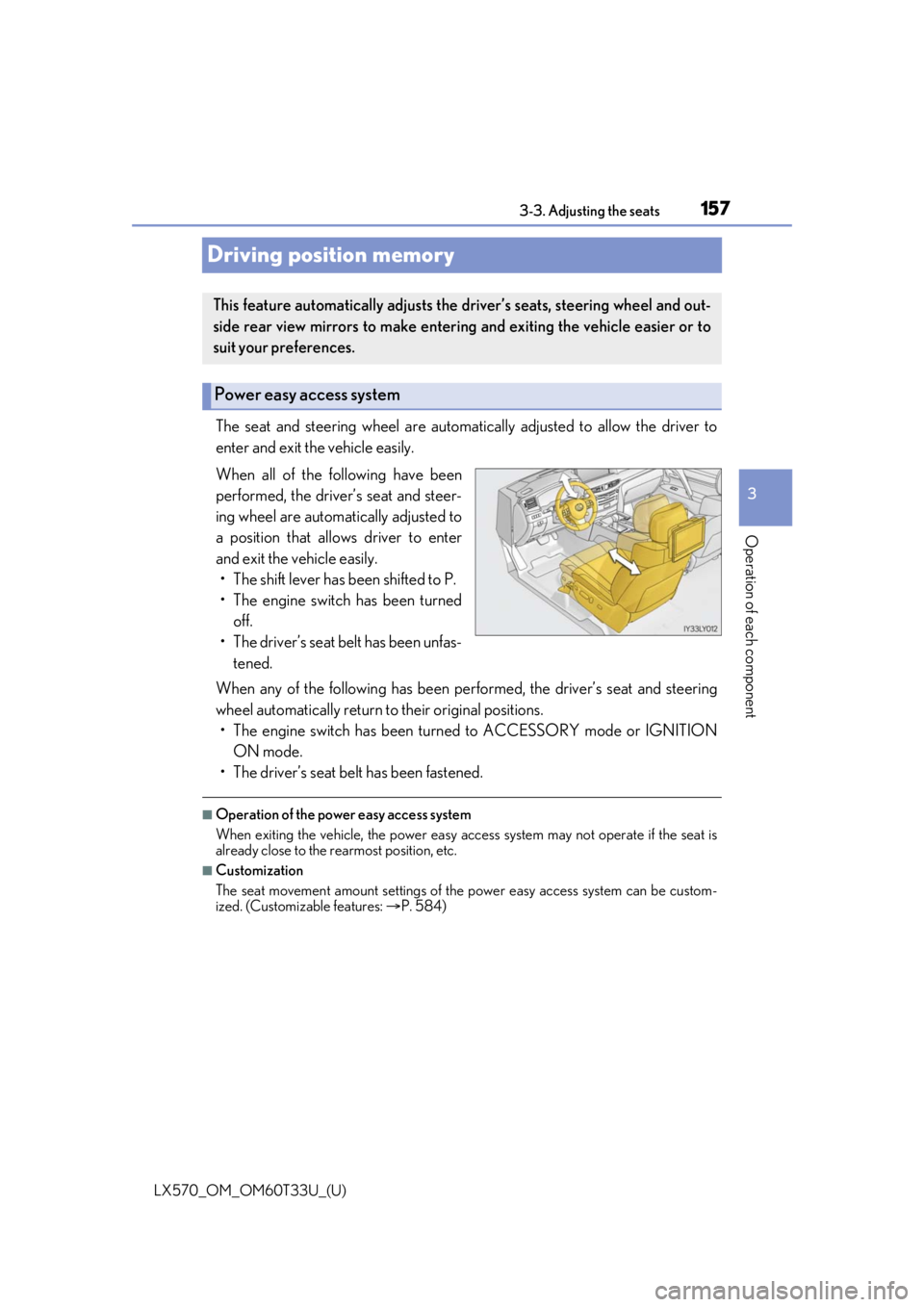
The seat and steering wheel are automati
cally adjusted to allow the driver to
enter and exit the vehicle easily.
When all of the following have been
performed, the driver’s seat and steer-
ing wheel are automatically adjusted to
a position that allows driver to enter
and exit the vehicle easily. • The shift lever has been shifted to P.
• The engine switch has been turned off.
• The driver’s seat belt has been unfas- tened.
When any of the following has been perf ormed, the driver’s seat and steering
wheel automatically return to their original positions.
• The engine switch has been turn ed to ACCESSORY mode or IGNITION
ON mode.
• The driver’s seat belt has been fastened.
■Operation of the power easy access system
When exiting the vehicle, the power easy ac cess system may not operate if the seat is
already close to the rearmost position, etc.
■Customization
The seat movement amount settings of the power easy access system can be custom-
ized. (Customizable features: P. 584)
This feature automatically adjusts the driver’s seats, steering wheel and out-
side rear view mirrors to make enteri ng and exiting the vehicle easier or to
suit your preferences.
Power easy access system
Page 158 of 635
![LEXUS LX570 2021 Owners Guide 158
LX570_OM_OM60T33U_(U)3-3. Adjusting the seats
Your preferred driving position (the positi
on of the driver’s seat, steering wheel,
outside rear view mirrors and HUD [head-up display] [if equippe](/img/36/58942/w960_58942-157.png "LEXUS LX570 2021 Owners Guide 158
LX570_OM_OM60T33U_(U)3-3. Adjusting the seats
Your preferred driving position (the positi
on of the driver’s seat, steering wheel,
outside rear view mirrors and HUD [head-up display] [if equippe")
158
LX570_OM_OM60T33U_(U)3-3. Adjusting the seats
Your preferred driving position (the positi
on of the driver’s seat, steering wheel,
outside rear view mirrors and HUD [head-up display] [if equipped]) can be
entered into the computer’s memory and recalled with the touch of a button. It is
also possible to set this function to activate automatically when the doors are
unlocked.
Three different driving positions can be recorded into memory.
■Recording procedure
Check that the shift lever is in P.
Turn the engine switch to IGNITION ON mode.
Adjust the driver’s seat, steering wh eel, outside rear view mirrors and HUD
(head-up display) (if equipped) to the desired positions.
While pressing the “SET” button,
or within 3 seconds after the
“SET” button is pressed, press
button “1”, “2” or “3” until the
buzzer sounds.
If the selected button has already
been preset, the previously recorded
position will be overwritten.
■Recall procedure
Check that the shift lever is in P.
Turn the engine switch to IGNITION ON mode.
Press one of the buttons for the
driving position you want to recall
until the buzzer sounds.
Driving position memory
1
2
3
4
1
2
3
Page 159 of 635
LX570_OM_OM60T33U_(U)
1593-3. Adjusting the seats
3
Operation of each component
■To stop the position recall operation part-way through
Perform any of the following:
●Press the “SET” button.
●Press button “1”, “2” or “3”.
●Operate any of the seat adjustment switches (only cancels seat position recall).
●Operate the tilt and telescopic steering control switch (only cancels steering wheel
position recall).
■Operating the driving position memory after turning the engine switch off
Recorded seat positions can be activated up to 180 seconds after the driver’s door is
opened and another 60 seconds after it is closed again.
■If the battery is disconnected
The memorized positions must be reset becau se the computer’s memory is erased when
the battery is disconnected.
Each electronic key can be registered to recall your preferred driving position.
■Registering procedure
Record your driving position to button “1”, “2” or “3” before performing the
following:
Carry only the key you want to regist er, and then close the driver’s door.
If 2 or more keys are in the vehicle, the driving position cannot be recorded
properly.
Check that the shift lever is in P.
Turn the engine switch to IGNITION ON mode.
Recall the driving position that you want to record.
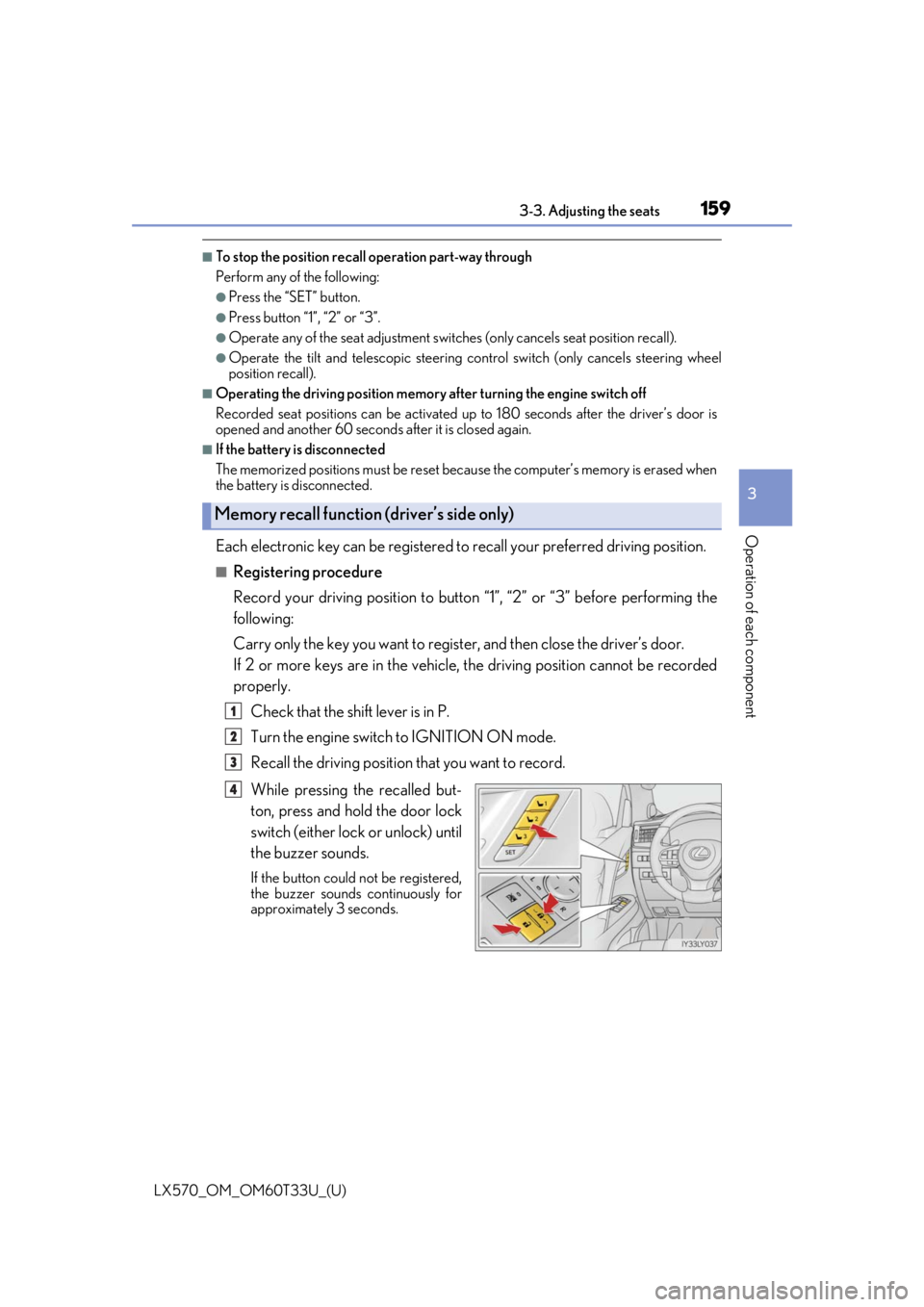
While pressing the recalled but-
ton, press and hold the door lock
switch (either lock or unlock) until
the buzzer sounds.
If the button could not be registered,
the buzzer sounds continuously for
approximately 3 seconds.
Memory recall function (driver’s side only)
1
2
3
4
Page 160 of 635

160
LX570_OM_OM60T33U_(U)3-3. Adjusting the seats
■Recall procedure
Make sure that the doors are locked before recalling the driving position.
Carry the electronic key that has been registered to the driving position,
and then unlock and open the driver’s door using the smart access system
with push-button start or wireless remote control.
The driving position will move to the recorded position (not including the steering
wheel and HUD [head-up display] [if equipp ed]). However, the seat will move to a
position slightly behind the recorded positi on in order to make entering the vehicle
easier.
If the driving position is in a position th at has already been recorded, the seat and
outside rear view mirrors will not move.
Turn the engine switch to ACCESS ORY mode or IGNITION ON mode,
or fasten a seat belt.
The seat, steering wheel and HUD (head-up display) (if equipped) will move to the
recorded position.
■Cancelation procedure
Carry only the key you want to cance l and then close the driver’s door.
If 2 or more keys are in the vehicle, the driving position cannot be canceled
properly.
Turn the engine switch to IGNITION ON mode.
While pressing the “SET” button, pr ess and hold the door lock switch
(either lock or unlock) un til the buzzer sounds twice.
If the button could not be canceled, the buzzer sounds continuously for approxi-
mately 3 seconds.
■Recalling the driving position using the memory recall function
●Different driving positions can be registered for each electronic key. Therefore, the
driving position that is recalled may be di fferent depending on the key being carried.
●If a door other than the driver’s door is unlocked with the smart access system with
push-button start, the driving position cannot be recalled. In this case, press the driving
position button which has been set.
■Customization
The unlock door settings of the memo ry recall function can be customized.
(Customizable features: P. 584)
WARNING
■Seat adjustment caution
Take care during seat adjustment so that the seat does not strike the rear passenger or
squeeze your body against the steering wheel.
1
2
1
2
Page 161 of 635

161
LX570_OM_OM60T33U_(U)3-3. Adjusting the seats
3
Operation of each component
Head restraints
Vertical adjustment
Up
Pull the head restraints up.
Down
Push the head restraint down while
pushing the lock release button.
Angle adjustment (if equipped)
Up
Pull the head restraints up.
Down
Push the head restraint down while
pushing the lock release button.
Head restraints are provided for all seats.
Front seats
Lock release button
1
2
Second seats
Lock release button
1
2
Page 162 of 635

162
LX570_OM_OM60T33U_(U)3-3. Adjusting the seats
To fold the head restraints, pull the head
restraint angle lever
■Adjusting the height of the head restraints
■Removing the head restraints
Front seats
While pressing in the fl
athead screwdriver, pull up the head restraint.
Second seats
Third outboard seats (if equipped)
Make sure that the head restraints are adjusted
so that the center of the head restraint is closest
to the top of your ears.
Push a flathead screwdriver into the slot. The
slot is located on the right side of the right
head restraint anchor.
Pull the head restraint up while pressing the lock
release button.
1
2
Lock release button
Page 163 of 635

LX570_OM_OM60T33U_(U)
1633-3. Adjusting the seats
3
Operation of each component
Third center seat (if equipped)
Third outboard seats (if equipped)
The head restraint cannot be removed.
■Installing the head restraints (e xcept for the third outboard seats)
Align the head restraint with the installation holes.
Push down the head restraint to the lock position.
Press and hold the lock release button when lowering the head restraint.
■When not using the third center seat head restraint (if equipped) Pull the head restraint up while pressing the lock
release button.
Open the zipper on the back of the third seat
and stow the head restraint inside.
WARNING
■Head restraint precautions
Observe the following precautions regarding th e head restraints. Failure to do so may
result in death or serious injury.
●Use the head restraints designed for each respective seat.
●Adjust the head restraints to th e correct position at all times.
●After adjusting the head restraints, push down on them and make sure they are
locked in position.
●Do not drive with the head restraints removed.
Lock
release
button
1
2
Page 190 of 635

190
LX570_OM_OM60T33U_(U)4-1. Before driving
WARNING
■Things that must not be carri
ed in the luggage compartment
The following things may cause a fire if loaded in the luggage compartment:
●Receptacles containing gasoline
●Aerosol cans
■Storage precautions
Observe the following precautions.
Failure to do so may prevent the pedals from being depressed properly, may block the
driver’s vision, or may result in items hittin g the driver or passengers, possibly causing
an accident.
●Stow cargo and luggage in the luggage compartment whenever possible.
●Do not stack cargo and luggage in the luggage compartment higher than the seat-
backs.
●Do not place cargo or luggage in or on the following locations.
• At the feet of the driver
• On the front passenger or re ar seats (when stacking items)
• On the luggage cover (if equipped)
• On the instrument panel
•On the dashboard
• On the auxiliary box or tray that has no lid
●Secure all items in the occupant compartment.
●When you fold down the rear seats, long items should not be placed directly behind
the front seats.
●Never allow anyone to ride in the luggage compartment. It is not designed for pas-
sengers. They should ride in their seats with their seat belts properly fastened. Other-
wise, they are much more likely to suffer de ath or serious bodily injury, in the event of
sudden braking, sudden swerving or an accident.
■Capacity and distribution
●Do not exceed the maximum axle weight rating or the total vehicle weight rating.
●Even if the total load of occupant’s weight and the cargo load is less than the total load
capacity, do not apply the load unevenly. Improper loading may cause deterioration
of steering or braking control whic h may cause death or serious injury.
Page 406 of 635

406
LX570_OM_OM60T33U_(U)5-2. Lexus Climate Concierge
Lexus Climate Concierge
“CLIMATE CONCIERGE” switch
When the switch is
pressed, the indica-
tor above the switch illuminates and all
of the following systems operate in auto-
matic mode.
If any of the system is operated manually,
the indicator turns off. However, all
other functions continue to operate in
automatic mode.
■Automatic air conditioning system ( P. 407, 418)
The temperature can be adjusted individually for the driver seat, passenger seat, and
rear seats.
When a passenger is detected in the second seat, the rear air conditioning operates
in automatic mode.
■Seat heaters and ventilators (if equipped) ( P. 421)
Heating or ventilation is automatically se lected according to the set temperature of
the air conditioning system, the outside temperature, etc.
The seat heaters and ventilators of the front passenger seat and second outboard
seats operate in automatic mode if passengers are detected.
■Heated steering wheel (if equipped) ( P. 421)
Heated steering wheel operates automatically according to the outside temperature
and cabin temperature.
■Front air conditioning system operation
To improve air conditioning performance in th e front seat area, the air outlets on the rear
of the console box may close when there is no passenger in the second seat.
■Rear air conditioning system operation
The rear air conditioning system may stop automatically when there is no passenger in
the second seat.
■Seat heater/ventilator operation
When automatic mode is selected using th e seat heater/ventilator switch, passenger
detection is not performed.
The seat heaters, seat ventilators and heated steering wheel are each auto-
matically controlled according to the set temperature of the air conditioning
system, the outside and cabin temperat ure, etc. Lexus Climate Concierge
allows a comfortable condition to be maintained without adjusting each sys-
tem.