brake light LEXUS NX200T 2016 User Guide
[x] Cancel search | Manufacturer: LEXUS, Model Year: 2016, Model line: NX200T, Model: LEXUS NX200T 2016Pages: 660, PDF Size: 9.96 MB
Page 204 of 660

2044-2. Driving procedures
NX200t_OM_USA_OM78081U
Parking brake
The parking brake is set or released automatically according to shift lever opera-
tion.
Even when in automatic mode, the parkin g brake can be set and released manu-
ally. ( P. 2 0 5 )
Turns automatic mode on (while the
vehicle is stopped, pull and hold the
parking brake switch until the auto-
matic mode lamp turns on)
• When the shift lever is moved out of P, the parking brake will be released,
and the parking brake indicator light
and parking brake lamp turn off.
• When the shift lever is moved into P, the parking brake will be set, and the
parking brake indicator light and
parking brake lamp turn on.
Operate the shift lever with the brake
pedal depressed.
Turns automatic mode off (while the
vehicle is stopped, press and hold
the parking brake switch until the
automatic mode lamp turns off)
A selections can be made as de sired from the following modes.
Automatic mode
Automatic
mode lampAutomatic
mode lamp
Pa r k i n g
brake lamp Pa r k i n g
brake lamp
U.S.A.Canada
1
2
Page 205 of 660

2054-2. Driving procedures
4
Driving
NX200t_OM_USA_OM78081U
The parking brake can be set and released manually. Sets the parking brake
The parking brake indicator light and
parking brake lamp will turn on.
Pull and hold the parking brake switch if
an emergency occurs and it is necessary
to operate the parking brake while driv-
ing.
Releases the parking brake
Operate the parking brake switch while
depressing the brake pedal. Make sure
that the parking brake indicator light
and parking brake lamp turn off.
If the parking brake indicator light and
parking brake lamp flashes, operate the
switch again. ( P. 5 5 1 )
■Parking brake operation
●When the engine switch is not in IGNITION ON mode, the parking brake cannot be
released using the pa rking brake switch.
●When the engine switch is not in IGNI TION ON mode, automatic mode (automatic
brake setting and releas ing) is not available.
■If “Parking Brake Overheated Parking Brake Unavailable” is displayed on the multi-
information display
If the parking brake is operated repeatedly over a short period of time, the system may
restrict operation to prevent overheating. If this happens, refrain from operating the
parking brake. Normal operation will return after about 1 minute.
■Parking brake operation sound
When the parking brake operates, a motor sound (whirring sound) may be heard. This
does not indicate a malfunction.
■Parking brake indicator light and parking brake lamp
●Depending on the engine switch mode, the parking brake indicator light and parking
brake lamp will turn on and stay on as described below:
IGNITION ON mode: Comes on until the parking brake is released.
Not in IGNITION ON mode: Stays on for approximately 15 seconds.
●When the engine switch is turned off with the parking brake set, the parking brake indi-
cator light and parking brake lamp will stay on for about 15 seconds. This does not indi-
cate a malfunction.
Manual mode
U.S.A. Canada
Pa r k i n g
brake lampPa r k i n g
brake lamp
1
2
Page 206 of 660

2064-2. Driving procedures
NX200t_OM_USA_OM78081U
■Changing the mode
When changing the automatic mode on/off , the message will be shown on the multi-
information display and the buzzer sounds.
■Parking brake engaged warning buzzer
A buzzer will sound if the vehicle is driven with the parking brake engaged. “Release
Parking Brake” is displayed on the multi-information display.
■Warning messages and buzzers
Warning messages and buzzers are used to indicate a system malfunction or to inform
the driver of the need for caution. If a warn ing message is shown on the multi-information
display, read the message and follow the instructions.
■If the brake system warning light comes on
P. 5 5 0
■Usage in winter time
P. 3 1 8
WA R N I N G
■When parking the vehicle
Do not leave a child in the vehicle alone. The parking brake may be released uninten-
tionally and there is the danger of the vehicle moving that may lead to an accident
resulting in death or serious injury.
NOTICE
■When parking the vehicle
Before you leave the vehicle, shift the shif t lever to P, set the parking brake and make
sure that the vehicle does not move.
■When the system malfunctions
Stop the vehicle in a safe place and check the warning messages.
■When the parking brake cannot be released due to a malfunction
Driving the vehicle with the parking brake set will lead to brake components overheat-
ing, which may affect braking performance and increase brake wear. Have the vehicle
inspected by contact your Lexus de aler immediately if this occurs.
Page 207 of 660

2074-2. Driving procedures
4
Driving
NX200t_OM_USA_OM78081U
Brake Hold
Turns the brake hold system on
The brake hold standby indicator
(green) comes on. While the system is
holding the brake, the brake hold oper-
ated indicator (yellow) comes on.
■Brake hold system operating conditions
The brake hold system cannot be turned on in the following conditions:
●The back door or hood is not closed.
●The driver’s door is not closed.
●The driver is not wearing the seat belt.
If any of the conditions above are detected when the brake hold system is enabled, the
system will turn off and the brake hold standby indicator light will go of f. In addition, if any
of the conditions are detected while the sy stem is holding the brake, a warning buzzer
will sound and a message will be shown on th e multi-information display. The parking
brake will then be set automatically.
■Brake hold function
●If the brake pedal is left released for a period of about 3 minutes after the system has
started holding the brake, the parking brake w ill be set automatically. In this case, a
warning buzzer sounds and a message is shown on the multi-information display.
●To turn the system off while the system is holding the brake, firmly depress the brake
pedal and press the button again.
●The brake hold function may not hold the vehicle when the vehicle is on a steep incline.
In this situation, it may be necessary for the driver to apply the brakes. A warning
buzzer will sound and the multi-information di splay will inform the driver of this situa-
tion. If a warning message is shown on the multi-information display, re a d t h e m e s s a g e
and follow the instructions.
■When the parking brake is set automatically while the system is holding the brakes
The parking brake will not be released automatically. With the brake pedal depressed,
release the parking brake by operating the parking brake switch, making sure that the
parking brake indicator light goes off. ( P. 2 0 4 )
The brake hold system keeps the brake applied when the shift lever is in D, M
or N with the system on and the brake pedal has been depressed to stop the
vehicle. The system releases the brake when the accelerator pedal is
depressed with the shift lever in D or M to allow smooth start off.
Page 212 of 660

2124-3. Operating the lights and wipers
NX200t_OM_USA_OM78081U
When the following conditions are met, while the headlights (low beam) are on,
the cornering lights will additionally turn on and light up the direction of move-
ment for the vehicle. This is to ensure excellent visibility when either driving at
intersections or parking at night.
●The steering wheel is operated
●The turn signal lever is operated
●The shift lever is in R
However, when vehicle speed is 40 km/h (25 mph) or above, the cornering
lights do not turn on.
When the cornering lights ar e on for more than 30 minutes, they will automati-
cally turn off.
■Daytime running light system
●To make your vehicle more visible to other drivers during daytime driving, the daytime
running lights turn on automatically (at an increased intensity) whenever the engine is
started and the parking brake is released with the headlight switch off or in the “AUTO”
position. (Illuminate brighter than the front parking lights.) Daytime running lights are
not designed for use at night.
Type A only: Daytime running lights can be turned off by operating the switch.
●If a turn signal light is in use, the daytime running light, on the same side, is turned off.
For emergency flashers, both are turned off.
●Compared to turning on the headlights, the daytime running light system offers greater
durability and consumes less electricity, so it can help improve fuel economy.
■Headlight control sensor
■Automatic light off system
●When the headlights come on: The headlights and tail lights turn off 30 seconds after a
door is opened and closed if the engine switch is turned to ACCESSORY mode or
turned off. (The lights turn off immediately if on the key is pressed after all the doors
are locked.)
●When only the tail lights come on: The tail lights turn off automatically if the engine
switch is turned to ACCESSORY mode or turned off and the driver’s door is opened.
To turn the lights on again, turn the engine switch to IGNITION ON mode, or turn the
light switch off once and then back to or .
Cornering lights (if equipped)
The sensor may not function properly if an
object is placed on the sensor, or anything that
blocks the sensor is affixed to the windshield.
Doing so interferes with the sensor detecting
the level of ambient light and may cause the
automatic headlight system to malfunction.
Page 232 of 660

2324-5. Using the driving support systems
NX200t_OM_USA_OM78081U
This mode employs a radar sensor to detect the presence of vehicles up to
approximately 400 ft. (120 m) ahead, determines the current vehicle-to-vehicle
following distance, and operates to main tain a suitable following distance from
the vehicle ahead.
Note that vehicle-to-vehicle distance will close in when traveling on long downhill
slopes.
Example of constant speed cruising
When there are no vehicles ahead
The vehicle travels at the speed set by the driver. The desired vehicle-to-vehicle dis-
tance can also be set by operating the vehicle-to-vehicle distance control.
Example of deceleration cruising
When a preceding vehicle is driving slower than the set speed appears
When a vehicle is detected running ahead of you, the system automatically deceler-
ates your vehicle. When a greater reduction in vehicle speed is necessary, the system
applies the brakes (the stop lights will come on at this time). A warning tone warns you
when the system cannot decelera te sufficiently to prevent your vehicle from closing in
on the vehicle ahead.
Example of follow-up cruising
When following a preceding vehicle is driving slower than the set speed
The system continues follow-up cruising wh ile adjusting for changes in the speed of
the vehicle ahead in order to maintain the vehicle-to-vehicle distance set by the driver.
Example of acceleration
When there are no longer any preceding vehicles driving slower than the set
speed
The system accelerates until the set speed is reached. The system then returns to con-
stant speed cruising.
Driving in vehicle-to-vehicle distance control mode
1
2
3
4
Page 245 of 660

2454-5. Using the driving support systems
4
Driving
NX200t_OM_USA_OM78081U
This mode employs a radar sensor to detect the presence of vehicles up to
approximately 400 ft. (120 m) ahead, determines the current vehicle-to-vehicle
following distance, and operates to maintain a suitable following distance from
the vehicle ahead.
Note that vehicle-to-vehicle distance will close in when traveling on long downhill
slopes.
Example of constant speed cruising
When there are no vehicles ahead
The vehicle travels at the speed set by the driver. The desired vehicle-to-vehicle dis-
tance can also be set by operating the vehicle-to-vehicle distance control.
Example of deceleration cruising and follow-up cruising
When a preceding vehicle is driving slower than the set speed appears
When a vehicle is detected running ahead of you, the system automatically deceler-
ates your vehicle. When a greater reduction in vehicle speed is necessary, the system
applies the brakes (the stop lights will come on at this time). The system will respond to
changes in the speed of the vehicle ahead in order to maintain the vehicle-to-vehicle
distance set by the driver. A warning tone warns you when the system cannot deceler-
ate sufficiently to prevent your vehicl e from closing in on the vehicle ahead.
When the vehicle ahead of you stops, your ve hicle will also stop (vehicle is stopped by
system control). After the vehicle ahead starts off, pushing the cruise control lever up
or depressing the accelerator peda l will resume follow-up cruising.
Example of acceleration
When there are no longer any preceding vehicles driving slower than the set
speed
The system accelerates until the set speed is reached. The system then returns to con-
stant speed cruising.
Driving in vehicle-to-vehicle distance control mode
1
2
3
Page 275 of 660

2754-5. Using the driving support systems
4
Driving
NX200t_OM_USA_OM78081U
■The intuitive parking assist can be operated when
●Front corner sensors:
• The engine switch is in IGNITION ON mode.
• The shift lever is in other than P.
• The vehicle speed is less than about 6 mph (10 km/h).(At any speed when the shift lever is in R)
●Front center sensors:
• The engine switch is in IGNITION ON mode.
• The shift lever is in other than P or R.
• The vehicle speed is less than about 6 mph (10 km/h).
●Rear corner and rear center sensors:
• The engine switch is in IGNITION ON mode.
• The shift lever is in R.
■Intuitive parking assist display
When an obstacle is detected while the Lexus parking assist monitor is in use, the warn-
ing indicator will appear in the upper corner of the screen even if the display setting has
been set to off.
■Sensor detectio n information
●The sensor’s detection areas are limited to the areas around the vehicle’s bumper.
●Certain vehicle conditions and the surround ing environment may affect the ability of a
sensor to correctly detect an obstacle. Particular instances where this may occur are
listed below.
• There is dirt, snow or ice on the sensor . (Wiping the sensors will resolve this prob-
lem.)
• The sensor is frozen. (Thawing th e area will resolve this problem.)
In especially cold weather, if a sensor is frozen the screen may show an abnormal
display, or obstacles may not be detected.
• The sensor is covered in any way.
• The vehicle is leaning co nsiderably to one side.
• On an extremely bumpy road, on an incline, on gravel, or on grass.
• The vicinity of the vehicle is noisy due to vehicle horns, motorcycle engines, air brakes of large vehicles, or other loud noises producing ultrasonic waves.
• There is another vehicle equipped with parking assist sensors in the vicinity.
• The sensor is coated with a sheet of spray or heavy rain.
• The vehicle is equipped with a fender pole or wireless antenna.
• Towing eyelets are installed.
• The bumper or sensor receives a strong impact.
• The vehicle is approaching a tall or curved curb.
• In harsh sunlight or intense cold weather.
• The area directly under the bumpers is not detected.
• If obstacles draw too close to the sensor.
• A non-genuine Lexus suspension (low ered suspension etc.) is installed.
• People may not be detected if they are wearing certain types of clothing.
In addition to the examples above, there are instances in which, because of their shape,
signs and other objects may be judged by a sensor to be closer than they are.
Page 299 of 660
2994-5. Using the driving support systems
4
Driving
NX200t_OM_USA_OM78081U
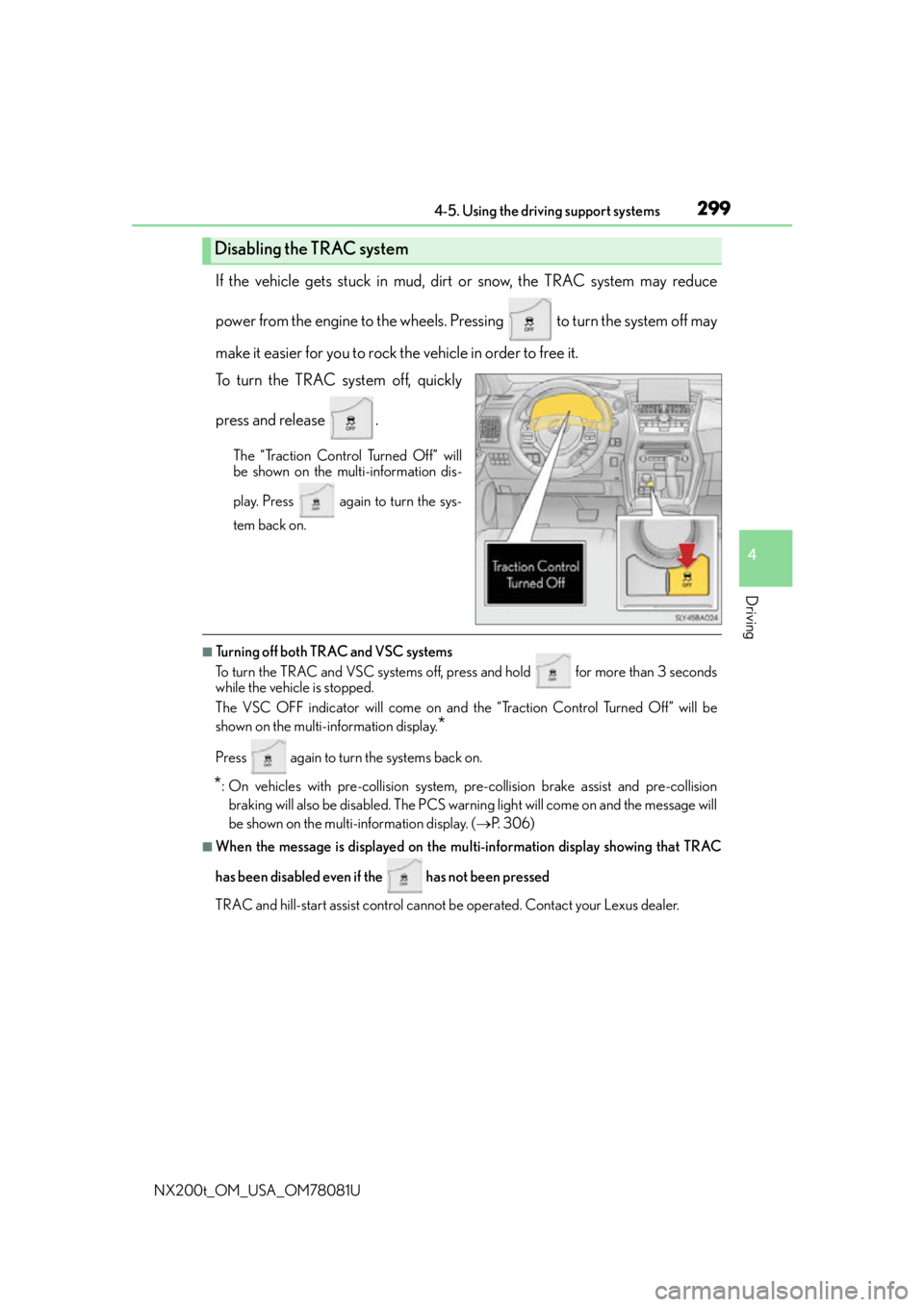
If the vehicle gets stuck in mud, dirt or snow, the TRAC system may reduce
power from the engine to the wheels. Pressing to turn the system off may
make it easier for you to rock the vehicle in order to free it.
To turn the TRAC system off, quickly
press and release .
The “Traction Control Turned Off” will
be shown on the multi-information dis-
play. Press again to turn the sys-
tem back on.
■Turning off both TRAC and VSC systems
To turn the TRAC and VSC systems off, press and hold for more than 3 seconds
while the vehicle is stopped.
The VSC OFF indicator will come on and the “Traction Control Turned Off” will be
shown on the multi- information display.
*
Press again to turn the systems back on.
*: On vehicles with pre-collision system, pre-collision brake assist and pre-collision
braking will also be disabled. The PCS warn ing light will come on and the message will
be shown on the multi-information display. ( P. 3 0 6 )
■When the message is displayed on the mu lti-information display showing that TRAC
has been disabled even if the has not been pressed
TRAC and hill-start assist control cannot be operated. Contact your Lexus dealer.
Disabling the TRAC system
Page 300 of 660

3004-5. Using the driving support systems
NX200t_OM_USA_OM78081U
■Sounds and vibrations caused by the ABS, brake assist, TRAC, VSC and hill-start assist
control systems
●A sound may be heard from the engine compartment when the brake pedal is
depressed repeatedly, when the engine is started or just after the vehicle begins to
move. This sound does not indicate that a malfunction has occurred in any of these sys-
tems.
●Any of the following condit ions may occur when the above systems are operating.
None of these indicates that a malfunction has occurred.
• Vibrations may be felt through the vehicle body and steering.
• A motor sound may be heard after the vehicle comes to a stop.
• The brake pedal may pulsate slig htly after the ABS is activated.
• The brake pedal may move down s lightly after the ABS is activated.
■EPS operation sound
When the steering wheel is operated, a motor sound (whirring sound) may be heard.
This does not indicate a malfunction.
■Reduced effectiveness of the EPS system
The effectiveness of the EPS system is reduced to prevent the system from overheating
when there is frequent steering input over an extended period of time. The steering
wheel may feel heavy as a result. Should this occur, refrain from excessive steering input
or stop the vehicle and turn the engine of f. The EPS system should return to normal
within 10 minutes.
■Automatic reactivation of TRAC and VSC systems
After turning the TRAC and VSC systems off, the systems will be automatically
re-enabled in the following situations:
●When the engine switch is turned off
●If only the TRAC system is turned off, the TRAC will turn on when vehicle speed
increases
If both the TRAC and VSC systems are turn ed off, automatic re-enabling will not
occur when vehicl e speed increases.
■Operating conditions of hill-start assist control
When the following four conditions are met, the hill-start assist control will operate:
●The shift lever is in a position other than P or N (when starting off forward/backward on
an upward incline).
●The vehicle is stopped.
●The accelerator pedal is not depressed.
●The parking brake is not engaged.
■Automatic system cancelation of hill-start assist control
The hill-start assist control will turn off in any of the following situations:
●The shift lever is moved to P or N.
●The accelerator pedal is depressed.
●The parking brake is engaged.
●Approximately 2 seconds elapse after the brake pedal is released.