wheel LEXUS NX200T 2016 User Guide
[x] Cancel search | Manufacturer: LEXUS, Model Year: 2016, Model line: NX200T, Model: LEXUS NX200T 2016Pages: 660, PDF Size: 9.96 MB
Page 46 of 660
461-1. For safe use
NX200t_OM_USA_OM78081U
■If the SRS airbags deploy (inflate)
●Slight abrasions, burns, bruising, etc., may be sustained from SRS airbags, due to the
extremely high speed deployment (inflation) by hot gases.
●A loud noise and white powder will be emitted.
●Parts of the airbag module (steering wheel hub, airbag cover and inflator) as well as the
front seats, parts of th e front and rear pillars, and roof side rails, may be hot for several
minutes. The airbag itself may also be hot.
●The windshield may crack.
●For Safety Connect subscribers, if the SRS airbags deploy or in the event of a severe
rear-end collision, the system is designed to send an emergency call to the response
center, notifying them of the vehicle’s location (without needing to push the “SOS” but-
ton) and an agent will attempt to speak wi th the occupants to ascertain the level of
emergency and assistance required. If the oc cupants are unable to communicate, the
agent automatically treats the call as an em ergency and helps to dispatch the necessary
emergency services. ( P. 466)
■SRS airbag deployment conditions (SRS front airbags)
●The SRS front airbags will deploy in the event of an impact that exceeds the set threshold
level (the level of force corresponding to an approximately 12-18 mph [20-30 km/h]
frontal collision with a fixed wall that does not move or deform).
However, this threshold velocity will be considerably higher in the following situations:
• If the vehicle strikes an object, such as a parked vehicle or sign pole, which can move
or deform on impact
• If the vehicle is involved in an underride collision, such as a collision in which the
front of the vehicle “underrides”, or goes under, the bed of a truck
●Depending on the type of collision, it is possib le that only the seat belt pretensioners will
activate.
●The SRS front airbags for the front passenger will not activate if there is no passenger
sitting in the front passenger seat. However, the SRS front airbags for the front passen-
ger may deploy if luggage is put in the seat, even if the se at is unoccupied. (P. 5 1 )
●The SRS seat cushion airbag on the front passenger seat will not operate if the occu-
pant is not wearing a seat belt.
■SRS airbag deployment conditions (S RS side and curtain shield airbags)
●The SRS side and curtain shield airbags wi ll deploy in the event of an impact that
exceeds the set threshol d level (the level of force corresponding to the impact force
produced by an approximately 3300 lb. [1500 kg] vehicle colliding with the vehicle
cabin from a direction perpendicular to the vehicle orientation at an approximate
speed of 12 -18 mph [20 -30 km/h]).
●The SRS curtain shield airbags will deploy in the event of vehicle rollover.
●The SRS side and curtain shield airbags may al so deploy in the event of a severe frontal
collision.
Page 49 of 660
491-1. For safe use
1
For safety and security
NX200t_OM_USA_OM78081U
■When to contact your Lexus dealer
In the following cases, the vehicle will require inspection and/or repair. Contact your
Lexus dealer as soon as possible.
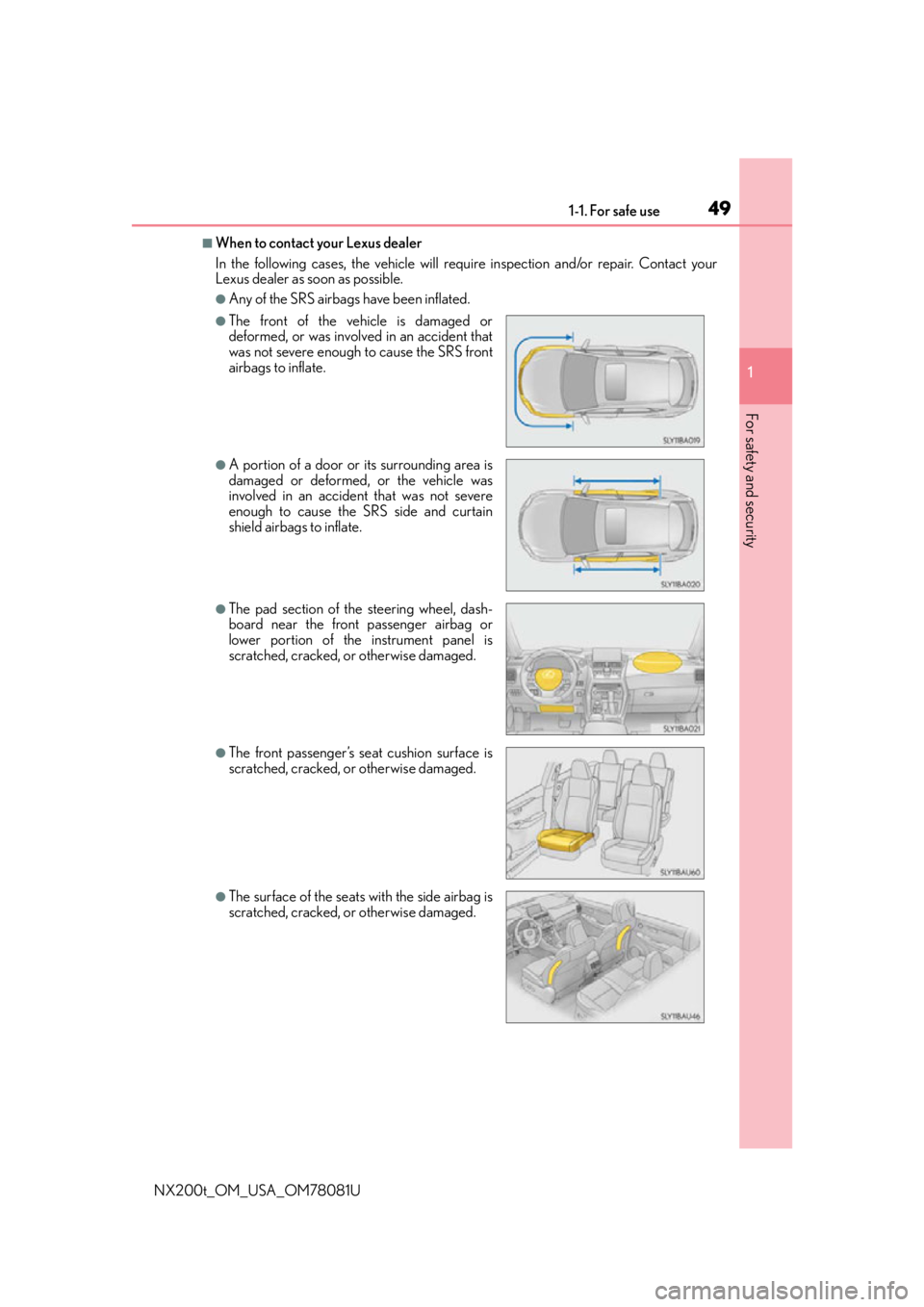
●Any of the SRS airbags have been inflated.
●The front of the vehicle is damaged or
deformed, or was involv ed in an accident that
was not severe enough to cause the SRS front
airbags to inflate.
●A portion of a door or its surrounding area is
damaged or deformed, or the vehicle was
involved in an accident that was not severe
enough to cause the SRS side and curtain
shield airbags to inflate.
●The pad section of the steering wheel, dash-
board near the front passenger airbag or
lower portion of the instrument panel is
scratched, cracked, or otherwise damaged.
●The front passenger’s seat cushion surface is
scratched, cracked, or otherwise damaged.
●The surface of the seats with the side airbag is
scratched, cracked, or otherwise damaged.
Page 85 of 660

852. Instrument cluster
2
Instrument cluster
NX200t_OM_USA_OM78081U
*1: These lights turn on when the engine switch is turned to the IGNITION ON mode toindicate that a system check is being perfor med. They will turn off after the engine is
started, or after a few seconds. There may be a malfunction in a system if the lights do
not turn on, or turn off. Have the vehicle inspected by your Lexus dealer.
*2: The light flashes to indicate that the system is operating.
*3: The light comes on when the system is turned off.
*8Cruise control “SET”
indicator
( P. 231, 244, 258)
(U.S.A.)
Parking brake indicator
( P. 2 0 4 , 2 0 5 )
*8Cruise control indicator
( P. 237, 251, 258)
(Canada)
Parking brake indicator
( P. 2 0 4 , 2 0 5 )
*8
(if equipped)
LDA indicator ( P. 2 6 1 )
*1Brake hold standby
indicator ( P. 2 0 7 )
*8
(if equipped)
Steering control indicator
( P. 2 6 1 ) *1Brake hold operated
indicator ( P. 2 0 7 )
(if equipped)
Intuitive parking assist
indicator ( P. 2 7 0 )*4, 8
Low outside temperature
indicator ( P. 8 7 )
*1, 2Slip indicator light
( P. 2 9 8 )*5, 6
(if equipped)
BSM outside rear view
mirror indicators
( P. 3 0 9 )
*1VSC OFF indicator
( P. 299)*7
Security indicator
( P. 75, 77)
*1, 3
(if equipped)
PCS warning light
( P. 3 0 4 ) *7“A I R B A G O N / O F F ”
indicator ( P. 51)
*1
(AWD
models only)
All-wheel drive lock
indicator ( P. 3 0 2 )
Page 93 of 660

932. Instrument cluster
2
Instrument cluster
NX200t_OM_USA_OM78081U
■Elapsed time (after reset*2/after start)*1
Displays the elapsed time since the function was reset and the engine was
started, respectively
■Distance (driving range/after start)*1
Displays the estimated maximum distance that can be driven with the quantity
of fuel remaining and the distance driven after the engine was started respec-
tively.
• This distance is computed based on your average fuel consumption. As a result,
the actual distance that can be driven may differ from that displayed.
• When only a small amount of fuel is added to the tank, the display may not be
updated.
When refueling, turn the engine switch off. If the vehicle is refueled without turning
the engine switch off, the display may not be updated.
■Eco Driving Indicator Zone Display
P. 9 4
■Boost Meter/Oil Temperature Gauge/Oil Pressure Gauge (if equipped)
Boost Meter:
Displays the boost pressure. The display changes colors when the set pres-
sure is exceeded.
Oil Temperature Gauge:
Displays the temperature of the engine oil. The display flashes when the
engine oil exceeds 284°F (140°C). ( P. 5 5 7 )
Oil Pressure Gauge:
Displays the oil pressure for the engine interior. A buzzer sounds and warning
message is displayed when the oil pressure gets low. ( P. 5 5 7 )
Depending on the road conditions, temperature, vehicle speed, etc., the actual
vehicle condition on the display screen may differ.
Use the display screen as a reference.
■G monitor (if equipped)
Displays the acceleration forces of the fr ont, back, left and right of the vehicle.
Also displays the turning angle of th e steering wheel, brake oil pressure,
accelerator opening.
• The actual vehicle conditions may differ from those on the display screen, depend- ing on the road conditions, outside temperature, vehicle speed, etc.
Use the display screen as a reference.
• If a battery terminal is disconnected and reconnected, the steering amount display
may be disabled temporarily. After drivin g the vehicle for a while, the display will
be enabled.
■Tire inflation pressure
Displays inflation pressure of each tire.
The inflation pressure of the spare tire will not be displayed.
Page 107 of 660

107
3
Operation of
each component
NX200t_OM_USA_OM78081U
3-1. Key information
Keys .................................................. 108
3-2. Opening, closing and locking the doors
Side doors ........................................ 114
Back door....................................... 120
Smart access system with push-button start........................ 131
3-3. Adjusting the seats Front seats ....................................... 137
Rear seats ....................................... 138
Driving position memory ..........145
Head restraints .............................149
3-4. Adjusting the steering wheel and mirrors
Steering wheel ............................... 151
Inside rear view mirror.............. 153
Outside rear view mirrors ....... 155
3-5. Opening, closing the windows and moon roof
Power windows ............................ 158
Moon roof ........................................ 161
Page 137 of 660

1373-3. Adjusting the seats
3
Operation of each component
NX200t_OM_USA_OM78081U
Front seats
Seat position adjustment switch
Seat cushion (front) angle adjust-
ment switch
Vertical height adjustment switch
Seatback angle adjustment switch
Lumbar support adjustment switch
(for driver’s side)
■Power easy access system
The driver’s seat and steering wheel move in accordance with engine switch mode and
the driver’s seat belt condition. ( P. 1 4 5 )
Adjustment procedure
1
2
3
4
5
WA R N I N G
■When adjusting the seat position
●Take care when adjusting the seat position to ensure that other passengers are not
injured by the moving seat.
●Do not put your hands under the seat or near the moving parts to avoid injury.
Fingers or hands may become jammed in the se at mechanism.
■Seat adjustment
To reduce the risk of sliding under the lap belt during a collision, do not recline the seat
more than necessary.
If the seat is too rec lined, the lap belt may slide past the hips and apply restraint forces
directly to the abdomen, or your neck may contact the shoulder belt, increasing the risk
of death or serious injury in the event of an accident.
Adjustments should not be ma de while driving as the seat may unexpectedly move and
cause the driver to lose control of the vehicle.
Page 145 of 660

1453-3. Adjusting the seats
3
Operation of each component
NX200t_OM_USA_OM78081U
Driving position memory
The seat and steering wheel are automatically adjusted to allow the driver to
enter and exit the vehicle easily.
When all of the following have been
performed, the driver’s seat and steer-
ing wheel are automatically adjusted to
a position that allows driver to enter
and exit the
vehicle easily.
• The shift lever has been shifted to P.
• The engine switch has been turnedoff.
• The driver’s seat belt has been unfastened.
When any of the following has been perf ormed, the driver’s seat and steering
wheel automatically return to their original positions. • The engine switch has been turn ed to ACCESSORY mode or IGNITION
ON mode.
• The driver’s seat belt has been fastened.
■Operation of the power easy access system
When exiting the vehicle, the power easy acc ess system may not operate if the seat is
already close to the rearmost position, etc.
■Customization
The seat movement amount settings of the power easy access system can be custom-
ized. (Customizable features: P. 6 1 4 )
: If equipped
This feature automatically adjusts the fr ont seats, steering wheel and outside
rear view mirrors to make entering and ex iting the vehicle easier or to suit your
preferences.
Power easy access system
Page 146 of 660

1463-3. Adjusting the seats
NX200t_OM_USA_OM78081U
Your preferred driving position (the posi tion of the driver’s seat, steering wheel
and outside rear view mirrors) can be recorded and recalled by pressing a but-
ton.
Three different driving positions can be recorded into memory.
■Recording procedure
Check that the shift lever is in P.
Turn the engine switch to IGNITION ON mode.
Adjust the driver’s seat, steering wheel and outside rear view mirrors to the
desired positions.
While pressing the “SET” button,
or within 3 seconds after the
“SET” button is pressed, press
button “1”, “2” or “3” until the
buzzer sounds.
If the selected button has already
been preset, the previously recorded
position will be overwritten.
■Recall procedureCheck that the shift lever is in P.
Turn the engine switch to IGNITION ON mode.
Press one of the buttons for the
driving position you want to recall
until the buzzer sounds.
Driving position memory
1
2
3
4
1
2
3
Page 147 of 660

1473-3. Adjusting the seats
3
Operation of each component
NX200t_OM_USA_OM78081U
■To stop the position recall operation part-way through
Perform any of the following:
●Press the “SET” button.
●Press button “1”, “2” or “3”.
●Operate any of the seat adjustment switches (only cancels seat position recall).
●Operate the tilt and telescopic steering co ntrol switch (only cancels steering wheel
position recall).
■Seat positions that can be memorized ( P. 1 3 7 )
The adjusted positions other than the position adjusted by lumbar support switch can be
recorded.
■Operating the driving position memory after turning the engine switch off
Recorded seat positions can be activated up to 180 seconds after the driver’s door is
opened and another 60 seconds after it is closed again.
■In order to correctly use the dr iving position memory function
If a seat position is already in the furthest po ssible position and the seat is operated in the
same direction, the recorded position may be slightly different when it is recalled.
Each electronic key (including a card key) can be registered to recall your pre-
ferred driving position.
■Registering procedure
Record your driving position to button “1”, “2” or “3” before performing the
following:
Carry only the key you want to regist er, and then close the driver’s door.
If 2 or more keys are in the vehicle, the driving position cannot be recorded
properly.
Check that the shift lever is in P.
Turn the engine switch to IGNITION ON mode.
Recall the driving position that you want to record.
While pressing the recalled but-
ton, press and hold the door lock
switch (either lock or unlock) until
the buzzer sounds.
If the button could not be registered,
the buzzer sounds continuously for
approximately 3 seconds.
Memory recall function
1
2
3
4
Page 148 of 660

1483-3. Adjusting the seats
NX200t_OM_USA_OM78081U
■Recall procedure Carry the electronic key that has been registered to the driving position,
and then unlock and open the driver’s door using the smart access system
with push-button start or wireless remote control.
The driving position will move to the reco rded position (not including the steering
wheel). However, the seat will move to a po sition slightly behind the recorded posi-
tion in order to make entering the vehicle easier.
If the driving position is in a position th at has already been recorded, the seat and
outside rear view mirrors will not move.
Turn the engine switch to ACCESSORY mode or IGNITION ON mode,
or fasten a seat belt.
The seat and steering wheel will move to the recorded position.
■Cancelation procedure
Carry only the key you want to cancel and then close the driver’s door.
If 2 or more keys are in the vehicle, the driving position cannot be canceled
properly.
Turn the engine switch to IGNITION ON mode.
While pressing the “SET” button, press and hold the door lock switch
(either lock or unlock) unt il the buzzer sounds twice.
If it could not be canceled, the buzzer sounds continuously for approximately 3
seconds.
■Recalling the driving position using the memory recall function
●Different driving positions can be registered for each electronic key. Therefore, the
driving position that is recalled may be different depending on the key being carried.
●If a door other than the driver’s door is unlocked with the smart access system with
push-button start, the driving position cannot be recalled. In this case, press the driving
position button which has been set.
■Customization
The unlock door settings of the memory re call function can be customized. (Customiz-
able features: P. 6 1 4 )
WA R N I N G
■Seat adjustment caution
Take care during seat adjustment so that th e seat does not strike the rear passenger or
squeeze your body against the steering wheel.
1
2
1
2