interior lights LEXUS NX200T 2016 Owners Manual
[x] Cancel search | Manufacturer: LEXUS, Model Year: 2016, Model line: NX200T, Model: LEXUS NX200T 2016Pages: 660, PDF Size: 9.96 MB
Page 1 of 660

NX200t_OM_USA_OM78081U
Pictorial indexSearch by illustration
1For safety
and securityMake sure to read through them
2Instrument clusterHow to read the gauges and meters, the variety of
warning lights and indicators, etc.
3Operation of
each componentOpening and closing the doors and windows,
adjustment before driving, etc.
4DrivingOperations and advices which are necessary for
driving
5Lexus Display
Audio systemOperating the Lexus Display Audio system
6Interior featuresUsage of the interior features, etc.
7Maintenance
and careCaring for your vehicle and maintenance procedures
8When trouble
arisesWhat to do in case of malfunction or emergency
9Vehicle
specificationsVehicle specifications, customizable features, etc.
10For ownersReporting safety defects for US owners, and seat belt
and SRS airbag instructions for Canadian owners
IndexSearch by symptom
Search alphabetically
Page 5 of 660

5
1
9 8
7
6 4 3
2
10
5
NX200t_OM_USA_OM78081U
5-9. Bluetooth® Phone
Using a Bluetooth
®
Phone .......................................... 382
Making a call ............................... 384
Receiving a call .......................... 387
Speaking on the phone...........388
Using a Bluetooth
®
phone message....................... 390
Using the steering wheel switches...................................... 392
Bluetooth
® phone
settings ....................................... 393
5-10. Phonebook Contact settings ........................ 395
Messaging setting.....................398
5-11. Bluetooth
®
What to do if... (Troubleshooting)................... 399
Bluetooth
®.................................. 403
5-12. Other function “Information” screen ................408
USB photo .................................... 410
Weather information ................. 412
Voice command system ...........413
LEXUS Enform Remote .......... 417 6-1. Using the air conditioning
system and defogger
Automatic air conditioning system .......................................... 420
Heated steering wheel/ seat heaters/
seat ventilators ......................... 430
6-2. Using the interior lights Interior lights list ......................... 433• Front interior light ................ 434
• Personal lights ....................... 434
• Rear interior light ................. 435
6-3. Using the storage features List of storage features ............ 436• Glove box ................................437
• Console box ...........................437
•Cup holders/ bottle holders ........................ 438
• Sunglass holder .................... 439
Luggage compartment features ....................................... 440
6Interior features
Page 23 of 660

23Pictorial index
NX200t_OM_USA_OM78081U
Inside rear view mirror . . . . . . . . . . . . . . . . . . . . . . . . . . . . . . . . . . . . . . . . . . . . . . .P. 153
Sun visors . . . . . . . . . . . . . . . . . . . . . . . . . . . . . . . . . . . . . . . . . . . . . . . . . . . . . . . . . . . . P. 445
Vanity mirrors . . . . . . . . . . . . . . . . . . . . . . . . . . . . . . . . . . . . . . . . . . . . . . . . . . . . . . . . P . 445
Interior light
*2. . . . . . . . . . . . . . . . . . . . . . . . . . . . . . . . . . . . . . . . . . . . . . . . . P. 433, 435
Personal lights . . . . . . . . . . . . . . . . . . . . . . . . . . . . . . . . . . . . . . . . . . . . . . . . . . . . . . . P. 434
Moon roof switches
*1 . . . . . . . . . . . . . . . . . . . . . . . . . . . . . . . . . . . . . . . . . . . . . . . . P. 161
“SOS” button
*1 . . . . . . . . . . . . . . . . . . . . . . . . . . . . . . . . . . . . . . . . . . . . . . . . . . . . . . P. 466
Garage door opener switches
*1 . . . . . . . . . . . . . . . . . . . . . . . . . . . . . . . . . . . . P. 456
*1: If equipped
*2: The illustration shows the front, but they are also equipped in the rear.
1
2
3
4
5
6
7
Page 419 of 660

419
6Interior features
NX200t_OM_USA_OM78081U
6-1. Using the air conditioning system and defogger
Automatic air conditioning system ..........................................420
Heated steering wheel/ seat heaters/
seat ventilators......................... 430
6-2. Using the interior lights Interior lights list..........................433• Front interior light ................434
• Personal lights........................434
• Rear interior light .................435 6-3. Using the storage features
List of storage features ............ 436• Glove box ............................... 437
• Console box........................... 437
•Cup holders/ bottle holders.........................438
• Sunglass holder .................... 439
Luggage compartment features........................................440
6-4. Other interior features Other interior features ............ 445
• Sun visors ................................ 445
• Vanity mirrors ........................ 445
• Clock ........................................ 446
• Power outlet (12 VDC)...... 446
• Power outlet (120 VAC) ... 447
• Wireless charger.................. 448
• Armrest .................................... 454
• Assist grips.............................. 455
• Coat hooks ............................. 455
Garage door opener................ 456
Compass ....................................... 462
Safety Connect ........................... 466
Page 433 of 660

4336-2. Using the interior lights
6
Interior features
NX200t_OM_USA_OM78081U
Interior lights list
Outer foot lights
Personal lights (P. 4 3 4 )
Front interior light ( P. 4 3 4 )
Rear interior light ( P. 4 3 5 )
Footwell lights
• When the engine switch is in IGNITION ON mode, the f ootwell lights will turn on.
However, if the instrument pa nel light control switch is turned to minimum, the foot-
well lights will turn off. ( P. 88)
• When shifting the shift lever is in a position other than P, the brightness of the foot-
well light will reduce intensity.
1
2
3
4
5
Page 434 of 660

4346-2. Using the interior lights
NX200t_OM_USA_OM78081U
Turns the light on/off (touch the light)
The rear interior light also turns on/off.
However, when the rear interior light
has already been turned on, it will not be
controlled by front interior light opera-
tions.
Turns the door position on/off On
The front and rear interior lights turn on/
off when a door is opened/closed.
Off
Turns the lights on/off (touch the lights)
Front interior light
1
2
Personal lights
Page 435 of 660

4356-2. Using the interior lights
6
Interior features
NX200t_OM_USA_OM78081U
Tu r n s t h e l i g h t o n /o f f
The rear interior light is also turned on/
off by the front interior light operations.
If the light is turned on by front interior
light operation, the rear interior light
cannot turn off by pressing the switch.
●Illuminated entry system: The lights automatically turn on/off according to engine
switch mode, the presence of the electronic key, whether the doors are locked/
unlocked, and whether the doors are opened/closed.
●If the interior lights remain on when the engine switch is turned off, the lights will go off
automatically after 20 minutes.
●In the following cases, the front interior li ghts and personal lights may not respond as
normal.
• When water, dirt, etc., have adhered to the lens surface
• When operated with a wet hand
• When wearing gloves, etc.
●Settings (e.g. the time elapsed before the lights turn off) can be changed.
(Customizable features: P. 6 1 8 )
Rear interior light
NOTICE
●Never remove the lens for the front interior light and personal lights. Otherwise, the
lights will be damaged. If the lens need to remove, contact your Lexus dealer.
●To prevent battery discharge, do not leav e the lights on longer than necessary when
the engine is off.
Page 437 of 660

4376-3. Using the storage features
6
Interior features
NX200t_OM_USA_OM78081U
Open (press the button)
Unlock with the mechanical key
Lock with the mechanical key
The glove box light turns on when the tail lights are on.
Lift the lid while pushing the button
to release the lock.
Vehicles with the wireless charger:
Lift the wireless charger.
●The console box light turns on when the tail lights are on.
Glove box
1
2
3
Console box
1
2
●Vehicles without the wireless charger:
The tray slides forward/backward and can be
removed.
Page 445 of 660
4456-4. Other interior features
6
Interior features
NX200t_OM_USA_OM78081U
Other interior features
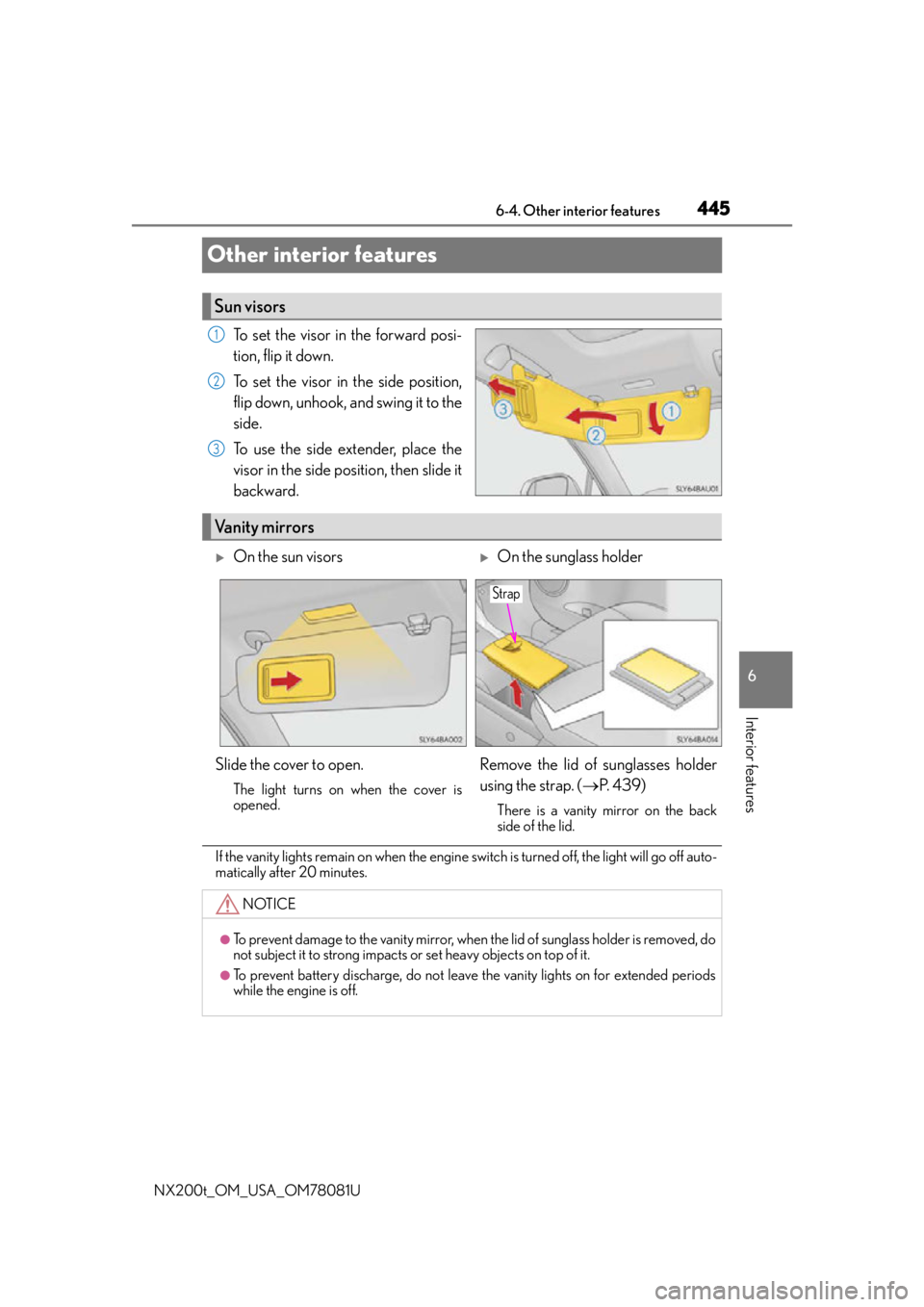
To set the visor in the forward posi-
tion, flip it down.
To set the visor in the side position,
flip down, unhook, and swing it to the
side.
To use the side extender, place the
visor in the side position, then slide it
backward.
If the vanity lights remain on when the engine switch is turned off, the light will go off auto-
matically after 20 minutes.
Sun visors
1
2
3
Vanity mirrors
On the sun visorsOn the sunglass holder
Slide the cover to open.
The light turns on when the cover is
opened.
Remove the lid of sunglasses holder
using the strap. ( P. 4 3 9 )
There is a vanity mirror on the back
side of the lid.
NOTICE
●To prevent damage to the vanity mirror, when the lid of sunglass holder is removed, do
not subject it to strong impacts or set heavy objects on top of it.
●To prevent battery discharge, do not leave the vanity lights on for extended periods
while the engine is off.
Strap
Page 450 of 660

4506-4. Other interior features
NX200t_OM_USA_OM78081U
■Lighting conditions of operation indicator light
*: Depending on the portable device, there are cases where the operation indicator light will continue being lit up orange even after the charging is complete.
●When the operation indicator light flashes
When an error occurs, the operation in dicator light flashes an orange color.
Handle the error based on the following table.
■The wireless charger can be operated when
The engine switch is in ACCESSORY or IGNITION ON mode.
■Usable portable devices
Qi standard wireless charge standard can be used on compatible devices.
However, not all Qi standard devi ces and compatibility are guaranteed.
Starting with mobile phones and smart phones , it is aimed for low power electrically sup-
plied portable devices of no more than 5W.
■When covers and accessories are attached to portable devices
Do not charge in situations where cover an d accessories not able to handle Qi are
attached to the portable devi ce. Depending on the type of cover and accessory, it may
not be possible to charge. When charging is not performed even with the portable
device placed on the charge area, remove the cover and accessories.
Operation indicator lightConditions
Tu r n i n g o f fWhen the Wireless charger power supply is off
Green (comes on)On Standby (charging possible state)
When charging is complete*
Orange (comes on)
When placing the portable device on the charging
area (detecting the portable device)
Charging
Operation indicator lightSuspected causesHandling method
Flashing repeatedly once
every second (Orange)Vehicle to charger commu-
nication failure.Contact your Lexus dealer.
Repeatedly flashes
3 times continuously
(Orange)
A foreign substance is
between the portable device
and charge area.Remove the foreign sub-
stance from between por-
table device and the
charge area.
The portable device is out of
sync due to the device being
shifted from its position.Place the portable device
near the center of the
charge area.
Repeatedly flashes
4 times continuously
(Orange)Te m p e r a t u r e r i s i n g w i t h i n
the wireless charger.Stop charging at once and
start charging again after
for a while.