turn signal LEXUS NX200T 2016 Owners Manual
[x] Cancel search | Manufacturer: LEXUS, Model Year: 2016, Model line: NX200T, Model: LEXUS NX200T 2016Pages: 660, PDF Size: 9.96 MB
Page 3 of 660

3
1
9 8
7
6 4 3
2
10
5
NX200t_OM_USA_OM78081U
4-1. Before driving Driving the vehicle ......................166
Cargo and luggage......................174
Vehicle load limits ........................ 178
Trailer towing (vehicles with towing package) .............. 179
Trailer towing (vehicles without towing package) ........ 191
Dinghy towing ...............................192
4-2. Driving procedures Engine (ign ition) switch .............193
Automatic transmission ........... 198
Turn signal lever .......................... 203
Parking brake .............................. 204
Brake Hold ................................... 207
ASC (Active Sound Control) ...................................... 209
4-3. Operating the lights and wipers
Headlight switch ......................... 210
Automatic High Beam...............214
Fog light switch ............................ 218
Windshield wipers and washer ...........................................219
Rear window wiper and washer ......................................... 225 4-4. Refueling
Opening the fuel tank cap ......227
4-5. Using the driving support systems
Dynamic radar cruise control ...........................................231
Dynamic radar cruise control with full-speed
range .............................................244
Cruise control ............................. 258
LDA (Lane Departure Alert with steering co ntrol) .............. 261
Intuitive parking assist ...............270
Lexus parking assist monitor.........................................278
Driving mode select switch ........................................... 294
Driving assist systems ...............297
All-wheel drive lock switch (AWD models) .......... 302
PCS (Pre-Collision System) ....................................... 303
BSM (Blind Spot Monitor)..... 309
4-6. Driving tips Winter driving tips ....................... 317
Utility vehicle pr ecautions........321
4Driving
Page 15 of 660
15Pictorial index
NX200t_OM_USA_OM78081U
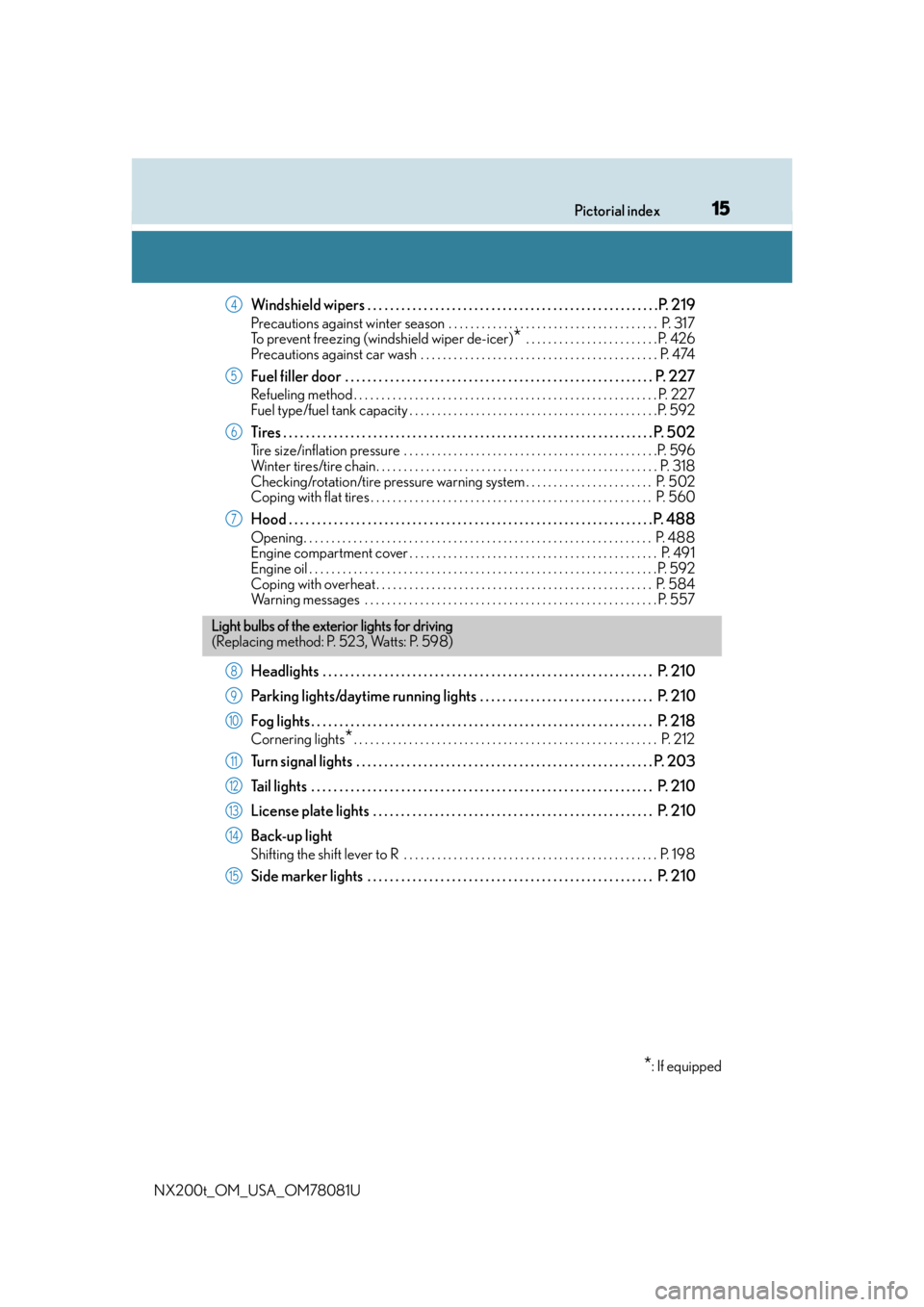
Windshield wipers . . . . . . . . . . . . . . . . . . . . . . . . . . . . . . . . . . . . . . . . . . . . . . . . . . . .P. 219
Precautions against winter season . . . . . . . . . . . . . . . . . . . . . . . . . . . . . . . . . . . . . . P. 317
To prevent freezing (windshield wiper de-icer)
* . . . . . . . . . . . . . . . . . . . . . . . . P. 426
Precautions against car wash . . . . . . . . . . . . . . . . . . . . . . . . . . . . . . . . . . . . . . . . . . . P. 474
Fuel filler door . . . . . . . . . . . . . . . . . . . . . . . . . . . . . . . . . . . . . . . . . . . . . . . . . . . . . . . P. 2 2 7
Refueling method . . . . . . . . . . . . . . . . . . . . . . . . . . . . . . . . . . . . . . . . . . . . . . . . . . . . . . . P. 227
Fuel type/fuel tank capacity . . . . . . . . . . . . . . . . . . . . . . . . . . . . . . . . . . . . . . . . . . . . .P. 592
Tires . . . . . . . . . . . . . . . . . . . . . . . . . . . . . . . . . . . . . . . . . . . . . . . . . . . . . . . . . . . . . . . . . . P. 502
Tire size/inflation pressure . . . . . . . . . . . . . . . . . . . . . . . . . . . . . . . . . . . . . . . . . . . . . .P. 596
Winter tires/tire chain. . . . . . . . . . . . . . . . . . . . . . . . . . . . . . . . . . . . . . . . . . . . . . . . . . . P. 318
Checking/rotation/tire pressure warning system . . . . . . . . . . . . . . . . . . . . . . . P. 502
Coping with flat tires . . . . . . . . . . . . . . . . . . . . . . . . . . . . . . . . . . . . . . . . . . . . . . . . . . . P. 560
Hood . . . . . . . . . . . . . . . . . . . . . . . . . . . . . . . . . . . . . . . . . . . . . . . . . . . . . . . . . . . . . . . . . P. 488
Opening. . . . . . . . . . . . . . . . . . . . . . . . . . . . . . . . . . . . . . . . . . . . . . . . . . . . . . . . . . . . . . . P. 488
Engine compartment cover . . . . . . . . . . . . . . . . . . . . . . . . . . . . . . . . . . . . . . . . . . . . . P. 491
Engine oil . . . . . . . . . . . . . . . . . . . . . . . . . . . . . . . . . . . . . . . . . . . . . . . . . . . . . . . . . . . . . . .P. 592
Coping with overheat . . . . . . . . . . . . . . . . . . . . . . . . . . . . . . . . . . . . . . . . . . . . . . . . . . P. 584
Warning messages . . . . . . . . . . . . . . . . . . . . . . . . . . . . . . . . . . . . . . . . . . . . . . . . . . . . . P. 55 7
Headlights . . . . . . . . . . . . . . . . . . . . . . . . . . . . . . . . . . . . . . . . . . . . . . . . . . . . . . . . . . . P. 210
Parking lights/daytime running lights . . . . . . . . . . . . . . . . . . . . . . . . . . . . . . . P. 210
Fog lights . . . . . . . . . . . . . . . . . . . . . . . . . . . . . . . . . . . . . . . . . . . . . . . . . . . . . . . . . . . . . P. 218
Cornering lights*. . . . . . . . . . . . . . . . . . . . . . . . . . . . . . . . . . . . . . . . . . . . . . . . . . . . . . . P. 212
Turn signal lights . . . . . . . . . . . . . . . . . . . . . . . . . . . . . . . . . . . . . . . . . . . . . . . . . . . . . P. 203
Tail lights . . . . . . . . . . . . . . . . . . . . . . . . . . . . . . . . . . . . . . . . . . . . . . . . . . . . . . . . . . . . . P. 210
License plate lights . . . . . . . . . . . . . . . . . . . . . . . . . . . . . . . . . . . . . . . . . . . . . . . . . . P. 210
Back-up light
Shifting the shift lever to R . . . . . . . . . . . . . . . . . . . . . . . . . . . . . . . . . . . . . . . . . . . . . . P. 19 8
Side marker lights . . . . . . . . . . . . . . . . . . . . . . . . . . . . . . . . . . . . . . . . . . . . . . . . . . . P. 210
4
5
6
7
Light bulbs of the exterior lights for driving
(Replacing method: P. 523, Watts: P. 598)
*: If equipped
8
9
10
11
12
13
14
15
Page 17 of 660

17Pictorial index
NX200t_OM_USA_OM78081U
Multi-information display . . . . . . . . . . . . . . . . . . . . . . . . . . . . . . . . . . . . . . . . . . . . . P. 91
Display . . . . . . . . . . . . . . . . . . . . . . . . . . . . . . . . . . . . . . . . . . . . . . . . . . . . . . . . . . . . . . . . . . . P. 91
When the warning messages are displayed . . . . . . . . . . . . . . . . . . . . . . . . . . . . . P. 557
Turn signal lever. . . . . . . . . . . . . . . . . . . . . . . . . . . . . . . . . . . . . . . . . . . . . . . . . . . . . . P. 203
Headlight switch . . . . . . . . . . . . . . . . . . . . . . . . . . . . . . . . . . . . . . . . . . . . . . . . . . . . . . . . . P. 210
Headlights/parking lights/tai l lights/license plate lights/
daytime running lights . . . . . . . . . . . . . . . . . . . . . . . . . . . . . . . . . . . . . . . . . . . . . . . . . . P. 2 10
Fog lights . . . . . . . . . . . . . . . . . . . . . . . . . . . . . . . . . . . . . . . . . . . . . . . . . . . . . . . . . . . . . . . P. 218
Windshield wiper and washer switch. . . . . . . . . . . . . . . . . . . . . . . . . . P. 219, 225
Usage . . . . . . . . . . . . . . . . . . . . . . . . . . . . . . . . . . . . . . . . . . . . . . . . . . . . . . . . . . . . .P. 219, 225
Adding washer fluid . . . . . . . . . . . . . . . . . . . . . . . . . . . . . . . . . . . . . . . . . . . . . . . . . . . . P. 501
Warning messages . . . . . . . . . . . . . . . . . . . . . . . . . . . . . . . . . . . . . . . . . . . . . . . . . . . . . P. 55 7
Emergency flasher switch . . . . . . . . . . . . . . . . . . . . . . . . . . . . . . . . . . . . . . . . . . . P. 540
Hood lock release lever . . . . . . . . . . . . . . . . . . . . . . . . . . . . . . . . . . . . . . . . . . . . . P. 488
Tilt and telescopic steering control switch
*1. . . . . . . . . . . . . . . . . . . . . . . . . P. 151
Adjustment . . . . . . . . . . . . . . . . . . . . . . . . . . . . . . . . . . . . . . . . . . . . . . . . . . . . . . . . . . . . . . P. 151
Driving position memory*1 . . . . . . . . . . . . . . . . . . . . . . . . . . . . . . . . . . . . . . . . . . . . . P. 145
Tilt and telescopic steering lock release lever*1. . . . . . . . . . . . . . . . . . . . . P. 151
Adjustment . . . . . . . . . . . . . . . . . . . . . . . . . . . . . . . . . . . . . . . . . . . . . . . . . . . . . . . . . . . . . . P. 151
Air conditioning system . . . . . . . . . . . . . . . . . . . . . . . . . . . . . . . . . . . . . . . . . . . . . P. 420
Usage . . . . . . . . . . . . . . . . . . . . . . . . . . . . . . . . . . . . . . . . . . . . . . . . . . . . . . . . . . . . . . . . . .P. 420
Rear window defogger . . . . . . . . . . . . . . . . . . . . . . . . . . . . . . . . . . . . . . . . . . . . . . . . .P. 425
Audio system*2
Audio system . . . . . . . . . . . . . . . . . . . . . . . . . . . . . . . . . . . . . . . . . . . . . . . . . . . . . . . . . . .P. 326
Hands-free system . . . . . . . . . . . . . . . . . . . . . . . . . . . . . . . . . . . . . . . . . . . . . . . . . . . . . P. 3 82
*1: If equipped
*2: For vehicles with a navigation system, refer to
“NAVIGATION SYSTEM OWNER’S MANUAL”.
4
5
6
7
8
9
10
11
12
Page 84 of 660

842. Instrument cluster
NX200t_OM_USA_OM78081U
*1: These lights turn on when the engine switch is turned to IGNITION ON mode to indicate that a system check is being perfor med. They will turn off after the engine is
started, or after a few seconds. There may be a malfunction in a system if the lights do
not turn on, or turn off. Have the vehicle inspected by your Lexus dealer.
*2: This light illuminates on the multi-information display.
*3: The light flashes to indicate a malfunction.
The indicators inform the driver of the operating state of the vehicle’s various sys-
tems.
*1Master warning light
( P. 5 5 2 )*2Brake Override System/
Drive-Start Control warning
light ( P. 5 5 2 )
*1Tire pressure warning light
( P. 5 5 2 )
Indicators
Turn signal indicator
( P. 2 0 3 )*1Eco Driving Indicator Light
( P. 9 4 )
(U.S.A.)
Headlight indicator
( P. 2 1 0 )*8Eco drive mode indicator
( P. 2 9 4 )
(Canada)
Tail light indicator
( P. 210, 211)*8“SPORT” indicator
( P. 2 9 4 )
Headlight high beam
indicator ( P. 211)
*8
(if equipped)
“SPORT S” indicator
( P. 2 9 4 )
(if equipped)
Automatic High Beam
indicator ( P. 2 1 4 )*8
(if equipped)
“SPORT S+” indicator
( P. 2 9 4 )
Fog light indicator
( P. 2 1 8 )
*8
(if equipped)
Radar cruise control
indicator ( P. 231, 244)
Page 115 of 660

1153-2. Opening, closing and locking the doors
3
Operation of each component
NX200t_OM_USA_OM78081U
■Operation signals
Doors:
A buzzer sounds and the emergency flashers flash to indicate that the doors have been
locked/unlocked. (Locked: Once; Unlocked: Twice)
Windows:
A buzzer sounds to indicate that all windows are opening.
■Security feature
If a door is not opened within approximately 60 seconds after the vehicle is unlocked, the
security feature automatically locks the vehicle again.
■Welcome light illumination control
The side marker, parking, tail and license plat e lights automatically turn on at night when
the doors are unlocked using the entry functi on or wireless remote control if the light
switch is in the “AUTO” position.
■When the door cannot be locked by the lock sensor on the surface of the door handle
■Door lock buzzer
If an attempt to lock the doors is made when a door is not fully closed, a buzzer sounds
continuously for 5 seconds. Fully close the door to stop the buzzer, and lock the vehicle
once more.
■Setting the alarm
Locking the doors will set the alarm system. ( P. 77)
■If the smart access system with push-butto n start or the wireless remote control does
not operate properly
●Use the mechanical key to lock and unlock the doors. ( P. 5 76 )
●Replace the key battery with a new one if it is depleted. ( P. 5 1 8 )
When the door can not be locked even if the
lock sensor on the surfac
e of the door handle is
touched by a finger, touch the lock sensor with
the palm.
When gloves are being worn, remove the
gloves.
Page 134 of 660

1343-2. Opening, closing and locking the doors
NX200t_OM_USA_OM78081U
■Note for the entry function
●Even when the electronic key is within the effective range (detection areas), the system
may not operate properly in the following cases:
• The electronic key is too close to the window or outside door handle, near the
ground, or in a high place when the doors are locked or unlocked.
• The electronic key is near the ground or in a high place, or too close to the rear
bumper center when the back door is opened.
• The electronic key is on the instrument panel, luggage room, floor, or in the door
pockets or glove box when the engine is started or engine switch modes are
changed.
●Do not leave the electronic key on top of th e instrument panel or near the door pockets
when exiting the vehicle. Depending on the radio wave reception conditions, it may be
detected by the antenna outs ide the cabin and the door will become lockable from the
outside, possibly trapping the el ectronic key inside the vehicle.
●As long as the electronic key is within the effective range, the doors may be locked or
unlocked by anyone.
●Even if the electronic key is not inside the vehicle, it may be possible to start the engine
if the electronic key is near the window.
●The doors may unlock if a large amount of wa ter splashes on the door handle, such as in
the rain or in a car wash when the electronic key is within the effective range. (The door
will automatically be locked after approximately 60 seconds if the doors are not
opened and closed.)
●If the wireless remote control is used to lo ck the doors when the electronic key is near
the vehicle, there is a possibility that the door may not be unlocked by the entry func-
tion. (Use the wireless remote control to unlock the doors.)
●Touching the door lock sensor while wearin g gloves may delay or prevent lock opera-
tion. Remove the gloves and touch the lock sensor again.
●When the lock operation is performed using the lock sensor, recognition signals will be
shown up to two consecutive times. After th is, no recognition signals will be given.
●If the door handle becomes wet while the el ectronic key is within the effective range,
the door may lock and unlock repeatedly. In that case, follow the following correction
procedures to wash the vehicle:
• Place the electronic key in a location 6 ft. (2 m) or more away from the vehicle. (Take
care to ensure that the key is not stolen.)
• Set the electronic key to battery-saving mode to disable the smart access system with push-button start. ( P. 1 3 3 )
●If the electronic key is insi de the vehicle and a door handle becomes wet during a car
wash, a message may be shown on the mult i-information display and a buzzer will
sound outside the vehicle. To turn off the alarm, lock all the doors.
●The lock sensor may not work properly if it comes into contact with ice, snow, mud, etc.
Clean the lock sensor and attempt to operate it again.
Page 165 of 660

165
4Driving
NX200t_OM_USA_OM78081U
4-1. Before drivingDriving the vehicle ...................... 166
Cargo and luggage ..................... 174
Vehicle load limits ....................... 178
Trailer towing (vehicles with towing pa ckage) ............. 179
Trailer towing (vehicles without towing package) ....... 191
Dinghy towing............................... 192
4-2. Driving procedures Engine (ignition) switch ............ 193
Automatic transmission ............198
Turn signal lever ..........................203
Parking brake ...............................204
Brake Hold .................................... 207
ASC (Active Sound Control)...................................... 209
4-3. Operating the lights and wipers
Headlight switch .......................... 210
Automatic High Beam .............. 214
Fog light switch............................. 218
Windshield wipers and washer........................................... 219
Rear window wiper and washer..........................................225 4-4. Refueling
Opening the fuel tank cap ..... 227
4-5. Using the driving support systems
Dynamic radar cruise control .......................................... 231
Dynamic radar cruise control with full-speed
range ............................................ 244
Cruise control .............................258
LDA (Lane Departure Alert with steering control) .............. 261
Intuitive parking assist .............. 270
Lexus parking assist monitor ........................................ 278
Driving mode select switch ........................................... 294
Driving assist systems................297
All-wheel drive lock switch (AWD models) ..........302
PCS (Pre-Collision System)........................................303
BSM (Blind Spot Monitor) .....309
4-6. Driving tips Winter driving tips .......................317
Utility vehicle precautions ....... 321
Page 203 of 660
2034-2. Driving procedures
4
Driving
NX200t_OM_USA_OM78081U
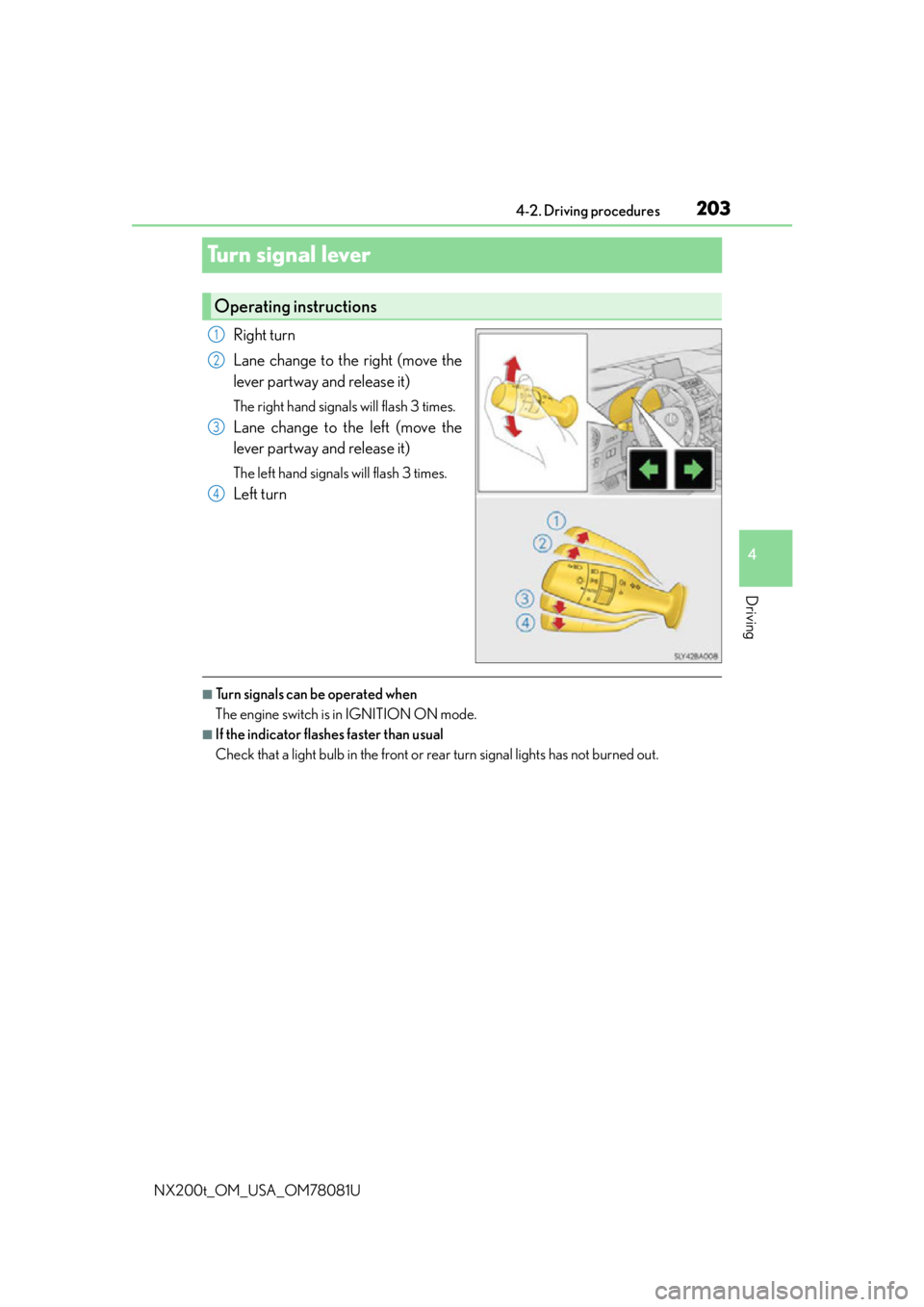
Turn signal lever
Right turn
Lane change to the right (move the
lever partway and release it)
The right hand signals will flash 3 times.
Lane change to the left (move the
lever partway and release it)
The left hand signals will flash 3 times.
Left turn
■Turn signals can be operated when
The engine switch is in IGNITION ON mode.
■If the indicator flashes faster than usual
Check that a light bulb in the front or rear turn signal lights has not burned out.
Operating instructions
1
2
3
4
Page 212 of 660

2124-3. Operating the lights and wipers
NX200t_OM_USA_OM78081U
When the following conditions are met, while the headlights (low beam) are on,
the cornering lights will additionally turn on and light up the direction of move-
ment for the vehicle. This is to ensure excellent visibility when either driving at
intersections or parking at night.
●The steering wheel is operated
●The turn signal lever is operated
●The shift lever is in R
However, when vehicle speed is 40 km/h (25 mph) or above, the cornering
lights do not turn on.
When the cornering lights ar e on for more than 30 minutes, they will automati-
cally turn off.
■Daytime running light system
●To make your vehicle more visible to other drivers during daytime driving, the daytime
running lights turn on automatically (at an increased intensity) whenever the engine is
started and the parking brake is released with the headlight switch off or in the “AUTO”
position. (Illuminate brighter than the front parking lights.) Daytime running lights are
not designed for use at night.
Type A only: Daytime running lights can be turned off by operating the switch.
●If a turn signal light is in use, the daytime running light, on the same side, is turned off.
For emergency flashers, both are turned off.
●Compared to turning on the headlights, the daytime running light system offers greater
durability and consumes less electricity, so it can help improve fuel economy.
■Headlight control sensor
■Automatic light off system
●When the headlights come on: The headlights and tail lights turn off 30 seconds after a
door is opened and closed if the engine switch is turned to ACCESSORY mode or
turned off. (The lights turn off immediately if on the key is pressed after all the doors
are locked.)
●When only the tail lights come on: The tail lights turn off automatically if the engine
switch is turned to ACCESSORY mode or turned off and the driver’s door is opened.
To turn the lights on again, turn the engine switch to IGNITION ON mode, or turn the
light switch off once and then back to or .
Cornering lights (if equipped)
The sensor may not function properly if an
object is placed on the sensor, or anything that
blocks the sensor is affixed to the windshield.
Doing so interferes with the sensor detecting
the level of ambient light and may cause the
automatic headlight system to malfunction.
Page 216 of 660

2164-3. Operating the lights and wipers
NX200t_OM_USA_OM78081U
■The Automatic High Beam can be operated when
The engine switch is in IGNITION ON mode.
■Camera sensor dete ction information
●High beam may not be automatically tu rned off in the following situations:
• When oncoming vehicles sudd enly appear from a curve
• When the vehicle is cut in front of by another
• When oncoming or preceding vehicles are hidden from sight due to repeated
curves, road dividers or roadside trees
●High beam may be turned off if an oncoming vehicle that is using fog lights without
using the headlights is detected.
●House lights, street lights, red traffic signals, and illuminated billboards or signs may
cause the high beam to turn off.
●The following factors may affect the amount of time taken to turn high beam on or off:
• The brightness of headlights, fog lights, and tail lights of oncoming and preceding
vehicles
• The movement and direction of oncoming and preceding vehicles
• When a oncoming or preceding vehicle on ly has operational lights on one side
• When a oncoming or preceding vehicle is a two-wheeled vehicle
• The condition of the road (gradient, curve, condition of the road surface, etc.)
• The number of passengers and amount of luggage
●High beam may be turned on or off when unexpected by the driver.
●In the situations below, the system may not be able to correctly detect the surrounding
brightness levels, and may flash or expose nearby pedestrians to the high beam. There-
fore, you should consider turning the high be ams on or off manually rather than relying
on the Automatic High Beam system.
• In bad weather (rain, snow , fog, sandstorms, etc.)
• The windshield is obscured by fog, mist, ice, dirt, etc.
• The windshield is cracked or damaged.
• The camera sensor is deformed or dirty.
• The camera sensor temperature is extremely high.
• Surrounding brightness levels are equal to those of headlights, tail lights or fog lights.
• Vehicles ahead have headlights or tail lights that are either switched off, dirty, are
changing color, or are not aimed properly.
• When driving through an area of intermit tently changing brightness and darkness.
• When frequently and repeatedly driving ascending/descending roads, or roads with
rough, bumpy or uneven surfaces (such as stone-paved roads, gravel tracks, etc.).
• When frequently and repeat edly taking curves or driving on a winding road.
• There is a highly reflective object ahead of the vehicle, such as a sign or a mirror.
• The back of a vehicle ahead is highly reflective, such as a container on a truck.
• The vehicle’s headlights are damaged or dirty.
• The vehicle is listing or titling, due to a flat tire, a trailer being towed, etc.
• The driver believes that the high beam may be causing problems or distress to other
drivers or pedestrians nearby.