lock LEXUS NX300 2020 Owners Manual
[x] Cancel search | Manufacturer: LEXUS, Model Year: 2020, Model line: NX300, Model: LEXUS NX300 2020Pages: 468, PDF Size: 10.24 MB
Page 400 of 468

4007-2. Steps to take in an emergency
LEXUS NX300 Owners Manual_USA_M78389_en
If you have a set of jumper (or booster)
cables and a second vehicle with a bat-
tery, you can jump start your vehicle by
following the steps below.
1Confirm that the electronic key is
being carried.
When connecting the jumper (or booster)
cables, depending on the situation, the
alarm may activate and the doors may lock.
( P.71)
2 Open the hood ( P.333)
If the vehicle battery is dis-
charged
The following procedures may be
used to start the engine if the vehi-
cle’s battery is discharged.
You can also call your Lexus dealer
or a qualified repair shop.
Restarting the engine
Page 402 of 468
4027-2. Steps to take in an emergency
LEXUS NX300 Owners Manual_USA_M78389_en
■Starting the engine when the battery is
discharged
The engine cannot be started by push-start-
ing.
■To prevent battery discharge
●Turn off the headlights and the audio sys-
tem while the engine is off.
●Turn off any unnecessary electrical com-
ponents when the vehicle is running at a
low speed for an extended period, such
as in heavy traffic.
■Charging the battery
The electricity stored in the battery will dis-
charge gradually even when the vehicle is
not in use, due to natural discharge and the
draining effects of certain electrical appli-
ances. If the vehicle is left for a long time,
the battery may discharge, and the engine
may be unable to start. (The battery
recharges automatically during driving.)
■When the battery is removed or dis-
charged
●In some cases, it may not be possible to
unlock the doors using the smart access
system with push-button start when the
battery is discharged. Use the wireless
remote control or the mechanical key to
lock or unlock the doors.
●The engine may not start on the first
attempt after the battery has recharged
but will start normally after the second
attempt. This is not a malfunction.
●The engine switch mode is memorized by
the vehicle. When the battery is recon-
nected, the system will return to the
mode it was in before the battery was dis-
charged. Before di sconnecting the bat-
tery, turn the engine switch off.
If you are unsure what mode the engine
switch was in befo re the battery dis-
charged, be especially careful when
reconnecting the battery.
●Some systems may require initialization.
WARNING
■Avoiding battery fires or explosions
Observe the following precautions to
prevent accidentally igniting the flamma-
ble gas that may be emitted from the bat-
tery:
●Make sure each jumper cable is con-
nected to the correct terminal and that
it is not unintentiona lly in contact with
any other than the intended terminal.
●Do not allow the other end of the
jumper cable connected to the “+” ter-
minal to come into contact with any
other parts or metal surfaces in the
area, such as brackets or unpainted
metal.
●Do not allow the + and - clamps of the
jumper cables to come into contact
with each other.
●Do not smoke, use matches, cigarette
lighters or allow open flame near the
battery.
■Battery precautions
The battery contains poisonous and cor-
rosive acidic electrol yte, while related
parts contain lead and lead compounds.
Observe the following precautions when
handling the battery:
●When working with the battery, always
wear safety glasses and take care not
to allow any battery fluids (acid) to
come into contact with skin, clothing
or the vehicle body.
●Do not lean over the battery.
●In the event that battery fluid comes
into contact with the skin or eyes,
immediately wash the affected area
with water and seek medical attention.
Place a wet sponge or cloth over the
affected area until medical attention
can be received.
Page 409 of 468
4098-1. Specifications
LEXUS NX300 Owners Manual_USA_M78389_en
8
Vehicle specifications
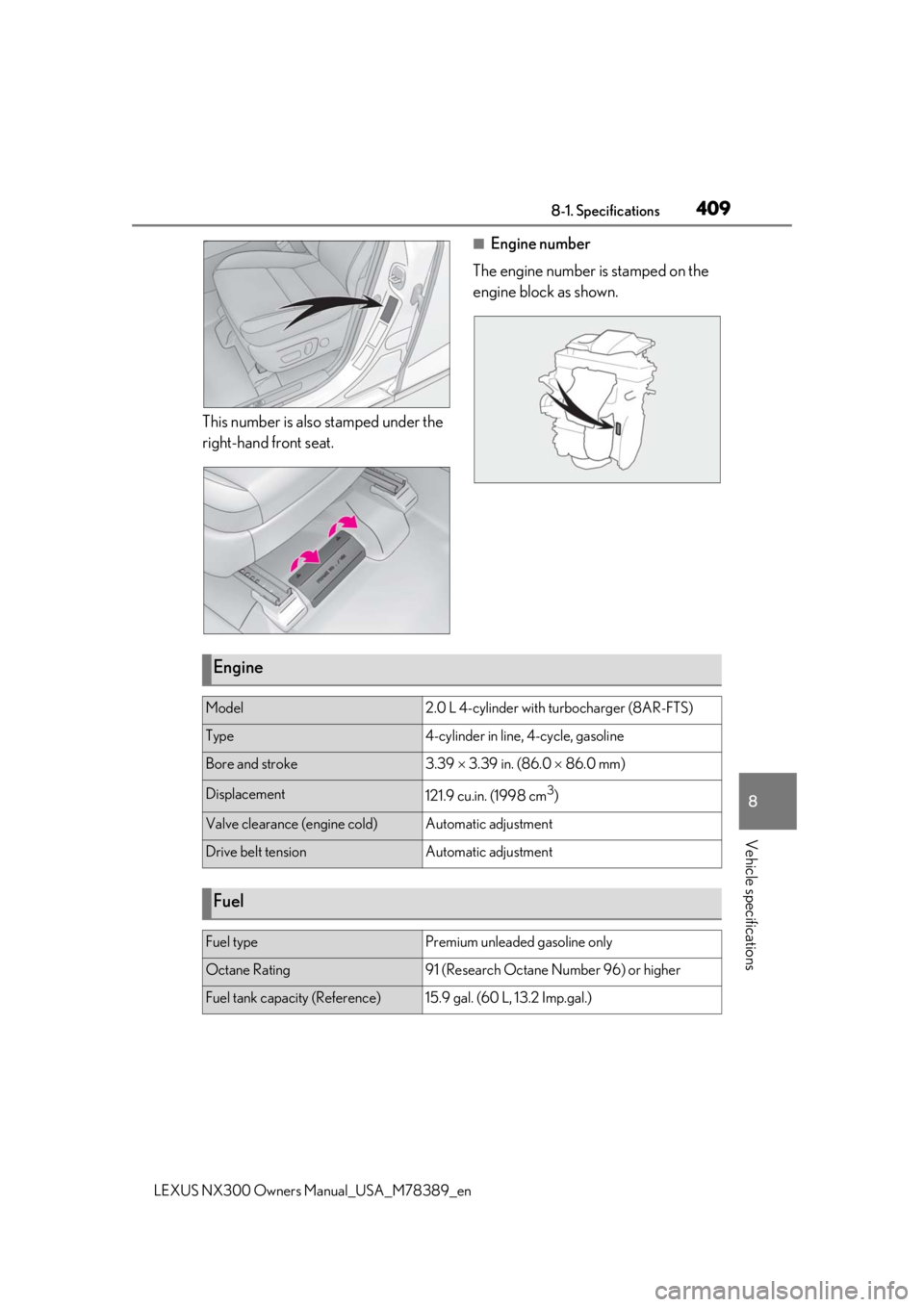
This number is also stamped under the
right-hand front seat.
■Engine number
The engine number is stamped on the
engine block as shown.
Engine
Model2.0 L 4-cylinder with turbocharger (8AR-FTS)
Type4-cylinder in line, 4-cycle, gasoline
Bore and stroke3.39 3.39 in. (86.0 86.0 mm)
Displacement121.9 cu.in. (1998 cm3)
Valve clearance (engine cold)Automatic adjustment
Drive belt tensionAutomatic adjustment
Fuel
Fuel typePremium unleaded gasoline only
Octane Rating91 (Research Octane Number 96) or higher
Fuel tank capacity (Reference)15.9 gal. (60 L, 13.2 Imp.gal.)
Page 412 of 468
4128-1. Specifications
LEXUS NX300 Owners Manual_USA_M78389_en
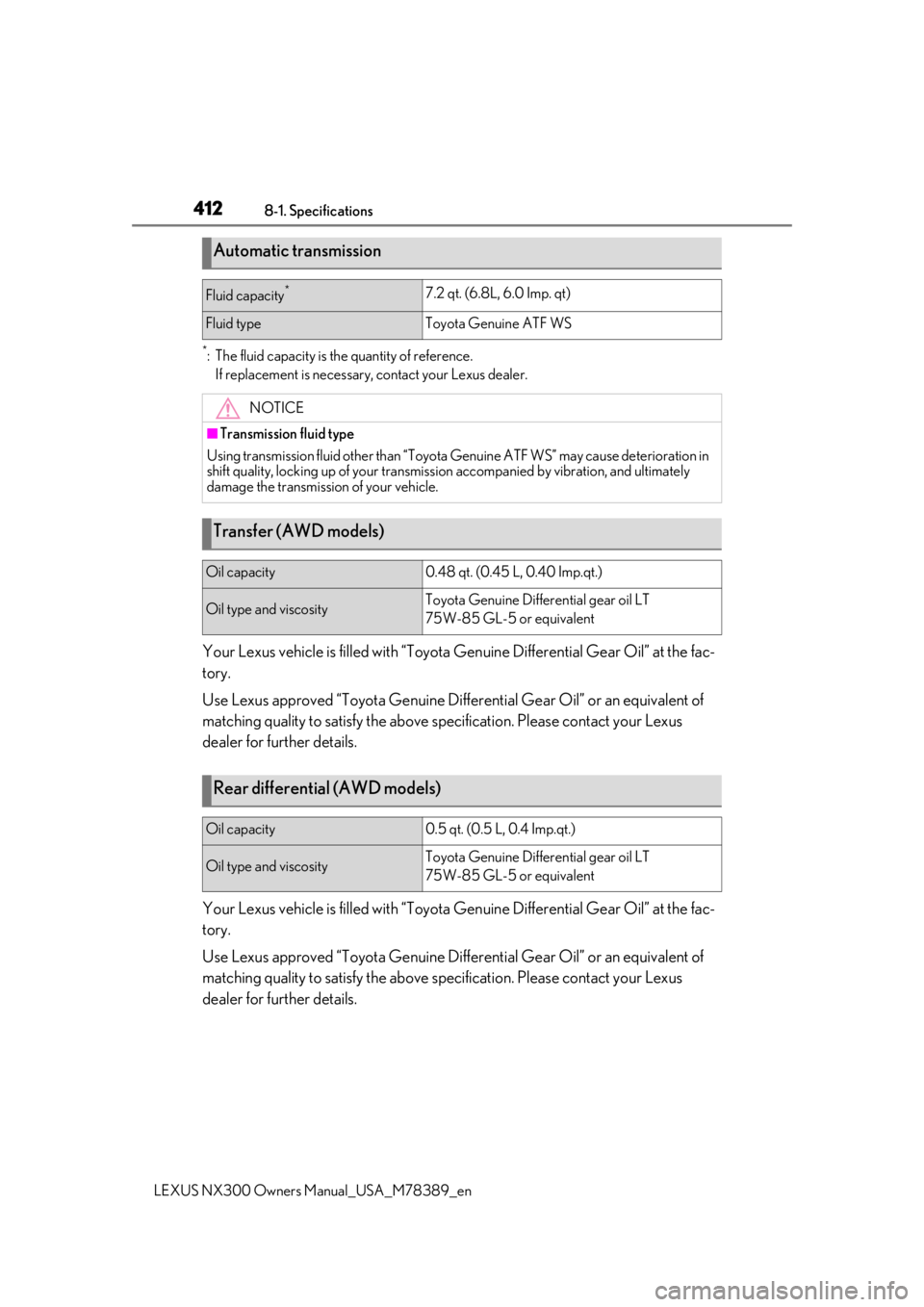
*: The fluid capacity is the quantity of reference.
If replacement is necessary, contact your Lexus dealer.
Your Lexus vehicle is filled with “Toyota Genuine Differential Gear Oil” at the fac-
tory.
Use Lexus approved “Toyota Genuine Differential Gear Oil” or an equivalent of
matching quality to satisfy the above sp ecification. Please contact your Lexus
dealer for further details.
Your Lexus vehicle is filled with “Toyota Genuine Differential Gear Oil” at the fac-
tory.
Use Lexus approved “Toyota Genuine Differential Gear Oil” or an equivalent of
matching quality to satisfy the above sp ecification. Please contact your Lexus
dealer for further details.
Automatic transmission
Fluid capacity*7.2 qt. (6.8L, 6.0 Imp. qt)
Fluid typeToyota Genuine ATF WS
NOTICE
■Transmission fluid type
Using transmission fluid other than “Toyota Genuine ATF WS” may ca use deterioration in
shift quality, locking up of your transmission accompanied by vibration, and ultimately
damage the transmission of your vehicle.
Transfer (AWD models)
Oil capacity0.48 qt. (0.45 L, 0.40 Imp.qt.)
Oil type and viscosityToyota Genuine Differential gear oil LT
75W-85 GL-5 or equivalent
Rear differential (AWD models)
Oil capacity0.5 qt. (0.5 L, 0.4 Imp.qt.)
Oil type and viscosityToyota Genuine Differential gear oil LT
75W-85 GL-5 or equivalent
Page 428 of 468
4288-2. Customization
LEXUS NX300 Owners Manual_USA_M78389_en
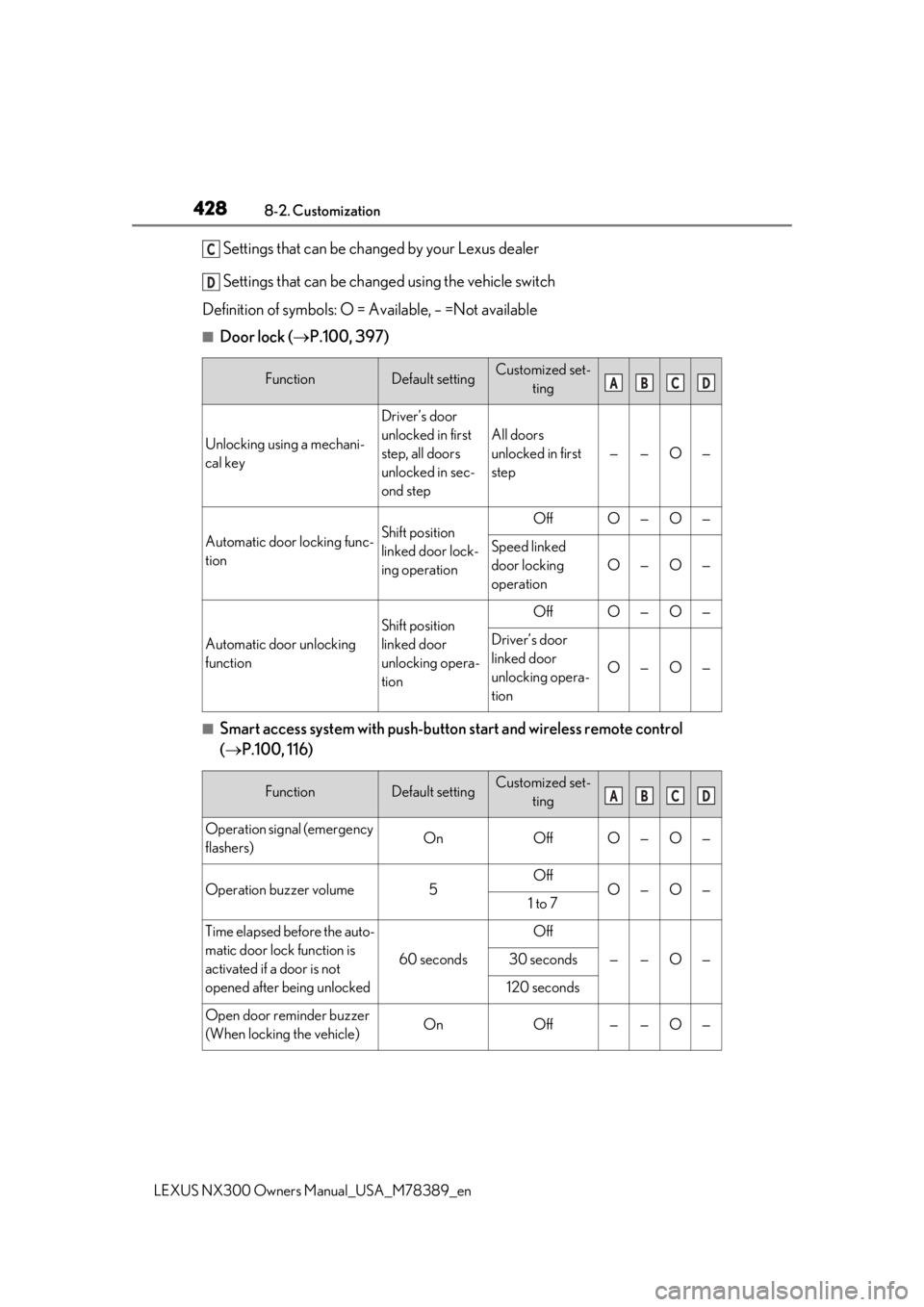
Settings that can be changed by your Lexus dealer
Settings that can be changed using the vehicle switch
Definition of symbols: O = Available, – =Not available
■Door lock ( P.100, 397)
■Smart access system with push-butto n start and wireless remote control
( P.100, 116)
FunctionDefault settingCustomized set-
ting
Unlocking using a mechani-
cal key
Driver’s door
unlocked in first
step, all doors
unlocked in sec-
ond step
All doors
unlocked in first
step
——O—
Automatic door locking func-
tionShift position
linked door lock-
ing operationOffO—O—
Speed linked
door locking
operation
O—O—
Automatic door unlocking
function
Shift position
linked door
unlocking opera-
tionOffO—O—
Driver’s door
linked door
unlocking opera-
tion
O—O—
FunctionDefault settingCustomized set-ting
Operation signal (emergency
flashers)OnOffO—O—
Operation buzzer volume5OffO—O—1 to 7
Time elapsed before the auto-
matic door lock function is
activated if a door is not
opened after being unlocked
60 seconds
Off
——O—30 seconds
120 seconds
Open door reminder buzzer
(When locking the vehicle)OnOff——O—
C
D
ABCD
ABCD
Page 429 of 468

4298-2. Customization
LEXUS NX300 Owners Manual_USA_M78389_en
8
Vehicle specifications
■Smart access system with push-button start ( P.116)
■Wireless remote control ( P.97)
■Automatic light control system ( P.178)
FunctionDefault settingCustomized set-
ting
The doors that are unlocked
using the smart access sys-
tem with push-button start
can be selected
Driver’s doorAll the doorsO—OO
Smart access system with
push-button startOnOff——O—
Number of consecutive door
lock operations2 timesAs many as desired——O—
FunctionDefault settingCustomized set- ting
Wireless remote controlOnOff——O—
Unlocking operation
Driver’s door
unlocked in first step, all doors
unlocked in sec- ond step
All doors
unlocked in first
step
O—O—
Panic functionOnOff——O—
The function that validates the
switch of the wireless
remote control when locking
the door ( P.107)
When locking the
doorWhen unlocking
the door——O—
FunctionDefault settingCustomized set-ting
Light sensor sensitivityStandard-2 to 2O—O—
Adjust the time elapsed
before the headlights auto-
matically turn off
30 seconds
Off
O—O—60 seconds
90 seconds
ABCD
ABCD
ABCD
Page 430 of 468

4308-2. Customization
LEXUS NX300 Owners Manual_USA_M78389_en
■Lights (P.178)
■Illumination ( P.289)
■Multi-information display ( P.79, 82)
FunctionDefault settingCustomized set-
ting
Daytime Running Lights
(Daytime running lights can
be disabled)
OnOffO—O—
FunctionDefault settingCustomized set-ting
Time elapsed before the inte-
rior lights turn off15 seconds
Off
O—O—7.5 seconds
30 seconds
Time elapsed before the exte-
rior lights turn off15 seconds
Off
O—O—7.5 seconds
30 seconds
Operation after the engine
switch is turned offOnOff——O—
Operation when the doors
are unlockedOnOff——O—
Operation when you
approach the vehicle with the
electronic key on your person
OnOff——O—
Footwell lightingOnOff——O—
Fading out of the outer foot
lights when they turn offLongShort——O—
FunctionDefault settingCustomized set-ting
Eco Driving Indicator LightOnOff—O——
Language*1EnglishFrenchOO——Spanish
ABCD
ABCD
ABCD
Page 431 of 468

4318-2. Customization
LEXUS NX300 Owners Manual_USA_M78389_en
8
Vehicle specifications
*1: The default setting varies according to countries.
*2: Some status screens cannot be registered (i ndicated on the multi-information display)
*3: 2 of the following items: current fuel consumption, average fuel economy (after reset),
average fuel economy (after refuel), average fuel economy (after start), average vehicle
speed (after reset), average vehicle speed (a fter start), distance (driving range), dis-
tance (after start), elapsed time (after reset), elapsed time (after start), blank
*4: Intersection guidance, Incomi ng calls, Adjust brightness
Units*1miles (MPG US)
miles
(MPG Imperial)
OO——km (L/100 km)
km (km/L)
switch settingsDrive information 1Desired status
screen
*2—O——
Drive information 1
Current fuel con- sumption
*3—O——Average fuel con-sumption (after reset)
Drive information 2
Distance (range)
*3—O——Average speed (after reset)
Drive information 3
Average fuel con-sumption (after refuel)
*3—O——
Elapsed time (after start)
Pop-up display*4OnOff—O——
Accent colorColor 1Color 2OO——
Clock24-hour display12-hour display—O——
FunctionDefault settingCustomized set- tingABCD
Page 434 of 468
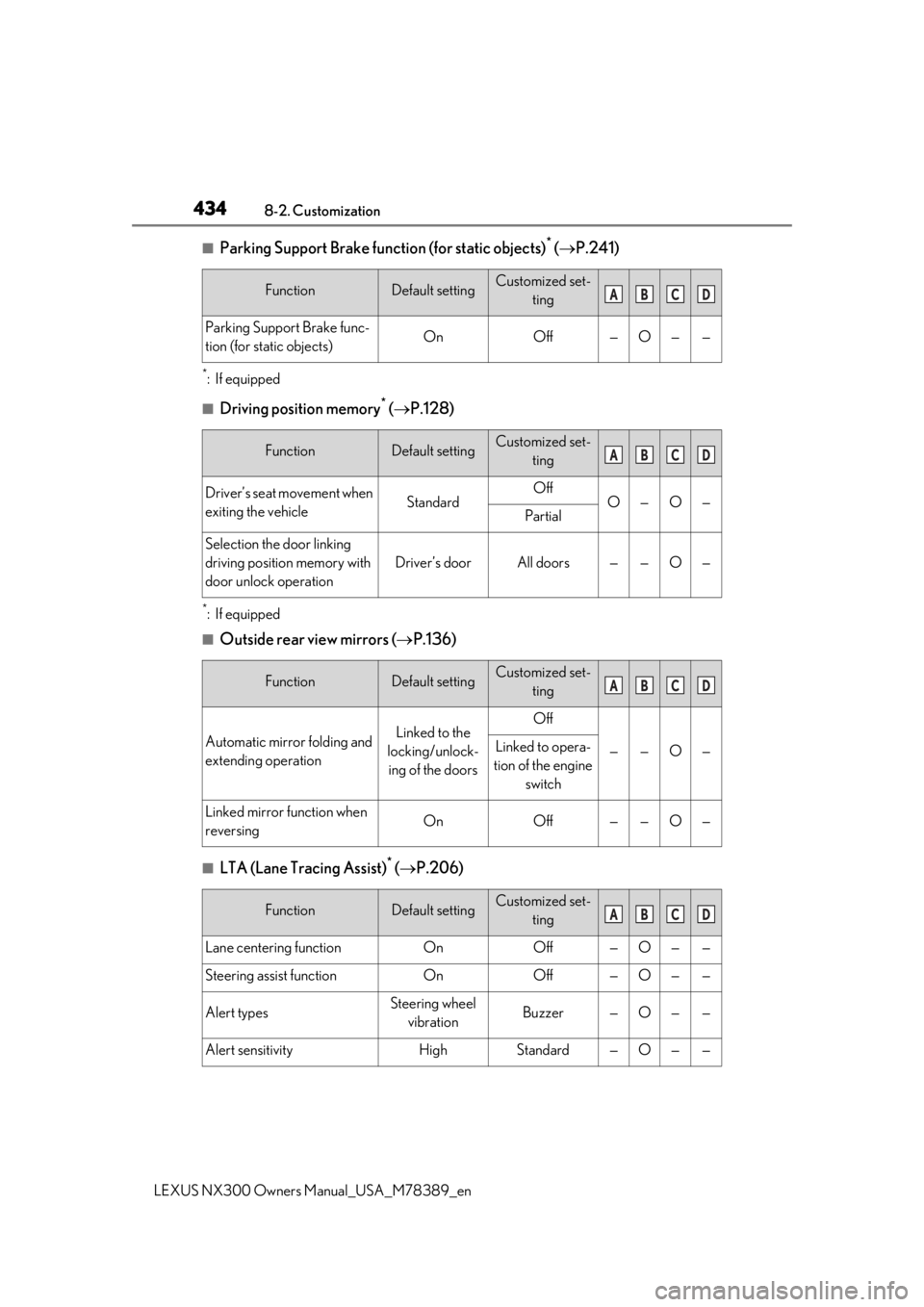
4348-2. Customization
LEXUS NX300 Owners Manual_USA_M78389_en
■Parking Support Brake function (for static objects)* ( P.241)
*:If equipped
■Driving position memory* ( P.128)
*:If equipped
■Outside rear view mirrors ( P.136)
■LTA (Lane Tracing Assist)* ( P.206)
FunctionDefault settingCustomized set-
ting
Parking Support Brake func-
tion (for static objects)OnOff—O——
FunctionDefault settingCustomized set-ting
Driver’s seat movement when
exiting the vehicleStandardOffO—O—Partial
Selection the door linking
driving position memory with
door unlock operation
Driver’s doorAll doors——O—
FunctionDefault settingCustomized set-ting
Automatic mirror folding and
extending operationLinked to the
locking/unlock- ing of the doorsOff
——O—Linked to opera-
tion of the engine switch
Linked mirror function when
reversingOnOff——O—
FunctionDefault settingCustomized set- ting
Lane centering functionOnOff—O——
Steering assist functionOnOff—O——
Alert typesSteering wheel vibrationBuzzer—O——
Alert sensitivityHighStandard—O——
ABCD
ABCD
ABCD
ABCD
Page 436 of 468

4368-2. Customization
LEXUS NX300 Owners Manual_USA_M78389_en
*:If equipped
■Power back door*1 ( P.104)
*1: If equipped
*2: Configured by operating the sw itch of the lower back door. (P.115)
*3: While carrying the electronic key on your person, press the back door opener switch.
*4: When the towing hitch is installed, the kick sensor does not work
Excess speed notification
methodDisplay only
No notification
—OO—Display and
buzzer
Others notification methodDisplay only
No notification
—OO—Display and buzzer
Excess speed notification
level1 mph (2 km/h)3 mph (5 km/h)—OO—5 mph (10 km/h)
FunctionDefault settingCustomized set- ting
Back door automatic open
and stop position5
Stop at the
desired position
(height)
*2O——O
1 to 5
Back door opener switch
operationsWhen the back
door is locked
*3When the back
door is unlocked——O—
Power back door operationsOnOff—O——
Operation buzzer volume31—O——2
Kick Sensor*1, 4OnOff—O——
FunctionDefault settingCustomized set- tingABCD
ABCD