center LEXUS NX300 2020 User Guide
[x] Cancel search | Manufacturer: LEXUS, Model Year: 2020, Model line: NX300, Model: LEXUS NX300 2020Pages: 468, PDF Size: 10.24 MB
Page 61 of 468

611-3. Lexus Enform
LEXUS NX300 Owners Manual_USA_M78389_en
1
For safety and security
1-3.Lexus Enform
*:If equipped
Microphone
“SOS” button
LED light indicators
Lexus Enform Safety Con-
nect*
Safety Connect is a subscription-
based telematics service that uses
Global Positioning System (GPS)
data and embedded cellular tech-
nology to provide safety and secu-
rity features to subscribers. Safety
Connect is supported by Lexus’
designated response center, which
operates 24 hours per day, 7 days
per week.
Safety Connect service is available
by subscription on select, telemat-
ics hardware-equipped vehicles.
By using the Safety Connect ser-
vice, you are agreeing to be bound
by the Telematics Subscription Ser-
vice Agreement and its Terms and
Conditions, as in effect and
amended from time to time, a cur-
rent copy of which is available at
Lexus.com. All use of the Safety
Connect service is subject to such
then-applicable Terms and Condi-
tions.
System components
A
B
C
Page 63 of 468
631-3. Lexus Enform
LEXUS NX300 Owners Manual_USA_M78389_en
1
For safety and security
Subscribers have the following Safety
Connect services available:
Automatic Collision Notification
*
Helps drivers receive necessary response
from emergency service providers.
( P.64)
*: U.S. Patent No. 7,508,298 B2
Stolen Vehicle Location
Helps drivers in the event of vehicle theft.
( P.64)
Emergency Assistance Button
(“SOS”)
Connects drivers to response-center sup-
port. ( P.64)
Enhanced Roadside Assistance
Provides drivers various on-road assis-
tance. ( P.64)
After you have signed the Telematics
Subscription Service Agreement and
are enrolled, you can begin receiving
services.
A variety of subscription terms is avail-
able for purchase. Contact your Lexus
dealer, call the following or push the
“SOS” button in your vehicle for fur-
ther subscription details.
• The United States
1-800-25-LEXUS (1-800-255-3987)
• Canada
1-800-26-LEXUS (1-800-265-3987)
•Puerto Rico
1-877-539-8777
■Safety Connect Services Information
●Phone calls using the vehicles Blue-
tooth® technology will not be possible
during Safety Connect.
●Safety Connect is available beginning Fall
2009 on select Le xus models (in the
contiguous United States only). Contact
with the Safety Connect response center
is dependent upon the telematics device
being in operative condition, cellular con-
nection availability, and GPS satellite sig-
nal reception, which ca n limit the ability to
reach the response center or receive
emergency service support. Enrollment
and Telematics Subscription Service
Agreement required. A variety of sub-
scription terms is available; charges vary
by subscription term selected and loca-
tion.
●Automatic Collision Notification, Emer-
gency Assistance and Stolen Vehicle
Location will function in the United
States, including Hawaii and Alaska,
Puerto Rico and in Canada, and
Enhanced Roadside Assistance will func-
tion in the United States, Puerto Rico and
in Canada.
●Automatic Collision Notification, Emer-
gency Assistance, Stolen Vehicle and
Enhanced Road Assistance will not func-
tion in the United St ates Virgin Islands.
For vehicles first sold in the USVI, no
Safety Connect services will function in
and outside the United States Virgin
Islands.
●Safety Connect services are not subject
to section 255 of the Telecommunica-
tions Act and the device is not TTY com-
patible.
■Languages
The Safety Connect re sponse center will
offer support in mult iple languages. The
Safety Connect system will offer voice
prompts in English, Spanish and French.
Please indicate your language of choice
when enrolling.
■When contacting the response center
You may be unable to contact the response
center if the network is busy.
Services
Subscription
Page 64 of 468
641-3. Lexus Enform
LEXUS NX300 Owners Manual_USA_M78389_en
When the engine switch is turned to
IGNITION ON mode, the red indica-
tor light comes on for 2 seconds then
turns off. Afterward, the green indica-
tor light comes on, indicating that the
service is active.
The following indicator light patterns
indicate specific system usage condi-
tions:
Green indicator light on = Active
service
Green indicator light flashing =
Safety Connect call in process
Red indicator light (except at vehi-
cle start-up) = System malfunction
(contact your Lexus dealer)
No indicator light (off) = Safety
Connect service not active
■Automatic Collision Notification
In case of either airbag deployment or
severe rear-end collision, the system is
designed to automatically call the
response center. The responding agent
receives the vehicle’s location and
attempts to speak with the vehicle
occupants to assess the level of emer-
gency. If the occupants are unable to
communicate, the ag ent automatically
treats the call as an emergency, con-
tacts the nearest emergency services
provider to describe the situation, and
requests that assistance be sent to the
location.
■Stolen Vehicle Location
If your vehicle is stolen, Safety Connect
can work with local authorities to assist
them in locating and recovering the
vehicle. After filing a police report, call
the Safety Connect response center at
1-800-25-LEXUS (1-800-255-
3987) in the United States, 1-877-
539-8777 in Puerto Rico or 1-800-
265-3987 in Canada, and follow the
prompts for Safety Connect to initiate
this service.
In addition to assisting law enforce-
ment with recovery of a stolen vehicle,
Safety-Connect-equipped vehicle
location data may, under certain cir-
cumstances, be shared with third par-
ties to locate your vehicle. Further
information is available at Lexus.com.
■Emergency Assistance Button
(“SOS”)
In the event of an emergency on the
road, push the “SOS” button to reach
the Safety Connect response center.
The answering agent will determine
your vehicle’s location, assess the
emergency, and dispatch the neces-
sary assistance required.
If you accidentally press the “SOS” button,
tell the response-center agent that you are
not experiencing an emergency.
■Enhanced Roadside Assistance
Enhanced Roadside Assistance adds
GPS data to the already included war-
ranty- based Lexus roadside service.
Subscribers can press the “SOS” but-
ton to reach a Safety Connect
response-center agent, who can help
Safety Connect LED light Indi-
cators
Safety Connect services
Page 76 of 468

762-1. Instrument cluster
LEXUS NX300 Owners Manual_USA_M78389_en
the engine is started, or after a few sec-
onds. There may be a malfunction in a
system if the lights do not turn on, or
turn off. Have the vehicle inspected by
your Lexus dealer.
*2: This light illuminates on the multi-infor-
mation display.
*3: The light flashes to indicate a malfunc-tion.
*4: This light illuminates on the center panel.
The indicators inform the driver of the
operating state of the vehicle’s various
systems.
WARNING
■If a safety system warning light does
not come on
Should a safety system light such as the
ABS and SRS airbag warning light not
come on when you start the engine, this
could mean that these systems are not
available to help pr otect you in an acci-
dent, which could result in death or seri-
ous injury. Have the vehicle inspected by
your Lexus dealer immediately if this
occurs.
Indicators
Turn signal indicator ( P.172)
(U.S.A.)
Headlight indicator ( P.178)
(Canada)
Tail light indicator ( P.178)
Headlight high beam indicator
( P.180)
Automatic High Beam indica-
tor ( P.181)
Fog light indicator ( P.184)
Eco Driving Indicator Light
*1
( P.78)
“Eco” indicator
*2 ( P.258)
“Sport” indicator
*2 ( P.258)
“Sport S” indicator
*2 (if
equipped) ( P.258)
“Sport S+” indicator
*2 (if
equipped) ( P.258)
“Custom” indicator
*2 (if
equipped) ( P.258)
Dynamic radar cruise control
indicator
*2 ( P.225)
Cruise control “SET” indica-
tor
*2 ( P.225)
Cruise control indicator
*2
( P.225)
Page 78 of 468
782-1. Instrument cluster
LEXUS NX300 Owners Manual_USA_M78389_en
If the BSM outside rear view mirror indi-
cators do not illuminate or do not turn
off, there may be a malfunction in the
system.
If this occurs, have
the vehicle inspected
by your Lexus dealer.
*7: This light illuminates on the outside rear view mirrors.
*8: This light illuminates on the center panel.
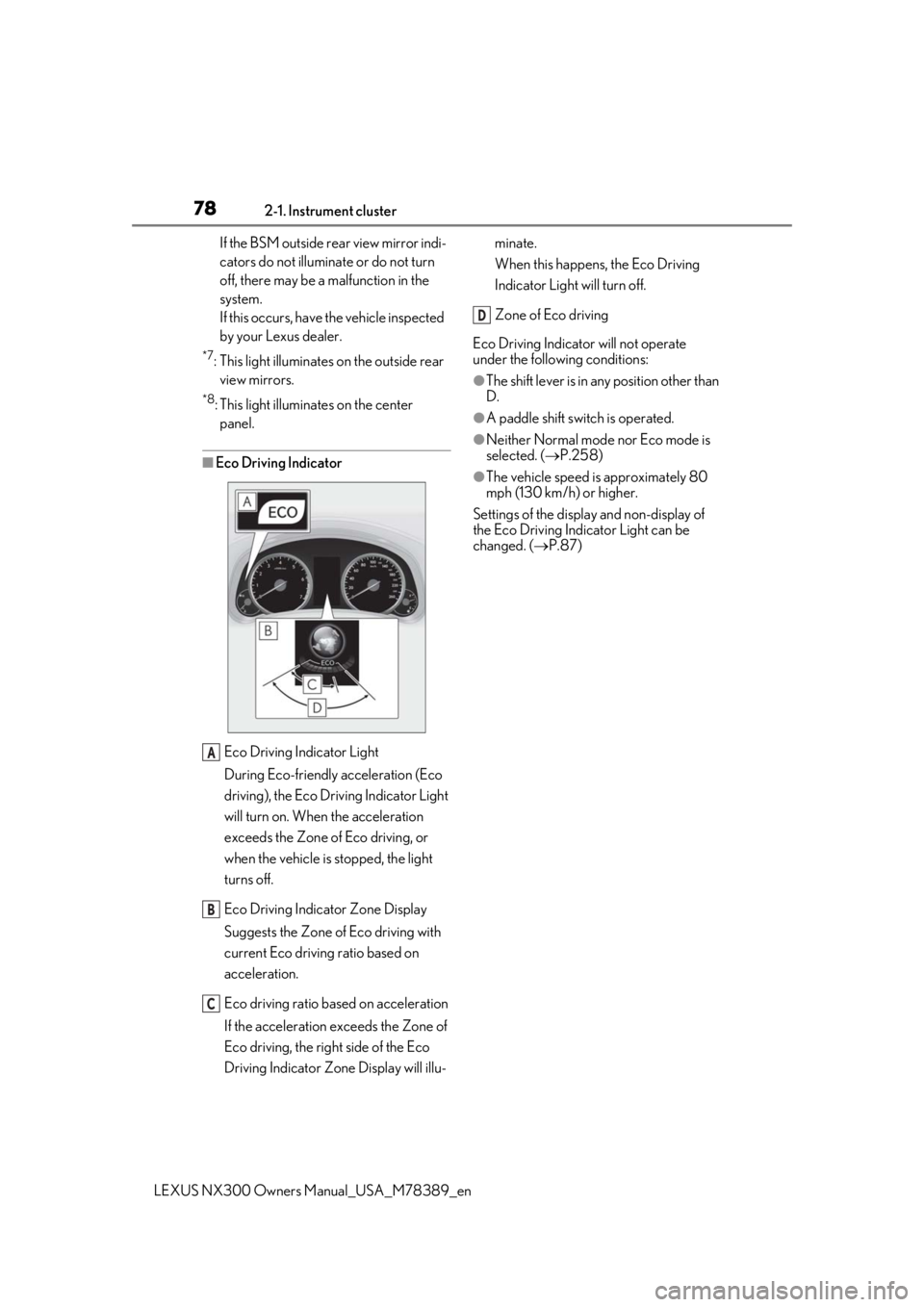
■Eco Driving Indicator
Eco Driving Indicator Light
During Eco-friendly acceleration (Eco
driving), the Eco Driving Indicator Light
will turn on. When the acceleration
exceeds the Zone of Eco driving, or
when the vehicle is stopped, the light
turns off.
Eco Driving Indicator Zone Display
Suggests the Zone of Eco driving with
current Eco driving ratio based on
acceleration.
Eco driving ratio based on acceleration
If the acceleration exceeds the Zone of
Eco driving, the right side of the Eco
Driving Indicator Zone Display will illu- minate.
When this happens, the Eco Driving
Indicator Light will turn off.
Zone of Eco driving
Eco Driving Indicator will not operate
under the following conditions:
●The shift lever is in an y position other than
D.
●A paddle shift swit ch is operated.
●Neither Normal mode nor Eco mode is
selected. (P.258)
●The vehicle speed is approximately 80
mph (130 km/h) or higher.
Settings of the display and non-display of
the Eco Driving Indicator Light can be
changed. ( P.87)
A
B
C
D
Page 85 of 468
852-1. Instrument cluster
LEXUS NX300 Owners Manual_USA_M78389_en
2
Vehicle status information and indicators
Route guidance
Compass display (heading-up dis-
play)
Select to enable selection of an audio
source or track on the display using the
meter control switches.
Select to display the operational status
of the following systems:
LTA (Lane Tracing Assist) ( P.206)
LDA (Lane Departure Alert with
steering control) ( P.215)
Dynamic radar cruise control with
full-speed range ( P.225)
RSA (Road Sign Assist) ( P.223)
The displayed icon changes depending
on the system used.
Select to display warning messages
and measures to be taken if a malfunc-
tion is detected. ( P.384)
The settings of the following items can
be changed using the meter control
switches.
For functions that can be enabled or
disabled, the function switches
between on and off each time is
pressed.■ LTA (Lane Tracing Assist) (if
equipped) ( P.206)
Select to set up the following items.
Lane centering
Select to enable/disable the lane centering
function.
Steering Assist
Select to enable/dis able steering wheel
assistance.
Alert
Select to change the alert types.
Alert sensitivity
Select to set the warning sensitivity.
Sway warning
Select to enable/disable the vehicle sway
warning.
Sway sensitivity
Select to set the vehicle sway warning sen-
sitivity.
■ LDA (Lane Departure Alert
with steering control) (if equipped)
( P.215)
Select to set up the following items.
Steering Assist
Select to enable/dis able steering wheel
assistance.
Alert
Select to change the alert types.
Alert sensitivity
Select to set the warning sensitivity.
Sway warning
Select to enable/disable the vehicle sway
warning.
Audio system-linked display
Driving assist system information
Warning message display
Settings display
Page 112 of 468

1123-2. Opening, closing and locking the doors
LEXUS NX300 Owners Manual_USA_M78389_en
WARNING
■Power back door
Observe the following precautions when
operating the power back door.
Failure to do so may cause death or seri-
ous injury.
●Check the safety of the surrounding
area to make sure there are no obsta-
cles or anything that could cause any
of your belongings to get caught.
●If anyone is in the vicinity, make sure
they are safe and let them know that
the back door is about to open or
close.
●If the power back door system is
turned off with the main switch while
the back door is operating automati-
cally, the automatic operation is
stopped. The back door then has to be
operated manually. Take extra care
when on an incline, as the back door
may open or close unexpectedly.
●If the operating conditions of the
power back door are no longer met, a
buzzer may sound and the back door
may stop opening or closing. The back
door then has to be operated manu-
ally. Take extra care when on an incline,
as the back door may open or close
abruptly.
●On an incline, the back door may sud-
denly shut after it opens. Make sure
the back door is fully open and secure.
●In the following situations, the power
back door may detect an abnormality
and automatic operation may be
stopped. In this case, the back door
has to be operated manually. Take
extra care when on an incline, as the
back door may open or close abruptly.
• When the back door contacts an obstacle
• When the battery voltage suddenly drops, such as when the engine switch
is turned to IGNITION ON mode or
the engine is started during automatic
operation
●If a bicycle carrier or similar heavy
object is attached to the back door, the
power back door may not operate,
causing itself to malfunction, or the
back door may suddenly shut again
after being opened, causing some-
one’s hands, head or neck to be caught
and injured. When installing an acces-
sory part to the back door, using a
genuine Lexus part is recommended.
■Jam protection function
Observe the following precautions.
Failure to do so may cause death or seri-
ous injury.
●Never use any part of your body to
intentionally activa te the jam protec-
tion function.
●The jam protection function may not
work if something gets caught just
before the back door fully closes. Be
careful not to catch fingers caught or
anything else.
●The jam protection function may not
work depending on the shape of the
object that is caught. Be careful not to
catch fingers or anything else.
■Kick sensor (vehicles with Hands
Free Power Back Door)
Observe the following precautions when
operating the power back door.
Failure to do so may cause death or seri-
ous injury.
●Check the safety of the surrounding
area to make sure there are no obsta-
cles or anything that could cause any
of your belongings to get caught.
●When putting your foot near the lower
center part of the rear bumper and
moving it from the rear bumper, be
careful not to touch the exhaust pipes
until they have cooled down suffi-
ciently, as touching hot exhaust pipes
can cause burns.
●Do not operate the Hands Free Power
Back Door if there is little space under
the rear bumper.
Page 113 of 468
1133-2. Opening, closing and locking the doors
LEXUS NX300 Owners Manual_USA_M78389_en
3
Before driving
NOTICE
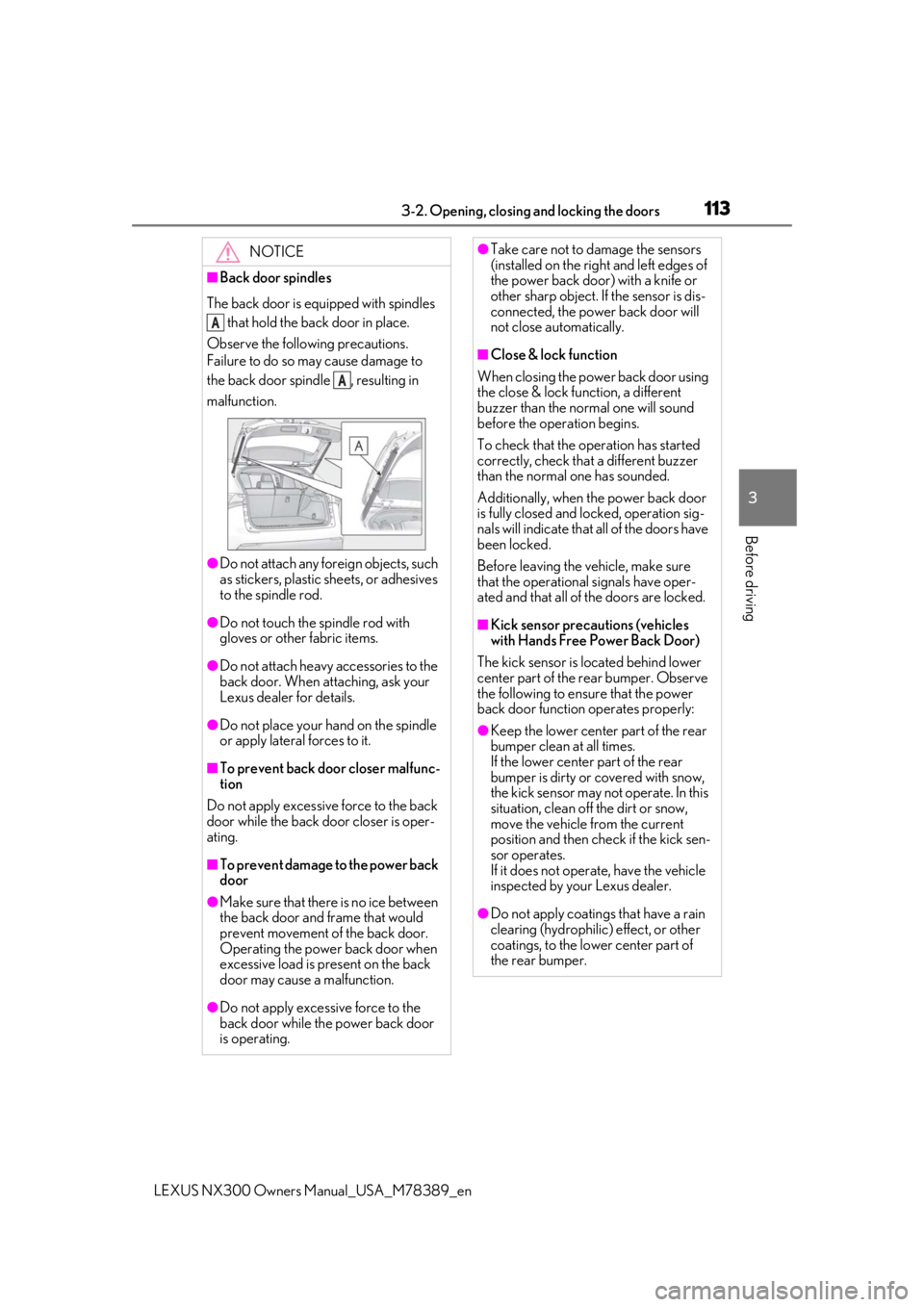
■Back door spindles
The back door is equipped with spindles that hold the back door in place.
Observe the following precautions.
Failure to do so may cause damage to
the back door spindle , resulting in
malfunction.
●Do not attach any foreign objects, such
as stickers, plastic sheets, or adhesives
to the spindle rod.
●Do not touch the spindle rod with
gloves or other fabric items.
●Do not attach heavy accessories to the
back door. When attaching, ask your
Lexus dealer for details.
●Do not place your ha nd on the spindle
or apply lateral forces to it.
■To prevent back door closer malfunc-
tion
Do not apply excessive force to the back
door while the back door closer is oper-
ating.
■To prevent damage to the power back
door
●Make sure that there is no ice between
the back door and frame that would
prevent movement of the back door.
Operating the power back door when
excessive load is present on the back
door may cause a malfunction.
●Do not apply excessive force to the
back door while the power back door
is operating.
A
A
●Take care not to damage the sensors
(installed on the right and left edges of
the power back door) with a knife or
other sharp object. If the sensor is dis-
connected, the power back door will
not close automatically.
■Close & lock function
When closing the power back door using
the close & lock function, a different
buzzer than the normal one will sound
before the operation begins.
To check that the operation has started
correctly, check that a different buzzer
than the normal one has sounded.
Additionally, when the power back door
is fully closed and locked, operation sig-
nals will indicate that all of the doors have
been locked.
Before leaving the vehicle, make sure
that the operational signals have oper-
ated and that all of the doors are locked.
■Kick sensor precautions (vehicles
with Hands Free Power Back Door)
The kick sensor is lo cated behind lower
center part of the rear bumper. Observe
the following to ensure that the power
back door function operates properly:
●Keep the lower center part of the rear
bumper clean at all times.
If the lower center part of the rear
bumper is dirty or covered with snow,
the kick sensor may not operate. In this
situation, clean off the dirt or snow,
move the vehicle from the current
position and then check if the kick sen-
sor operates.
If it does not operate, have the vehicle
inspected by your Lexus dealer.
●Do not apply coatings that have a rain
clearing (hydrophilic ) effect, or other
coatings, to the lower center part of
the rear bumper.
Page 114 of 468

1143-2. Opening, closing and locking the doors
LEXUS NX300 Owners Manual_USA_M78389_en
ON (operate) and OFF (stop) can be
switched between by the of the
multi-information display. ( P.82) 1
Press or of the meter con-
trol switches and select .
2
Press or of the meter con-
trol switches, select the “Vehicle
Settings” and then press .
3
Press or of the meter con-
trol switches, select and
then press .
4
Press or of the meter con-
trol switches, and then select
“PBD”.
5
ON and OFF will be switched over
with presses of on the meter
control switches.
When OFF is selected and the operations
of the power back door is made to stop
from the of multi-information display,
unless it is set to ON , the operation of the
power back door will not return. (No
return in the engine switch operation)
NOTICE
●Do not park the vehicle near objects
that may move and contact the lower
center part of the rear bumper, such as
grass or trees.
If the vehicle has been parked for a
while near objects that may move and
contact the lower center part of the
rear bumper, such as grass or trees,
the kick sensor may not operate. In this
situation, move the vehicle from the
current position and then check if the
kick sensor operates. If it does not
operate, have the vehicle inspected by
your Lexus dealer.
●Do not subject the kick sensor or its
surrounding area to a strong impact.
If the kick sensor
or its surrounding
area has been subjected to a strong
impact, the kick sensor may not oper-
ate properly. If the kick sensor does
not operate in the following situations,
have the vehicle inspected by your
Lexus dealer.
• The kick sensor or its surrounding area has been subjected to a strong impact.
• The lower center part of the rear bumper is scratched or damaged.
●Do not disassemble the rear bumper.
●Do not attach stickers to the rear
bumper.
●Do not paint the rear bumper.
●If a bicycle carrier or similar heavy
object is attached to the power back
door, disable the kick sensor.
Canceling the power back door
system (vehicles with power
back door)
Page 118 of 468
1183-2. Opening, closing and locking the doors
LEXUS NX300 Owners Manual_USA_M78389_en
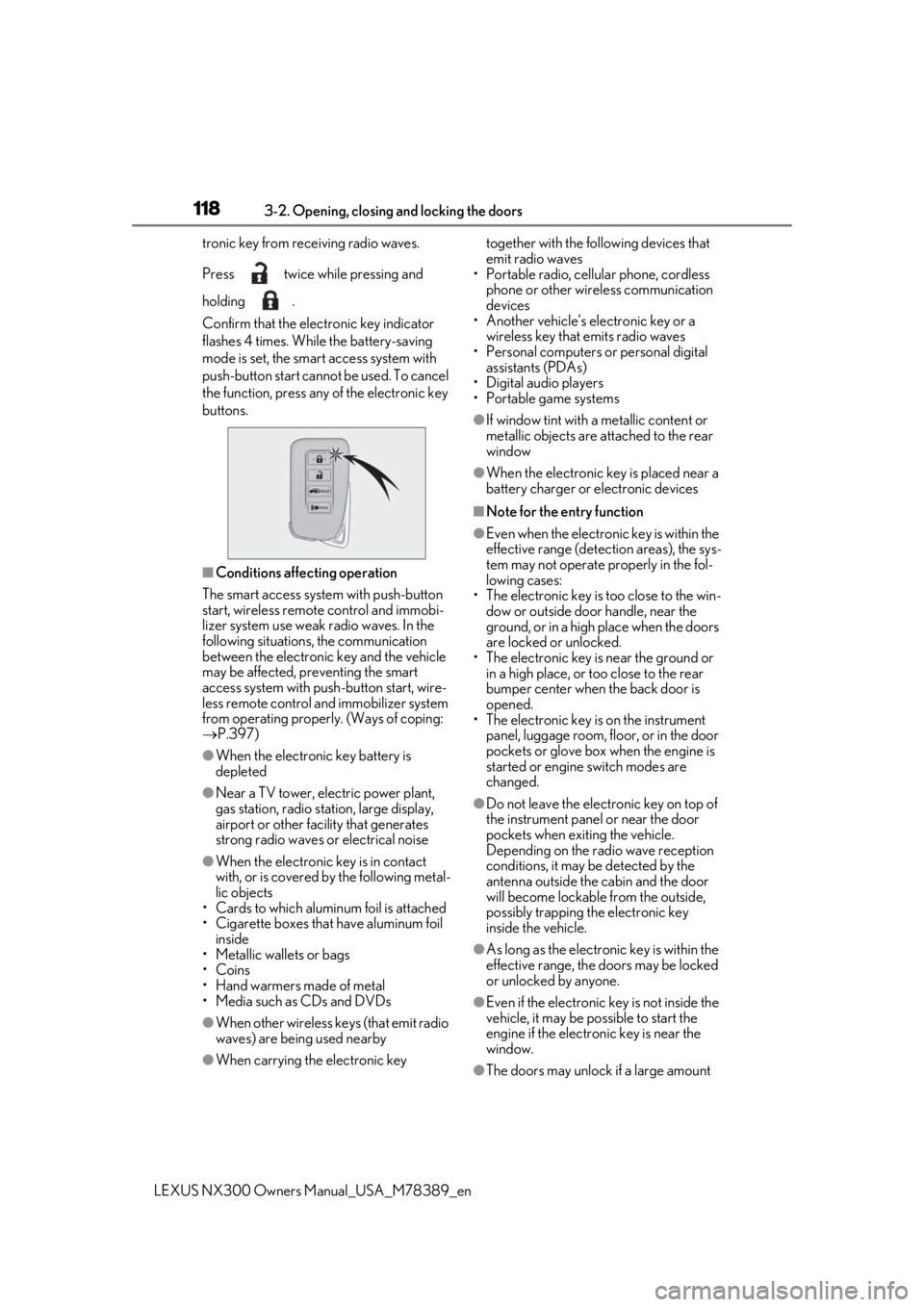
tronic key from re
ceiving radio waves.
Press twice while pressing and
holding .
Confirm that the elec tronic key indicator
flashes 4 times. While the battery-saving
mode is set, the smar t access system with
push-button start cannot be used. To cancel
the function, press any of the electronic key
buttons.
■Conditions affe cting operation
The smart access system with push-button
start, wireless remote control and immobi-
lizer system use weak radio waves. In the
following situations, the communication
between the electronic key and the vehicle
may be affected, preventing the smart
access system with push -button start, wire-
less remote control and immobilizer system
from operating properly. (Ways of coping:
P.397)
●When the electronic key battery is
depleted
●Near a TV tower, electric power plant,
gas station, radio stat ion, large display,
airport or other faci lity that generates
strong radio waves or electrical noise
●When the electronic key is in contact
with, or is covered by the following metal-
lic objects
• Cards to which aluminum foil is attached
• Cigarette boxes that have aluminum foil
inside
• Metallic wallets or bags
•Coins
• Hand warmers made of metal
• Media such as CDs and DVDs
●When other wireless ke ys (that emit radio
waves) are being used nearby
●When carrying the electronic key together with the following devices that
emit radio waves
• Portable radio, cellular phone, cordless
phone or other wireless communication
devices
• Another vehicle’s electronic key or a
wireless key that emits radio waves
• Personal computers or personal digital assistants (PDAs)
• Digital audio players
• Portable game systems
●If window tint with a metallic content or
metallic objects are attached to the rear
window
●When the electronic key is placed near a
battery charger or electronic devices
■Note for the entry function
●Even when the electronic key is within the
effective range (detection areas), the sys-
tem may not operate properly in the fol-
lowing cases:
• The electronic key is too close to the win-
dow or outside door handle, near the
ground, or in a high place when the doors
are locked or unlocked.
• The electronic key is near the ground or in a high place, or too close to the rear
bumper center when the back door is
opened.
• The electronic key is on the instrument panel, luggage room, floor, or in the door
pockets or glove box when the engine is
started or engine switch modes are
changed.
●Do not leave the electronic key on top of
the instrument panel or near the door
pockets when exiting the vehicle.
Depending on the radio wave reception
conditions, it may be detected by the
antenna outside the cabin and the door
will become lockable from the outside,
possibly trapping the electronic key
inside the vehicle.
●As long as the electronic key is within the
effective range, the doors may be locked
or unlocked by anyone.
●Even if the electronic key is not inside the
vehicle, it may be po ssible to start the
engine if the electronic key is near the
window.
●The doors may unlock if a large amount