instrument panel LEXUS NX300 2020 User Guide
[x] Cancel search | Manufacturer: LEXUS, Model Year: 2020, Model line: NX300, Model: LEXUS NX300 2020Pages: 468, PDF Size: 10.24 MB
Page 87 of 468

872-1. Instrument cluster
LEXUS NX300 Owners Manual_USA_M78389_en
2
Vehicle status information and indicators
nance is performed.
■Meter settings
Language
Select to change the language on the dis-
play.
Units
Select to change the unit of measure for
fuel consumption.
Eco Driving Indicator Light
( P.78)
Select to activate/deactivate the Eco Driv-
ing Indicator Light.
Switch settings (P.82)
Displays a procedure to register a desired
screen to
.
You can register 1 screen as a shortcut,
which can be displayed by pressing
.
Drive information screen ( P.83)
Select to choose between 2 items that will
be displayed on each drive information
screen (“
Drive info 1”, “Drive Info 2” and
“Drive Info 3
”) respectively.
Pop-up display ( P.80)
Select to set the following pop-up displays,
which may appear in some situations,
on/off.
• Intersection guidance display of the nav-
igation system-linked system
• Incoming call display of the hands-free phone system
• Instrument panel brightness adjustment display
Accent color
Select to change the accent colors on the screen, such as the cursor color.
Initialization
Select to reset the meter display settings.
■Suspension of the settings display
In the following situations, the settings dis-
play using the meter control switches will be
suspended.
●When a warning message appears on the
multi-information display
●When the vehicle begins to move
Automatically displayed when the sys-
tem is used. ( P.236)
WARNING
■Cautions during setting up the dis-
play
As the engine needs to be running
during setting up the display, en sure that
the vehicle is parked in a place with ade-
quate ventilation. In a closed area such as
a garage, exhaust gases including harm-
ful carbon monoxide (CO) may collect
and enter the vehicle. This may lead to
death or a serious health hazard.
NOTICE
■During setting up the display
To prevent battery discharge, ensure that
the engine is running while setting up the
display features.
Intuitive parking assist (if
equipped)
Page 118 of 468
1183-2. Opening, closing and locking the doors
LEXUS NX300 Owners Manual_USA_M78389_en
tronic key from re
ceiving radio waves.
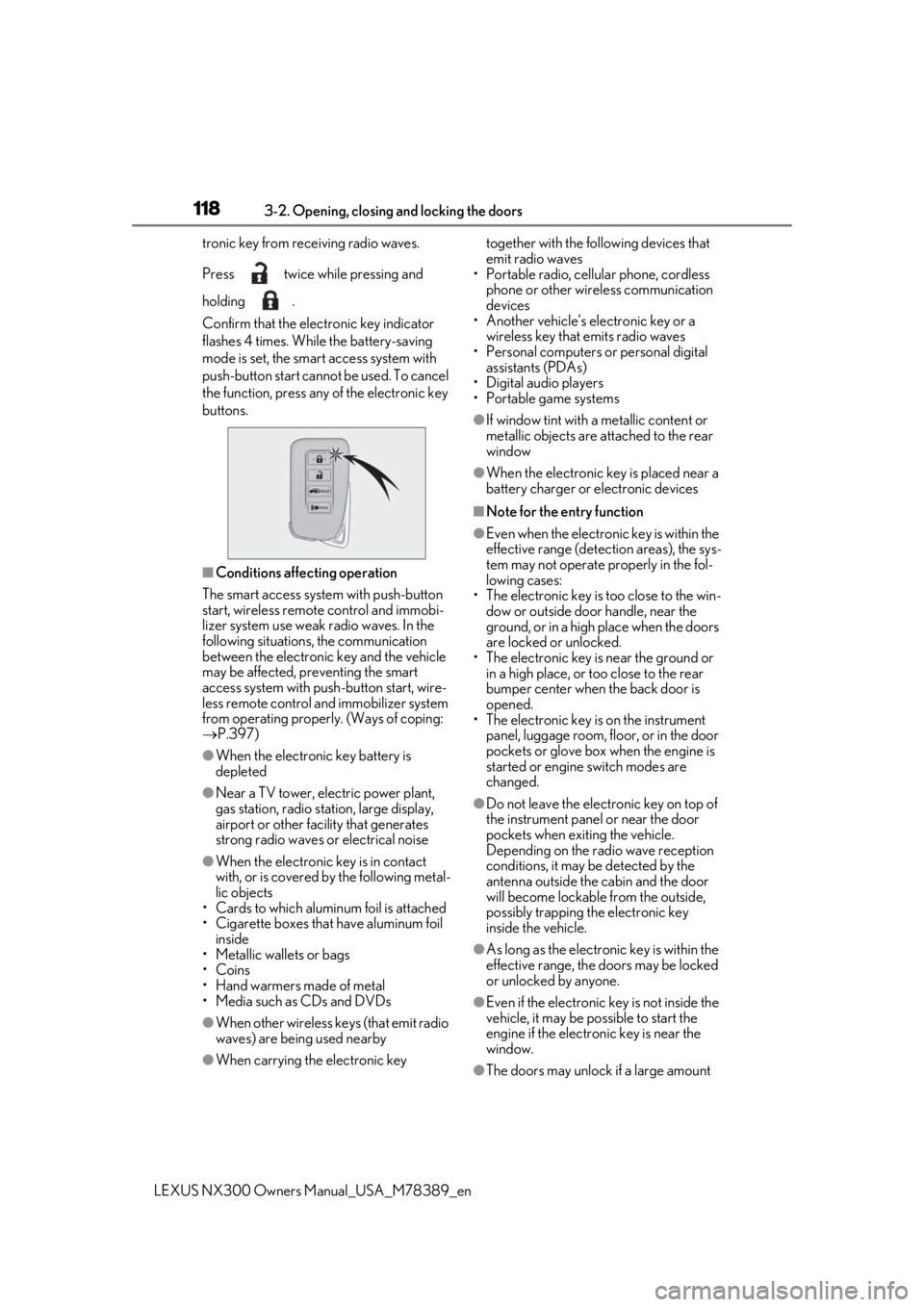
Press twice while pressing and
holding .
Confirm that the elec tronic key indicator
flashes 4 times. While the battery-saving
mode is set, the smar t access system with
push-button start cannot be used. To cancel
the function, press any of the electronic key
buttons.
■Conditions affe cting operation
The smart access system with push-button
start, wireless remote control and immobi-
lizer system use weak radio waves. In the
following situations, the communication
between the electronic key and the vehicle
may be affected, preventing the smart
access system with push -button start, wire-
less remote control and immobilizer system
from operating properly. (Ways of coping:
P.397)
●When the electronic key battery is
depleted
●Near a TV tower, electric power plant,
gas station, radio stat ion, large display,
airport or other faci lity that generates
strong radio waves or electrical noise
●When the electronic key is in contact
with, or is covered by the following metal-
lic objects
• Cards to which aluminum foil is attached
• Cigarette boxes that have aluminum foil
inside
• Metallic wallets or bags
•Coins
• Hand warmers made of metal
• Media such as CDs and DVDs
●When other wireless ke ys (that emit radio
waves) are being used nearby
●When carrying the electronic key together with the following devices that
emit radio waves
• Portable radio, cellular phone, cordless
phone or other wireless communication
devices
• Another vehicle’s electronic key or a
wireless key that emits radio waves
• Personal computers or personal digital assistants (PDAs)
• Digital audio players
• Portable game systems
●If window tint with a metallic content or
metallic objects are attached to the rear
window
●When the electronic key is placed near a
battery charger or electronic devices
■Note for the entry function
●Even when the electronic key is within the
effective range (detection areas), the sys-
tem may not operate properly in the fol-
lowing cases:
• The electronic key is too close to the win-
dow or outside door handle, near the
ground, or in a high place when the doors
are locked or unlocked.
• The electronic key is near the ground or in a high place, or too close to the rear
bumper center when the back door is
opened.
• The electronic key is on the instrument panel, luggage room, floor, or in the door
pockets or glove box when the engine is
started or engine switch modes are
changed.
●Do not leave the electronic key on top of
the instrument panel or near the door
pockets when exiting the vehicle.
Depending on the radio wave reception
conditions, it may be detected by the
antenna outside the cabin and the door
will become lockable from the outside,
possibly trapping the electronic key
inside the vehicle.
●As long as the electronic key is within the
effective range, the doors may be locked
or unlocked by anyone.
●Even if the electronic key is not inside the
vehicle, it may be po ssible to start the
engine if the electronic key is near the
window.
●The doors may unlock if a large amount
Page 124 of 468
1243-3. Adjusting the seats
LEXUS NX300 Owners Manual_USA_M78389_en
■Before folding down the rear seat-
backs
1
Stow the rear center seat belt, seat
belt buckles and armrest. ( P.29)
2
Lower the head restraint of the rear
seat. ( P.131)
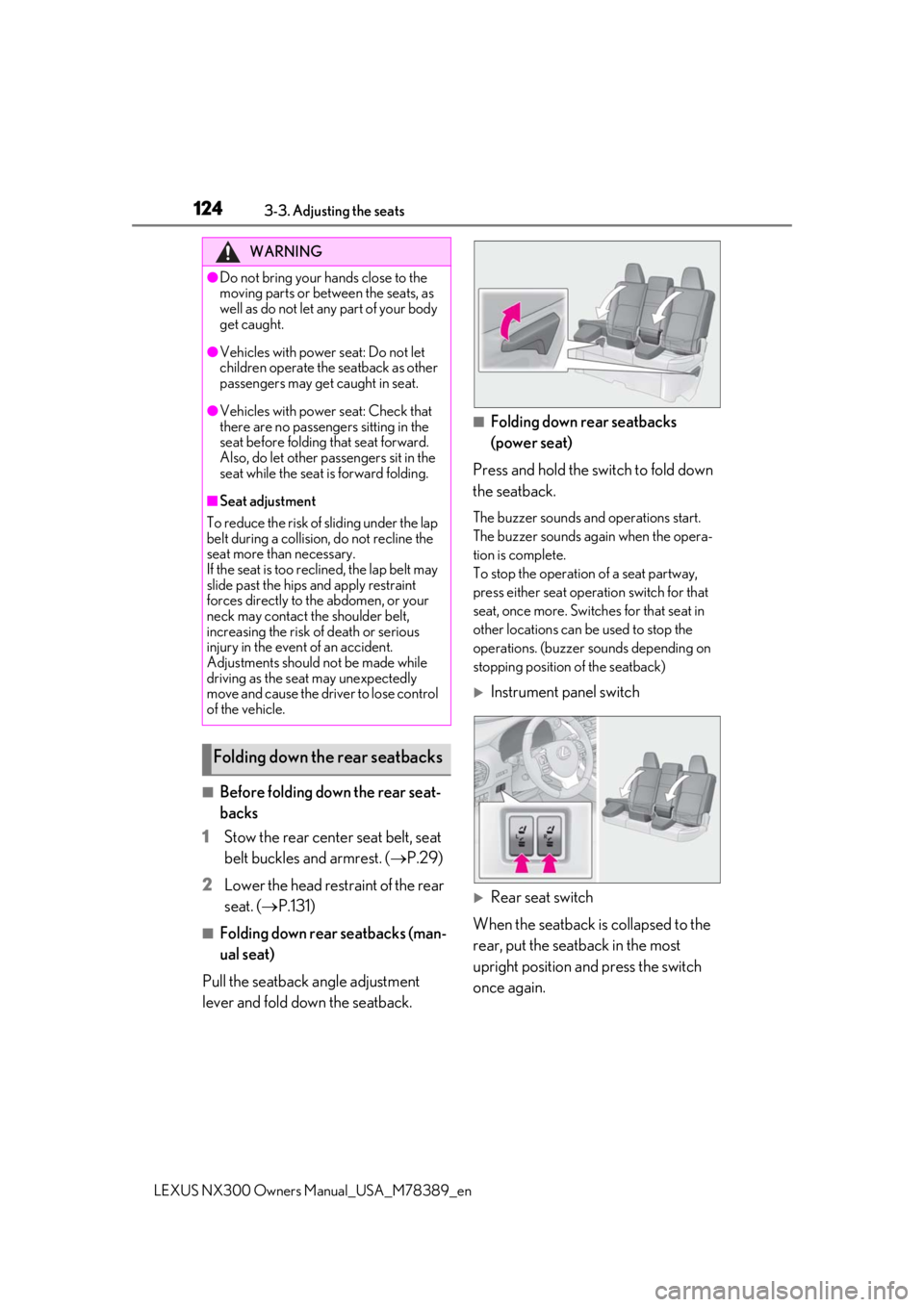
■Folding down rear seatbacks (man-
ual seat)
Pull the seatback angle adjustment
lever and fold down the seatback.
■Folding down rear seatbacks
(power seat)
Press and hold the switch to fold down
the seatback.
The buzzer sounds and operations start.
The buzzer sounds again when the opera-
tion is complete.
To stop the operation of a seat partway,
press either seat operation switch for that
seat, once more. Switches for that seat in
other locations can be used to stop the
operations. (buzzer sounds depending on
stopping position of the seatback)
Instrument panel switch
Rear seat switch
When the seatback is collapsed to the
rear, put the seatback in the most
upright position and press the switch
once again.
WARNING
●Do not bring your hands close to the
moving parts or between the seats, as
well as do not let any part of your body
get caught.
●Vehicles with power seat: Do not let
children operate the seatback as other
passengers may get caught in seat.
●Vehicles with power seat: Check that
there are no passengers sitting in the
seat before folding that seat forward.
Also, do let other passengers sit in the
seat while the seat is forward folding.
■Seat adjustment
To reduce the risk of sliding under the lap
belt during a collision, do not recline the
seat more than necessary.
If the seat is too reclined, the lap belt may
slide past the hips and apply restraint
forces directly to the abdomen, or your
neck may contact the shoulder belt,
increasing the risk of death or serious
injury in the event of an accident.
Adjustments should not be made while
driving as the seat may unexpectedly
move and cause the driver to lose control
of the vehicle.
Folding down the rear seatbacks
Page 125 of 468
1253-3. Adjusting the seats
LEXUS NX300 Owners Manual_USA_M78389_en
3
Before driving
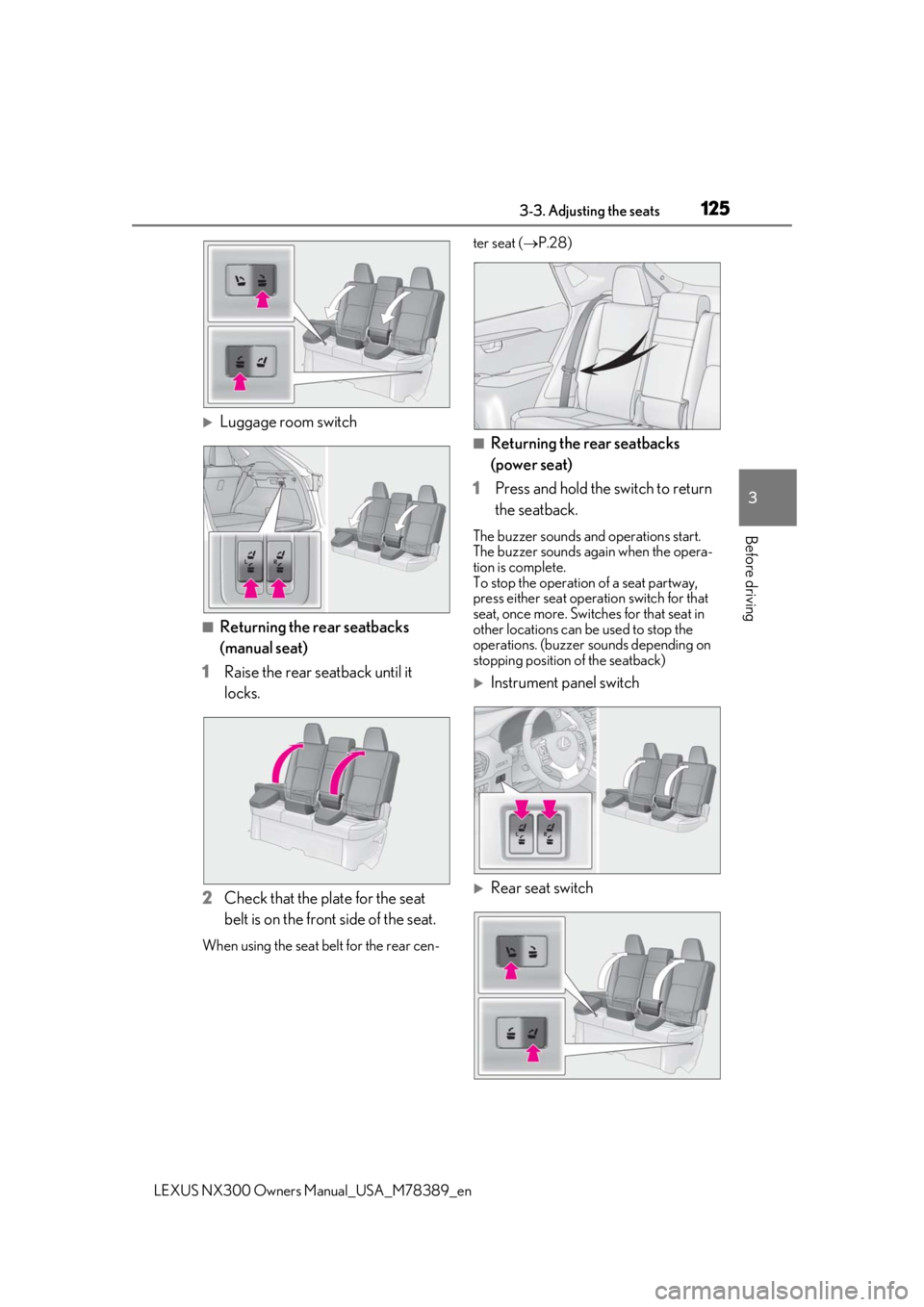
Luggage room switch
■Returning the rear seatbacks
(manual seat)
1 Raise the rear seatback until it
locks.
2 Check that the plate for the seat
belt is on the front side of the seat.
When using the seat be lt for the rear cen- ter seat (
P.28)
■Returning the rear seatbacks
(power seat)
1 Press and hold the switch to return
the seatback.
The buzzer sounds and operations start.
The buzzer sounds again when the opera-
tion is complete.
To stop the operation of a seat partway,
press either seat oper ation switch for that
seat, once more. Switches for that seat in
other locations can be used to stop the
operations. (buzzer sounds depending on
stopping position of the seatback)
Instrument panel switch
Rear seat switch
Page 126 of 468

1263-3. Adjusting the seats
LEXUS NX300 Owners Manual_USA_M78389_en
Luggage room switch
2 Check that the plate for the seat
belt is on the front side of the seat.
When using the seat be lt for the rear cen-
ter seat ( P.28)
■Operating conditions for folding down
the seatback (power seat)
When the following conditions are met,
switch operations are possible.
●When operating the rear seat switch: The
seatback position is within the range
in the illustration from the most upright
position.
●When operating the instrument panel
switch or luggage compartment switch:
The seatback position is within the range in the illustration.
●When operating the rear seat switch:
When the rear door for the seat to be
operated is open.
●When operating the luggage compart-
ment switch: When the back door is
open.
●When the other operation switches for
the seat being operated are not pressed.
When the engine swit ch is in IGNITION
ON mode, in addition to the above, the
power seat operates for any of the following
conditions:
• Parking brake is engaged
• The brake pedal is depressed
• The shift lever is in P
■Operating conditions for returning the
seatback (power seat)
When the following conditions are met,
switch operations are possible.
●When operating the rear seat switch: The
seatback position is within the range
in the illustration fr om the most upright
position.
●When operating the rear seat switch:
When the rear door for the seat to be
operated is open.
●When operating the luggage compart-
ment switch: When the back door is
open.
●When the other operation switches for
the seat being operated are not pressed.
When the engine swit ch is in IGNITION
ON mode, in addition to the above, the
power seat operates for any of the following
conditions:
• Parking brake is engaged
A
B
A
Page 152 of 468
1524-1. Before driving
LEXUS NX300 Owners Manual_USA_M78389_en
Cargo capacity depends on the total
weight of the occupants.
(Cargo capacity) = (Total load capac-
Cargo and luggage
Take notice of the following infor-
mation about storage precautions,
cargo capacity and load.
WARNING
■Things that must not be carried in the
luggage compartment
The following things may cause a fire if
loaded in the luggage compartment:
●Receptacles containing gasoline
●Aerosol cans
■Storage precautions
Observe the following precautions.
Failure to do so may prevent the pedals
from being depressed properly, may
block the driver’s vision, or may result in
items hitting the driver or passengers,
possibly causing an accident.
●Stow cargo and luggage in the lug-
gage compartment whenever possi-
ble.
●Do not stack cargo and luggage in the
luggage compartment higher than the
seatbacks.
●When you fold down the rear seats,
long items should not be placed
directly behind the front seats.
●Never allow anyone to ride in the lug-
gage compartment. It is not designed
for passengers. They should ride in
their seats with their seat belts prop-
erly fastened.
●Do not place cargo or luggage in or on
the following locations.
• At the feet of the driver
• On the front passenger or rear seats (when stacking items)
• On the luggage cover
• On the instrument panel
• On the dashboard
●Secure all items in the occupant com-
partment.
■When using a roof luggage carrier
(vehicles with roof rails)
Observe the following precautions:
●Place the cargo so that its weight is dis-
tributed evenly between the front and
rear axles.
●If loading long or wide cargo, never
exceed the vehicle overall length or
width. ( P.408)
●Before driving, make sure the cargo is
securely fastened on the roof luggage
carrier.
●Loading cargo on the roof luggage
carrier will make the center of gravity
of the vehicle higher. Avoid high
speeds, sudden starts, sharp turns,
sudden braking or abrupt maneuvers,
otherwise it may result in loss of con-
trol or vehicle rollover due to failure to
operate this vehicle correctly and
result in death or serious injury.
●If driving for a long distance, on rough
roads, or at high sp eeds, stop the vehi-
cle now and then during the trip to
make sure the cargo remains in its
place.
●Do not exceed 176.3 lb. (80 kg) cargo
weight on the roof luggage carrier.
NOTICE
■When loading cargo (vehicles with
moon roof)
Do not set luggage on the moon roof.
Failure to observe so may lead to cause
damage.
Capacity and distribution
Page 177 of 468

1774-2. Driving procedures
LEXUS NX300 Owners Manual_USA_M78389_en
4
Driving
*:If equipped
1Louder
2 Lower
The indicator comes on when the ASC
system is on.
When the dial is turned to the lowest
volume, the ASC system will be turned
off and the indicator will go off.
■Operating conditions
When the driving mode select switch is not in Eco mode.
■Temporary cancelation of the ASC sys-
tem functions
The ASC system may be temporarily can-
celed depending on the driving conditions,
such as when the tires slip due to sudden
acceleration.ASC (Active Sound Con-
trol)*
The ASC system is an electronic
sound system that generates
engine sound, conveying the
kinetic situations of the vehicle’s
acceleration and deceleration to
the driver throug h the speakers
inside the instrument panel.
The vehicle’s response to the
driver’s accelerati on behavior and
shift operations are also conveyed
in sound.
When Sport mode is selected, the
sound conveyed to the driver will be
louder.
Controlling volume
Page 178 of 468
1784-3. Operating the lights and wipers
LEXUS NX300 Owners Manual_USA_M78389_en
4-3.Operating the lights and wipers
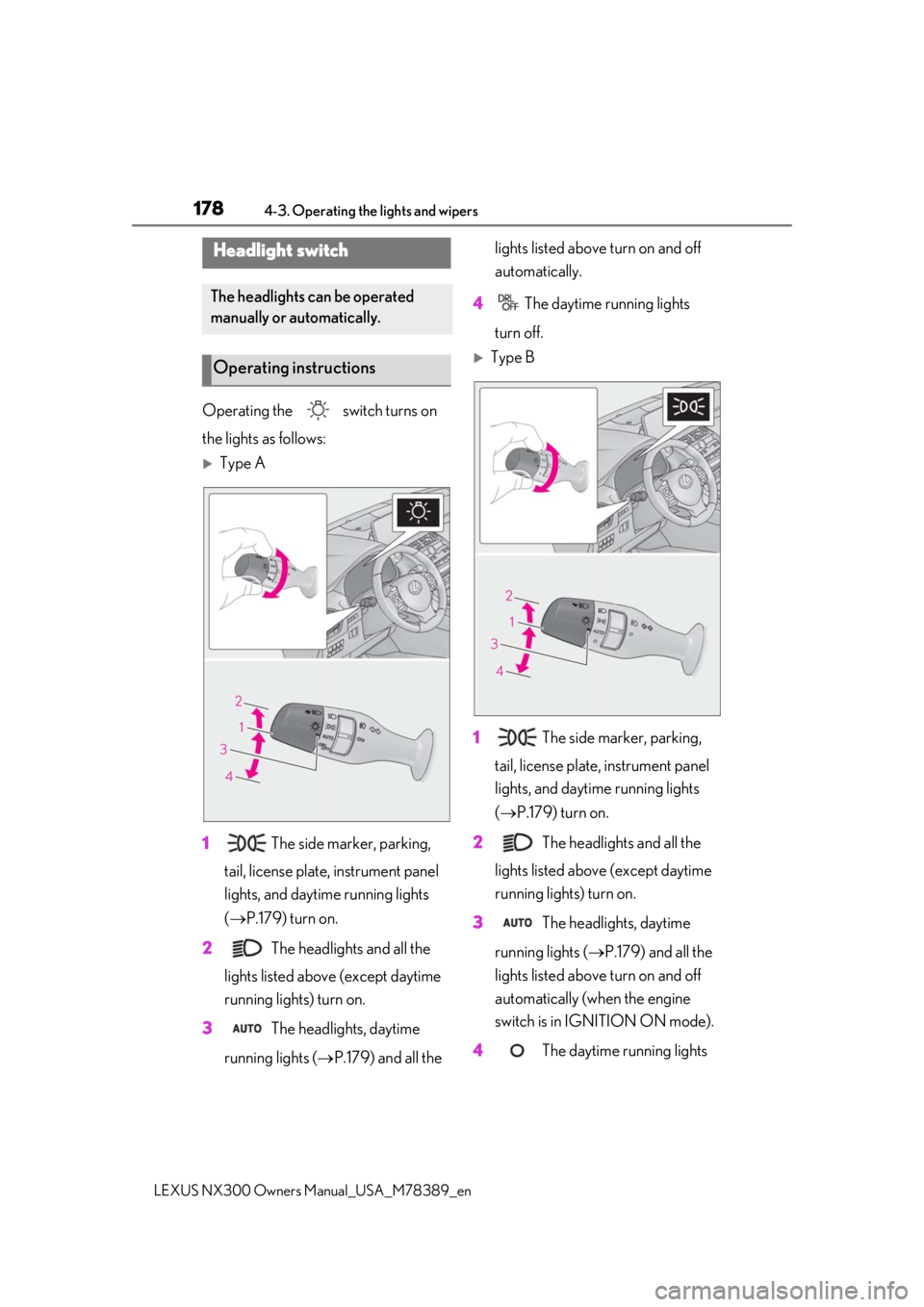
Operating the switch turns on
the lights as follows:
Type A
1 The side marker, parking,
tail, license plate, instrument panel
lights, and daytime running lights
( P.179) turn on.
2 The headlights and all the
lights listed above (except daytime
running lights) turn on.
3 The headlights, daytime
running lights ( P.179) and all the lights listed above turn on and off
automatically.
4 The daytime running lights
turn off.
Type B
1 The side marker, parking,
tail, license plate, instrument panel
lights, and daytime running lights
( P.179) turn on.
2 The headlights and all the
lights listed above (except daytime
running lights) turn on.
3 The headlights, daytime
running lights ( P.179) and all the
lights listed above turn on and off
automatically (when the engine
switch is in IGNITION ON mode).
4 The daytime running lights
Headlight switch
The headlights can be operated
manually or automatically.
Operating instructions
Page 286 of 468
2865-2. Using the air conditioning system and defogger
LEXUS NX300 Owners Manual_USA_M78389_en
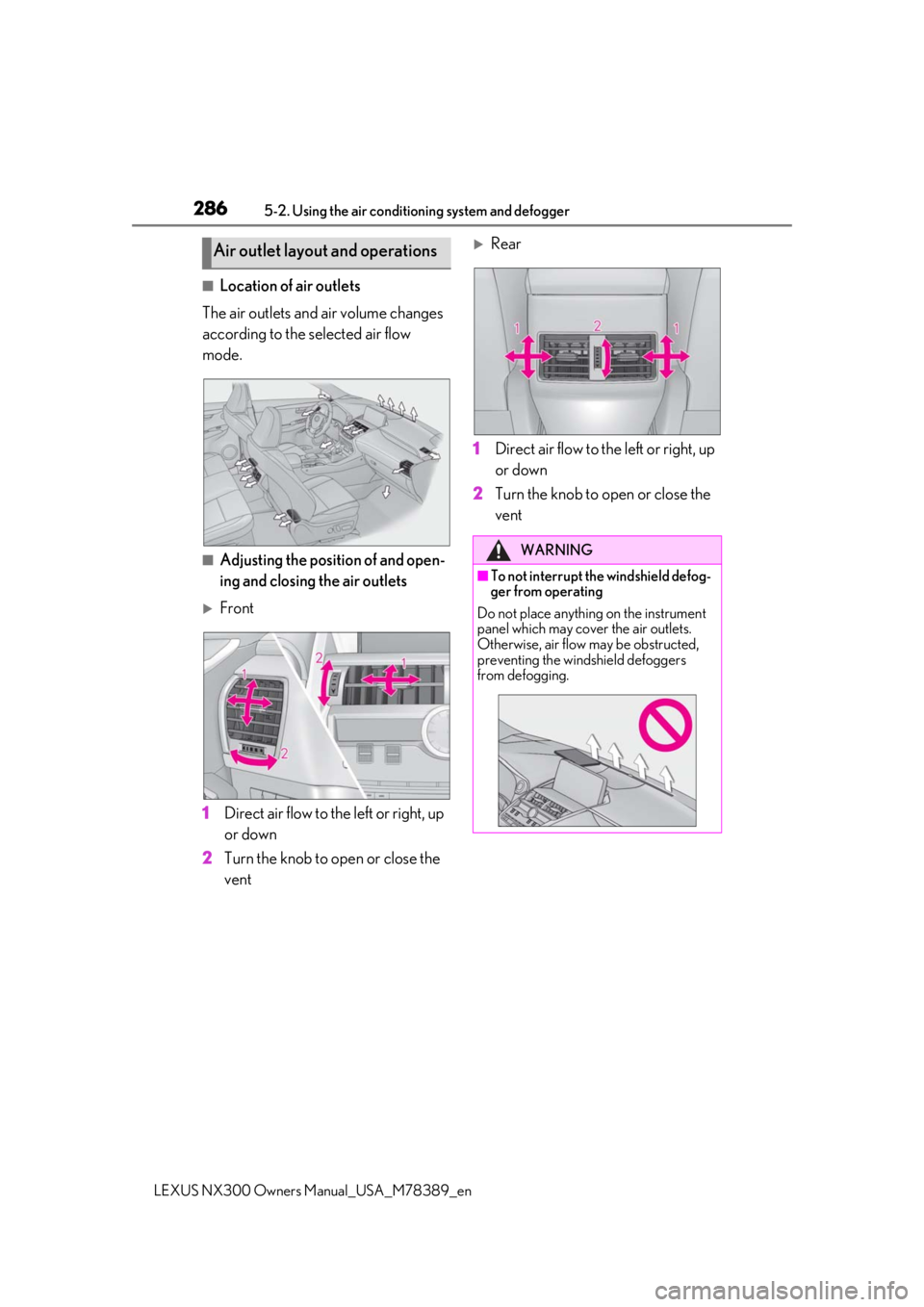
■Location of air outlets
The air outlets and air volume changes
according to the selected air flow
mode.
■Adjusting the position of and open-
ing and closing the air outlets
Front
1
Direct air flow to the left or right, up
or down
2
Turn the knob to open or close the
vent
Rear
1
Direct air flow to the left or right, up
or down
2
Turn the knob to open or close the
vent
Air outlet layout and operations
WARNING
■To not interrupt the windshield defog-
ger from operating
Do not place anything on the instrument
panel which may cover the air outlets.
Otherwise, air flow may be obstructed,
preventing the windshield defoggers
from defogging.
Page 324 of 468
3246-1. Maintenance and care
LEXUS NX300 Owners Manual_USA_M78389_en
●If the windows are very dirty, do not open
and close them repeatedly.
WARNING
■Water in the vehicle
●Do not splash or spill liquid in the vehi-
cle.
Doing so may cause electrical compo-
nents, etc. to malfunction or catch fire.
●Do not get any of the SRS components
or wiring in the vehicle interior wet.
( P.32)
An electrical malfunction may cause
the airbags to deploy or not function
properly, resulting in death or serious
injury.
■Cleaning the interior (especially
instrument panel)
Do not use polish wax or polish cleaner.
The instrument panel may reflect off the
windshield, obstructing the driver’s view
and leading to an accident, resulting in
death or serious injury.
NOTICE
■Cleaning detergents
●Do not use the following types of
detergent, as they may discolor the
vehicle interior or cause streaks or
damage to painted surfaces:
• Non-seat portions: Organic sub- stances such as benzene or gasoline,
alkaline or acidic solutions, dye, and
bleach
• Seats: Alkaline or acidic solutions, such as thinner, benzene, and alcohol
●Do not use polish wax or polish
cleaner. The instrument panel’s or
other interior part’s painted surface
may be damaged.
■Preventing damage to leather sur-
faces
Observe the following precautions to
avoid damage to and deterioration of
leather surfaces:
●Remove any dust or dirt from leather
surfaces immediately.
●Do not expose the vehicle to direct
sunlight for extended periods of time.
Park the vehicle in the shade, espe-
cially during summer.
●Do not place items made of vinyl, plas-
tic, or containing wax on the uphol-
stery, as they may stick to the leather
surface if the vehicle interior heats up
significantly.
■Water on the floor
Do not wash the vehicle floor with water.
Vehicle systems such as the audio system
may be damaged if water comes into
contact with electrical components such
as the audio system above or under the
floor of the vehicle. Water may also
cause the body to rust.
■When cleaning the inside of the wind-
shield (vehicles with Lexus Safety
System+ 2.0)
Do not allow glass cleaner to contact the
lens. Also, do not touch the lens.
( P.193)
■Cleaning the inside of the rear win-
dow
●Do not use glass cleaner to clean the
rear window, as this may cause dam-
age to the rear window defogger
heater wires or antenna. Use a cloth
dampened with lukewarm water to
gently wipe the window clean. Wipe
the window in strokes running parallel
to the heater wires or antenna.
●Be careful not to scratch or damage
the heater wires or antenna.