warning lights LEXUS NX300 2020 User Guide
[x] Cancel search | Manufacturer: LEXUS, Model Year: 2020, Model line: NX300, Model: LEXUS NX300 2020Pages: 468, PDF Size: 10.24 MB
Page 74 of 468

742-1. Instrument cluster
LEXUS NX300 Owners Manual_USA_M78389_en
2-1.Instrument cluster
For the purpose of explanatio n, the following illustration displays all warning lights
and indicators illuminated.
The units used on the meters and some indicators may differ depending on the target
region.
Warning lights and indicators
The warning lights and indicators inform th e driver of the status of the vehicle’s
various systems.
Instrument cluster
Page 75 of 468

752-1. Instrument cluster
LEXUS NX300 Owners Manual_USA_M78389_en
2
Vehicle status information and indicators
Warning lights inform the driver of mal-
functions in any of the vehicle’s sys-
tems.
*1: These lights turn on when the engine
switch is turned to IGNITION ON
mode to indicate that a system check is
being performed. They will turn off after
Warning lights
(U.S.A.)
Brake system warning light*1
( P.375)
(Red)
(Canada)
Brake system warning light*1
( P.375)
Charging system warning
light
*2 ( P.375)
Low engine oil pressure warn-
ing light
*2 ( P.375)
High coolant temperature
warning light
*2 ( P.376)
(Yellow)
Brake system warning light*1
( P.376)
(U.S.A.)
Malfunction indicator lamp*1
( P.376)
(Canada)
Malfunction indicator lamp*1
( P.376)
SRS warning light
*1 ( P.376)
(U.S.A.)
ABS warning light*1 ( P.377)
(Canada)
ABS warning light*1 ( P.377)
(Yellow)
Electric power steering sys-
tem warning light
*1 ( P.377)
(Red)
Electric power steering sys-
tem warning light
*1 ( P.377)
PCS warning light
*1 ( P.377)
(Orange)
LTA indicator*2 (if equipped)
( P.378)
LDA indicator
*2 (if equipped)
( P.378)
PKSB OFF indicator
*1, 3 (if
equipped) ( P.378)
Slip indicator light
*1 ( P.378)
Brake hold operated indica-
tor
*1, 3 ( P.379)
(U.S.A.)
Parking brake indicator*3
( P.379)
(Canada)
Parking brake indicator*3
( P.379)
Low fuel level warning light
( P.379)
Driver’s and front passenger’s
seat belt reminder light
( P.379)
Rear passengers’ seat belt
reminder light
*4 ( P.380)
Master warning light
*1
( P.380)
Tire pressure warning light
*1
( P.380)
Brake Override Sys-
tem/Drive-Start Control warn-
ing light
*2 ( P.381)
Page 76 of 468

762-1. Instrument cluster
LEXUS NX300 Owners Manual_USA_M78389_en
the engine is started, or after a few sec-
onds. There may be a malfunction in a
system if the lights do not turn on, or
turn off. Have the vehicle inspected by
your Lexus dealer.
*2: This light illuminates on the multi-infor-
mation display.
*3: The light flashes to indicate a malfunc-tion.
*4: This light illuminates on the center panel.
The indicators inform the driver of the
operating state of the vehicle’s various
systems.
WARNING
■If a safety system warning light does
not come on
Should a safety system light such as the
ABS and SRS airbag warning light not
come on when you start the engine, this
could mean that these systems are not
available to help pr otect you in an acci-
dent, which could result in death or seri-
ous injury. Have the vehicle inspected by
your Lexus dealer immediately if this
occurs.
Indicators
Turn signal indicator ( P.172)
(U.S.A.)
Headlight indicator ( P.178)
(Canada)
Tail light indicator ( P.178)
Headlight high beam indicator
( P.180)
Automatic High Beam indica-
tor ( P.181)
Fog light indicator ( P.184)
Eco Driving Indicator Light
*1
( P.78)
“Eco” indicator
*2 ( P.258)
“Sport” indicator
*2 ( P.258)
“Sport S” indicator
*2 (if
equipped) ( P.258)
“Sport S+” indicator
*2 (if
equipped) ( P.258)
“Custom” indicator
*2 (if
equipped) ( P.258)
Dynamic radar cruise control
indicator
*2 ( P.225)
Cruise control “SET” indica-
tor
*2 ( P.225)
Cruise control indicator
*2
( P.225)
Page 77 of 468
772-1. Instrument cluster
LEXUS NX300 Owners Manual_USA_M78389_en
2
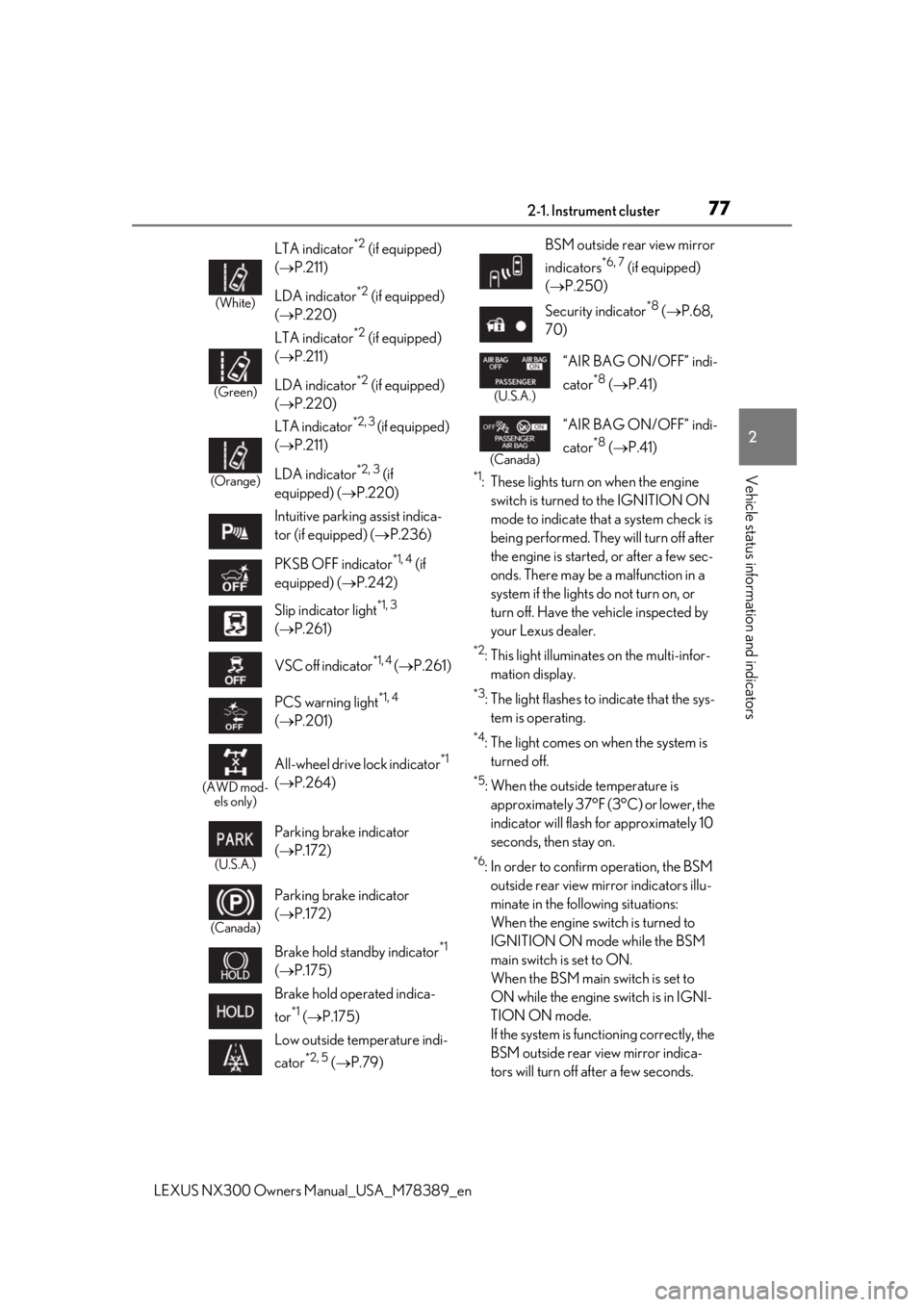
Vehicle status information and indicators*1: These lights turn on when the engine
switch is turned to the IGNITION ON
mode to indicate that a system check is
being performed. They will turn off after
the engine is started, or after a few sec-
onds. There may be a malfunction in a
system if the lights do not turn on, or
turn off. Have the vehicle inspected by
your Lexus dealer.
*2: This light illuminates on the multi-infor-mation display.
*3: The light flashes to indicate that the sys-tem is operating.
*4: The light comes on when the system is turned off.
*5: When the outside temperature is approximately 37°F (3°C) or lower, the
indicator will flash for approximately 10
seconds, then stay on.
*6: In order to confirm operation, the BSM outside rear view mirror indicators illu-
minate in the following situations:
When the engine switch is turned to
IGNITION ON mode while the BSM
main switch is set to ON.
When the BSM main switch is set to
ON while the engine switch is in IGNI-
TION ON mode.
If the system is func tioning correctly, the
BSM outside rear view mirror indica-
tors will turn off after a few seconds.
(White)
LTA indicator*2 (if equipped)
( P.211)
LDA indicator
*2 (if equipped)
( P.220)
(Green)
LTA indicator*2 (if equipped)
( P.211)
LDA indicator
*2 (if equipped)
( P.220)
(Orange)
LTA indicator*2, 3 (if equipped)
( P.211)
LDA indicator
*2, 3 (if
equipped) ( P.220)
Intuitive parking assist indica-
tor (if equipped) ( P.236)
PKSB OFF indicator
*1, 4 (if
equipped) ( P.242)
Slip indicator light
*1, 3
( P.261)
VSC off indicator
*1, 4 ( P.261)
PCS warning light
*1, 4
( P.201)
(AWD mod-
els only)
All-wheel drive lock indicator*1
( P.264)
(U.S.A.)
Parking brake indicator
( P.172)
(Canada)
Parking brake indicator
( P.172)
Brake hold standby indicator
*1
( P.175)
Brake hold operated indica-
tor
*1 ( P.175)
Low outside temperature indi-
cator
*2, 5 ( P.79)
BSM outside rear view mirror
indicators
*6, 7 (if equipped)
( P.250)
Security indicator
*8 ( P.68,
70)
(U.S.A.)
“AIR BAG ON/OFF” indi-
cator
*8 ( P.41)
(Canada)
“AIR BAG ON/OFF” indi-
cator
*8 ( P.41)
Page 81 of 468

812-1. Instrument cluster
LEXUS NX300 Owners Manual_USA_M78389_en
2
Vehicle status information and indicators
Switches between odometer, trip
meter and maintenance required infor-
mation displays. When the trip meter is
displayed, pressing and holding the
button will reset the trip meter. The brightness of the instrument panel
lights can be adjusted.
1
Darker
2
Brighter
■Instrument panel brightness adjustment
The instrument panel brightness levels
when the tail lights are on and off can be
adjusted individually. However, when the
surroundings are bright (daytime, etc.),
turning on the tail lights will not change the
instrument panel brightness. At this time,
any adjustments made to the instrument
panel brightness levels will be applied to
both settings at once.
WARNING
■The information display at low tem-
peratures
Allow the interior of the vehicle to warm
up before using the liquid crystal infor-
mation display. At extremely low tem-
peratures, the information display
monitor may respond slowly, and display
changes may be delayed.
For example, there is a lag between the
driver’s shifting and the new gear number
appearing on the display. This lag could
cause the driver to downshift again,
causing rapid and excessive engine brak-
ing and possibly an accident resulting in
personal death or injury.
NOTICE
■To prevent damage to the engine and
its components
●Do not let the indicator needle of the
tachometer enter the red zone, which
indicates the maximum engine speed.
●The engine may be overheating if the
engine coolant temperature gauge is
in the red zone (H); or “Engine Cool-
ant Temp High” is shown on the multi-
information display. In this case, imme-
diately stop the vehicle in a safe place,
and check the engine after it has
cooled completely. ( P.403)
Changing between the odome-
ter, trip meter and maintenance
required information
Changing the Instrument panel
light brightness
Page 101 of 468

1013-2. Opening, closing and locking the doors
LEXUS NX300 Owners Manual_USA_M78389_en
3
Before driving
For vehicles with alarm: To prevent unin-
tended triggering of the alarm, unlock the
doors using the wireless remote control and
open and close a door once after the set-
tings have been changed. (If a door is not
opened within 60 seconds after is
pressed, the doors will be locked again and
the alarm will automatically be set.)
In a case that the alarm is triggered, imme-
diately stop the alarm. ( P.70)
■Locking the doors from the outside with-
out a key
1 Move the inside lock button to the lock
position.
2 Close the door.
The door cannot be locked if the engine
switch is in ACCESSORY or IGNITION
ON mode, or the electronic key is left
inside the vehicle.
The key may not be detected correctly and
the door may be locked.
■Impact detection door lock release sys-
tem
In the event that the vehicle is subject to a
strong impact, all the doors are unlocked. Depending on the force of the impact or the
type of accident, however, the system may
not operate.
■Operation signals
Doors:
A buzzer sounds and the emergency flash-
ers flash to indicate that the doors have
been locked/unlocked. (Locked: Once;
Unlocked: Twice)
Windows and moon roof:
A buzzer sounds to indicate that all win-
dows and moon roof are opening.
■Security feature
If a door is not opened within approximately
60 seconds after the vehicle is unlocked,
the security feature automatically locks the
vehicle again.
■Open door warning buzzer
If the vehicle speed reaches 3 mph (5
km/h), the master warning light flashes and
a buzzer sounds to indicate that door(s) or
the hood in not fully closed.
The open door(s) or hood is displayed on
the multi-information display.
■Welcome light illumination control
The side marker, parking, tail and license
plate lights automatically turn on at night
when the doors are unlocked using the
entry function or wireless remote control if
the light switch is in the position.
■When the door cannot be locked by the
lock sensor on the surface of the door
handle
When the door cannot be locked even if the
lock sensor on the surface of the door han-
dle is touched by a finger, touch the lock
sensor with the palm.
When gloves are being worn, remove the
gloves.
Multi-information display/BeepUnlocking function
Exterior: Beeps 3 times
Interior: Pings once
Holding the driver’s
door handle unlocks
only the driver’s door.
Holding any of the
passenger door han- dles unlocks all the doors.
Exterior: Beeps twice
Interior: Pings once
Holding a door han-dle unlocks all the doors.
Page 134 of 468

1343-4. Adjusting the steering wheel and mirrors
LEXUS NX300 Owners Manual_USA_M78389_en
To sound the horn, press on or close to
the mark. The height of the rear view mirror can
be adjusted to suit your driving pos-
ture.
Adjust the height of the rear view mir-
ror by moving it up and down.
Responding to the level of brightness
of the headlights of vehicles behind, the
reflected light is automatically
reduced.
Type A
Changing automatic anti-glare func-
tion mode on/off
WARNING
■Caution while driving
Do not adjust the steering wheel while
driving.
Doing so may cause the driver to mis-
handle the vehicle and cause an acci-
dent, resulting in death or serious injury.
■After adjusting the steering wheel
(manual type)
Make sure that the steering wheel is
securely locked.
Otherwise, the steering wheel may move
suddenly, possibly causing an accident,
resulting in death or serious injury.
Sounding the horn
Inside rear view mirror
The rear view mirror’s position can
be adjusted to enable sufficient
confirmation of the rear view.
Adjusting the heig ht of rear view
mirror
WARNING
■Caution while driving
Do not adjust the position of the mirror
while driving.
Doing so may lead to mishandling of the
vehicle and cause an accident, resulting
in death or serious injury.
Anti-glare function
Page 158 of 468
1584-1. Before driving
LEXUS NX300 Owners Manual_USA_M78389_en
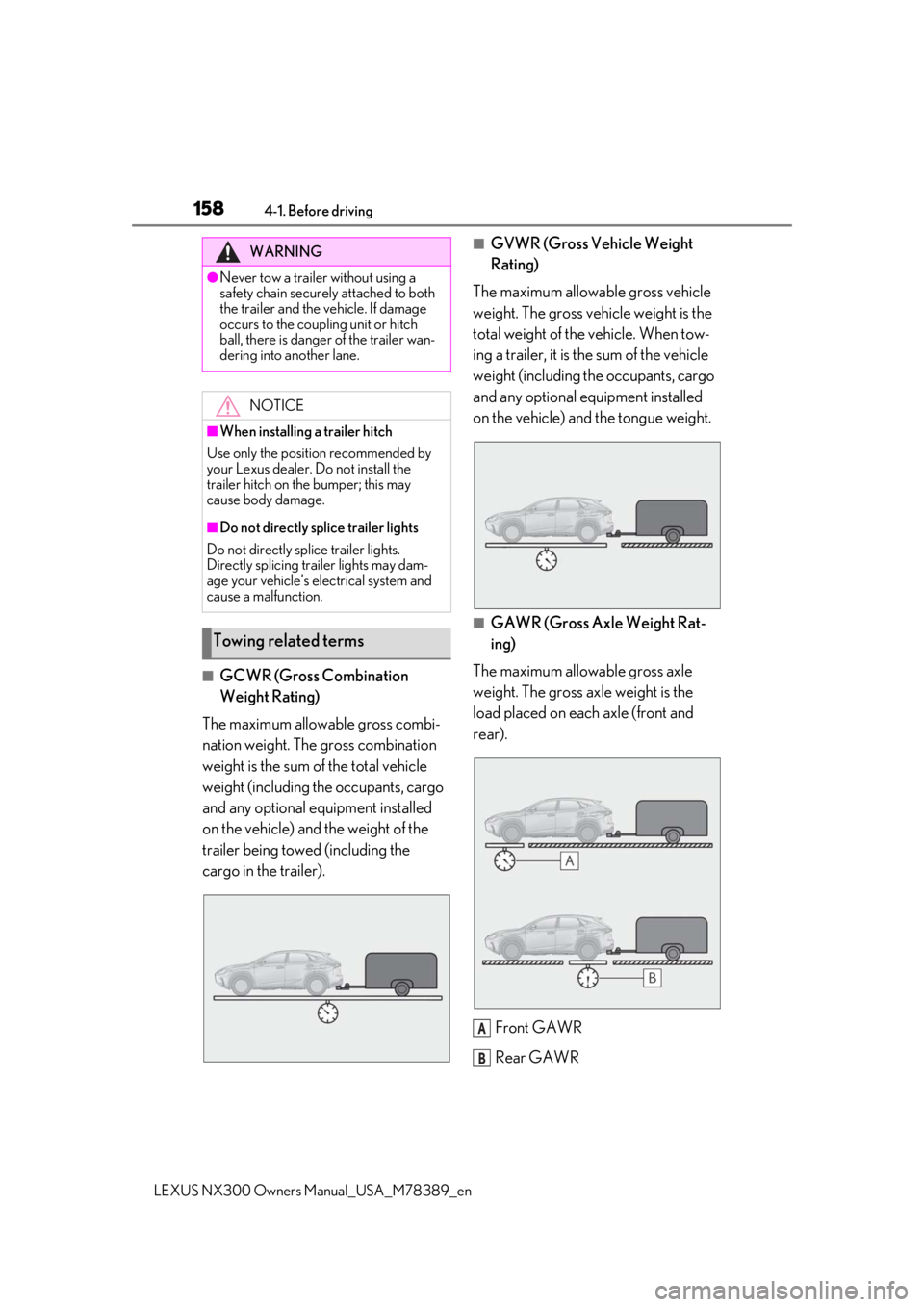
■GCWR (Gross Combination
Weight Rating)
The maximum allowable gross combi-
nation weight. The gross combination
weight is the sum of the total vehicle
weight (including the occupants, cargo
and any optional equipment installed
on the vehicle) and the weight of the
trailer being towed (including the
cargo in the trailer).
■GVWR (Gross Vehicle Weight
Rating)
The maximum allowable gross vehicle
weight. The gross vehicle weight is the
total weight of the vehicle. When tow-
ing a trailer, it is the sum of the vehicle
weight (including the occupants, cargo
and any optional equipment installed
on the vehicle) and the tongue weight.
■GAWR (Gross Axle Weight Rat-
ing)
The maximum allowable gross axle
weight. The gross axle weight is the
load placed on each axle (front and
rear).
Front GAWR
Rear GAWR
WARNING
●Never tow a trailer without using a
safety chain securely attached to both
the trailer and the vehicle. If damage
occurs to the coupling unit or hitch
ball, there is danger of the trailer wan-
dering into another lane. NOTICE
■When installing a trailer hitch
Use only the position recommended by
your Lexus dealer. Do not install the
trailer hitch on the bumper; this may
cause body damage.
■Do not directly splice trailer lights
Do not directly splice trailer lights.
Directly splicing trailer lights may dam-
age your vehicle’s electrical system and
cause a malfunction.
Towing related terms
A
B
Page 161 of 468
1614-1. Before driving
LEXUS NX300 Owners Manual_USA_M78389_en
4
Driving
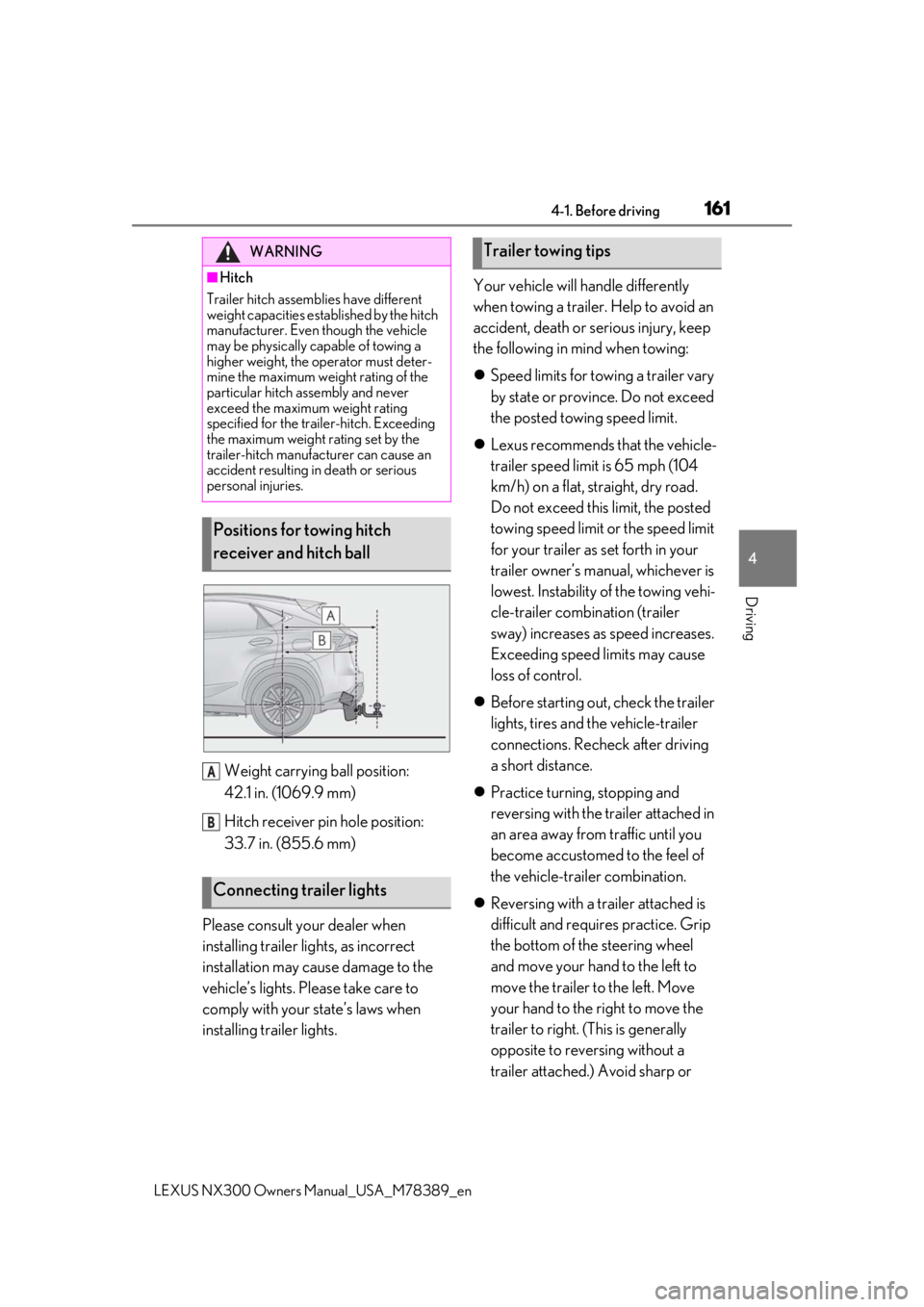
Weight carrying ball position:
42.1 in. (1069.9 mm)
Hitch receiver pin hole position:
33.7 in. (855.6 mm)
Please consult your dealer when
installing trailer lights, as incorrect
installation may cause damage to the
vehicle’s lights. Please take care to
comply with your state’s laws when
installing trailer lights. Your vehicle will handle differently
when towing a trailer. Help to avoid an
accident, death or serious injury, keep
the following in mind when towing:
Speed limits for towing a trailer vary
by state or province. Do not exceed
the posted towing speed limit.
Lexus recommends that the vehicle-
trailer speed limit is 65 mph (104
km/h) on a flat, straight, dry road.
Do not exceed this limit, the posted
towing speed limit or the speed limit
for your trailer as set forth in your
trailer owner’s manual, whichever is
lowest. Instability of the towing vehi-
cle-trailer combination (trailer
sway) increases as speed increases.
Exceeding speed limits may cause
loss of control.
Before starting out, check the trailer
lights, tires and the vehicle-trailer
connections. Recheck after driving
a short distance.
Practice turning, stopping and
reversing with the trailer attached in
an area away from traffic until you
become accustomed to the feel of
the vehicle-trailer combination.
Reversing with a trailer attached is
difficult and requires practice. Grip
the bottom of the steering wheel
and move your hand to the left to
move the trailer to the left. Move
your hand to the right to move the
trailer to right. (This is generally
opposite to reversing without a
trailer attached.) Avoid sharp or
WARNING
■Hitch
Trailer hitch assemb lies have different
weight capacities established by the hitch
manufacturer. Even though the vehicle
may be physically capable of towing a
higher weight, the operator must deter-
mine the maximum weight rating of the
particular hitch assembly and never
exceed the maximum weight rating
specified for the trailer-hitch. Exceeding
the maximum weight rating set by the
trailer-hitch manufacturer can cause an
accident resulting in death or serious
personal injuries.
Positions for towing hitch
receiver and hitch ball
Connecting trailer lights
A
B
Trailer towing tips
Page 181 of 468
1814-3. Operating the lights and wipers
LEXUS NX300 Owners Manual_USA_M78389_en
4
Driving
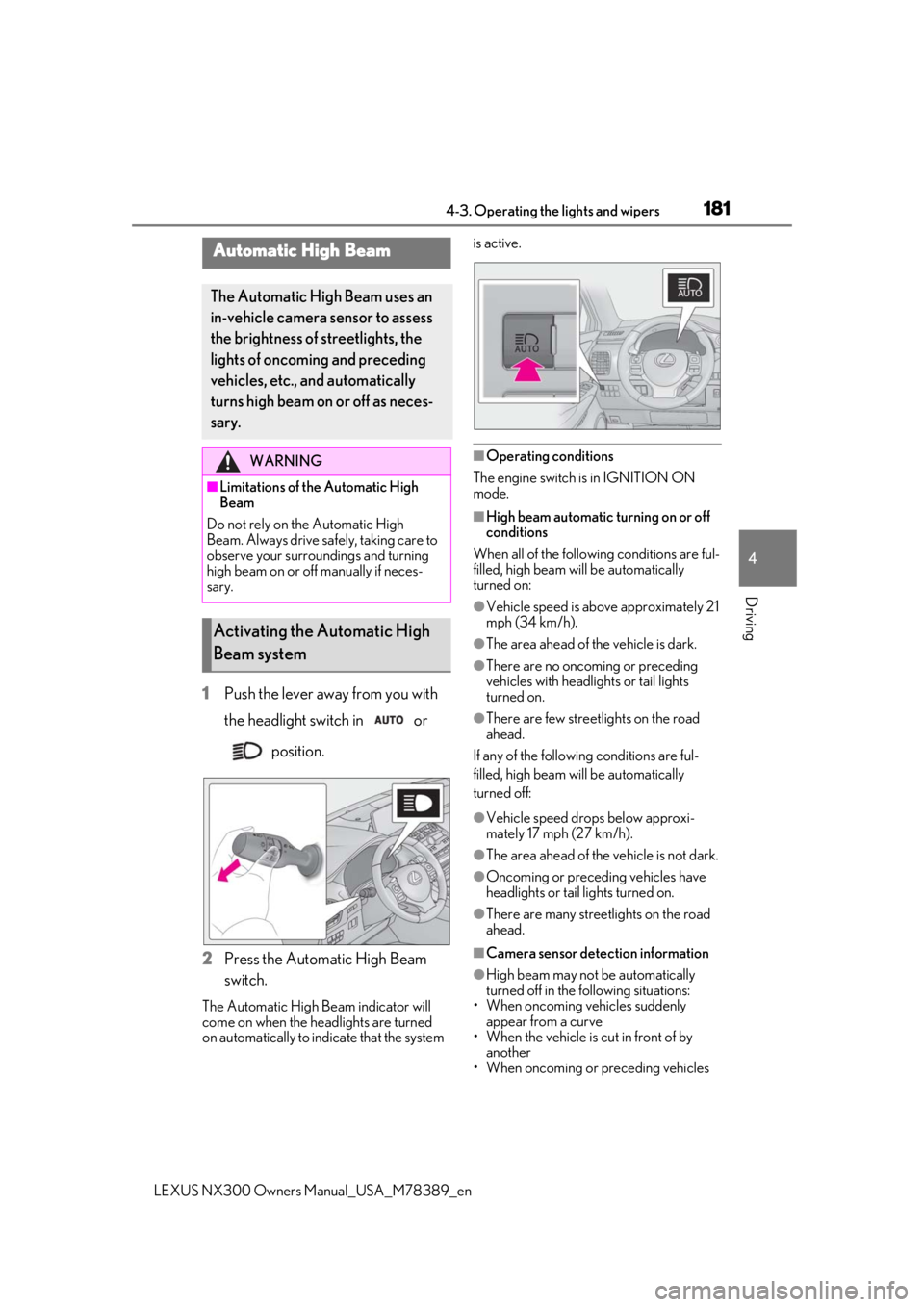
1Push the lever away from you with
the headlight switch in or
position.
2
Press the Automatic High Beam
switch.
The Automatic High Beam indicator will
come on when the headlights are turned
on automatically to indicate that the system is active.
■Operating conditions
The engine switch is in IGNITION ON
mode.
■High beam automatic turning on or off
conditions
When all of the following conditions are ful-
filled, high beam will be automatically
turned on:
●Vehicle speed is above approximately 21
mph (34 km/h).
●The area ahead of the vehicle is dark.
●There are no oncoming or preceding
vehicles with headlights or tail lights
turned on.
●There are few streetlights on the road
ahead.
If any of the following conditions are ful-
filled, high beam will be automatically
turned off:
●Vehicle speed drops below approxi-
mately 17 mph (27 km/h).
●The area ahead of the vehicle is not dark.
●Oncoming or preceding vehicles have
headlights or tail lights turned on.
●There are many streetlights on the road
ahead.
■Camera sensor detection information
●High beam may not be automatically
turned off in the following situations:
• When oncoming vehicles suddenly
appear from a curve
• When the vehicle is cut in front of by another
• When oncoming or preceding vehicles
Automatic High Beam
The Automatic High Beam uses an
in-vehicle camera sensor to assess
the brightness of streetlights, the
lights of oncoming and preceding
vehicles, etc., and automatically
turns high beam on or off as neces-
sary.
WARNING
■Limitations of the Automatic High
Beam
Do not rely on the Automatic High
Beam. Always drive sa fely, taking care to
observe your surroundings and turning
high beam on or off manually if neces-
sary.
Activating the Automatic High
Beam system