ECO LEXUS NX300 2020 Owner's Manual
[x] Cancel search | Manufacturer: LEXUS, Model Year: 2020, Model line: NX300, Model: LEXUS NX300 2020Pages: 468, PDF Size: 10.24 MB
Page 76 of 468

762-1. Instrument cluster
LEXUS NX300 Owners Manual_USA_M78389_en
the engine is started, or after a few sec-
onds. There may be a malfunction in a
system if the lights do not turn on, or
turn off. Have the vehicle inspected by
your Lexus dealer.
*2: This light illuminates on the multi-infor-
mation display.
*3: The light flashes to indicate a malfunc-tion.
*4: This light illuminates on the center panel.
The indicators inform the driver of the
operating state of the vehicle’s various
systems.
WARNING
■If a safety system warning light does
not come on
Should a safety system light such as the
ABS and SRS airbag warning light not
come on when you start the engine, this
could mean that these systems are not
available to help pr otect you in an acci-
dent, which could result in death or seri-
ous injury. Have the vehicle inspected by
your Lexus dealer immediately if this
occurs.
Indicators
Turn signal indicator ( P.172)
(U.S.A.)
Headlight indicator ( P.178)
(Canada)
Tail light indicator ( P.178)
Headlight high beam indicator
( P.180)
Automatic High Beam indica-
tor ( P.181)
Fog light indicator ( P.184)
Eco Driving Indicator Light
*1
( P.78)
“Eco” indicator
*2 ( P.258)
“Sport” indicator
*2 ( P.258)
“Sport S” indicator
*2 (if
equipped) ( P.258)
“Sport S+” indicator
*2 (if
equipped) ( P.258)
“Custom” indicator
*2 (if
equipped) ( P.258)
Dynamic radar cruise control
indicator
*2 ( P.225)
Cruise control “SET” indica-
tor
*2 ( P.225)
Cruise control indicator
*2
( P.225)
Page 77 of 468
772-1. Instrument cluster
LEXUS NX300 Owners Manual_USA_M78389_en
2
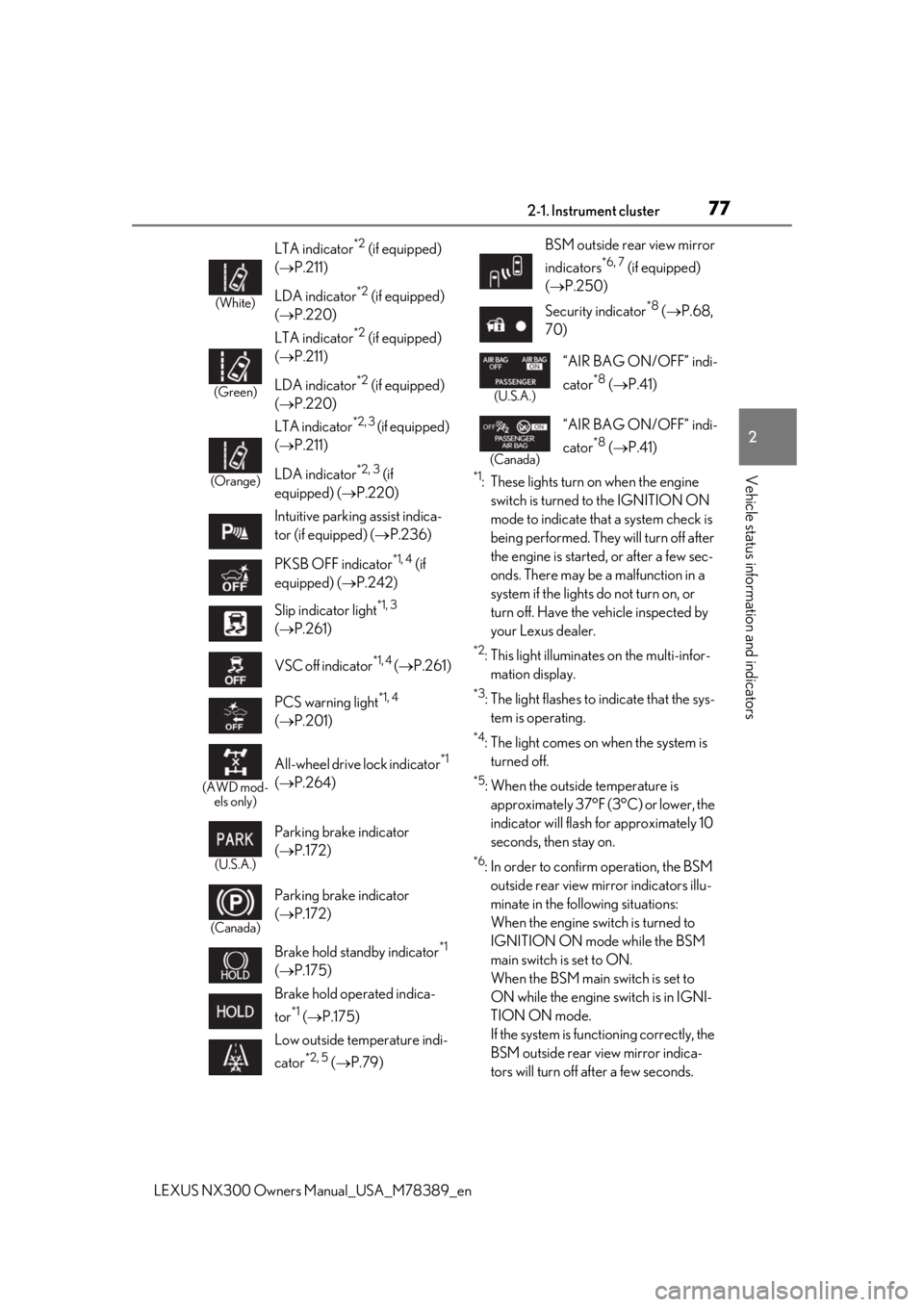
Vehicle status information and indicators*1: These lights turn on when the engine
switch is turned to the IGNITION ON
mode to indicate that a system check is
being performed. They will turn off after
the engine is started, or after a few sec-
onds. There may be a malfunction in a
system if the lights do not turn on, or
turn off. Have the vehicle inspected by
your Lexus dealer.
*2: This light illuminates on the multi-infor-mation display.
*3: The light flashes to indicate that the sys-tem is operating.
*4: The light comes on when the system is turned off.
*5: When the outside temperature is approximately 37°F (3°C) or lower, the
indicator will flash for approximately 10
seconds, then stay on.
*6: In order to confirm operation, the BSM outside rear view mirror indicators illu-
minate in the following situations:
When the engine switch is turned to
IGNITION ON mode while the BSM
main switch is set to ON.
When the BSM main switch is set to
ON while the engine switch is in IGNI-
TION ON mode.
If the system is func tioning correctly, the
BSM outside rear view mirror indica-
tors will turn off after a few seconds.
(White)
LTA indicator*2 (if equipped)
( P.211)
LDA indicator
*2 (if equipped)
( P.220)
(Green)
LTA indicator*2 (if equipped)
( P.211)
LDA indicator
*2 (if equipped)
( P.220)
(Orange)
LTA indicator*2, 3 (if equipped)
( P.211)
LDA indicator
*2, 3 (if
equipped) ( P.220)
Intuitive parking assist indica-
tor (if equipped) ( P.236)
PKSB OFF indicator
*1, 4 (if
equipped) ( P.242)
Slip indicator light
*1, 3
( P.261)
VSC off indicator
*1, 4 ( P.261)
PCS warning light
*1, 4
( P.201)
(AWD mod-
els only)
All-wheel drive lock indicator*1
( P.264)
(U.S.A.)
Parking brake indicator
( P.172)
(Canada)
Parking brake indicator
( P.172)
Brake hold standby indicator
*1
( P.175)
Brake hold operated indica-
tor
*1 ( P.175)
Low outside temperature indi-
cator
*2, 5 ( P.79)
BSM outside rear view mirror
indicators
*6, 7 (if equipped)
( P.250)
Security indicator
*8 ( P.68,
70)
(U.S.A.)
“AIR BAG ON/OFF” indi-
cator
*8 ( P.41)
(Canada)
“AIR BAG ON/OFF” indi-
cator
*8 ( P.41)
Page 78 of 468
782-1. Instrument cluster
LEXUS NX300 Owners Manual_USA_M78389_en
If the BSM outside rear view mirror indi-
cators do not illuminate or do not turn
off, there may be a malfunction in the
system.
If this occurs, have
the vehicle inspected
by your Lexus dealer.
*7: This light illuminates on the outside rear view mirrors.
*8: This light illuminates on the center panel.
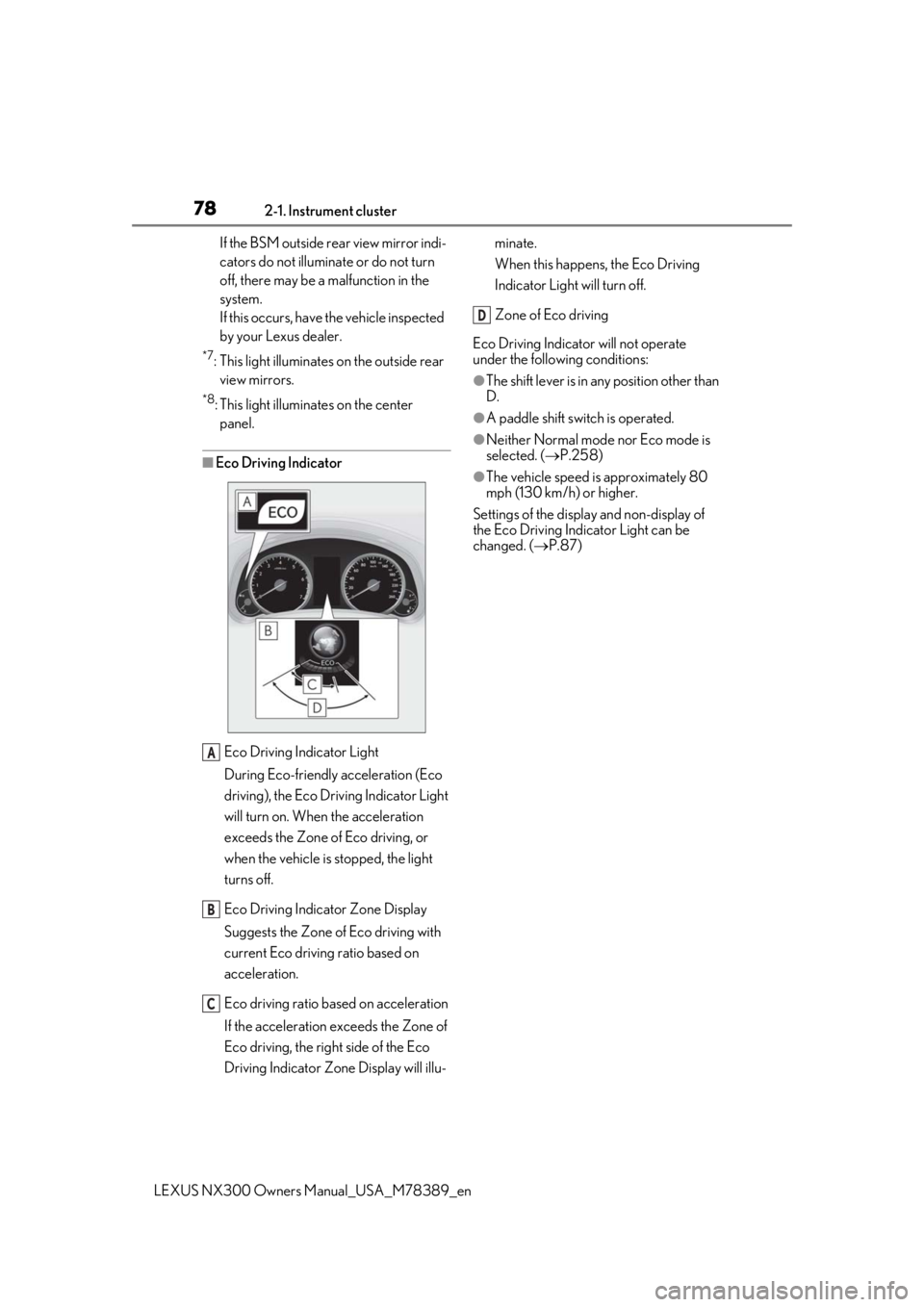
■Eco Driving Indicator
Eco Driving Indicator Light
During Eco-friendly acceleration (Eco
driving), the Eco Driving Indicator Light
will turn on. When the acceleration
exceeds the Zone of Eco driving, or
when the vehicle is stopped, the light
turns off.
Eco Driving Indicator Zone Display
Suggests the Zone of Eco driving with
current Eco driving ratio based on
acceleration.
Eco driving ratio based on acceleration
If the acceleration exceeds the Zone of
Eco driving, the right side of the Eco
Driving Indicator Zone Display will illu- minate.
When this happens, the Eco Driving
Indicator Light will turn off.
Zone of Eco driving
Eco Driving Indicator will not operate
under the following conditions:
●The shift lever is in an y position other than
D.
●A paddle shift swit ch is operated.
●Neither Normal mode nor Eco mode is
selected. (P.258)
●The vehicle speed is approximately 80
mph (130 km/h) or higher.
Settings of the display and non-display of
the Eco Driving Indicator Light can be
changed. ( P.87)
A
B
C
D
Page 79 of 468
792-1. Instrument cluster
LEXUS NX300 Owners Manual_USA_M78389_en
2
Vehicle status information and indicators
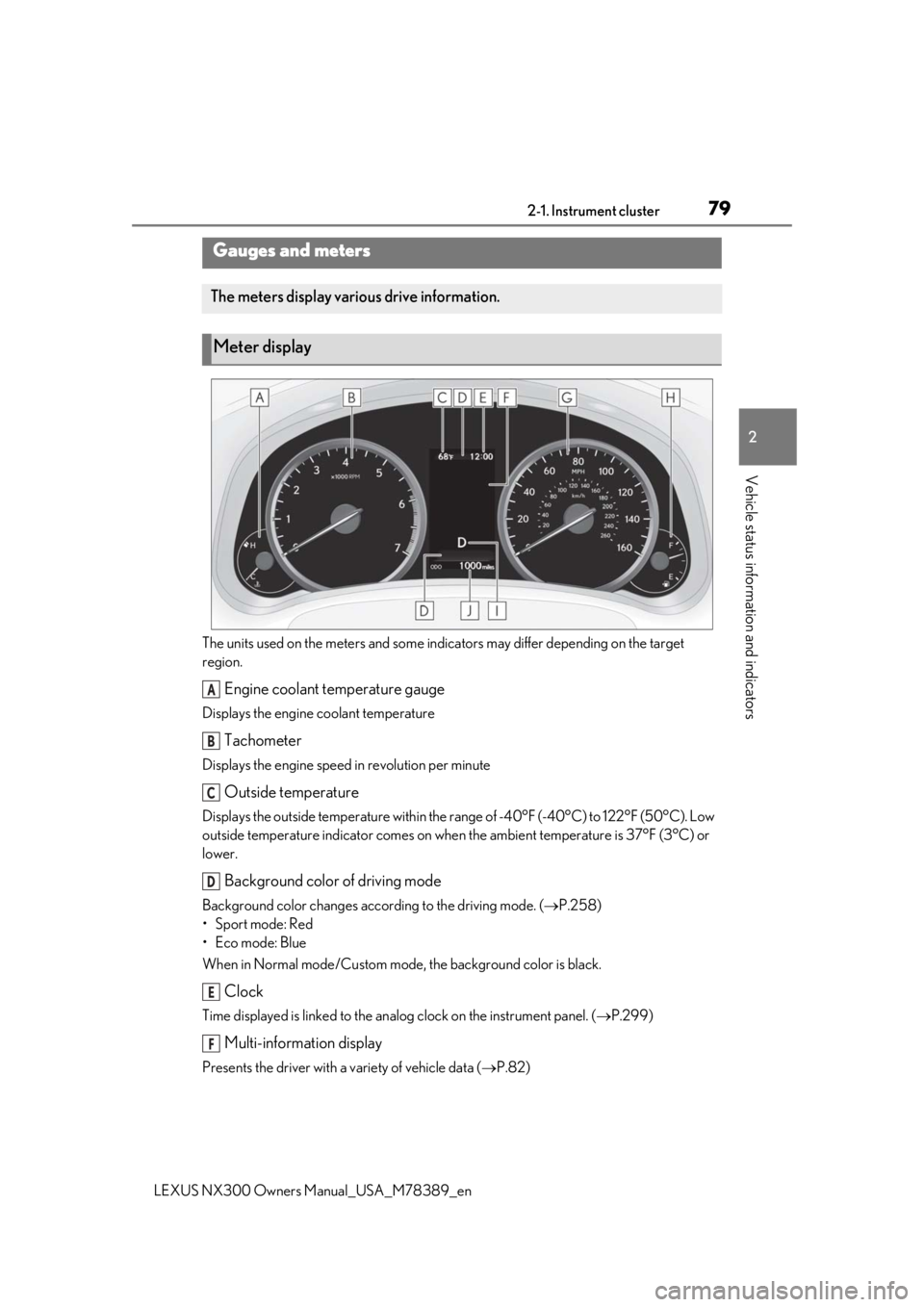
The units used on the meters and some indicators may differ depending on the target
region.
Engine coolant temperature gauge
Displays the engine coolant temperature
Tachometer
Displays the engine speed in revolution per minute
Outside temperature
Displays the outside temperature within the range of -40°F (-40°C) to 122°F (50°C). Low
outside temperature indicator comes on when the ambient temperature is 37°F (3°C) or
lower.
Background color of driving mode
Background color changes acco rding to the driving mode. (P.258)
•Sport mode: Red
•Eco mode: Blue
When in Normal mode/Custom mode , the background color is black.
Clock
Time displayed is linked to the analog clock on the instrument panel. (P.299)
Multi-information display
Presents the driver with a variety of vehicle data ( P.82)
Gauges and meters
The meters display various drive information.
Meter display
A
B
C
D
E
F
Page 80 of 468

802-1. Instrument cluster
LEXUS NX300 Owners Manual_USA_M78389_en
Displays warning messages in
case of a malfunction (P.384)
Speedometer
Displays the vehicle speed
Fuel gauge
Displays the quantity of fuel remaining in the tank
Shift position and shift range
Displays the selected shift posi tion or selected shift range (P.168)
Odometer, trip meter and maintena nce required information display
Odometer:
Displays the total distance the vehicle has been driven
Trip meter:
Displays the distance the vehicle has been driven since the meter was last reset.
Trip meters “A” and “B” can be used to record and display different distances inde-
pendently.
Maintenance required information:
Displays the remaining distance until the engine oil should be changed.
• Displays the maintenance requir ed information when the engine switch is in IGNITION
ON mode.
• It can be reset on of the multi-information display. ( P.85)
■Operating condition
The engine switch is in IGNITION ON
mode.
■Outside temperature display
●In the following situations, the correct
outside temperature may not be dis-
played, or the display may take longer
than normal to change.
• When stopped, or driving at low speeds
(less than 12 mph [20 km/h])
• When the outside temperature has changed suddenly (at the entrance/exit of
a garage, tunnel, etc.)
●When “--” or “E” is displayed, the system
may be malfunctioning.
Take your vehicle to your Lexus dealer.
■Pop-up display
In some situations, a pop-up display will be
temporarily displayed on the multi-informa-
tion display or the odometer/trip
meter/maintenance re quired information
screen.
The pop-up display function can be set on/off. (
P.87)
■Liquid crystal display
Small spots or light sp ots may appear on the
display. This phenomen on is characteristic
of liquid crystal disp lays, and there is no
problem continuing to use the display.
■Customization
The meter display can be customized on
the multi-information display.
(Customizable features: P.427)
G
H
I
J
Page 83 of 468
832-1. Instrument cluster
LEXUS NX300 Owners Manual_USA_M78389_en
2
Vehicle status information and indicators
will be shown.
Call sending/receiving and history
display
Linked with the hands-free system, sending
or receiving call is displayed. For details
regarding the hands-free system, refer to
the “NAVIGATION AND MULTIMEDIA
SYSTEM OWNER’S MANUAL”.
■Content displayed as drive infor-
mation
Select to display various drive data.
Items displayed can be switched by
pressing or of the meter con-
trol switches to select and pressing
or .
Current fuel consumption
*1
Displays the current rate of fuel consump-
tion
Average fuel consumption (after
reset
*2/after start/after refuel)*1
Displays the average fuel consumption
since the function was reset, the engine
was started, and the vehicle was refueled,
respectively
Use the displayed average fuel consump-
tion as a reference.
Average vehicle speed (after
reset
*2/after start)*1
Displays the average vehicle speed since
the function was reset and the engine was
started, respectively
Elapsed time (after reset*2/after
start)
*1
Displays the elapsed time since the func-
tion was reset and the engine was started,
respectively
Distance (driving range/after start)*1
Displays the estimated maximum distance
that can be driven with the quantity of fuel
remaining and the distan ce driven after the
engine was starte d respectively.
• This distance is computed based on your average fuel consumption. As a result,
the actual distance that can be driven
may differ from that displayed.
• When only a small amount of fuel is added to the tank, the display may not be
updated.
When refueling, turn the engine switch
off. If the vehicle is refueled without turn-
ing the engine switch off, the display may
not be updated.
*1: Displayed when the it em is set in “Drive
Info 1”, “Drive Info 2” and “Drive Info 3”.
*2: The function can be reset by pressing
the of the meter control switches
for longer than 1 second when the item
to reset is displayed.
If there is more than one item that can
be reset, the item selection screen will
appear.
■Eco Driving Indicator Zone Dis-
play
P.78
■Boost Meter/Oil Temperature
Gauge/Oil Pressure Gauge (if
equipped)
Boost Meter:
Displays the boost pressure. The dis-
play changes colors when the specified
pressure is exceeded.
Drive information
E
Page 84 of 468
842-1. Instrument cluster
LEXUS NX300 Owners Manual_USA_M78389_en
Oil Temperature Gauge:
Displays the temperature of the engine
oil. The display flashes when the engine
oil exceeds 284°F (140°C).
Oil Pressure Gauge:
Displays the oil pressure for the engine
interior. A buzzer sounds and warning
message is displayed when the oil
pressure gets low. (P.386)
Depending on the road conditions, tem-
perature, vehicle speed, etc., the actual
vehicle condition on the display screen
may differ.
Use the display screen as a reference.
■G monitor (if equipped)
Displays the acceleration forces of the
front, back, left and right of the vehicle.
Also displays the turning angle of the
steering wheel, brake oil pressure,
accelerator opening.
The actual vehicle conditions may
differ from those on the display
screen, depending on the road con-
ditions, outside temperature, vehicle
speed, etc. Use the display screen
as a reference.
If a battery terminal is disconnected
and reconnected, the steering
amount display may be disabled
temporarily. After driving the vehi-
cle for a while, the display will be
enabled.
■Speedometer
Displays the vehicle speed.
■Tire inflation pressure
Displays inflation pressure of each tire.
The inflation pressure of the spare tire will not be displayed.
■Vehicle sway warning
Detects the sway of the vehicle within a
lane, which is often associated with a
decrease in the driver’s attention level,
and displays the decrease in attention
using a bar display.
The shorter the bar length, the more
the driver may need to rest.
This display is a part of the LTA (Lane
Tracing Assist) system or LDA (Lane
Departure Alert with steering control)
system. The display is enabled when
the operating conditions of the vehicle
sway warning are met. ( P.210, 219)
■Display off
A blank screen is displayed.
■Tire inflation pressure
●It may take a few minutes to display the
tire inflation pressu re after the engine
switch is turned to IGNITION ON mode.
It may also take a few minutes to display
the tire inflation pressure after inflation
pressure has b een adjusted.
●“--” may be displayed if the tire informa-
tion cannot be determined due to unfa-
vorable radio wave conditions.
●Tire inflation pressure changes with tem-
perature. The displaye d values may also
be different from the values measured
using a tire pressure gauge.
■When disconnecting and reconnecting
battery terminals
The drive information will be reset.
Select to display the following naviga-
tion system-linked information.
Navigation system-linked dis-
play (if equipped)
Page 87 of 468

872-1. Instrument cluster
LEXUS NX300 Owners Manual_USA_M78389_en
2
Vehicle status information and indicators
nance is performed.
■Meter settings
Language
Select to change the language on the dis-
play.
Units
Select to change the unit of measure for
fuel consumption.
Eco Driving Indicator Light
( P.78)
Select to activate/deactivate the Eco Driv-
ing Indicator Light.
Switch settings (P.82)
Displays a procedure to register a desired
screen to
.
You can register 1 screen as a shortcut,
which can be displayed by pressing
.
Drive information screen ( P.83)
Select to choose between 2 items that will
be displayed on each drive information
screen (“
Drive info 1”, “Drive Info 2” and
“Drive Info 3
”) respectively.
Pop-up display ( P.80)
Select to set the following pop-up displays,
which may appear in some situations,
on/off.
• Intersection guidance display of the nav-
igation system-linked system
• Incoming call display of the hands-free phone system
• Instrument panel brightness adjustment display
Accent color
Select to change the accent colors on the screen, such as the cursor color.
Initialization
Select to reset the meter display settings.
■Suspension of the settings display
In the following situations, the settings dis-
play using the meter control switches will be
suspended.
●When a warning message appears on the
multi-information display
●When the vehicle begins to move
Automatically displayed when the sys-
tem is used. ( P.236)
WARNING
■Cautions during setting up the dis-
play
As the engine needs to be running
during setting up the display, en sure that
the vehicle is parked in a place with ade-
quate ventilation. In a closed area such as
a garage, exhaust gases including harm-
ful carbon monoxide (CO) may collect
and enter the vehicle. This may lead to
death or a serious health hazard.
NOTICE
■During setting up the display
To prevent battery discharge, ensure that
the engine is running while setting up the
display features.
Intuitive parking assist (if
equipped)
Page 88 of 468
882-1. Instrument cluster
LEXUS NX300 Owners Manual_USA_M78389_en
*:If equipped
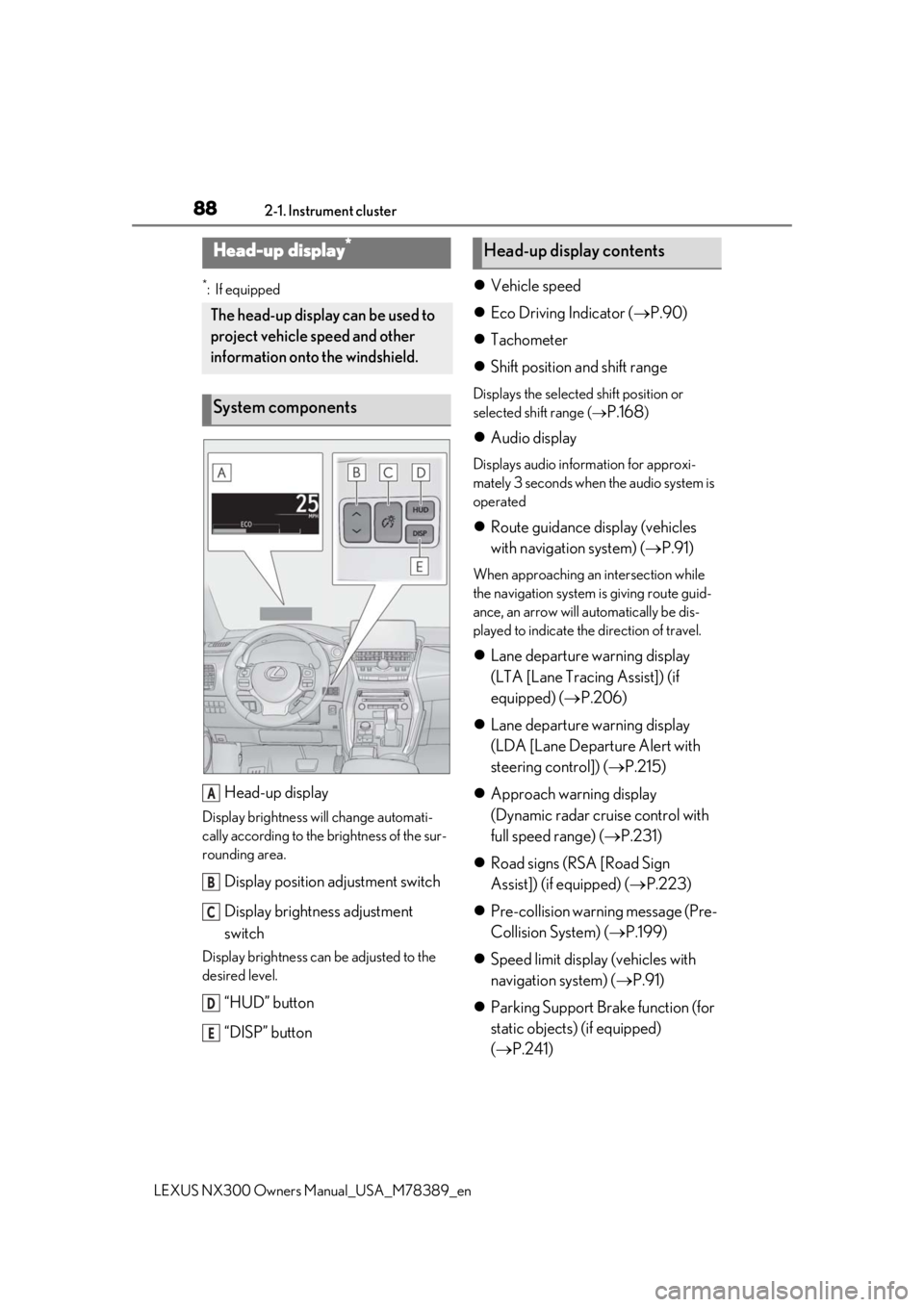
Head-up display
Display brightness will change automati-
cally according to the brightness of the sur-
rounding area.
Display position adjustment switch
Display brightness adjustment
switch
Display brightness can be adjusted to the
desired level.
“HUD” button
“DISP” button
Vehicle speed
Eco Driving Indicator ( P.90)
Tachometer
Shift position and shift range
Displays the selected shift position or
selected shift range (
P.168)
Audio display
Displays audio information for approxi-
mately 3 seconds when the audio system is
operated
Route guidance display (vehicles
with navigation system) ( P.91)
When approaching an intersection while
the navigation system is giving route guid-
ance, an arrow will automatically be dis-
played to indicate the direction of travel.
Lane departure warning display
(LTA [Lane Tracing Assist]) (if
equipped) ( P.206)
Lane departure warning display
(LDA [Lane Departure Alert with
steering control]) ( P.215)
Approach warning display
(Dynamic radar cruise control with
full speed range) ( P.231)
Road signs (RSA [Road Sign
Assist]) (if equipped) ( P.223)
Pre-collision warning message (Pre-
Collision System) ( P.199)
Speed limit display (vehicles with
navigation system) ( P.91)
Parking Support Brake function (for
static objects) (if equipped)
( P.241)
Head-up display*
The head-up display can be used to
project vehicle speed and other
information onto the windshield.
System components
A
B
C
D
E
Head-up display contents
Page 89 of 468

892-1. Instrument cluster
LEXUS NX300 Owners Manual_USA_M78389_en
2
Vehicle status information and indicators
G monitor (if equipped) ( P.84)
Boost Meter (if equipped) ( P.83)
Brake Override System ( P.147)
Drive-Start Control ( P.147)
■“HUD” button
Pressing the button turns the head-up
display on/off and changes the vehicle
speed display units as follows:
U.S.A.
OFF ON (MPH) ON (km/h)
OFF
Canada
OFF ON (km/h) ON (MPH)
OFF
■“DISP” button
Pressing the button changes the dis-
play items (except vehicle speed) as
follows:
• Off
• Eco Driving Indicator
• Tachometer
• Tachometer/Boost Meter (if equipped)
• G monitor (if equipped)
■Head-up display
●The head-up display may seem dark and
hard to see when viewed through sun-
glasses, especially polarized sunglasses.
Adjust the brightness of the head-up dis-
play or remove your sunglasses.
●When the head-up display is turned off, it
will not display anything until it is turned
on again.
Switching the head-up display
A
WARNING
■Before using the head-up display
Check that the position and brightness of
the head-up display image does not
interfere with safe driving. Incorrect
adjustment of the image’s position or
brightness may obstruct the driver’s view
and lead to an accident, resulting in
death or serious injury.
■Caution for changing settings of the
head-up display
As the engine needs to be running while
changing the settings of the head-up dis-
play, ensure that the vehicle is parked in a
place with adequate ventilation. In a
closed area such as a garage, exhaust
gases including harmful carbon monox-
ide (CO) may collect and enter the vehi-
cle. This may lead to death or a serious
health hazard.