battery LEXUS NX300 2020 Owner's Manual
[x] Cancel search | Manufacturer: LEXUS, Model Year: 2020, Model line: NX300, Model: LEXUS NX300 2020Pages: 468, PDF Size: 10.24 MB
Page 180 of 468
1804-3. Operating the lights and wipers
LEXUS NX300 Owners Manual_USA_M78389_en
tion will be disabled.
When any of the following are performed,
the battery-saving function is canceled
once and then reactivated. All the lights will
turn off automatically 20 minutes after the
battery-saving function has been reacti-
vated:
●When the headlight switch is operated
●When a door is opened or closed
■Customization
Settings (e.g. light sens or sensitivity) can be
changed. (Customizable features: P.427)
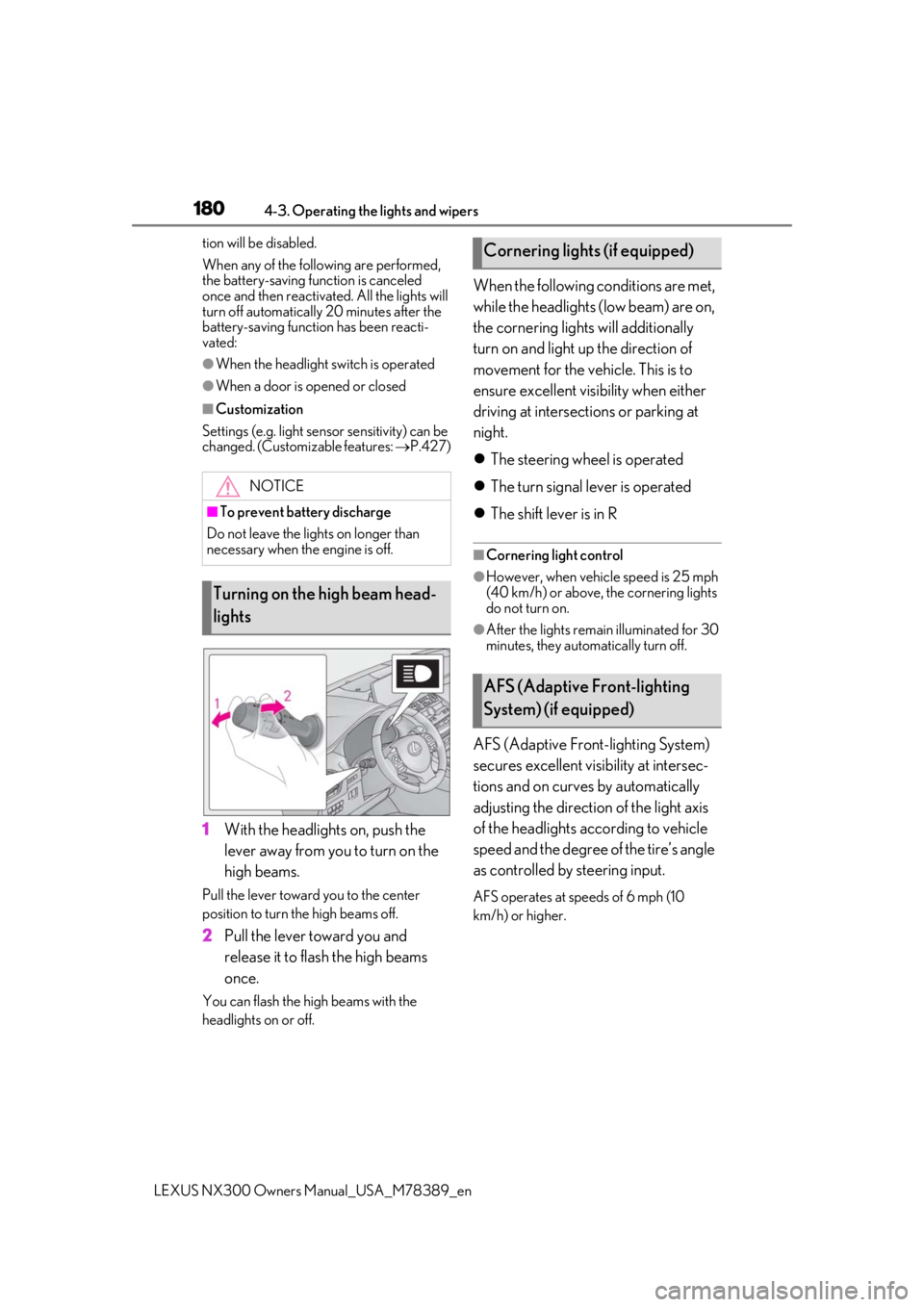
1With the headlights on, push the
lever away from you to turn on the
high beams.
Pull the lever toward you to the center
position to turn the high beams off.
2Pull the lever toward you and
release it to flash the high beams
once.
You can flash the high beams with the
headlights on or off.
When the following conditions are met,
while the headlights (low beam) are on,
the cornering lights will additionally
turn on and light up the direction of
movement for the vehicle. This is to
ensure excellent visibility when either
driving at intersections or parking at
night.
The steering wheel is operated
The turn signal lever is operated
The shift lever is in R
■Cornering light control
●However, when vehicle speed is 25 mph
(40 km/h) or above, the cornering lights
do not turn on.
●After the lights remain illuminated for 30
minutes, they automatically turn off.
AFS (Adaptive Front-lighting System)
secures excellent visibility at intersec-
tions and on curves by automatically
adjusting the direction of the light axis
of the headlights according to vehicle
speed and the degree of the tire’s angle
as controlled by steering input.
AFS operates at speeds of 6 mph (10
km/h) or higher.
NOTICE
■To prevent battery discharge
Do not leave the lights on longer than
necessary when the engine is off.
Turning on the high beam head-
lights
Cornering lights (if equipped)
AFS (Adaptive Front-lighting
System) (if equipped)
Page 184 of 468
1844-3. Operating the lights and wipers
LEXUS NX300 Owners Manual_USA_M78389_en
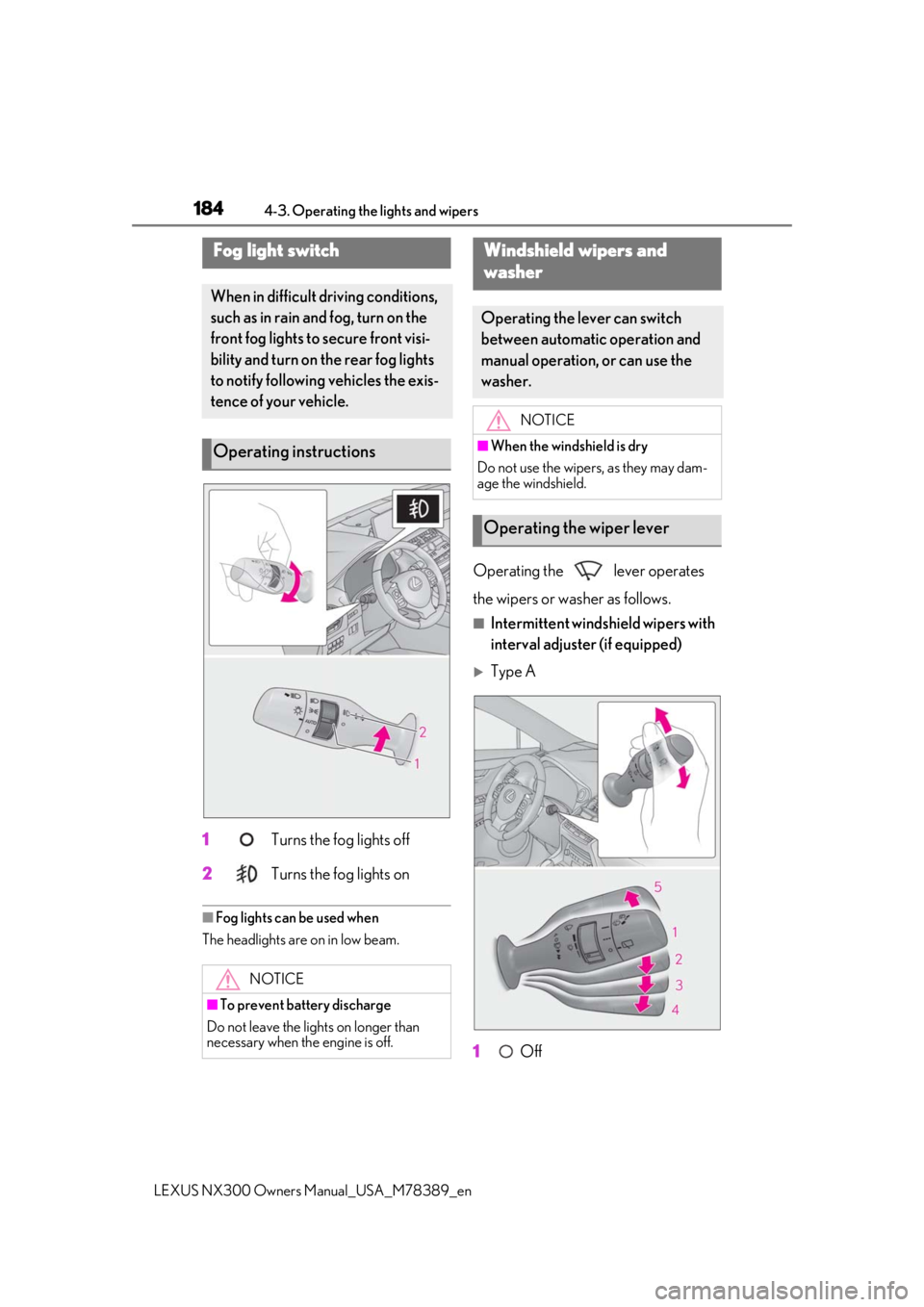
1 Turns the fog lights off
2
Turns the fog lights on
■Fog lights can be used when
The headlights are on in low beam.
Operating the lever operates
the wipers or washer as follows.
■Intermittent windshield wipers with
interval adjuster (if equipped)
Type A
1
Off
Fog light switch
When in difficult driving conditions,
such as in rain and fog, turn on the
front fog lights to secure front visi-
bility and turn on the rear fog lights
to notify following vehicles the exis-
tence of your vehicle.
Operating instructions
NOTICE
■To prevent battery discharge
Do not leave the lights on longer than
necessary when the engine is off.
Windshield wipers and
w
asher
Operating the lever can switch
between automatic operation and
manual operation, or can use the
washer.
NOTICE
■When the windshield is dry
Do not use the wipers, as they may dam-
age the windshield.
Operating the wiper lever
Page 189 of 468
1894-3. Operating the lights and wipers
LEXUS NX300 Owners Manual_USA_M78389_en
4
Driving
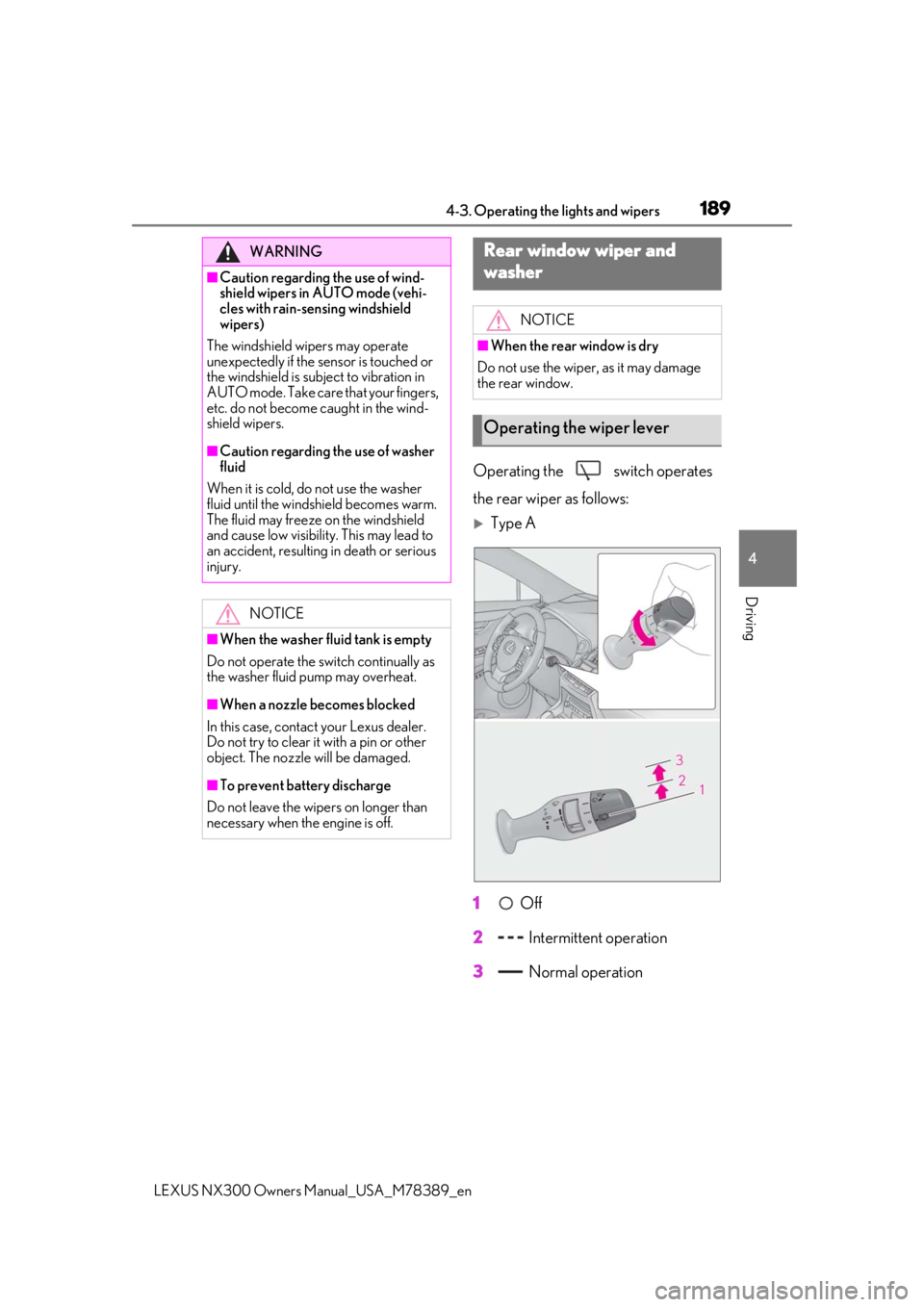
Operating the switch operates
the rear wiper as follows:
Type A
1
Off
2
Intermittent operation
3
Normal operation
WARNING
■Caution regarding the use of wind-
shield wipers in AUTO mode (vehi-
cles with rain-sen sing windshield
wipers)
The windshield wipers may operate
unexpectedly if the sensor is touched or
the windshield is subject to vibration in
AUTO mode. Take care that your fingers,
etc. do not become caught in the wind-
shield wipers.
■Caution regarding the use of washer
fluid
When it is cold, do not use the washer
fluid until the windshield becomes warm.
The fluid may freeze on the windshield
and cause low visibility. This may lead to
an accident, resulting in death or serious
injury.
NOTICE
■When the washer fluid tank is empty
Do not operate the switch continually as
the washer fluid pump may overheat.
■When a nozzle becomes blocked
In this case, contact your Lexus dealer.
Do not try to clear it with a pin or other
object. The nozzle will be damaged.
■To prevent battery discharge
Do not leave the wipers on longer than
necessary when the engine is off.
Rear window wiper and
w
asher
NOTICE
■When the rear window is dry
Do not use the wiper, as it may damage
the rear window.
Operating the wiper lever
Page 190 of 468
1904-3. Operating the lights and wipers
LEXUS NX300 Owners Manual_USA_M78389_en
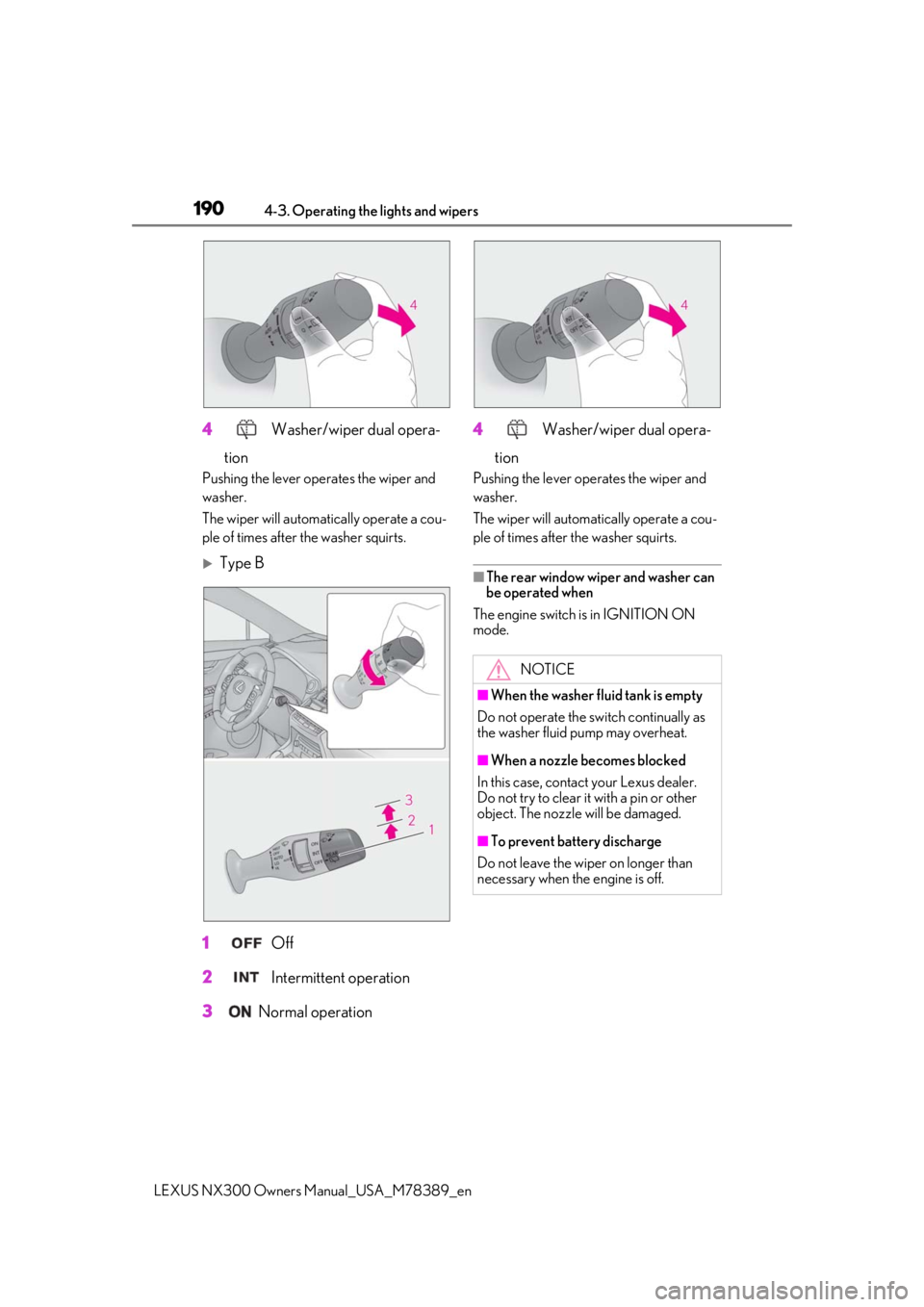
4 Washer/wiper dual opera-
tion
Pushing the lever operates the wiper and
washer.
The wiper will automatically operate a cou-
ple of times after the washer squirts.
Type B
1
Off
2
Intermittent operation
3
Normal operation 4
Washer/wiper dual opera-
tion
Pushing the lever oper ates the wiper and
washer.
The wiper will automatically operate a cou-
ple of times after the washer squirts.
■The rear window wiper and washer can
be operated when
The engine switch is in IGNITION ON
mode.
NOTICE
■When the washer fluid tank is empty
Do not operate the switch continually as
the washer fluid pump may overheat.
■When a nozzle becomes blocked
In this case, contact your Lexus dealer.
Do not try to clear it with a pin or other
object. The nozzle will be damaged.
■To prevent battery discharge
Do not leave the wiper on longer than
necessary when the engine is off.
Page 202 of 468
2024-5. Using the driving support systems
LEXUS NX300 Owners Manual_USA_M78389_en
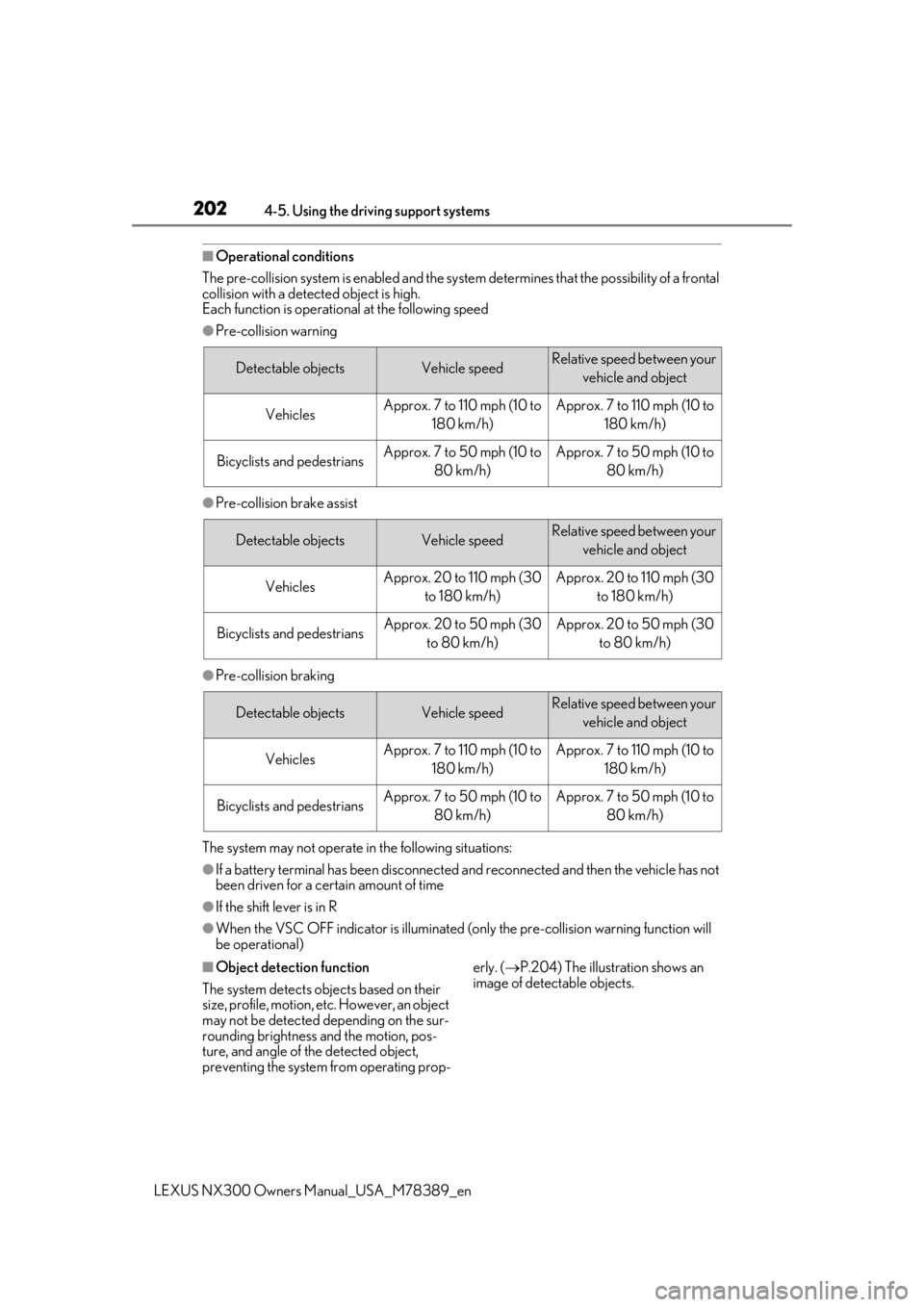
■Operational conditions
The pre-collision system is enabled and the system determines that the possibility of a frontal
collision with a detect ed object is high.
Each function is operational at the following speed
●Pre-collision warning
●Pre-collision brake assist
●Pre-collision braking
The system may not operate in the following situations:
●If a battery terminal has been disconnected and reconnected and then the vehicle has not
been driven for a certain amount of time
●If the shift lever is in R
●When the VSC OFF indicator is illuminated (only the pre-collision warning function will
be operational)
■Object detection function
The system detects ob jects based on their
size, profile, motion, etc. However, an object
may not be detected depending on the sur-
rounding brightness and the motion, pos-
ture, and angle of the detected object,
preventing the system from operating prop- erly. (
P.204) The illustration shows an
image of detectable objects.
Detectable objectsVehicle speedRelative speed between your
vehicle and object
VehiclesApprox. 7 to 110 mph (10 to 180 km/h)Approx. 7 to 110 mph (10 to 180 km/h)
Bicyclists and pedestriansApprox. 7 to 50 mph (10 to 80 km/h)Approx. 7 to 50 mph (10 to 80 km/h)
Detectable objectsVehicle speedRelative speed between your vehicle and object
VehiclesApprox. 20 to 110 mph (30 to 180 km/h)Approx. 20 to 110 mph (30 to 180 km/h)
Bicyclists and pedestriansApprox. 20 to 50 mph (30 to 80 km/h)Approx. 20 to 50 mph (30 to 80 km/h)
Detectable objectsVehicle speedRelative speed between your vehicle and object
VehiclesApprox. 7 to 110 mph (10 to 180 km/h)Approx. 7 to 110 mph (10 to 180 km/h)
Bicyclists and pedestriansApprox. 7 to 50 mph (10 to 80 km/h)Approx. 7 to 50 mph (10 to 80 km/h)
Page 247 of 468

2474-5. Using the driving support systems
LEXUS NX300 Owners Manual_USA_M78389_en
4
Driving
• The vehicle is driven on a gravel road or
in an area with tall grass
• Ice, snow, dirt, etc., has adhered to the sensor (if removed, the system returns to
normal)
• Heavy rain or water strikes the vehicle
• In severe weather such as fog, snow or a sand storm
●Influence from other sonic waves
• An ultrasonic wave source is nearby, such
as the horn or clearance sonar of another
vehicle, a vehicle detector, a motorcycle
engine or the air brake of a large vehicle
• Electronic components (such as a backlit license plate (especially fluorescent
types), fog lights, a fender pole or a wire-
less antenna) are installed near the sen-
sors
●Changes in the vehicle
• The vehicle is tilted a large amount
• The height of the vehicle has drastically changed due to the carried load (the
nose tilts up or down)
• The direction of the sensor has deviated
due to a collision or other impact
■When “Parking Support Brake Unavail-
able” is displayed on the multi-informa-
tion display and the PKSB OFF indicator
flashes
●Ice, snow, dirt, etc., may have adhered to
the sensor. If this occurs, remove the ice,
snow, dirt, etc., from the sensor to return
the system to normal. Also, a warning message may be dis-
played at low temperatures due to ice
forming on the sensor, and the sensor
may not detect static objects. Once the
ice melts, the system will return to normal.
●If this message is
shown even after
removing dirt from the sensor, or shown
when the sensor was not dirty to begin
with, have the vehicle inspected by your
Lexus dealer.
●System initialization may not have been
performed after remova l and installation
of the battery. Perform system initializa-
tion.
■When removing and installing the bat-
tery
The system needs to be initialized.
The system can be initialized by driving the
vehicle straight ahead for 5 seconds or
more at a speed of approximately 22 mph
(35 km/h) or higher.
■When “Parking Support Brake Mal-
function Visit Your Dealer” is displayed
on the multi-information display, the
PKSB OFF indicator flashes and the
buzzer sounds
The system may not be operating properly.
Have the vehicle inspected by your Lexus
dealer.
WARNING
■In order for the system to operate
properly
Make sure to observe the following pre-
cautions regarding the sensors
( P.239). Failure to observe these pre-
cautions may cause the sensors not to
operate properly, and may result in an
unexpected accident.
●Do not perform work such as modifi-
cation, disassembly or painting
●Only perform replacements using
genuine parts
●Do not subject the area around the
sensors to any impacts
Page 266 of 468

2664-6. Driving tips
LEXUS NX300 Owners Manual_USA_M78389_en
4-6.Driving tips
Use fluids that are appropriate to
the prevailing outside temperatures.
• Engine oil
• Engine coolant
• Washer fluid
Have a service technician inspect
the condition of the battery.
Have the vehicle fitted with four
snow tires or purchase a set of tire
chains for the front tires
*.
Ensure that all tires are the same size and
brand, and that chains match the size of the
tires.
*: Tire chains cannot be mounted on the
225/60R18 tires.
Snow tires should be used instead.
Perform the following according to the
Winter driving tips
Carry out the necessary prepara-
tions and inspections before driving
the vehicle in winter. Always drive
the vehicle in a manner appropriate
to the prevailing weather condi-
tions.
Preparation for winter
WARNING
■Driving with snow tires
Observe the following precautions to
reduce the risk of accidents.
Failure to do so may result in a loss of
vehicle control and cause death or seri-
ous injury.
●Use tires of the specified size.
●Maintain the recommended level of air
pressure.
●Do not drive in excess of 75 mph (120
km/h), regardless of the type of snow
tires being used.
●Use snow tires on all, not just some
wheels.
■Driving with tire chains
Observe the following precautions to
reduce the risk of accidents.
Failure to do so may result in the vehicle
being unable to be driven safely, and may
cause death or serious injury.
●Do not drive in excess of the speed
limit specified for the tire chains being
used, or 30 mph (50 km/h), which-
ever is lower.
●Avoid driving on bumpy road surfaces
or over potholes.
●Avoid sudden acceleration, abrupt
steering, sudden br aking and shifting
operations that cause sudden engine
braking.
●Slow down sufficiently before entering
a curve to ensure that vehicle control is
maintained.
●Do not use LDA (Lane Departure
Alert with steering control) (if
equipped).
●Do not use LTA (Lane Tracing Assist)
(if equipped).
NOTICE
■Repairing or replacing snow tires
Request repairs or replacement of snow
tires from Lexus dealers or legitimate tire
retailers.
This is because the removal and attach-
ment of snow tires affects the operation
of the tire pressure warning valves and
transmitters.
Before driving the vehicle
Page 282 of 468
2825-2. Using the air conditioning system and defogger
LEXUS NX300 Owners Manual_USA_M78389_en
■When the outside temperature is low
The dehumidification function may not
operate even when “A/C” is pressed or
“A/C” is selected.
■Ventilation and air conditioning odors
●To let fresh air in, set the air conditioning
system to the outside air mode.
●During use, various odors from inside and
outside the vehicle may enter into and
accumulate in the air conditioning sys-
tem. This may then cause odor to be
emitted from the vents.
●To reduce potential odors from occur-
ring:
• It is recommended that the air condition-
ing system be set to outside air mode
prior to turning the vehicle off.
• The start timing of the blower may be
delayed for a short period of time imme-
diately after the air conditioning system is
started in automatic mode.
■Air conditioning filter
P.355
■Customization
Settings (e.g. A/C automatic mode switch
operation) can be changed.
(Customizable features: P.427)
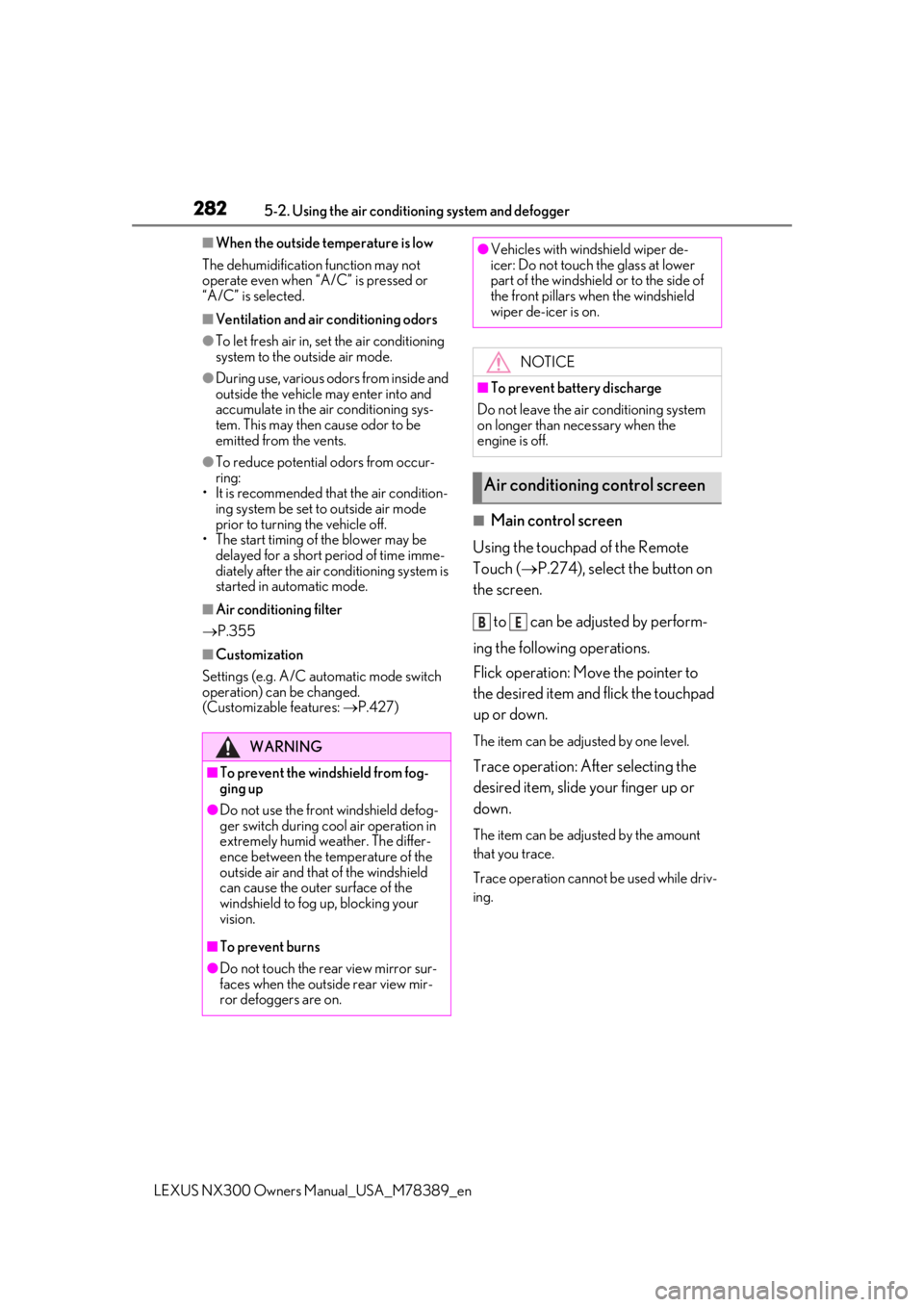
■Main control screen
Using the touchpad of the Remote
Touch ( P.274), select the button on
the screen.
to can be adjusted by perform-
ing the following operations.
Flick operation: Move the pointer to
the desired item and flick the touchpad
up or down.
The item can be adjusted by one level.
Trace operation: After selecting the
desired item, slide your finger up or
down.
The item can be adjusted by the amount
that you trace.
Trace operation cannot be used while driv-
ing.
WARNING
■To prevent the windshield from fog-
ging up
●Do not use the front windshield defog-
ger switch during cool air operation in
extremely humid weather. The differ-
ence between the temperature of the
outside air and that of the windshield
can cause the outer surface of the
windshield to fog up, blocking your
vision.
■To prevent burns
●Do not touch the rear view mirror sur-
faces when the outside rear view mir-
ror defoggers are on.
●Vehicles with windshield wiper de-
icer: Do not touch the glass at lower
part of the windshield or to the side of
the front pillars when the windshield
wiper de-icer is on.
NOTICE
■To prevent battery discharge
Do not leave the air conditioning system
on longer than necessary when the
engine is off.
Air conditioning control screen
BE
Page 287 of 468
2875-2. Using the air conditioning system and defogger
LEXUS NX300 Owners Manual_USA_M78389_en
5
Interior features
*: If equipped
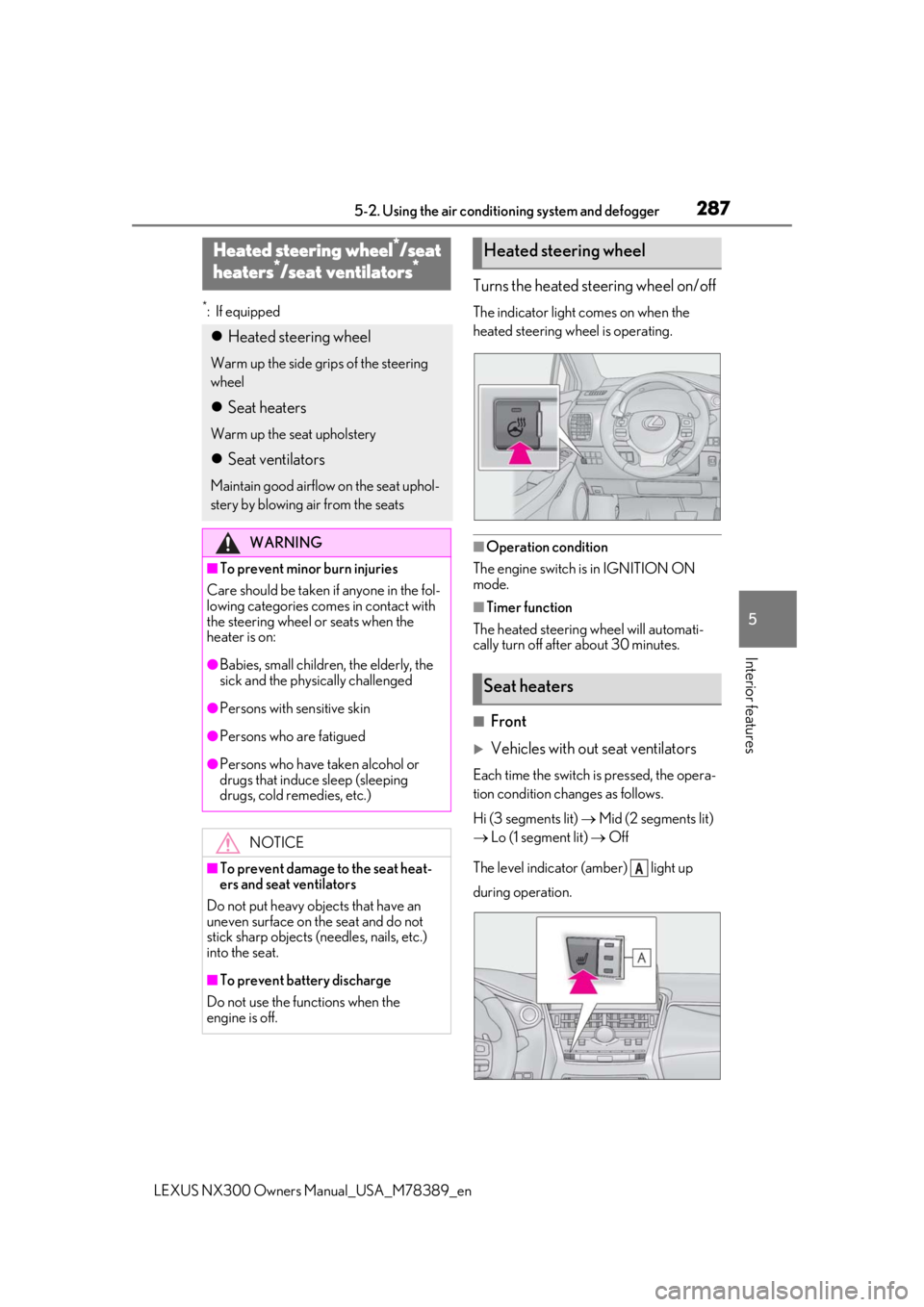
Turns the heated steering wheel on/off
The indicator light comes on when the
heated steering wheel is operating.
■Operation condition
The engine switch is in IGNITION ON
mode.
■Timer function
The heated steering wheel will automati-
cally turn off after about 30 minutes.
■Front
Vehicles with out seat ventilators
Each time the switch is pressed, the opera-
tion condition changes as follows.
Hi (3 segments lit) Mid (2 segments lit)
Lo (1 segment lit) Off
The level indicator (amber) light up
during operation.
Heated steering wheel*/seat
h
eaters*/seat ventilators*
Heated steering wheel
Warm up the side grips of the steering
wheel
Seat heaters
Warm up the seat upholstery
Seat ventilators
Maintain good airflo w on the seat uphol-
stery by blowing air from the seats
WARNING
■To prevent minor burn injuries
Care should be taken if anyone in the fol-
lowing categories comes in contact with
the steering wheel or seats when the
heater is on:
●Babies, small children, the elderly, the
sick and the phys ically challenged
●Persons with sensitive skin
●Persons who are fatigued
●Persons who have taken alcohol or
drugs that induce sleep (sleeping
drugs, cold remedies, etc.)
NOTICE
■To prevent damage to the seat heat-
ers and seat ventilators
Do not put heavy objects that have an
uneven surface on the seat and do not
stick sharp objects (needles, nails, etc.)
into the seat.
■To prevent battery discharge
Do not use the functions when the
engine is off.
Heated steering wheel
Seat heaters
A
Page 290 of 468
2905-3. Using the interior lights
LEXUS NX300 Owners Manual_USA_M78389_en
■Customization
Setting (e.g. the time elapsed before lights
turn off) can be changed. (Customizable
features: P.427)
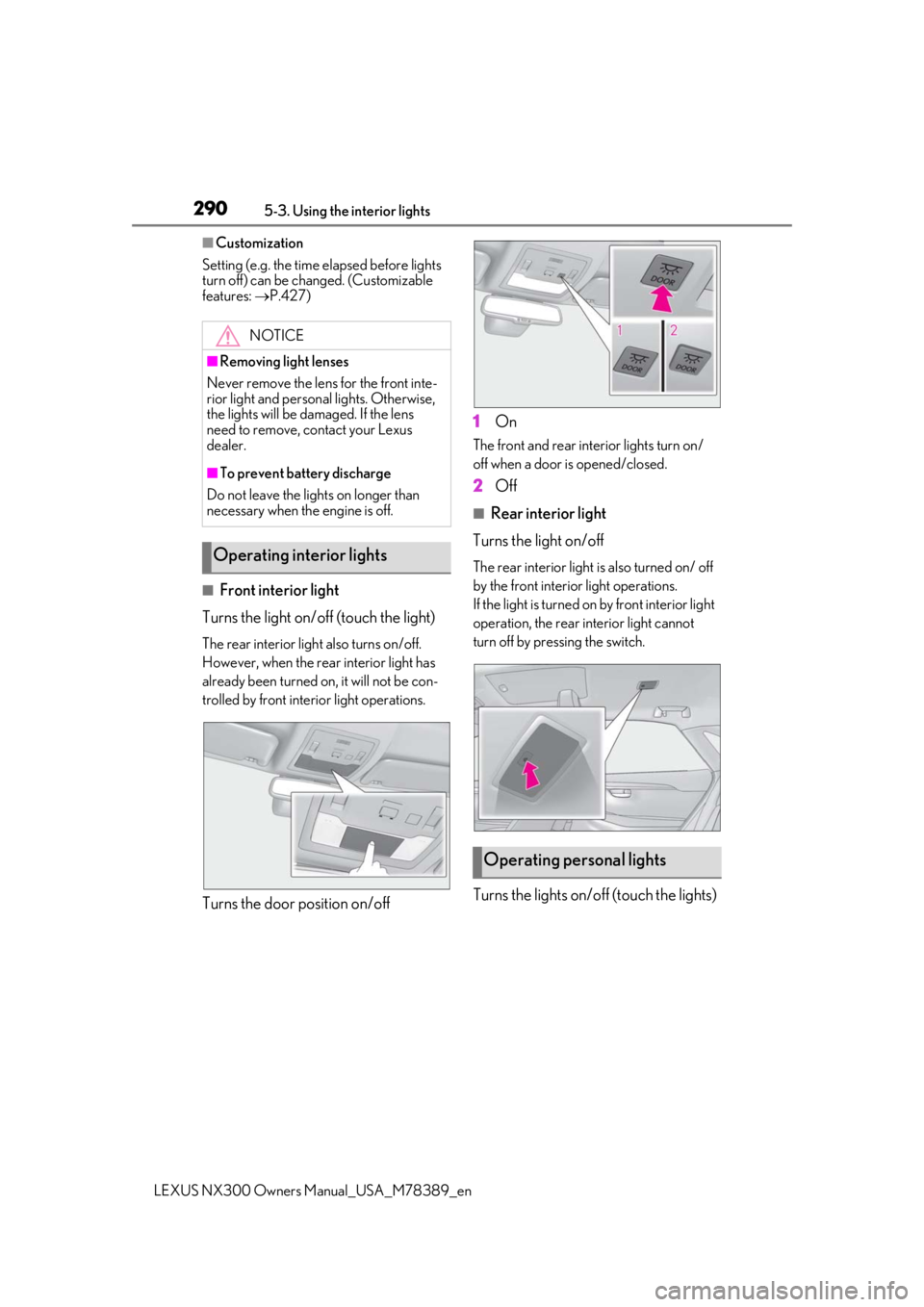
■Front interior light
Turns the light on/off (touch the light)
The rear interior light also turns on/off.
However, when the rear interior light has
already been turned on, it will not be con-
trolled by front interior light operations.
Turns the door position on/off 1
On
The front and rear interior lights turn on/
off when a door is opened/closed.
2Off
■Rear interior light
Turns the light on/off
The rear interior light is also turned on/ off
by the front interior light operations.
If the light is turned on by front interior light
operation, the rear interior light cannot
turn off by pressing the switch.
Turns the lights on/off (touch the lights)
NOTICE
■Removing light lenses
Never remove the lens for the front inte-
rior light and personal lights. Otherwise,
the lights will be damaged. If the lens
need to remove, contact your Lexus
dealer.
■To prevent battery discharge
Do not leave the lights on longer than
necessary when the engine is off.
Operating interior lights
Operating personal lights