mirror LEXUS NX300 2020 Owner's Manual
[x] Cancel search | Manufacturer: LEXUS, Model Year: 2020, Model line: NX300, Model: LEXUS NX300 2020Pages: 468, PDF Size: 10.24 MB
Page 252 of 468

2524-5. Using the driving support systems
LEXUS NX300 Owners Manual_USA_M78389_en
The Blind Spot Monitor function uses
radar sensors to detect vehicles that
are traveling in an adjacent lane in the
area that is not reflected in the outside
rear view mirror (the blind spot), and
advises the driver of the vehicles exis-
tence via the BSM outside rear view
mirror indicator.
■The Blind Spot Monitor function
detection areas
The areas that vehicles can be
detected in are outlined below.
WARNING
■Handling the radar sensor
One Blind Spot Monitor sensor is
installed inside the left and right side of
the vehicle rear bumper respectively.
Observe the following to ensure the
Blind Spot Monitor system can function
correctly.
●Keep the sensor an d its surrounding
area on the bumper clean at all times.
●Do not subject the sensor or surround-
ing area on the bumper to a strong
impact. If the sensor moves even
slightly off position, the system may
malfunction and vehicles that enter the
detection area may not be detected. If
the sensor or surrounding area is sub-
ject to a strong impact, always have the
area inspected by your Lexus dealer.
●Do not disassemb le the sensor.
●Do not attach accessories or stickers
to the sensor or surrounding area on
the bumper.
●Do not modify the sensor or surround-
ing area on the bumper.
●Do not paint the rear bumper any
color other than an official Lexus color.
●If the radar sensor needs to be
replaced, contact your Lexus dealer.
The Blind Spot Monitor function
Page 254 of 468
2544-5. Using the driving support systems
LEXUS NX300 Owners Manual_USA_M78389_en
consecutive curves, or uneven surfaces
• When vehicle lanes are wide, or when driving on the edge of a lane, and the
vehicle in an adjacent lane is far away
from your vehicle
• When towing a trailer (vehicles with tow-
ing package)
• When items such as a bicycle carrier are installed on the rear of the vehicle
• When there is a significant difference in height between your vehicle and the
vehicle that enters the detection area
• Immediately after the Blind Spot Monitor function is turned on
●Instances of the Blind Spot Monitor func-
tion unnecessarily detecting a vehicle
and/or object may increase in the follow-
ing situations:
• When the sensor is misaligned due to a strong impact to the sensor or its sur-
rounding area
• When the distance between your vehicle and a guardrail, wall, etc. that enters the
detection area is short
• When driving up an d down consecutive
steep inclines, such as hills, dips in the
road, etc.
• When vehicle lanes are narrow, or when driving on the edge of a lane, and a vehi-
cle traveling in a lane other than the adja- cent lanes enters the detection area
• When driving on roads with sharp bends, consecutive curves, or uneven surfaces
• When the tires are slipping or spinning
• When the distance between your vehicle and a following vehicle is short
• When a bicycle carrier or other acces- sory is installed to the rear of the vehicle
• When towing a trailer (vehicles with tow-
ing package)
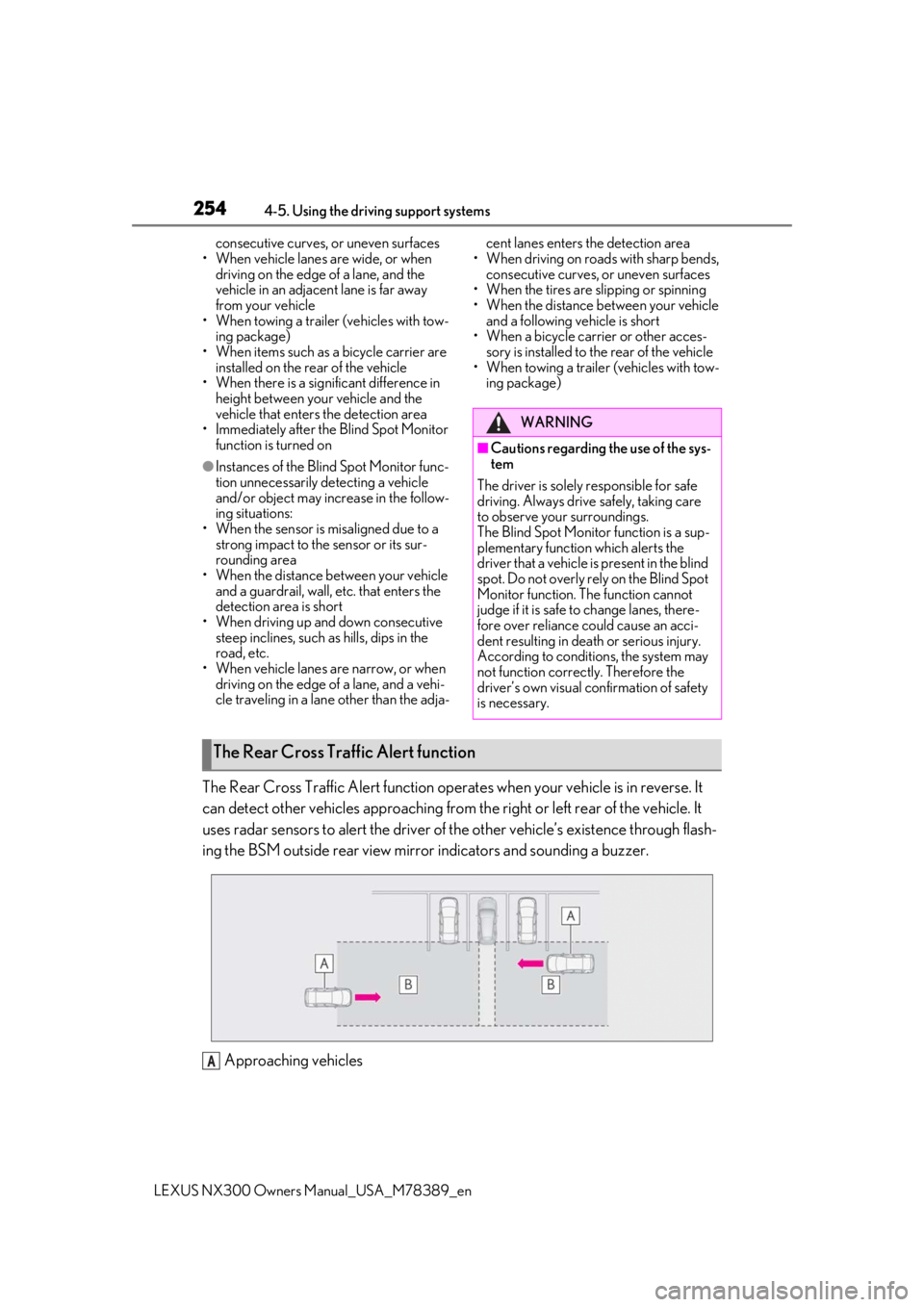
The Rear Cross Traffic Alert function operates when your vehicle is in reverse. It
can detect other vehicles approaching from the right or left rear of the vehicle. It
uses radar sensors to alert the driver of the other vehicle’s existence through flash-
ing the BSM outside rear view mirror indicators and sounding a buzzer.
Approaching vehicles
WARNING
■Cautions regarding the use of the sys-
tem
The driver is solely responsible for safe
driving. Always drive safely, taking care
to observe your surroundings.
The Blind Spot Monitor function is a sup-
plementary function which alerts the
driver that a vehicle is present in the blind
spot. Do not overly rely on the Blind Spot
Monitor function. The function cannot
judge if it is safe to change lanes, there-
fore over reliance could cause an acci-
dent resulting in death or serious injury.
According to conditions, the system may
not function correctly. Therefore the
driver’s own visual confirmation of safety
is necessary.
The Rear Cross Traffic Alert function
A
Page 279 of 468

2795-2. Using the air conditioning system and defogger
LEXUS NX300 Owners Manual_USA_M78389_en
5
Interior features
5-2.Using the air conditioning system and defogger
Left-hand side temperature control switch
Fan speed control switch
Airflow mode control switch
Right-hand side temperature control switch
Automatic mode switch
Off switch
Front windshield defogger switch
Rear windshield and outside rear view mirror defogger switch
Automatic air conditioning system
Air outlets and fan speed are automati cally adjusted according to the tem-
perature setting.
Press the “MENU” button on the Remote Touch, then select to display the
air conditioning control screen.
The air conditioning system can be disp layed and operated on the side display.
Air conditioning controls
A
B
C
D
E
F
G
H
Page 280 of 468
2805-2. Using the air conditioning system and defogger
LEXUS NX300 Owners Manual_USA_M78389_en
Outside/recirculated air mode switch
A/C switch
DUAL switch
■Adjusting the temperature setting
Operate the temperature control
switch upwards to increase the tem-
perature and downwards to decrease
the temperature.
If “A/C” switch is not pressed, the sys-
tem will blow ambient temperature air
or heated air.
■Adjusting the fan speed setting
Operate the fan speed control switch
upwards to increase the fan speed and
downwards to decrease the fan speed.
Press the off switch to turn the fan off.
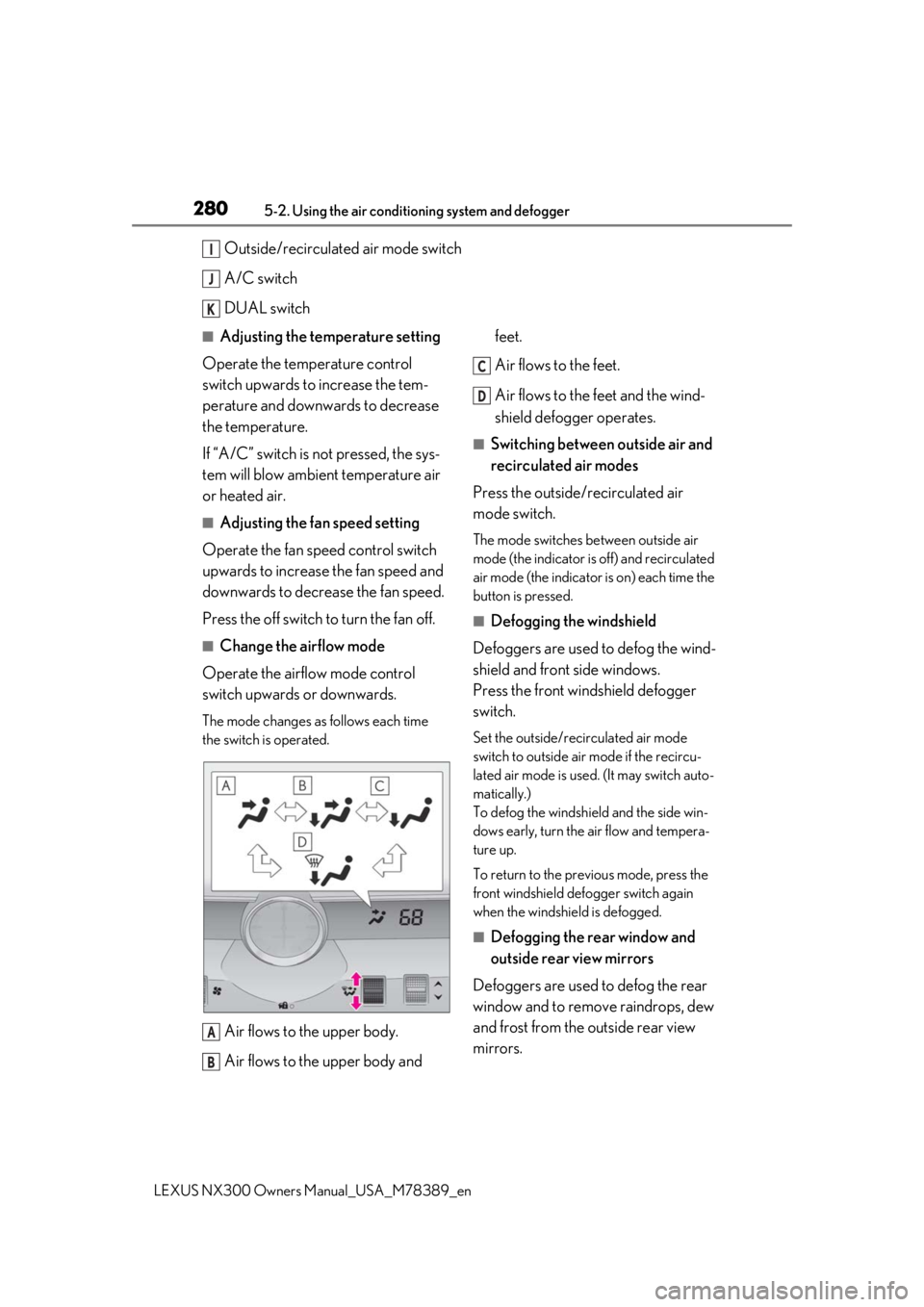
■Change the airflow mode
Operate the airflow mode control
switch upwards or downwards.
The mode changes as follows each time
the switch is operated.
Air flows to the upper body.
Air flows to the upper body and feet.
Air flows to the feet.
Air flows to the feet and the wind-
shield defogger operates.
■Switching between outside air and
recirculated air modes
Press the outside/recirculated air
mode switch.
The mode switches between outside air
mode (the indicator is off) and recirculated
air mode (the indicator is on) each time the
button is pressed.
■Defogging the windshield
Defoggers are used to defog the wind-
shield and front side windows.
Press the front windshield defogger
switch.
Set the outside/recirculated air mode
switch to outside air mode if the recircu-
lated air mode is used. (It may switch auto-
matically.)
To defog the windshield and the side win-
dows early, turn the air flow and tempera-
ture up.
To return to the previous mode, press the
front windshield defo gger switch again
when the windshield is defogged.
■Defogging the rear window and
outside rear view mirrors
Defoggers are used to defog the rear
window and to remove raindrops, dew
and frost from the outside rear view
mirrors.
I
J
K
A
B
C
D
Page 281 of 468
2815-2. Using the air conditioning system and defogger
LEXUS NX300 Owners Manual_USA_M78389_en
5
Interior features
Press the rear windshield and outside
rear view mirror defogger switch.
The defoggers will automatically turn off
after a period of time.
■Windshield wiper de-icer (if
equipped)
P.284
■When the outside temperature exceeds
75°F (24°C) and the air conditioning
system is on
●In order to reduce the air conditioning
power consumption, the air conditioning
system may switch to recirculated air
mode automatically.
This may also reduce fuel consumption.
●Recirculated air mode is selected as a
default mode when the engine switch is
turned to IGNITION ON mode.
●It is possible to switch to outside air mode
at any time by pressing the outside/recir-
culated air mode switch.
■Fogging up of the windows
●The windows will easily fog up when the
humidity in the vehicle is high. Pressing
“A/C” button or selecting “A/C” will
dehumidify the air from the outlets and
defog the windshield effectively.
●If you turn “A/C” off, the windows may
fog up more easily.
●The windows may fog up if the recircu-
lated air mode is used.
■When driving on dusty roads
Close all windows. If dust thrown up by the
vehicle is still drawn into the vehicle after
closing the windows, it is recommended
that the air intake mode be set to outside air
mode and the fan speed to any setting
except off.
■Outside/recirculated air mode
●Setting to the recirculated air mode tem-
porarily is recommended in preventing
dirty air from entering the vehicle interior
and helping to cool the vehicle when the
outside air temperature is high.
●Outside/recirculated air mode may auto-
matically switch depending on the tem-
perature setting or the inside
temperature.
■Registering air conditioning settings to
electronic keys (vehicles with driving
position memory)
●Unlocking the vehicle using an electronic
key and turning the engine switch to
IGNITION ON mode will recall that
key’s registered air conditioning settings.
●When the engine switch is turned off, the
current air conditioning settings will auto-
matically be registered to the electronic
key that was used to unlock the vehicle.
●The system may not operate correctly if
more than one electr onic key is in the
vicinity or if the smart access system with
push-button start is used to unlock a pas-
senger door.
●The doors that can recall the air condi-
tioning setting when unlocked using the
smart access system with push-button
start can be changed.
* For details, con-
tact your Lexus dealer.
*: The doors that can recall the driving posi-
tion memory are changed at the same
time.
■Operation of the air conditioning sys-
tem in Eco mode
●In the Eco mode, the air conditioning sys-
tem is controlled as follows to prioritize
fuel efficiency
• Engine speed and compressor operation
controlled to restrict heating/cooling
capacity
• Fan speed restricted when automatic
mode is selected
●To improve air conditioning performance,
perform the following operations
• Adjust the fan speed
• Adjust the temperature setting
• Turn off Eco mode
●Even when the driving mode is set to Eco
mode, the air conditioning eco mode can
be turned off by selecting the
.
Page 282 of 468
2825-2. Using the air conditioning system and defogger
LEXUS NX300 Owners Manual_USA_M78389_en
■When the outside temperature is low
The dehumidification function may not
operate even when “A/C” is pressed or
“A/C” is selected.
■Ventilation and air conditioning odors
●To let fresh air in, set the air conditioning
system to the outside air mode.
●During use, various odors from inside and
outside the vehicle may enter into and
accumulate in the air conditioning sys-
tem. This may then cause odor to be
emitted from the vents.
●To reduce potential odors from occur-
ring:
• It is recommended that the air condition-
ing system be set to outside air mode
prior to turning the vehicle off.
• The start timing of the blower may be
delayed for a short period of time imme-
diately after the air conditioning system is
started in automatic mode.
■Air conditioning filter
P.355
■Customization
Settings (e.g. A/C automatic mode switch
operation) can be changed.
(Customizable features: P.427)
■Main control screen
Using the touchpad of the Remote
Touch ( P.274), select the button on
the screen.
to can be adjusted by perform-
ing the following operations.
Flick operation: Move the pointer to
the desired item and flick the touchpad
up or down.
The item can be adjusted by one level.
Trace operation: After selecting the
desired item, slide your finger up or
down.
The item can be adjusted by the amount
that you trace.
Trace operation cannot be used while driv-
ing.
WARNING
■To prevent the windshield from fog-
ging up
●Do not use the front windshield defog-
ger switch during cool air operation in
extremely humid weather. The differ-
ence between the temperature of the
outside air and that of the windshield
can cause the outer surface of the
windshield to fog up, blocking your
vision.
■To prevent burns
●Do not touch the rear view mirror sur-
faces when the outside rear view mir-
ror defoggers are on.
●Vehicles with windshield wiper de-
icer: Do not touch the glass at lower
part of the windshield or to the side of
the front pillars when the windshield
wiper de-icer is on.
NOTICE
■To prevent battery discharge
Do not leave the air conditioning system
on longer than necessary when the
engine is off.
Air conditioning control screen
BE
Page 295 of 468
2955-4. Using the storage features
LEXUS NX300 Owners Manual_USA_M78389_en
5
Interior features
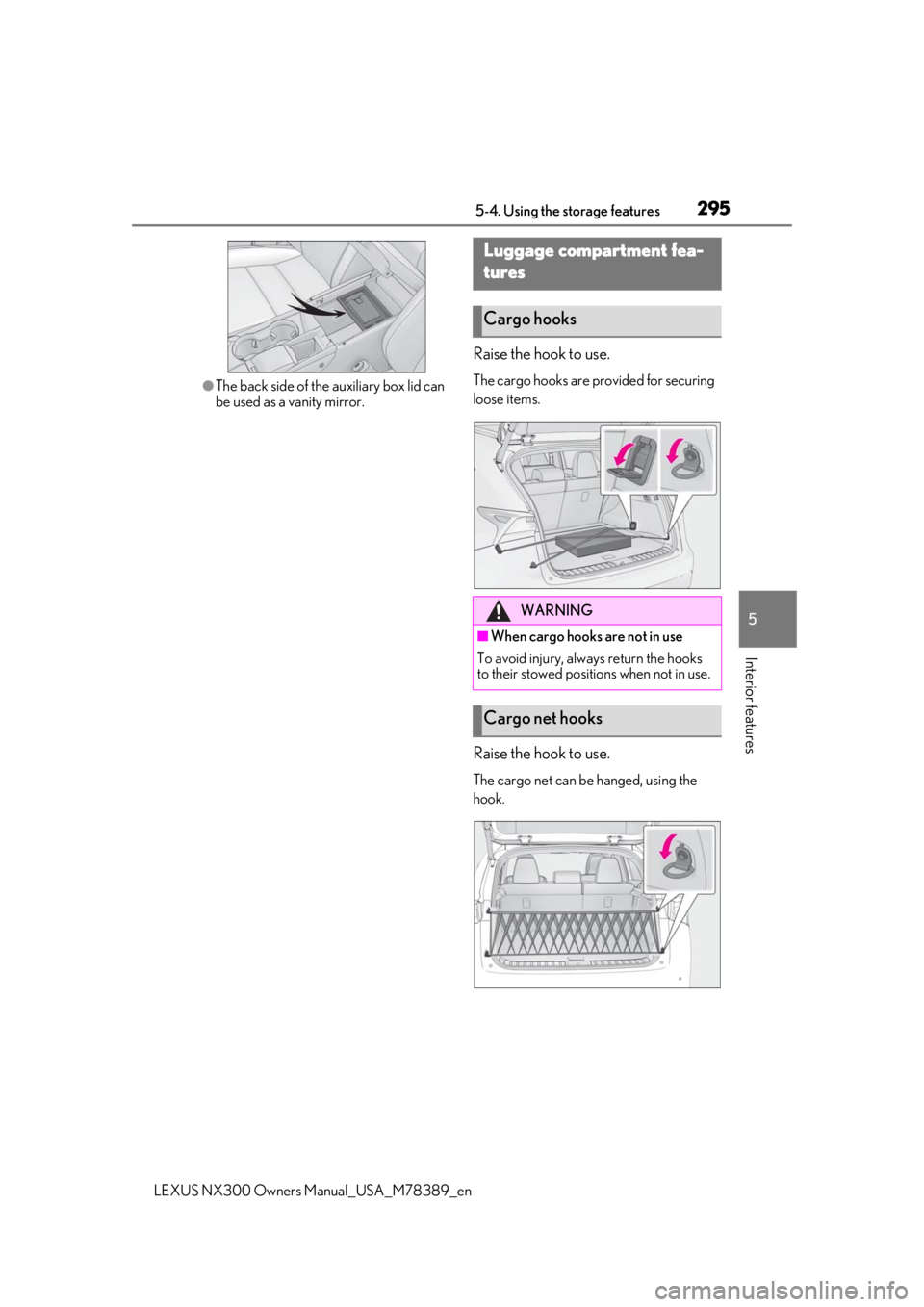
●The back side of the auxiliary box lid can
be used as a vanity mirror.
Raise the hook to use.
The cargo hooks are provided for securing
loose items.
Raise the hook to use.
The cargo net can be hanged, using the
hook.
Luggage compartment fea-
tures
Cargo hooks
WARNING
■When cargo hooks are not in use
To avoid injury, always return the hooks
to their stowed positions when not in use.
Cargo net hooks
Page 299 of 468

2995-5. Using the other interior features
LEXUS NX300 Owners Manual_USA_M78389_en
5
Interior features
5-5.Using the other interior features
1To set the visor in the forward posi-
tion, flip it down.
2
To set the visor in the side position,
flip down, unhook, and swing it to
the side.
3
To use the side extender, place the
visor in the side position, then slide
it backward.
■Sun visors
Slide the cover to open.
The light turns on when the cover is
opened.
■Auxiliary box
Remove the lid of auxiliary box using the strap . (
P.294)
There is a vanity mirror on the back side of
the lid.
■Automatic light off to prevent battery
discharge
If the vanity lights remain on when the
engine switch is turned off, the lights will go
off automatically after 20 minutes.
The GPS clock’s time is automatically
adjusted by utilizing GPS time infor-
mation.
For details, refer to the “NAVIGA-
TION AND MULTIMEDIA SYSTEM
OWNER’S MANUAL”.
Other interior features
Sun visors
Vanity mirrors
NOTICE
■To prevent damage to the vanity mir-
ror
When the lid of auxiliary box is removed,
do not subject it to strong impacts or set
heavy objects on top of it.
■To prevent battery discharge
Do not leave the vanity lights on for
extended periods while the engine is off.
Clock
A
Page 311 of 468
3115-5. Using the other interior features
LEXUS NX300 Owners Manual_USA_M78389_en
5
Interior features
■Before programming the Home-
Link
®
During programming, it is possible
that garage doors, gates, or other
devices may operate. For this rea-
son, make sure that people and
objects are clear of the garage door
or other devices to prevent injury or
other potential harm.
It is recommended that a new bat-
tery be placed in the remote control
transmitter for more accurate pro-
gramming.
Garage door opener motors manu-
factured after 1995 may be
equipped with rolling code protec-
tion. If this is the case, you may need
a stepladder or other sturdy, safe
device to reach the “learn” or
“smart” button on the garage door
opener motor.
■Programming the HomeLink®
Steps 1 through 3 must be performed
within 60 seconds, otherwise the indi-
cator light will stop flashing and pro-
gramming will not be able to be
completed.
1 Press and release the HomeLink
®
button you want to program and
check that the HomeLink
® indica-
tor light flashes orange.
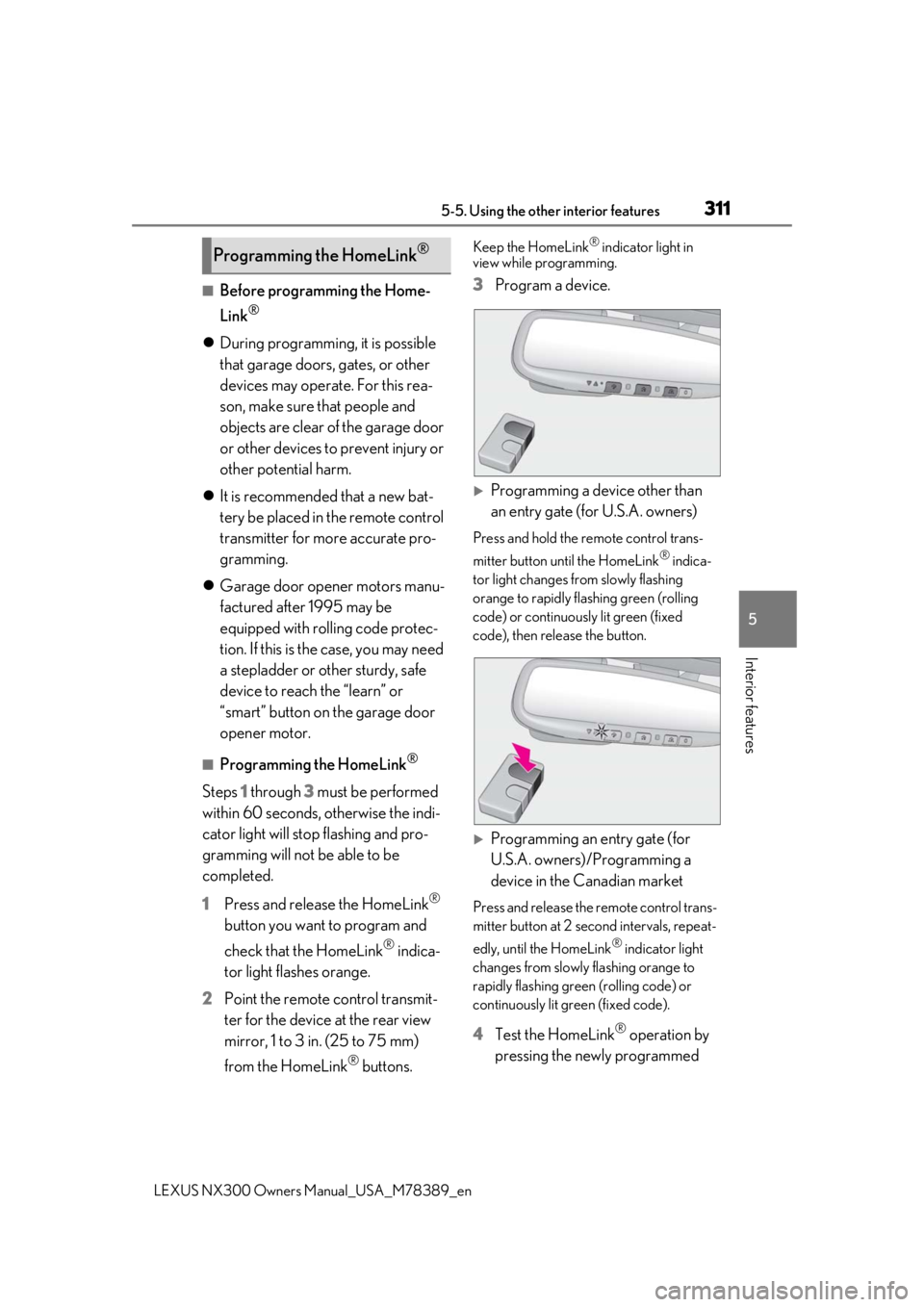
2 Point the remote control transmit-
ter for the device at the rear view
mirror, 1 to 3 in. (25 to 75 mm)
from the HomeLink
® buttons.
Keep the HomeLink® indicator light in
view while programming.
3 Program a device.
Programming a device other than
an entry gate (for U.S.A. owners)
Press and hold the remote control trans-
mitter button until the HomeLink
® indica-
tor light changes from slowly flashing
orange to rapidly flashing green (rolling
code) or continuously lit green (fixed
code), then release the button.
Programming an entry gate (for
U.S.A. owners)/Programming a
device in the Canadian market
Press and release the remote control trans-
mitter button at 2 second intervals, repeat-
edly, until the HomeLink
® indicator light
changes from slowly flashing orange to
rapidly flashing green (rolling code) or
continuously lit green (fixed code).
4 Test the HomeLink® operation by
pressing the newly programmed
Programming the HomeLink®
Page 315 of 468
3155-5. Using the other interior features
LEXUS NX300 Owners Manual_USA_M78389_en
5
Interior features
*: If equipped
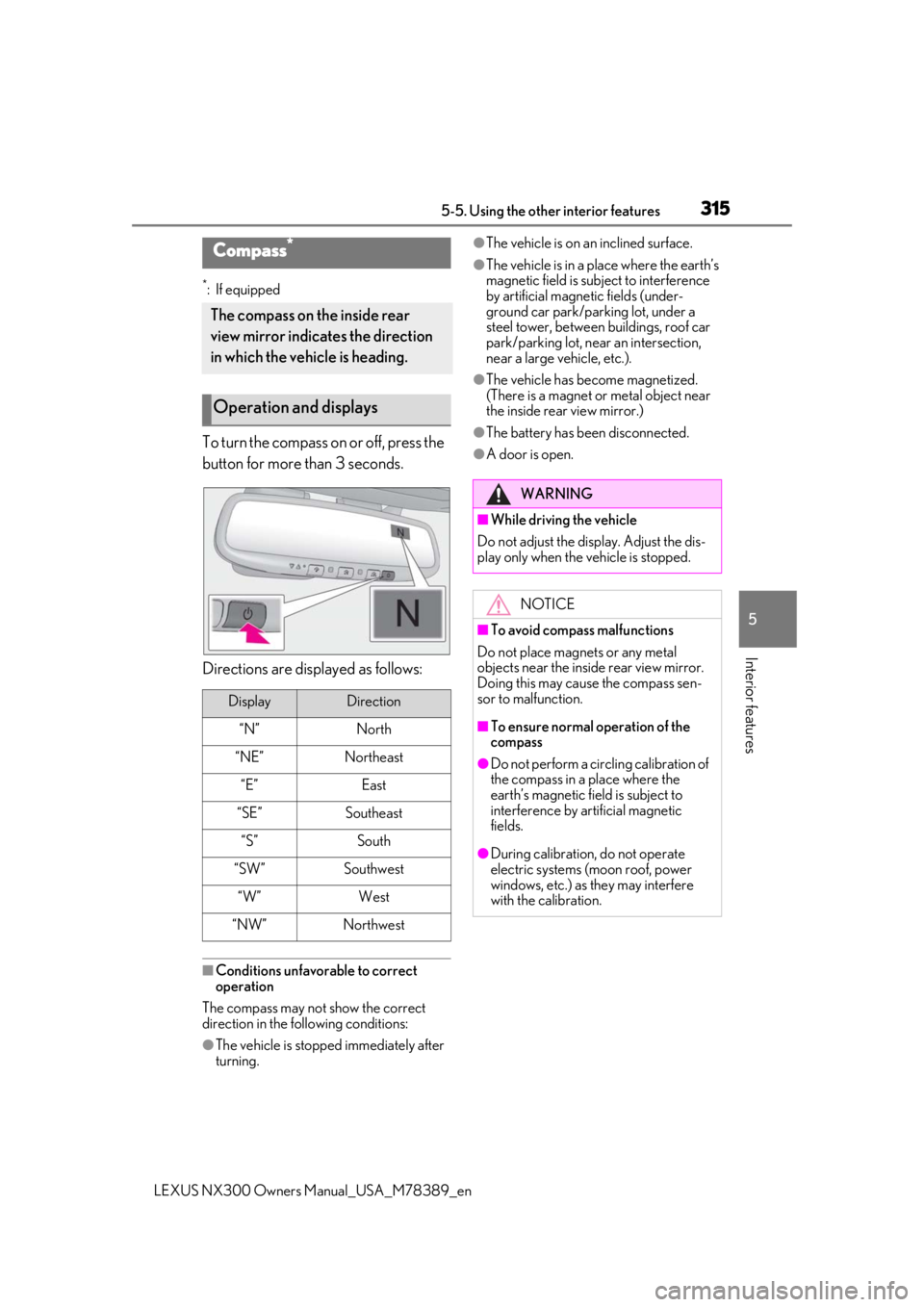
To turn the compass on or off, press the
button for more than 3 seconds.
Directions are displayed as follows:
■Conditions unfavorable to correct
operation
The compass may not show the correct
direction in the following conditions:
●The vehicle is stopped immediately after
turning.
●The vehicle is on an inclined surface.
●The vehicle is in a place where the earth’s
magnetic field is subject to interference
by artificial magnetic fields (under-
ground car park/parking lot, under a
steel tower, between buildings, roof car
park/parking lot, near an intersection,
near a large vehicle, etc.).
●The vehicle has become magnetized.
(There is a magnet or metal object near
the inside rear view mirror.)
●The battery has been disconnected.
●A door is open.
Compass*
The compass on the inside rear
view mirror indicates the direction
in which the vehicle is heading.
Operation and displays
DisplayDirection
“N”North
“NE”Northeast
“E”East
“SE”Southeast
“S”South
“SW”Southwest
“W”West
“NW”Northwest
WARNING
■While driving the vehicle
Do not adjust the display. Adjust the dis-
play only when the vehicle is stopped.
NOTICE
■To avoid compass malfunctions
Do not place magnets or any metal
objects near the inside rear view mirror.
Doing this may cause the compass sen-
sor to malfunction.
■To ensure normal operation of the
compass
●Do not perform a circling calibration of
the compass in a place where the
earth’s magnetic field is subject to
interference by artificial magnetic
fields.
●During calibration, do not operate
electric systems (moon roof, power
windows, etc.) as they may interfere
with the calibration.