warning light LEXUS NX300 2020 Owner's Manual
[x] Cancel search | Manufacturer: LEXUS, Model Year: 2020, Model line: NX300, Model: LEXUS NX300 2020Pages: 468, PDF Size: 10.24 MB
Page 73 of 468

73
LEXUS NX300 Owners Manual_USA_M78389_en
2
2
Vehicle status information and indicators
Vehicle status information
and indicators
2-1. Instrument cluster
Warning lights and indicators . 74
Gauges and meters .................... 79
Multi-information display.......... 82
Head-up display ........................... 88
Fuel consumption information 92
Page 74 of 468

742-1. Instrument cluster
LEXUS NX300 Owners Manual_USA_M78389_en
2-1.Instrument cluster
For the purpose of explanatio n, the following illustration displays all warning lights
and indicators illuminated.
The units used on the meters and some indicators may differ depending on the target
region.
Warning lights and indicators
The warning lights and indicators inform th e driver of the status of the vehicle’s
various systems.
Instrument cluster
Page 75 of 468

752-1. Instrument cluster
LEXUS NX300 Owners Manual_USA_M78389_en
2
Vehicle status information and indicators
Warning lights inform the driver of mal-
functions in any of the vehicle’s sys-
tems.
*1: These lights turn on when the engine
switch is turned to IGNITION ON
mode to indicate that a system check is
being performed. They will turn off after
Warning lights
(U.S.A.)
Brake system warning light*1
( P.375)
(Red)
(Canada)
Brake system warning light*1
( P.375)
Charging system warning
light
*2 ( P.375)
Low engine oil pressure warn-
ing light
*2 ( P.375)
High coolant temperature
warning light
*2 ( P.376)
(Yellow)
Brake system warning light*1
( P.376)
(U.S.A.)
Malfunction indicator lamp*1
( P.376)
(Canada)
Malfunction indicator lamp*1
( P.376)
SRS warning light
*1 ( P.376)
(U.S.A.)
ABS warning light*1 ( P.377)
(Canada)
ABS warning light*1 ( P.377)
(Yellow)
Electric power steering sys-
tem warning light
*1 ( P.377)
(Red)
Electric power steering sys-
tem warning light
*1 ( P.377)
PCS warning light
*1 ( P.377)
(Orange)
LTA indicator*2 (if equipped)
( P.378)
LDA indicator
*2 (if equipped)
( P.378)
PKSB OFF indicator
*1, 3 (if
equipped) ( P.378)
Slip indicator light
*1 ( P.378)
Brake hold operated indica-
tor
*1, 3 ( P.379)
(U.S.A.)
Parking brake indicator*3
( P.379)
(Canada)
Parking brake indicator*3
( P.379)
Low fuel level warning light
( P.379)
Driver’s and front passenger’s
seat belt reminder light
( P.379)
Rear passengers’ seat belt
reminder light
*4 ( P.380)
Master warning light
*1
( P.380)
Tire pressure warning light
*1
( P.380)
Brake Override Sys-
tem/Drive-Start Control warn-
ing light
*2 ( P.381)
Page 76 of 468

762-1. Instrument cluster
LEXUS NX300 Owners Manual_USA_M78389_en
the engine is started, or after a few sec-
onds. There may be a malfunction in a
system if the lights do not turn on, or
turn off. Have the vehicle inspected by
your Lexus dealer.
*2: This light illuminates on the multi-infor-
mation display.
*3: The light flashes to indicate a malfunc-tion.
*4: This light illuminates on the center panel.
The indicators inform the driver of the
operating state of the vehicle’s various
systems.
WARNING
■If a safety system warning light does
not come on
Should a safety system light such as the
ABS and SRS airbag warning light not
come on when you start the engine, this
could mean that these systems are not
available to help pr otect you in an acci-
dent, which could result in death or seri-
ous injury. Have the vehicle inspected by
your Lexus dealer immediately if this
occurs.
Indicators
Turn signal indicator ( P.172)
(U.S.A.)
Headlight indicator ( P.178)
(Canada)
Tail light indicator ( P.178)
Headlight high beam indicator
( P.180)
Automatic High Beam indica-
tor ( P.181)
Fog light indicator ( P.184)
Eco Driving Indicator Light
*1
( P.78)
“Eco” indicator
*2 ( P.258)
“Sport” indicator
*2 ( P.258)
“Sport S” indicator
*2 (if
equipped) ( P.258)
“Sport S+” indicator
*2 (if
equipped) ( P.258)
“Custom” indicator
*2 (if
equipped) ( P.258)
Dynamic radar cruise control
indicator
*2 ( P.225)
Cruise control “SET” indica-
tor
*2 ( P.225)
Cruise control indicator
*2
( P.225)
Page 77 of 468
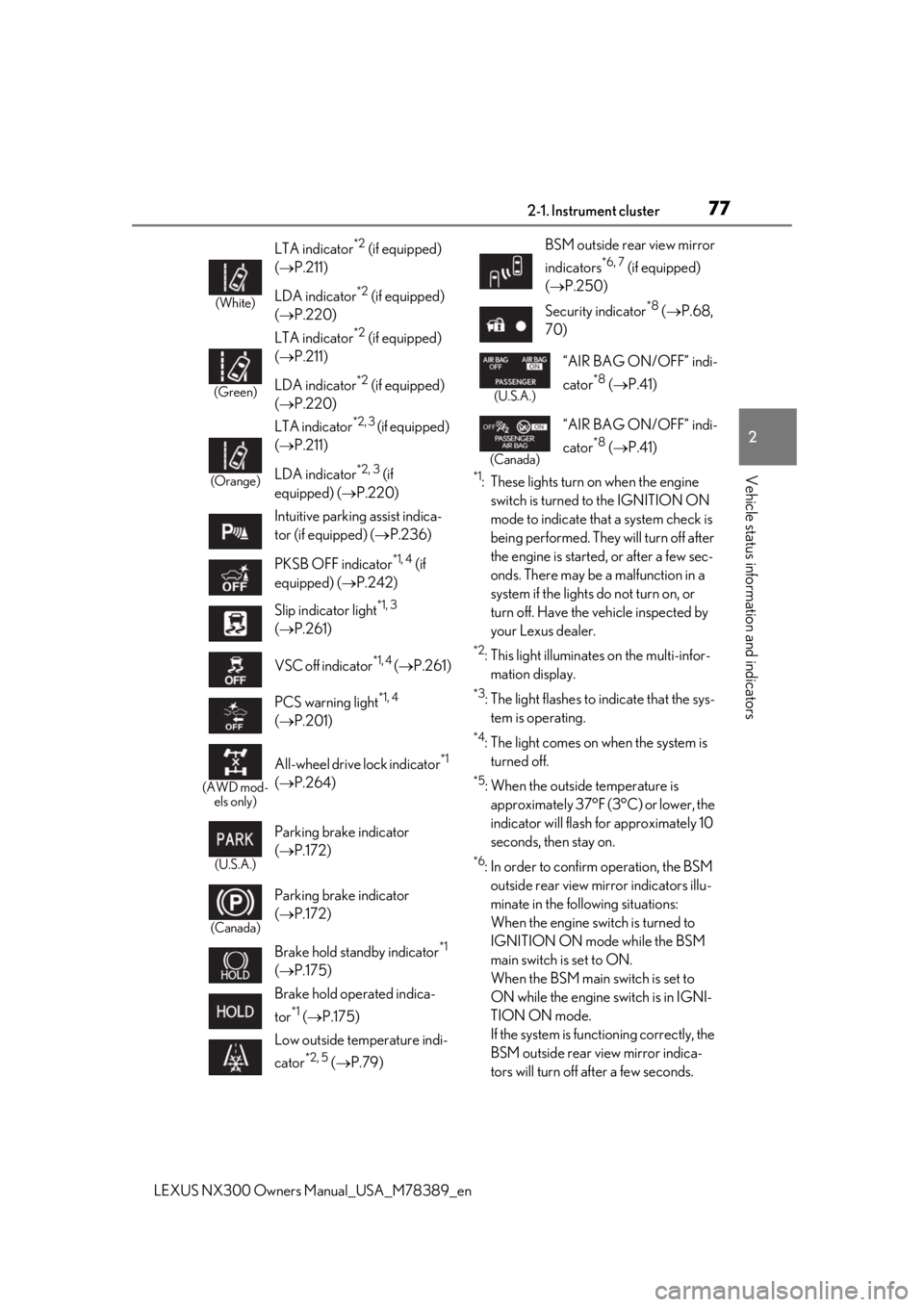
772-1. Instrument cluster
LEXUS NX300 Owners Manual_USA_M78389_en
2
Vehicle status information and indicators*1: These lights turn on when the engine
switch is turned to the IGNITION ON
mode to indicate that a system check is
being performed. They will turn off after
the engine is started, or after a few sec-
onds. There may be a malfunction in a
system if the lights do not turn on, or
turn off. Have the vehicle inspected by
your Lexus dealer.
*2: This light illuminates on the multi-infor-mation display.
*3: The light flashes to indicate that the sys-tem is operating.
*4: The light comes on when the system is turned off.
*5: When the outside temperature is approximately 37°F (3°C) or lower, the
indicator will flash for approximately 10
seconds, then stay on.
*6: In order to confirm operation, the BSM outside rear view mirror indicators illu-
minate in the following situations:
When the engine switch is turned to
IGNITION ON mode while the BSM
main switch is set to ON.
When the BSM main switch is set to
ON while the engine switch is in IGNI-
TION ON mode.
If the system is func tioning correctly, the
BSM outside rear view mirror indica-
tors will turn off after a few seconds.
(White)
LTA indicator*2 (if equipped)
( P.211)
LDA indicator
*2 (if equipped)
( P.220)
(Green)
LTA indicator*2 (if equipped)
( P.211)
LDA indicator
*2 (if equipped)
( P.220)
(Orange)
LTA indicator*2, 3 (if equipped)
( P.211)
LDA indicator
*2, 3 (if
equipped) ( P.220)
Intuitive parking assist indica-
tor (if equipped) ( P.236)
PKSB OFF indicator
*1, 4 (if
equipped) ( P.242)
Slip indicator light
*1, 3
( P.261)
VSC off indicator
*1, 4 ( P.261)
PCS warning light
*1, 4
( P.201)
(AWD mod-
els only)
All-wheel drive lock indicator*1
( P.264)
(U.S.A.)
Parking brake indicator
( P.172)
(Canada)
Parking brake indicator
( P.172)
Brake hold standby indicator
*1
( P.175)
Brake hold operated indica-
tor
*1 ( P.175)
Low outside temperature indi-
cator
*2, 5 ( P.79)
BSM outside rear view mirror
indicators
*6, 7 (if equipped)
( P.250)
Security indicator
*8 ( P.68,
70)
(U.S.A.)
“AIR BAG ON/OFF” indi-
cator
*8 ( P.41)
(Canada)
“AIR BAG ON/OFF” indi-
cator
*8 ( P.41)
Page 80 of 468

802-1. Instrument cluster
LEXUS NX300 Owners Manual_USA_M78389_en
Displays warning messages in
case of a malfunction (P.384)
Speedometer
Displays the vehicle speed
Fuel gauge
Displays the quantity of fuel remaining in the tank
Shift position and shift range
Displays the selected shift posi tion or selected shift range (P.168)
Odometer, trip meter and maintena nce required information display
Odometer:
Displays the total distance the vehicle has been driven
Trip meter:
Displays the distance the vehicle has been driven since the meter was last reset.
Trip meters “A” and “B” can be used to record and display different distances inde-
pendently.
Maintenance required information:
Displays the remaining distance until the engine oil should be changed.
• Displays the maintenance requir ed information when the engine switch is in IGNITION
ON mode.
• It can be reset on of the multi-information display. ( P.85)
■Operating condition
The engine switch is in IGNITION ON
mode.
■Outside temperature display
●In the following situations, the correct
outside temperature may not be dis-
played, or the display may take longer
than normal to change.
• When stopped, or driving at low speeds
(less than 12 mph [20 km/h])
• When the outside temperature has changed suddenly (at the entrance/exit of
a garage, tunnel, etc.)
●When “--” or “E” is displayed, the system
may be malfunctioning.
Take your vehicle to your Lexus dealer.
■Pop-up display
In some situations, a pop-up display will be
temporarily displayed on the multi-informa-
tion display or the odometer/trip
meter/maintenance re quired information
screen.
The pop-up display function can be set on/off. (
P.87)
■Liquid crystal display
Small spots or light sp ots may appear on the
display. This phenomen on is characteristic
of liquid crystal disp lays, and there is no
problem continuing to use the display.
■Customization
The meter display can be customized on
the multi-information display.
(Customizable features: P.427)
G
H
I
J
Page 81 of 468

812-1. Instrument cluster
LEXUS NX300 Owners Manual_USA_M78389_en
2
Vehicle status information and indicators
Switches between odometer, trip
meter and maintenance required infor-
mation displays. When the trip meter is
displayed, pressing and holding the
button will reset the trip meter. The brightness of the instrument panel
lights can be adjusted.
1
Darker
2
Brighter
■Instrument panel brightness adjustment
The instrument panel brightness levels
when the tail lights are on and off can be
adjusted individually. However, when the
surroundings are bright (daytime, etc.),
turning on the tail lights will not change the
instrument panel brightness. At this time,
any adjustments made to the instrument
panel brightness levels will be applied to
both settings at once.
WARNING
■The information display at low tem-
peratures
Allow the interior of the vehicle to warm
up before using the liquid crystal infor-
mation display. At extremely low tem-
peratures, the information display
monitor may respond slowly, and display
changes may be delayed.
For example, there is a lag between the
driver’s shifting and the new gear number
appearing on the display. This lag could
cause the driver to downshift again,
causing rapid and excessive engine brak-
ing and possibly an accident resulting in
personal death or injury.
NOTICE
■To prevent damage to the engine and
its components
●Do not let the indicator needle of the
tachometer enter the red zone, which
indicates the maximum engine speed.
●The engine may be overheating if the
engine coolant temperature gauge is
in the red zone (H); or “Engine Cool-
ant Temp High” is shown on the multi-
information display. In this case, imme-
diately stop the vehicle in a safe place,
and check the engine after it has
cooled completely. ( P.403)
Changing between the odome-
ter, trip meter and maintenance
required information
Changing the Instrument panel
light brightness
Page 87 of 468

872-1. Instrument cluster
LEXUS NX300 Owners Manual_USA_M78389_en
2
Vehicle status information and indicators
nance is performed.
■Meter settings
Language
Select to change the language on the dis-
play.
Units
Select to change the unit of measure for
fuel consumption.
Eco Driving Indicator Light
( P.78)
Select to activate/deactivate the Eco Driv-
ing Indicator Light.
Switch settings (P.82)
Displays a procedure to register a desired
screen to
.
You can register 1 screen as a shortcut,
which can be displayed by pressing
.
Drive information screen ( P.83)
Select to choose between 2 items that will
be displayed on each drive information
screen (“
Drive info 1”, “Drive Info 2” and
“Drive Info 3
”) respectively.
Pop-up display ( P.80)
Select to set the following pop-up displays,
which may appear in some situations,
on/off.
• Intersection guidance display of the nav-
igation system-linked system
• Incoming call display of the hands-free phone system
• Instrument panel brightness adjustment display
Accent color
Select to change the accent colors on the screen, such as the cursor color.
Initialization
Select to reset the meter display settings.
■Suspension of the settings display
In the following situations, the settings dis-
play using the meter control switches will be
suspended.
●When a warning message appears on the
multi-information display
●When the vehicle begins to move
Automatically displayed when the sys-
tem is used. ( P.236)
WARNING
■Cautions during setting up the dis-
play
As the engine needs to be running
during setting up the display, en sure that
the vehicle is parked in a place with ade-
quate ventilation. In a closed area such as
a garage, exhaust gases including harm-
ful carbon monoxide (CO) may collect
and enter the vehicle. This may lead to
death or a serious health hazard.
NOTICE
■During setting up the display
To prevent battery discharge, ensure that
the engine is running while setting up the
display features.
Intuitive parking assist (if
equipped)
Page 101 of 468

1013-2. Opening, closing and locking the doors
LEXUS NX300 Owners Manual_USA_M78389_en
3
Before driving
For vehicles with alarm: To prevent unin-
tended triggering of the alarm, unlock the
doors using the wireless remote control and
open and close a door once after the set-
tings have been changed. (If a door is not
opened within 60 seconds after is
pressed, the doors will be locked again and
the alarm will automatically be set.)
In a case that the alarm is triggered, imme-
diately stop the alarm. ( P.70)
■Locking the doors from the outside with-
out a key
1 Move the inside lock button to the lock
position.
2 Close the door.
The door cannot be locked if the engine
switch is in ACCESSORY or IGNITION
ON mode, or the electronic key is left
inside the vehicle.
The key may not be detected correctly and
the door may be locked.
■Impact detection door lock release sys-
tem
In the event that the vehicle is subject to a
strong impact, all the doors are unlocked. Depending on the force of the impact or the
type of accident, however, the system may
not operate.
■Operation signals
Doors:
A buzzer sounds and the emergency flash-
ers flash to indicate that the doors have
been locked/unlocked. (Locked: Once;
Unlocked: Twice)
Windows and moon roof:
A buzzer sounds to indicate that all win-
dows and moon roof are opening.
■Security feature
If a door is not opened within approximately
60 seconds after the vehicle is unlocked,
the security feature automatically locks the
vehicle again.
■Open door warning buzzer
If the vehicle speed reaches 3 mph (5
km/h), the master warning light flashes and
a buzzer sounds to indicate that door(s) or
the hood in not fully closed.
The open door(s) or hood is displayed on
the multi-information display.
■Welcome light illumination control
The side marker, parking, tail and license
plate lights automatically turn on at night
when the doors are unlocked using the
entry function or wireless remote control if
the light switch is in the position.
■When the door cannot be locked by the
lock sensor on the surface of the door
handle
When the door cannot be locked even if the
lock sensor on the surface of the door han-
dle is touched by a finger, touch the lock
sensor with the palm.
When gloves are being worn, remove the
gloves.
Multi-information display/BeepUnlocking function
Exterior: Beeps 3 times
Interior: Pings once
Holding the driver’s
door handle unlocks
only the driver’s door.
Holding any of the
passenger door han- dles unlocks all the doors.
Exterior: Beeps twice
Interior: Pings once
Holding a door han-dle unlocks all the doors.
Page 105 of 468

1053-2. Opening, closing and locking the doors
LEXUS NX300 Owners Manual_USA_M78389_en
3
Before driving
■Smart access system with push-
button start
Carry the electronic key to enable this
function.
1
Locks all the doors
Check that the door is securely locked.
2Unlocks all the doors
The doors cannot be unlocked for 3 sec-
onds after the doors are locked.
■Wireless remote control
P.97
■Door lock switches
P.102
■Open
Raise the back door while pressing up
the back door opener switch.
WARNING
●When closing the back door, take
extra care to prevent your fingers, etc.,
from being caught.
●When closing the back door, make
sure to press it lightly on its outer sur-
face. If the back door handle is used to
fully close the back door, it may result
in hands or arms being caught.
●Do not pull on the back door damper
stay (vehicles without power back
door) ( P.106) or back door spindle
(vehicles with power back door)
( P.113) to close the back door, and
do not hang on the back door damper
stay (vehicles without power back
door) or back door spindle (vehicles
with power back door).
Doing so may cause hands to be
caught or the back door damper stay
(vehicles without power back door) or
back door spindle (vehicles with
power back door) to break, causing an
accident.
●If a bicycle carrier or similar heavy
object is attached to the back door, it
may suddenly shut again after being
opened, causing someone’s hands,
head or neck to be caught and injured.
When installing an accessory part to
the back door, using a genuine Lexus
part is recommended.
Unlocking and locking the back
door from the outside
Unlocking and locking the back
door from the inside
Opening/closing the back door
(vehicles without power back
door)