data link LEXUS NX300 2020 Owners Manual
[x] Cancel search | Manufacturer: LEXUS, Model Year: 2020, Model line: NX300, Model: LEXUS NX300 2020Pages: 468, PDF Size: 10.24 MB
Page 79 of 468
792-1. Instrument cluster
LEXUS NX300 Owners Manual_USA_M78389_en
2
Vehicle status information and indicators
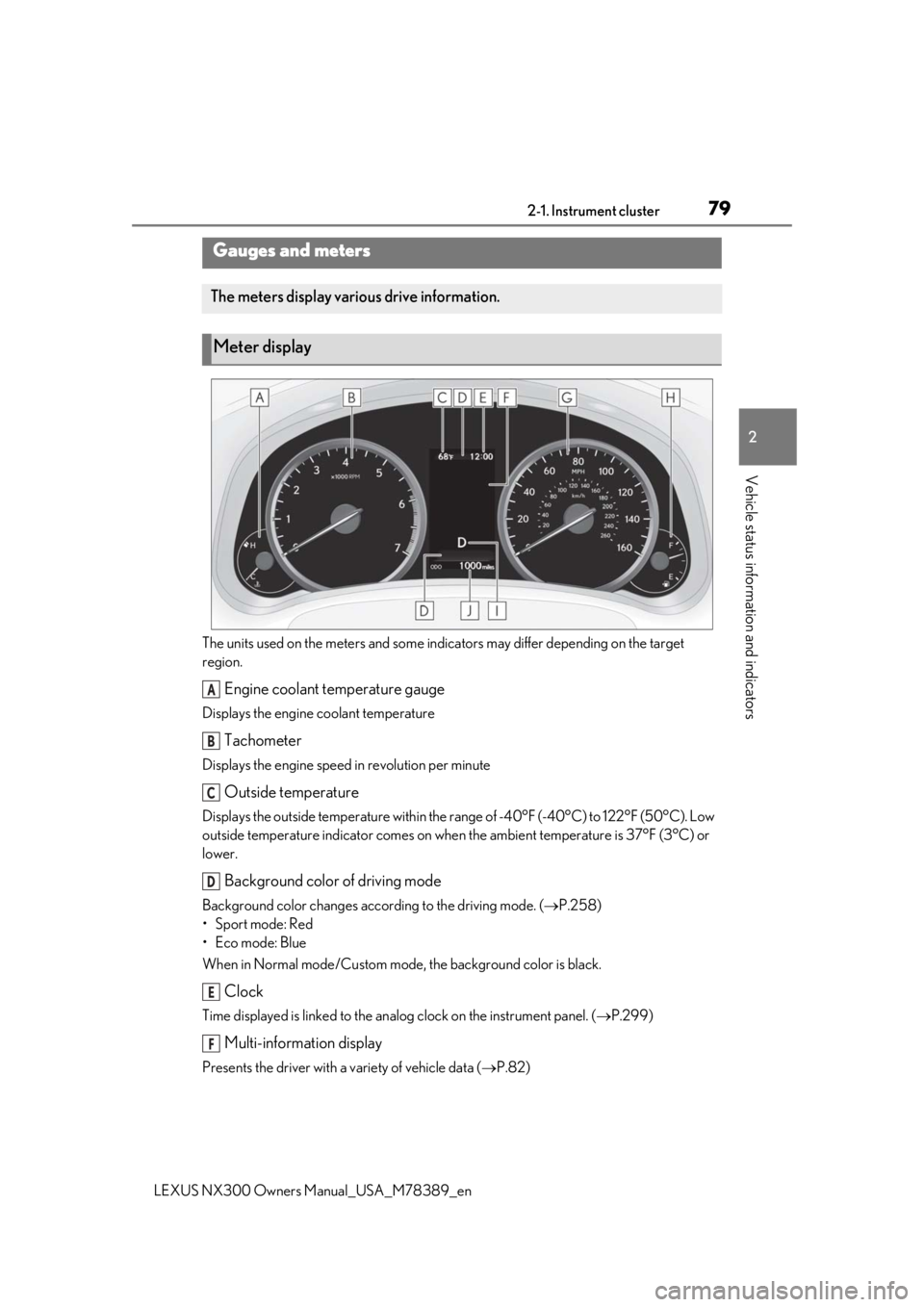
The units used on the meters and some indicators may differ depending on the target
region.
Engine coolant temperature gauge
Displays the engine coolant temperature
Tachometer
Displays the engine speed in revolution per minute
Outside temperature
Displays the outside temperature within the range of -40°F (-40°C) to 122°F (50°C). Low
outside temperature indicator comes on when the ambient temperature is 37°F (3°C) or
lower.
Background color of driving mode
Background color changes acco rding to the driving mode. (P.258)
•Sport mode: Red
•Eco mode: Blue
When in Normal mode/Custom mode , the background color is black.
Clock
Time displayed is linked to the analog clock on the instrument panel. (P.299)
Multi-information display
Presents the driver with a variety of vehicle data ( P.82)
Gauges and meters
The meters display various drive information.
Meter display
A
B
C
D
E
F
Page 82 of 468
822-1. Instrument cluster
LEXUS NX300 Owners Manual_USA_M78389_en
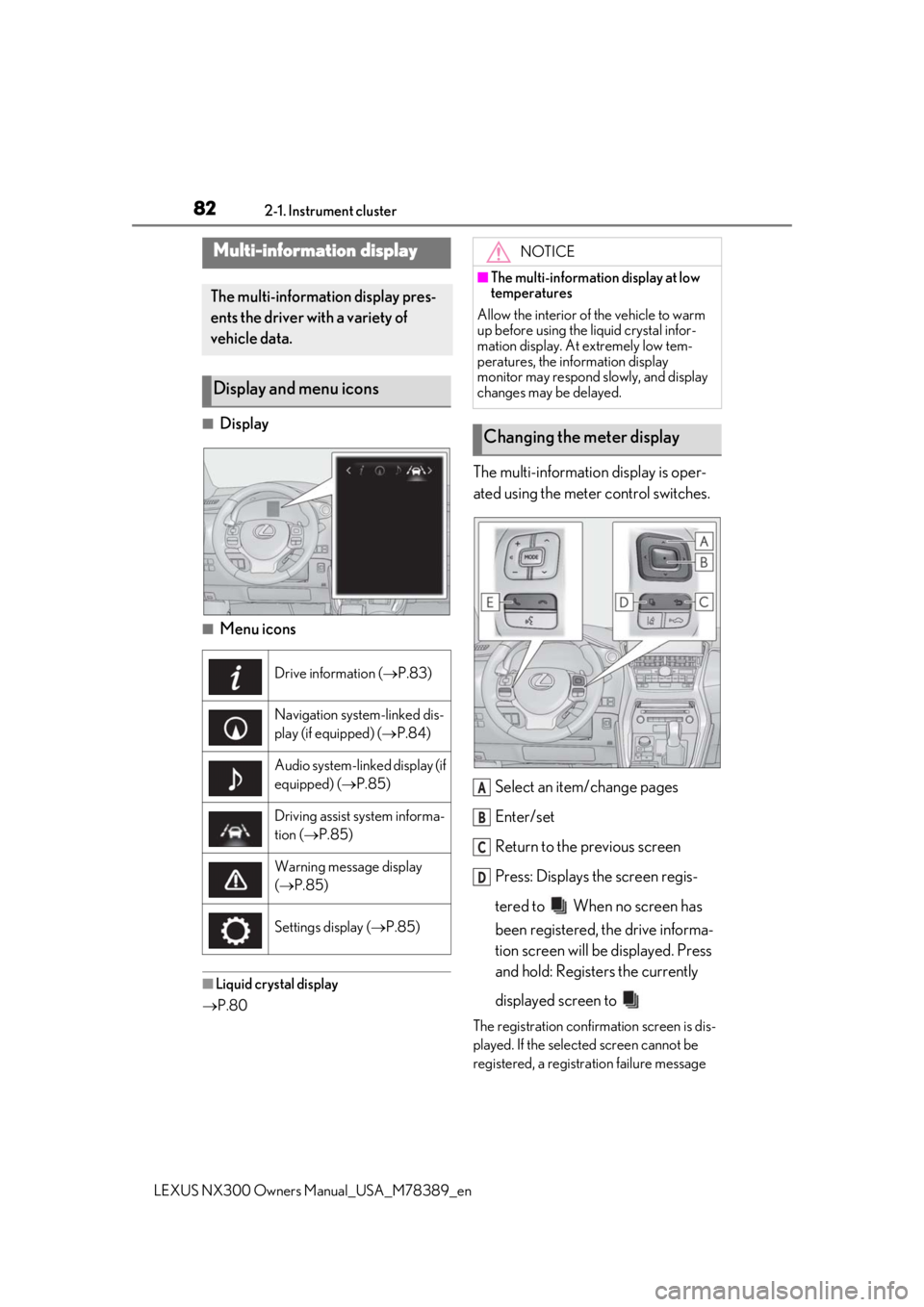
■Display
■Menu icons
■Liquid crystal display
P.80
The multi-information display is oper-
ated using the meter control switches.
Select an item/change pages
Enter/set
Return to the previous screen
Press: Displays the screen regis-
tered to When no screen has
been registered, the drive informa-
tion screen will be displayed. Press
and hold: Registers the currently
displayed screen to
The registration confirmation screen is dis-
played. If the selected screen cannot be
registered, a registration failure message
Multi-information display
The multi-information display pres-
ents the driver with a variety of
vehicle data.
Display and menu icons
Drive information ( P.83)
Navigation system-linked dis-
play (if equipped) ( P.84)
Audio system-linked display (if
equipped) (P.85)
Driving assist system informa-
tion (P.85)
Warning message display
( P.85)
Settings display ( P.85)
NOTICE
■The multi-information display at low
temperatures
Allow the interior of the vehicle to warm
up before using the liquid crystal infor-
mation display. At extremely low tem-
peratures, the information display
monitor may respond slowly, and display
changes may be delayed.
Changing the meter display
A
B
C
D
Page 83 of 468
832-1. Instrument cluster
LEXUS NX300 Owners Manual_USA_M78389_en
2
Vehicle status information and indicators
will be shown.
Call sending/receiving and history
display
Linked with the hands-free system, sending
or receiving call is displayed. For details
regarding the hands-free system, refer to
the “NAVIGATION AND MULTIMEDIA
SYSTEM OWNER’S MANUAL”.
■Content displayed as drive infor-
mation
Select to display various drive data.
Items displayed can be switched by
pressing or of the meter con-
trol switches to select and pressing
or .
Current fuel consumption
*1
Displays the current rate of fuel consump-
tion
Average fuel consumption (after
reset
*2/after start/after refuel)*1
Displays the average fuel consumption
since the function was reset, the engine
was started, and the vehicle was refueled,
respectively
Use the displayed average fuel consump-
tion as a reference.
Average vehicle speed (after
reset
*2/after start)*1
Displays the average vehicle speed since
the function was reset and the engine was
started, respectively
Elapsed time (after reset*2/after
start)
*1
Displays the elapsed time since the func-
tion was reset and the engine was started,
respectively
Distance (driving range/after start)*1
Displays the estimated maximum distance
that can be driven with the quantity of fuel
remaining and the distan ce driven after the
engine was starte d respectively.
• This distance is computed based on your average fuel consumption. As a result,
the actual distance that can be driven
may differ from that displayed.
• When only a small amount of fuel is added to the tank, the display may not be
updated.
When refueling, turn the engine switch
off. If the vehicle is refueled without turn-
ing the engine switch off, the display may
not be updated.
*1: Displayed when the it em is set in “Drive
Info 1”, “Drive Info 2” and “Drive Info 3”.
*2: The function can be reset by pressing
the of the meter control switches
for longer than 1 second when the item
to reset is displayed.
If there is more than one item that can
be reset, the item selection screen will
appear.
■Eco Driving Indicator Zone Dis-
play
P.78
■Boost Meter/Oil Temperature
Gauge/Oil Pressure Gauge (if
equipped)
Boost Meter:
Displays the boost pressure. The dis-
play changes colors when the specified
pressure is exceeded.
Drive information
E