radio LEXUS NX300h 2015 Owners Manual
[x] Cancel search | Manufacturer: LEXUS, Model Year: 2015, Model line: NX300h, Model: LEXUS NX300h 2015Pages: 681, PDF Size: 9.14 MB
Page 4 of 681

TABLE OF CONTENTS
4
NX300h_U_OM78007U 5-1. Basic Operations
Lexus Display Audio
System ........................................ 336
Steering wheel audio
switches...................................... 342
Mobile Assistant........................ 343
USB/AUX ports ........................ 345
5-2. Setup
Setup menu ................................. 347
General settings ........................348
Voice settings................................351
Display settings .......................... 352
5-3. Using the audio system
Selecting the audio
source ......................................... 353
Optimal use of the audio
system ......................................... 354
Audio settings............................. 355
Audio menu screen
operation ................................... 358
5-4. Using the radio
Radio operation ........................... 361
5-5. Playing an audio CD and
MP3/WMA/AAC discs
CD player operation ................367 5-6. Using an external device
Listening to an iPod ................... 374
Using USB memory
device........................................... 377
Using the AUX port ................. 381
5-7. Connecting Bluetooth ®
Steps for using Bluetooth ®
devices........................................ 382
Registering a Bluetooth ®
device.......................................... 384
Selecting a Bluetooth ®
device..........................................385
Connecting a Bluetooth ®
audio player.............................. 386
Connecting a Bluetooth ®
phone .......................................... 387
Displaying a Bluetooth ®
device details ...........................388
Detailed Bluetooth ®
settings ....................................... 389
5-8. Bluetooth ®
Audio
Listening to Bluetooth ®
Audio .......................................... 3905
Lexus Display Audio system
Page 9 of 681

9
NX300h_U_OM78007U The installation of a mobile two-way radio sy stem in your vehicle could affect electronic
systems such as: ●
Multiport fuel injection system/sequential multiport fuel injection system ●
Dynamic radar cruise control system ●
Cruise control system ●
Anti-lock brake system ●
SRS airbag system ●
Seat belt pretensioner system
Be sure to check with your Lexus dealer fo r precautionary measures or special instruc-
tions regarding insta llation of a mobile two-way radio system.
High voltage parts and cables on the hybrid vehicles emit approximately the same
amount of electromagnetic waves as the conventional gasoline powered vehicles or
home electronic appliances despite of their electromagnetic shielding.
Unwanted noise may occur in the rece ption of the mobile two-way radio.Installation of a mobile two-way radio system
Page 47 of 681

471-1. For safe use
1
For safety and security
NX300h_U_OM78007U WA R N I N G ■
SRS airbag precautions ●
If breathing becomes difficult after the SRS airbags have deployed, open a door or
window to allow fresh air in, or leave the vehicl e if it is safe to do so. Wash off any resi-
due as soon as possible to prevent skin irritation. ●
If the areas where the SRS airbags are stored, such as the steering wheel pad and
front and rear pillar garnishes, are damaged or cracked, have them replaced by your
Lexus dealer. ●
Do not place anything, such as a cushion, on the front passenger’s seat. Doing so will
disperse the passenger’s weight, which prevents the sensor from detecting the pas-
senger’s weight properly. As a result, th e SRS front airbags for the front passenger
may not deploy in the event of a collision. ■
Modification and disposal of SRS airbag system components
Do not dispose of your vehicle or perform any of the following modifications without
consulting your Lexus dealer. The SRS airb ags may malfunction or deploy (inflate)
accidentally, causing de ath or serious injury.●
Installation, removal, disassembl y and repair of the SRS airbags●
Repairs, modifications, removal or replac ement of the steering wheel, instrument
panel, dashboard, seats or seat upholstery, fr ont, side and rear pillars or roof side rails●
Repairs or modifications of the front fend er, front bumper, or side of the occupant
compartment ●
Installation of a grille guar d (bull bars, kangaroo bar, etc.), snow plows, winches or
roof luggage carrier ●
Modifications to the vehicle’s suspension system ●
Installation of electronic devices such as mobile two-way radios and CD players●
Modifications to your vehicle for a person with a physical disability
Page 83 of 681
831-2. Hybrid system
1
For safety and security
NX300h_U_OM78007U ■
If a warning light comes on, a warning message is displayed, or the 12-volt battery is dis-
connected
The hybrid system may not start. In this case, try to start the system again. If the “READY”
indicator does not come on, contact your Lexus dealer. ■
Running out of fuel
When the vehicle has run out of fuel and the hybrid system cannot be started, refuel the
vehicle with at least enough gasoline to make the low fuel level warning light ( P. 5 6 7 )
go off. If there is only a small amount of fu el, the hybrid system may not be able to start.
(The standard amount of fuel is about 2.7 gal. [10.1 L, 2.2 Imp.gal.], when the vehicle is on
a level surface. This value may vary when the vehicle is on a slope. Add extra fuel when
the vehicle is inclined.) ■
Electromagnetic waves ●
High voltage parts and cables on hybrid ve hicles incorporate electromagnetic shield-
ing, and therefore emit approximately the same amount of electromagnetic waves as
conventional gasoline powered vehicl es or home electronic appliances.●
Your vehicle may cause sound interference in some third party-produced radio parts. ■
Hybrid battery (traction battery)
The hybrid battery (traction battery) has a limited service life. The lifespan of the hybrid
battery (traction battery) can change in accordance with driving style and driving condi-
tions.
WA R N I N G ■
High voltage precautions
This vehicle has high voltage DC and AC systems as well as a 12-volt system. DC and
AC high voltage is very dangerous and can cause severe burns and electric shock that
may result in death or serious injury. ●
Never touch, disassemble, remove or replace the high voltage parts, cables or their
connectors. ●
The hybrid system will become hot after star ting as the system uses high voltage. Be
careful of both the high voltage and the hi gh temperature, and always obey the warn-
ing labels attached to the vehicle. ●
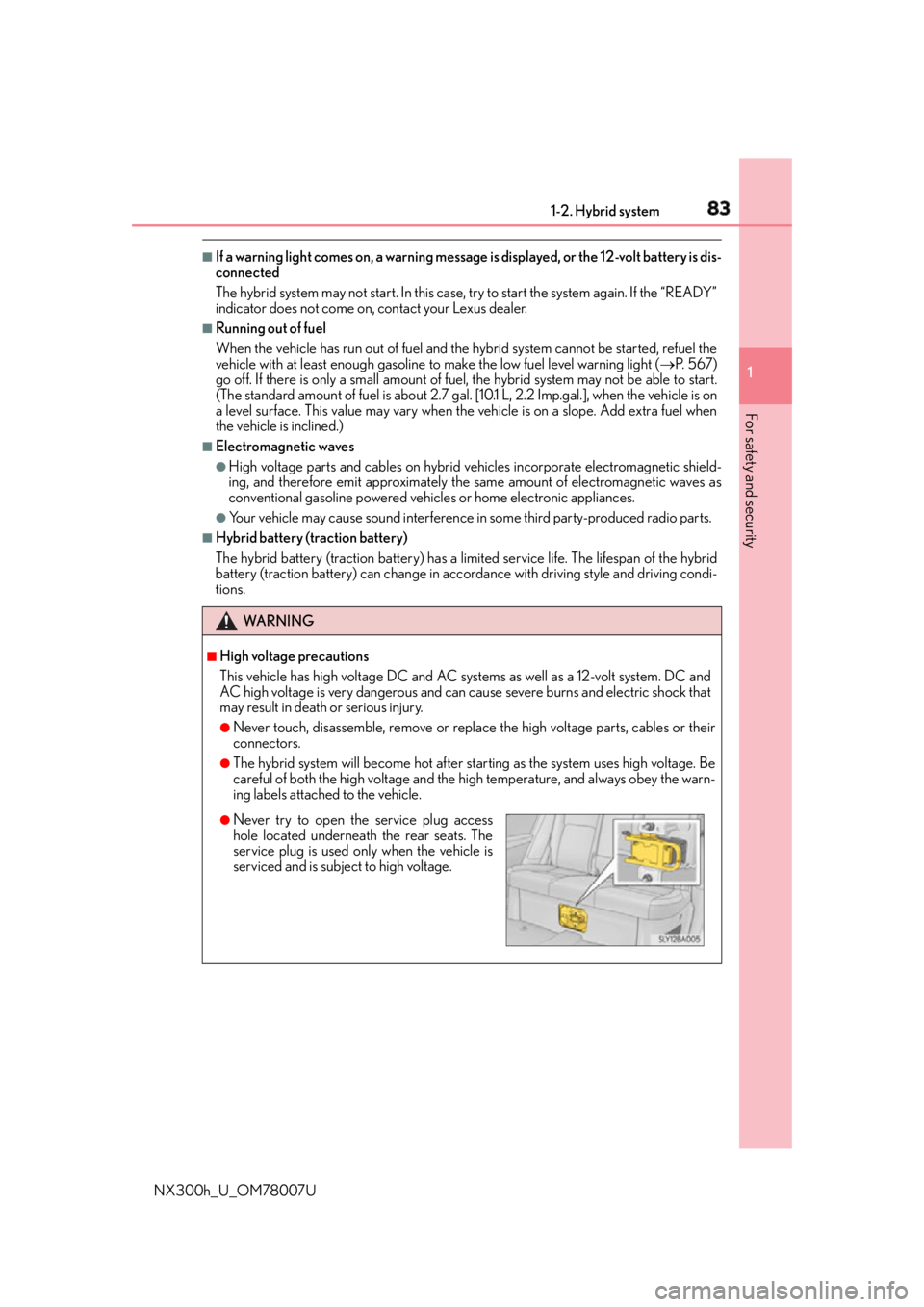
Never try to open the service plug access
hole located underneath the rear seats. The
service plug is used only when the vehicle is
serviced and is subject to high voltage.
Page 105 of 681

1052. Instrument cluster
2
Instrument cluster
NX300h_U_OM78007U ■
Suspension of the settings display
In the following situations, th e settings display using the meter control switches will be
suspended. ●
When a warning message appears on the multi-information display●
When the vehicle begins to move ■
Tire inflation pressure ●
It may take a few minutes to display the tire inflation pressure after the power switch is
turned to ON mode. It may also take a few minutes to display the tire inflation pressure
after inflation pressure has been adjusted. ●
“---” may be displayed if the tire information cannot be determined due to unfavorable
radio wave conditions. ●
Tire inflation pressure changes with temperat ure. The displayed values may also be dif-
ferent from the values measured using a tire pressure gauge.■
When disconnecting and reconnec ting 12-volt battery terminals
The drive information will be reset. ■
Liquid crystal display
P. 1 0 1
WA R N I N G ■
Cautions during setting up the display
As the hybrid system needs to be operating during setting up the display, ensure that
the vehicle is parked in a place with adequate ventilation. In a closed area such as a
garage, exhaust gases includin g harmful carbon monoxide (CO) may collect and enter
the vehicle. This may lead to death or a serious health hazard.
NOTICE ■
The multi-information disp lay at low temperatures
Allow the interior of the vehicle to warm up before using the liquid crystal information
display. At extremely low temperatures, th e information display monitor may respond
slowly, and display changes may be delayed. ■
During setting up the display
To prevent 12-volt battery discharge, ensure that the hybrid syst em is operating while
setting up the display features.
Page 120 of 681
120 3-1. Key information
NX300h_U_OM78007U ■
Card key (if equipped) ●
The mechanical key that is st ored inside the card key should be used only if a problem
arises, such as when the card key does not operate properly. ●
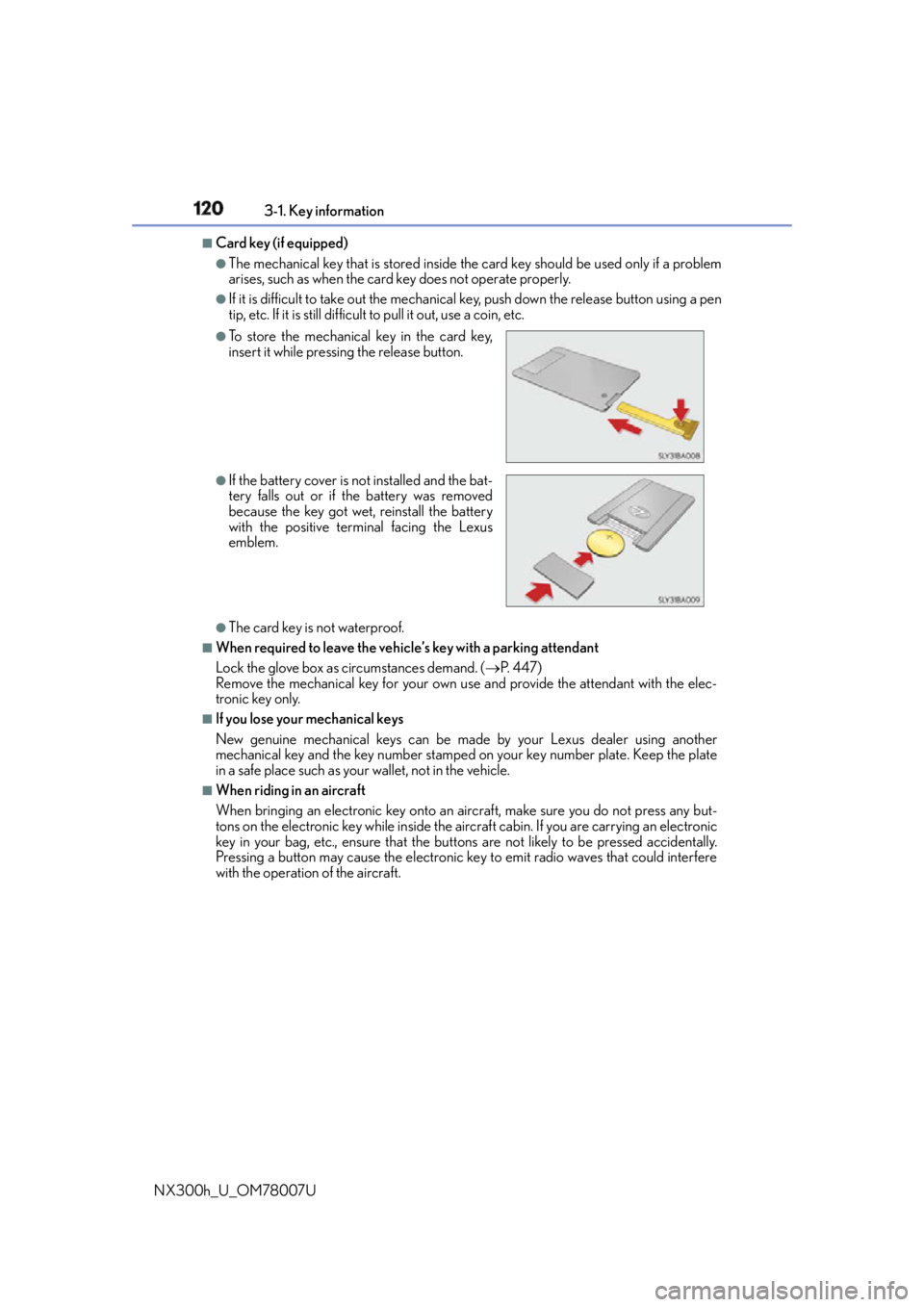
If it is difficult to take out the mechanical key, push down the release button using a pen
tip, etc. If it is still difficult to pull it out, use a coin, etc.
●
The card key is not waterproof. ■
When required to leave the vehicle’s key with a parking attendant
Lock the glove box as circumstances demand. ( P. 4 4 7 )
Remove the mechanical key for your own use and provide the attendant with the elec-
tronic key only. ■
If you lose your mechanical keys
New genuine mechanical keys can be made by your Lexus dealer using another
mechanical key and the key number stamped on your key number plate. Keep the plate
in a safe place such as your wallet, not in the vehicle.■
When riding in an aircraft
When bringing an electronic key onto an aircraft, make sure you do not press any but-
tons on the electronic key while inside the airc raft cabin. If you are carrying an electronic
key in your bag, etc., ensure that the butt ons are not likely to be pressed accidentally.
Pressing a button may cause the electronic key to emit radio waves that could interfere
with the operation of the aircraft. ●
To store the mechanical key in the card key,
insert it while pressing the release button. ●
If the battery cover is not installed and the bat-
tery falls out or if the battery was removed
because the key got wet, reinstall the battery
with the positive terminal facing the Lexus
emblem.
Page 122 of 681

122 3-1. Key information
NX300h_U_OM78007U NOTICE ■
To prevent key damage ●
Do not drop the keys, subject them to strong shocks or bend them. ●
Do not expose the keys to high temp eratures for long periods of time.●
Do not get the keys wet or wash them in an ultrasonic washer, etc. ●
Do not attach metallic or magnetic materials to the keys or place the keys close to
such materials. ●
Do not disassemble the keys. ●
Do not attach a sticker or anything else to the surface of the electronic key. ●
Do not place the keys near objects that pr oduce magnetic fields, such as TVs, audio
systems and induction cookers, or medical electrical equipment, such as low-fre-
quency therapy equipment. ■
Carrying the electronic key on your person
Carry the electronic key 3.9 in. (10 cm) or mo re away from electric appliances that are
turned on. Radio waves emitted from electric appliances within 3. 9 in. (10 cm) of the
electronic key may interfere with the key, causing the key to not function properly. ■
In case of a smart access system with push-button start malfunction or other key-
related problems
Take your vehicle with all the electronic keys provided with your vehicle, including the
card key, to your Lexus dealer. ■
When an electronic key is lost
If the electronic key remains lost, the risk of vehicle theft increase s significantly. Visit
your Lexus dealer immediately with all rema ining electronic keys and the card key that
were provided with your vehicle.
Page 142 of 681

142 3-2. Opening, closing and locking the doors
NX300h_U_OM78007U ■
Electronic Key battery-Saving Function
When battery-saving mode is set, battery de pletion is minimized by stopping the elec-
tronic key from receiving radio waves.
■
Conditions affe cting operation
The smart access system with push-button star t, wireless remote control and immobilizer
system use weak radio waves. In the followi ng situations, the communication between the
electronic key and the vehicle may be affected, preventing the smart access system with
push-button start, wireless remote control and immobilizer system from operating prop-
erly. (Ways of coping: P. 5 9 2 )●
When the electronic key battery is depleted ●
Near a TV tower, electric powe r plant, gas station, radio stat ion, large display, airport or
other facility that generates strong radio waves or electrical noise ●
When the electronic key is in contact wi th, or is covered by the following metallic
objects
• Cards to which aluminum foil is attached
• Cigarette boxes that have aluminum foil inside
• Metallic wallets or bags
•Coins
•Hand warmers made of metal
• Media such as CDs and DVDs ●
When other wireless keys (that emit radio waves) are being used nearby ●
When carrying the electronic key together with the following devices that emit radio
waves
• Portable radio, cellular phone, cordless phone or other wireless communication
devices
• Another vehicle’s electronic key or a wireless key that emits radio waves
• Personal computers or person al digital assistants (PDAs)
• Digital audio players
• Portable game systems ●
If window tint with a metallic content or me tallic objects are attached to the rear win-
dow ●
When the electronic key is placed near a battery charger or electronic devicesPress twice while pressing and holding .
Confirm that the electronic key indicator flashes
4 times.
While the battery-saving mode is set, the smart
access system with push-button start cannot be
used. To cancel the function, press any of the
electronic key buttons.
Page 143 of 681

1433-2. Opening, closing and locking the doors
3
Operation of each component
NX300h_U_OM78007U ■
Note for the entry function ●
Even when the electronic key is within the effective range (detection areas), the system
may not operate properly in the following cases:
• The electronic key is too close to the window or outside door handle, near the
ground, or in a high place when the doors are locked or unlocked.
• The electronic key is near the ground or in a high place, or too close to the rear
bumper center when the back door is opened.
• The electronic key is on the instrument panel, luggage room, floor, or in the door
pockets or glove box when the hybrid system is started or power switch modes are
changed. ●
Do not leave the electronic key on top of th e instrument panel or near the door pockets
when exiting the vehicle. Depending on the radio wave reception conditions, it may be
detected by the antenna outs ide the cabin and the door will become lockable from the
outside, possibly trapping the el ectronic key inside the vehicle.●
As long as the electronic key is within the effective range, the doors may be locked or
unlocked by anyone. ●
Even if the electronic key is not inside the ve hicle, it may be possible to start the hybrid
system if the electronic key is near the window. ●
The doors may unlock if a large amount of wa ter splashes on the door handle, such as in
the rain or in a car wash when the electronic key is within the effective range. (The door
will automatically be locked after approximately 60 seconds if the doors are not
opened and closed.) ●
If the wireless remote control is used to lo ck the doors when the electronic key is near
the vehicle, there is a possibility that the door may not be unlocked by the entry func-
tion. (Use the wireless remote control to unlock the doors.) ●
Touching the door lock sensor while wearin g gloves may delay or prevent lock opera-
tion. Remove the gloves and touch the lock sensor again. ●
When the lock operation is performed using the lock sensor, recognition signals will be
shown up to two consecutive times. After th is, no recognition signals will be given. ●
If the door handle becomes wet while the el ectronic key is within the effective range,
the door may lock and unlock repeatedly. In that case, follow the following correction
procedures to wash the vehicle:
• Place the electronic key in a location 6 ft. (2 m) or more away from the vehicle. (Take
care to ensure that the key is not stolen.)
• Set the electronic key to battery-saving mode to disable the smart access system
with push-button start. ( P. 1 4 2 )●
If the electronic key is insi de the vehicle and a door handle becomes wet during a car
wash, a message may be shown on the mult i-information display and a buzzer will
sound outside the vehicle. To turn off the alarm, lock all the doors. ●
The lock sensor may not work properly if it comes into contact with ice, snow, mud, etc.
Clean the lock sensor and attempt to operate it again.
Page 145 of 681

1453-2. Opening, closing and locking the doors
3
Operation of each component
NX300h_U_OM78007U ■
Certification for the smart access system with push-button start
For vehicles sold in the U.S.A.
FCC ID: HYQ23AAB
FCC ID: HYQ14FBA
FCC ID: HYQ14CBB
FCC ID: NI4TMLF12-3
NOTE:
This device complies with part 15 of the FC C Rules. Operation is subject to the following
two conditions: (1) This device may not caus e harmful interference, and (2) this device
must accept any interference received, incl uding interference that may cause undesired
operation.
FCC WARNING:
Changes or modifications not expressly approved by the party responsible for compli-
ance could void the user’s authority to operate the equipment.
For vehicles sold in Canada
NOTE:
This device complies with Industry Canada licence-exempt RSS st andard(s). Operation
is subject to the following two conditions: (1) this device may not cause interference, and
(2) this device must accept any interference, including interference that may cause
undesired operation of the device.
WA R N I N G ■
Caution regarding interference with electronic devices ●
People with implantable cardiac pacemakers, cardiac resynchronization therapy-
pacemakers or implantable cardioverter de fibrillators should keep away from the
smart access system with pu sh-button start antennas. ( P. 1 4 0 )
The radio waves may affect the operation of such devices. If necessary, the entry
function can be disabled. Ask your Lexus dealer for details, such as the frequency of
radio waves and timing of the emitted radio waves. Then, consult your doctor to see if
you should disable the entry function. ●
Users of any electrical medical device other than implantable cardiac pacemakers,
cardiac resynchronization therapy-pacemakers or implantable cardioverter defibril-
lators should consult the ma nufacturer of the device for information about its opera-
tion under the influence of radio waves.
Radio waves could have unexpected effe cts on the operation of such medical
devices.
Ask your Lexus dealer for details on disabling the entry function.