USB LEXUS NX300h 2015 User Guide
[x] Cancel search | Manufacturer: LEXUS, Model Year: 2015, Model line: NX300h, Model: LEXUS NX300h 2015Pages: 681, PDF Size: 9.14 MB
Page 357 of 681
3575-3. Using the audio system
5
Lexus Display Audio system
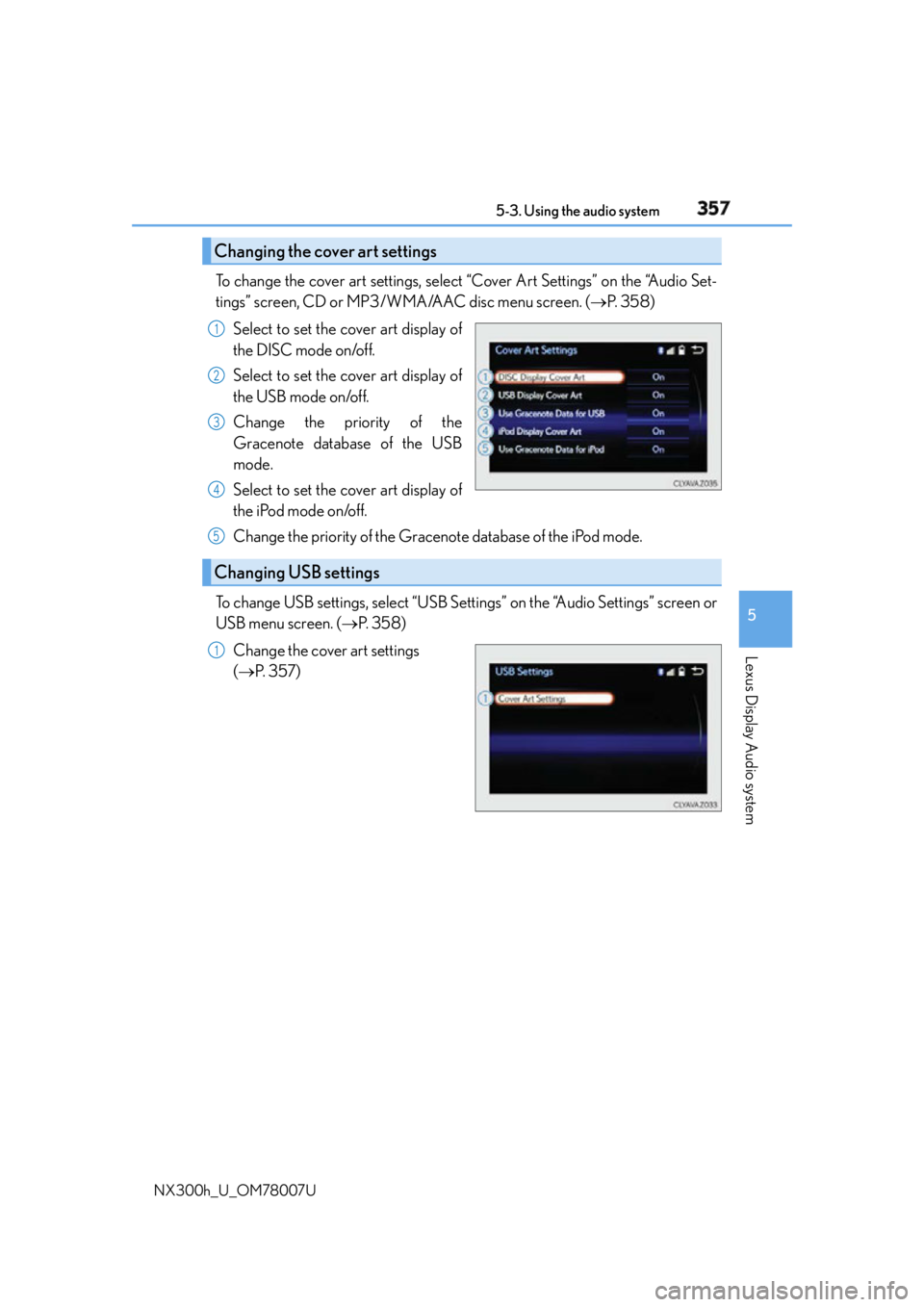
NX300h_U_OM78007U To change the cover art settings, select “Cover Art Settings” on the “Audio Set-
tings” screen, CD or MP3/WMA/AAC disc menu screen. ( P. 3 5 8 )
Select to set the cover art display of
the DISC mode on/off.
Select to set the cover art display of
the USB mode on/off.
Change the priority of the
Gracenote database of the USB
mode.
Select to set the cover art display of
the iPod mode on/off.
Change the priority of the Gracenote database of the iPod mode.
To change USB settings, select “USB Settings” on the “Audio Settings” screen or
USB menu screen. ( P. 3 5 8 )
Change the cover art settings
( P. 3 5 7 )Changing the cover art settings 1
2
3
4
Changing USB settings 5
1
Page 359 of 681
3595-3. Using the audio system
5
Lexus Display Audio system
NX300h_U_OM78007U
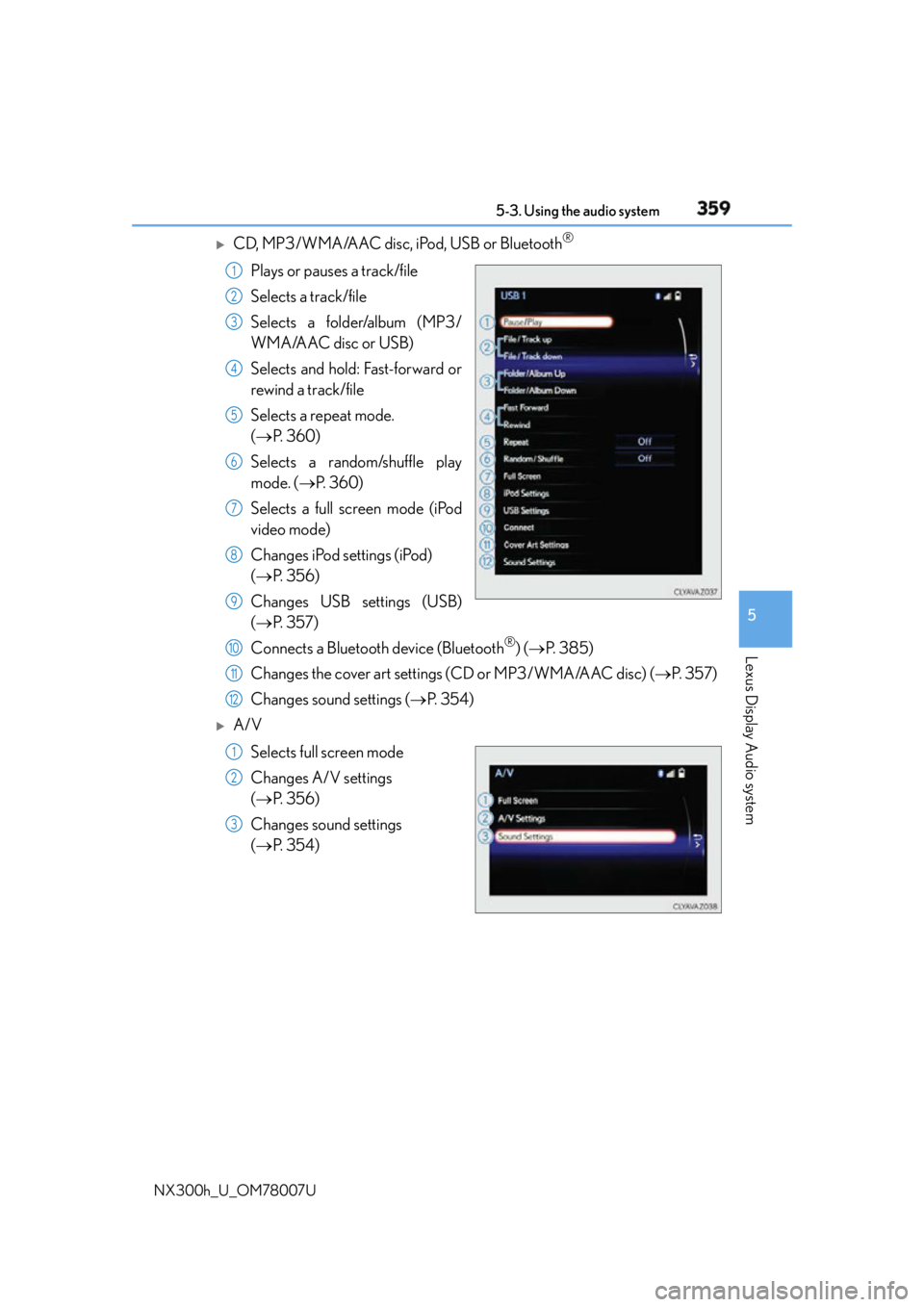
CD, MP3/WMA/AAC disc, iPod, USB or Bluetooth ®
Plays or pauses a track/file
Selects a track/file
Selects a folder/album (MP3/
WMA/AAC disc or USB)
Selects and hold: Fast-forward or
rewind a track/file
Selects a repeat mode.
( P. 3 6 0 )
Selects a random/shuffle play
mode. ( P. 3 6 0 )
Selects a full screen mode (iPod
video mode)
Changes iPod settings (iPod)
( P. 3 5 6 )
Changes USB settings (USB)
( P. 3 5 7 )
Connects a Bluetooth device (Bluetooth ®
) ( P. 3 8 5 )
Changes the cover art settings (CD or MP3/WMA/AAC disc) ( P. 3 5 7 )
Changes sound settings ( P. 3 5 4 )
A/V
Selects full screen mode
Changes A/V settings
( P. 3 5 6 )
Changes sound settings
( P. 3 5 4 ) 1
2
3
4
5
6
7
8
9
10
11
12
1
2
3
Page 360 of 681
360 5-3. Using the audio system
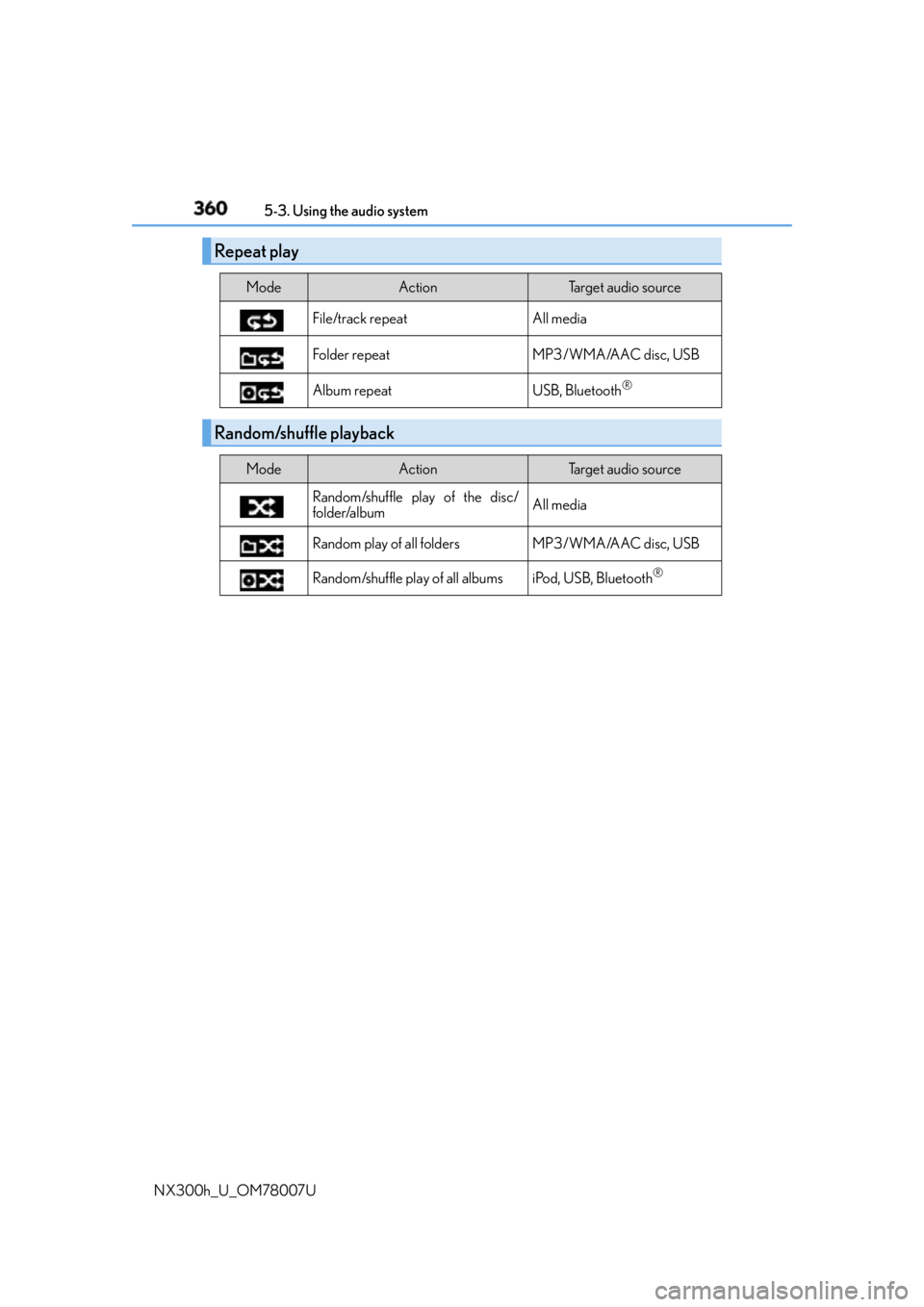
NX300h_U_OM78007U Repeat play Mode Action Target audio source
File/track repeat All media
Folder repeat MP3/WMA/AAC disc, USB
Album repeat USB, Bluetooth ®
Random/shuffle playback Mode Action Target audio source
Random/shuffle play of the disc/
folder/album All media
Random play of all folders MP3/WMA/AAC disc, USB
Random/shuffle play of all albums iPod, USB, Bluetooth ®
Page 377 of 681
3775-6. Using an external device
5
Lexus Display Audio system
NX300h_U_OM78007UUsing USB memory device P. 3 4 5
Pressing the “MEDIA” button displays the USB top screen from any screen of the
selected source. ■
Menu screen
P. 3 5 8■
Selecting a file
Press the “ ” or “ ” on the “PRST•TRACK” button or turn the
“TUNE•SCROLL” knob to select the desired file number.
To fast-forward or rewind, press and hold the “ ” or “ ” on the “PRST•TRACK”
button. ■
Selecting a play mode
Move the controller to the right and select “Browse”.
Select the desired play mode, then select a file to begin the selected play
mode.■
Displaying the now playing list
Move the controller to the right and select “Now Playing List”.Connecting a USB memory device enables you to enjoy music from the vehi-
cle speakers.
Select “USB1” or “USB2” on th e audio source selection screen.
Connecting a USB memory device
USB top screen
1
2
Page 378 of 681
378 5-6. Using an external device
NX300h_U_OM78007U ■
USB memory functions ●
Depending on the USB memory device that is connected to the system, the device
itself may not be operable and certain functions may not be available. If the device is
inoperable or a function is unavailable du e to a malfunction (as opposed to a system
specification), disco nnecting the device and reconnect ing it may resolve the problem.●
If the USB memory device still does not be gin operation after being disconnected and
reconnected, format the device. ■
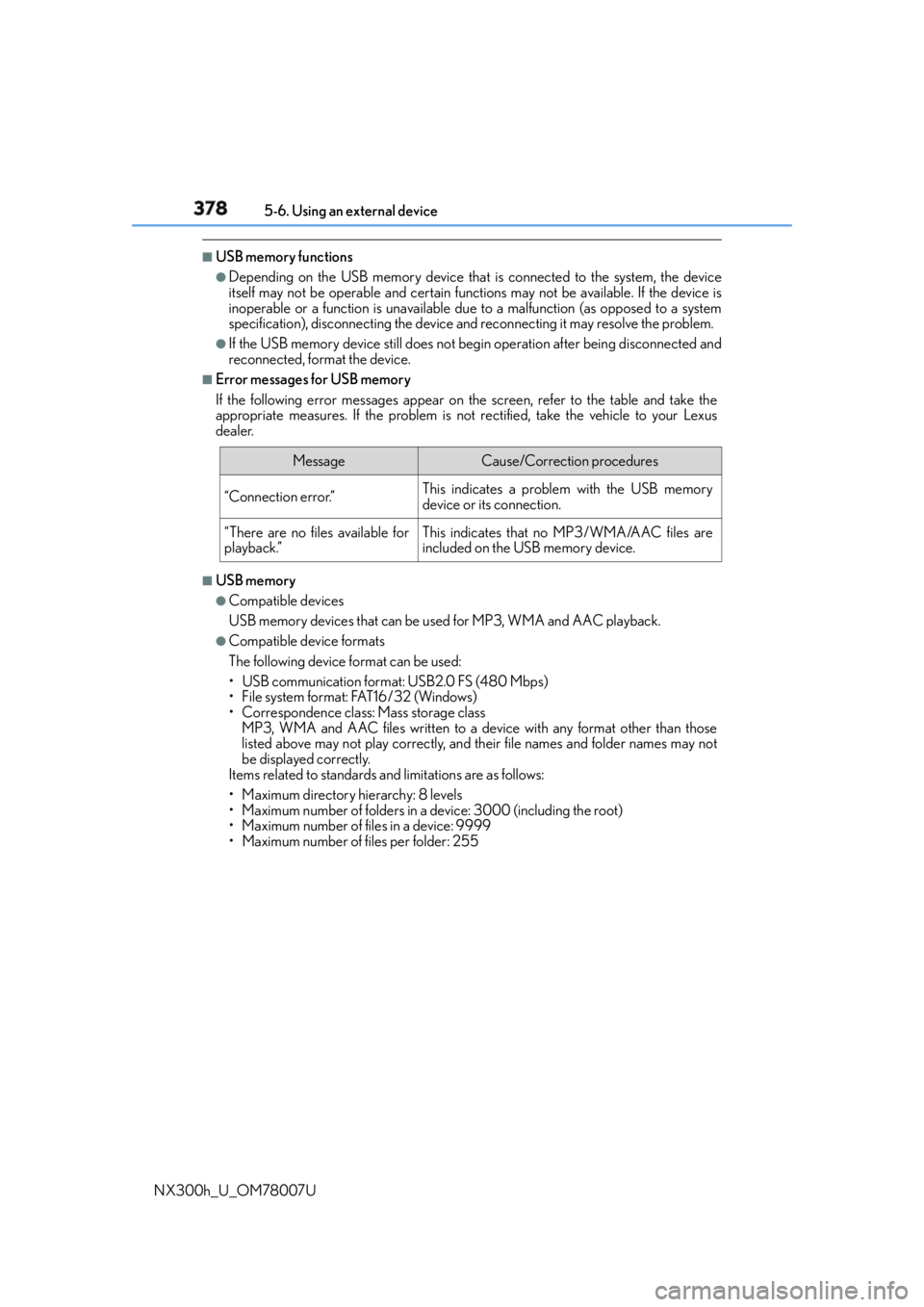
Error messages for USB memory
If the following error messages appear on the screen, refer to the table and take the
appropriate measures. If the pr oblem is not rectified, take the vehicle to your Lexus
dealer.
■
USB memory ●
Compatible devices
USB memory devices that can be used for MP3, WMA and AAC playback. ●
Compatible device formats
The following device format can be used:
• USB communication format: USB2.0 FS (480 Mbps)
• File system format: FAT16/32 (Windows)
• Correspondence class: Mass storage class
MP3, WMA and AAC files written to a device with any format other than those
listed above may not play correctly, and their file names and folder names may not
be displayed correctly.
Items related to standards and limitations are as follows:
• Maximum directory hierarchy: 8 levels
• Maximum number of folders in a device: 3000 (including the root)
• Maximum number of files in a device: 9999
• Maximum number of files per folder: 255 Message Cause/Correction procedures
“Connection error.” This indicates a problem with the USB memory
device or its connection.
“There are no files available for
playback.” This indicates that no MP3/WMA/AAC files are
included on the USB memory device.
Page 380 of 681
380 5-6. Using an external device
NX300h_U_OM78007U ●
MP3, WMA and AAC playback
• When a device containing MP3, WMA or AAC files is connected, all files in the
USB memory device are checked. Once the file check is finished, the first MP3,
WMA or AAC file is played. To make the file check finish more quickly, we recom-
mend that you do not include any files ot her than MP3, WMA or AAC files or cre-
ate any unnecessary folders.
• When a USB memory device is connected and the audio source is changed to USB
memory mode, the USB memory device will start playing the first file in the first
folder. If the same device is removed and reconnected (and the contents have not
been changed), the USB memory device will resume play from the same point in
which it was last used. ●
Extensions
If the file extensions .mp3, .wma and .m4a are used for files other than MP3, WMA
and AAC files, they will be skipped (not played).●
Playback
• To play MP3 files with steady sound quality, we recommend a fixed bit rate of at least
128 kbps and a sampling frequency of 44.1 kHz.
• There is a wide variety of freeware and other encoding software for MP3, WMA
and AAC files on the market, and depending on the status of the encoding and the
file format, poor sound qualit y or noise at the start of playback may result. In some
cases, playback may not be possible at all.
• Microsoft, Windows, and Windows Medi a are the registered trademarks of
Microsoft Corporation in the U.S.A. and other countries.
NOTICE ■
To prevent damage to the USB memory device or its terminals ●
Do not leave the USB memory device in the vehicle. The temperature inside the vehi-
cle may become high. ●
Do not push down on or apply unnecessary pressure to the USB memory device
while it is connected. ●
Do not insert foreign objects into the port.
Page 418 of 681
418 5-12. Other function
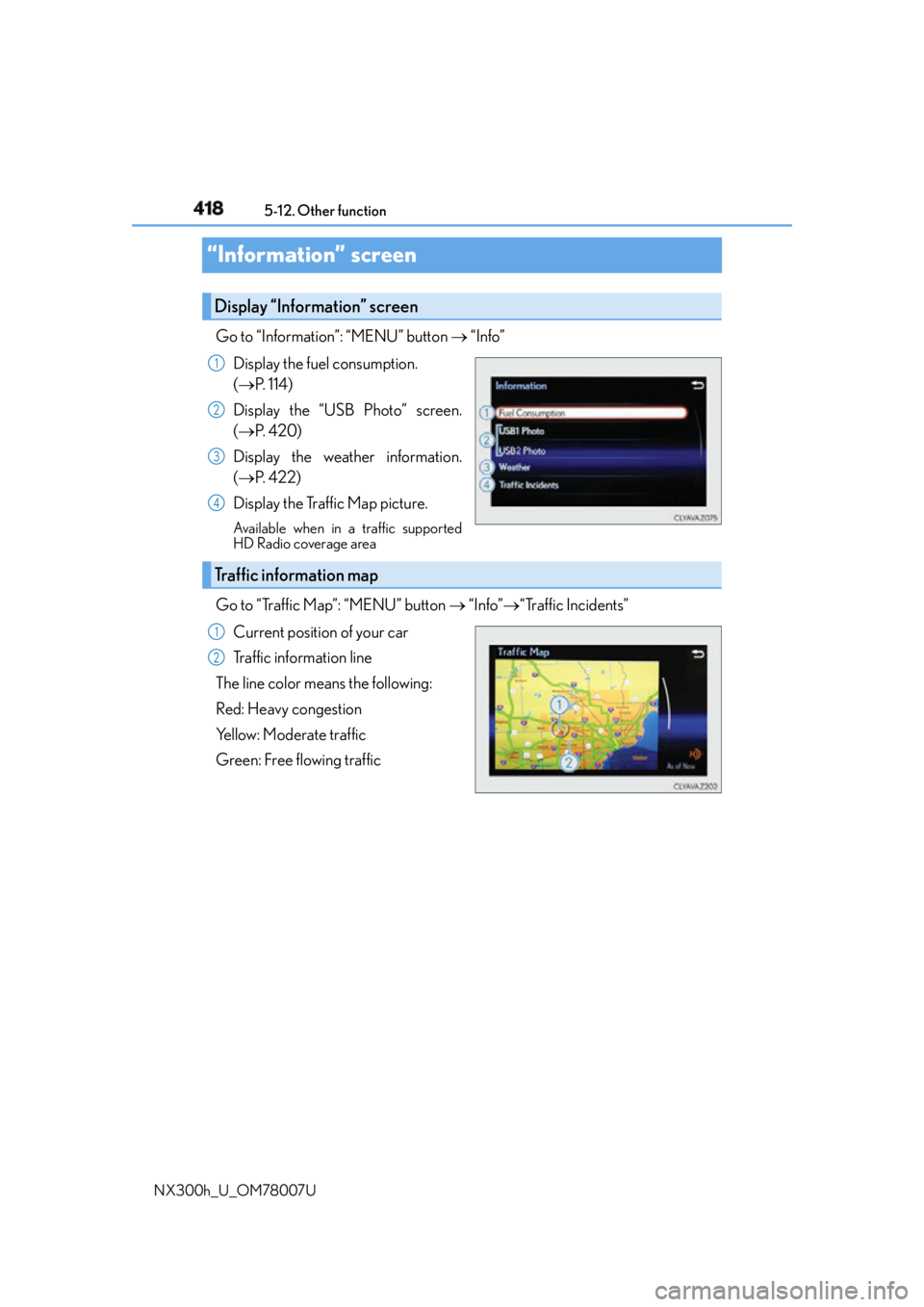
NX300h_U_OM78007U“Information” screen Go to “Information”: “MENU” button “Info”
Display the fuel consumption.
( P. 1 1 4 )
Display the “USB Photo” screen.
( P. 4 2 0 )
Display the weather information.
( P. 422)
Display the Traffic Map picture. Available when in a traffic supported
HD Radio coverage area
Go to “Traffic Map”: “MENU” button “Info” “Traffic Incidents”
Current position of your car
Traffic information line
The line color means the following:
Red: Heavy congestion
Yellow: Moderate traffic
Green: Free flowing trafficDisplay “Information” screen 1
2
3
4
Traffic information map 1
2
Page 420 of 681
420 5-12. Other function
NX300h_U_OM78007UUSB photo Go to “USB Photo”: “MENU” button “Info” “USB1 Photo” or “USB2
Photo”
P. 3 4 5
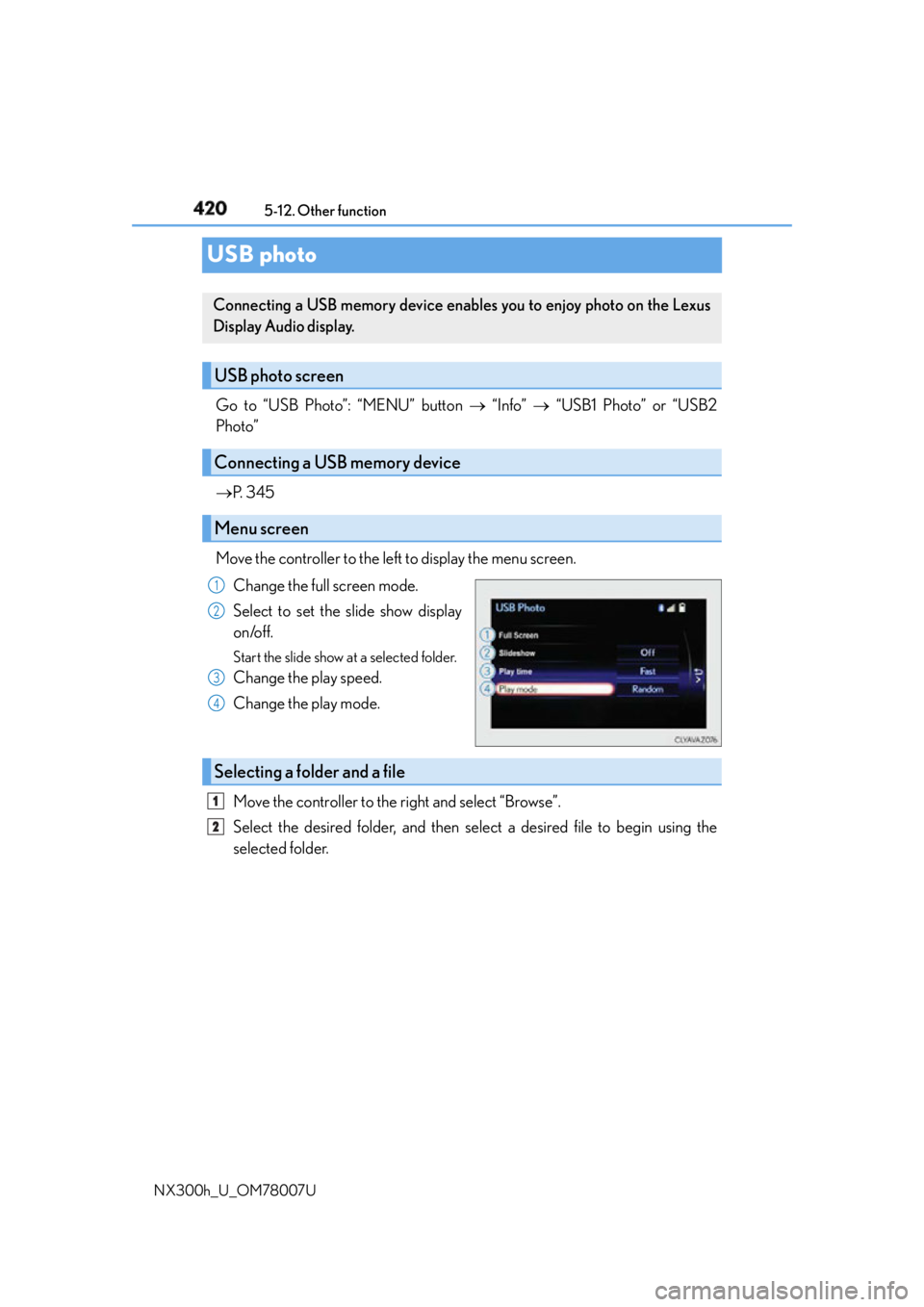
Move the controller to the left to display the menu screen.
Change the full screen mode.
Select to set the slide show display
on/off. Start the slide show at a selected folder.
Change the play speed.
Change the play mode.
Move the controller to the right and select “Browse”.
Select the desired folder, and then select a desired file to begin using the
selected folder.Connecting a USB memory device enables you to enjoy photo on the Lexus
Display Audio display.
USB photo screen
Connecting a USB memory device
Menu screen 1
2
3
4
Selecting a folder and a file 1
2
Page 421 of 681
4215-12. Other function
5
Lexus Display Audio system
NX300h_U_OM78007U ■
USB memory functions
P. 3 7 8 ■
USB memory ●
Compatible devices
USB memory device that can be used for JPEG display. ●
Compatible device formats
The following device format can be used:
• USB communication format: USB2.0 FS (480 Mbps)
• File system format: FAT16/32 (Windows)
• Correspondence class: Mass storage class ●
JPEG file compatibility
• Compatible image size: Maximum 10MB
• Compatible pixel size: Maximum 10,000,000 pixels
NOTICE ■
To prevent damage to the USB memory device or its terminals
P. 3 8 0
Page 424 of 681
424 5-12. Other function
NX300h_U_OM78007U ●
Voice commands may not be recognized if:
• Spoken too quickly.
• Spoken at a low or high volume.
• The roof or windows are open.
• Passengers are talking while voice commands are spoken.
• The air conditioning speed is set high.
• The air conditioning vents are turned towards the microphone. ●
In the following conditions, the system ma y not recognize the command properly and
using voice commands may not be possible:
• The command is incorrect or unclear. No te that certain words, accents or speech
patterns may be difficult for the system to recognize.
• There is excessive background noise, such as wind noise. ■
When searching for a track ●
A USB memory or iPod must be connected to enable track searching and playback.
( P. 3 4 5 ) ●
When a USB memory or iPod is connected, recognition data is created so tracks can
be searched using voice commands. ●
Recognition data is updated un der the following conditions:
• When the USB memory or iPod data has changed.
• When the voice recognition language is changed. ( P. 3 4 8 )●
While the recognition data is being created or being updated, a track search cannot be
performed using a voice command. ■
The Gracenote ®
media database
P. 3 7 1
Due to natural language speech recognitio n technology, this system enables rec-
ognition of a command when spoken naturally. However, the system cannot rec-
ognize every variation of each command.
In some situations, it is possible to omit the command for the procedure and
directly state the desired operation.
This function is available in English, Spanish and French.Casual speech recognition