change time LEXUS NX300h 2015 User Guide
[x] Cancel search | Manufacturer: LEXUS, Model Year: 2015, Model line: NX300h, Model: LEXUS NX300h 2015Pages: 681, PDF Size: 9.14 MB
Page 202 of 681
202 4-2. Driving procedures
NX300h_U_OM78007U Stop the vehicle completely.
Shift the shift lever to P. ( P. 2 0 8 )
Set the parking brake. ( P. 2 1 4 )If the parking brake is in automatic mode, the parking brake is set automatically when
shifting the shift lever to P. (
P. 2 1 3 )
Press the power switch.
Release the brake pedal and check that th e display on the instrument cluster is
off.
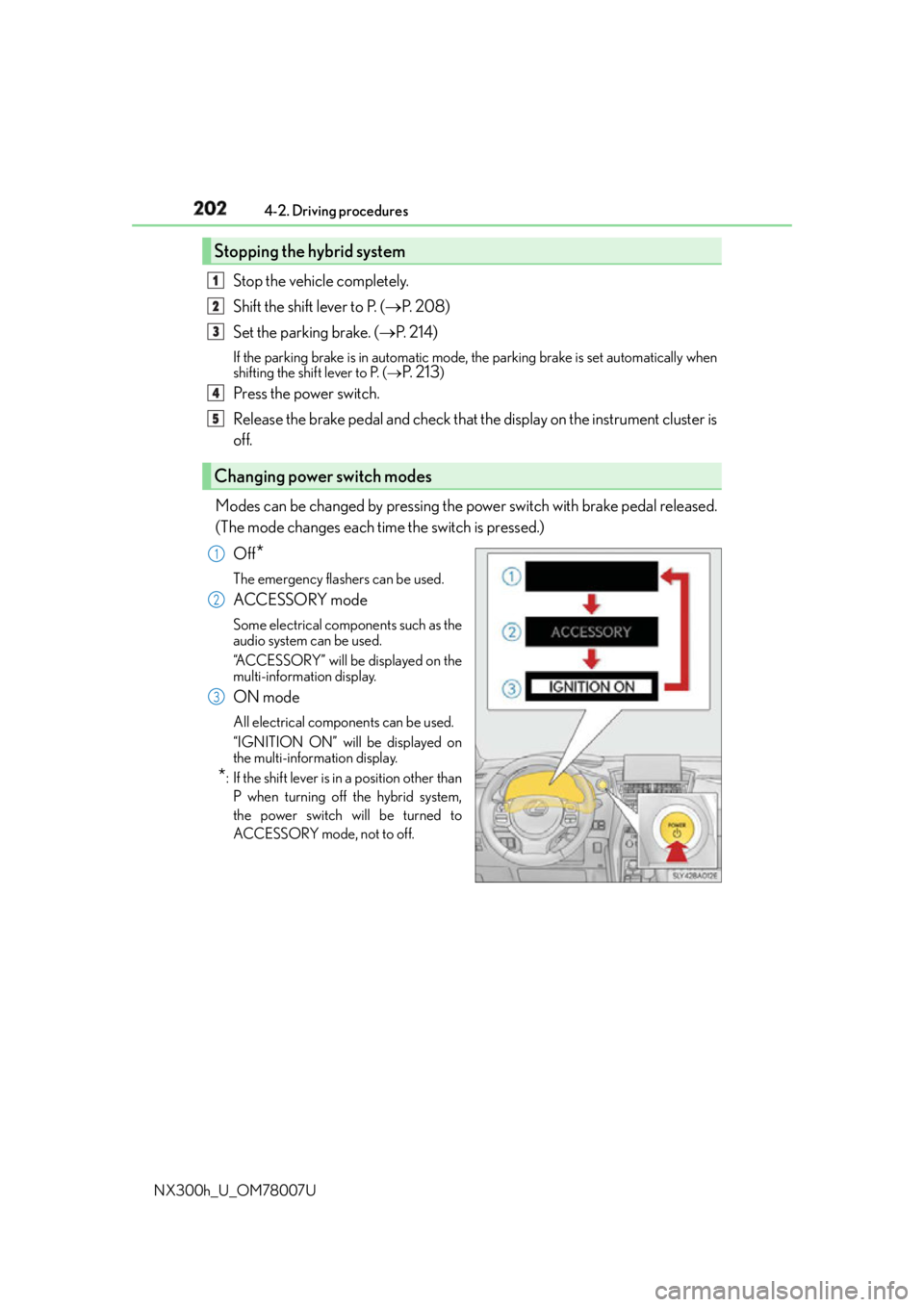
Modes can be changed by pressing the po wer switch with brake pedal released.
(The mode changes each time the switch is pressed.)
Off
* The emergency flashers can be used.
ACCESSORY mode Some electrical components such as the
audio system can be used.
“ACCESSORY” will be displayed on the
multi-information display.
ON mode All electrical components can be used.
“IGNITION ON” will be displayed on
the multi-information display.
* : If the shift lever is in a position other than
P when turning off the hybrid system,
the power switch will be turned to
ACCESSORY mode, not to off.Stopping the hybrid system
Changing power switch modes 1
2
3
4
5
1
2
3
Page 204 of 681
204 4-2. Driving procedures
NX300h_U_OM78007U ■
When the steering lock cannot be released
■
Steering lock motor overheating prevention
To prevent the steering lock motor from over heating, operation of the motor may be sus-
pended if the hybrid system is turned on and off repeatedly in a short period of time. In
this case, refrain from operating the hybrid system. After about 10 seconds, the steering
lock motor will resume functioning. ■
When “Smart Access System Malfunction See Owner’s Manual” is displayed on the
multi-information display
The system may be malfunctioning. Have the vehicle inspected by your Lexus dealer
immediately. ■
If the “READY” indicator does not come on
In the event that the “READY” indicator does not come on even after performing the
proper procedures for starting the vehicle, contact your Lexus dealer immediately. ■
If the hybrid system is malfunctioning
P. 8 2 ■
If the electronic key battery is depleted
P. 5 3 2 ■
Operation of the power switch ●
When operating the power switch, one short, firm press is enough. If the switch is
pressed improperly, the hybrid system may no t start or the power switch mode may not
change. It is not necessary to press and hold the switch. ●
If attempting to restart the hybrid system immediately after turning the power switch off,
the hybrid system may not start in some cases. After turning the power switch off,
please wait a few seconds before restarting the hybrid system.■
If the smart access system with push-butto n start has been deactivated by a customized
setting
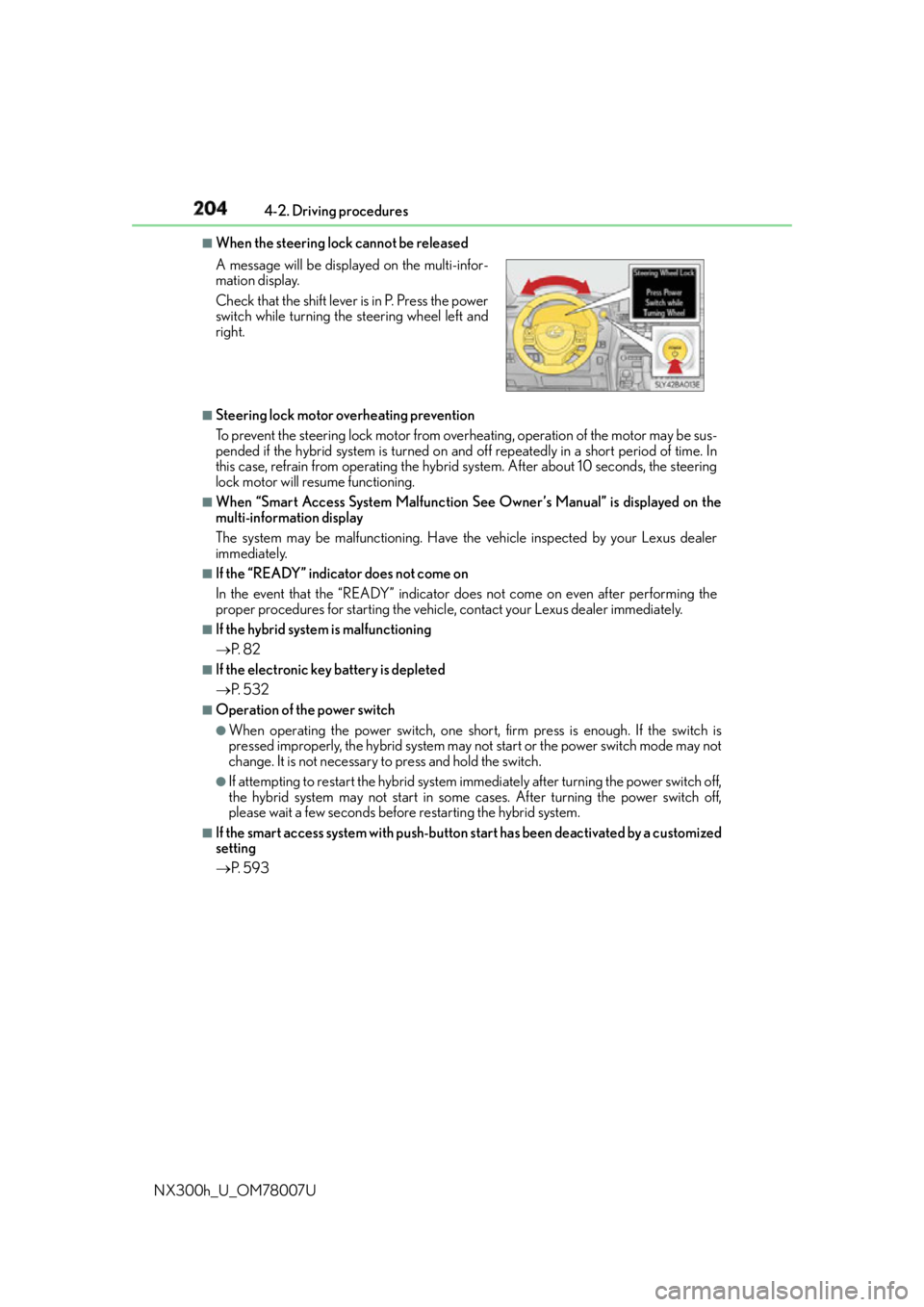
P. 5 9 3A message will be displayed on the multi-infor-
mation display.
Check that the shift lever is in P. Press the power
switch while turning the steering wheel left and
right.
Page 212 of 681
212 4-2. Driving procedures
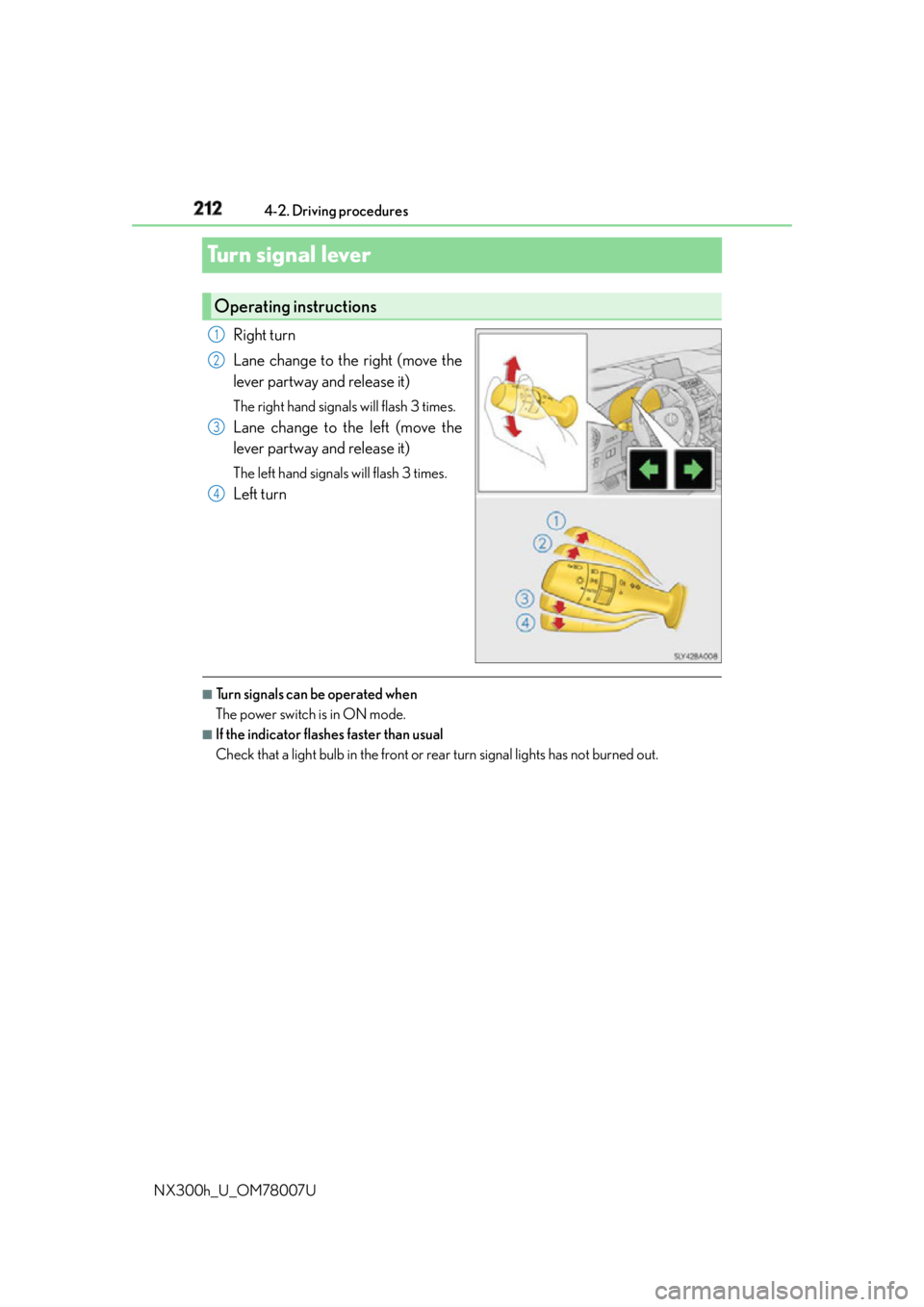
NX300h_U_OM78007UTurn signal lever Right turn
Lane change to the right (move the
lever partway and release it) The right hand signals will flash 3 times.
Lane change to the left (move the
lever partway and release it) The left hand signals will flash 3 times.
Left turn
■
Turn signals can be operated when
The power switch is in ON mode. ■
If the indicator flashes faster than usual
Check that a light bulb in the front or rear turn signal lights has not burned out.Operating instructions 1
2
3
4
Page 243 of 681
2434-5. Using the driving support systems
4
Driving
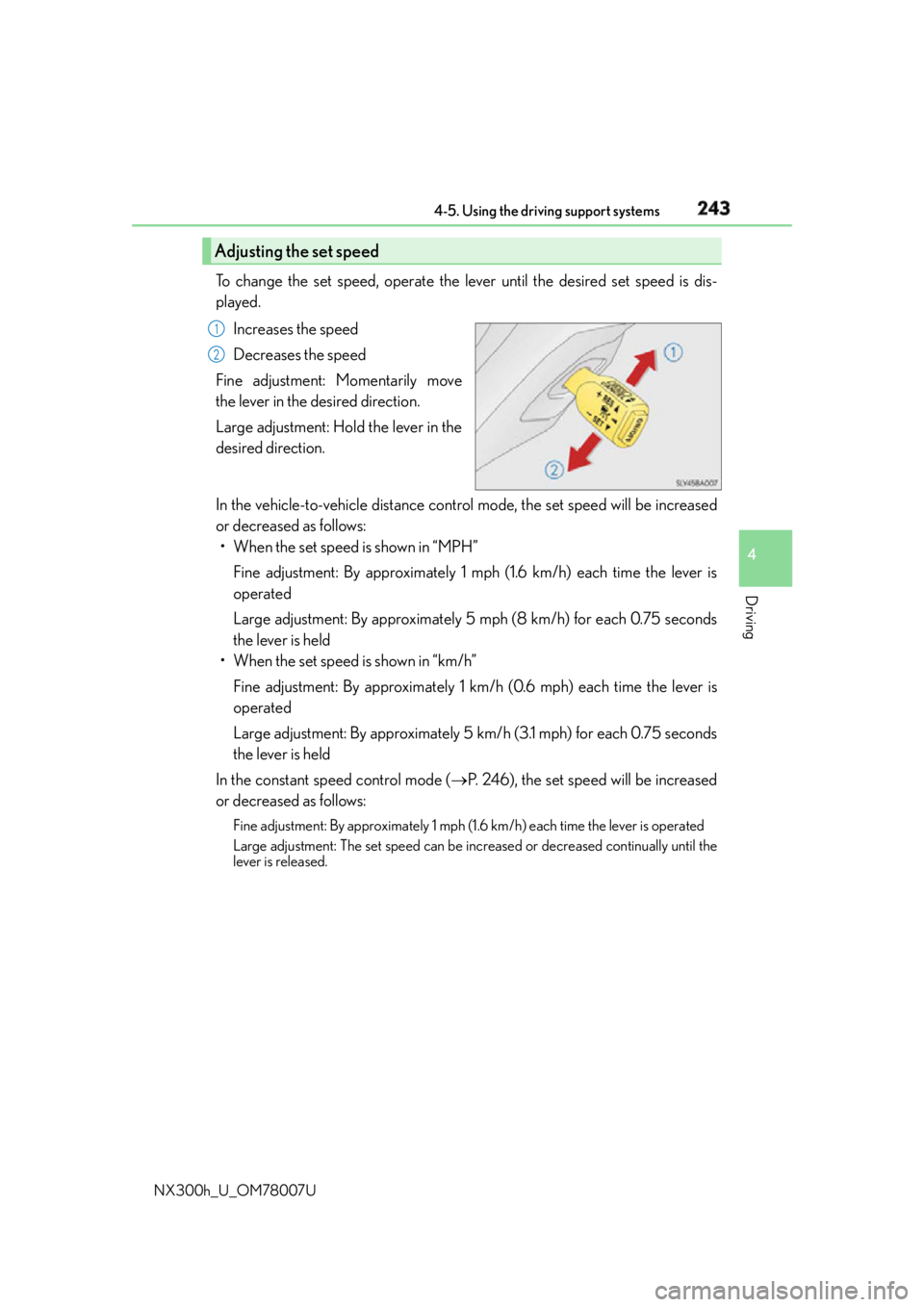
NX300h_U_OM78007U To change the set speed, operate the lever until the desired set speed is dis-
played.
Increases the speed
Decreases the speed
Fine adjustment: Momentarily move
the lever in the desired direction.
Large adjustment: Hold the lever in the
desired direction.
In the vehicle-to-vehicle distance control mode, the set speed will be increased
or decreased as follows:
• When the set speed is shown in “MPH”
Fine adjustment: By approximately 1 mph (1.6 km/h) each time the lever is
operated
Large adjustment: By approximately 5 mph (8 km/h) for each 0.75 seconds
the lever is held
• When the set speed is shown in “km/h”
Fine adjustment: By approximately 1 km /h (0.6 mph) each time the lever is
operated
Large adjustment: By approximately 5 km /h (3.1 mph) for each 0.75 seconds
the lever is held
In the constant speed control mode ( P. 246), the set speed will be increased
or decreased as follows: Fine adjustment: By approximately 1 mph (1.6 km/h) each time the lever is operated
Large adjustment: The set speed can be incr eased or decreased co ntinually until the
lever is released.Adjusting the set speed 1
2
Page 254 of 681
254 4-5. Using the driving support systems
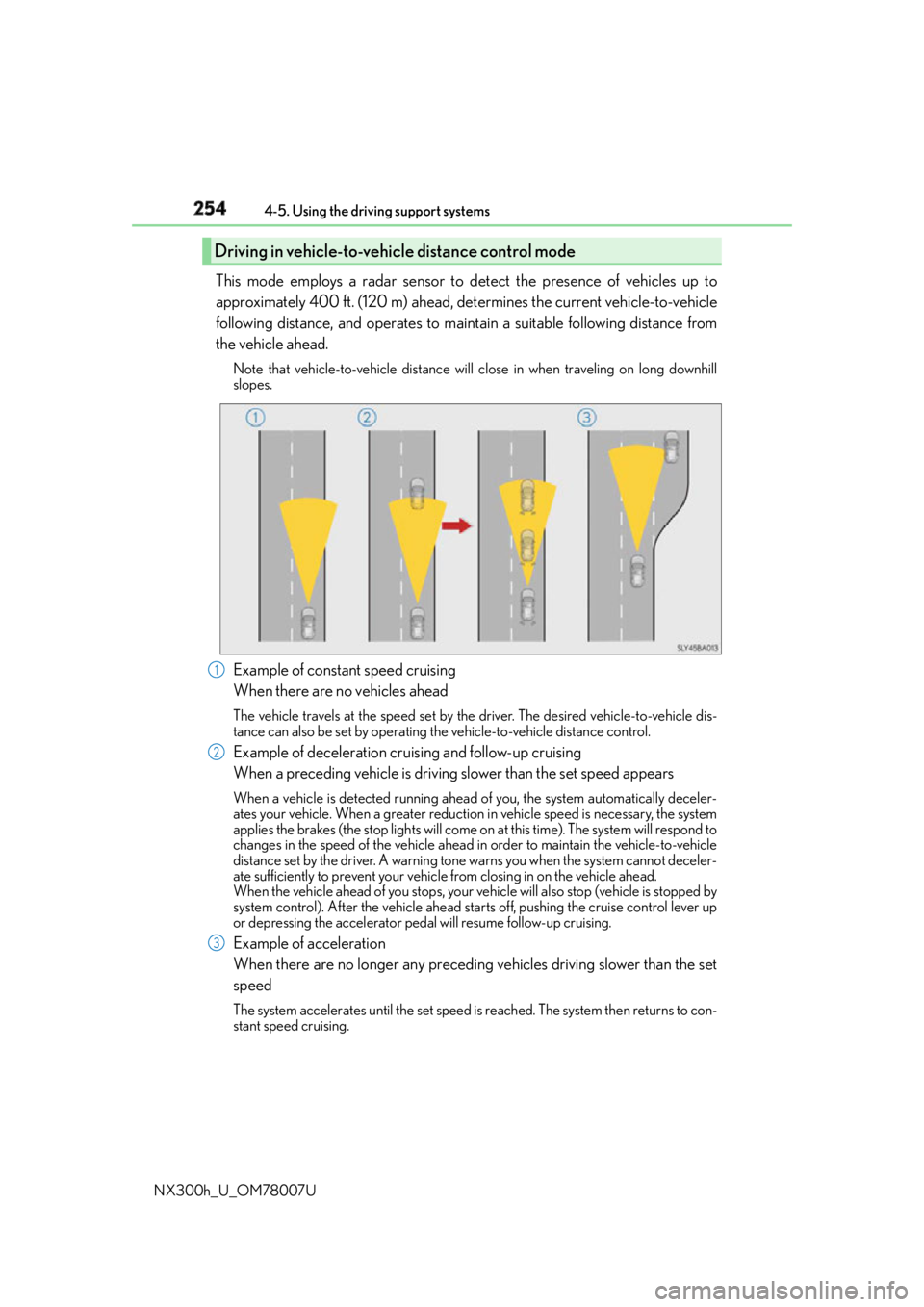
NX300h_U_OM78007U This mode employs a radar sensor to detect the presence of vehicles up to
approximately 400 ft. (120 m) ahead, determines the current vehicle-to-vehicle
following distance, and operates to main tain a suitable following distance from
the vehicle ahead. Note that vehicle-to-vehicle distance will close in when traveling on long downhill
slopes.
Example of constant speed cruising
When there are no vehicles ahead The vehicle travels at the speed set by the driver. The desired vehicle-to-vehicle dis-
tance can also be set by operating the vehicle-to-vehicle distance control.
Example of deceleration cruising and follow-up cruising
When a preceding vehicle is driving slower than the set speed appearsWhen a vehicle is detected running ahead of you, the system automatically deceler-
ates your vehicle. When a greater reduction in vehicle speed is necessary, the system
applies the brakes (the stop lights will come on at this time). The system will respond to
changes in the speed of the vehicle ahead in order to maintain the vehicle-to-vehicle
distance set by the driver. A warning tone warns you when the system cannot deceler-
ate sufficiently to prevent your vehicl e from closing in on the vehicle ahead.
When the vehicle ahead of you stops, your ve hicle will also stop (vehicle is stopped by
system control). After the vehicle ahead starts off, pushing the cruise control lever up
or depressing the accelerator peda l will resume follow-up cruising.
Example of acceleration
When there are no longer any preceding vehicles driving slower than the set
speed The system accelerates until the set speed is reached. The system then returns to con-
stant speed cruising.Driving in vehicle-to-vehicle distance control mode
1
2
3
Page 256 of 681
256 4-5. Using the driving support systems
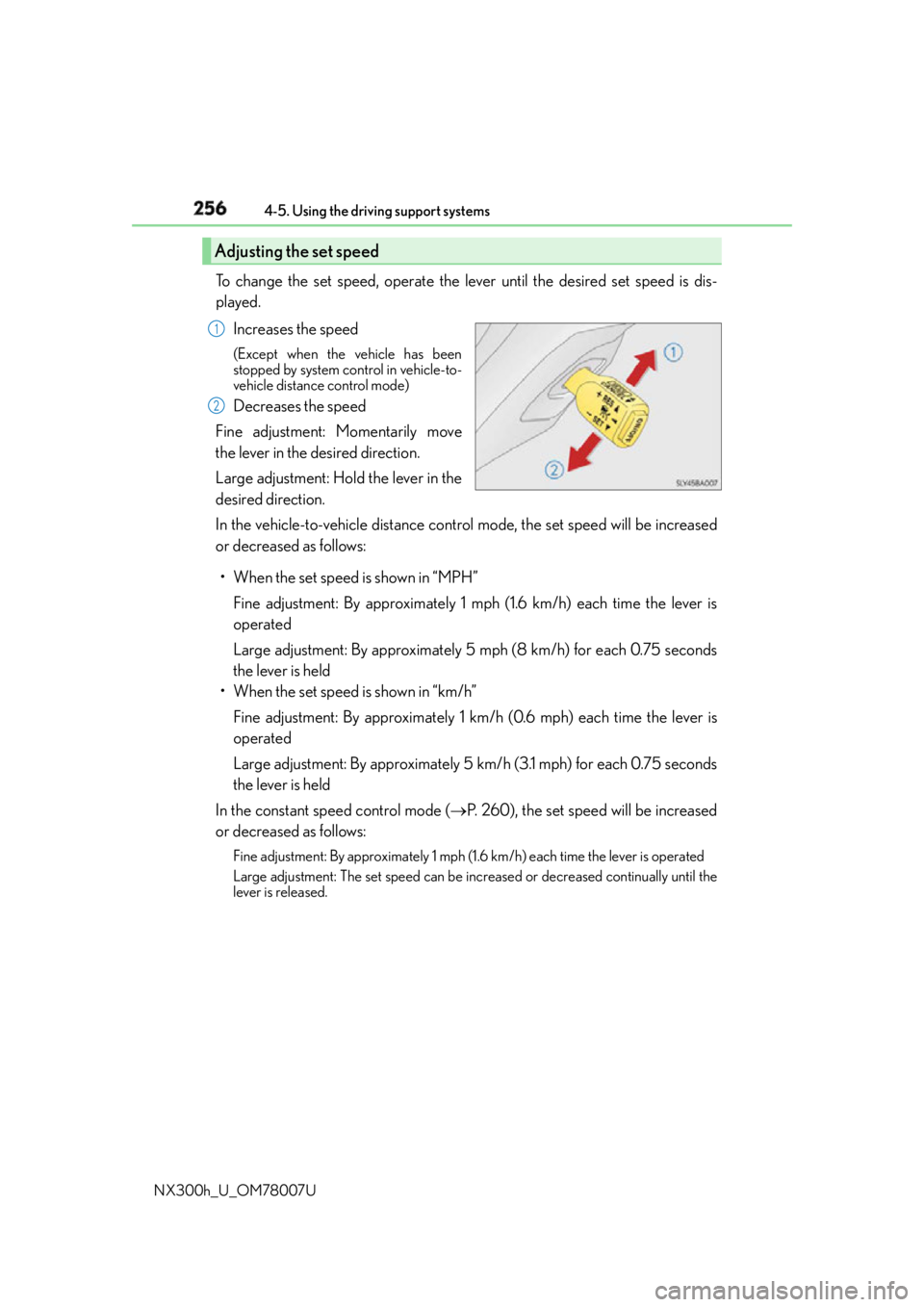
NX300h_U_OM78007U To change the set speed, operate the lever until the desired set speed is dis-
played.
Increases the speed (Except when the vehicle has been
stopped by system control in vehicle-to-
vehicle distance control mode)
Decreases the speed
Fine adjustment: Momentarily move
the lever in the desired direction.
Large adjustment: Hold the lever in the
desired direction.
In the vehicle-to-vehicle distance control mode, the set speed will be increased
or decreased as follows:
• When the set speed is shown in “MPH”
Fine adjustment: By approximately 1 mph (1.6 km/h) each time the lever is
operated
Large adjustment: By approximately 5 mph (8 km/h) for each 0.75 seconds
the lever is held
• When the set speed is shown in “km/h”
Fine adjustment: By approximately 1 km /h (0.6 mph) each time the lever is
operated
Large adjustment: By approximately 5 km /h (3.1 mph) for each 0.75 seconds
the lever is held
In the constant speed control mode ( P. 260), the set speed will be increased
or decreased as follows: Fine adjustment: By approximately 1 mph (1.6 km/h) each time the lever is operated
Large adjustment: The set speed can be incr eased or decreased co ntinually until the
lever is released.Adjusting the set speed 1
2
Page 268 of 681
268 4-5. Using the driving support systems
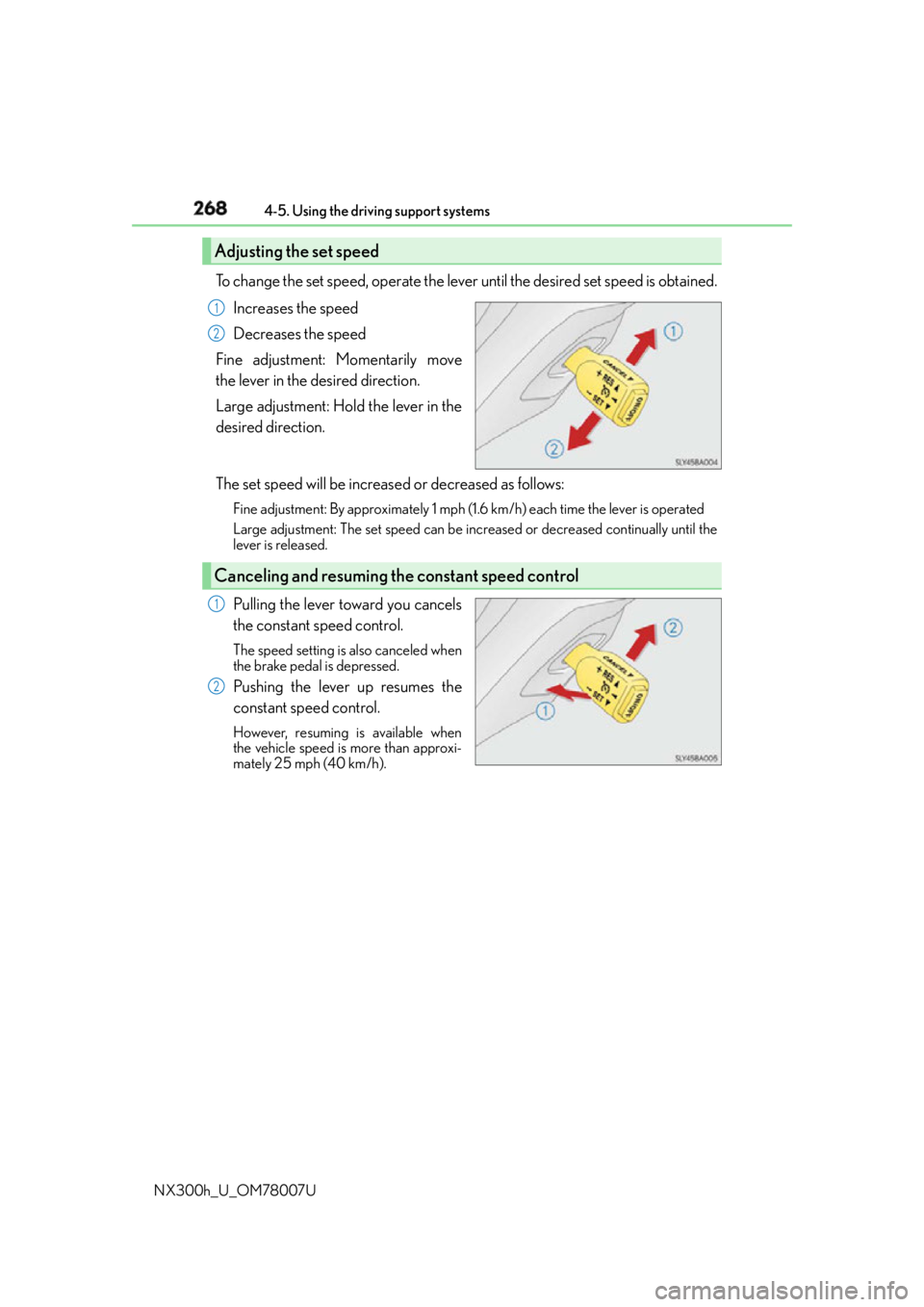
NX300h_U_OM78007U To change the set speed, operate the lever until the desired set speed is obtained.
Increases the speed
Decreases the speed
Fine adjustment: Momentarily move
the lever in the desired direction.
Large adjustment: Hold the lever in the
desired direction.
The set speed will be increase d or decreased as follows:Fine adjustment: By approximately 1 mph (1.6 km/h) each time the lever is operated
Large adjustment: The set speed can be incr eased or decreased co ntinually until the
lever is released.
Pulling the lever toward you cancels
the constant speed control. The speed setting is also canceled when
the brake pedal is depressed.
Pushing the lever up resumes the
constant speed control. However, resuming is available when
the vehicle speed is more than approxi-
mately 25 mph (40 km/h).Adjusting the set speed 1
2
Canceling and resuming the constant speed control 1
2
Page 276 of 681
276 4-5. Using the driving support systems
NX300h_U_OM78007U ●
When the lane markers are on a curb, etc. ●
When driving on a particularly brig ht road surface, such as concrete●
When driving on a road surface that is bright due to reflected light ●
When driving in a location wh ere the light level changes rapi dly, such as the entrance to
or exit from a tunnel ●
When sunlight or the headlights of oncoming vehicles are shining directly into the cam-
era lens ●
When driving on roads that are branching or merging ●
When driving on a hill ●
When driving on winding roads or roads that are uneven ●
When driving on rough or unpaved roads ●
When driving on a sharp curve ●
When lane markers are extremely narrow or extremely wide ●
When the vehicle leans to one side an unus ual amount due to a heavy load or improper
tire inflation pressure ●
When the following distance between your vehicle and the vehicle ahead is extremely
short ●
When the vehicle experiences strong up-and -down motion such as when driving on an
extremely rough road or on a seam in the pavement ●
When headlight brightness at nighttime is reduced due to dirt on the lenses, or when
the headlights are misaligned ●
When receiving a side wind ■
When changing the tires
Depending on the tires used, sufficient performance may not be maintainable.■
Warning messages for the LDA
Warning messages are used to indicate a syst em malfunction or to inform the driver of
the need for caution while driving. If a wa rning message is shown on the multi-informa-
tion display, read the message and follow the instructions.
Also, even if a warning message is displayed, it will not impede normal driving. ■
When turning on/off the steering control function
From “Settings display” ( P. 103) of the multi-information display, the steering
control function can be turned on/off.
Pressing the or meter control switches ( P. 103), selects
With each press of meter control switch es, the control switches between “On” and
“Off” ■
Sensitivity adjustment for th e lane deviation alert buzzer
From
“Settings display” ( P. 103) of the multi-inform ation display, the alert sen-
sitivity for the alert buzzer when deviating from the lane can be adjusted.
Pressing the or meter control switches ( P. 103), selects
With each press of meter control switches, the control switches between “High”
and “Standard” 1
2
1
2
Page 278 of 681
278 4-5. Using the driving support systems
NX300h_U_OM78007U NOTICE ■
To prevent damage to or incorrect operation of the LDA
Observe the following to ensure that the LDA system functions correctly●
Do not modify the headlights or attach stickers to the surface of the lights. ●
Do not modify the suspension or replace it with non-genuine parts.●
Do not install or place anything on the hood or the grille. Also, do not install a grille
guard (bull bars, kangaroo bar, etc.). ●
If your windshield needs repair s, contact your Lexus dealer.●
Do not overload with luggage ■
Lane recognition camera
Observe the following to ensure that the LDA system functions correctly●
Keep the windshield clean at all times.
Performance could be affected if the windshie ld is dirty, or if raindrops, condensation
or ice are adhering to the windshield.
●
Do not spill liquids onto the lane recognition camera. ●
Do not attach window tinting to the windshield. ●
Do not install an antenna in fron t of the lane recognition camera.●
If the windshield area in fr ont of the lane recognition camera is fogged up, use the
windshield defogger to remove the fog from that area. ( P. 4 3 5 )
When it is cold, using the he ater with air blowing to the feet may allow the upper part
of the windshield to fog up. This will have a negative effect on the images.●
Do not scratch the camera lens, or let it get dirty.
When cleaning the inside of the windshield , be careful not to get any glass cleaner,
etc., on the lens. Also, do not touch the lens.
For lens repair, contact your Lexus dealer. ●
Do not change the installation position or direction of the lane recognition camera or
remove it.
The direction of the lane recognit ion camera is precisely adjusted.●
Do not subject the lane recognition camera to strong impact or force, and do not dis-
assemble the lane recognition camera. ●
Do not replace windshield wi th non-genuine windshield.
Contact your Lexus dealer. ●
Do not attach a sticker or other items to the
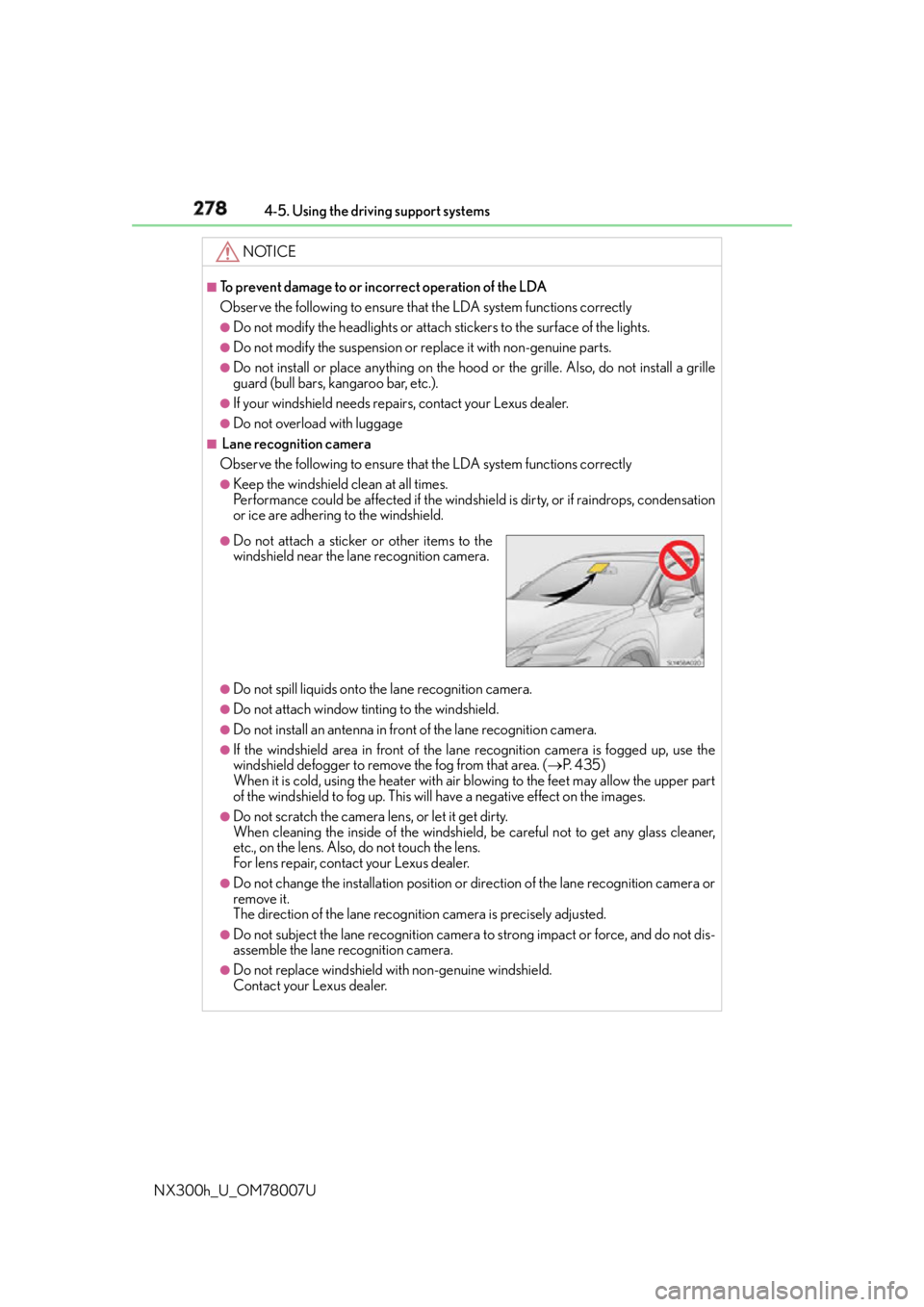
windshield near the lane recognition camera.
Page 311 of 681
3114-5. Using the driving support systems
4
Driving
NX300h_U_OM78007U ■
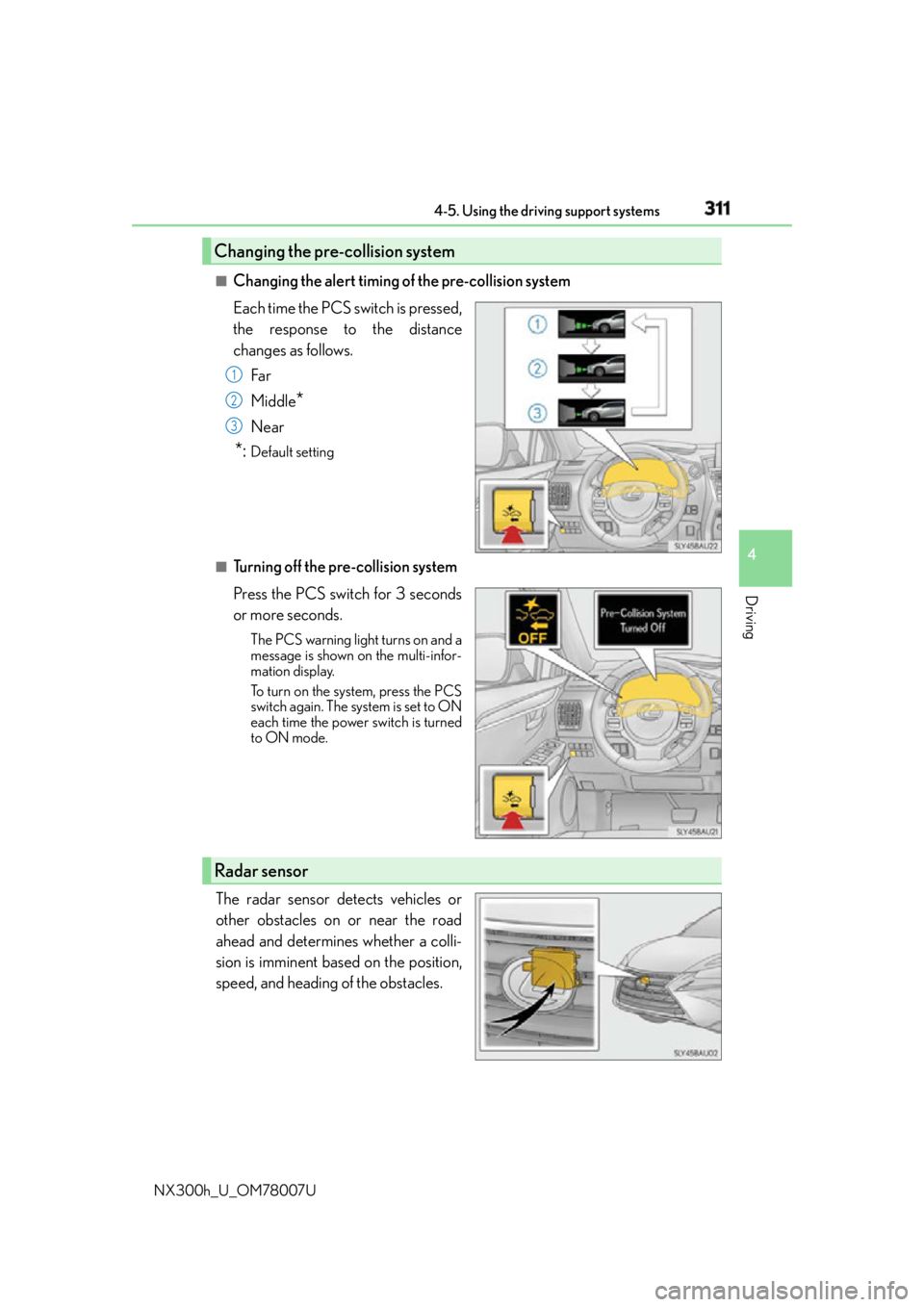
Changing the alert timing of the pre-collision system
Each time the PCS switch is pressed,
the response to the distance
changes as follows.
Far
Middle
* Near
*: Default setting
■
Turning off the pre-collision system
Press the PCS switch for 3 seconds
or more seconds. The PCS warning light turns on and a
message is shown on the multi-infor-
mation display.
To turn on the system, press the PCS
switch again. The system is set to ON
each time the power switch is turned
to ON mode.
The radar sensor detects vehicles or
other obstacles on or near the road
ahead and determines whether a colli-
sion is imminent based on the position,
speed, and heading of the obstacles.Changing the pre-collision system 1
2
3
Radar sensor