charging LEXUS NX300h 2015 User Guide
[x] Cancel search | Manufacturer: LEXUS, Model Year: 2015, Model line: NX300h, Model: LEXUS NX300h 2015Pages: 681, PDF Size: 9.14 MB
Page 458 of 681
458 6-4. Other interior features
NX300h_U_OM78007U A portable device can be charged by ju st placing Qi standard wireless charge
compatible portable devices according to the Wireless Power Consortium, such
as smart phones and mobile batteries, etc., on the charge area.
This function cannot be used with port able devices that are larger than the
charging area. Also, depending on the portable device, it may not operate as
normal. Please read the operation manual for portable devices to be used. ■
The “Qi” symbol
The “Qi” symbol is a trademark of the Wireless Power Consortium. ■
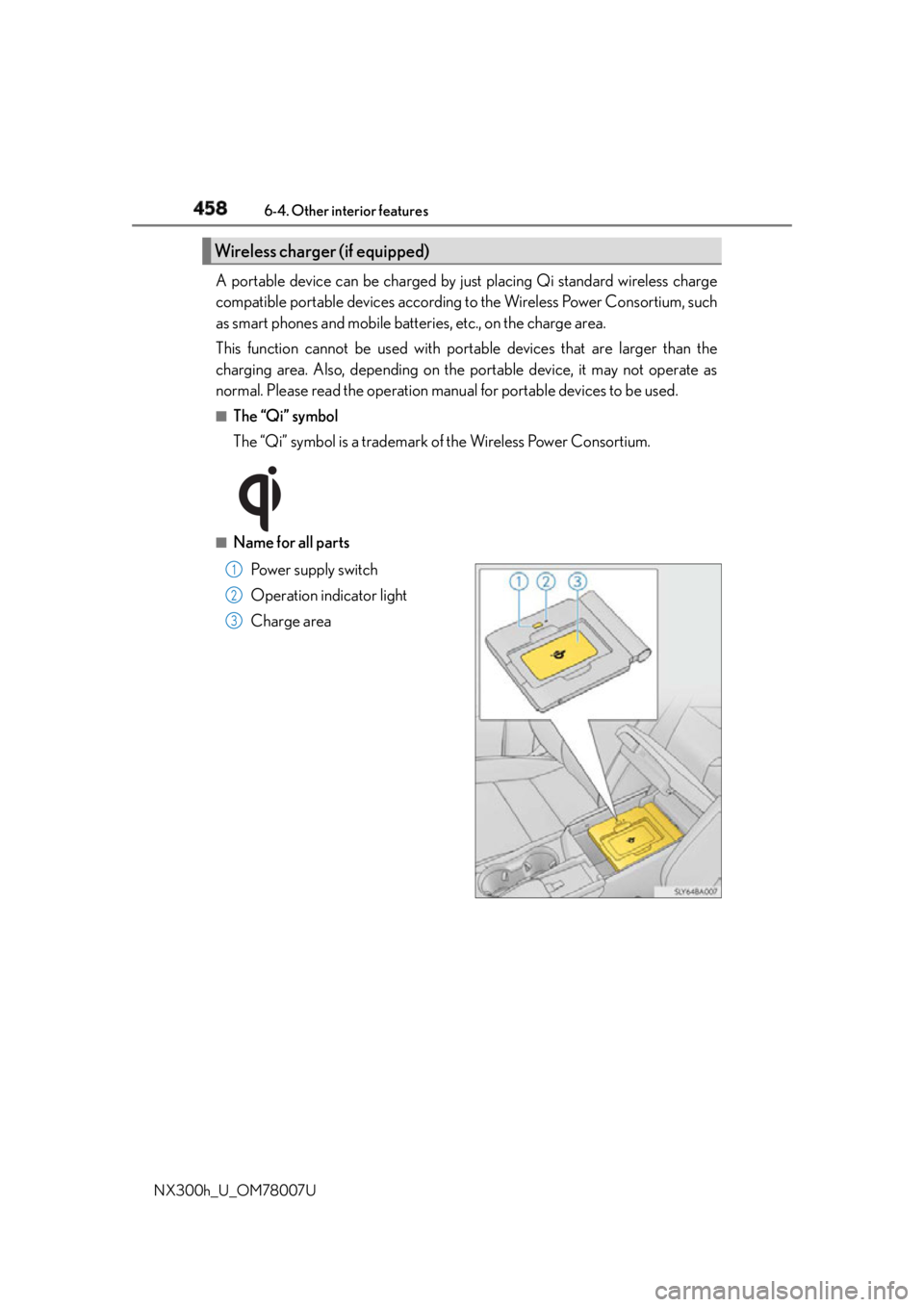
Name for all parts
Power supply switch
Operation indicator light
Charge areaWireless charger (if equipped)
1
2
3
Page 459 of 681
4596-4. Other interior features
6
Interior features
NX300h_U_OM78007U ■
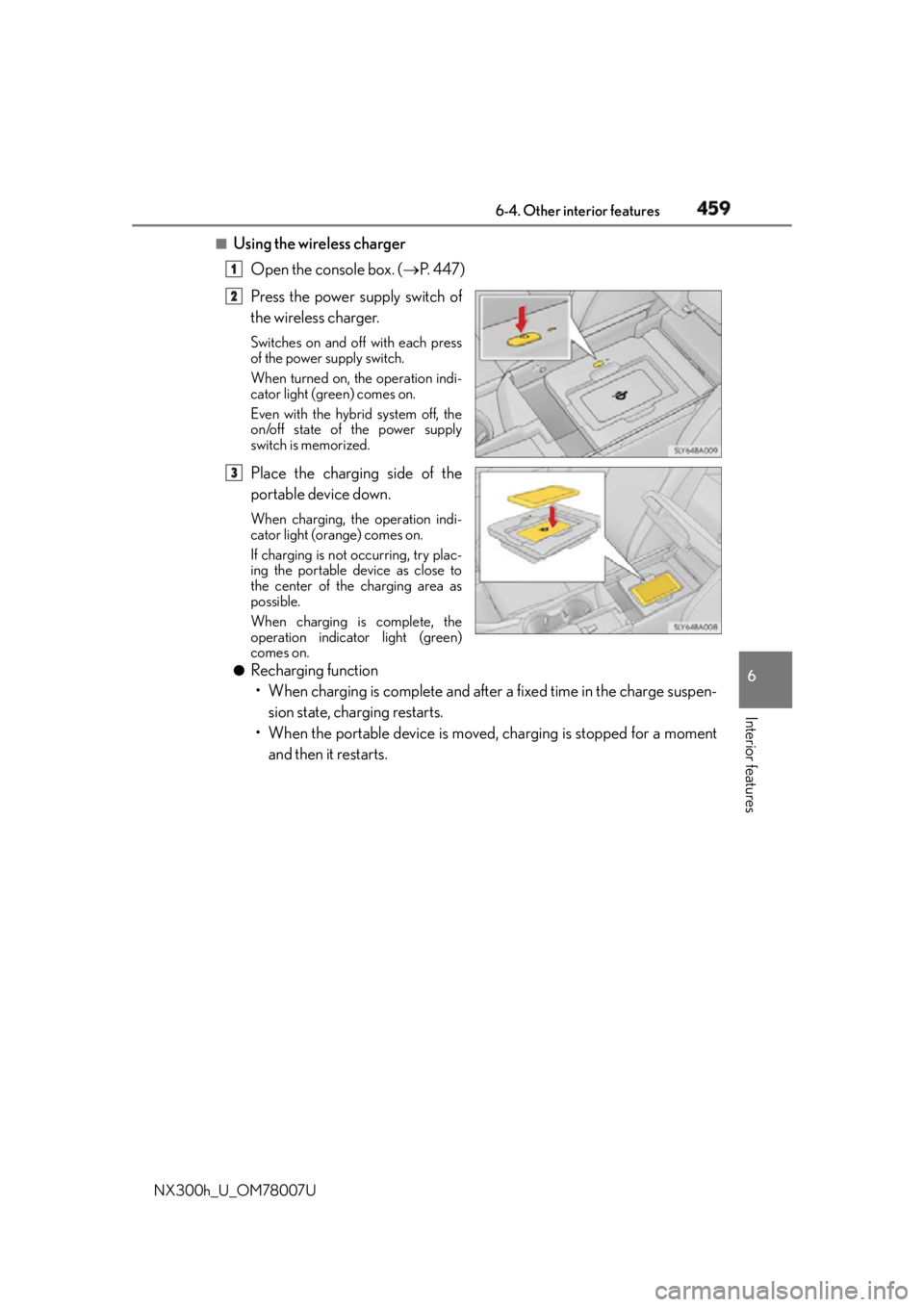
Using the wireless charger
Open the console box. ( P. 4 4 7 )
Press the power supply switch of
the wireless charger. Switches on and off with each press
of the power supply switch.
When turned on, the operation indi-
cator light (green) comes on.
Even with the hybrid system off, the
on/off state of the power supply
switch is memorized.
Place the charging side of the
portable device down. When charging, the operation indi-
cator light (orange) comes on.
If charging is not occurring, try plac-
ing the portable device as close to
the center of the charging area as
possible.
When charging is complete, the
operation indicator light (green)
comes on.●
Recharging function
• When charging is complete and after a fixed time in the charge suspen-
sion state, charging restarts.
• When the portable device is moved, charging is stopped for a moment
and then it restarts. 1
2
3
Page 460 of 681
460 6-4. Other interior features
NX300h_U_OM78007U ■
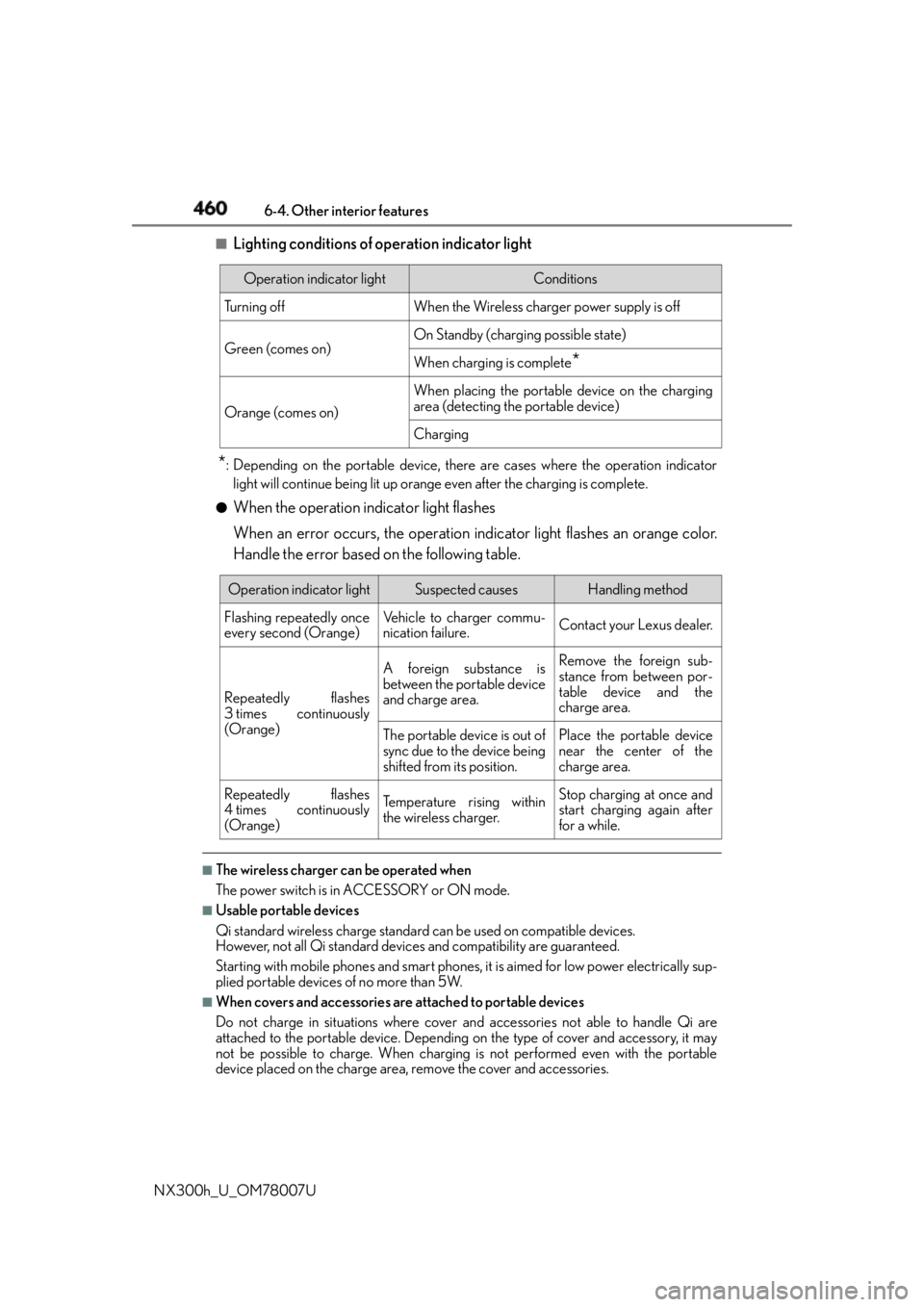
Lighting conditions of operation indicator light
* : Depending on the portable device, there are cases where the operation indicator
light will continue being lit up orange even after the charging is complete.●
When the operation indicator light flashes
When an error occurs, the operation in dicator light flashes an orange color.
Handle the error based on the following table.
■
The wireless charger can be operated when
The power switch is in ACCESSORY or ON mode. ■
Usable portable devices
Qi standard wireless charge standard can be used on compatible devices.
However, not all Qi standard devi ces and compatibility are guaranteed.
Starting with mobile phones and smart phones , it is aimed for low power electrically sup-
plied portable devices of no more than 5W.■
When covers and accessories are attached to portable devices
Do not charge in situations where cover an d accessories not able to handle Qi are
attached to the portable devi ce. Depending on the type of cover and accessory, it may
not be possible to charge. When charging is not performed even with the portable
device placed on the charge area, remove the cover and accessories. Operation indicator light Conditions
Tu r n i n g o f f When the Wireless charger power supply is off
Green (comes on) On Standby (charging possible state)
When charging is complete
*Orange (comes on) When placing the portable device on the charging
area (detecting the portable device)
Charging
Operation indicator light Suspected causes Handling method
Flashing repeatedly once
every second (Orange) Vehicle to charger commu-
nication failure. Contact your Lexus dealer.
Repeatedly flashes
3 times continuously
(Orange) A foreign substance is
between the portable device
and charge area. Remove the foreign sub-
stance from between por-
table device and the
charge area.
The portable device is out of
sync due to the device being
shifted from its position. Place the portable device
near the center of the
charge area.
Repeatedly flashes
4 times continuously
(Orange) Te m p e r a t u r e r i s i n g w i t h i n
the wireless charger. Stop charging at once and
start charging again after
for a while.
Page 461 of 681
4616-4. Other interior features
6
Interior features
NX300h_U_OM78007U ■
While charging, noise enters the AM radio
Turn off the wireless charger and confirm th at the noise has decreased. If the noise
decreases, continuously pushing the power supply switch of the wireless charger for 2
seconds, the frequency of the charger can be changed and the noise can be reduced.
Also, on that occasion, the operation indicator light will flash orange 2 times. ■
Important points of the wireless charger ●
If the electronic key cannot be detected within the vehicle interior, charging cannot be
done. When the door is opened and closed , charging may be temporarily suspended.●
When charging, the wireless charging device and portable device will get warmer,
however this is not a malfunction.
When a portable device gets warm while charging, charging may stop due to the pro-
tection function on the portable device side. In this case, when the temperature of the
portable device drops significantly, charge again. ■
Operation sounds
When the power supply is turned on, while se arching for the portable device a sound will
be produced, however this is not a malfunction. ■
Certification for the wireless charger
FCC Note: This equipment has been tested and found to comply with Part 18 of the FCC
Rules. These limits are designed to provide reasonable protection against harmful inter-
ference in a residential installation.
FCC Caution: Any changes or modification s not expressly approved by the party
responsible for compliance could void the user’s authority to operate this equipment.
Page 463 of 681
4636-4. Other interior features
6
Interior features
NX300h_U_OM78007U WA R N I N G ■
Caution while driving
When charging a portable device, for safety reasons, the driver should not operate the
main the part of the port able device while driving.■
Caution regarding interference with electronic devices
People with implantable cardiac pacema kers, cardiac resynchronization therapy-
pacemakers or implantable cardioverter defi brillators, as well as any other electrical
medical device, should consult their physicia n about the usage of the wireless charger.
The operations of the wireless charger may have an affect on medical devices. ■
To prevent damage or burns
Observe the following precautions.
Failure to do so may result in a possibility of equipment failure and damage, catch fire,
burns due to overheat. ●
Do not insert any metallic objects between the charging area and the portable device
while charging ●
Do not attach stickers, metallic objects, etc., to the charger area or portable device ●
Do not cover with cloth, etc., and charge ●
Do not charge portable devices other than designated ●
Do not attempt to dismantle for disassembly or modifications ●
Do not hit or apply a strong force
Page 464 of 681

464 6-4. Other interior features
NX300h_U_OM78007U WA R N I N G ■
Conditions in which the function may not operate correctly
In the following conditions, it may not operate correctly ●
The portable device is fully charged ●
There is foreign matter between the charge area and portable device ●
The temperature of the portable device gets higher from charging ●
The charging surface of the portable device is facing up ●
The placement of the portable device is out of alignment with the charge area●
Near a TV tower, electric power plant, gas st ation, radio station, large display, airport
or other facility that generates strong radio waves or electrical noise ●
When the electronic key is in contact with , or is covered by the following metallic
objects
• Cards to which aluminum foil is attached
• Cigarette boxes that have aluminum foil inside
• Metallic wallets or bags
•Coins
•Hand warmers made of metal
• Media such as CDs and DVDs ●
When other wireless keys (that emit radio waves) are being used nearby
In addition, excluding the above-mentioned, when the charger does not perform nor-
mally or the operation display lamp is flashi ng continuously, it is considered that the
wireless charger is malfunctioning. Contact your Lexus dealer. ■
To prevent failure or damage to data ●
Do not bring magnetic cards, such as credit cards, or magnetic recording media, etc.,
close to the charger while charging, otherw ise, data may disapp ear under the influ-
ence of magnetism. Also, do not bring pr ecision instruments such as wrist watches,
etc., close to the charger, as such objects may break. ●
Do not leave portable devices in the cab in. The temperature inside the cabin may
become high, when under the sun, and cause damage to the device. ■
To prevent 12-volt battery discharge
When the hybrid system is stopped, do not use the wireless charger for a long time.
Page 513 of 681

5137-3. Do-it-yourself maintenance
7
Maintenance and care
NX300h_U_OM78007U Make sure that the 12-volt battery terminals are not corroded and that there are
no loose connections, cracks, or loose clamps.
Te r m i n a l s
Hold-down clamp
Insert the left side auxiliary box.
Push up center position
Insert
Press ■
Before recharging
When recharging, the 12-volt battery produces hydrogen gas which is flammable and
explosive. Therefore, observe the following precautions before recharging: ●
If recharging with the 12-volt battery installed on the vehicle, be sure to disconnect the
ground cable. ●
Make sure the power switch on the charger is off when connecting and disconnecting
the charger cables to the 12-volt battery. ■
After recharging/reconnecting the 12-volt battery ●
The hybrid system may not start. Follow the procedure below to initialize the system.
Shift the shift lever to P.
Open and close any of the doors.
Restart the hybrid system.●
Unlocking the doors using the smart access system with push-button start may not be
possible immediately after reconnecting the 12-volt battery. If this happens, use the
wireless remote control or the mech anical key to lock/unlock the doors.●
Start the hybrid system with the power switch in ACCESSORY mode. The hybrid sys-
tem may not start with the power switch turned off. However, the hybrid system will
operate normally from the second attempt.Exterior 1
2
Installing the 12-volt battery maintenance cover 1
2
3
1
2
3
Page 515 of 681
5157-3. Do-it-yourself maintenance
7
Maintenance and care
NX300h_U_OM78007U WA R N I N G ■
When handling the 12-volt battery
P. 5 9 9 ■
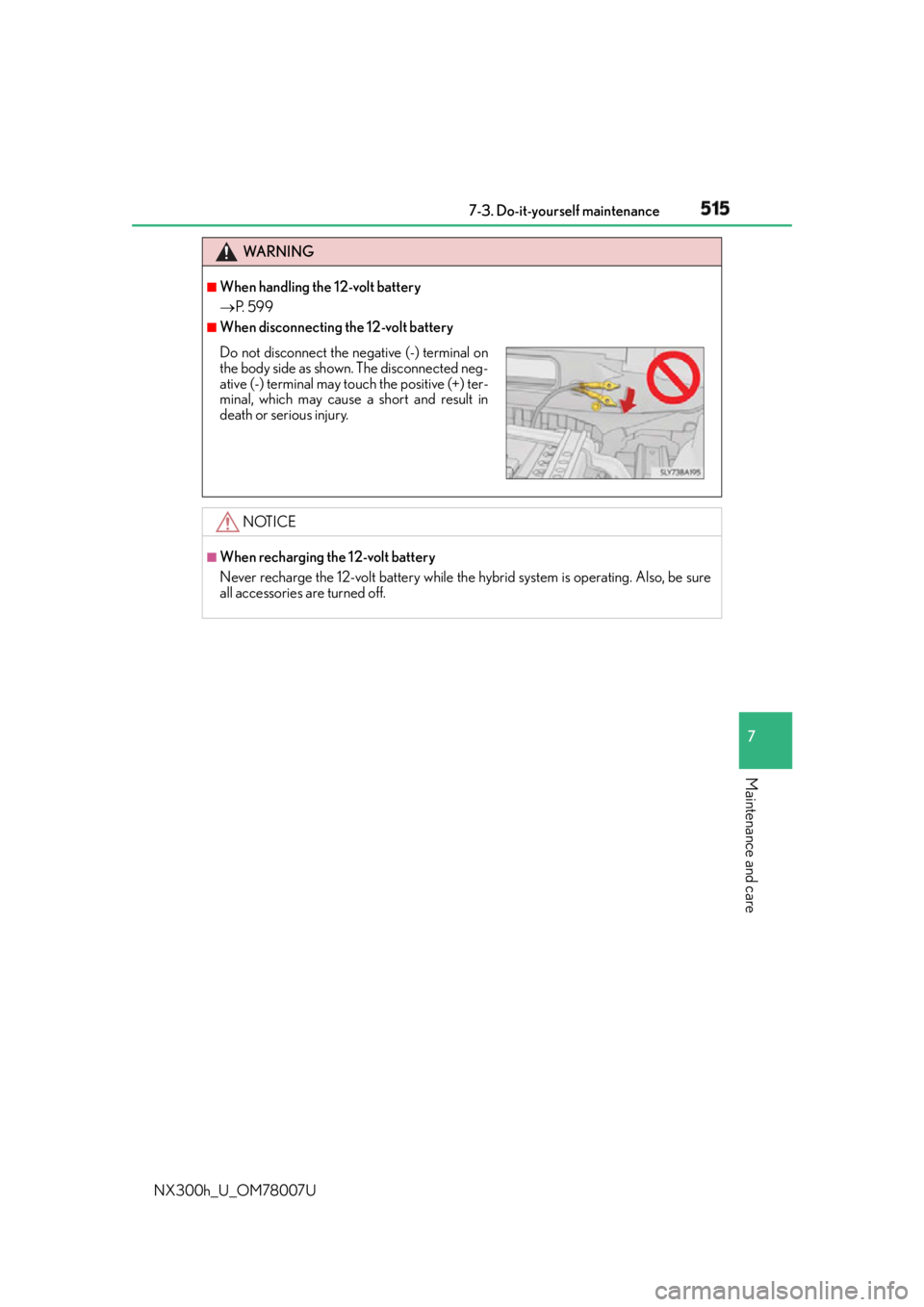
When disconnecting the 12-volt battery
NOTICE ■
When recharging the 12-volt battery
Never recharge the 12-volt battery while the hybrid system is operating. Also, be sure
all accessories are turned off.Do not disconnect the negative (-) terminal on
the body side as shown. The disconnected neg-
ative (-) terminal may to uch the positive (+) ter-
minal, which may cause a short and result in
death or serious injury.
Page 565 of 681
565
8
When trouble arises 8-2. Steps to take in an emergency
NX300h_U_OM78007UIf a warning light turns on or a warning buzzer
sounds Calmly perform the following actions if any of the warning lights comes on or
flashes. If a light comes on or flashes, bu t then goes off, this does not necessar-
ily indicate a malfunction in the system. However, if this continues to occur,
have the vehicle inspected by your Lexus dealer.
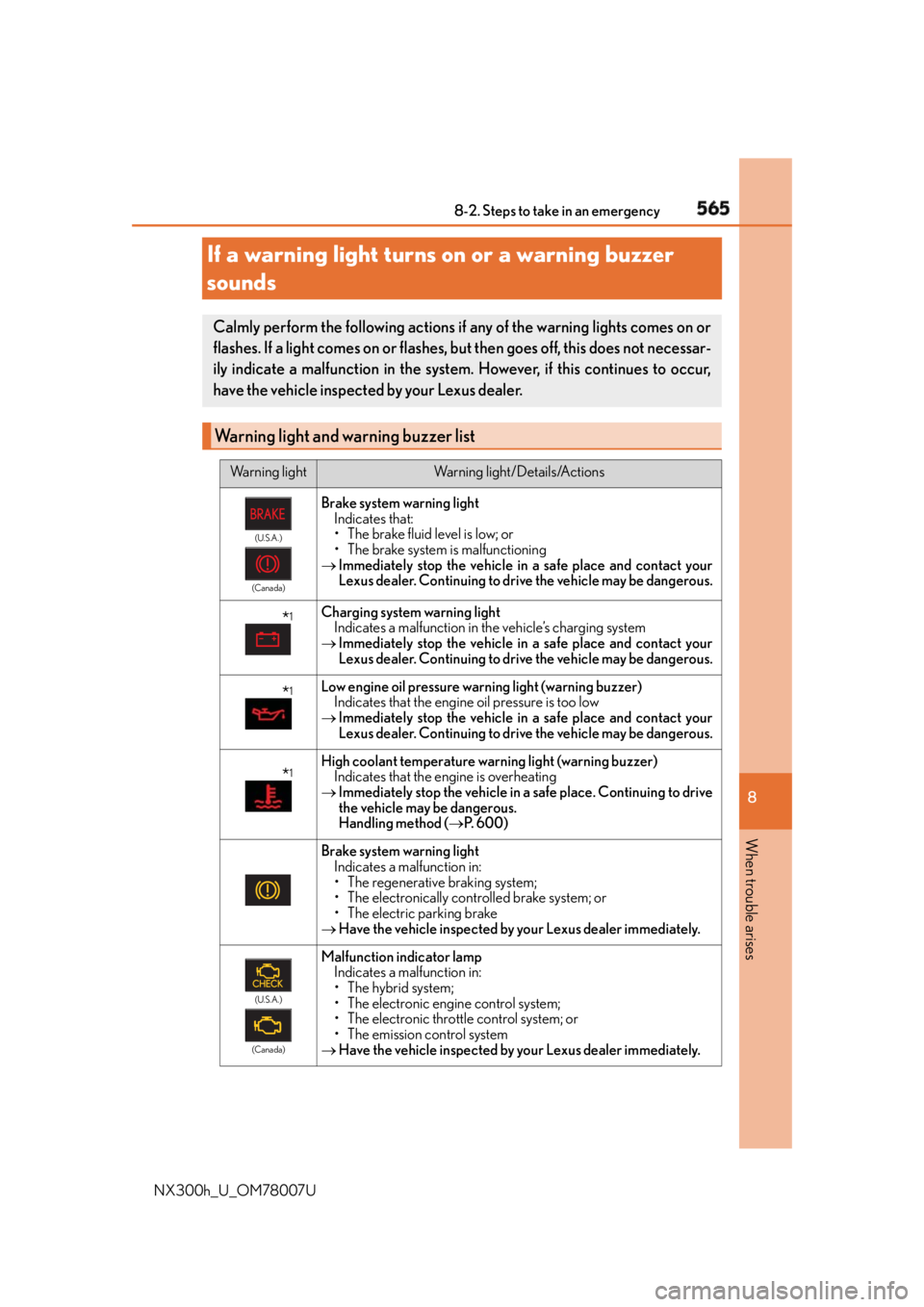
Warning light and warning buzzer list Warning light Warning light/Details/Actions(U.S.A.)
(Canada)
Brake system warning light
Indicates that:
• The brake fluid level is low; or
• The brake system is malfunctioning
Immediately stop the vehicle in a safe place and contact your
Lexus dealer. Continuing to drive the vehicle may be dangerous.
* 1
Charging system warning light
Indicates a malfunction in the vehicle’s charging system
Immediately stop the vehicle in a safe place and contact your
Lexus dealer. Continuing to drive the vehicle may be dangerous.
* 1
Low engine oil pressure warning light (warning buzzer)
Indicates that the engine oil pressure is too low
Immediately stop the vehicle in a safe place and contact your
Lexus dealer. Continuing to drive the vehicle may be dangerous.
* 1
High coolant temperature warning light (warning buzzer)
Indicates that the engine is overheating
Immediately stop the vehicle in a safe place. Continuing to drive
the vehicle may be dangerous.
Handling method ( P. 600)
Brake system warning light
Indicates a malfunction in:
• The regenerative braking system;
• The electronically controlled brake system; or
• The electric parking brake
Have the vehicle inspected by your Lexus dealer immediately. (U.S.A.)
(Canada)
Malfunction indicator lamp
Indicates a malfunction in:
• The hybrid system;
• The electronic engine control system;
• The electronic throttle control system; or
• The emission control system
Have the vehicle inspected by your Lexus dealer immediately.
Page 573 of 681
5738-2. Steps to take in an emergency
8
When trouble arises
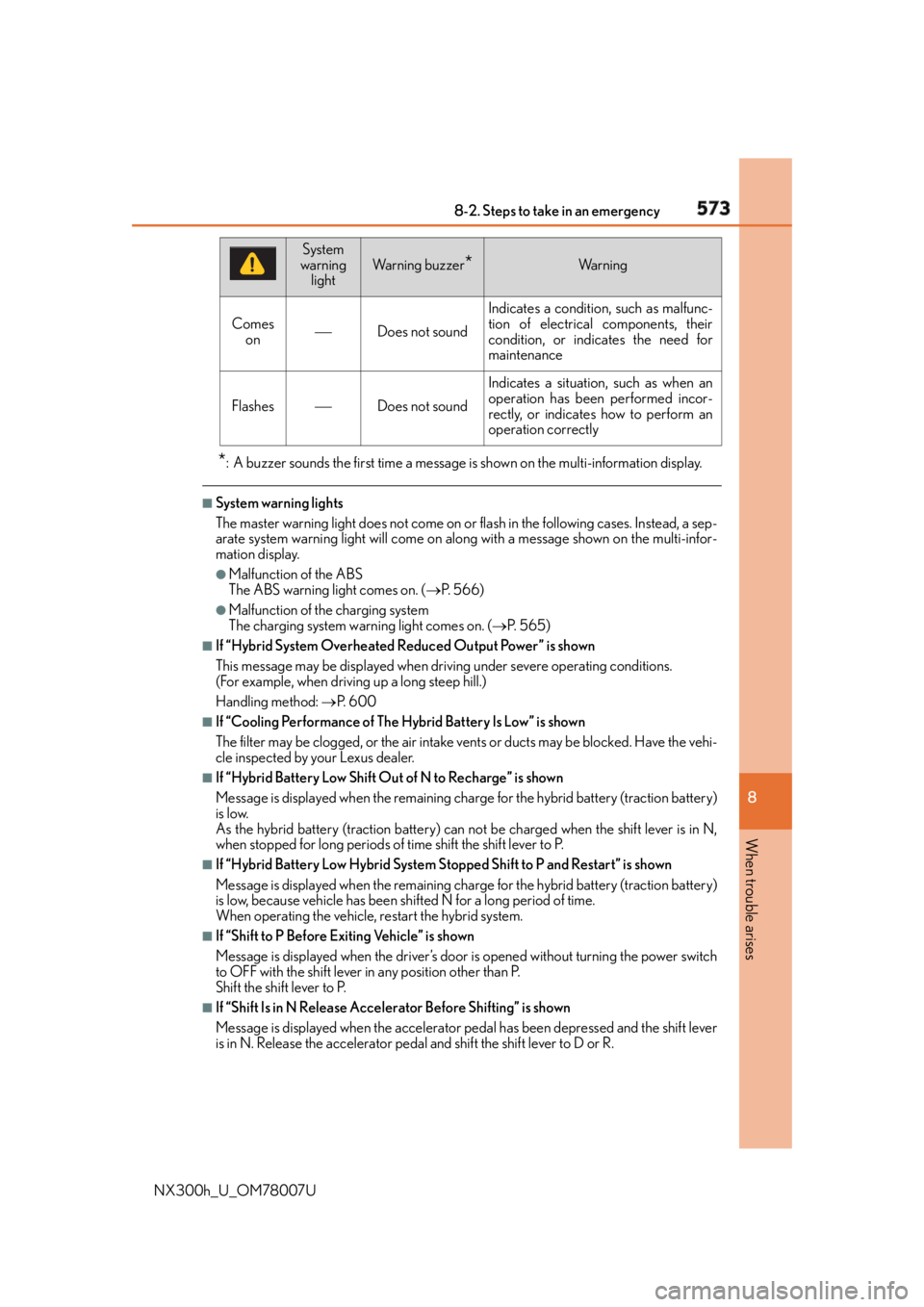
NX300h_U_OM78007U * : A buzzer sounds the first time a message is shown on the multi-information display. ■
System warning lights
The master warning light does not come on or flash in the following cases. Instead, a sep-
arate system warning light will come on al ong with a message shown on the multi-infor-
mation display. ●
Malfunction of the ABS
The ABS warning light comes on. ( P. 566)●
Malfunction of th e charging system
The charging system warning light comes on. ( P. 565)■
If “Hybrid System Overheated Reduced Output Power” is shown
This message may be displayed when driv ing under severe operating conditions.
(For example, when drivin g up a long steep hill.)
Handling method: P. 6 0 0■
If “Cooling Performance of The Hybrid Battery Is Low” is shown
The filter may be clogged, or the air intake vents or ducts may be blocked. Have the vehi-
cle inspected by your Lexus dealer. ■
If “Hybrid Battery Low Shift Out of N to Recharge” is shown
Message is displayed when the remaining charge for the hybrid battery (traction battery)
is low.
As the hybrid battery (traction battery) can not be charged when the shift lever is in N,
when stopped for long periods of time shift the shift lever to P.■
If “Hybrid Battery Low Hybrid System St opped Shift to P and Restart” is shown
Message is displayed when the remaining charge for the hybrid battery (traction battery)
is low, because vehicle has been sh ifted N for a long period of time.
When operating the vehicle, restart the hybrid system. ■
If “Shift to P Before Exiting Vehicle” is shown
Message is displayed when the driver’s door is opened without turning the power switch
to OFF with the shift lever in any position other than P.
Shift the shift lever to P. ■
If “Shift Is in N Release Accele rator Before Shifting” is shown
Message is displayed when the accelerator pe dal has been depressed and the shift lever
is in N. Release the accelerator peda l and shift the shift lever to D or R.Comes
on Does not sound Indicates a condition, such as malfunc-
tion of electrical components, their
condition, or indicates the need for
maintenance
Flashes Does not sound Indicates a situation, such as when an
operation has been performed incor-
rectly, or indicates how to perform an
operation correctlySystem
warning
light Wa r n i n g b u z z e r
* Wa r n i n g