key battery LEXUS NX300h 2015 User Guide
[x] Cancel search | Manufacturer: LEXUS, Model Year: 2015, Model line: NX300h, Model: LEXUS NX300h 2015Pages: 681, PDF Size: 9.14 MB
Page 203 of 681
2034-2. Driving procedures
4
Driving
NX300h_U_OM78007U If the hybrid system is stopped with the shift lever in a position other than P, the
power switch will not be turned off but instead be turned to ACCESSORY
mode. Perform the following procedure to turn the switch off:
Check that the parking brake is set.
Shift the shift lever to P.
Check that “Turn Off Vehicle” is displayed on the multi-information display
and then press the power switch once.
Check that “Turn Off Vehicle” on the multi-information display is off. ■
Auto power off function
If the vehicle is left in ACCESSORY mode for more than 20 minutes or ON mode (the
hybrid system is not operating) for more than an hour with the shift lever in P, the power
switch will automatically turn off. However, this function cannot entirely prevent 12-volt
battery discharge. Do not leave the vehicle with the power switch in ACCESSORY or
ON mode for long periods of time when the hybrid system is not operating.■
Sounds and vibrations spec ific to a hybrid vehicle
P. 8 0 ■
Electronic key battery depletion
P. 1 2 1 ■
When the ambient temperature is low, such as during winter driving conditions
When starting the hybrid system, the flas hing time of the “READY” indicator may be
long. Leave the vehicle as it is until the “REA DY” indicator is steady on, as steady means
the vehicle is able to move. ■
Conditions affe cting operation
P. 1 4 2 ■
Note for the entry function
P. 1 4 3 ■
If the hybrid system does not start ●
The immobilizer system may no t have been deactivated. ( P. 8 6 )
Contact your Lexus dealer. ●
Check that the shift lever is se curely set in P. The hybrid sy stem may not start if the shift
lever is displaced out of P. “To Start Vehicle, Put Shift Lever into P” will be displayed on
the multi-information display. ■
Steering lock
After turning the power switch off and opening and closing the doors, the steering wheel
will be locked due to the stee ring lock function. Operating the power switch again auto-
matically cancels the steering lock.When stopping the hybrid system with the shift lever in a position other
than P 1
2
3
4
Page 204 of 681
204 4-2. Driving procedures
NX300h_U_OM78007U ■
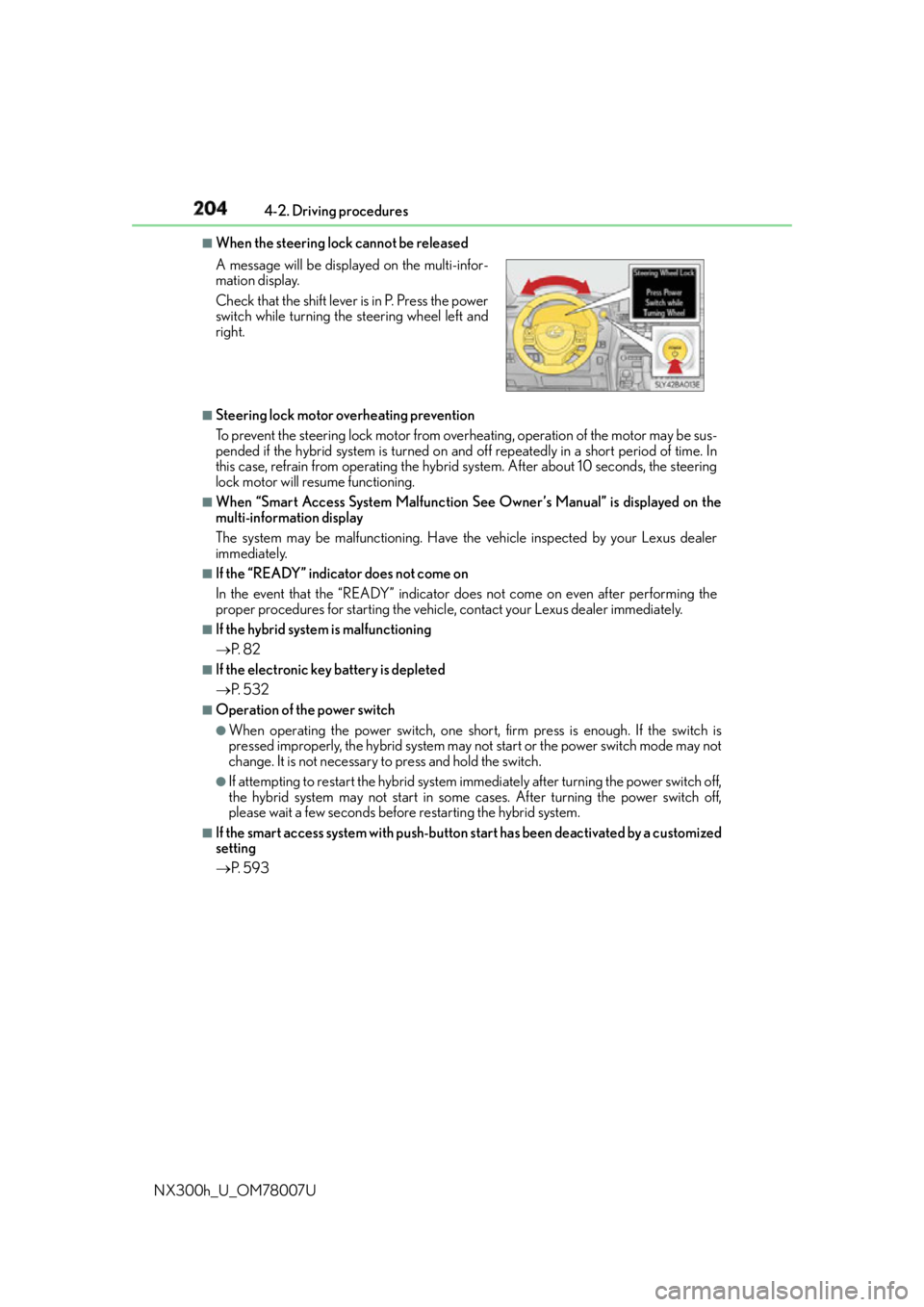
When the steering lock cannot be released
■
Steering lock motor overheating prevention
To prevent the steering lock motor from over heating, operation of the motor may be sus-
pended if the hybrid system is turned on and off repeatedly in a short period of time. In
this case, refrain from operating the hybrid system. After about 10 seconds, the steering
lock motor will resume functioning. ■
When “Smart Access System Malfunction See Owner’s Manual” is displayed on the
multi-information display
The system may be malfunctioning. Have the vehicle inspected by your Lexus dealer
immediately. ■
If the “READY” indicator does not come on
In the event that the “READY” indicator does not come on even after performing the
proper procedures for starting the vehicle, contact your Lexus dealer immediately. ■
If the hybrid system is malfunctioning
P. 8 2 ■
If the electronic key battery is depleted
P. 5 3 2 ■
Operation of the power switch ●
When operating the power switch, one short, firm press is enough. If the switch is
pressed improperly, the hybrid system may no t start or the power switch mode may not
change. It is not necessary to press and hold the switch. ●
If attempting to restart the hybrid system immediately after turning the power switch off,
the hybrid system may not start in some cases. After turning the power switch off,
please wait a few seconds before restarting the hybrid system.■
If the smart access system with push-butto n start has been deactivated by a customized
setting
P. 5 9 3A message will be displayed on the multi-infor-
mation display.
Check that the shift lever is in P. Press the power
switch while turning the steering wheel left and
right.
Page 221 of 681
2214-3. Operating the lights and wipers
4
Driving
NX300h_U_OM78007U ■
Daytime running light system ●
To make your vehicle more visible to other dr ivers, the front parking lights turn on auto-
matically (at an increased inte nsity) whenever the hybrid system is started and the park-
ing brake is released. Daytime running lights are not designed for use at night.
Type A only: Daytime running lights can be tu rned off by operating the headlight switch
to “DRL OFF” position. ●
If a turn signal light is in use, the daytime running light, on the same side, is turned off.
For emergency flashers, both are turned off. ■
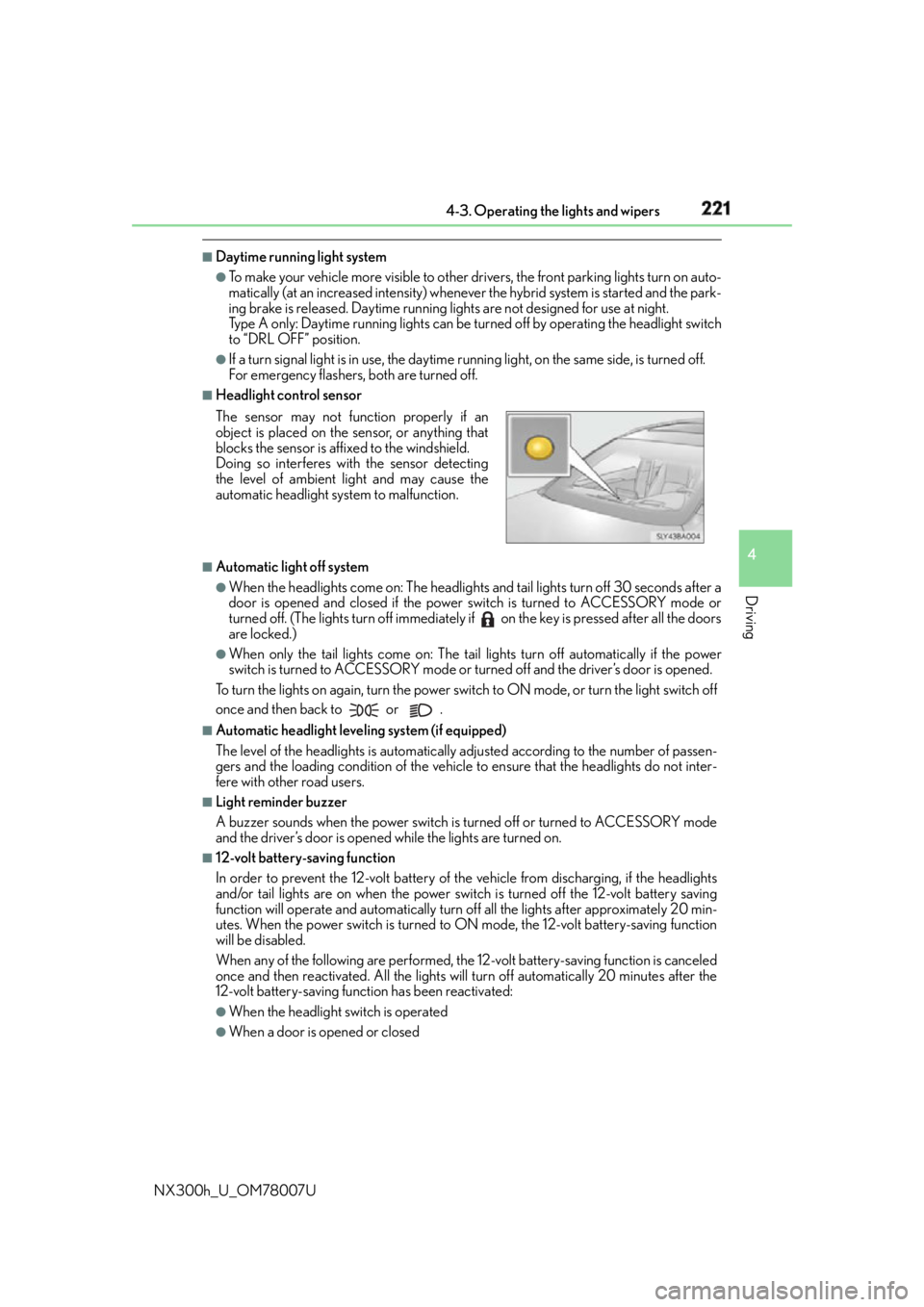
Headlight control sensor
■
Automatic light off system ●
When the headlights come on: The headlights and tail lights turn off 30 seconds after a
door is opened and closed if the power switch is turned to ACCESSORY mode or
turned off. (The lights turn off immediately if on the key is pressed after all the doors
are locked.) ●
When only the tail lights come on: The tail lights turn off automatically if the power
switch is turned to ACCESSORY mode or turned off and the driver’s door is opened.
To turn the lights on again, turn the power switch to ON mode, or turn the light switch off
once and then back to or . ■
Automatic headlight leveling system (if equipped)
The level of the headlights is automatically ad justed according to the number of passen-
gers and the loading condition of the vehicle to ensure that the headlights do not inter-
fere with other road users. ■
Light reminder buzzer
A buzzer sounds when the power switch is turned off or turned to ACCESSORY mode
and the driver’s door is opened while the lights are turned on. ■
12-volt battery-saving function
In order to prevent the 12-volt battery of the vehicle from discharging, if the headlights
and/or tail lights are on when the power swit ch is turned off the 12-volt battery saving
function will operate and automatically turn off all the lights after approximately 20 min-
utes. When the power switch is turned to ON mode, the 12-volt battery-saving function
will be disabled.
When any of the following are performed, the 12-volt battery-saving function is canceled
once and then reactivated. All the lights w ill turn off automatically 20 minutes after the
12-volt battery-saving function has been reactivated: ●
When the headlight switch is operated ●
When a door is opened or closedThe sensor may not function properly if an
object is placed on the sensor, or anything that
blocks the sensor is affixed to the windshield.
Doing so interferes with the sensor detecting
the level of ambient light and may cause the
automatic headlight system to malfunction.
Page 445 of 681
4456-2. Using the interior lights
6
Interior features
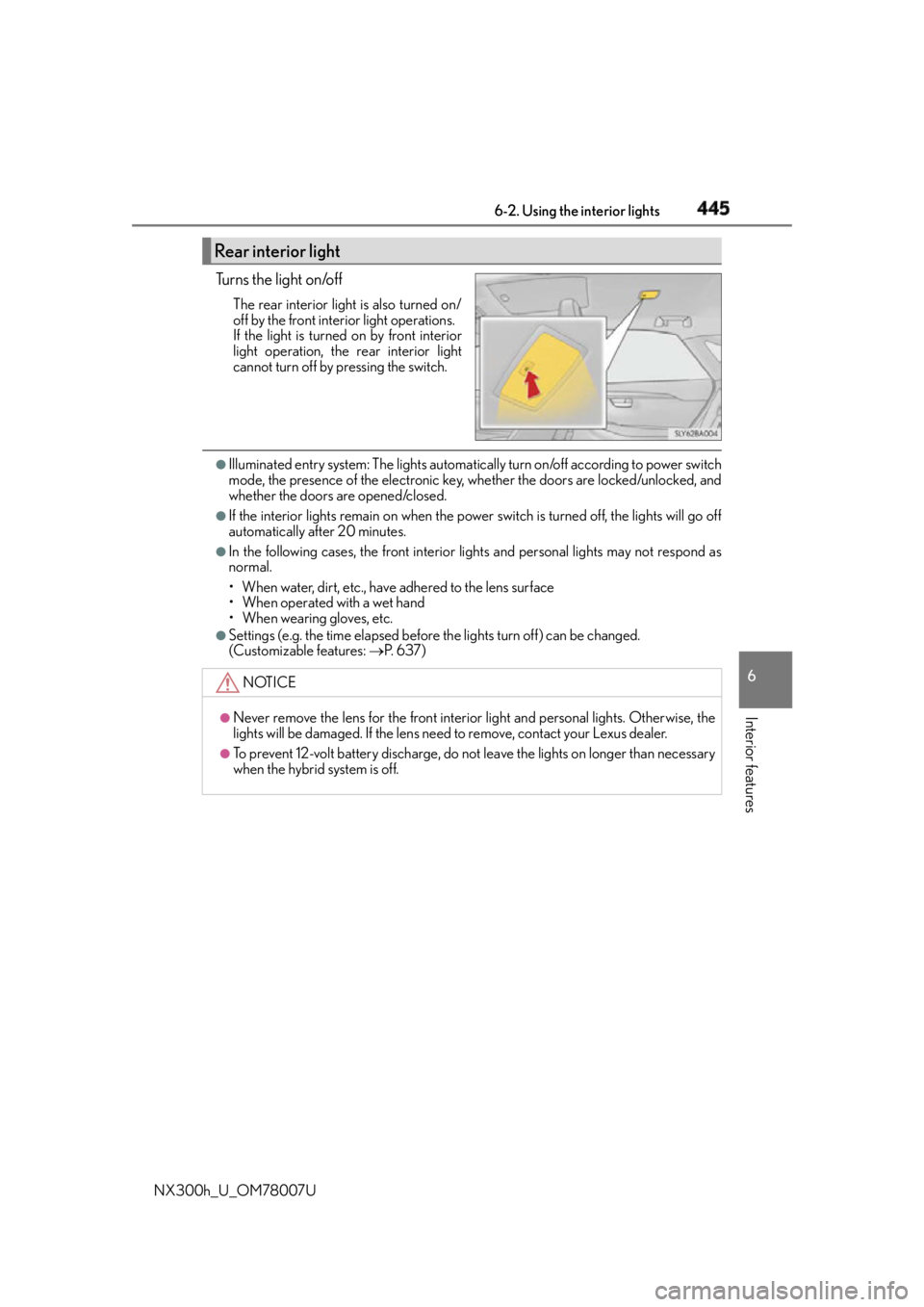
NX300h_U_OM78007U Tu r n s t h e l i g h t o n /o f f The rear interior light is also turned on/
off by the front interior light operations.
If the light is turned on by front interior
light operation, the rear interior light
cannot turn off by pressing the switch. ●
Illuminated entry system: The lights automatical ly turn on/off according to power switch
mode, the presence of the electronic key, whether the doors are locked/unlocked, and
whether the doors are opened/closed. ●
If the interior lights remain on when the power switch is turned off, the lights will go off
automatically after 20 minutes. ●
In the following cases, the front interior li ghts and personal lights may not respond as
normal.
• When water, dirt, etc., have adhered to the lens surface
• When operated with a wet hand
• When wearing gloves, etc. ●
Settings (e.g. the time elapsed before the lights turn off) can be changed.
(Customizable features: P. 6 3 7 )Rear interior light
NOTICE ●
Never remove the lens for the front interior light and personal lig hts. Otherwise, the
lights will be damaged. If the lens need to remove, contact your Lexus dealer.●
To prevent 12-volt battery discharge, do not leave the lights on lo nger than necessary
when the hybrid system is off.
Page 464 of 681

464 6-4. Other interior features
NX300h_U_OM78007U WA R N I N G ■
Conditions in which the function may not operate correctly
In the following conditions, it may not operate correctly ●
The portable device is fully charged ●
There is foreign matter between the charge area and portable device ●
The temperature of the portable device gets higher from charging ●
The charging surface of the portable device is facing up ●
The placement of the portable device is out of alignment with the charge area●
Near a TV tower, electric power plant, gas st ation, radio station, large display, airport
or other facility that generates strong radio waves or electrical noise ●
When the electronic key is in contact with , or is covered by the following metallic
objects
• Cards to which aluminum foil is attached
• Cigarette boxes that have aluminum foil inside
• Metallic wallets or bags
•Coins
•Hand warmers made of metal
• Media such as CDs and DVDs ●
When other wireless keys (that emit radio waves) are being used nearby
In addition, excluding the above-mentioned, when the charger does not perform nor-
mally or the operation display lamp is flashi ng continuously, it is considered that the
wireless charger is malfunctioning. Contact your Lexus dealer. ■
To prevent failure or damage to data ●
Do not bring magnetic cards, such as credit cards, or magnetic recording media, etc.,
close to the charger while charging, otherw ise, data may disapp ear under the influ-
ence of magnetism. Also, do not bring pr ecision instruments such as wrist watches,
etc., close to the charger, as such objects may break. ●
Do not leave portable devices in the cab in. The temperature inside the cabin may
become high, when under the sun, and cause damage to the device. ■
To prevent 12-volt battery discharge
When the hybrid system is stopped, do not use the wireless charger for a long time.
Page 483 of 681

483
7Maintenance and care
NX300h_U_OM78007U 7-1. Maintenance and care
Cleaning and protecting
the vehicle exterior.................484
Cleaning and protecting
the vehicle interior ................. 488
7-2. Maintenance
Maintenance
requirements.............................. 491
General maintena nce .............. 494
Emission inspection and
maintenance (I/M)
programs .....................................497
7-3. Do-it-yourself maintenance
Do-it-yourself service
precautions ................................ 498
Hood .............................................. 500
Positioning a floor jack .............. 501
Engine compartment ...............502
12-volt battery............................... 512
Tires ................................................... 516
Tire inflation pressure ............... 525
Wheels ........................................... 528
Air conditioning filter ...............530
Electronic key battery .............. 532
Checking and replacing
fuses ..............................................534
Light bulbs.....................................538
Page 485 of 681

4857-1. Maintenance and care
7
Maintenance and care
NX300h_U_OM78007U ■
Note for a smart access system with push-button start ●
If the door handle becomes wet while the el ectronic key is within the effective range,
the door may lock and unlock repeatedly. Place the key in a position 6 ft. (2 m) or more
separate from the vehicle while the vehicle is being washed. (Take care to ensure that
the key is not stolen.) ●
If the electronic key is insi de the vehicle and a door handle becomes wet during a car
wash, a buzzer will sound outside the vehicle. To turn off the alarm, lock all the doors. ●
Set the electronic key to battery-saving mo de to disable the smart access system with
push-button start. ( P. 1 4 1 )■
Aluminum wheels ●
Remove any dirt immediately by using a neutral detergent. Do not use hard brushes or
abrasive cleaners. Do not use strong or harsh chemical cleaners.
Use the same mild detergent and wax as used on the paint. ●
Do not use detergent on the wheels when they are hot, for example after driving for
long distance in the hot weather. ●
Wash detergent from the wheels immediately after use. ■
Bumpers
Do not scrub with abrasive cleaners. ■
Front side windows water-repellent coatin g (vehicles with water-repellent coating)●
The following precautions can extend the effectiveness of the water-repellent coating.
• Remove any dirt, etc. from the front side windows regularly.
• Do not allow dirt and dust to accumulate on the windows for a long period.
Clean the windows with a soft, da mp cloth as soon as possible.
• Do not use wax or glass cleaners that co ntain abrasives when cleaning the windows.
• Do not use any metallic objects to remove condensation build up.●
When the water-repellent performance has become insufficient, the coating can be
repaired. Contact your Lexus dealer.
Page 513 of 681

5137-3. Do-it-yourself maintenance
7
Maintenance and care
NX300h_U_OM78007U Make sure that the 12-volt battery terminals are not corroded and that there are
no loose connections, cracks, or loose clamps.
Te r m i n a l s
Hold-down clamp
Insert the left side auxiliary box.
Push up center position
Insert
Press ■
Before recharging
When recharging, the 12-volt battery produces hydrogen gas which is flammable and
explosive. Therefore, observe the following precautions before recharging: ●
If recharging with the 12-volt battery installed on the vehicle, be sure to disconnect the
ground cable. ●
Make sure the power switch on the charger is off when connecting and disconnecting
the charger cables to the 12-volt battery. ■
After recharging/reconnecting the 12-volt battery ●
The hybrid system may not start. Follow the procedure below to initialize the system.
Shift the shift lever to P.
Open and close any of the doors.
Restart the hybrid system.●
Unlocking the doors using the smart access system with push-button start may not be
possible immediately after reconnecting the 12-volt battery. If this happens, use the
wireless remote control or the mech anical key to lock/unlock the doors.●
Start the hybrid system with the power switch in ACCESSORY mode. The hybrid sys-
tem may not start with the power switch turned off. However, the hybrid system will
operate normally from the second attempt.Exterior 1
2
Installing the 12-volt battery maintenance cover 1
2
3
1
2
3
Page 532 of 681
532 7-3. Do-it-yourself maintenance
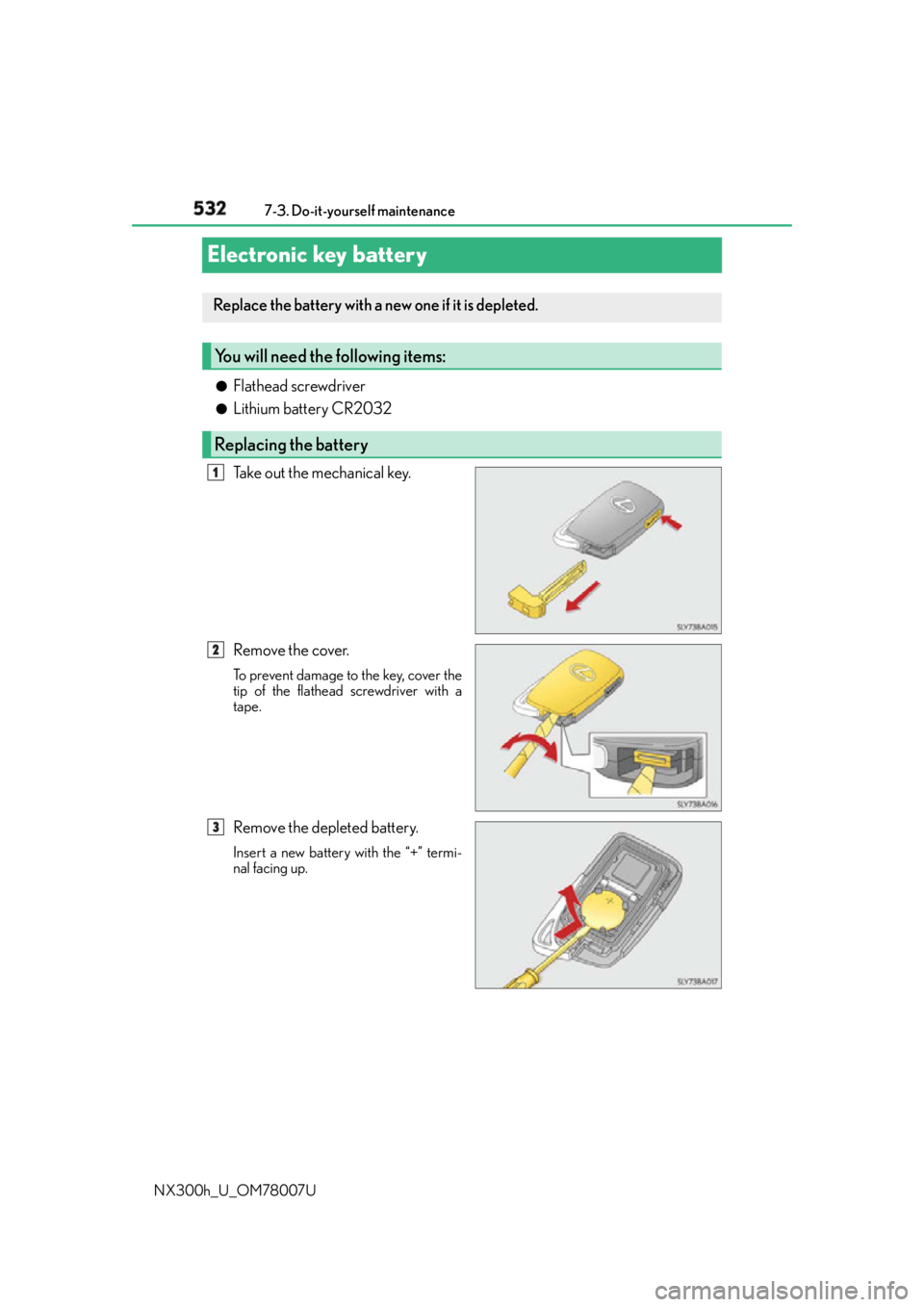
NX300h_U_OM78007UElectronic key battery ●
Flathead screwdriver ●
Lithium battery CR2032
Take out the mechanical key.
Remove the cover. To prevent damage to the key, cover the
tip of the flathead screwdriver with a
tape.
Remove the depleted battery. Insert a new battery with the “+” termi-
nal facing up.Replace the battery with a new one if it is depleted.
You will need the following items:
Replacing the battery 1
2
3
Page 533 of 681
5337-3. Do-it-yourself maintenance
7
Maintenance and care
NX300h_U_OM78007U ■
Use a CR2032 lithium battery ●
Batteries can be purchased at your Lexus dealer, local electrical appliance shops or
camera stores. ●
Replace only with the same or equivalent type recommended by the manufacturer. ●
Dispose of used batteries according to the local laws. ■
When the card key battery needs to be replaced (if equipped)
The battery for the card key is available only at Lexus dealers. Your Lexus dealer can
replace the battery for you. ■
If the electronic key battery is depleted
The following symptoms may occur: ●
The smart access system with push-button start and wireless remote control will not
function properly. ●
The operational range will be reduced.
WA R N I N G ■
Removed battery and other parts
These parts are small and if swallowed by a child, they can cause choking. Keep away
from children. Failure to do so could result in death or serious injury.
NOTICE ■
For normal operation afte r replacing the battery
Observe the following precautions to prevent accidents: ●
Always work with dry hands.
Moisture may cause the battery to rust. ●
Do not touch or move any other component inside the remote control. ●
Do not bend either of the battery terminals.