headlights LEXUS NX300h 2015 Owner's Manual
[x] Cancel search | Manufacturer: LEXUS, Model Year: 2015, Model line: NX300h, Model: LEXUS NX300h 2015Pages: 681, PDF Size: 9.14 MB
Page 352 of 681
352 5-2. Setup
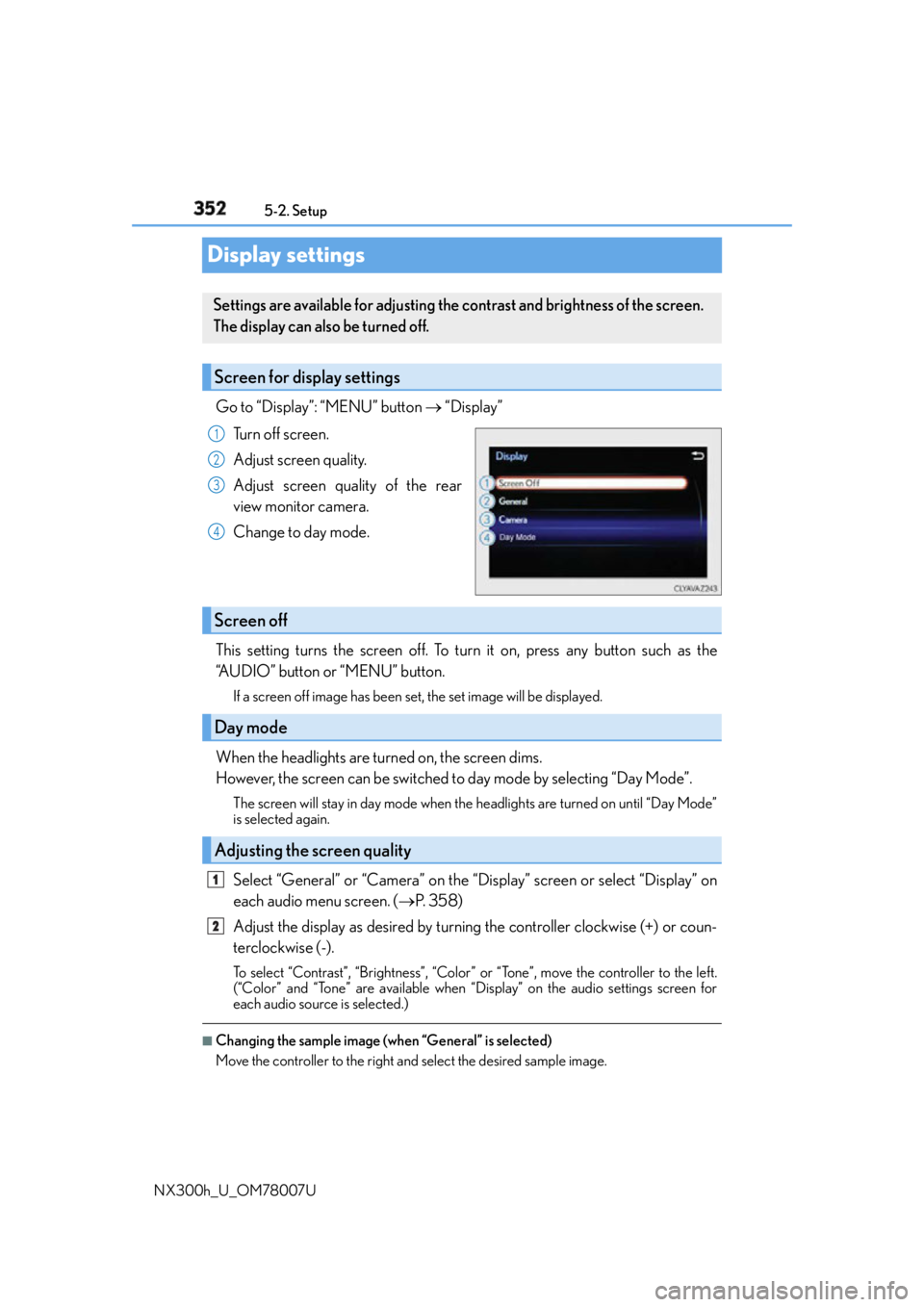
NX300h_U_OM78007UDisplay settings Go to “Display”: “MENU” button “Display”
Turn off screen.
Adjust screen quality.
Adjust screen quality of the rear
view monitor camera.
Change to day mode.
This setting turns the screen off. To turn it on, press any button such as the
“AUDIO” button or “MENU” button. If a screen off image has been set, the set image will be displayed.
When the headlights are turned on, the screen dims.
However, the screen can be switched to day mode by selecting “Day Mode”. The screen will stay in day mode when the headlights are turned on until “Day Mode”
is selected again.
Select “General” or “Camera” on the “Display” screen or select “Display” on
each audio menu screen. ( P. 3 5 8 )
Adjust the display as desired by turning the controller clockwise (+) or coun-
terclockwise (-). To select “Contrast”, “Brightness”, “Color” or “Tone”, move the controller to the left.
(“Color” and “Tone” are available when “Display” on the audio settings screen for
each audio source is selected.) ■
Changing the sample image (when “General” is selected)
Move the controller to the right and select the desired sample image.Settings are available for adjusting the contrast and brightness of the screen.
The display can also be turned off.
Screen for display settings 1
2
3
4
Screen off
Day mode
Adjusting the screen quality 1
2
Page 589 of 681
589
8
When trouble arises 8-2. Steps to take in an emergency
NX300h_U_OM78007UIf the hybrid system will not start One of the following may be the cause of the problem: ●
The electronic key may not be functioning properly.
( P. 5 9 2 )●
There may not be sufficient fuel in the vehicle’s tank.
Refuel the vehicle. ( P. 8 3 )●
There may be a malfunction in the immobilizer system. ( P. 8 6 )●
There may be a malfunction in the steering lock system. ●
The hybrid system may be malfunctioni ng due to an electrical problem such
as electronic key battery depletion or a blown fuse. However, depending on
the type of malfunction, an interim meas ure is available to start the hybrid sys-
tem. ( P. 5 9 0 )
One of the following may be the cause of the problem: ●
The 12-volt battery may be discharged. ( P. 5 9 5 )●
The 12-volt battery terminal connections may be loose or corroded.
( P. 5 1 2 )Reasons for the hybrid system not starting vary depending on the situation.
Check the following and perform the appropriate procedure:
The hybrid system will not start ev en though the correct starting proce-
dure is being followed. ( P. 201)
The interior lights and headlights are dim, or the horn does not sound or
sounds at a low volume.
Page 590 of 681
590 8-2. Steps to take in an emergency
NX300h_U_OM78007U One of the following may be the cause of the problem: ●
The 12-volt battery may be discharged. ( P. 5 9 5 )●
One or both of the 12-volt battery terminals may be disconnected. ( P. 5 1 2 )Contact your Lexus dealer if the problem cannot be repaired, or if repair procedures
are unknown.
When the hybrid system does not start, the following steps can be used as an
interim measure to start the hybrid system if the power switch is functioning nor-
mally:
Do not use this starting procedur e except in cases of emergency.
Set the parking brake.
Shift the shift lever to P.
Turn the power switch to ACCESSORY mode.
Press and hold the power switch for ab out 15 seconds while depressing the
brake pedal firmly.
Even if the hybrid system can be starte d using the above steps, the system may
be malfunctioning. Have the vehicle inspected by your Lexus dealer.The interior lights and headlights do not turn on, or the horn does not
sound.
Emergency start function 1
2
3
4
Page 597 of 681
5978-2. Steps to take in an emergency
8
When trouble arises
NX300h_U_OM78007U Start the engine of the second vehicle. Increase the engine speed slightly and
maintain at that level for approximately 5 minutes to recharge the 12-volt bat-
tery of your vehicle.
Open and close any of the doors of your vehicle with the power switch off.
Maintain the engine speed of the second vehicle and start the hybrid system
of your vehicle by turning the power switch to ON mode.
Make sure the “READY” indicator comes on. If the indicator light does not
come on, contact your Lexus dealer.
Once the hybrid system has started, remove the jumper cables in the exact
reverse order from which they were connected.
Close the exclusive jump starting terminal cover, and reinstall the fuse box
cover to its original position.
Once the hybrid system starts, have th e vehicle inspected at your Lexus dealer
as soon as possible. ■
Starting the hybrid system when the 12-volt battery is discharged
The hybrid system cannot be started by push-starting. ■
To prevent 12-volt battery discharge ●
Turn off the headlights and the audio system while the hybrid system is off. ●
Turn off any unnecessary electrical components when the vehicle is running at a low
speed for an extended period, such as in heavy traffic. ■
Charging the 12-volt battery
The electricity stored in the 12-volt battery will discharge gradually even when the vehicle
is not in use, due to natural discharge and the draining effects of certain electrical appli-
ances. If the vehicle is left for a long time, the 12-volt battery may discharge, and the
hybrid system may be unable to start. (The 12-volt battery recharges automatically while
the hybrid system is operating.) ■
When the 12-volt battery is removed or discharged ●
In some cases, it may not be possible to unlock the doors using the smart access system
with push-button start when the 12-volt battery is discharged. Use the wireless remote
control or the mechanical key to lock or unlock the doors. ●
The hybrid system may not start on the first attempt after the 12-volt battery has
recharged but will start normally after the second attempt. This is not a malfunction.●
The power switch mode is memorized by the vehicle. When the 12-volt battery is
reconnected, the system will return to the mode it was in before the 12-volt battery was
discharged. Before disconnecting the 12-volt battery, turn the power switch off.
If you are unsure what mode the power switch was in before the 12-volt battery dis-
charged, be especially careful when reconnecting the 12-volt battery. ●
The power back door must be initialized. ( P. 1 3 4 )●
Make sure that the key is not inside the vehicle when recharging or replacing the
12-volt battery. The key may be locked in the vehicle if the alarm is activated. ( P. 88)5
6
7
8
9
10
Page 617 of 681
6179-1. Specifications
9
Vehicle specifications
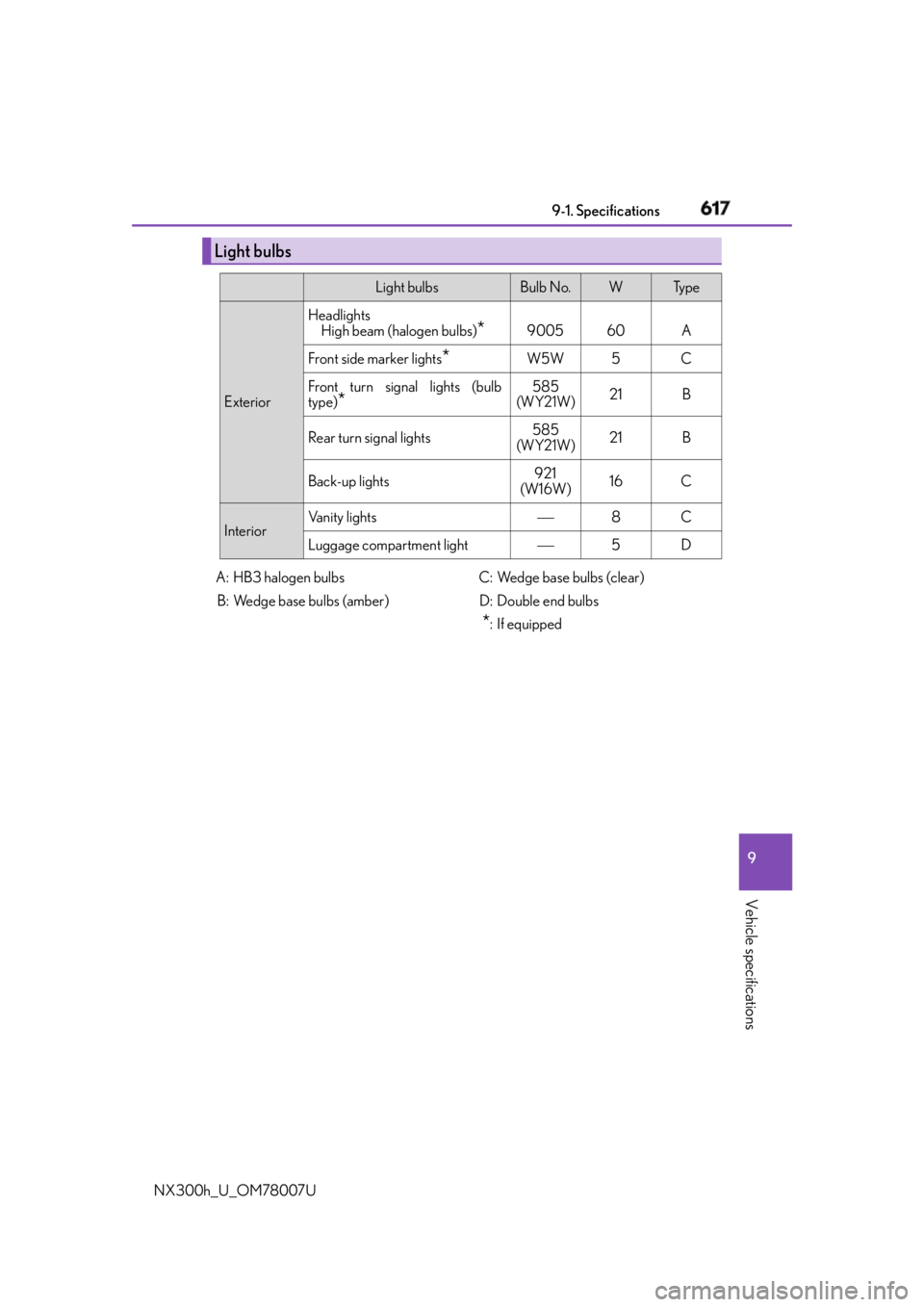
NX300h_U_OM78007U Light bulbs Light bulbs Bulb No. W Ty p e
Exterior Headlights
High beam (halogen bulbs)
* 9005 60 A
Front side marker lights
* W5W 5 C
Front turn signal lights (bulb
type)
* 585
(WY21W) 21 B
Rear turn signal lights 585
(WY21W) 21 B
Back-up lights 921
(W16W) 16 C
Interior Vanity lights 8 C
Luggage compartment light 5 D
A: HB3 halogen bulbs
B: Wedge base bulbs (amber) C: Wedge base bulbs (clear)
D: Double end bulbs
* : If equipped
Page 636 of 681
636 9-2. Customization
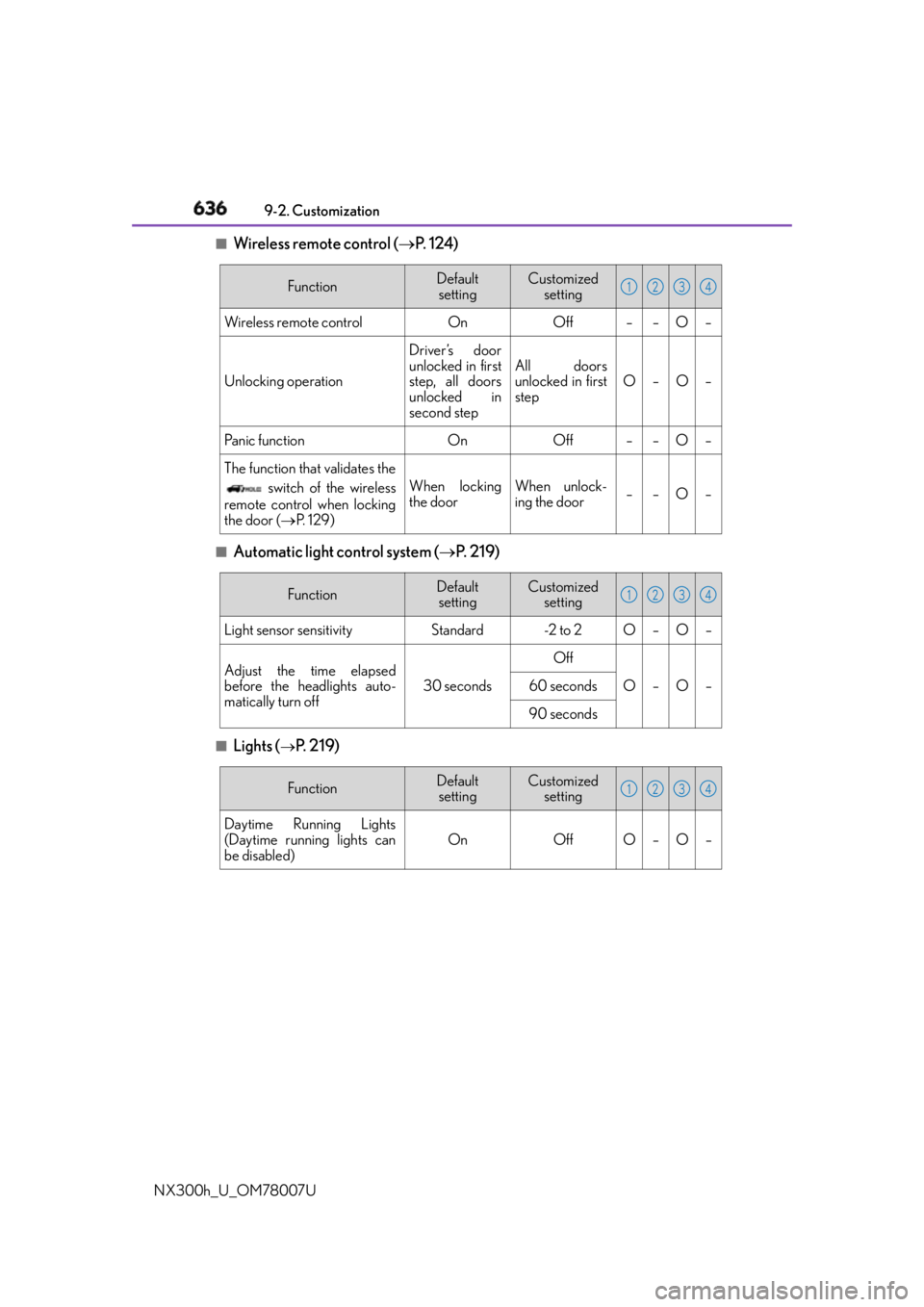
NX300h_U_OM78007U ■
Wireless remote control ( P. 1 2 4 )
■
Automatic light control system ( P. 2 1 9 )
■
Lights (
P. 2 1 9 ) Function Default
setting Customized
setting
Wireless remote control On Off – – O –
Unlocking operation Driver’s door
unlocked in first
step, all doors
unlocked in
second step All doors
unlocked in first
step O–O–
Panic function On Off – – O –
The function that validates the
switch of the wireless
remote control when locking
the door ( P. 1 2 9 ) When locking
the door When unlock-
ing the door ––O– 1 2 3 4
Function Default
setting Customized
setting
Light sensor sensitivity Standard -2 to 2 O – O –
Adjust the time elapsed
before the headlights auto-
matically turn off 30 seconds Off
O–O–
60 seconds
90 seconds 1 2 3 4
Function Default
setting Customized
setting
Daytime Running Lights
(Daytime running lights can
be disabled) On Off O – O – 1 2 3 4
Page 670 of 681

669Alphabetical index
NX300h_U_OM78007U Hands-free system
(for cellular phone) ........................... 392
Head restraints ....................................... 158
Headlights .................................................219
Automatic headlight leveling .........221
Automatic High Beam .................... 223
Light switch ............................................ 219
Replacing light bulbs ............. 541, 552
Wattage ....................................................617
Head-up display..................................... 106
Heated steering wheel .........................441
Heaters
Automatic air conditioning
system ................................................. 430
Heated steering wheel ................... 440
Outside rear view mirrors .............435
Seat heaters ......................................... 440
High mounted stoplight
Replacing .............................................. 552
Hill-start assist control ........................305
Hood ..........................................................500
Warning message .................. 128, 572
Hooks
Cargo hooks ....................................... 450
Retaining hooks (floor mat) ............. 28
Horn ............................................................ 160 Hybrid battery (traction battery)
Location ......................................................81
Specification ............................................ 611
Hybrid battery air vent .......................... 82
Hybrid system............................................ 77
Emergency shut off system ............. 82
Energy monitor/
consumption screen.......................... 111
EV drive mode ................................... 206
High voltage components .................81
Hybrid System Indicator ................. 100
Hybrid system precautions ...............81
Hybrid vehicle driving tips ............ 324
If the hybrid system will not
start....................................................... 589
Overheating........................................ 600
Power switch .........................................201
Regenerative braking ..........................79
Starting the hybrid system...............201
Vehicle proximity notification
system ..................................................... 78
Hybrid System Indicator .................... 100
Hybrid transmission ............................ 208H