service LEXUS NX300h 2015 Owner's Manual
[x] Cancel search | Manufacturer: LEXUS, Model Year: 2015, Model line: NX300h, Model: LEXUS NX300h 2015Pages: 681, PDF Size: 9.14 MB
Page 407 of 681
4075-10. Phonebook
5
Lexus Display Audio system
NX300h_U_OM78007U Go to “Remove Favorite”: “MENU” button “Setup” “Phone” “Con-
tact/Call History Settings” “Remove Favorite”
Select the desired contacts. You can select all contacts by selecting “Select All”.
Move the controller to the left and select “Remove”.
Go to “Delete Contacts”: “MENU” button “Setup” “Phone” “Con-
tact/Call History Settings” “Delete Contacts”
Select the desired contacts. You can select all contacts by selecting “Select All”.
Move the controller to the left and select “Delete”.■
Phonebook data
Phonebook data is managed separately for every registered phone. When one phone is
connected, you cannot read the registered data of the other phones. ■
When transferring contacts
Transfer contacts while the hy brid system is operating.
If the cellular phone is OPP or PBAP compatible, you may need to input “1234” on the
cellular phone for OBEX certification. ■
When you have selected “Replace contacts ” or “Add contact” to transfer contacts
If the cellular phone does not support OPP service, you cannot use these functions. You
can transfer the phonebook data only by operating your phone.■
Transferring contacts while Bluetooth ®
audio is playing
Bluetooth ®
audio will disconnect. It will reconnect automatically when data transfer fin-
ishes. It may not reconnect dependin g on the phone which is connected.Removing favorites
Deleting the contacts data 1
2
3
1
2
3
Page 408 of 681
408 5-10. Phonebook
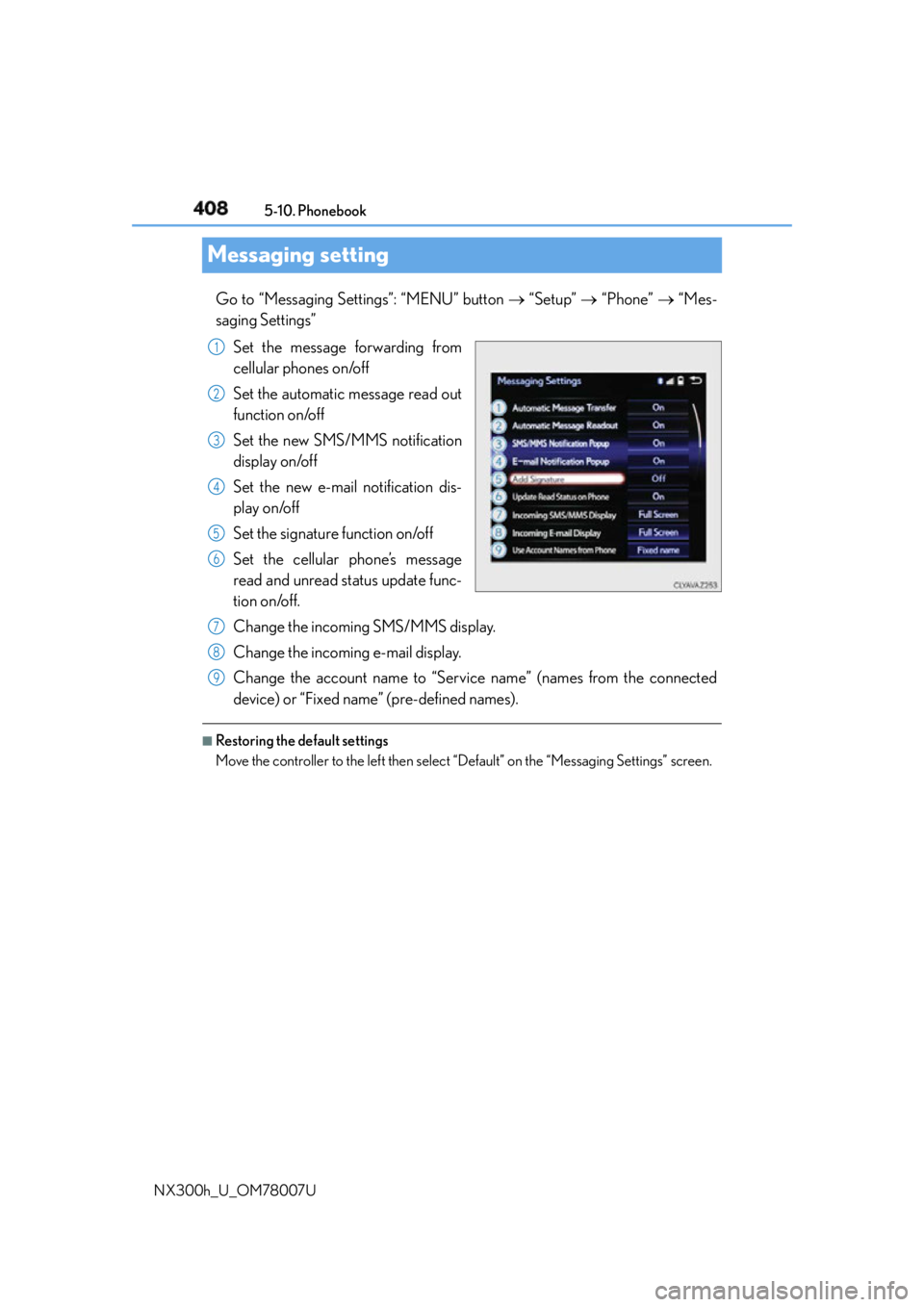
NX300h_U_OM78007UMessaging setting Go to “Messaging Settings”: “MENU” button “Setup” “Phone” “Mes-
saging Settings”
Set the message forwarding from
cellular phones on/off
Set the automatic message read out
function on/off
Set the new SMS/MMS notification
display on/off
Set the new e-mail notification dis-
play on/off
Set the signature function on/off
Set the cellular phone’s message
read and unread status update func-
tion on/off.
Change the incoming SMS/MMS display.
Change the incoming e-mail display.
Change the account name to “Service name” (names from the connected
device) or “Fixed name” (pre-defined names). ■
Restoring the default settings
Move the controller to the left then select “Default” on the “Messaging Settings” screen. 1
2
3
4
5
6
7
8
9
Page 410 of 681
410 5-11. Bluetooth ®
NX300h_U_OM78007U
When registering/connecting a cellular phone
When making/receiving a call A cellular phone cannot be registered.
An incorrect passcode was en tered on the cellular phone.
Enter the correct passcode on the cellular phone.
The registration operation has not been completed on the cellular phone side.
Complete the registration operation on the cellular phone (approve registration
on the phone).
Old registration information remains on ei ther this system or the cellular phone.
Delete the existing registration informat ion from both this system and the cellu-
lar phone, then register the cellular phon e you wish to connect to this system.
( P. 3 8 4 )
A Bluetooth ®
connection cannot be made.
Another Bluetooth ®
device is already connected.
Manually connect the cellular phone you wish to use to this system. ( P. 3 8 7 )
Bluetooth ®
function is not enabled on the cellular phone.
Enable the Bluetooth ®
function on the cellular phone.
A call cannot be made/received.
Your vehicle is in a “No Service” area.
Move to where “No Service” no longer appears on the display.
Page 413 of 681
4135-11. Bluetooth ®
5
Lexus Display Audio system
NX300h_U_OM78007UBluetooth ®■
When using the Bluetooth ®
audio system●
In the following situations, the system may not function.
• If the portable audio player is turned off
• If the portable audio player is not connected
• If the portable audio player’s battery is low ●
There may be a delay if a cellular phon e connection is made during Bluetooth ®
audio
play. ●
Depending on the type of portable audio play er that is connected to the system, opera-
tion may differ slightly and certain functions may not be available. ■
When using the hands-free system ●
The audio system is mu ted when making a call.●
If both parties speak at the same time, it may be difficult to hear.●
If the received call volume is over ly loud, an echo may be heard.
If the Bluetooth ®
phone is too close to the system, quality of the sound may deteriorate
and connection status may deteriorate. ●
In the following situations, it may be difficult to hear the other party:
• When driving on unpaved roads
• When driving at high speeds
•If a window is open
• If the air conditioning is blowing directly on the microphone
• If there is interference from the network of the cellular phone●
Depending on the type phone, cert ain functions may not be available.■
Conditions under which th e system will not operate●
If using a cellular phone that does not support Bluetooth ®
●
If the cellular phone is turned off ●
If you are outside of cellular phone service coverage ●
If the cellular phone is not connected ●
If the cellular phone’s battery is low ●
When outgoing calls are controlled, due to heavy traffic on telephone lines, etc.●
When the cellular phone itself cannot be used ●
When transferring phonebook data from the cellular phone
Page 415 of 681

4155-11. Bluetooth ®
5
Lexus Display Audio system
NX300h_U_OM78007U ■
Compatible models
The Bluetooth ®
audio system supports portable audi o players with the following specifi-
cations ●
Bluetooth ®
specifications:
Ver. 2.0 or higher (Recommended: Ver. 3.0 +EDR or higher) ●
Profiles:
• A2DP (Advanced Audio Distribution Profile) Ver. 1.0, or higher
(Recommended: Ver. 1.2 or higher)
This is a profile to transmit stereo audio or high quality sound to the audio system.
• AVRCP (Audio/Video Remote Control Profile) Ver. 1.0 or higher
(Recommended: Ver. 1.4 or higher)
This is a profile to allow remote control the A/V equipment.
However, please note that some functions may be limited depending on the type of por-
table audio player connected.
The hands-free system supports cellular phones with the following specifications. ●
Bluetooth ®
specification:
Ver. 2.0 or higher (Recommended: Ver. 3.0 +EDR or higher) ●
Profiles:
• HFP (Hands Free Profile) Ver. 1.0 or higher (Recommended: Ver. 1.6 or higher)
This is a profile to allow ha nds-free phone calls using a cellular phone or head set. It
has outgoing and incoming call functions.
• OPP (Object Push Profile) Ver. 1.1 or higher (Recommended: Ver. 1.2)
This is a profile to transfer phonebook data. When a Bluetooth ®
compatible cellular
phone has both PBAP and OPP, OPP cannot be used.
• PBAP (Phone Book Access Profile) Ver. 1.0 or higher (Recommended: Ver. 1.1)
This is a profile to tr ansfer phonebook data.
• MAP (Message Access Profile) Ver.1.0 or higher
This is a profile to using phone message.
If the cellular phone does not support HFP, you cannot register it with the hands-free sys-
tem. OPP, PBAP or MAP services must be selected individually.■
Reconnecting the portable audio player
If the portable audio player is disconnected due to poor reception when the power
switch is in ACCESSORY or ON mode, the system automatically reconnects the porta-
ble audio player.
If you have switched off the portable audio player yourself, follow the instructions below
to reconnect: ●
Select the portable audio player again ●
Enter the portable audio player ■
When you sell your car
Be sure to delete your personal data. ( P. 3 5 0 )
Page 427 of 681
4275-12. Other function
5
Lexus Display Audio system
NX300h_U_OM78007ULEXUS Enform Remote
After you sign the Telematics Subscription Service Agreement, download the
Lexus Enform Remote app from your cellular phone’s app store, and register
within the app (or enroll and complete registration at the dealer), you can begin
using these services. ( P. 4 7 7 )
A variety of subscription terms are available. Contact your Lexus dealer, or call 1-
800-25-LEXUS (1-800-255-3987) fo r further subscription details.
: If equippedLexus Enform Remote is a cellular phone application that lets you view and
remotely control certain aspects of your vehicle.
For details about the functions and serv ices of this application, refer to
http://www.lexus.com/enform/
.
Function of the Lexus Enform Remote is achieved by using an embedded cel-
lular device in the vehicle (D CM: Data Communication Module).
Subscription
Page 428 of 681

428 5-12. Other function
NX300h_U_OM78007U ■
Availability of service
Lexus Enform Remote is available in the cont iguous United States, Washington D.C. and
Alaska. ■
Lexus Enform Remote Information ●
Lexus Enform Remote should only be used by authorized users. ●
Laws in some communities may require that the vehicle be within view of the user when
operating Lexus Enform Remote.
In some states, use of Lexus Enform Remote may violate state or local laws. Before
using Lexus Enform Remote, check your state and local laws. ●
Any malfunction of the Lexus should be repaired by your Lexus dealer.●
Lexus Enform Remote is designed to work at temperatures above -22 F (-30 C). This
specification is related to the Lexus Enform Remote operation, but is dependent on the
vehicle’s operating temperature range which may be different. ●
Content is subject to change without notice. ●
Some features of the Lexus Enform Remote may not be available on some models.●
Additional information can be found at www.lexus.com/enform/ .●
Availability of functions of the Lexus Enform service is dependent on network reception
level. ■
Safety information for Lexus Enform Remote
Refer to safety information for Safety Connect: P. 4 8 1
Page 477 of 681
4776-4. Other interior features
6
Interior features
NX300h_U_OM78007USafety Connect
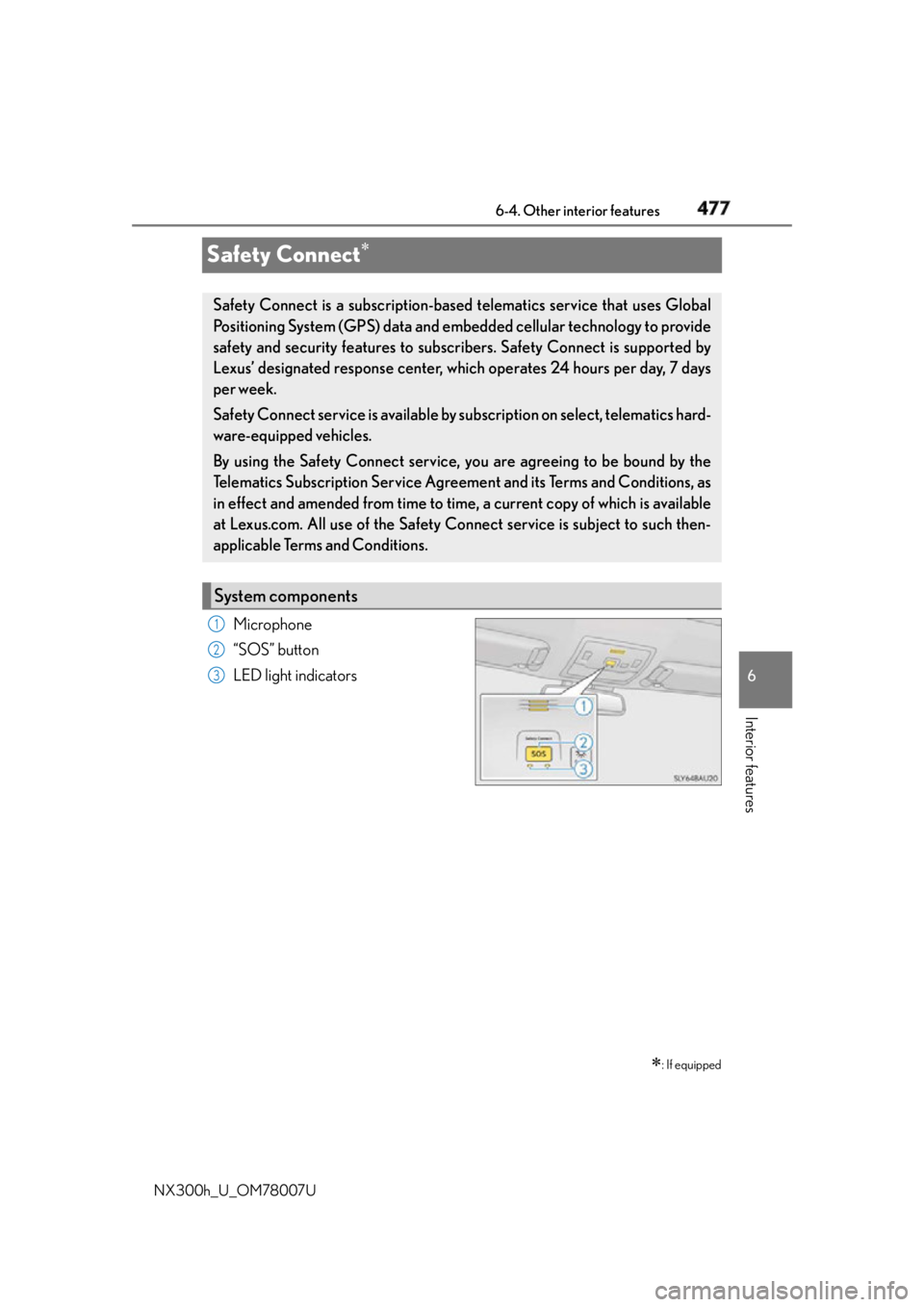
Microphone
“SOS” button
LED light indicators
: If equippedSafety Connect is a subscription-based telematics service that uses Global
Positioning System (GPS) data and embe dded cellular techno logy to provide
safety and security features to subscribers. Safety Connect is supported by
Lexus’ designated response center, wh ich operates 24 hours per day, 7 days
per week.
Safety Connect service is available by su bscription on select, telematics hard-
ware-equipped vehicles.
By using the Safety Connect service, yo u are agreeing to be bound by the
Telematics Subscription Service Agreement and its Terms and Conditions, as
in effect and amended from time to time, a current copy of which is available
at Lexus.com. All use of the Safety Connect service is subject to such then-
applicable Terms and Conditions.
System components 1
2
3
Page 478 of 681
478 6-4. Other interior features
NX300h_U_OM78007U Subscribers have the following Safety Connect services available: ●
Automatic Collision Notification
*Helps drivers receive necessary response from emergency service providers.
( P. 4 8 0 )
* : U.S. Patent No. 7,508,298 B2 ●
Stolen Vehicle Location
Helps drivers in the event of vehicle theft. ( P. 4 8 0 )●
Emergency Assistance Button (SOS)
Connects drivers to resp onse-center support. ( P. 4 8 0 )●
Enhanced Roadside Assistance
Provides drivers various on-road assistance. ( P. 4 8 0 )
After you have signed the Telematics Subscription Service Agreement and are
enrolled, you can begin receiving services.
A variety of subscription terms is available for purchase. Contact your Lexus
dealer, call 1-800-25-LEXUS (1-800-255-3987) or push the “SOS” button in
your vehicle for further subscription details.Services
Subscription
Page 479 of 681
4796-4. Other interior features
6
Interior features
NX300h_U_OM78007U ■
Safety Connect Services Information ●
Phone calls using the vehicles Bluetooth ®
technology will not be possible during Safety
Connect. ●
Safety Connect is available beginning Fall 2009 on select Lexus models. Contact with
the Safety Connect response center is dependent upon the telematics device being in
operative condition, cellular connection ava ilability, and GPS satellite signal reception,
which can limit the ability to reach the resp onse center or receive emergency service
support. Enrollment and Telematics Subscr iption Service Agreement required. A vari-
ety of subscription terms is available; ch arges vary by subscription term selected.●
Automatic Collision Notification, Emergency Assistance and Stolen Vehicle Location
will function in the United States, including Hawaii and Alaska, and in Canada, and
Enhanced Roadside Assistance will function in the United States (except Hawaii) and in
Canada. No Safety Connect services will function outside of the United States in coun-
tries other than Canada. ●
Safety Connect services are not subject to section 255 of the Telecommunications Act
and the device is not TTY compatible. ■
Languages
The Safety Connect resp onse center will offer support in multiple languages. The Safety
Connect system will offer voice prompts in English and Spanish. Please indicate your lan-
guage of choice when enrolling. ■
When contacting the response center
You may be unable to contact the resp onse center if the network is busy.
When the power switch is turned to ON mode, the red indicator light comes on
for 2 seconds then turns off. Afterward, the green indicator lig ht comes on, indi-
cating that the service is active.
The following indicator light patterns indicate specific system usage conditions: ●
Green indicator light on = Active service ●
Green indicator light flashing = Safety Connect call in process ●
Red indicator light (except at vehicle start-up) = System malfunction (contact
your Lexus dealer) ●
No indicator light (off) = Safety Connect service not activeSafety Connect LED light Indicators