battery LEXUS NX300h 2015 Workshop Manual
[x] Cancel search | Manufacturer: LEXUS, Model Year: 2015, Model line: NX300h, Model: LEXUS NX300h 2015Pages: 681, PDF Size: 9.14 MB
Page 440 of 681
440 6-1. Using the air conditioning system and defogger
NX300h_U_OM78007UHeated steering wheel
/seat heaters
/seat ventila-
tors
: If equippedHeated steering wheel and seat heater s heat the side grips of the steering
wheel and seats, respectively. Seat ventilators maintain good airflow by blow-
ing air from the seats. WA R N I N G ●
Care should be taken to prevent injury if anyone in the following categories comes in
contact with the steering wheel an d seats when the heater is on:
• Babies, small children, the elderly, the sick and the physically challenged
• Persons with sensitive skin
• Persons who are fatigued
• Persons who have taken alcohol or drugs that induce sleep (s leeping drugs, cold
remedies, etc.) ●
Observe the following precautions to prevent minor burns or overheating:
• Do not cover the seat with a blanket or cushion when using the seat heater.
• Do not use seat heater more than necessary.
NOTICE ●
Do not put heavy objects that have an uneven surface on the seat and do not stick
sharp objects (needles, nails, etc.) into the seat. ●
To prevent 12-volt battery discharge, do not use the functions when the hybrid system
is off.
Page 445 of 681
4456-2. Using the interior lights
6
Interior features
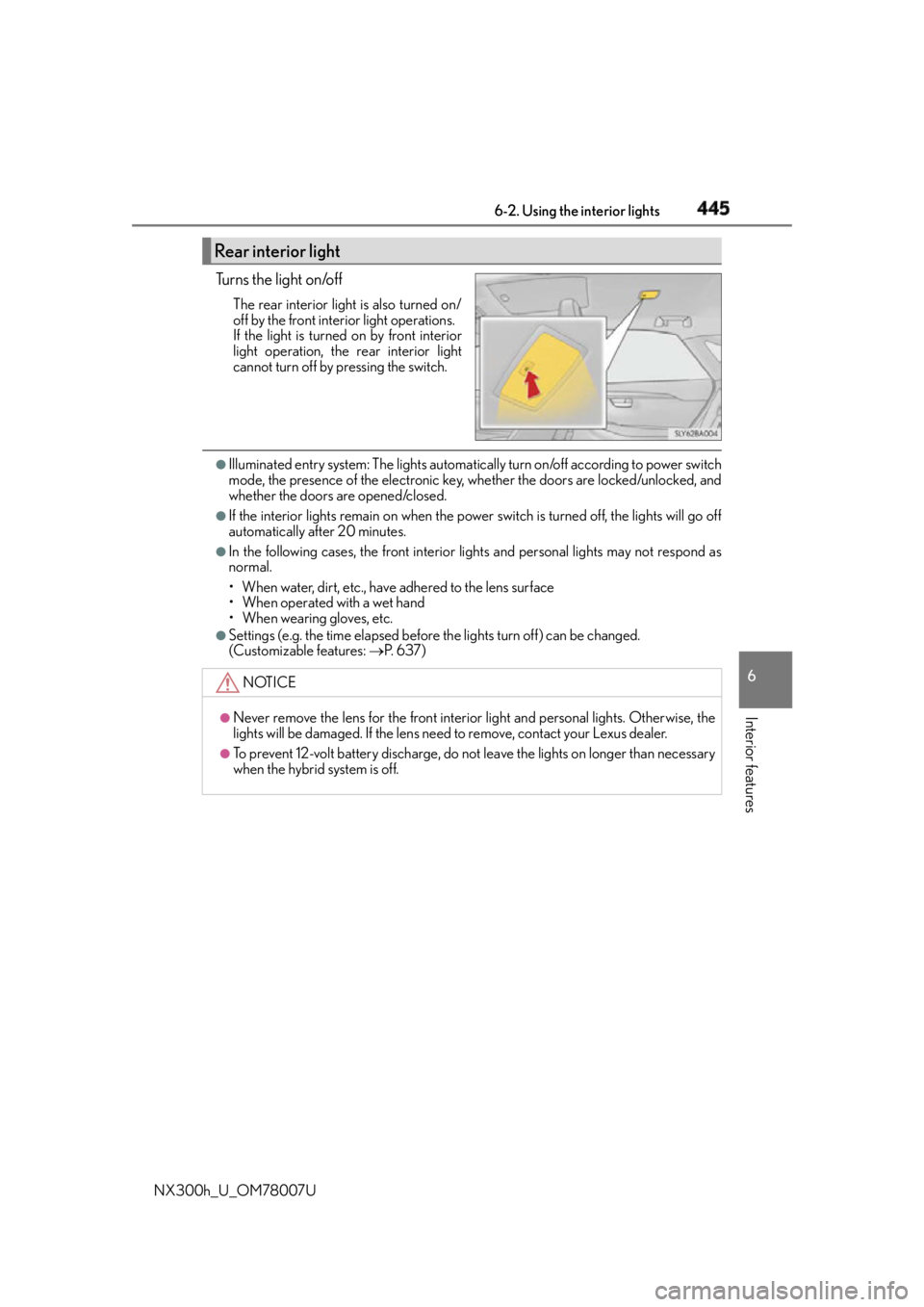
NX300h_U_OM78007U Tu r n s t h e l i g h t o n /o f f The rear interior light is also turned on/
off by the front interior light operations.
If the light is turned on by front interior
light operation, the rear interior light
cannot turn off by pressing the switch. ●
Illuminated entry system: The lights automatical ly turn on/off according to power switch
mode, the presence of the electronic key, whether the doors are locked/unlocked, and
whether the doors are opened/closed. ●
If the interior lights remain on when the power switch is turned off, the lights will go off
automatically after 20 minutes. ●
In the following cases, the front interior li ghts and personal lights may not respond as
normal.
• When water, dirt, etc., have adhered to the lens surface
• When operated with a wet hand
• When wearing gloves, etc. ●
Settings (e.g. the time elapsed before the lights turn off) can be changed.
(Customizable features: P. 6 3 7 )Rear interior light
NOTICE ●
Never remove the lens for the front interior light and personal lig hts. Otherwise, the
lights will be damaged. If the lens need to remove, contact your Lexus dealer.●
To prevent 12-volt battery discharge, do not leave the lights on lo nger than necessary
when the hybrid system is off.
Page 455 of 681
4556-4. Other interior features
6
Interior features
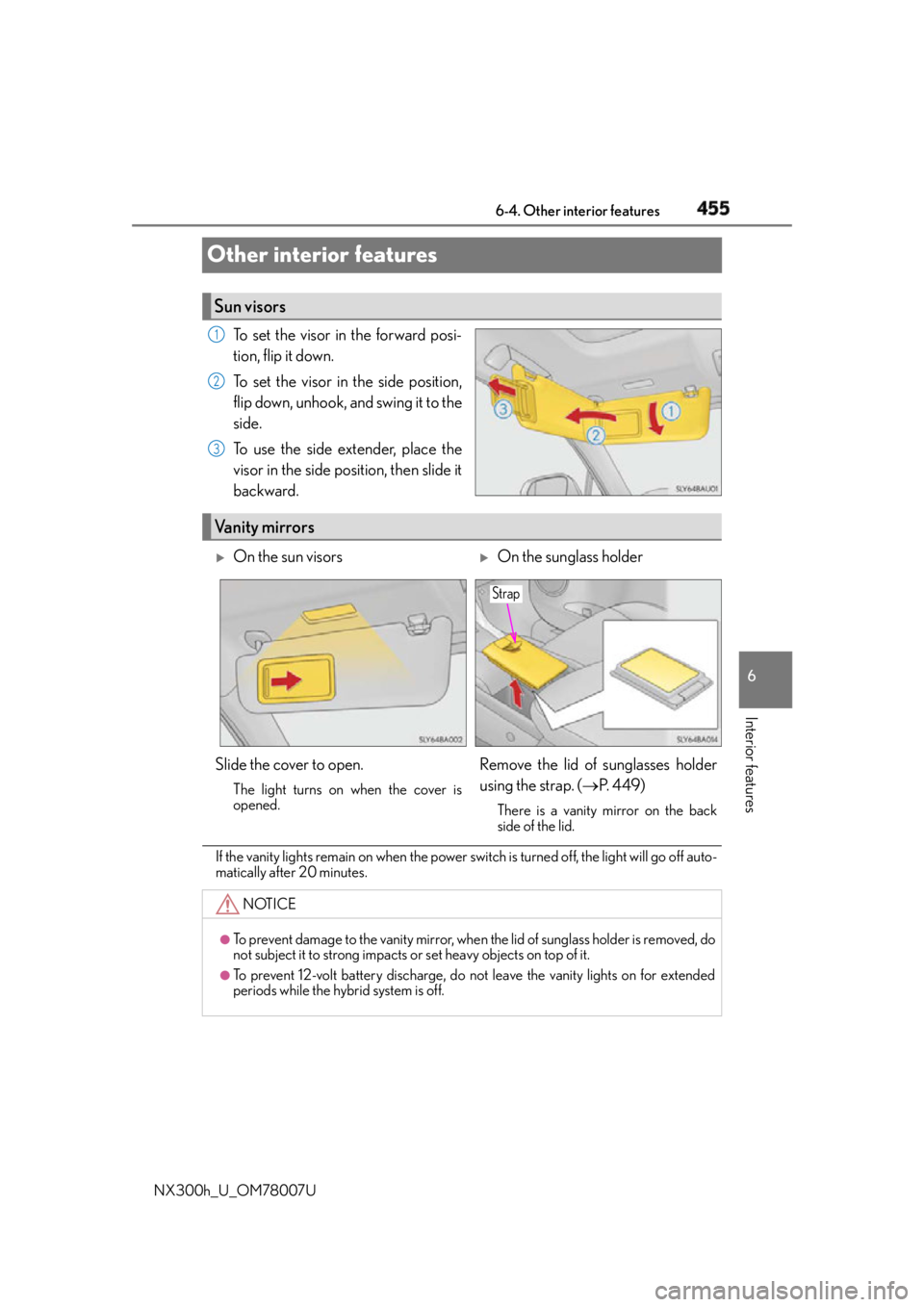
NX300h_U_OM78007UOther interior features To set the visor in the forward posi-
tion, flip it down.
To set the visor in the side position,
flip down, unhook, and swing it to the
side.
To use the side extender, place the
visor in the side position, then slide it
backward.
If the vanity lights remain on when the power swit ch is turned off, the light will go off auto-
matically after 20 minutes.Sun visors 1
2
3
Vanity mirrors
On the sun visors
On the sunglass holder
Slide the cover to open. The light turns on when the cover is
opened.
Remove the lid of sunglasses holder
using the strap. ( P. 4 4 9 )There is a vanity mirror on the back
side of the lid.
NOTICE ●
To prevent damage to the vanity mirror, when the lid of sunglass holder is removed, do
not subject it to strong impacts or set heavy objects on top of it.●
To prevent 12-volt battery discharge, do not leave the vanity lights on for extended
periods while the hybrid system is off. Strap
Page 457 of 681
4576-4. Other interior features
6
Interior features
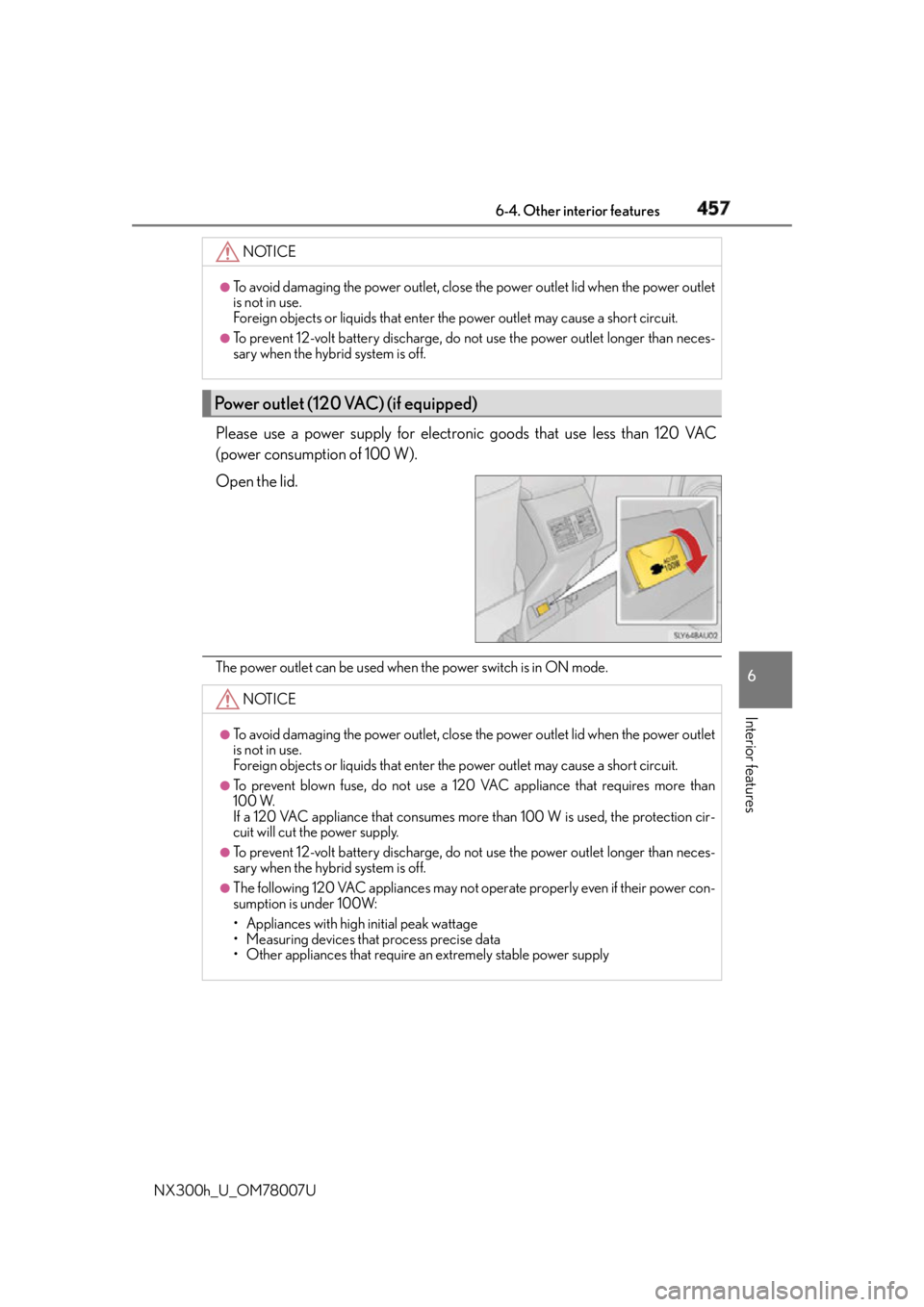
NX300h_U_OM78007U Please use a power supply for electronic goods that use less than 120 VAC
(power consumption of 100 W).
Open the lid.
The power outlet can be used when the power switch is in ON mode.NOTICE ●
To avoid damaging the power outlet, close the power outlet lid when the power outlet
is not in use.
Foreign objects or liquids that enter the power outlet may cause a short circuit. ●
To prevent 12-volt battery discharge, do not use the power outlet longer than neces-
sary when the hybrid system is off.
Power outlet (120 VAC) (if equipped)
NOTICE ●
To avoid damaging the power outlet, close the power outlet lid when the power outlet
is not in use.
Foreign objects or liquids that enter the power outlet may cause a short circuit. ●
To prevent blown fuse, do not use a 120 VAC appliance that requires more than
100 W.
If a 120 VAC appliance that consumes more than 100 W is used, the protection cir-
cuit will cut the power supply. ●
To prevent 12-volt battery discharge, do not use the power outlet longer than neces-
sary when the hybrid system is off. ●
The following 120 VAC appliances may not operate properly even if their power con-
sumption is under 100W:
• Appliances with high initial peak wattage
• Measuring devices that process precise data
• Other appliances that require an extremely stable power supply
Page 464 of 681
464 6-4. Other interior features
NX300h_U_OM78007U WA R N I N G ■
Conditions in which the function may not operate correctly
In the following conditions, it may not operate correctly ●
The portable device is fully charged ●
There is foreign matter between the charge area and portable device ●
The temperature of the portable device gets higher from charging ●
The charging surface of the portable device is facing up ●
The placement of the portable device is out of alignment with the charge area●
Near a TV tower, electric power plant, gas st ation, radio station, large display, airport
or other facility that generates strong radio waves or electrical noise ●
When the electronic key is in contact with , or is covered by the following metallic
objects
• Cards to which aluminum foil is attached
• Cigarette boxes that have aluminum foil inside
• Metallic wallets or bags
•Coins
•Hand warmers made of metal
• Media such as CDs and DVDs ●
When other wireless keys (that emit radio waves) are being used nearby
In addition, excluding the above-mentioned, when the charger does not perform nor-
mally or the operation display lamp is flashi ng continuously, it is considered that the
wireless charger is malfunctioning. Contact your Lexus dealer. ■
To prevent failure or damage to data ●
Do not bring magnetic cards, such as credit cards, or magnetic recording media, etc.,
close to the charger while charging, otherw ise, data may disapp ear under the influ-
ence of magnetism. Also, do not bring pr ecision instruments such as wrist watches,
etc., close to the charger, as such objects may break. ●
Do not leave portable devices in the cab in. The temperature inside the cabin may
become high, when under the sun, and cause damage to the device. ■
To prevent 12-volt battery discharge
When the hybrid system is stopped, do not use the wireless charger for a long time.
Page 467 of 681
4676-4. Other interior features
6
Interior features
NX300h_U_OM78007UGarage door opener
The HomeLink ®
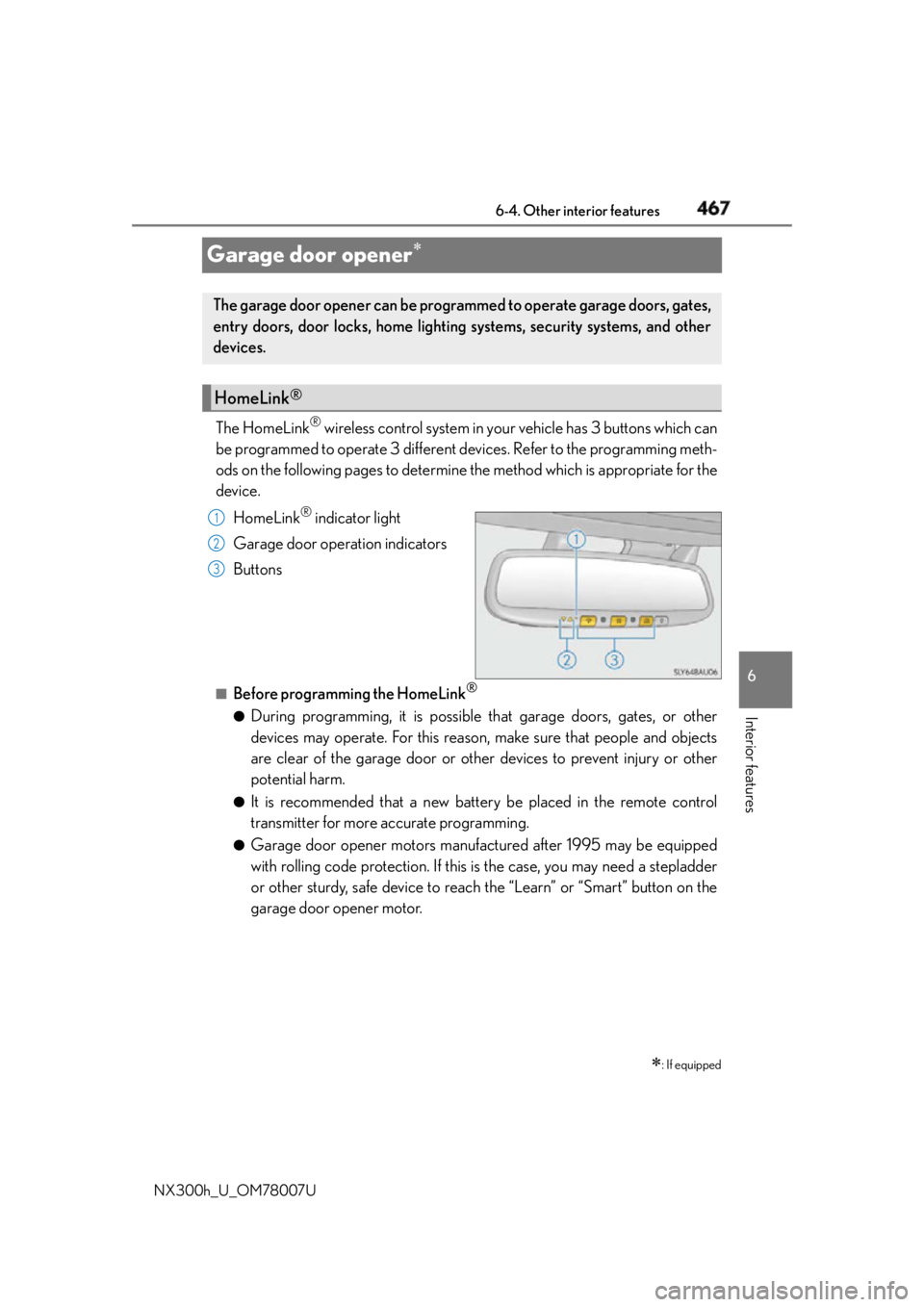
wireless control system in your vehicle has 3 buttons which can
be programmed to operate 3 different devices. Refer to the programming meth-
ods on the following pages to determine the method which is appropriate for the
device.
HomeLink ®
indicator light
Garage door operation indicators
Buttons
■
Before programming the HomeLink ®
●
During programming, it is possible th at garage doors, gates, or other
devices may operate. For this reason, make sure that people and objects
are clear of the garage door or other devices to prevent injury or other
potential harm. ●
It is recommended that a new battery be placed in the remote control
transmitter for more accurate programming. ●
Garage door opener motors manufactured after 1995 may be equipped
with rolling code protection. If this is the case, you may need a stepladder
or other sturdy, safe device to reach the “Learn” or “Smart” button on the
garage door opener motor.
: If equippedThe garage door opener can be programmed to operate garage doors, gates,
entry doors, door locks, home lighting systems, security systems, and other
devices.
HomeLink ®
1
2
3
Page 472 of 681

472 6-4. Other interior features
NX300h_U_OM78007U ■
Codes stored in the HomeLink ®
memory●
The registered codes are not erased even if the battery cabl e is disconnected.●
If learning failed when registerin g a different code to a HomeLink ®
button that already
has a code registered to it, the already registered code will not be erased. ■
Before programming ●
Install a new battery in the transmitter. ●
The battery side of the transmitter mu st be pointed away from the HomeLink ®
.■
Certification for the garage door opener
For vehicles sold in the U.S.A.
FCC ID: NZLAECHL5
NOTE:
This device complies with part 15 of the FC C Rules. Operation is subject to the following
two conditions: (1) This device may not caus e harmful interference, and (2) this device
must accept any interference received, incl uding interference that may cause undesired
operation.
FCC WARNING:
Changes or modifications not expressly approved by the party responsible for compli-
ance could void the user’s authority to operate the equipment.
For vehicles sold in Canada
NOTE:
This device complies with Industry Canada licence-exempt RSS standard(s).
Operation is subject to the following two co nditions: (1) this device may not cause inter-
ference, and (2) this device must accept any interference, including interference that
may cause undesired operation of the device.
REMARQUE:
Le présent appareil est conforme aux CNR d’Industrie Canada applicables aux appar-
eils radio exempts de licence. L’exploitation est autorisée aux deux conditions suivantes:
(1) l’appareil ne doit pas produire de brou illage, et (2) l’utilisateur de l’appareil doit
accepter tout brouillage radioé lectrique subi, même si le brouillage est susceptible d’en
compromettre le fonctionnement. ■
When support is necessary
Visit on the web at www.homelink.com
or call 1-800-355-3515.
WA R N I N G ■
When programming a garage door or other remote control device
The garage door or other device may operat e, so ensure people and objects are out of
danger to prevent potential harm. ■
Conforming to federal safety standards
Do not use the HomeLink ®
compatible transceiver with any garage door opener or
device that lacks safety stop and reverse fe atures as required by federal safety stan-
dards.
This includes any garage door that canno t detect an interfer ing object. A door or
device without these features increases the risk of death or serious injury. ■
When operating or programming HomeLink ®
Never allow a child to operate or play with the HomeLink ®
buttons.
Page 475 of 681
4756-4. Other interior features
6
Interior features
NX300h_U_OM78007U ■
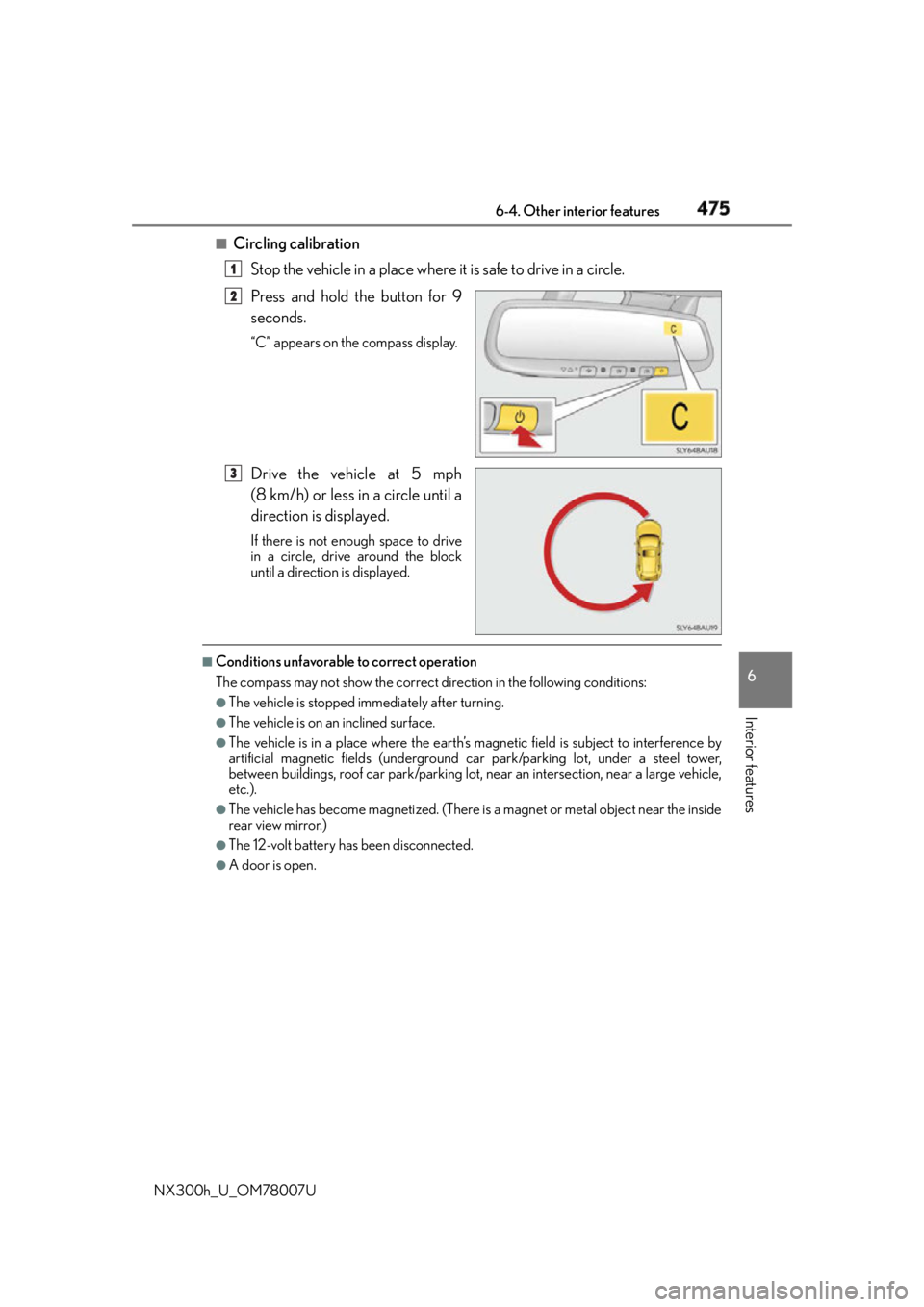
Circling calibration
Stop the vehicle in a place where it is safe to drive in a circle.
Press and hold the button for 9
seconds. “C” appears on the compass display.
Drive the vehicle at 5 mph
(8 km/h) or less in a circle until a
direction is displayed. If there is not enough space to drive
in a circle, drive around the block
until a direction is displayed.■
Conditions unfavorable to correct operation
The compass may not show the correct direction in the following conditions: ●
The vehicle is stopped immediately after turning. ●
The vehicle is on an inclined surface. ●
The vehicle is in a place where the earth’s ma gnetic field is subjec t to interference by
artificial magnetic fields (underground car park/parking lot, under a steel tower,
between buildings, roof car park/parking lot, near an intersection, near a large vehicle,
etc.). ●
The vehicle has become magnetized. (There is a magnet or metal object near the inside
rear view mirror.) ●
The 12-volt battery has been disconnected. ●
A door is open. 1
2
3
Page 483 of 681

483
7Maintenance and care
NX300h_U_OM78007U 7-1. Maintenance and care
Cleaning and protecting
the vehicle exterior.................484
Cleaning and protecting
the vehicle interior ................. 488
7-2. Maintenance
Maintenance
requirements.............................. 491
General maintena nce .............. 494
Emission inspection and
maintenance (I/M)
programs .....................................497
7-3. Do-it-yourself maintenance
Do-it-yourself service
precautions ................................ 498
Hood .............................................. 500
Positioning a floor jack .............. 501
Engine compartment ...............502
12-volt battery............................... 512
Tires ................................................... 516
Tire inflation pressure ............... 525
Wheels ........................................... 528
Air conditioning filter ...............530
Electronic key battery .............. 532
Checking and replacing
fuses ..............................................534
Light bulbs.....................................538
Page 485 of 681

4857-1. Maintenance and care
7
Maintenance and care
NX300h_U_OM78007U ■
Note for a smart access system with push-button start ●
If the door handle becomes wet while the el ectronic key is within the effective range,
the door may lock and unlock repeatedly. Place the key in a position 6 ft. (2 m) or more
separate from the vehicle while the vehicle is being washed. (Take care to ensure that
the key is not stolen.) ●
If the electronic key is insi de the vehicle and a door handle becomes wet during a car
wash, a buzzer will sound outside the vehicle. To turn off the alarm, lock all the doors. ●
Set the electronic key to battery-saving mo de to disable the smart access system with
push-button start. ( P. 1 4 1 )■
Aluminum wheels ●
Remove any dirt immediately by using a neutral detergent. Do not use hard brushes or
abrasive cleaners. Do not use strong or harsh chemical cleaners.
Use the same mild detergent and wax as used on the paint. ●
Do not use detergent on the wheels when they are hot, for example after driving for
long distance in the hot weather. ●
Wash detergent from the wheels immediately after use. ■
Bumpers
Do not scrub with abrasive cleaners. ■
Front side windows water-repellent coatin g (vehicles with water-repellent coating)●
The following precautions can extend the effectiveness of the water-repellent coating.
• Remove any dirt, etc. from the front side windows regularly.
• Do not allow dirt and dust to accumulate on the windows for a long period.
Clean the windows with a soft, da mp cloth as soon as possible.
• Do not use wax or glass cleaners that co ntain abrasives when cleaning the windows.
• Do not use any metallic objects to remove condensation build up.●
When the water-repellent performance has become insufficient, the coating can be
repaired. Contact your Lexus dealer.