instrument panel LEXUS NX300h 2015 Owners Manual
[x] Cancel search | Manufacturer: LEXUS, Model Year: 2015, Model line: NX300h, Model: LEXUS NX300h 2015Pages: 681, PDF Size: 9.14 MB
Page 18 of 681
18 Pictorial index
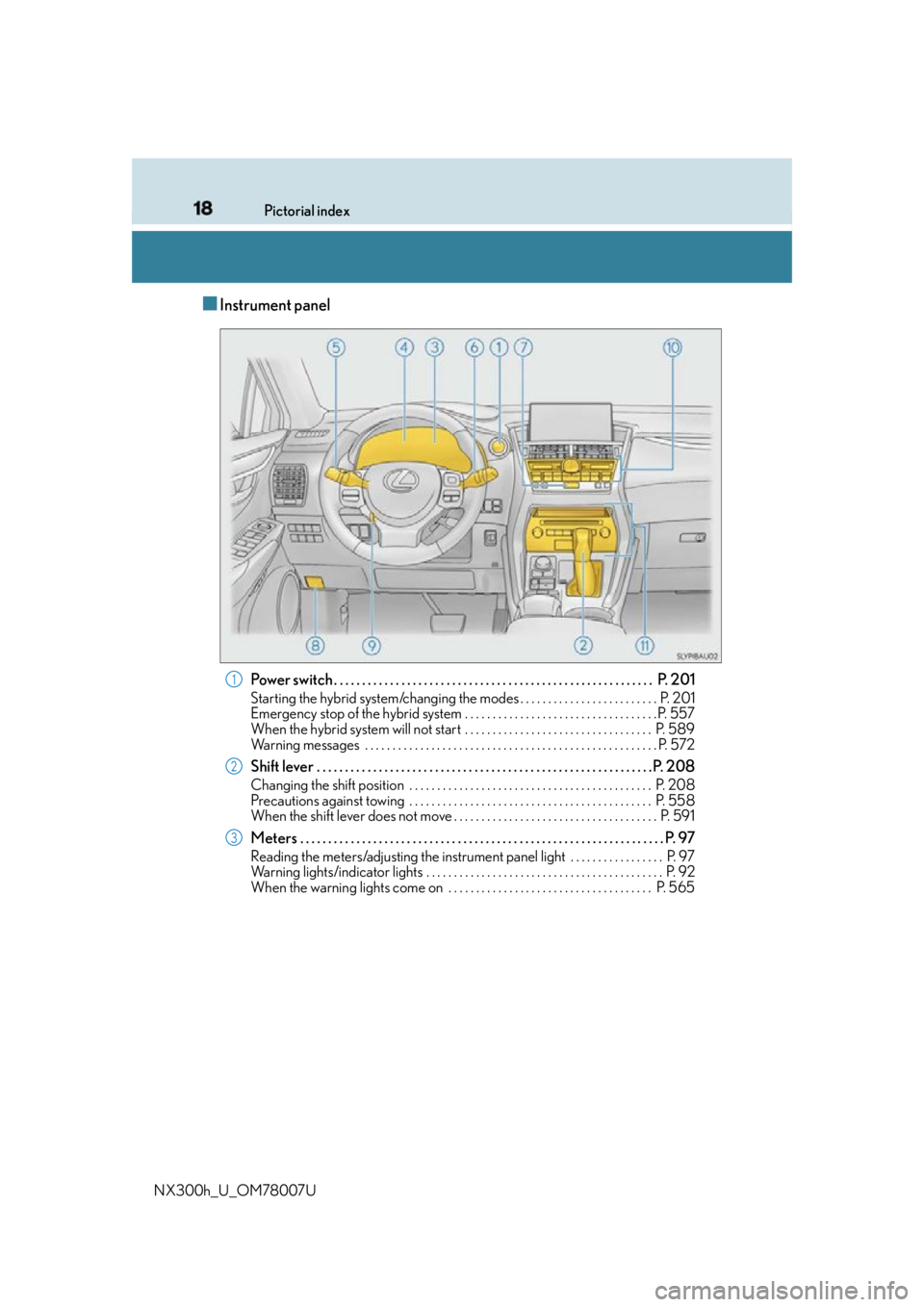
NX300h_U_OM78007U ■ Instrument panel
Power switch . . . . . . . . . . . . . . . . . . . . . . . . . . . . . . . . . . . . . . . . . . . . . . . . . . . . . . . . . P . 201Starting the hybrid system/changing the modes . . . . . . . . . . . . . . . . . . . . . . . . . P. 201
Emergency stop of the hybrid system . . . . . . . . . . . . . . . . . . . . . . . . . . . . . . . . . . . P. 557
When the hybrid system will not start . . . . . . . . . . . . . . . . . . . . . . . . . . . . . . . . . . P. 589
Warning messages . . . . . . . . . . . . . . . . . . . . . . . . . . . . . . . . . . . . . . . . . . . . . . . . . . . . . P. 57 2
Shift lever . . . . . . . . . . . . . . . . . . . . . . . . . . . . . . . . . . . . . . . . . . . . . . . . . . . . . . . . . . . . P. 208Changing the shift position . . . . . . . . . . . . . . . . . . . . . . . . . . . . . . . . . . . . . . . . . . . . P. 208
Precautions against towing . . . . . . . . . . . . . . . . . . . . . . . . . . . . . . . . . . . . . . . . . . . . P. 558
When the shift lever does not move . . . . . . . . . . . . . . . . . . . . . . . . . . . . . . . . . . . . . P. 591
Meters . . . . . . . . . . . . . . . . . . . . . . . . . . . . . . . . . . . . . . . . . . . . . . . . . . . . . . . . . . . . . . . . . P. 97 Reading the meters/adjusting the instrument pane l light . . . . . . . . . . . . . . . . . P. 97
Warning lights/indicator lights . . . . . . . . . . . . . . . . . . . . . . . . . . . . . . . . . . . . . . . . . . . P. 92
When the warning lights come on . . . . . . . . . . . . . . . . . . . . . . . . . . . . . . . . . . . . . P. 565 1
2
3
Page 20 of 681
20 Pictorial index
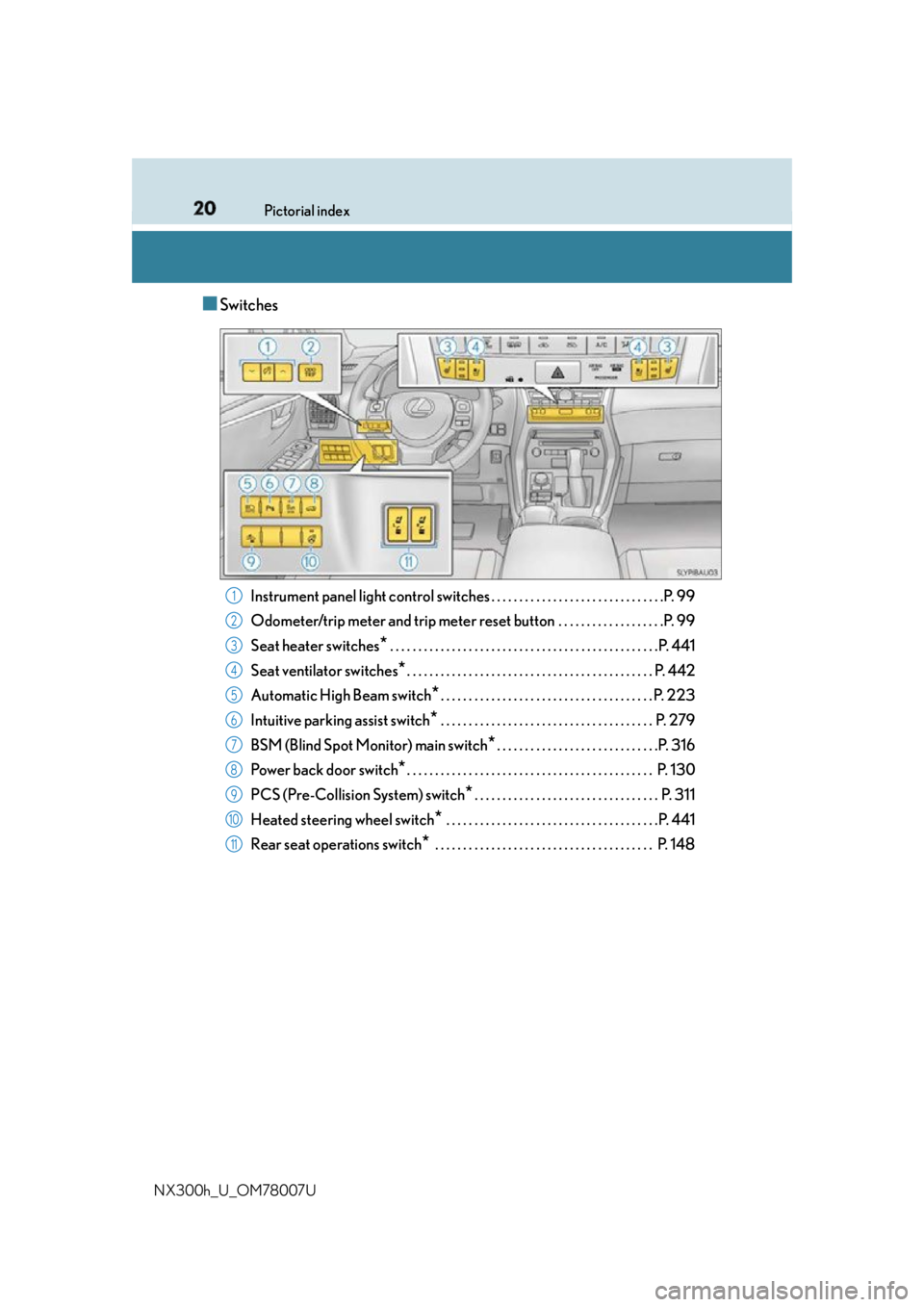
NX300h_U_OM78007U ■ Switches
Instrument panel light control swit ches . . . . . . . . . . . . . . . . . . . . . . . . . . . . . . .P. 99
Odometer/trip meter and trip meter reset button . . . . . . . . . . . . . . . . . . .P. 99
Seat heater switches
* . . . . . . . . . . . . . . . . . . . . . . . . . . . . . . . . . . . . . . . . . . . . . . . .P. 441
Seat ventilator switches
* . . . . . . . . . . . . . . . . . . . . . . . . . . . . . . . . . . . . . . . . . . . . P. 442
Automatic High Beam switch
* . . . . . . . . . . . . . . . . . . . . . . . . . . . . . . . . . . . . . . P. 223
Intuitive parking assist switch
* . . . . . . . . . . . . . . . . . . . . . . . . . . . . . . . . . . . . . . P. 279
BSM (Blind Spot Monitor) main switch
* . . . . . . . . . . . . . . . . . . . . . . . . . . . . .P. 316
Power back door switch
* . . . . . . . . . . . . . . . . . . . . . . . . . . . . . . . . . . . . . . . . . . . . P. 130
PCS (Pre-Collision System) switch
* . . . . . . . . . . . . . . . . . . . . . . . . . . . . . . . . . P. 311
Heated steering wheel switch
* . . . . . . . . . . . . . . . . . . . . . . . . . . . . . . . . . . . . . .P. 441
Rear seat operations switch
* . . . . . . . . . . . . . . . . . . . . . . . . . . . . . . . . . . . . . . . P. 1481
2
3
4
5
6
7
8
9
10
11
Page 43 of 681

431-1. For safe use
1
For safety and security
NX300h_U_OM78007U WA R N I N G ■
SRS airbag precautions
Observe the following precautions regarding the SRS airbags.
Failure to do so may cause death or serious injury. ●
The driver and all passengers in the vehicle must wear their seat belts properly.
The SRS airbags are supplemental device s to be used with the seat belts.●
The SRS driver airbag deploys with consider able force, and can cause death or seri-
ous injury especially if the driver is very close to the airbag. The National Highway
Traffic Safety Administration (NHTSA) advises:
Since the risk zone for the driver’s airbag is the first 2 - 3 in. (50 - 75 mm) of inflation,
placing yourself 10 in. (250 mm) from your driver airbag provides you with a clear
margin of safety. This distance is measured from the center of the steering wheel to
your breastbone. If you sit less than 10 in. (250 mm) away now, you can change your
driving position in several ways:
• Move your seat to the rear as far as you can while still reaching the pedals com-
fortably.
• Slightly recline the back of the seat. Al though vehicle designs vary, many drivers
can achieve the 10 in. (250 mm) distance, even with the driver seat all the way for-
ward, simply by reclining the back of th e seat somewhat. If reclining the back of
your seat makes it hard to see the road, raise yourself by using a firm, non-slippery
cushion, or raise the seat if your vehicle has that feature.
• If your steering wheel is ad justable, tilt it downward. Th is points the airbag toward
your chest instead of your head and neck.
The seat should be adjusted as recommen ded by NHTSA above, while still maintain-
ing control of the foot pedals, steering whee l, and your view of the instrument panel
controls.
Page 47 of 681

471-1. For safe use
1
For safety and security
NX300h_U_OM78007U WA R N I N G ■
SRS airbag precautions ●
If breathing becomes difficult after the SRS airbags have deployed, open a door or
window to allow fresh air in, or leave the vehicl e if it is safe to do so. Wash off any resi-
due as soon as possible to prevent skin irritation. ●
If the areas where the SRS airbags are stored, such as the steering wheel pad and
front and rear pillar garnishes, are damaged or cracked, have them replaced by your
Lexus dealer. ●
Do not place anything, such as a cushion, on the front passenger’s seat. Doing so will
disperse the passenger’s weight, which prevents the sensor from detecting the pas-
senger’s weight properly. As a result, th e SRS front airbags for the front passenger
may not deploy in the event of a collision. ■
Modification and disposal of SRS airbag system components
Do not dispose of your vehicle or perform any of the following modifications without
consulting your Lexus dealer. The SRS airb ags may malfunction or deploy (inflate)
accidentally, causing de ath or serious injury.●
Installation, removal, disassembl y and repair of the SRS airbags●
Repairs, modifications, removal or replac ement of the steering wheel, instrument
panel, dashboard, seats or seat upholstery, fr ont, side and rear pillars or roof side rails●
Repairs or modifications of the front fend er, front bumper, or side of the occupant
compartment ●
Installation of a grille guar d (bull bars, kangaroo bar, etc.), snow plows, winches or
roof luggage carrier ●
Modifications to the vehicle’s suspension system ●
Installation of electronic devices such as mobile two-way radios and CD players●
Modifications to your vehicle for a person with a physical disability
Page 51 of 681
511-1. For safe use
1
For safety and security
NX300h_U_OM78007U ■
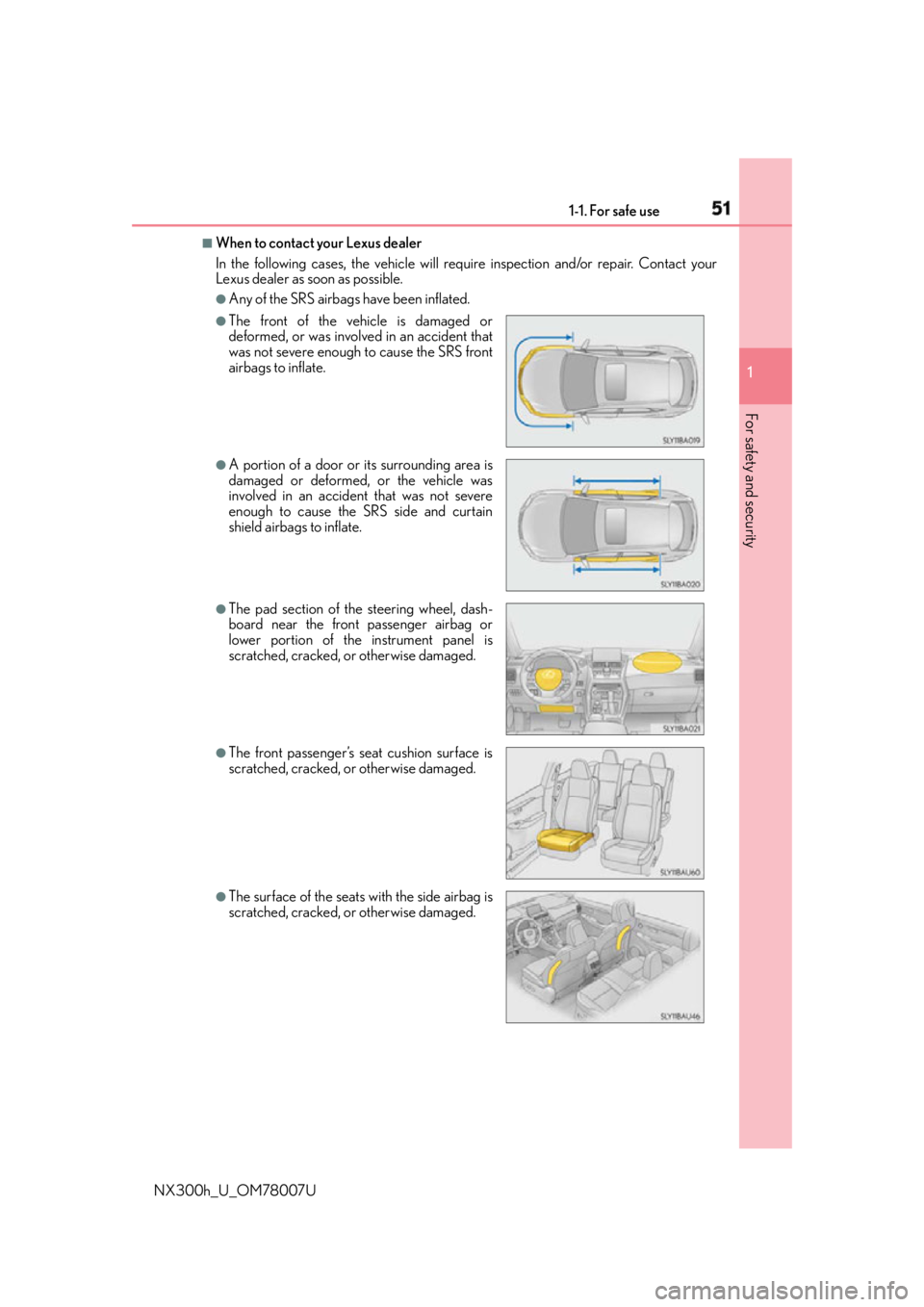
When to contact your Lexus dealer
In the following cases, the vehicle will re quire inspection and/or repair. Contact your
Lexus dealer as soon as possible. ●
Any of the SRS airbags have been inflated.●
The front of the vehicle is damaged or
deformed, or was involv ed in an accident that
was not severe enough to cause the SRS front
airbags to inflate. ●
A portion of a door or its surrounding area is
damaged or deformed, or the vehicle was
involved in an accident that was not severe
enough to cause the SRS side and curtain
shield airbags to inflate. ●
The pad section of the steering wheel, dash-
board near the front passenger airbag or
lower portion of the instrument panel is
scratched, cracked, or otherwise damaged. ●
The front passenger’s seat cushion surface is
scratched, cracked, or otherwise damaged.
●
The surface of the seats with the side airbag is
scratched, cracked, or otherwise damaged.
Page 94 of 681
94 2. Instrument cluster
NX300h_U_OM78007U * 1
: These lights turn on when the power switch is turned to ON mode to indicate that a
system check is being performed. They will turn off after the hybrid system is on, or
after a few seconds. There may be a malfunctio n in a system if the lights do not turn on,
or turn off. Have the vehicle inspected by your Lexus dealer.
* 2
: This light illuminates on the multi-information display.
* 3
: The light flashes to indicate a malfunction.
* 4
: This light illuminates on the center panel.
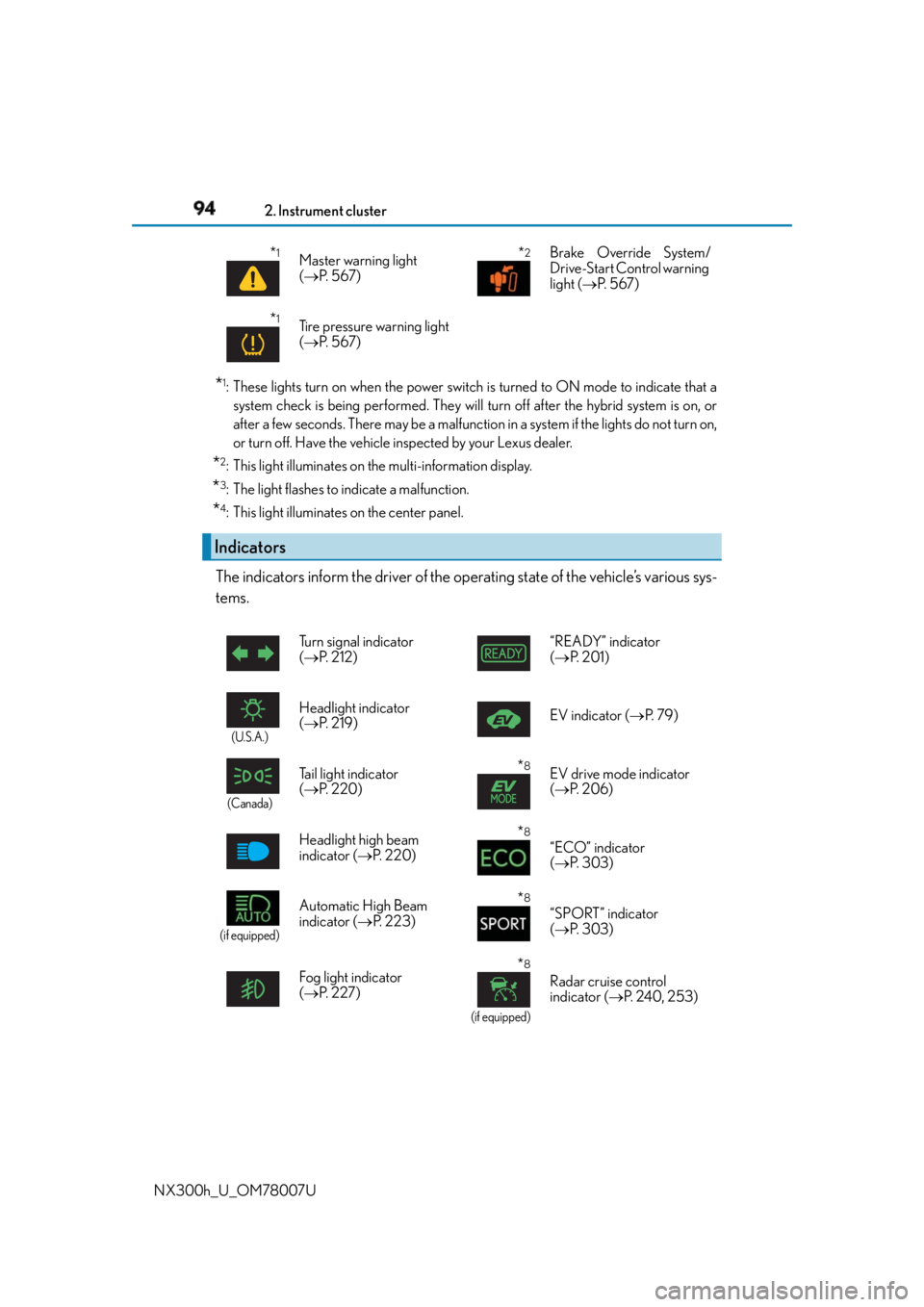
The indicators inform the driver of the op erating state of the vehicle’s various sys-
tems. * 1
Master warning light
( P. 5 6 7 )
* 2
Brake Override System/
Drive-Start Control warning
light ( P. 5 6 7 )
* 1
Tire pressure warning light
( P. 5 6 7 )
Indicators Turn signal indicator
( P. 212) “READY” indicator
( P. 2 0 1 )
(U.S.A.)
Headlight indicator
( P. 2 1 9 ) EV indicator ( P. 7 9 )
(Canada)
Tail light indicator
( P. 220) * 8
EV drive mode indicator
( P. 2 0 6 )
Headlight high beam
indicator ( P. 220) * 8
“ECO” indicator
( P. 303)
(if equipped)
Automatic High Beam
indicator ( P. 223) * 8
“SPORT” indicator
( P. 303)
Fog light indicator
( P. 2 2 7 ) * 8
(if equipped)Radar cruise control
indicator ( P. 2 4 0 , 2 5 3 )
Page 96 of 681

96 2. Instrument cluster
NX300h_U_OM78007U * 5
: In order to confirm operation, the BSM outside rear view mirror indicators illuminate
in the following situations:
• When the power switch is turned to ON mode while the BSM main switch is set to
ON.
• When the BSM main switch is set to ON while the power switch is in ON mode.
If the system is functioning correctly, the BSM outside rear view mirror indicators will
turn off after a few seconds.
If the BSM outside rear view mirror indica tors do not illuminate or do not turn off,
there may be a malfunction in the system.
If this occurs, have the vehicle inspected by your Lexus dealer.
* 6
: This light illuminates on the outside rear view mirrors.
* 7
: This light illuminates on the center panel.
* 8
: This light illuminates on the multi-information display.
WA R N I N G ■
If a safety system warning light does not come on
Should a safety system light such as the ABS and SRS airbag warning light not come on
when you start the hybrid system, this could mean that these systems are not available
to help protect you in an a ccident, which could result in death or serious injury. Have
the vehicle inspected by your Lexus dealer immediately if this occurs.
Page 99 of 681
992. Instrument cluster
2
Instrument cluster
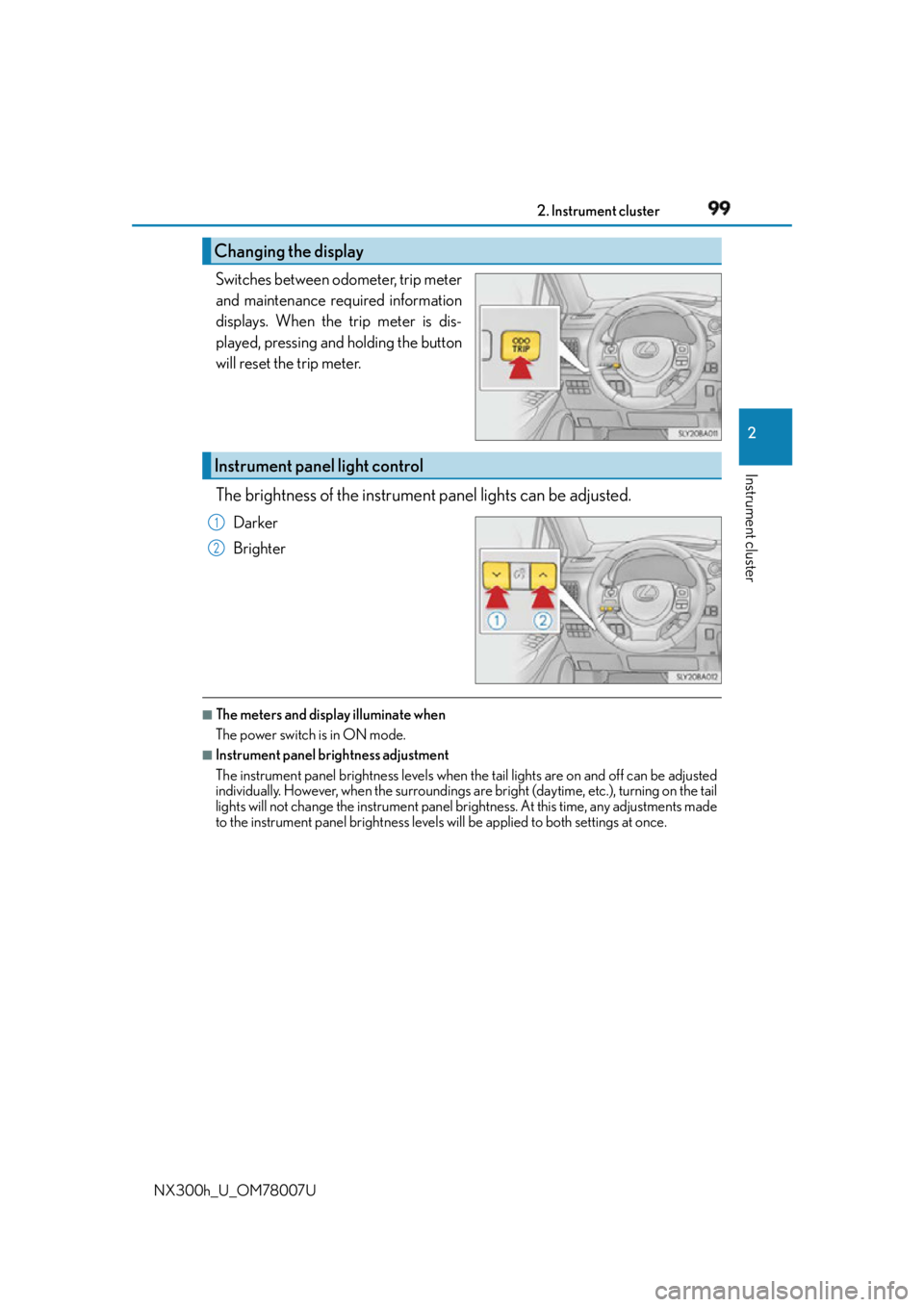
NX300h_U_OM78007U Switches between odometer, trip meter
and maintenance required information
displays. When the trip meter is dis-
played, pressing and holding the button
will reset the trip meter.
The brightness of the instrument panel lights can be adjusted.Darker
Brighter ■
The meters and display illuminate when
The power switch is in ON mode. ■
Instrument panel brightness adjustment
The instrument panel brig htness levels when the tail ligh ts are on and off can be adjusted
individually. However, when the surroundings ar e bright (daytime, etc.), turning on the tail
lights will not change the instru ment panel brightness. At th is time, any adjustments made
to the instrument panel bright ness levels will be applied to both settings at once.Changing the display
Instrument panel light control 1
2
Page 143 of 681

1433-2. Opening, closing and locking the doors
3
Operation of each component
NX300h_U_OM78007U ■
Note for the entry function ●
Even when the electronic key is within the effective range (detection areas), the system
may not operate properly in the following cases:
• The electronic key is too close to the window or outside door handle, near the
ground, or in a high place when the doors are locked or unlocked.
• The electronic key is near the ground or in a high place, or too close to the rear
bumper center when the back door is opened.
• The electronic key is on the instrument panel, luggage room, floor, or in the door
pockets or glove box when the hybrid system is started or power switch modes are
changed. ●
Do not leave the electronic key on top of th e instrument panel or near the door pockets
when exiting the vehicle. Depending on the radio wave reception conditions, it may be
detected by the antenna outs ide the cabin and the door will become lockable from the
outside, possibly trapping the el ectronic key inside the vehicle.●
As long as the electronic key is within the effective range, the doors may be locked or
unlocked by anyone. ●
Even if the electronic key is not inside the ve hicle, it may be possible to start the hybrid
system if the electronic key is near the window. ●
The doors may unlock if a large amount of wa ter splashes on the door handle, such as in
the rain or in a car wash when the electronic key is within the effective range. (The door
will automatically be locked after approximately 60 seconds if the doors are not
opened and closed.) ●
If the wireless remote control is used to lo ck the doors when the electronic key is near
the vehicle, there is a possibility that the door may not be unlocked by the entry func-
tion. (Use the wireless remote control to unlock the doors.) ●
Touching the door lock sensor while wearin g gloves may delay or prevent lock opera-
tion. Remove the gloves and touch the lock sensor again. ●
When the lock operation is performed using the lock sensor, recognition signals will be
shown up to two consecutive times. After th is, no recognition signals will be given. ●
If the door handle becomes wet while the el ectronic key is within the effective range,
the door may lock and unlock repeatedly. In that case, follow the following correction
procedures to wash the vehicle:
• Place the electronic key in a location 6 ft. (2 m) or more away from the vehicle. (Take
care to ensure that the key is not stolen.)
• Set the electronic key to battery-saving mode to disable the smart access system
with push-button start. ( P. 1 4 2 )●
If the electronic key is insi de the vehicle and a door handle becomes wet during a car
wash, a message may be shown on the mult i-information display and a buzzer will
sound outside the vehicle. To turn off the alarm, lock all the doors. ●
The lock sensor may not work properly if it comes into contact with ice, snow, mud, etc.
Clean the lock sensor and attempt to operate it again.
Page 148 of 681
148 3-3. Adjusting the seats
NX300h_U_OM78007U ■
Before folding down the rear seatbacks
Stow the rear center seat be lt and seat belt buckles. ( P. 3 4 )
Lower the head restraint of the rear seat. ( P. 1 5 8 )■
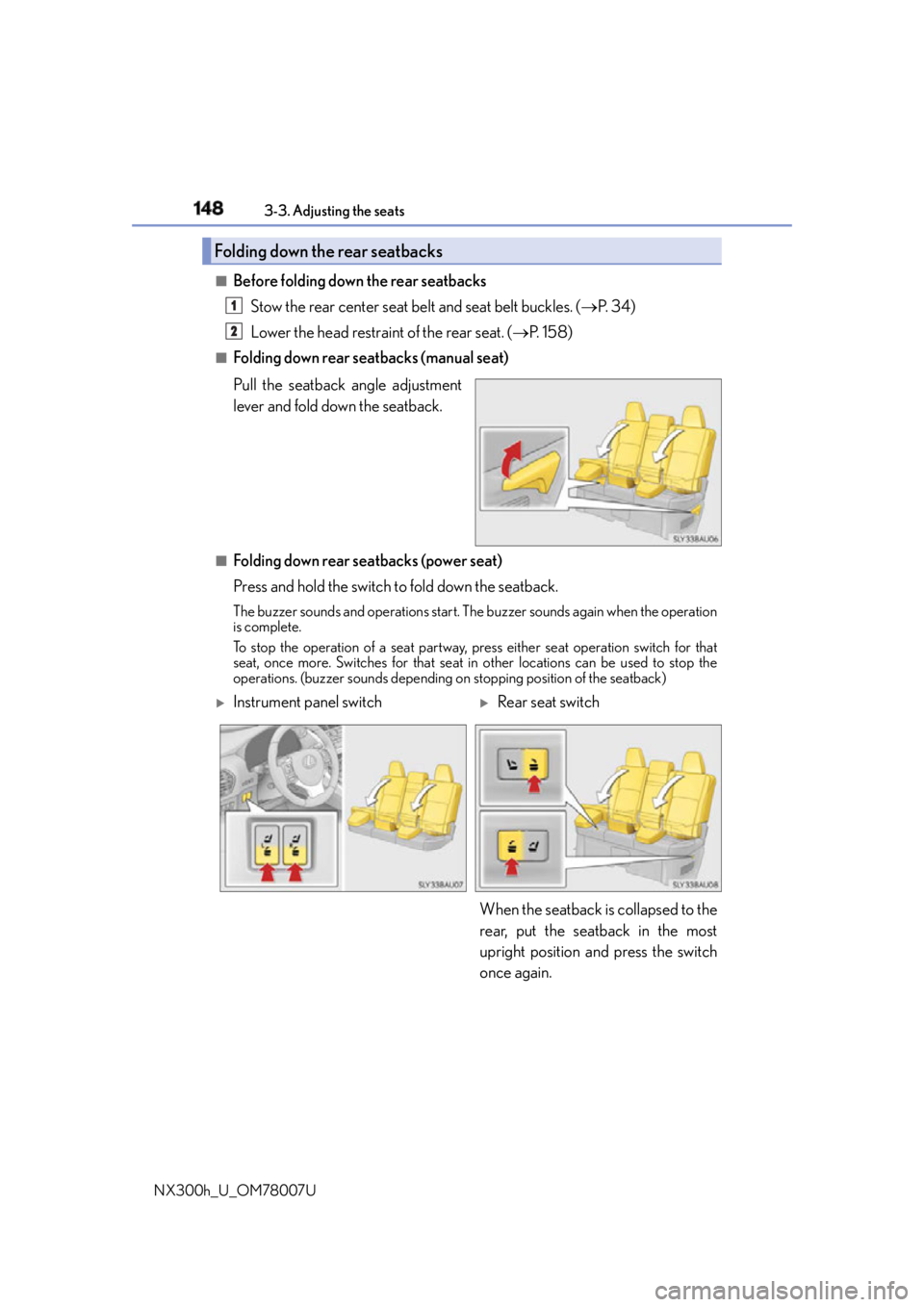
Folding down rear seatbacks (manual seat)
Pull the seatback angle adjustment
lever and fold down the seatback.
■
Folding down rear seatbacks (power seat)
Press and hold the switch to fold down the seatback.The buzzer sounds and operations start. Th e buzzer sounds again when the operation
is complete.
To stop the operation of a se at partway, press either seat operation switch for that
seat, once more. Switches for that seat in other locations can be used to stop the
operations. (buzzer sounds depending on stopping position of the seatback)Folding down the rear seatbacks 1
2
Instrument panel switch
Rear seat switch
When the seatback is collapsed to the
rear, put the seatback in the most
upright position and press the switch
once again.