lock LEXUS NX300H 2016 Owners Manual
[x] Cancel search | Manufacturer: LEXUS, Model Year: 2016, Model line: NX300H, Model: LEXUS NX300H 2016Pages: 680, PDF Size: 10.23 MB
Page 543 of 680
5437-3. Do-it-yourself maintenance
7
Maintenance and care
NX300h_OM_USA_OM78082U
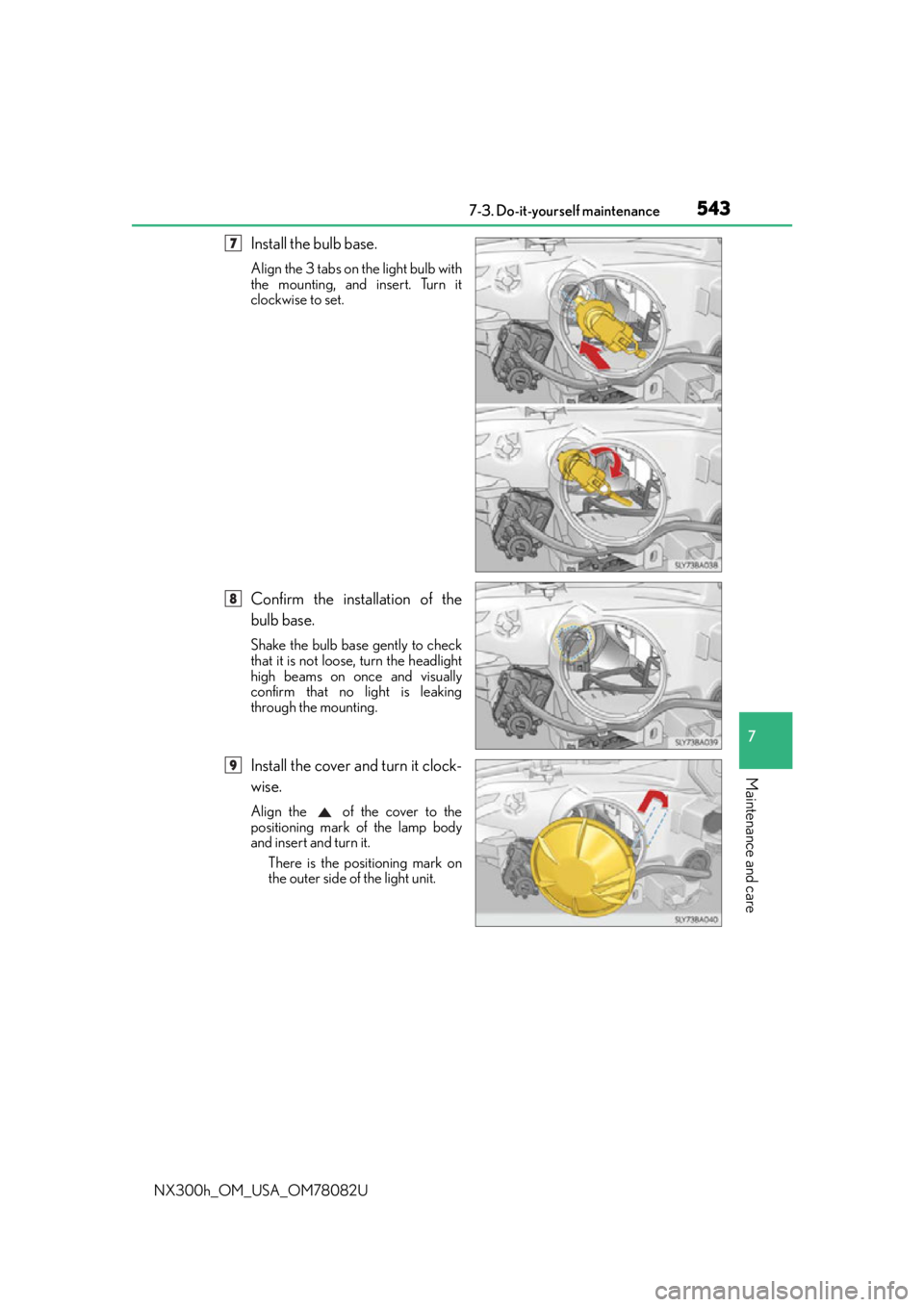
Install the bulb base.
Align the 3 tabs on the light bulb with
the mounting, and insert. Turn it
clockwise to set.
Confirm the installation of the
bulb base.
Shake the bulb base gently to check
that it is not loose, turn the headlight
high beams on once and visually
confirm that no light is leaking
through the mounting.
Install the cover and turn it clock-
wise.
Align the of the cover to the
positioning mark of the lamp body
and insert and turn it. There is the positioning mark on
the outer side of the light unit.
7
8
9
Page 545 of 680
5457-3. Do-it-yourself maintenance
7
Maintenance and care
NX300h_OM_USA_OM78082U
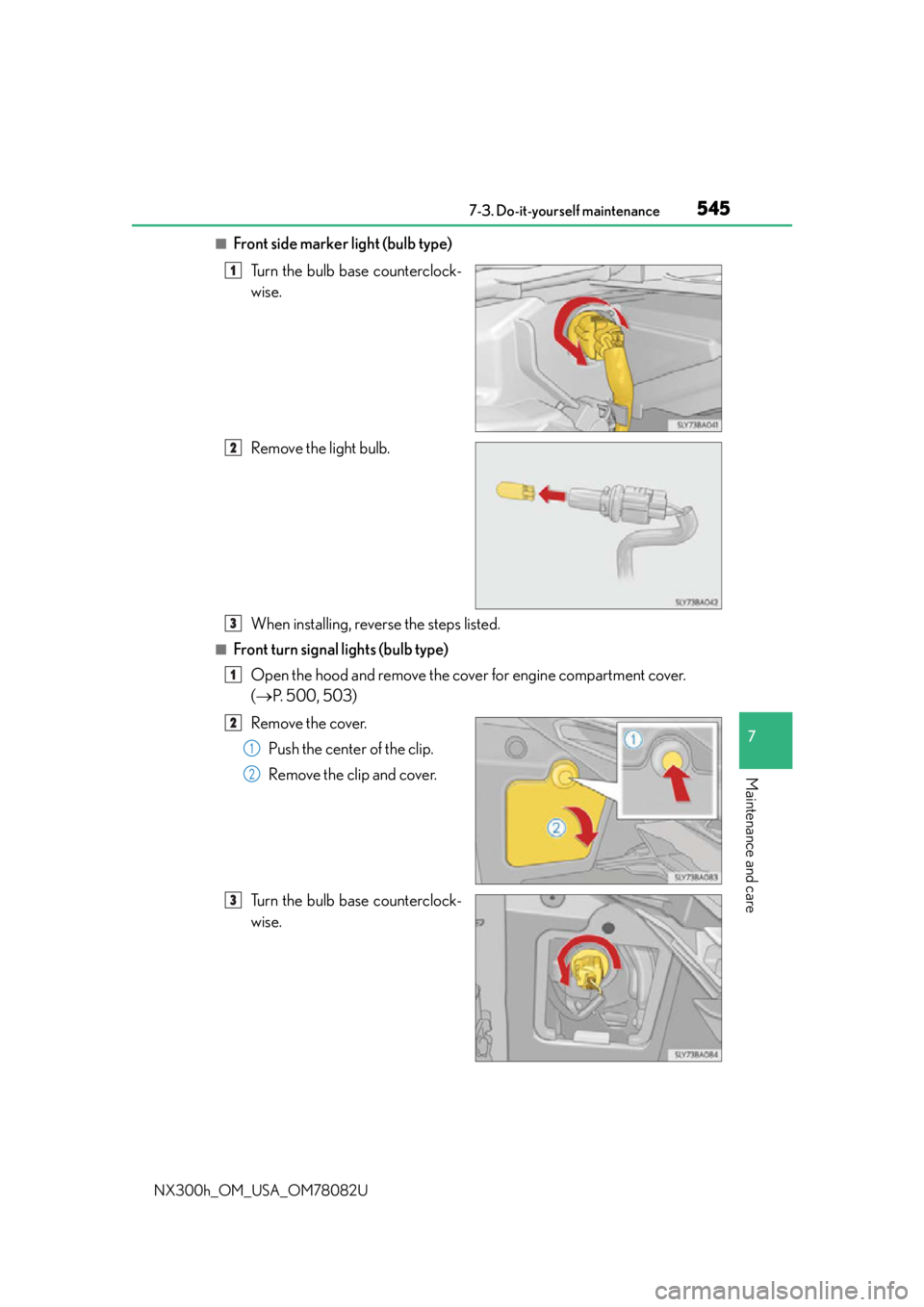
■Front side marker light (bulb type)Turn the bulb base counterclock-
wise.
Remove the light bulb.
When installing, reverse the steps listed.
■Front turn signal lights (bulb type)Open the hood and remove the cover for engine compartment cover.
( P. 500, 503)
Remove the cover. Push the center of the clip.
Remove the clip and cover.
Turn the bulb base counterclock-
wise.
1
2
3
1
2
1
2
3
Page 546 of 680
5467-3. Do-it-yourself maintenance
NX300h_OM_USA_OM78082U
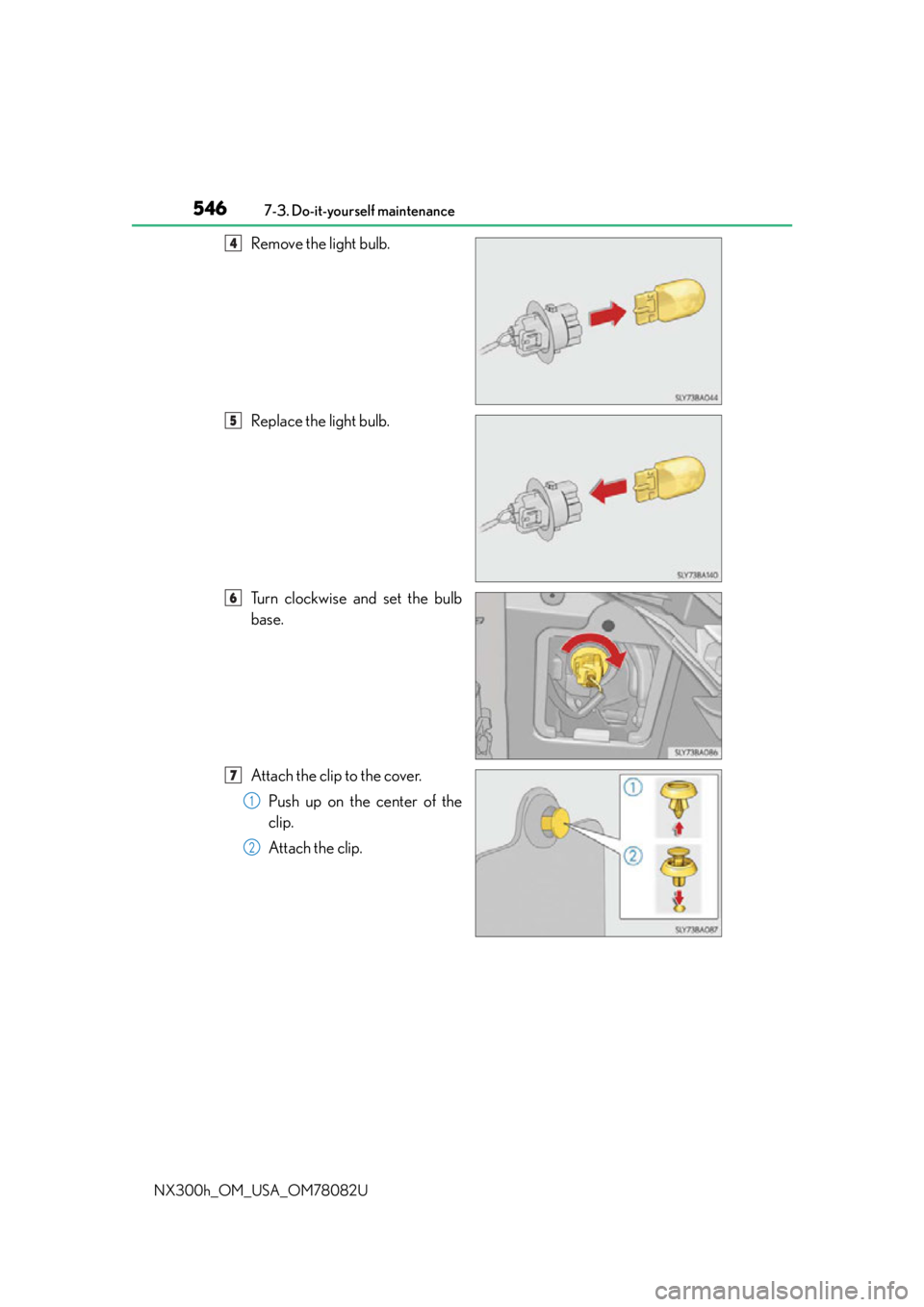
Remove the light bulb.
Replace the light bulb.
Turn clockwise and set the bulb
base.
Attach the clip to the cover. Push up on the center of the
clip.
Attach the clip.4
5
6
7
1
2
Page 548 of 680
5487-3. Do-it-yourself maintenance
NX300h_OM_USA_OM78082U
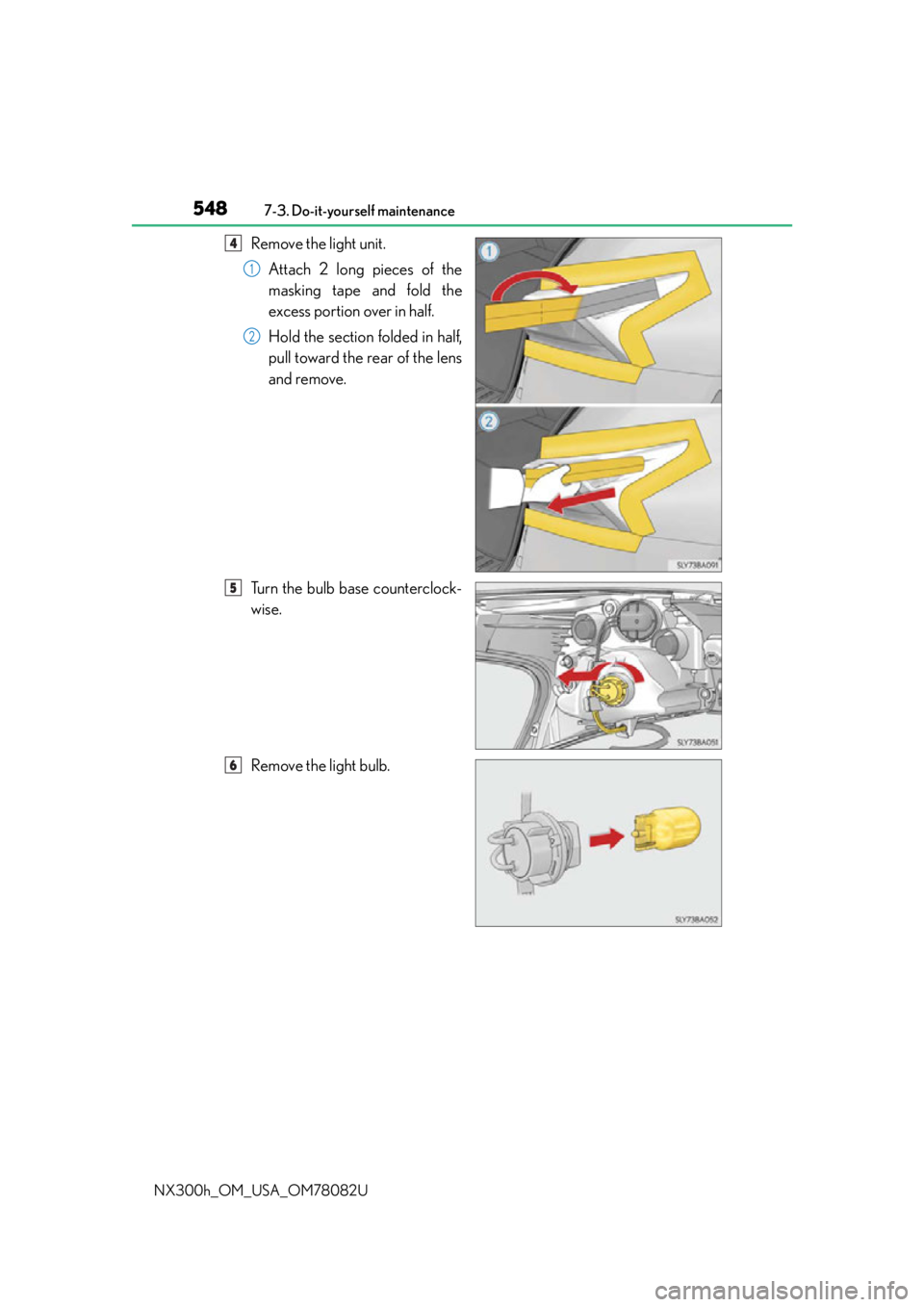
Remove the light unit. Attach 2 long pieces of the
masking tape and fold the
excess portion over in half.
Hold the section folded in half,
pull toward the rear of the lens
and remove.
Turn the bulb base counterclock-
wise.
Remove the light bulb.4
1
2
5
6
Page 549 of 680
5497-3. Do-it-yourself maintenance
7
Maintenance and care
NX300h_OM_USA_OM78082U
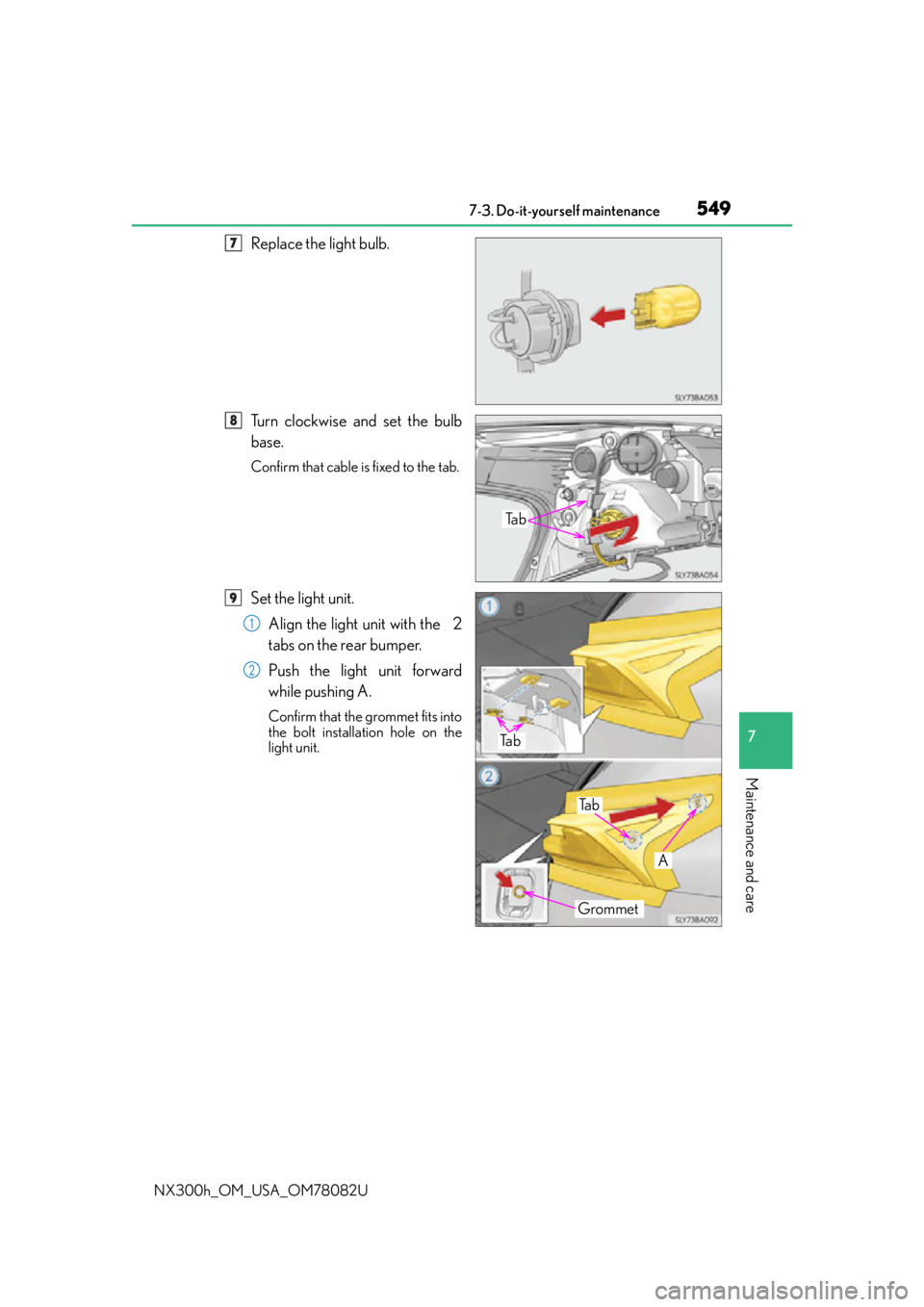
Replace the light bulb.
Turn clockwise and set the bulb
base.
Confirm that cable is fixed to the tab.
Set the light unit.Align the light unit with the 2
tabs on the rear bumper.
Push the light unit forward
while pushing A.
Confirm that the grommet fits into
the bolt installation hole on the
light unit.
37
Ta b
38
Grommet
A
Ta b
Ta b
9
1
2
Page 550 of 680
5507-3. Do-it-yourself maintenance
NX300h_OM_USA_OM78082U
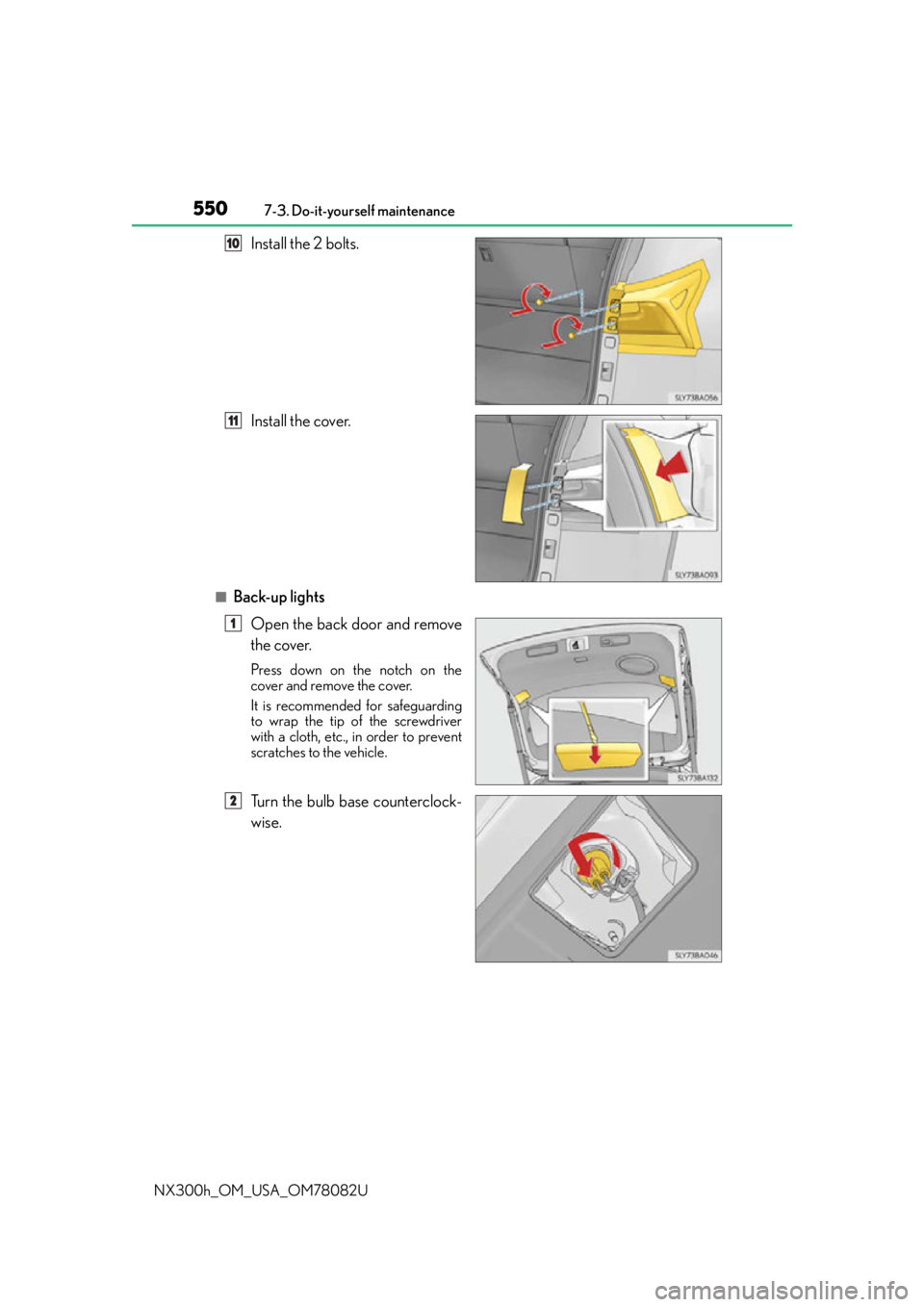
Install the 2 bolts.
Install the cover.
■Back-up lights Open the back door and remove
the cover.
Press down on the notch on the
cover and remove the cover.
It is recommended for safeguarding
to wrap the tip of the screwdriver
with a cloth, etc., in order to prevent
scratches to the vehicle.
Turn the bulb base counterclock-
wise.
10
11
1
2
Page 553 of 680
5537-3. Do-it-yourself maintenance
7
Maintenance and care
NX300h_OM_USA_OM78082U
WA R N I N G
■Replacing light bulbs
●Be sure to stop the hybrid system and turn off the lights. Do not attempt to replace the
bulb immediately after turning off the lights.
The bulbs become very hot and may cause burns.
●Do not touch the glass portion of the light bulb with bare hands. When it is unavoid-
able to hold the glass portion, use and hold with a clean dry cloth to avoid getting
moisture and oils on the bulb.
Also, if the bulb is scratched or dropped, it may blow out or crack.
●Fully install light bulbs and any parts used to secure them. Failure to do so may result
in heat damage, fire, or water entering the headlight unit. This may damage the head-
lights or cause condensation to build up on the lens.
●Do not attempt to repair or disassemble light bulbs, connectors, electric circuits or
component parts.
Doing so may result in death or se rious injury due to electric shock.
■To prevent damage or fire
●Make sure bulbs are fully seated and locked.
●Check the wattage of the bulb before installin g to prevent heat damage.
Page 562 of 680
5628-2. Steps to take in an emergency
NX300h_OM_USA_OM78082U
WA R N I N G
Observe the following precautions.
Failure to do so may result in death or serious injury.
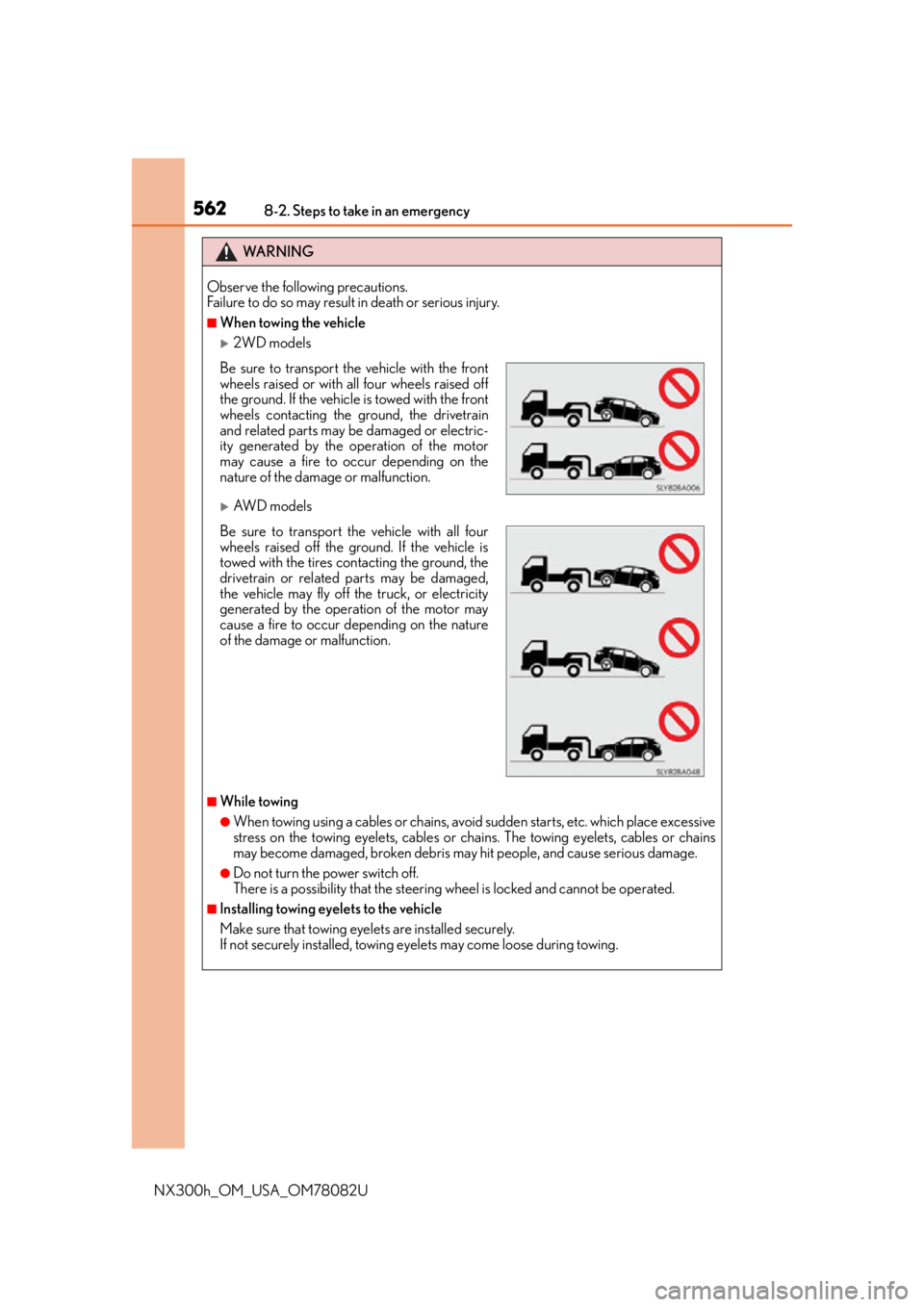
■When towing the vehicle
2WD models
AW D m o d e l s
■While towing
●When towing using a cables or chains, avoid sudden starts, etc. which place excessive
stress on the towing eyelets, cables or chains. The towing eyelets, cables or chains
may become damaged, broken debris may hit people, and cause serious damage.
●Do not turn the power switch off.
There is a possibility that the steering wheel is locked and cannot be operated.
■Installing towing eyelets to the vehicle
Make sure that towing eyelets are installed securely.
If not securely installed, towing eyelets may come loose during towing.
Be sure to transport the vehicle with the front
wheels raised or with all four wheels raised off
the ground. If the vehicle is towed with the front
wheels contacting the ground, the drivetrain
and related parts may be damaged or electric-
ity generated by the operation of the motor
may cause a fire to occur depending on the
nature of the damage or malfunction.
Be sure to transport the vehicle with all four
wheels raised off the ground. If the vehicle is
towed with the tires contacting the ground, the
drivetrain or related parts may be damaged,
the vehicle may fly off the truck, or electricity
generated by the operation of the motor may
cause a fire to occur depending on the nature
of the damage or malfunction.
Page 563 of 680
5638-2. Steps to take in an emergency
8
When trouble arises
NX300h_OM_USA_OM78082U
NOTICE
■To prevent damage to the vehicle when towing using a wheel-lift type truck
●Do not tow the vehicle from the rear when the power switch is off. The steering lock
mechanism is not strong enough to hold the front wheels straight.
●When raising the vehicle, ensure adequate ground clearance for towing at the oppo-
site end of the raised vehicle. Without adequate clearance, the vehicle could be dam-
aged while being towed.
■To prevent body damage when towing with a sling-type truck
Do not tow with a sling-type truck, either from the front or rear.
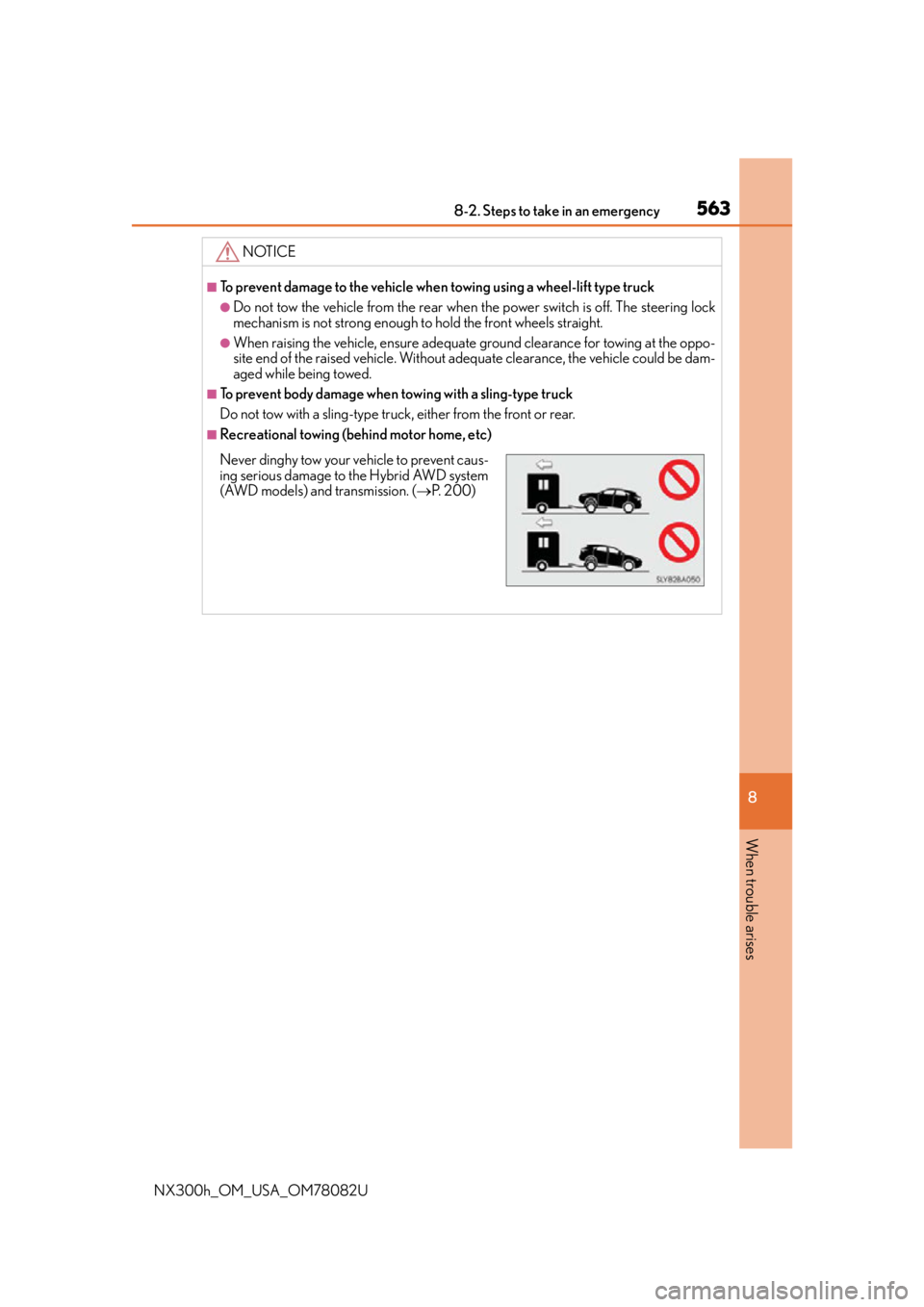
■Recreational towing (behind motor home, etc)
Never dinghy tow your vehicle to prevent caus-
ing serious damage to the Hybrid AWD system
(AWD models) and transmission. ( P. 2 0 0 )
Page 573 of 680

5738-2. Steps to take in an emergency
8
When trouble arises
NX300h_OM_USA_OM78082U
*: A buzzer sounds the first time a message is shown on the multi-information display.
■System warning lights
The master warning light does not come on or flash in the following cases. Instead, a sep-
arate system warning light will come on along with a message shown on the multi-infor-
mation display.
●Malfunction of the ABS
The ABS warning light comes on. ( P. 566)
●Malfunction of th e charging system
The charging system warning light comes on. ( P. 565)
■If “Hybrid System Overheated Reduced Output Power” is shown
This message may be displayed when driv ing under severe operating conditions.
(For example, when drivin g up a long steep hill.)
Handling method: P. 5 9 9
■If “Cooling Performance of The Hybrid Battery Is Low” is shown
The filter may be clogged, or the air intake vents or ducts may be blocked. Have the vehi-
cle inspected by your Lexus dealer.
■If “Hybrid Battery Low Shift Out of N to Recharge” is shown
Message is displayed when the remaining charge for the hybrid battery (traction battery)
is low.
As the hybrid battery (traction battery) cannot be charged when the shift lever is in N,
when stopped for long periods of time shift the shift lever to P.
■If “Hybrid Battery Low Hybrid System St opped Shift to P and Restart” is shown
Message is displayed when the remaining charge for the hybrid battery (traction battery)
is low, because vehicle has been sh ifted N for a long period of time.
When operating the vehicle, restart the hybrid system.
■If “Shift to P Before Exiting Vehicle” is shown
Message is displayed when the driver’s door is opened without turning the power switch
to OFF with the shift lever in any position other than P.
Shift the shift lever to P.
■If “Shift Is in N Release Accele rator Before Shifting” is shown
Message is displayed when the accelerator pe dal has been depressed and the shift lever
is in N. Release the accelerator peda l and shift the shift lever to D or R.
Comes
onDoes not sound
Indicates a condition, such as malfunc-
tion of electrical components, their
condition, or indicates the need for
maintenance
FlashesDoes not sound
Indicates a situation, such as when an
operation has been performed incor-
rectly, or indicates how to perform an
operation correctly
System
warning
lightWa r n i n g b u z z e r*Wa r n i n g