headlights LEXUS NX300H 2016 User Guide
[x] Cancel search | Manufacturer: LEXUS, Model Year: 2016, Model line: NX300H, Model: LEXUS NX300H 2016Pages: 680, PDF Size: 10.23 MB
Page 225 of 680

2254-3. Operating the lights and wipers
4
Driving
NX300h_OM_USA_OM78082U
■The Automatic High Beam can be operated when
The power switch is in ON mode.
■Camera sensor detection information
●High beam may not be automatically tu rned off in the following situations:
• When oncoming vehicles sudd enly appear from a curve
• When the vehicle is cut in front of by another
• When oncoming or preceding vehicles are hidden from sight due to repeated
curves, road dividers or roadside trees
●High beam may be turned off if an oncoming vehicle that is using fog lights without
using the headlights is detected.
●House lights, street lights, red traffic signals, and illuminated billboards or signs may
cause the high beam to turn off.
●The following factors may affect the amount of time taken to turn high beam on or off:
• The brightness of headlights, fog lights, and tail lights of oncoming and preceding
vehicles
• The movement and direction of oncoming and preceding vehicles
• When a oncoming or preceding vehicle on ly has operational lights on one side
• When a oncoming or preceding vehicle is a two-wheeled vehicle
• The condition of the road (gradient, curve, condition of the road surface, etc.)
• The number of passengers and amount of luggage
●High beam may be turned on or off when unexpected by the driver.
●In the situations below, the system may not be able to correctly detect the surrounding
brightness levels, and may flash or expose nearby pedestrians to the high beam. There-
fore, you should consider turning the high be ams on or off manually rather than relying
on the Automatic High Beam system.
• In bad weather (rain, snow , fog, sandstorms, etc.)
• The windshield is obscured by fog, mist, ice, dirt, etc.
• The windshield is cracked or damaged.
• The camera sensor is deformed or dirty.
• The camera sensor temperature is extremely high.
• Surrounding brightness levels are equal to those of headlights, tail lights or fog lights.
• Vehicles ahead have headlights or tail lights that are either switched off, dirty, are
changing color, or are not aimed properly.
• When driving through an area of intermit tently changing brightness and darkness.
• When frequently and repeatedly driving ascending/descending roads, or roads with
rough, bumpy or uneven surfaces (such as stone-paved roads, gravel tracks, etc.).
• When frequently and repeat edly taking curves or driving on a winding road.
• There is a highly reflective object ahead of the vehicle, such as a sign or a mirror.
• The back of a vehicle ahead is highly reflective, such as a container on a truck.
• The vehicle’s headlights are damaged or dirty.
• The vehicle is listing or titling, due to a flat tire, a trailer being towed, etc.
• The driver believes that the high beam may be causing problems or distress to other
drivers or pedestrians nearby.
Page 226 of 680
2264-3. Operating the lights and wipers
NX300h_OM_USA_OM78082U
WA R N I N G
■Limitations of the Automatic High Beam
Do not rely on the Automatic High Beam. Always drive safely, taking care to observe
your surroundings and turning high be am on or off manually if necessary.
NOTICE
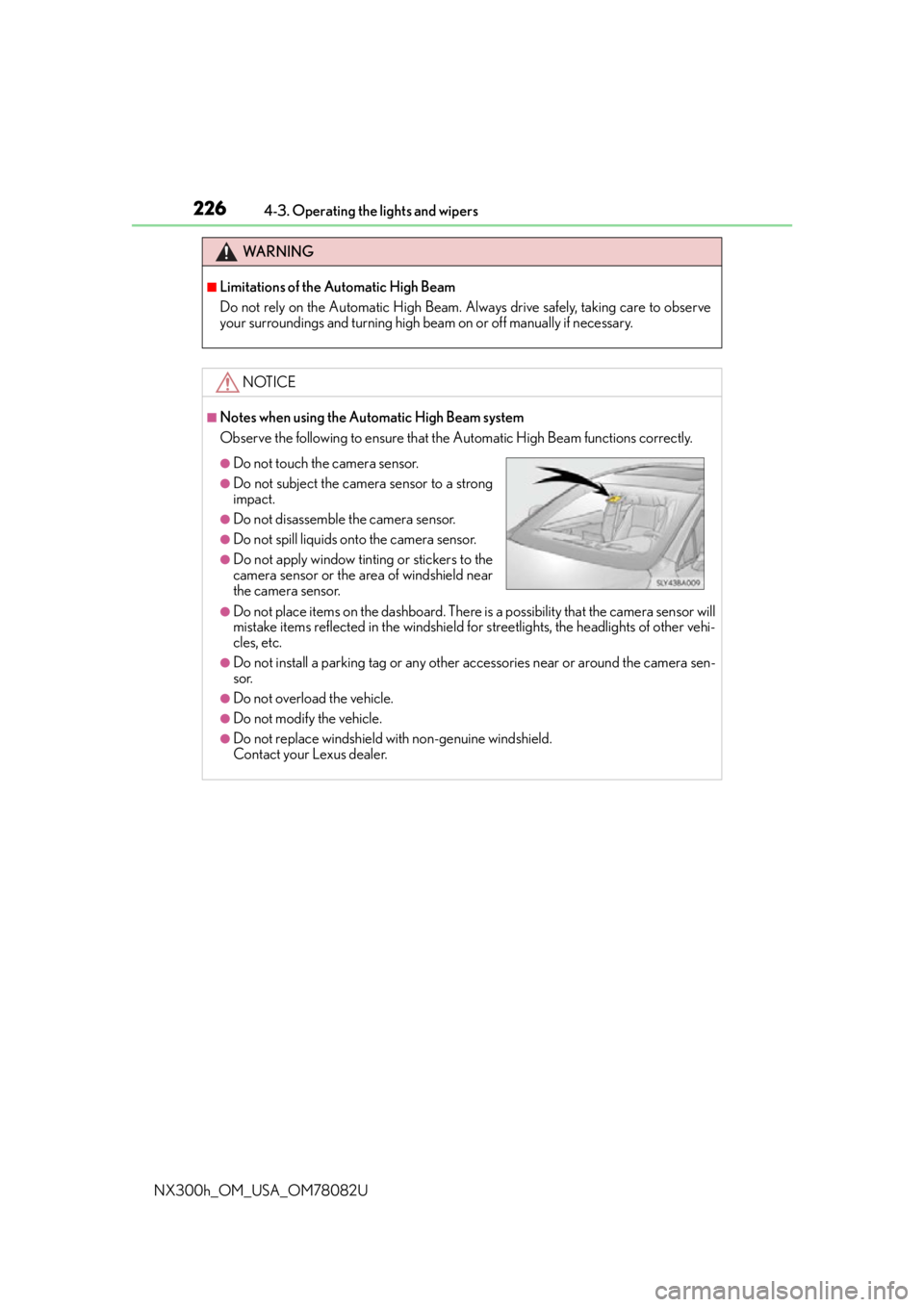
■Notes when using the Automatic High Beam system
Observe the following to ensure that the Automatic High Beam functions correctly.
●Do not place items on the dashboard. There is a possibility that the camera sensor will
mistake items reflected in the windshield for streetlights, the headlights of other vehi-
cles, etc.
●Do not install a parking tag or any other accessories near or around the camera sen-
sor.
●Do not overload the vehicle.
●Do not modify the vehicle.
●Do not replace windshield with non-genuine windshield.
Contact your Lexus dealer.
●Do not touch the camera sensor.
●Do not subject the camera sensor to a strong
impact.
●Do not disassemble the camera sensor.
●Do not spill liquids onto the camera sensor.
●Do not apply window tinting or stickers to the
camera sensor or the area of windshield near
the camera sensor.
Page 227 of 680
2274-3. Operating the lights and wipers
4
Driving
NX300h_OM_USA_OM78082U
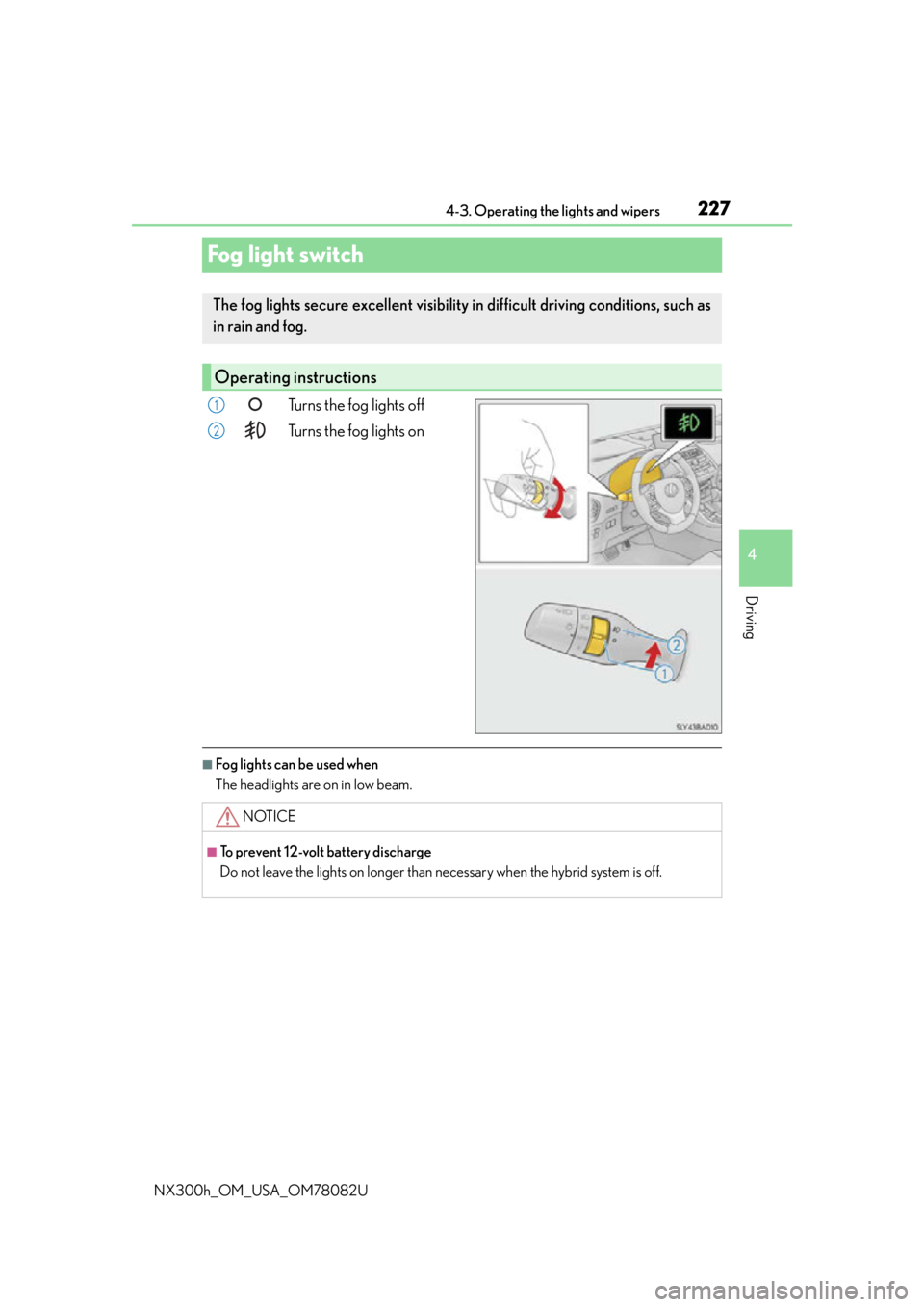
Fog light switch
Turns the fog lights off
Turns the fog lights on
■Fog lights can be used when
The headlights are on in low beam.
The fog lights secure excellent visibility in difficult driving conditions, such as
in rain and fog.
Operating instructions
1
2
NOTICE
■To prevent 12-volt battery discharge
Do not leave the lights on longer than necessary when the hybrid system is off.
Page 229 of 680
2294-3. Operating the lights and wipers
4
Driving
NX300h_OM_USA_OM78082U
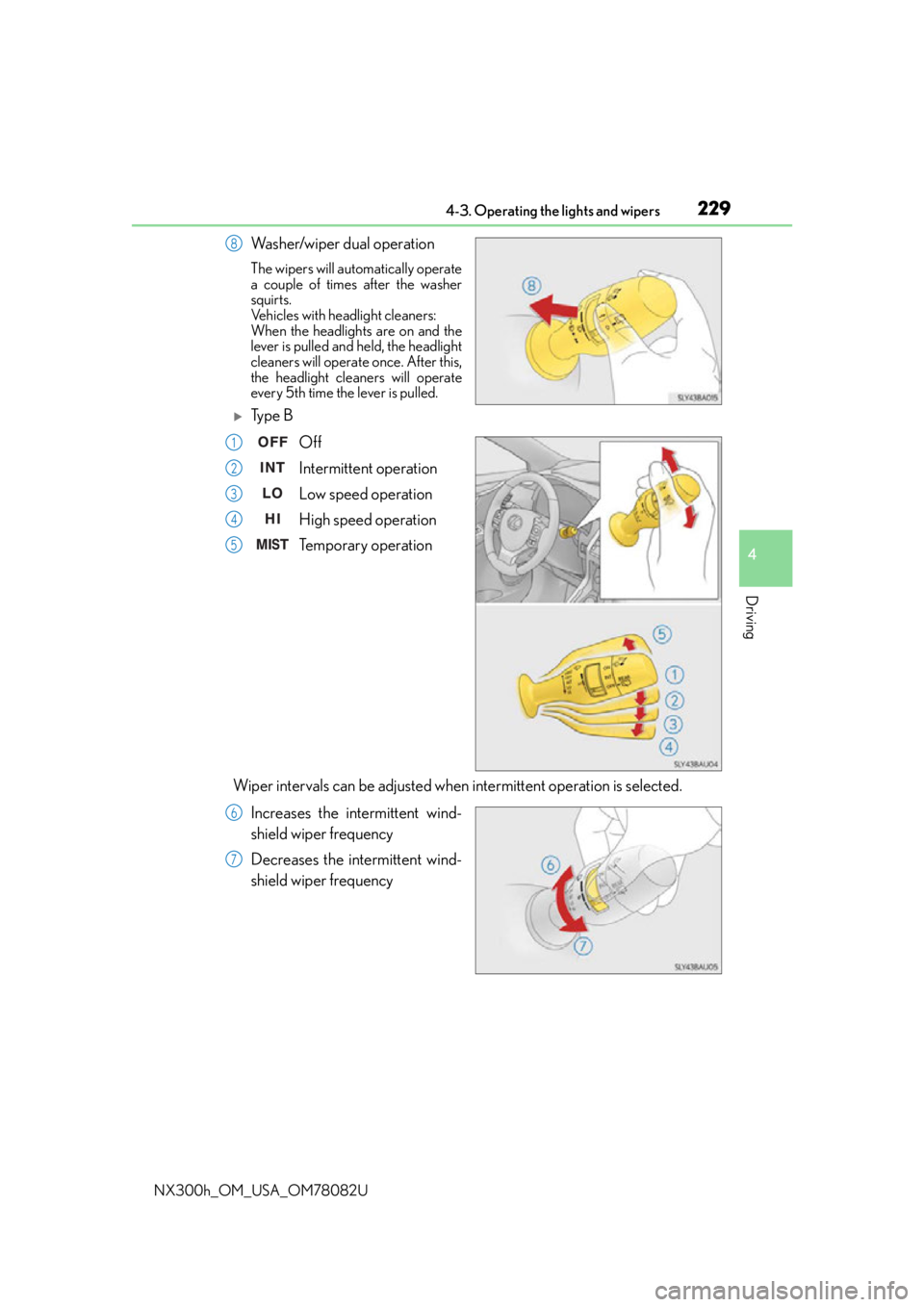
Washer/wiper dual operation
The wipers will automatically operate
a couple of times after the washer
squirts.
Vehicles with headlight cleaners:
When the headlights are on and the
lever is pulled and held, the headlight
cleaners will operate once. After this,
the headlight cleaners will operate
every 5th time the lever is pulled.
Ty p e BOff
Intermittent operation
Low speed operation
High speed operation
Temporary operation
Wiper intervals can be adjusted when intermittent operation is selected. Increases the intermittent wind-
shield wiper frequency
Decreases the intermittent wind-
shield wiper frequency
8
1
2
3
4
5
6
7
Page 230 of 680
2304-3. Operating the lights and wipers
NX300h_OM_USA_OM78082U
Washer/wiper dual operation
The wipers will automatically operate
a couple of times after the washer
squirts.
Vehicles with headlight cleaners:
When the headlights are on and the
lever is pulled and held, the headlight
cleaners will operate once. After this,
the headlight cleaners will operate
every 5th time the lever is pulled.
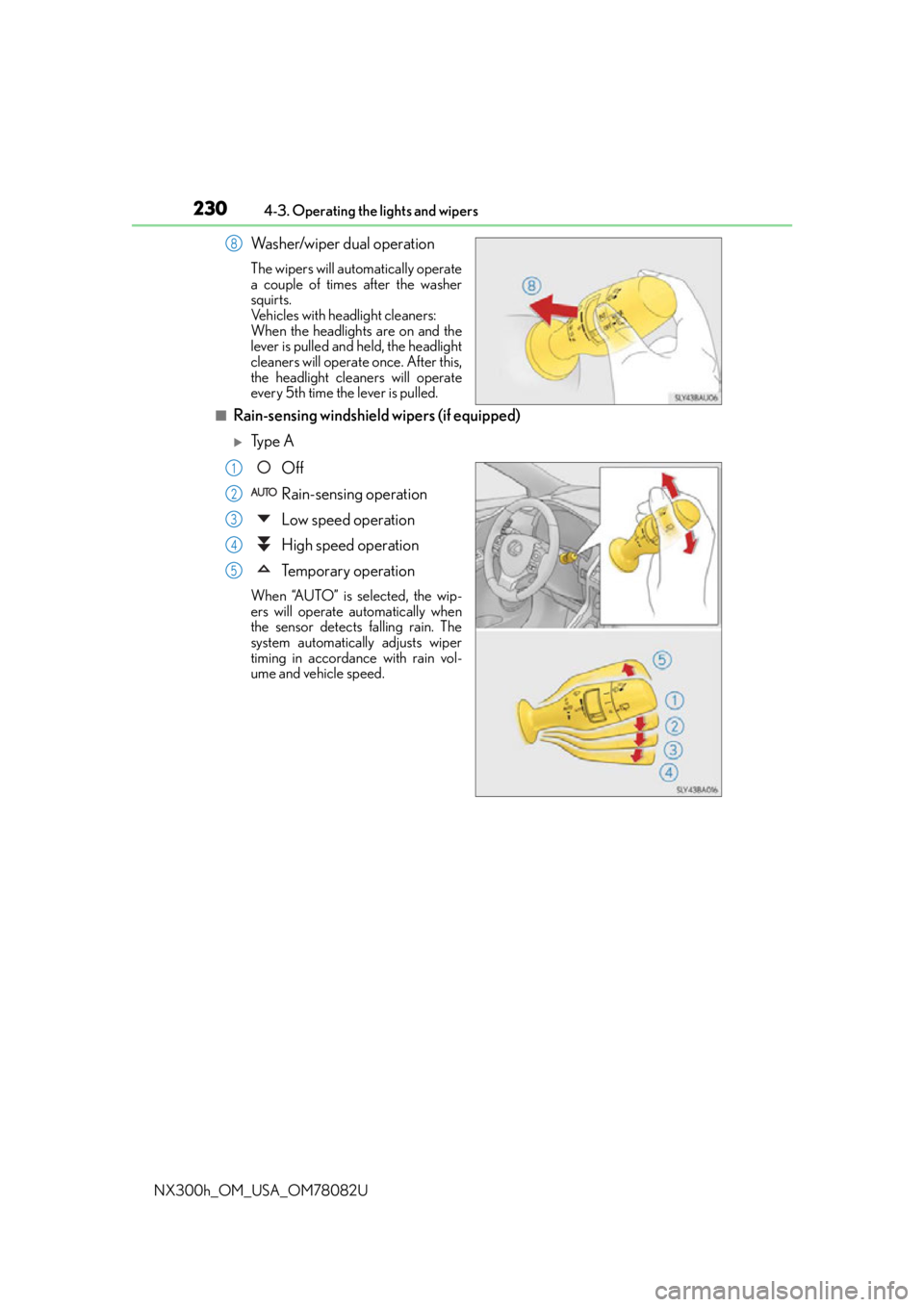
■Rain-sensing windshield wipers (if equipped)
Ty p e A Off
Rain-sensing operation
Low speed operation
High speed operation
Temporary operation
When “AUTO” is selected, the wip-
ers will operate automatically when
the sensor detects falling rain. The
system automatically adjusts wiper
timing in accordance with rain vol-
ume and vehicle speed.
8
1
2
3
4
5
Page 231 of 680
2314-3. Operating the lights and wipers
4
Driving
NX300h_OM_USA_OM78082U
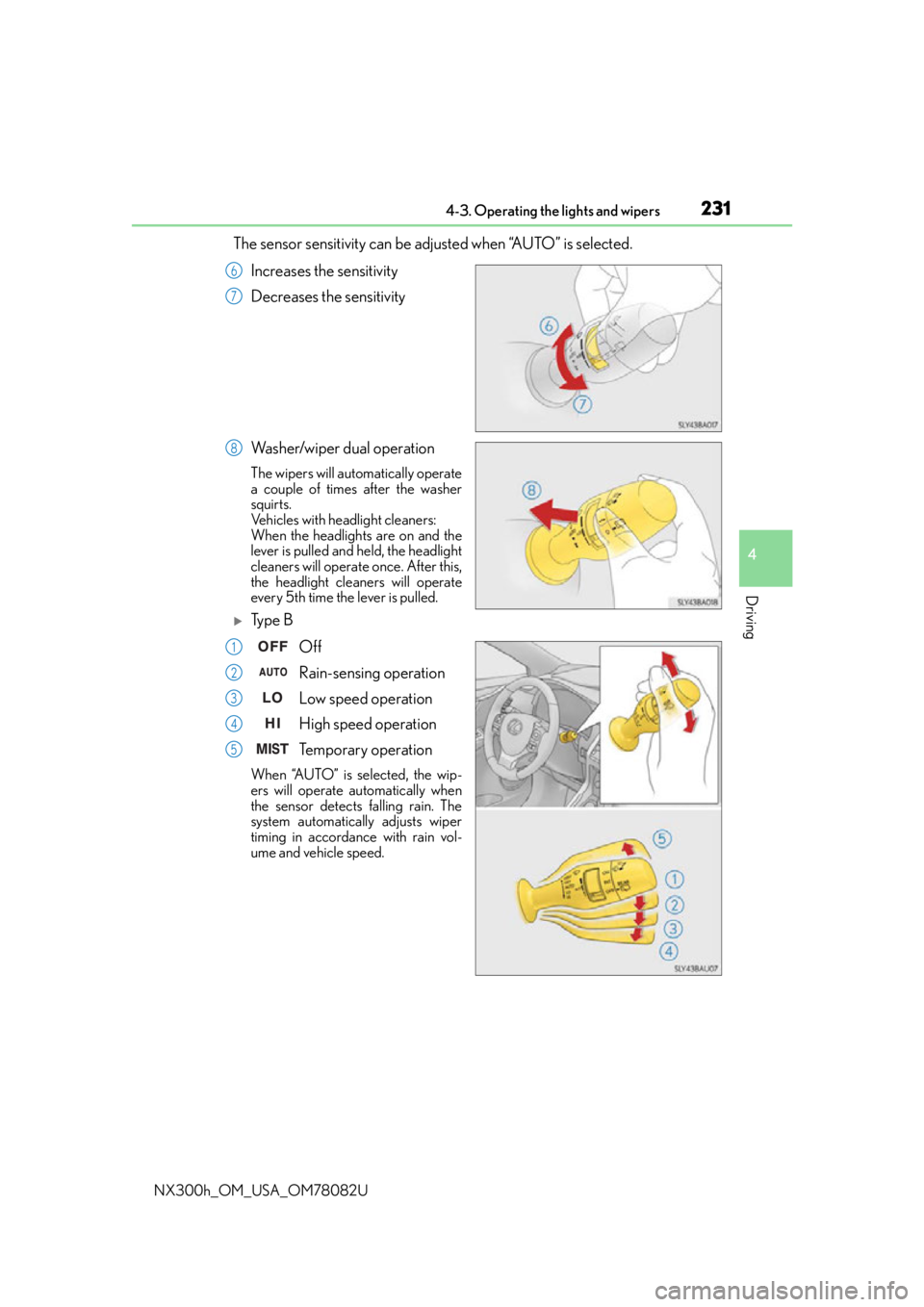
The sensor sensitivity can be adjusted when “AUTO” is selected.
Increases the sensitivity
Decreases the sensitivity
Washer/wiper dual operation
The wipers will automatically operate
a couple of times after the washer
squirts.
Vehicles with headlight cleaners:
When the headlights are on and the
lever is pulled and held, the headlight
cleaners will operate once. After this,
the headlight cleaners will operate
every 5th time the lever is pulled.
Ty p e B Off
Rain-sensing operation
Low speed operation
High speed operation
Temporary operation
When “AUTO” is selected, the wip-
ers will operate automatically when
the sensor detects falling rain. The
system automatically adjusts wiper
timing in accordance with rain vol-
ume and vehicle speed.
6
7
8
1
2
3
4
5
Page 232 of 680
2324-3. Operating the lights and wipers
NX300h_OM_USA_OM78082U
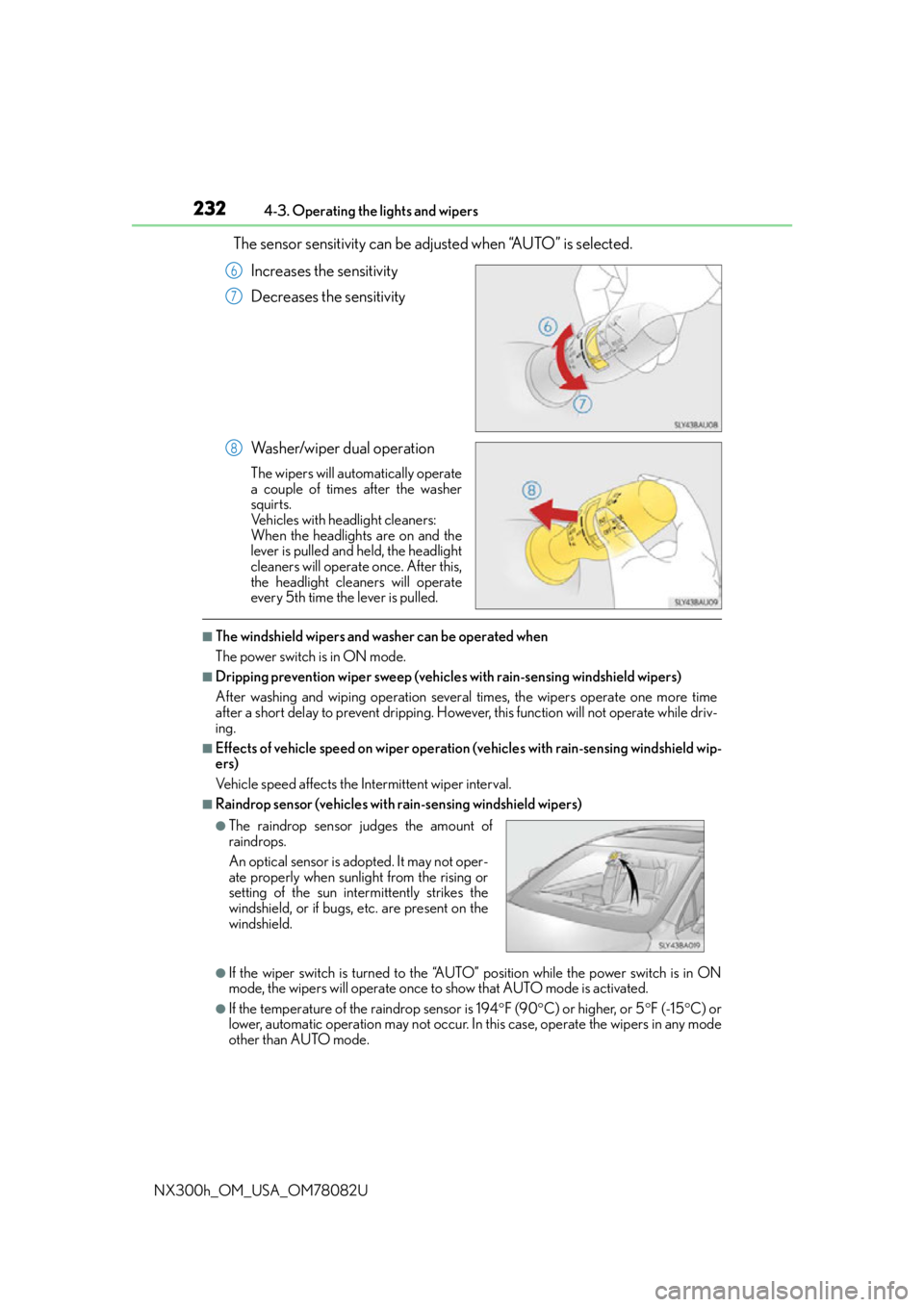
The sensor sensitivity can be adju sted when “AUTO” is selected.
Increases the sensitivity
Decreases the sensitivity
Washer/wiper dual operation
The wipers will automatically operate
a couple of times after the washer
squirts.
Vehicles with headlight cleaners:
When the headlights are on and the
lever is pulled and held, the headlight
cleaners will operate once. After this,
the headlight cleaners will operate
every 5th time the lever is pulled.
■The windshield wipers and washer can be operated when
The power switch is in ON mode.
■Dripping prevention wiper sweep (vehicle s with rain-sensing windshield wipers)
After washing and wiping operation several times, the wipers operate one more time
after a short delay to prevent dripping. Howeve r, this function will not operate while driv-
ing.
■Effects of vehicle speed on wiper operation (vehicles with rain-sensing windshield wip-
ers)
Vehicle speed affects the Intermittent wiper interval.
■Raindrop sensor (vehicles with rain-sensing windshield wipers)
●If the wiper switch is turned to the “AUTO” position while the power switch is in ON
mode, the wipers will operate once to show that AUTO mode is activated.
●If the temperature of the raindrop sensor is 194 F (90 C) or higher, or 5 F (-15 C) or
lower, automatic operation may not occur. In this case, operate the wipers in any mode
other than AUTO mode.
6
7
8
●The raindrop sensor judges the amount of
raindrops.
An optical sensor is ad opted. It may not oper-
ate properly when sunlight from the rising or
setting of the sun intermittently strikes the
windshield, or if bugs, etc. are present on the
windshield.
Page 276 of 680
2764-5. Using the driving support systems
NX300h_OM_USA_OM78082U
●When the lane markers are on a curb, etc.
●When driving on a particularly brig ht road surface, such as concrete
●When driving on a road surface that is bright due to reflected light
●When driving in a location where the light level changes rapi dly, such as the entrance to
or exit from a tunnel
●When sunlight or the headlights of oncoming vehicles are shining directly into the cam-
era lens
●When driving on roads that are branching or merging
●When driving on a hill
●When driving on winding roads or roads that are uneven
●When driving on rough or unpaved roads
●When driving on a sharp curve
●When lane markers are extremely narrow or extremely wide
●When the vehicle leans to one side an unus ual amount due to a heavy load or improper
tire inflation pressure
●When the following distance between your vehicle and the vehicle ahead is extremely
short
●When the vehicle experiences strong up-and -down motion such as when driving on an
extremely rough road or on a seam in the pavement
● When headlight brightness at nighttime is reduced due to dirt on the lenses, or when
the headlights are misaligned
●When receiving a side wind
■When changing the tires
Depending on the tires used such as snow ti res, etc., sufficient performance may not be
maintainable.
■Warning messages for the LDA
Warning messages are used to indicate a syst em malfunction or to inform the driver of
the need for caution while driving. If a wa rning message is shown on the multi-informa-
tion display, read the message and follow the instructions.
Also, even if a warning message is displayed, it will not impede normal driving.
■ When turning on/off the steering control function
From “Settings display” ( P. 103) of the multi-information display, the steering
control function can be turned on/off.
Pressing the or meter control switches ( P. 103), selects
With each press of meter control switch es, the control switches between “On” and
“Off”
■Sensitivity adjustment for th e lane deviation alert buzzer
From
“Settings display” ( P. 103) of the multi-inform ation display, the alert sen-
sitivity for the alert buzzer when deviating from the lane can be adjusted.
Pressing the or meter control switches ( P. 103), selects
With each press of meter control switches, the control switches between “High”
and “Standard”
1
2
1
2
Page 278 of 680
2784-5. Using the driving support systems
NX300h_OM_USA_OM78082U
NOTICE
■To prevent damage to or incorrect operation of the LDA
Observe the following to ensure that the LDA system functions correctly
●Do not modify the headlights or attach stickers to the surface of the lights.
●Do not modify the suspension or replace it with non-genuine parts.
●Do not install or place anything on the hood or the grille. Also, do not install a grille
guard (bull bars, kangaroo bar, etc.).
●If your windshield needs repairs, contact your Lexus dealer.
●Do not overload with luggage
■ Lane recognition camera
Observe the following to ensure that the LDA system functions correctly
●Keep the windshield clean at all times.
Performance could be affected if the windshie ld is dirty, or if raindrops, condensation
or ice are adhering to the windshield.
●Do not spill liquids onto the lane recognition camera.
●Do not attach window tinting to the windshield.
●Do not install an antenna in fron t of the lane recognition camera.
●If the windshield area in front of the lane recognition camera is fogged up, use the
windshield defogger to remove the fog from that area. ( P. 4 3 5 )
When it is cold, using the he ater with air blowing to the feet may allow the upper part
of the windshield to fog up. This will have a negative effect on the images.
●Do not scratch the camera lens, or let it get dirty.
When cleaning the inside of the windshield , be careful not to get any glass cleaner,
etc., on the lens. Also, do not touch the lens.
For lens repair, contact your Lexus dealer.
●Do not change the installation position or direction of the lane recognition camera or
remove it.
The direction of the lane recognit ion camera is precisely adjusted.
●Do not subject the lane recognition camera to strong impact or force, and do not dis-
assemble the lane recognition camera.
●Do not replace windshield with non-genuine windshield.
Contact your Lexus dealer.
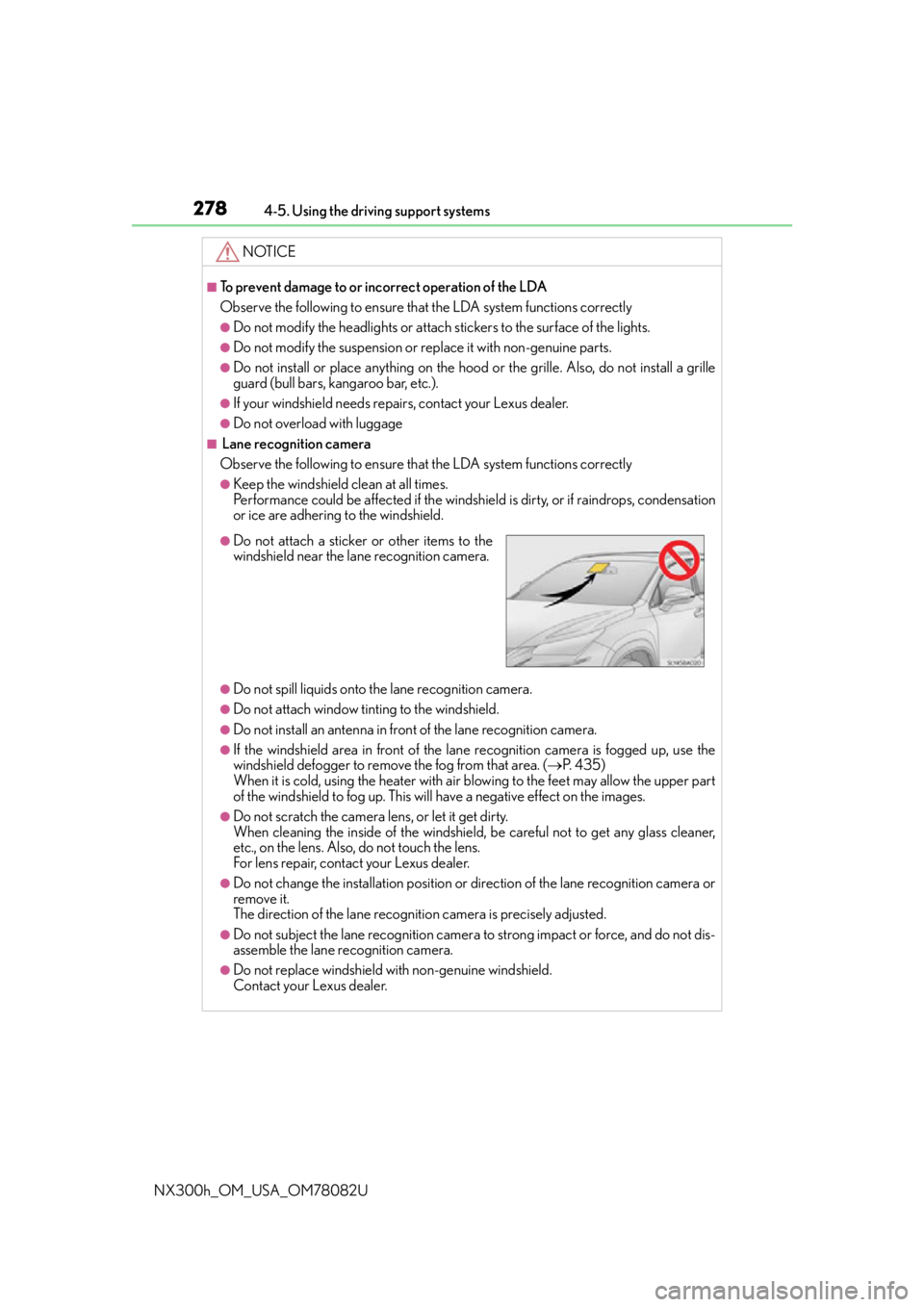
●Do not attach a sticker or other items to the
windshield near the lane recognition camera.
Page 299 of 680
2994-5. Using the driving support systems
4
Driving
NX300h_OM_USA_OM78082U
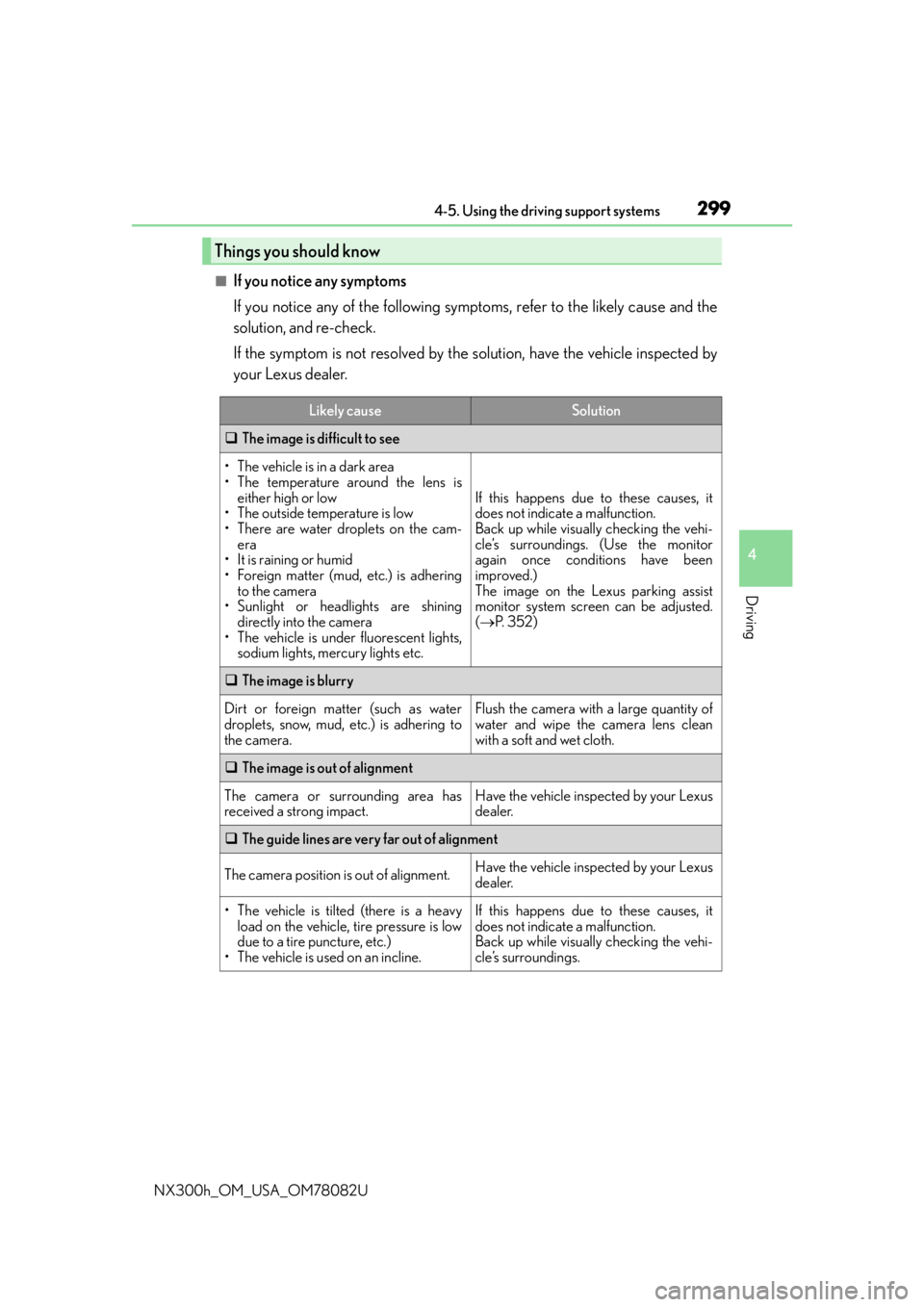
■If you notice any symptoms
If you notice any of the following symptoms, refer to the likely cause and the
solution, and re-check.
If the symptom is not resolved by the solution, have the vehicle inspected by
your Lexus dealer.
Things you should know
Likely causeSolution
The image is difficult to see
• The vehicle is in a dark area
• The temperature around the lens is
either high or low
• The outside temperature is low
• There are water droplets on the cam- era
• It is raining or humid
• Foreign matter (mud, etc.) is adhering to the camera
• Sunlight or headlights are shining directly into the camera
• The vehicle is under fluorescent lights,
sodium lights, mercury lights etc.
If this happens due to these causes, it
does not indicate a malfunction.
Back up while visually checking the vehi-
cle’s surroundings. (Use the monitor
again once conditions have been
improved.)
The image on the Lexus parking assist
monitor system screen can be adjusted.
( P. 3 5 2 )
The image is blurry
Dirt or foreign matter (such as water
droplets, snow, mud, etc.) is adhering to
the camera.Flush the camera with a large quantity of
water and wipe the camera lens clean
with a soft and wet cloth.
The image is out of alignment
The camera or surrounding area has
received a strong impact.Have the vehicle inspected by your Lexus
dealer.
The guide lines are very far out of alignment
The camera position is out of alignment.Have the vehicle inspected by your Lexus
dealer.
• The vehicle is tilted (there is a heavy
load on the vehicle, tire pressure is low
due to a tire puncture, etc.)
• The vehicle is used on an incline.If this happens due to these causes, it
does not indicate a malfunction.
Back up while visually checking the vehi-
cle’s surroundings.