radio LEXUS NX300H 2016 User Guide
[x] Cancel search | Manufacturer: LEXUS, Model Year: 2016, Model line: NX300H, Model: LEXUS NX300H 2016Pages: 680, PDF Size: 10.23 MB
Page 248 of 680
2484-5. Using the driving support systems
NX300h_OM_USA_OM78082U
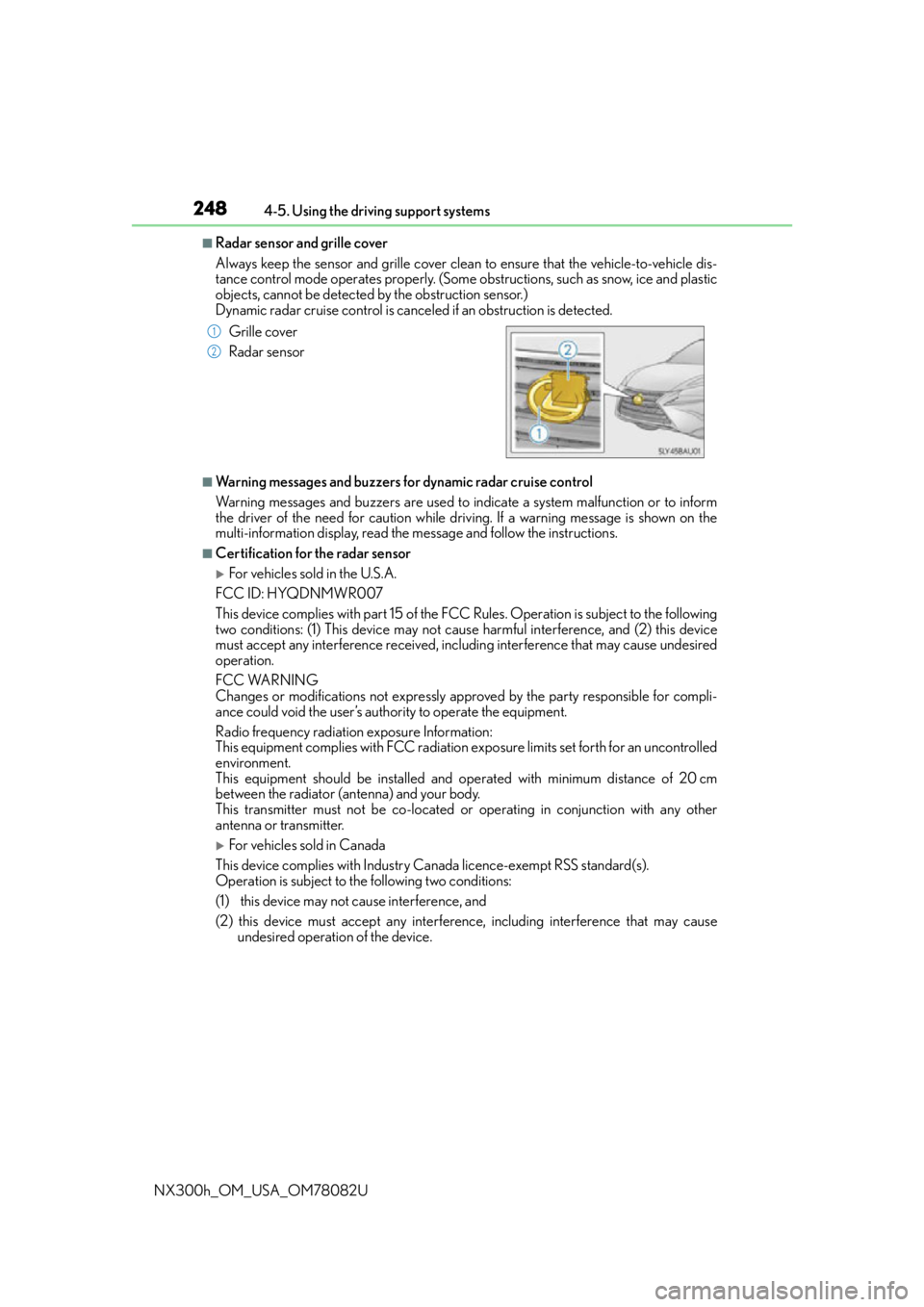
■Radar sensor and grille cover
Always keep the sensor and grille cover clean to ensure that the vehicle-to-vehicle dis-
tance control mode operates properly. (Some obstructions, such as snow, ice and plastic
objects, cannot be detected by the obstruction sensor.)
Dynamic radar cruise control is cancel ed if an obstruction is detected.
■Warning messages and buzzers for dynamic radar cruise control
Warning messages and buzzers are used to indicate a system malfunction or to inform
the driver of the need for caution while driving. If a warning message is shown on the
multi-information display, read the message and follow the instructions.
■Certification for the radar sensor
For vehicles sold in the U.S.A.
FCC ID: HYQDNMWR007
This device complies with part 15 of the FC C Rules. Operation is subject to the following
two conditions: (1) This device may not caus e harmful interference, and (2) this device
must accept any interference received, incl uding interference that may cause undesired
operation.
FCC WARNING
Changes or modifications not expressly approved by the party responsible for compli-
ance could void the user’s authority to operate the equipment.
Radio frequency radiation exposure Information:
This equipment complies with FCC radiation exposure limits set forth for an uncontrolled
environment.
This equipment should be installed and operated with minimum distance of 20 cm
between the radiator (antenna) and your body.
This transmitter must not be co-located or operating in conjunction with any other
antenna or transmitter.
For vehicles sold in Canada
This device complies with Industry Canada licence-exempt RSS standard(s).
Operation is subject to the following two conditions:
(1) this device may not cause interference, and
(2) this device must accept any interference, including interference that may cause undesired operation of the device.
Grille cover
Radar sensor
1
2
Page 313 of 680

3134-5. Using the driving support systems
4
Driving
NX300h_OM_USA_OM78082U
■Situations in which the pre-collision system does not function properly
The system may not function effectively in situations such as the following:
●On roads with sharp bends or uneven surfaces
●If a vehicle suddenly moves in front of your vehicle, such as at an intersection
●If a vehicle suddenly cuts in front of your vehicle, such as when overtaking
●In inclement weather such as heavy rain, fog, snow or sand storms
●When your vehicle is skidding with the VSC system off
●When an extreme change in vehicle height occurs
●When the radar sensor moves off position due to its surrounding area being subjected
to a strong impact
●Due to greatly turning the wheel when an obstacle suddenly appears ahead
■Automatic cancelation of the pre-collision system
When a malfunction occurs due to sensor contamination, etc., that results in the sensors
being unable to detect obstacles, the pre-collision syst em will be automatically disabled.
In this case, the system will not activate even if there is a collision possibility.
■When there is a malfunction in the system, or if the system is temporarily unavailable
The PCS warning light flashes and a warning message is shown on the multi-information
display. If a warning message is shown on th e multi-information display, read the message
and follow the instructions.
■When the TRAC and VSC are turned off
●When the TRAC and VSC operations are turned off ( P. 307), the pre-collision brake
assist and pre-collision braking are also turned off. However, the alert function oper-
ates.
●The PCS warning light turns on and the “V SC Turned Off Pre-Collision Brake System
Unavailable” is shown on the multi-information display.
■Certification
For vehicles sold in the U.S.A.
FCC ID: HYQDNMWR007
This device complies with part 15 of the FC C Rules. Operation is subject to the following
two conditions: (1) This device may not caus e harmful interference, and (2) this device
must accept any interference received, incl uding interference that may cause undesired
operation.
FCC WARNING
Changes or modifications not expressly approved by the party responsible for compli-
ance could void the user’s authority to operate the equipment.
Radio frequency radiation exposure Information:
This equipment complies with FCC radiation exposure limits set forth for an uncontrolled
environment.
This equipment should be installed and operated with minimum distance of 20 cm
between the radiator (antenna) and your body.
This transmitter must not be co-located or operating in conjunction with any other
antenna or transmitter.
For vehicles sold in Canada
This device complies with Industry Canada licence-exempt RSS standard(s).
Operation is subject to the following two co nditions: (1) this device may not cause inter-
ference, and (2) this device must accept any interference, including interference that
may cause undesired operation of the device.
Page 334 of 680

334
NX300h_OM_USA_OM78082U
5-1. Basic Operations Lexus Display Audio System ......................................... 336
Steering wheel audio switches ...................................... 342
Mobile Assistant ........................ 343
USB/AUX ports ........................ 345
5-2. Setup Setup menu.................................. 347
General settings ........................348
Voice settings............................... 351
Display settings .......................... 352
5-3. Using the audio system Selecting the audio source .......................................... 353
Optimal use of the audio system ......................................... 354
Audio settings ............................. 355
Audio menu screen operation ...................................358
5-4. Using the radio Radio operation ............................361
5-5. Playing an audio CD and MP3/WMA/AAC discs
CD player operation ................ 367
Lexus Display Audio system
5
Page 336 of 680
3365-1. Basic Operations
NX300h_OM_USA_OM78082U
Lexus Display Audio System
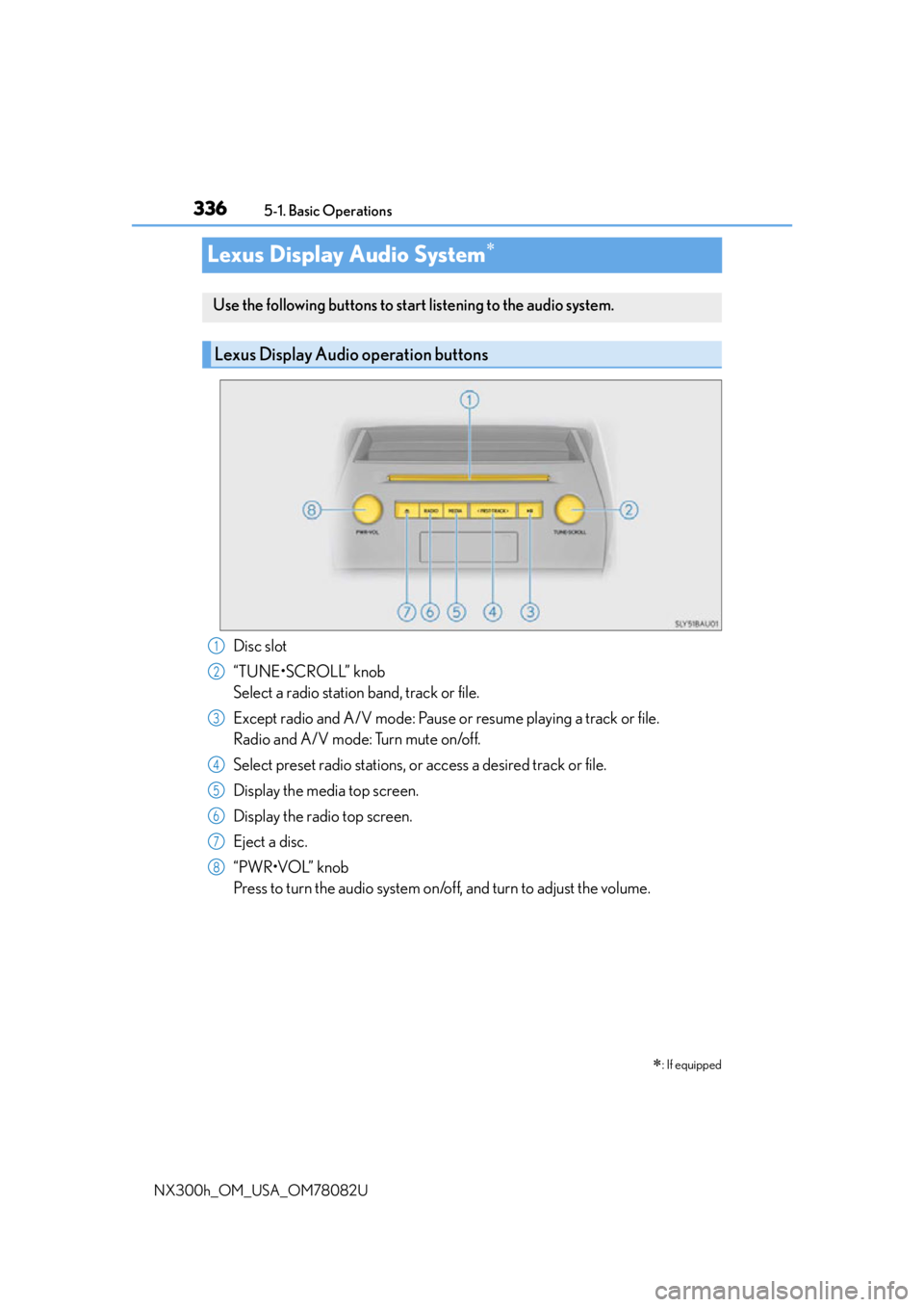
Disc slot
“TUNE•SCROLL” knob
Select a radio station band, track or file.
Except radio and A/V mode: Pause or resume playing a track or file.
Radio and A/V mode: Turn mute on/off.
Select preset radio stations, or access a desired track or file.
Display the media top screen.
Display the radio top screen.
Eject a disc.
“PWR•VOL” knob
Press to turn the audio system on/o ff, and turn to adjust the volume.
: If equipped
Use the following buttons to start listening to the audio system.
Lexus Display Audio operation buttons
1
2
3
4
5
6
7
8
Page 337 of 680
3375-1. Basic Operations
5
Lexus Display Audio system
NX300h_OM_USA_OM78082U
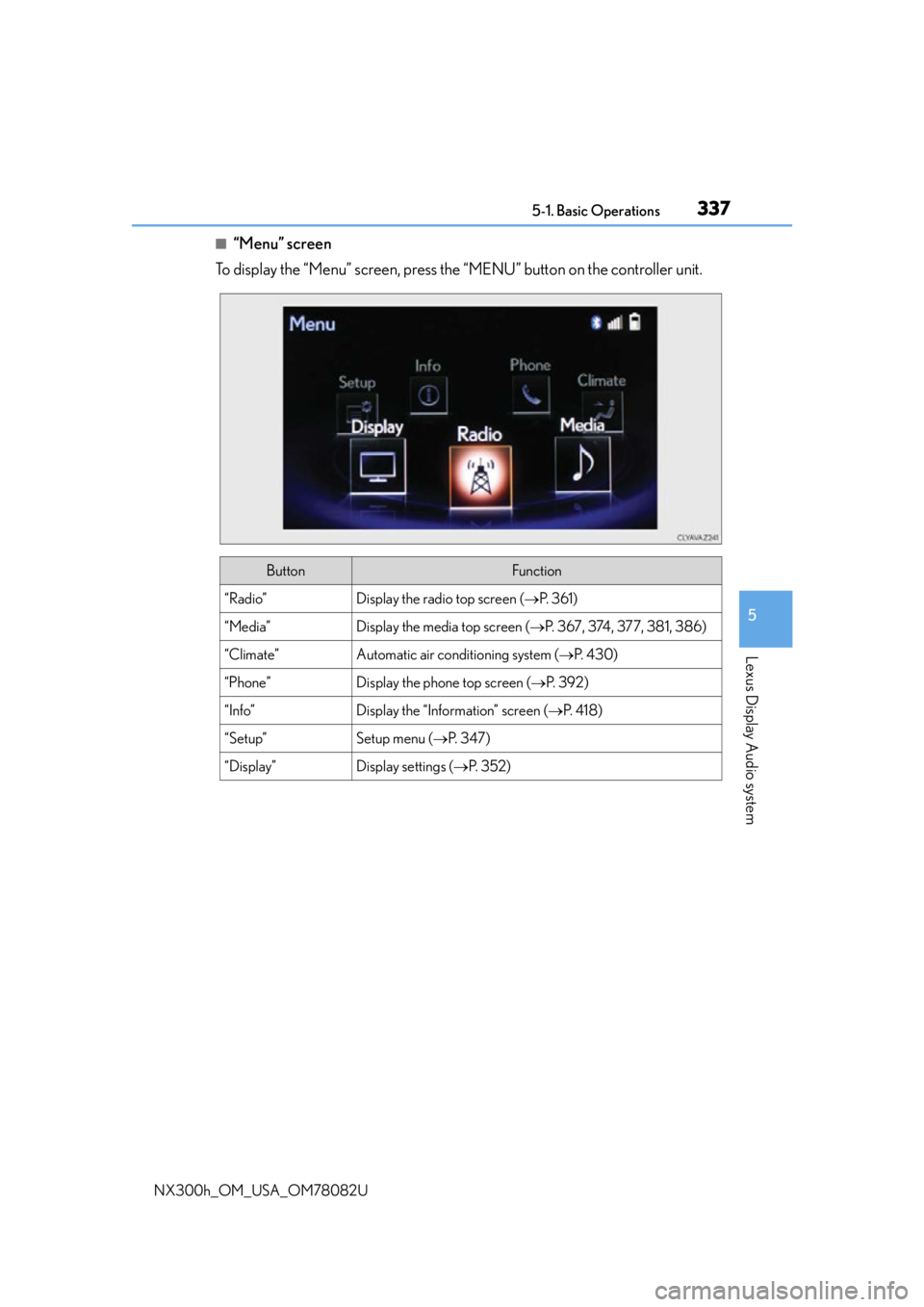
■“Menu” screen
To display the “Menu” screen, press the “MENU” button on the controller unit.
ButtonFunction
“Radio”Display the radio top screen ( P. 3 6 1 )
“Media”Display the media top screen ( P. 367, 374, 377, 381, 386)
“Climate”Automatic air conditioning system ( P. 4 3 0 )
“Phone”Display the phone top screen ( P. 3 9 2 )
“Info”Display the “Information” screen ( P. 4 1 8 )
“Setup”Setup menu ( P. 3 4 7 )
“Display”Display settings ( P. 3 5 2 )
Page 342 of 680
3425-1. Basic Operations
NX300h_OM_USA_OM78082U
Steering wheel audio switches
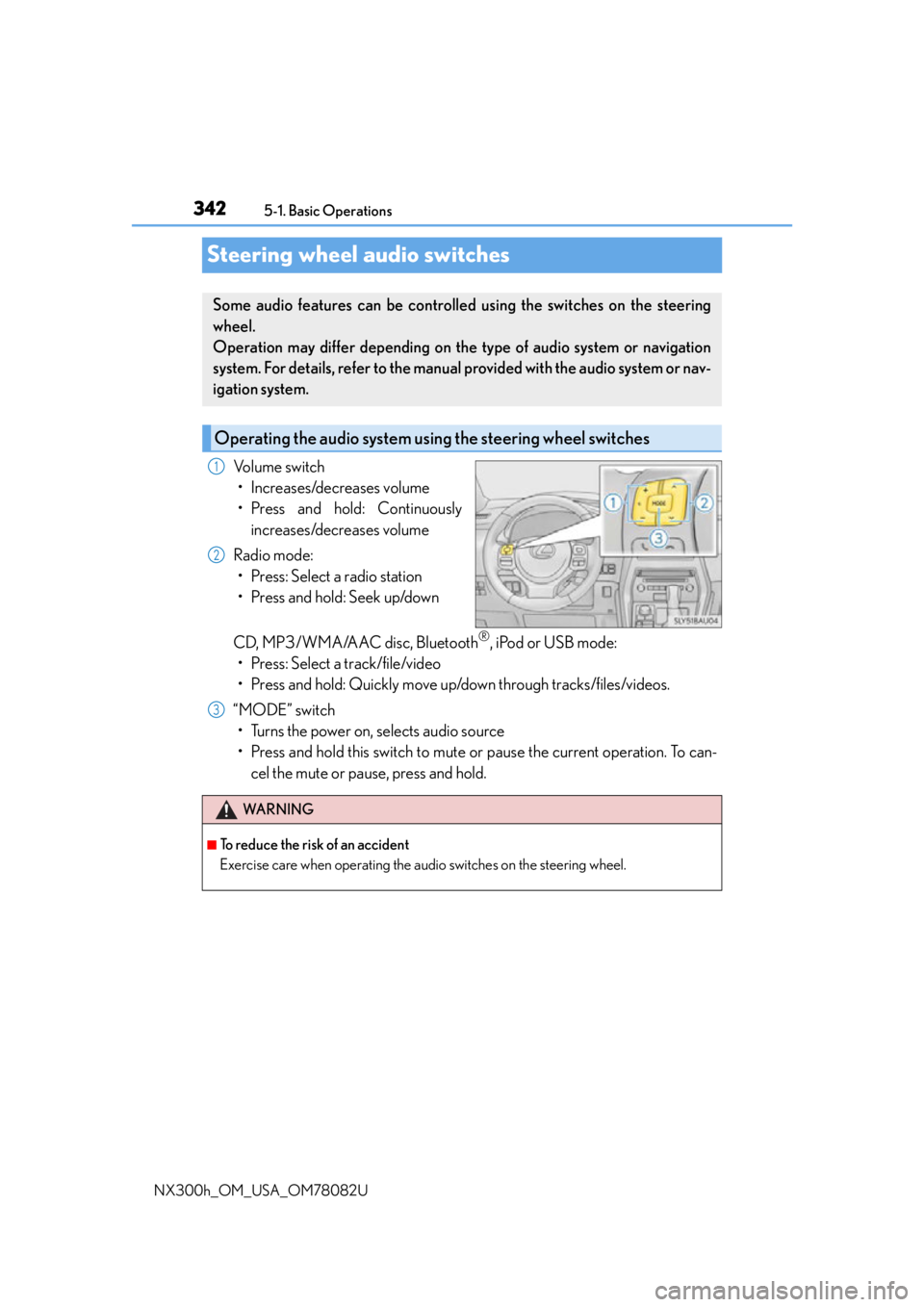
Volume switch • Increases/decreases volume
• Press and hold: Continuously increases/decreases volume
Radio mode: • Press: Select a radio station
• Press and hold: Seek up/down
CD, MP3/WMA/AAC disc, Bluetooth
®, iPod or USB mode:
• Press: Select a track/file/video
• Press and hold: Quickly move up/down through tracks/files/videos.
“MODE” switch • Turns the power on, selects audio source
• Press and hold this switch to mute or pause the current operation. To can- cel the mute or pause, press and hold.
Some audio features can be controlled using the switches on the steering
wheel.
Operation may differ depending on th e type of audio system or navigation
system. For details, refer to the manual provided with the audio system or nav-
igation system.
Operating the audio system us ing the steering wheel switches
1
2
WA R N I N G
■To reduce the risk of an accident
Exercise care when operating the audio switches on the steering wheel.
3
Page 347 of 680
3475-2. Setup
5
Lexus Display Audio system
NX300h_OM_USA_OM78082U
Setup menu
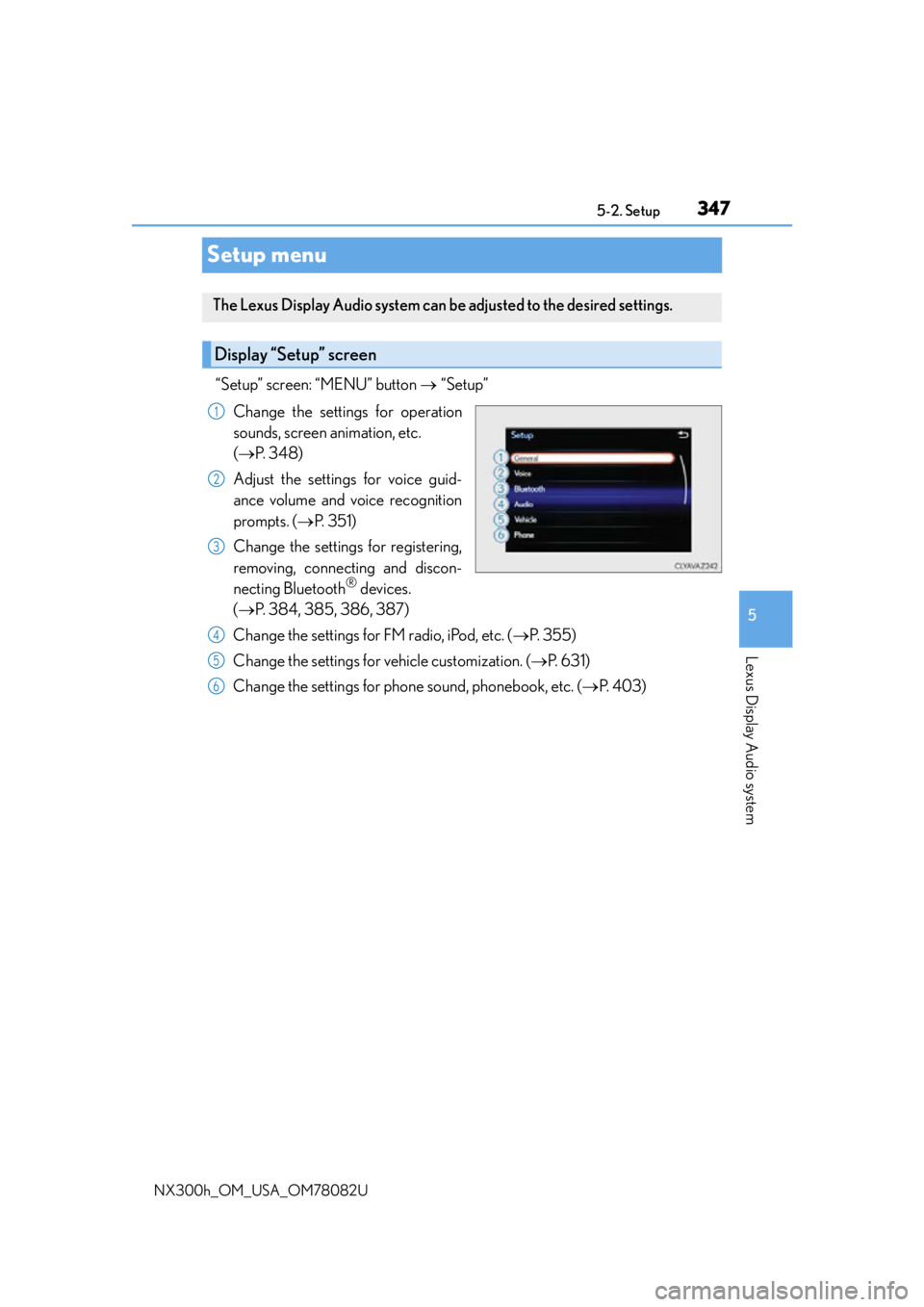
“Setup” screen: “MENU” button “Setup”
Change the settings for operation
sounds, screen animation, etc.
( P. 3 4 8 )
Adjust the settings for voice guid-
ance volume and voice recognition
prompts. ( P. 3 5 1 )
Change the settings for registering,
removing, connecting and discon-
necting Bluetooth
® devices.
( P. 384, 385, 386, 387)
Change the settings for FM radio, iPod, etc. ( P. 3 5 5 )
Change the settings for vehicle customization. ( P. 6 3 1 )
Change the settings for phone sound, phonebook, etc. ( P. 4 0 3 )
The Lexus Display Audio system can be adjusted to the desired settings.
Display “Setup” screen
1
2
3
4
5
6
Page 350 of 680
3505-2. Setup
NX300h_OM_USA_OM78082U
“MENU” button “Setup” “General” “Delete Personal Data”
Select “Delete”.
Check carefully beforehand, as data cannot be retrieved once deleted.
The following personal data will be deleted or changed to its default settings.
• Phonebook data
• Call history data
•Favorite data
•Bluetooth
® devices data
• Phone sound settings
• Detailed Bluetooth
® settings
• Audio/video setting
• Preset switch data
•Last used radio station
• Customized image data
•FM info setting
• iPod tagging information
• Software update history
• Software update detail information
•Phone disp lay setting
• Contact/call history setting
• Messaging setting
• Traffic information map
• Weather information
• Phonebook data for voice recognition
• Music data for voice recognition
NOTICE
■To prevent damage to the USB memory device or its terminals
P. 3 8 0
Deleting personal data
1
2
Page 353 of 680
3535-3. Using the audio system
5
Lexus Display Audio system
NX300h_OM_USA_OM78082U
Selecting the audio source
Press the “AUDIO” button to display the “Source” screen.
If the “Source” screen is not displayed, press the button again.
Select the desired audio source.
The audio source can be selected by pressing the “RADIO” or “MEDIA” button.
Press the “MODE” switch when the audio system is turned on. The audio source
changes each time the “MODE” switch is pressed.
■Rearranging the list
The listing order of the sour ce list can be rearranged.
Move the controller to the left while on the “Source” screen.
Select “Audio Source Select”.
Select an item you wish to move and th en select where to move the item to.
Switching between audio sources, such as the radio and CD, is explained in
this section.
Changing audio source
Using the steering wheel switches to change audio sources
1
2
1
2
3
Page 355 of 680
3555-3. Using the audio system
5
Lexus Display Audio system
NX300h_OM_USA_OM78082U
Audio settings
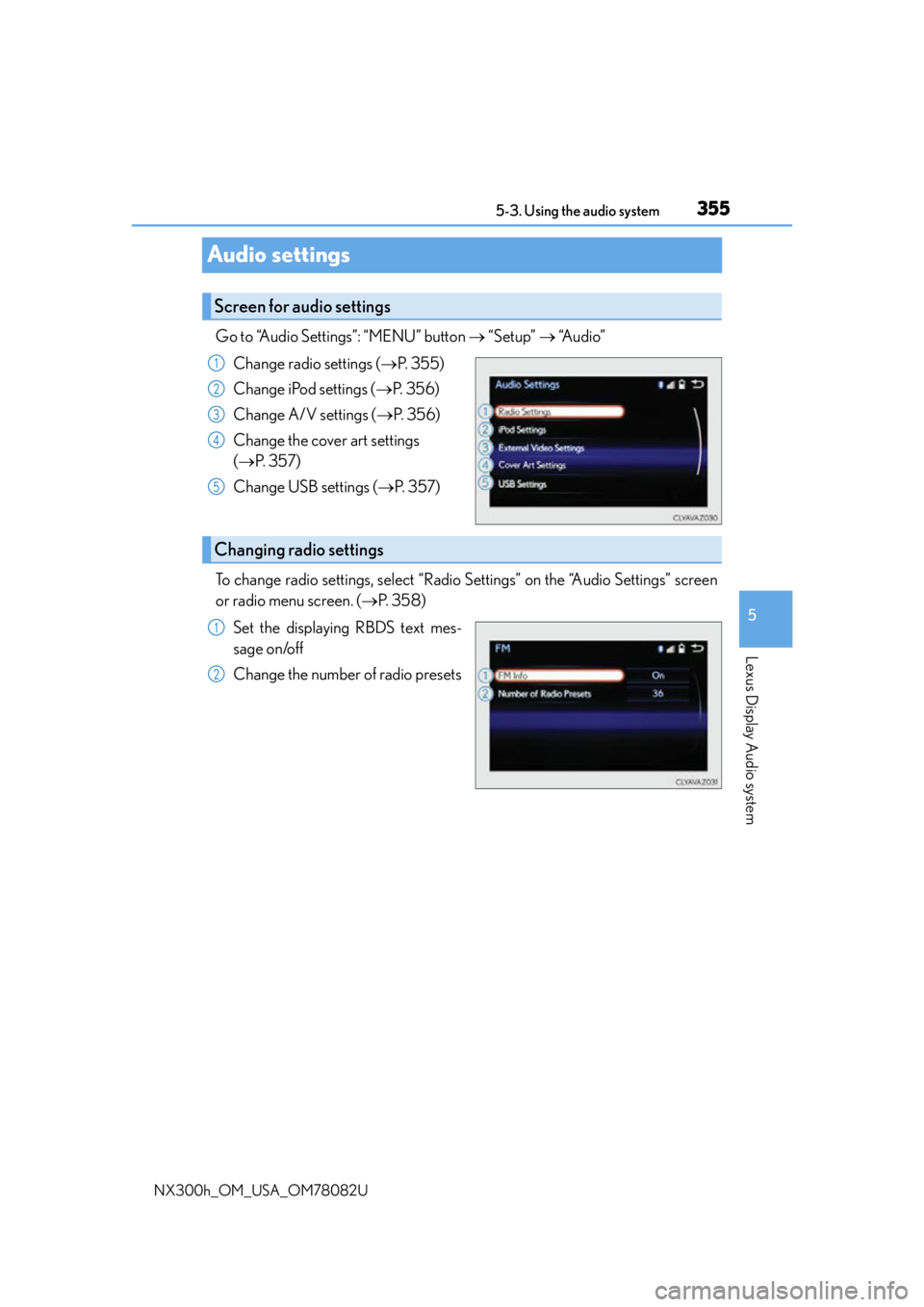
Go to “Audio Settings”: “MENU” button “Setup” “Audio”
Change radio settings ( P. 3 5 5 )
Change iPod settings ( P. 3 5 6 )
Change A/V settings ( P. 3 5 6 )
Change the cover art settings
( P. 3 5 7 )
Change USB settings ( P. 3 5 7 )
To change radio settings, select “Radio Settings” on the “Audio Settings” screen
or radio menu screen. ( P. 3 5 8 )
Set the displaying RBDS text mes-
sage on/off
Change the number of radio presets
Screen for audio settings
1
2
3
4
5
Changing radio settings
1
2