roof LEXUS NX300H 2016 User Guide
[x] Cancel search | Manufacturer: LEXUS, Model Year: 2016, Model line: NX300H, Model: LEXUS NX300H 2016Pages: 680, PDF Size: 10.23 MB
Page 65 of 680
651-1. For safe use
1
For safety and security
NX300h_OM_USA_OM78082U
When using a child restraint system on a rear seat
WA R N I N G
■When installing a child restraint system
Observe the following precautions.
Failure to do so may result in death or serious injury.
●Use child restraint system suitable to the age and size of the child and install it to the
rear seat.
●Do not allow the child to lean his/her head or any part of his/her body against the
door or the area of the seat, rear pillars or roof side rails from which the SRS curtain
shield airbag deploys even if the child is seated in the child restraint system. It is dan-
gerous if the SRS curtain sh ield airbag inflates, and the impact could cause death or
serious injury to the child.
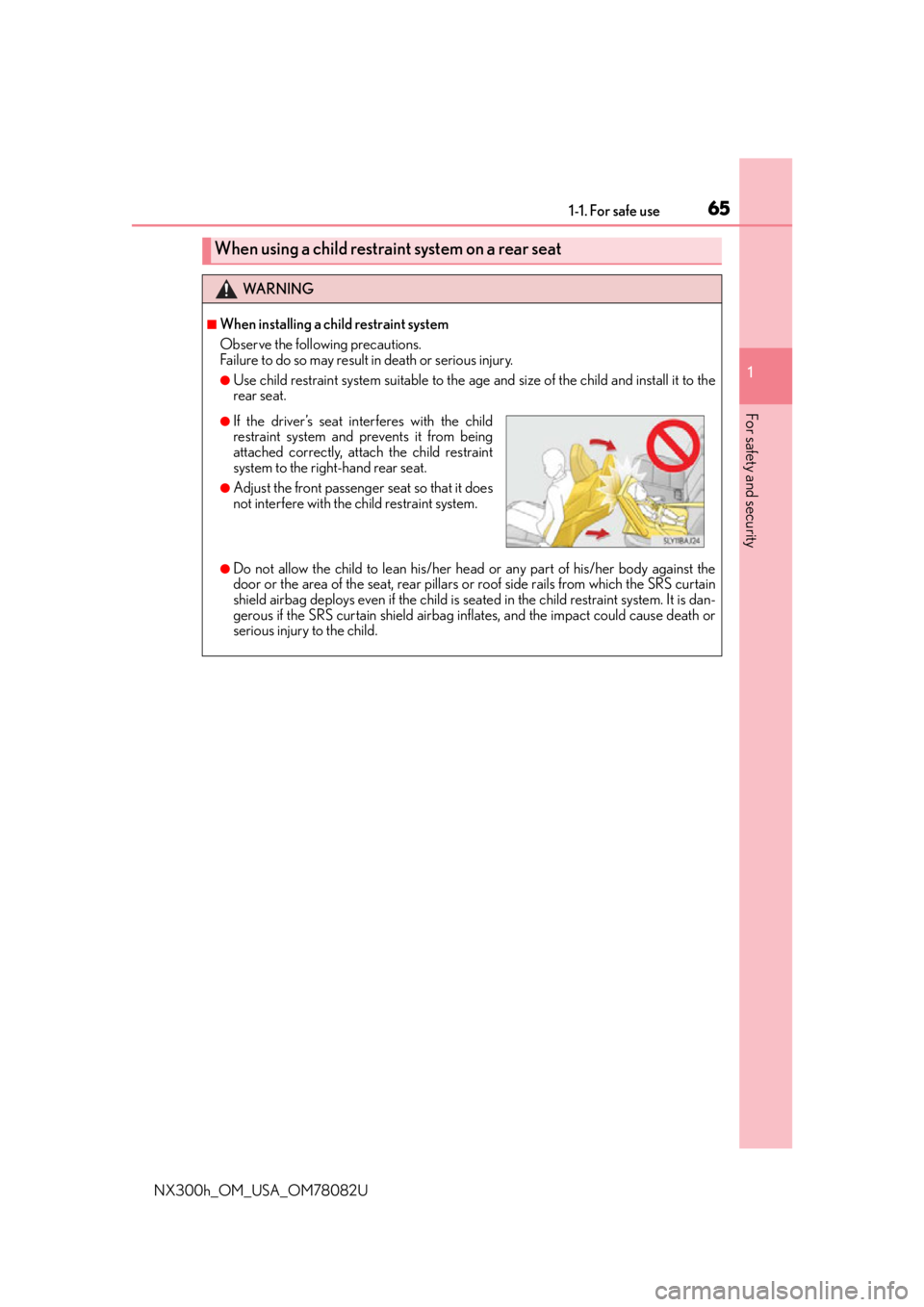
●If the driver’s seat interferes with the child
restraint system and prevents it from being
attached correctly, attach the child restraint
system to the right-hand rear seat.
●Adjust the front passenger seat so that it does
not interfere with the child restraint system.
Page 89 of 680
891-3. Theft deterrent system
1
For safety and security
NX300h_OM_USA_OM78082U
■System maintenance
The vehicle has a maintenance-free type alarm system.
■Items to check before locking the vehicle
To prevent unexpected triggering of the alarm and vehicle theft, make sure of the follow-
ing:
●Nobody is in the vehicle.
●The windows and moon roof (if equipped) are closed before the alarm is set.
●No valuables or other personal items are left in the vehicle.
■Triggering of the alarm
The alarm may be triggered in the following situations:
(Stopping the alarm deactivates the alarm system.)
■Alarm-operated door lock
In the following cases, depending on the situation, the door may automatically lock to
prevent improper entry into the vehicle:
●When a person remaining in the vehicle unlocks the door and the alarm is activated.
●While the alarm is activated, a person re maining in the vehicle unlocks the door.
●When recharging or replacing the 12-volt battery
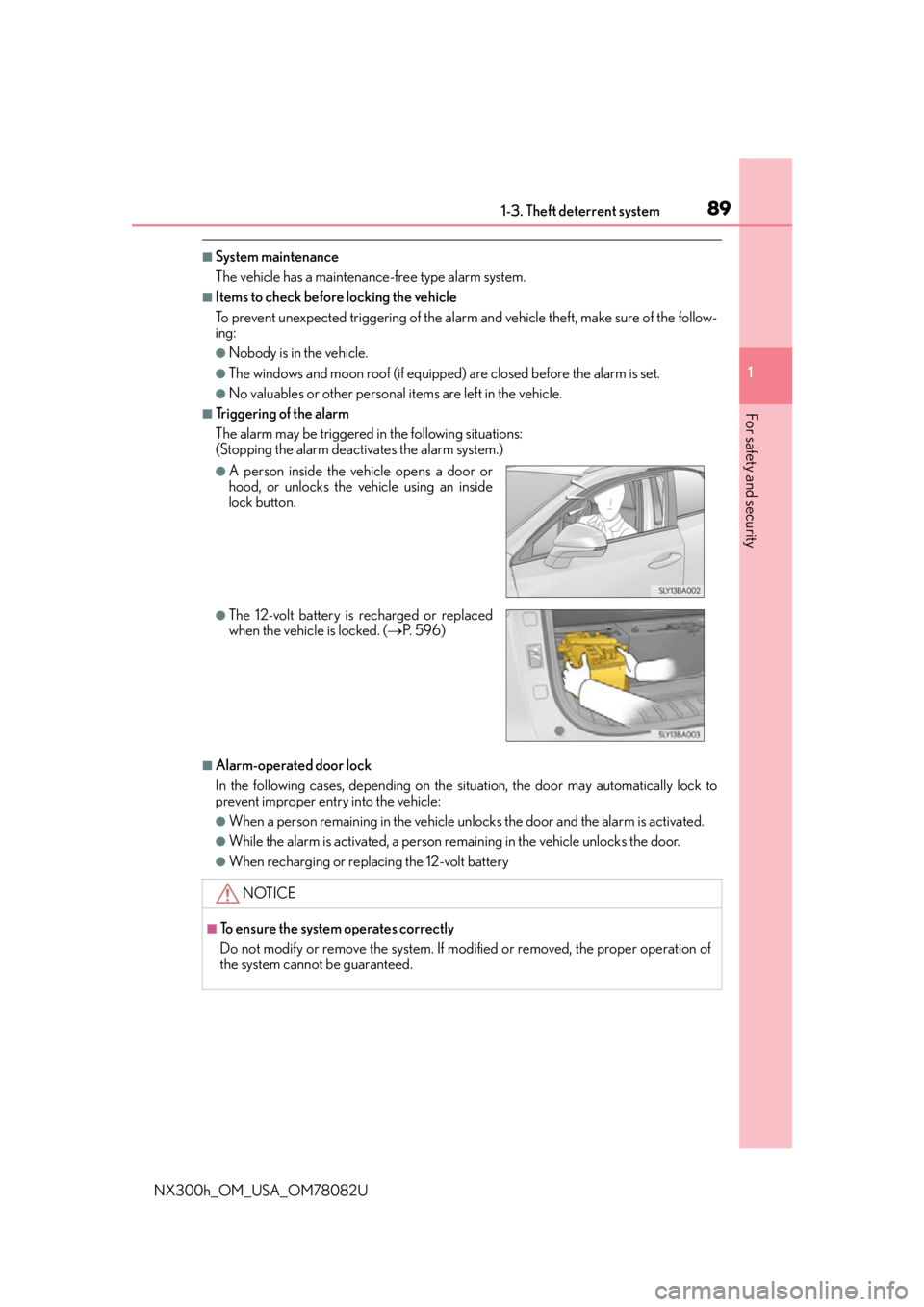
●A person inside the vehicle opens a door or
hood, or unlocks the vehicle using an inside
lock button.
●The 12-volt battery is recharged or replaced
when the vehicle is locked. (P. 5 9 6 )
NOTICE
■To ensure the system operates correctly
Do not modify or remove the system. If modified or removed, the proper operation of
the system cannot be guaranteed.
Page 117 of 680
117
3
Operation of
each component
NX300h_OM_USA_OM78082U
3-1. Key information
Keys ....................................................118
3-2. Opening, closing and locking the doors
Side doors ....................................... 124
Back door........................................129
Smart access system with push-button start...................... 140
3-3. Adjusting the seats Front seats ...................................... 146
Rear seats ........................................ 147
Driving position memory ......... 154
Head restraints ............................ 158
3-4. Adjusting the steering wheel and mirrors
Steering wheel ............................. 160
Inside rear view mirror................ 161
Outside rear view mirrors ....... 163
3-5. Opening, closing the windows and moon roof
Power windows ............................ 166
Moon roof .......................................169
Page 118 of 680
1183-1. Key information
NX300h_OM_USA_OM78082U
Keys
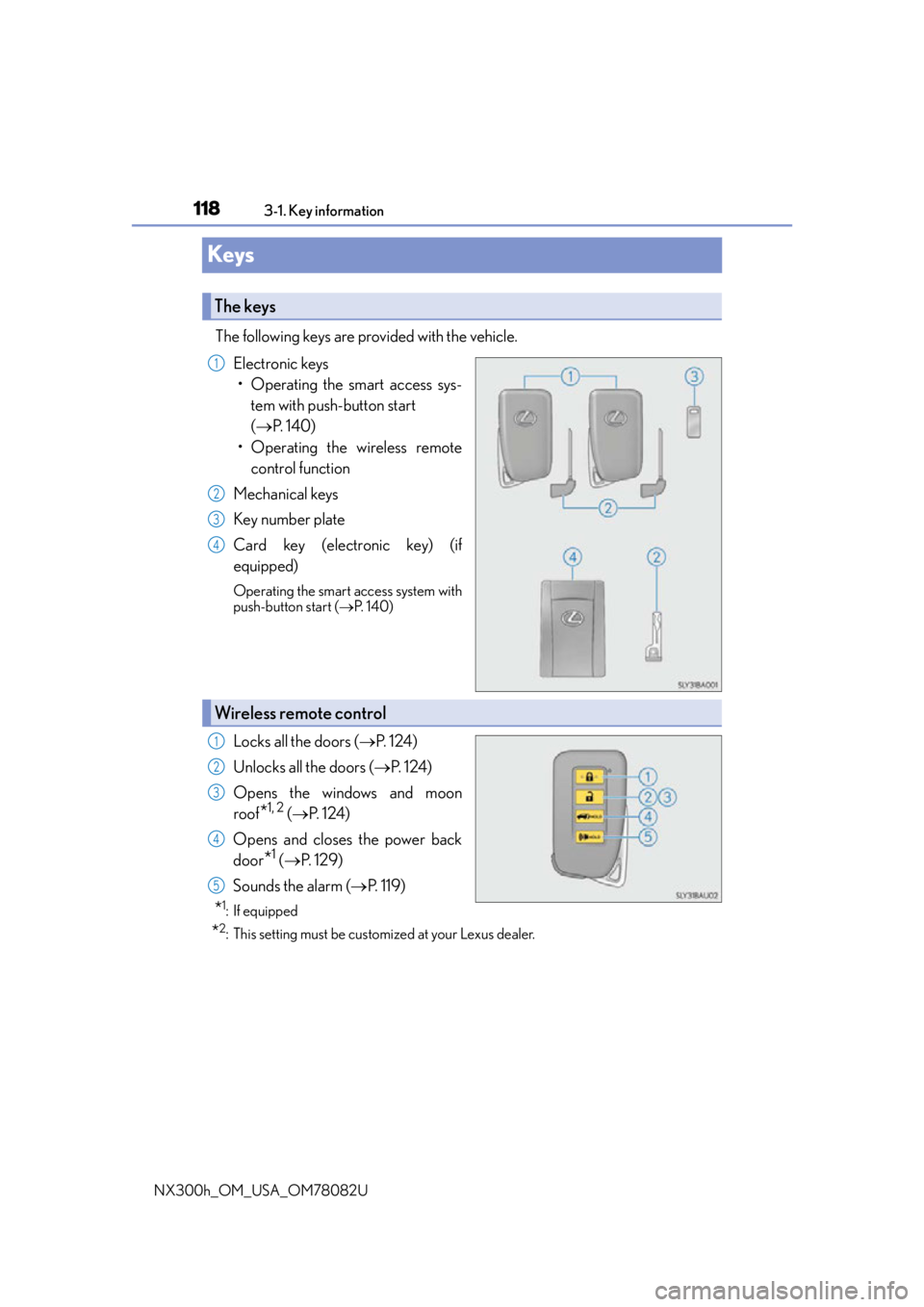
The following keys are provided with the vehicle. Electronic keys• Operating the smart access sys- tem with push-button start
( P. 1 4 0 )
• Operating the wireless remote control function
Mechanical keys
Key number plate
Card key (electronic key) (if
equipped)
Operating the smart access system with
push-button start ( P. 1 4 0 )
Locks all the doors ( P. 1 2 4 )
Unlocks all the doors ( P. 1 2 4 )
Opens the windows and moon
roof
*1, 2 ( P. 1 2 4 )
Opens and closes the power back
door
*1 ( P. 1 2 9 )
Sounds the alarm ( P. 1 1 9 )
*1:If equipped
*2: This setting must be customized at your Lexus dealer.
The keys
1
2
3
4
Wireless remote control
1
2
3
4
5
Page 120 of 680
1203-1. Key information
NX300h_OM_USA_OM78082U
■Card key (if equipped)
●The mechanical key that is st ored inside the card key should be used only if a problem
arises, such as when the card key does not operate properly.
●If it is difficult to take out the mechanical key, push down the release button using a pen
tip, etc. If it is still difficult to pull it out, use a coin, etc.
●The card key is not waterproof.
■When required to leave the vehicle’s key with a parking attendant
Lock the glove box as circumstances demand. ( P. 4 4 7 )
Remove the mechanical key for your own use and provide the attendant with the elec-
tronic key only.
■If you lose your mechanical keys
New genuine mechanical keys can be made by your Lexus dealer using another
mechanical key and the key number stamped on your key number plate. Keep the plate
in a safe place such as your wallet, not in the vehicle.
■When riding in an aircraft
When bringing an electronic key onto an aircraft, make sure you do not press any but-
tons on the electronic key while inside the airc raft cabin. If you are carrying an electronic
key in your bag, etc., ensure that the butt ons are not likely to be pressed accidentally.
Pressing a button may cause the electronic key to emit radio waves that could interfere
with the operation of the aircraft.
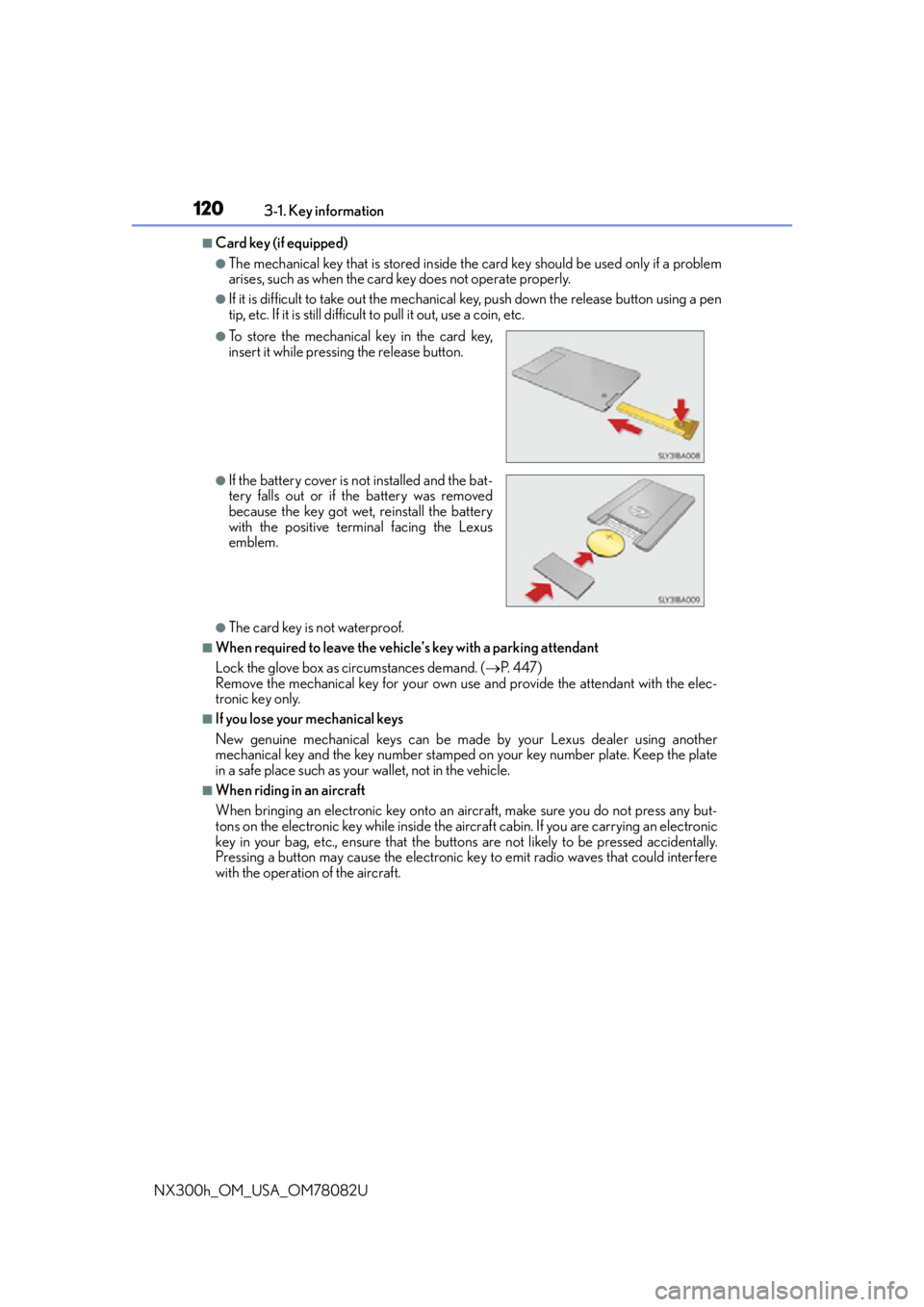
●To store the mechanical key in the card key,
insert it while pressing the release button.
●If the battery cover is not installed and the bat-
tery falls out or if the battery was removed
because the key got wet, reinstall the battery
with the positive terminal facing the Lexus
emblem.
Page 124 of 680
1243-2. Opening, closing and locking the doors
NX300h_OM_USA_OM78082U
Side doors
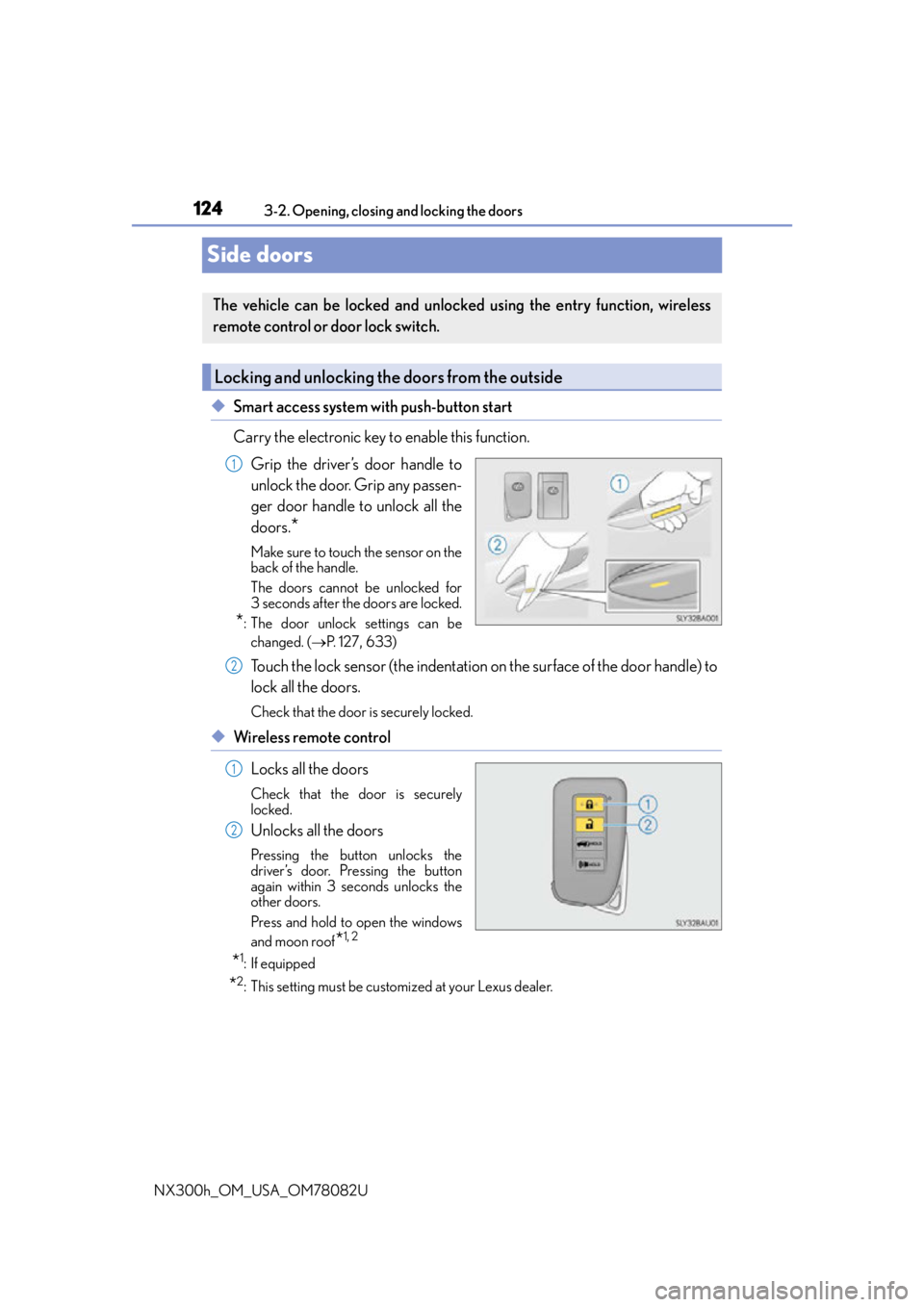
◆Smart access system with push-button start
Carry the electronic key to enable this function. Grip the driver’s door handle to
unlock the door. Grip any passen-
ger door handle to unlock all the
doors.
*
Make sure to touch the sensor on the
back of the handle.
The doors cannot be unlocked for
3 seconds after the doors are locked.
*: The door unlock settings can bechanged. ( P. 1 2 7 , 633)
Touch the lock sensor (the indentation on the surface of the door handle) to
lock all the doors.
Check that the door is securely locked.
◆Wireless remote control
Locks all the doors
Check that the door is securely
locked.
Unlocks all the doors
Pressing the button unlocks the
driver’s door. Pressing the button
again within 3 seconds unlocks the
other doors.
Press and hold to open the windows
and moon roof
*1, 2
*1:If equipped
*2: This setting must be customized at your Lexus dealer.
The vehicle can be locked and unlock ed using the entry function, wireless
remote control or door lock switch.
Locking and unlocking the doors from the outside
1
2
1
2
Page 166 of 680
1663-5. Opening, closing the windows and moon roof
NX300h_OM_USA_OM78082U
Power windows
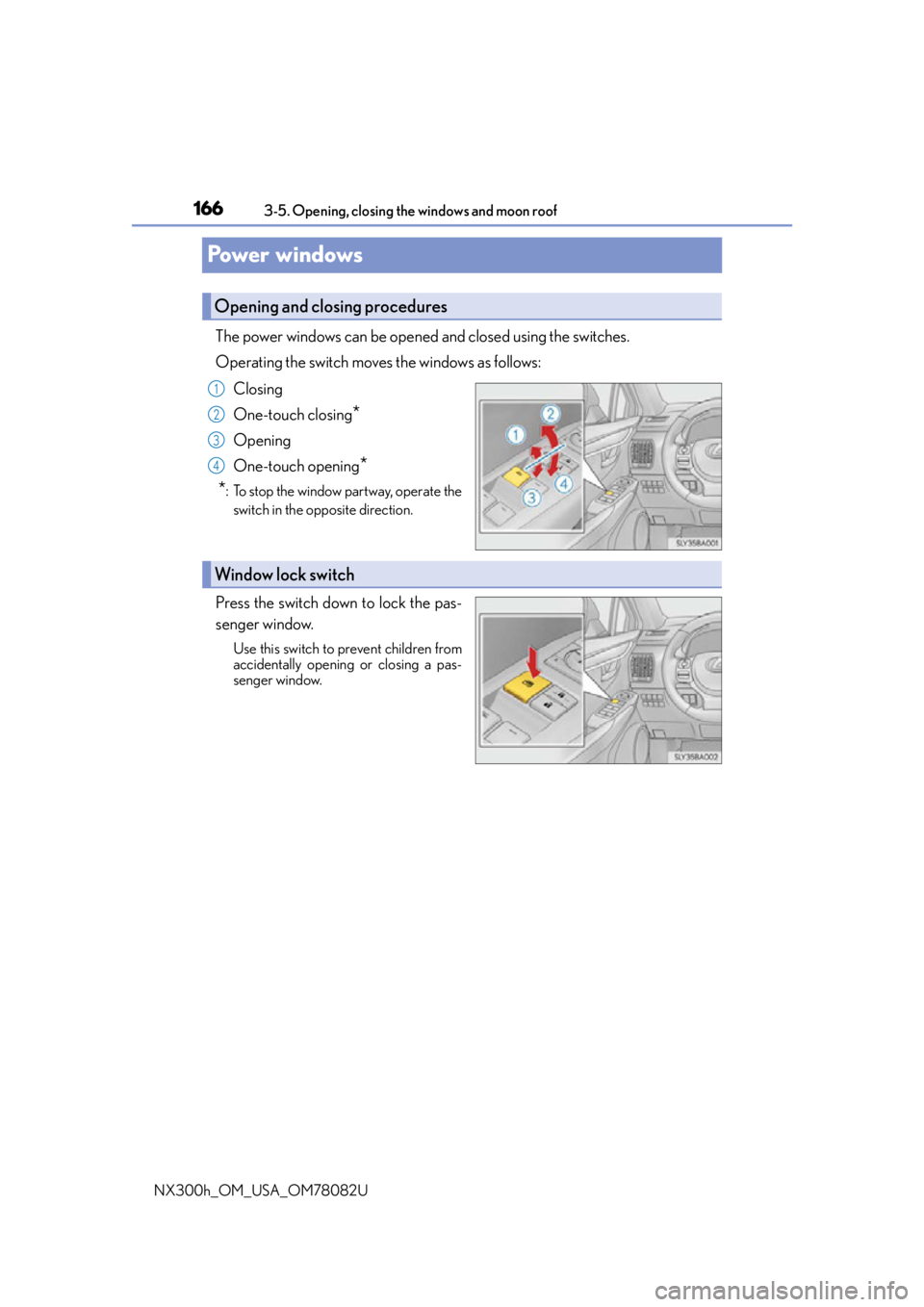
The power windows can be opened and closed using the switches.
Operating the switch moves the windows as follows: Closing
One-touch closing
*
Opening
One-touch opening
*
*
: To stop the window partway, operate the switch in the opposite direction.
Press the switch down to lock the pas-
senger window.
Use this switch to prevent children from
accidentally opening or closing a pas-
senger window.
Opening and closing procedures
1
2
3
4
Window lock switch
Page 167 of 680
1673-5. Opening, closing the windows and moon roof
3
Operation of each component
NX300h_OM_USA_OM78082U
■The power windows can be operated when
The power switch is in ON mode.
■Operating the power windows after turning the hybrid system off
The power windows can be operated for approximately 45 seconds even after the
power switch is turned to ACCESSORY mode or turned off. They cannot, however, be
operated once either front door is opened.
■Up jam protection function
If an object becomes caught between the window and the window frame, window travel
is stopped and the window is opened slightly.
■Down jam protection function
When the window is opening, if a foreign obje ct malfunction within the door causes it to
be clamped, the operation stops.
■When opening and closing the window cannot be done
When the up or down jam protection function operates unusually or the door window
cannot be fully opened and cl osed, perform the following op erations with the power win-
dow switch of that door.
●Stop the vehicle, with the power switch in ON mode, continually operate the power
window switch in the one-touch closing position within 4 seconds after the up jam or
down jam protection function was activated. Otherwise, by continually operating the
power window switch in the one-touch opening position, the door window can be
opened and closed.
●If the door window cannot be opened and closed even when performing the above
operations, implement the following pr ocedure for function initialization.
Turn the power switch to ON mode.
Pull and hold the power window switch in the one-touch closing position and com-
pletely close the door window.
Release the power window switch for a moment and then resume pulling and hold-
ing the switch in the one-touch closin g position for approximately 4 seconds.
Press and hold the power window switch in the one-touch opening position and
after the door window is co mpletely opened, continue ho lding the switch for a fur-
ther 1 second or more.
Pull and hold the power window switch in the one-touch closing position, once
more, and after the door window is comple tely closed, continue holding the switch
for a further 1 second or more.
If you release the switch while the window is moving, start again from the beginning.
If the window reverses and cannot be closed or completely open, have the vehicle
inspected by your Lexus dealer.
■Door lock linked window operation
●The power windows can be opened an d closed using the mechanical key.* ( P. 5 9 2 )
●The power windows can be opened us ing the wireless remote control.* (P. 1 2 4 )
*: These settings must be customized at your Lexus dealer.
1
2
3
4
5
Page 168 of 680
1683-5. Opening, closing the windows and moon roof
NX300h_OM_USA_OM78082U
■Power windows open warning buzzer
The buzzer sounds and a message is shown on the multi-information display in the instru-
ment cluster when the power switch is turned off and the driver’s door is opened with the
power windows open.
■Customization
Setting (e.g. linked door lock operation) can be changed.
(Customizable features:
P. 6 3 1 )
WA R N I N G
Observe the following precautions.
Failing to do so may result in death or serious injury.
■Closing the windows
●The driver is responsible for all the power window operations, including the operation
for the passengers. In order to prevent acci dental operation, especially by a child, do
not let a child operate the power windows. It is possible for children and other passen-
gers to have body parts caught in the power window. Also, when riding with a child, it
is recommended to use the window lock switch. ( P. 1 6 6 )
●Check to make sure that all passengers do not have any part of their body in a posi-
tion where it could be caught when a window is being operated.
●When using the mechanical key and oper ating the power windows, operate the
power window after checking to make sure that there is no possibility of any passen-
ger having any of their body parts caught in the window. Also do not let a child oper-
ate window by the mechanical key. It is possible for children and other passengers to
get caught in the power window.
●When exiting the vehicle, turn the power swit ch off, carry the key and exit the vehicle
along with the child. There may be accidental operation, due to mischief, etc., that
may possibly lead to an accident.
■Up jam protection function
●Never use any part of your body to intent ionally activate the up jam protection func-
tion.
●The up jam protection function may not work if something gets caught just before the
window fully closes.
■Down jam protection function
●Never allow passengers to use hands, arms, cloths, etc., to intentionally activate the
down jam protection function.
●The down jam protection function may not wo rk if a foreign object gets caught just
before the window completely opens. Be careful not to get hands, arms, clothes, etc.,
caught in the window.
Page 169 of 680
1693-5. Opening, closing the windows and moon roof
3
Operation of each component
NX300h_OM_USA_OM78082U
Moon roof
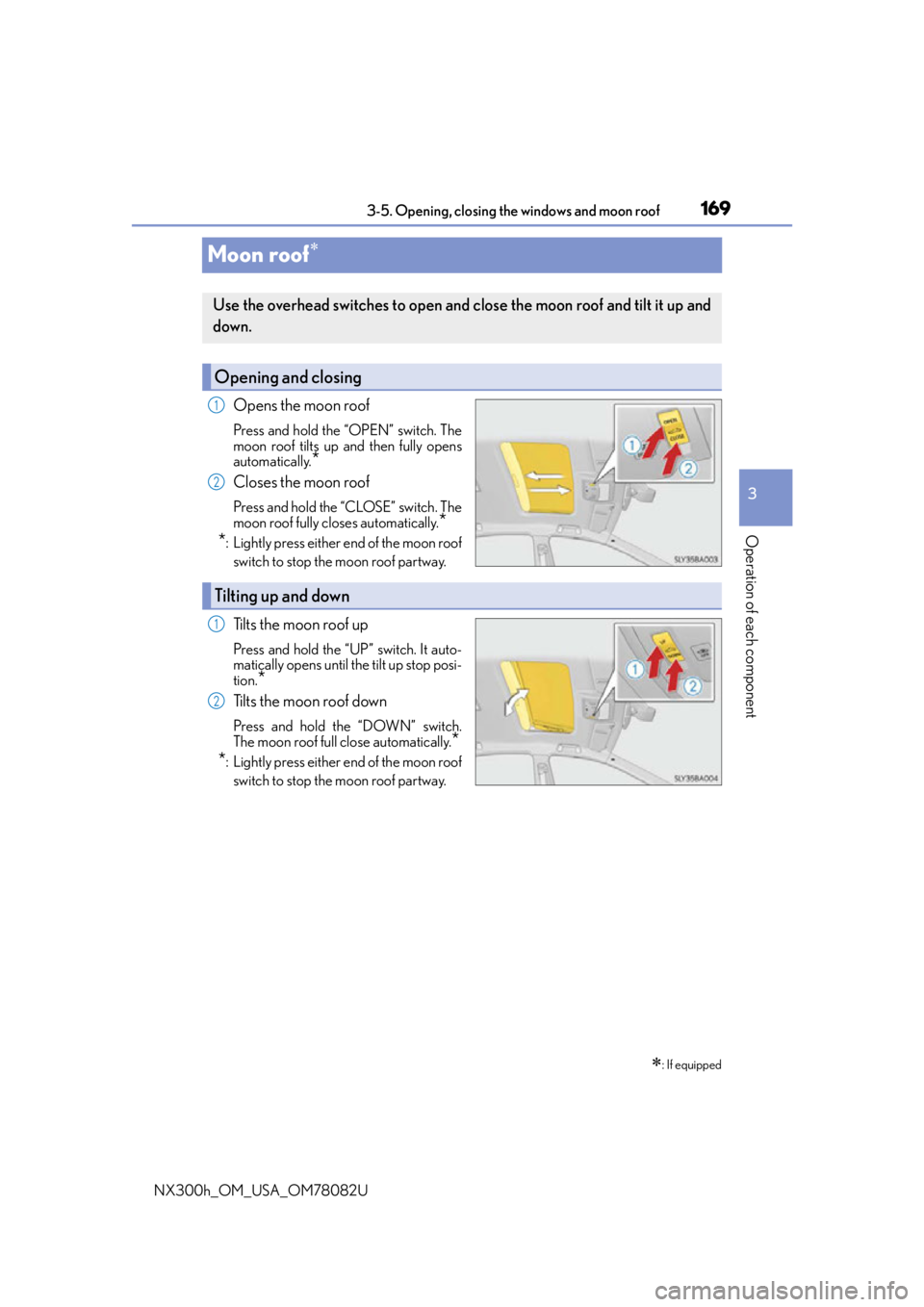
Opens the moon roof
Press and hold the “OPEN” switch. The
moon roof tilts up and then fully opens
automatically.
*
Closes the moon roof
Press and hold the “CLOSE” switch. The
moon roof fully closes automatically.
*
*
: Lightly press either end of the moon roof
switch to stop the moon roof partway.
Tilts the moon roof up
Press and hold the “UP” switch. It auto-
matically opens until the tilt up stop posi-
tion.
*
Tilts the moon roof down
Press and hold the “DOWN” switch.
The moon roof full close automatically.
*
*
: Lightly press either end of the moon roof
switch to stop the moon roof partway.
: If equipped
Use the overhead switches to open and close the moon roof and tilt it up and
down.
Opening and closing
1
2
Tilting up and down
1
2