warning lights LEXUS NX300H 2016 User Guide
[x] Cancel search | Manufacturer: LEXUS, Model Year: 2016, Model line: NX300H, Model: LEXUS NX300H 2016Pages: 680, PDF Size: 10.23 MB
Page 91 of 680
91
Instrument cluster2
NX300h_OM_USA_OM78082U
2. Instrument clusterWarning lights and indicators ....................................... 92
Gauges and meters ......................97
Multi-information display ........ 102
Head-up display .......................... 106
Energy monitor/ consumption screen .................. 111
Page 92 of 680
922. Instrument cluster
NX300h_OM_USA_OM78082U
Warning lights and indicators
The units used on the meter and some indicators may differ depending on the
target region.
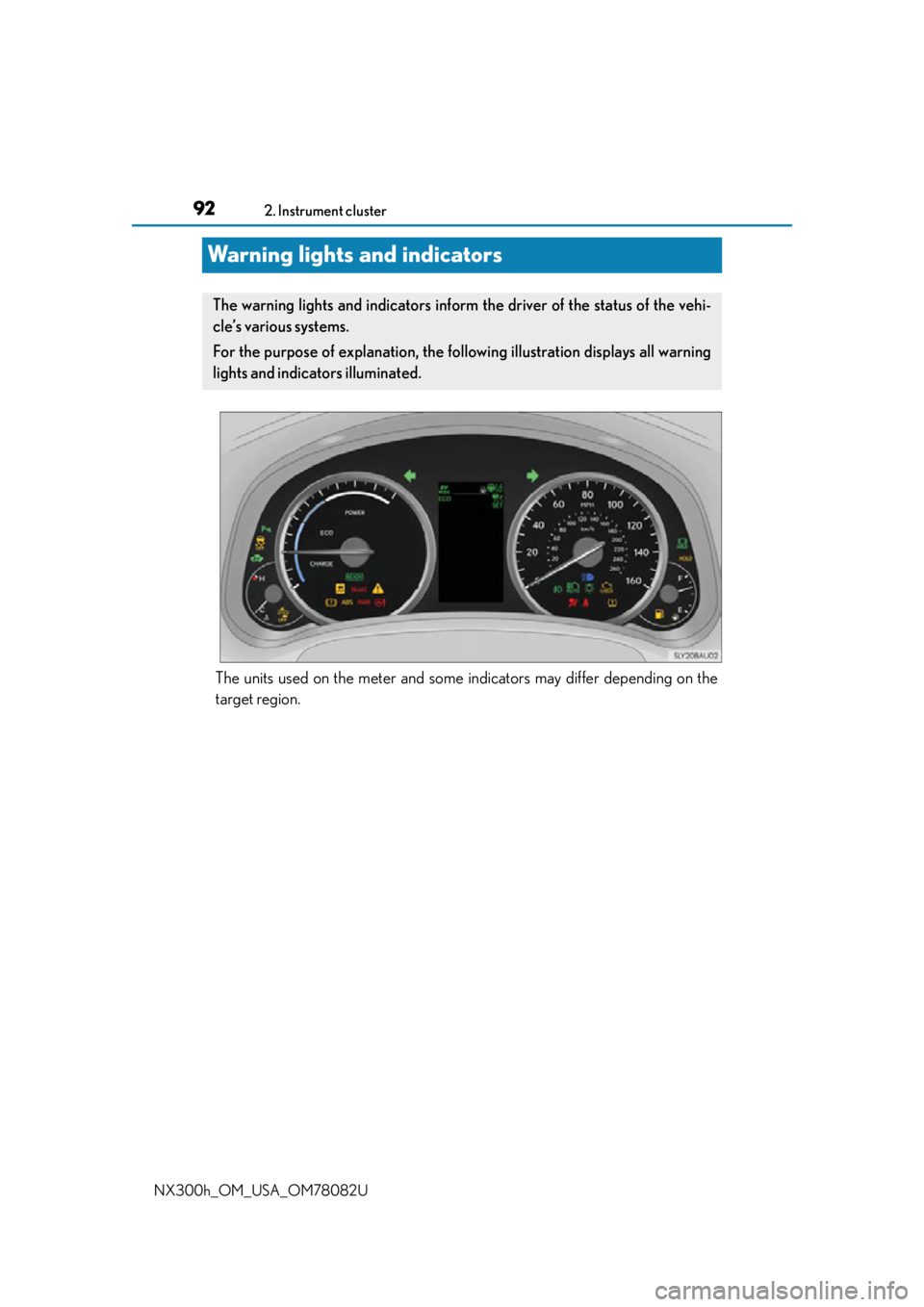
The warning lights and indicators inform the driver of the status of the vehi-
cle’s various systems.
For the purpose of explanation, the following illustration displays all warning
lights and indicators illuminated.
Page 93 of 680
932. Instrument cluster
2
Instrument cluster
NX300h_OM_USA_OM78082U
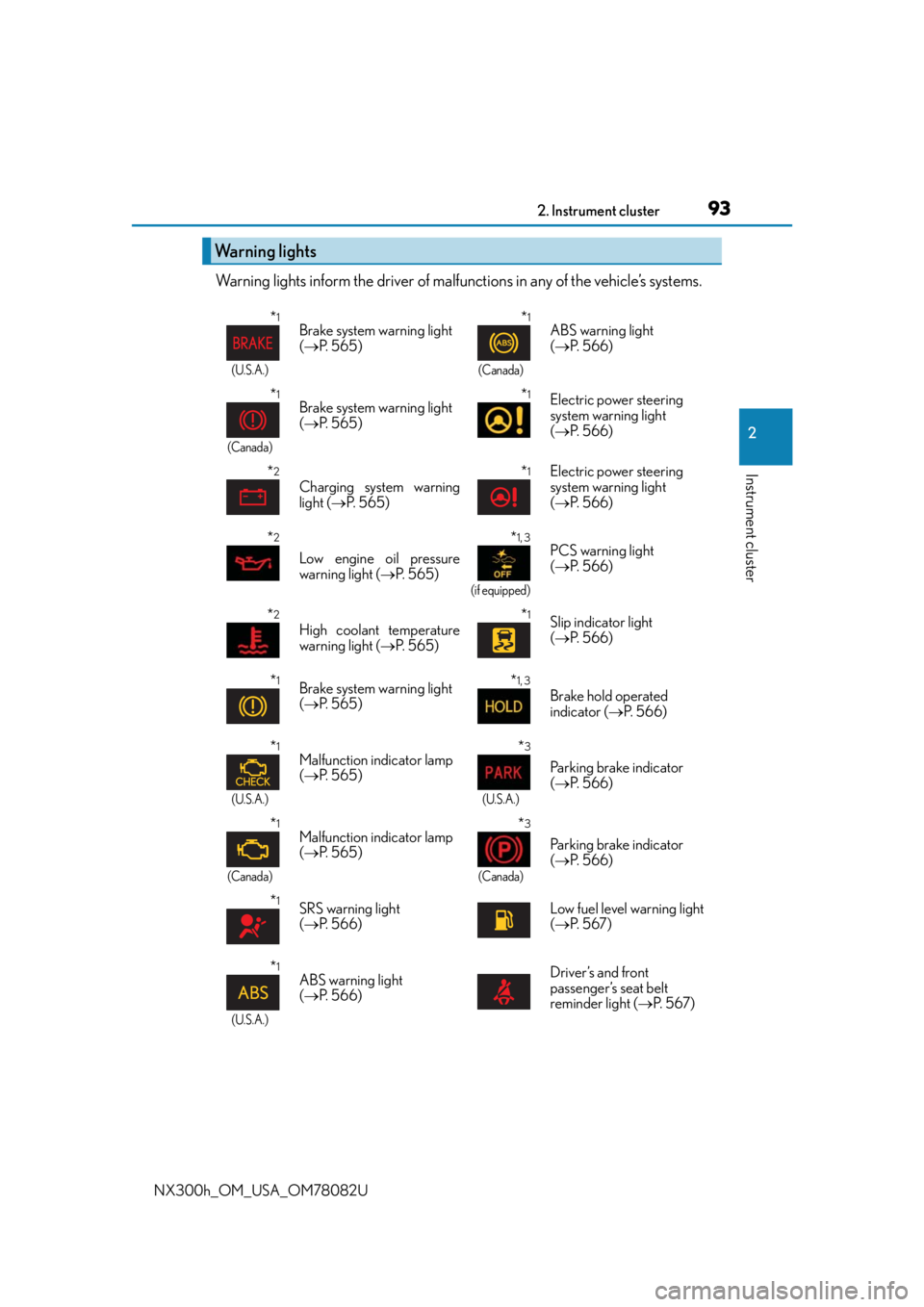
Warning lights inform the driver of malfunctions in any of the vehicle’s systems.
Warning lights
*1
(U.S.A.)
Brake system warning light
( P. 5 6 5 )*1
(Canada)
ABS warning light
( P. 5 6 6 )
*1
(Canada)
Brake system warning light
( P. 5 6 5 )*1Electric power steering
system warning light
( P. 5 6 6 )
*2
Charging system warning
light ( P. 5 6 5 )*1Electric power steering
system warning light
( P. 5 6 6 )
*2
Low engine oil pressure
warning light ( P. 565)
*1, 3
(if equipped)
PCS warning light
( P. 5 6 6 )
*2
High coolant temperature
warning light ( P. 565)*1Slip indicator light
( P. 5 6 6 )
*1Brake system warning light
( P. 5 6 5 )*1, 3
Brake hold operated
indicator ( P. 5 6 6 )
*1
(U.S.A.)
Malfunction indicator lamp
( P. 5 6 5 )*3
(U.S.A.)
Parking brake indicator
( P. 5 6 6 )
*1
(Canada)
Malfunction indicator lamp
( P. 5 6 5 )*3
(Canada)
Parking brake indicator
( P. 5 6 6 )
*1SRS warning light
( P. 5 6 6 ) Low fuel level warning light
(
P. 5 6 7 )
*1
(U.S.A.)
ABS warning light
( P. 5 6 6 ) Driver’s and front
passenger’s seat belt
reminder light (
P. 5 6 7 )
Page 94 of 680
942. Instrument cluster
NX300h_OM_USA_OM78082U
*1: These lights turn on when the power switch is turned to ON mode to indicate that a system check is being performed. They will turn off after the hybrid system is on, or
after a few seconds. There may be a malfunction in a system if the lights do not turn on,
or turn off. Have the vehicle inspected by your Lexus dealer.
*2: This light illuminates on the multi-information display.
*3: The light flashes to indicate a malfunction.
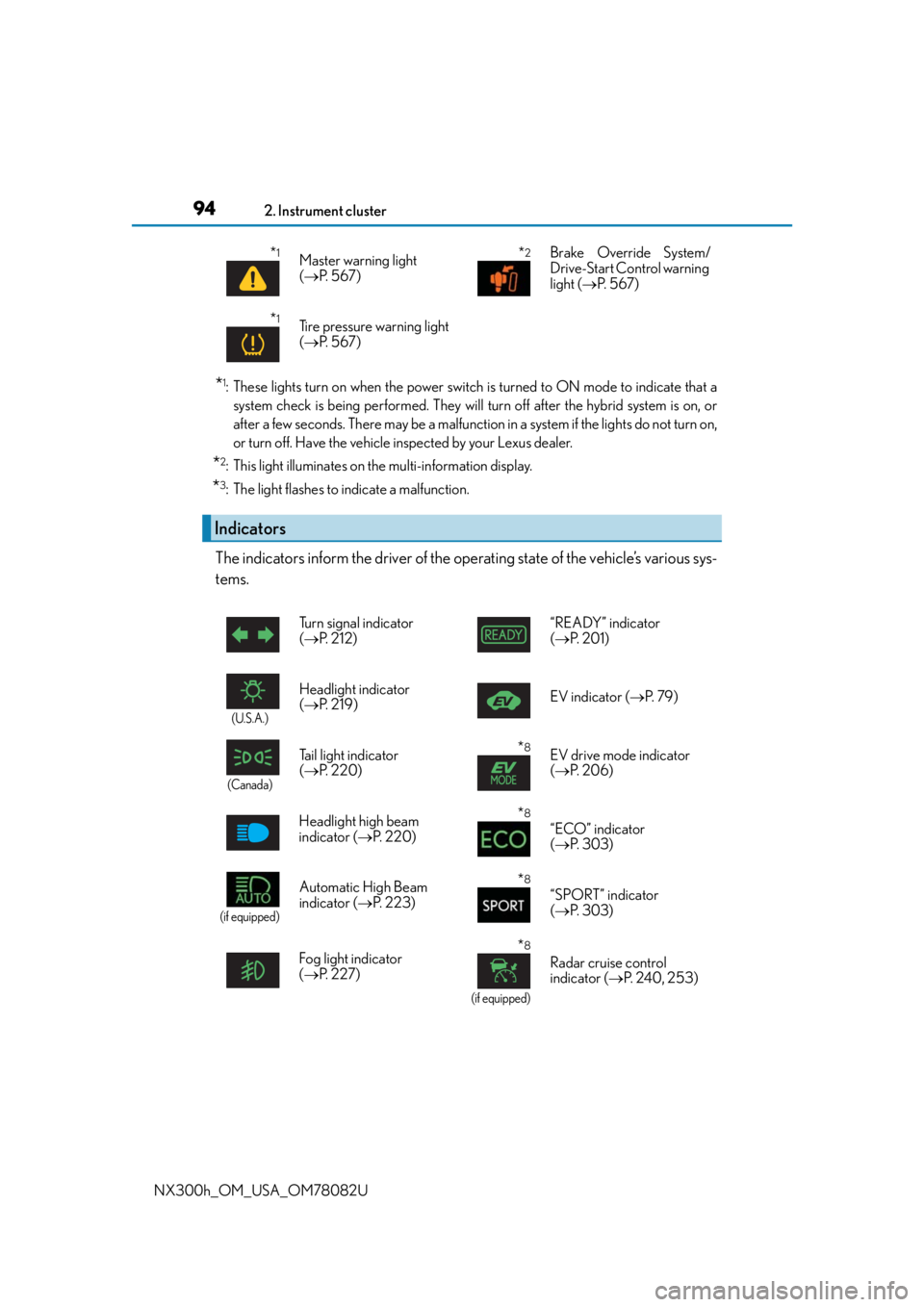
The indicators inform the driver of the operating state of the vehicle’s various sys-
tems.
*1Master warning light
( P. 5 6 7 )*2Brake Override System/
Drive-Start Control warning
light ( P. 5 6 7 )
*1Tire pressure warning light
( P. 5 6 7 )
Indicators
Turn signal indicator
( P. 212) “READY” indicator
(
P. 2 0 1 )
(U.S.A.)
Headlight indicator
( P. 2 1 9 ) EV indicator (
P. 7 9 )
(Canada)
Tail light indicator
( P. 220)*8EV drive mode indicator
( P. 2 0 6 )
Headlight high beam
indicator ( P. 220)
*8
“ECO” indicator
( P. 303)
(if equipped)
Automatic High Beam
indicator ( P. 223)*8
“SPORT” indicator
( P. 303)
Fog light indicator
( P. 2 2 7 )
*8
(if equipped)
Radar cruise control
indicator ( P. 2 4 0 , 2 5 3 )
Page 95 of 680
952. Instrument cluster
2
Instrument cluster
NX300h_OM_USA_OM78082U
*1: These lights turn on when the power switch is turned to the ON mode to indicate thata system check is being performed. They will turn off after the hybrid system is on, or
after a few seconds. There may be a malfunction in a system if the lights do not turn on,
or turn off. Have the vehicle inspected by your Lexus dealer.
*2: The light flashes to indicate that the system is operating.
*3: The light comes on when the system is turned off.
*4: When the outside temperature is approximately 37 F (3 C) or lower, the indicator
will flash for approximately 10 seconds, then stay on.
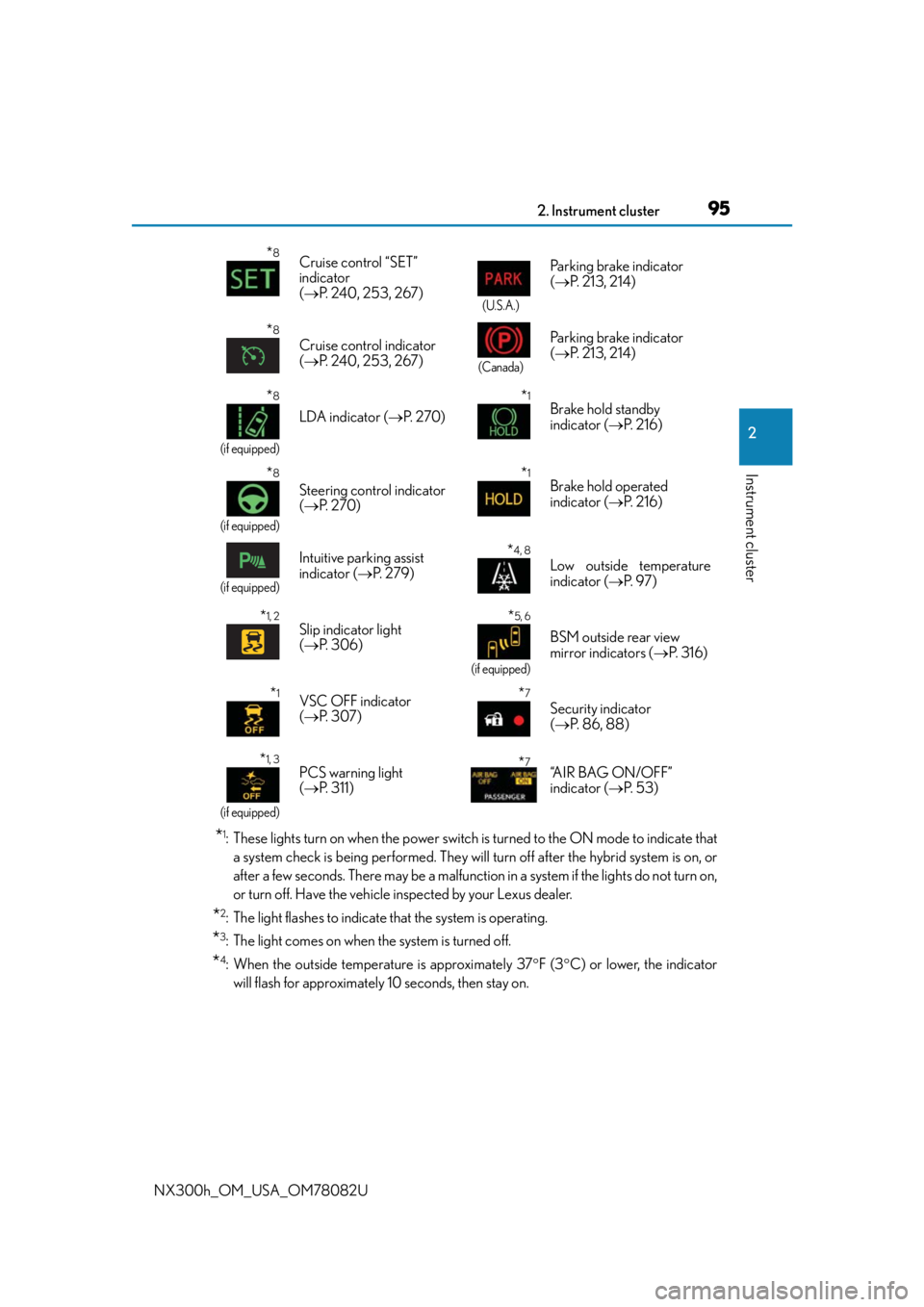
*8Cruise control “SET”
indicator
( P. 240, 253, 267)
(U.S.A.)
Parking brake indicator
( P. 213, 214)
*8
Cruise control indicator
( P. 240, 253, 267)
(Canada)
Parking brake indicator
( P. 213, 214)
*8
(if equipped)
LDA indicator ( P. 2 7 0 )
*1Brake hold standby
indicator ( P. 2 1 6 )
*8
(if equipped)
Steering control indicator
( P. 2 7 0 )
*1Brake hold operated
indicator ( P. 2 1 6 )
(if equipped)
Intuitive parking assist
indicator ( P. 2 7 9 )*4, 8
Low outside temperature
indicator ( P. 9 7 )
*1, 2Slip indicator light
( P. 3 0 6 )*5, 6
(if equipped)
BSM outside rear view
mirror indicators ( P. 3 1 6 )
*1VSC OFF indicator
( P. 3 0 7 )*7
Security indicator
( P. 86, 88)
*1, 3
(if equipped)
PCS warning light
( P. 311) *7“A I R B A G O N / O F F ”
indicator ( P. 5 3 )
Page 241 of 680
2414-5. Using the driving support systems
4
Driving
NX300h_OM_USA_OM78082U
This mode employs a radar sensor to detect the presence of vehicles up to
approximately 400 ft. (120 m) ahead, determines the current vehicle-to-vehicle
following distance, and operates to maintain a suitable following distance from
the vehicle ahead.
Note that vehicle-to-vehicle distance will close in when traveling on long downhill
slopes.
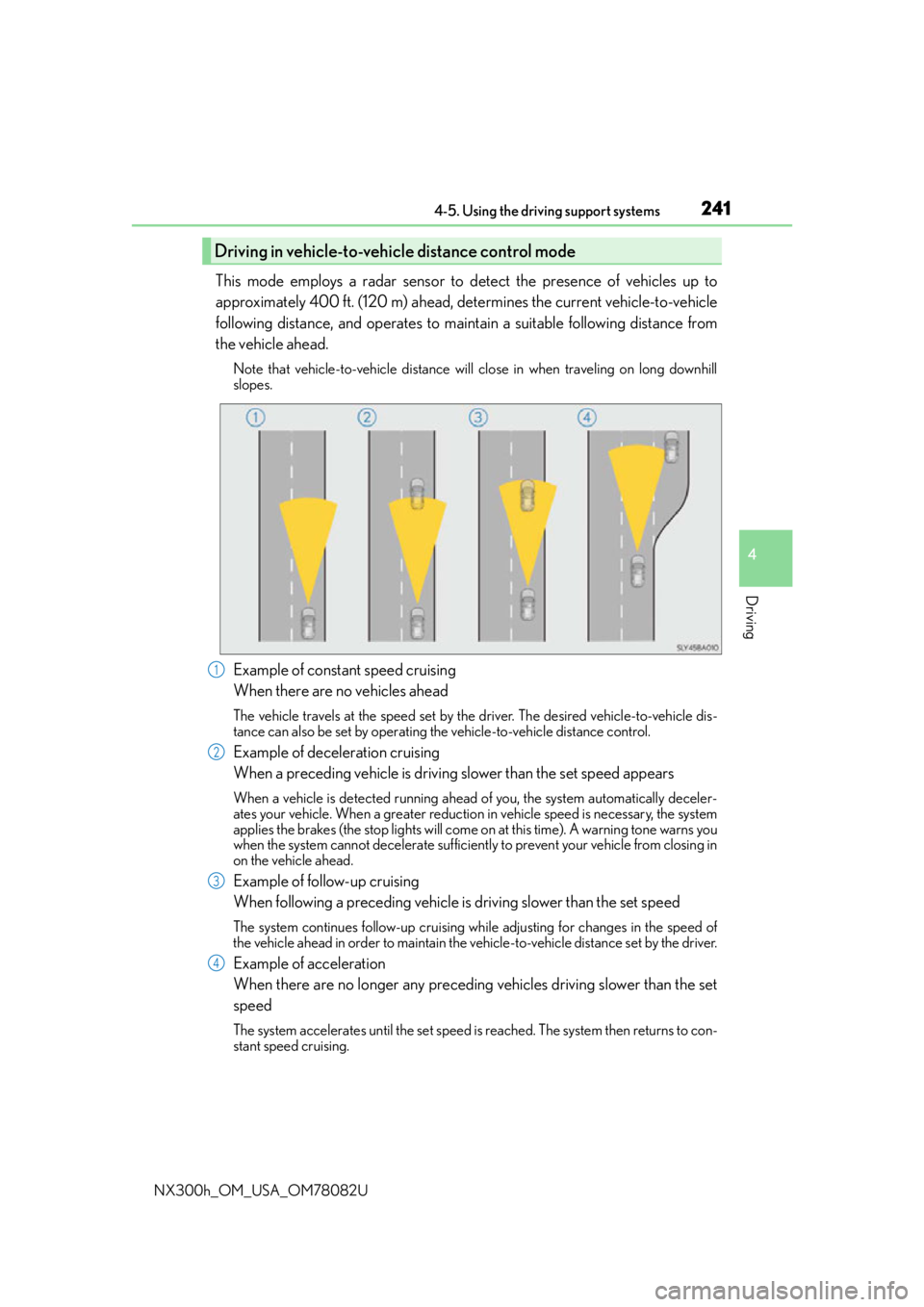
Example of constant speed cruising
When there are no vehicles ahead
The vehicle travels at the speed set by the driver. The desired vehicle-to-vehicle dis-
tance can also be set by operating the vehicle-to-vehicle distance control.
Example of deceleration cruising
When a preceding vehicle is driving slower than the set speed appears
When a vehicle is detected running ahead of you, the system automatically deceler-
ates your vehicle. When a greater reduction in vehicle speed is necessary, the system
applies the brakes (the stop lights will come on at this time). A warning tone warns you
when the system cannot decelera te sufficiently to prevent your vehicle from closing in
on the vehicle ahead.
Example of follow-up cruising
When following a preceding vehicle is driving slower than the set speed
The system continues follow-up cruising wh ile adjusting for changes in the speed of
the vehicle ahead in order to maintain the vehicle-to-vehicle distance set by the driver.
Example of acceleration
When there are no longer any preceding vehicles driving slower than the set
speed
The system accelerates until the set speed is reached. The system then returns to con-
stant speed cruising.
Driving in vehicle-to-vehicle distance control mode
1
2
3
4
Page 254 of 680

2544-5. Using the driving support systems
NX300h_OM_USA_OM78082U
This mode employs a radar sensor to detect the presence of vehicles up to
approximately 400 ft. (120 m) ahead, determines the current vehicle-to-vehicle
following distance, and operates to main tain a suitable following distance from
the vehicle ahead.
Note that vehicle-to-vehicle distance will close in when traveling on long downhill
slopes.
Example of constant speed cruising
When there are no vehicles ahead
The vehicle travels at the speed set by the driver. The desired vehicle-to-vehicle dis-
tance can also be set by operating the vehicle-to-vehicle distance control.
Example of deceleration cruising and follow-up cruising
When a preceding vehicle is driving slower than the set speed appears
When a vehicle is detected running ahead of you, the system automatically deceler-
ates your vehicle. When a greater reduction in vehicle speed is necessary, the system
applies the brakes (the stop lights will come on at this time). The system will respond to
changes in the speed of the vehicle ahead in order to maintain the vehicle-to-vehicle
distance set by the driver. A warning tone warns you when the system cannot deceler-
ate sufficiently to prevent your vehicl e from closing in on the vehicle ahead.
When the vehicle ahead of you stops, your ve hicle will also stop (vehicle is stopped by
system control). After the vehicle ahead starts off, pushing the cruise control lever up
or depressing the accelerator peda l will resume follow-up cruising.
Example of acceleration
When there are no longer any preceding vehicles driving slower than the set
speed
The system accelerates until the set speed is reached. The system then returns to con-
stant speed cruising.
Driving in vehicle-to-vehicle distance control mode
1
2
3
Page 276 of 680
2764-5. Using the driving support systems
NX300h_OM_USA_OM78082U
●When the lane markers are on a curb, etc.
●When driving on a particularly brig ht road surface, such as concrete
●When driving on a road surface that is bright due to reflected light
●When driving in a location where the light level changes rapi dly, such as the entrance to
or exit from a tunnel
●When sunlight or the headlights of oncoming vehicles are shining directly into the cam-
era lens
●When driving on roads that are branching or merging
●When driving on a hill
●When driving on winding roads or roads that are uneven
●When driving on rough or unpaved roads
●When driving on a sharp curve
●When lane markers are extremely narrow or extremely wide
●When the vehicle leans to one side an unus ual amount due to a heavy load or improper
tire inflation pressure
●When the following distance between your vehicle and the vehicle ahead is extremely
short
●When the vehicle experiences strong up-and -down motion such as when driving on an
extremely rough road or on a seam in the pavement
● When headlight brightness at nighttime is reduced due to dirt on the lenses, or when
the headlights are misaligned
●When receiving a side wind
■When changing the tires
Depending on the tires used such as snow ti res, etc., sufficient performance may not be
maintainable.
■Warning messages for the LDA
Warning messages are used to indicate a syst em malfunction or to inform the driver of
the need for caution while driving. If a wa rning message is shown on the multi-informa-
tion display, read the message and follow the instructions.
Also, even if a warning message is displayed, it will not impede normal driving.
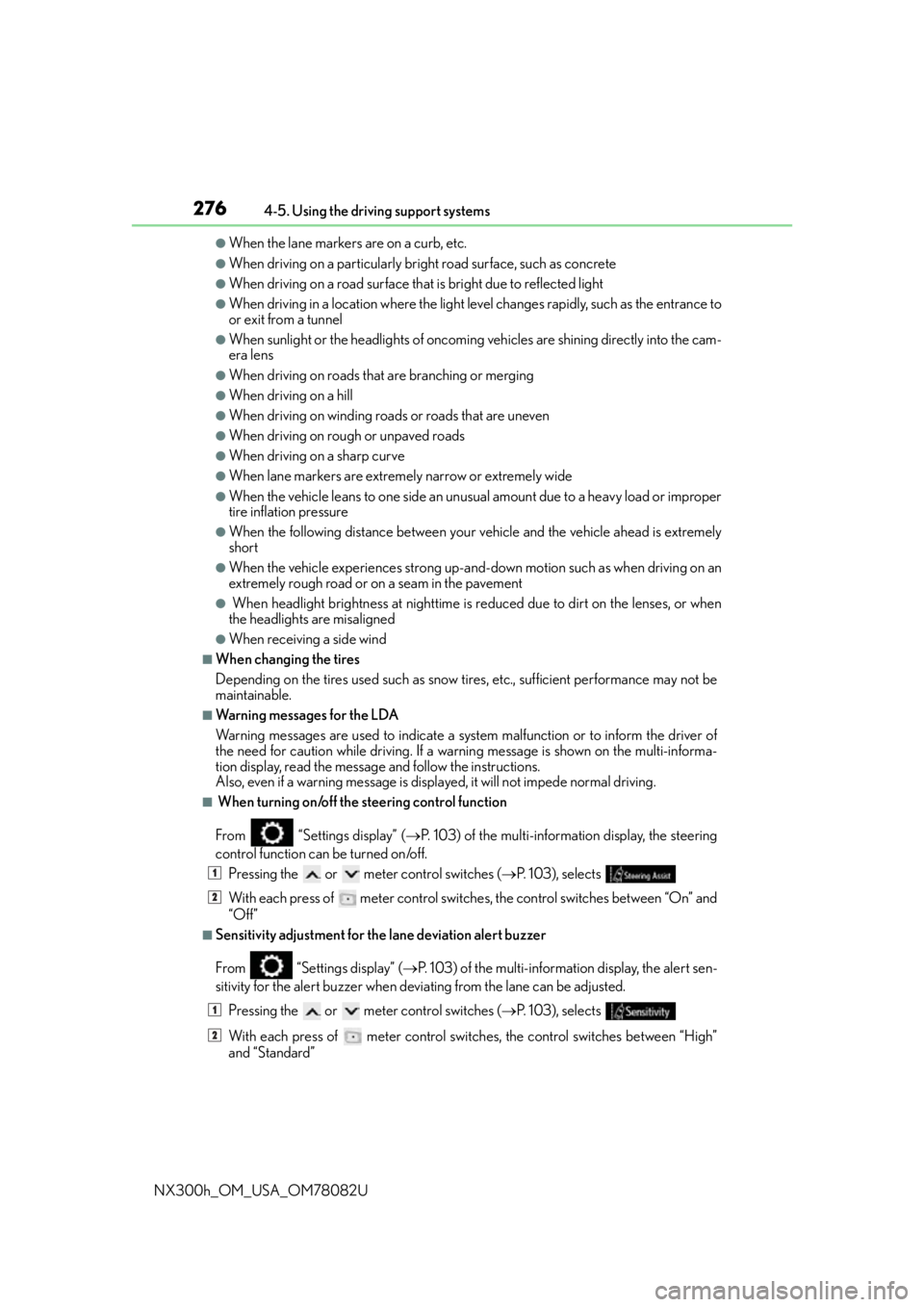
■ When turning on/off the steering control function
From “Settings display” ( P. 103) of the multi-information display, the steering
control function can be turned on/off.
Pressing the or meter control switches ( P. 103), selects
With each press of meter control switch es, the control switches between “On” and
“Off”
■Sensitivity adjustment for th e lane deviation alert buzzer
From
“Settings display” ( P. 103) of the multi-inform ation display, the alert sen-
sitivity for the alert buzzer when deviating from the lane can be adjusted.
Pressing the or meter control switches ( P. 103), selects
With each press of meter control switches, the control switches between “High”
and “Standard”
1
2
1
2
Page 565 of 680
565
8
When trouble arises
8-2. Steps to take in an emergency
NX300h_OM_USA_OM78082U
If a warning light turns on or a warning buzzer
sounds
Calmly perform the following actions if any of the warning lights comes on or
flashes. If a light comes on or flashes, bu t then goes off, this does not necessar-
ily indicate a malfunction in the system. However, if this continues to occur,
have the vehicle inspected by your Lexus dealer.
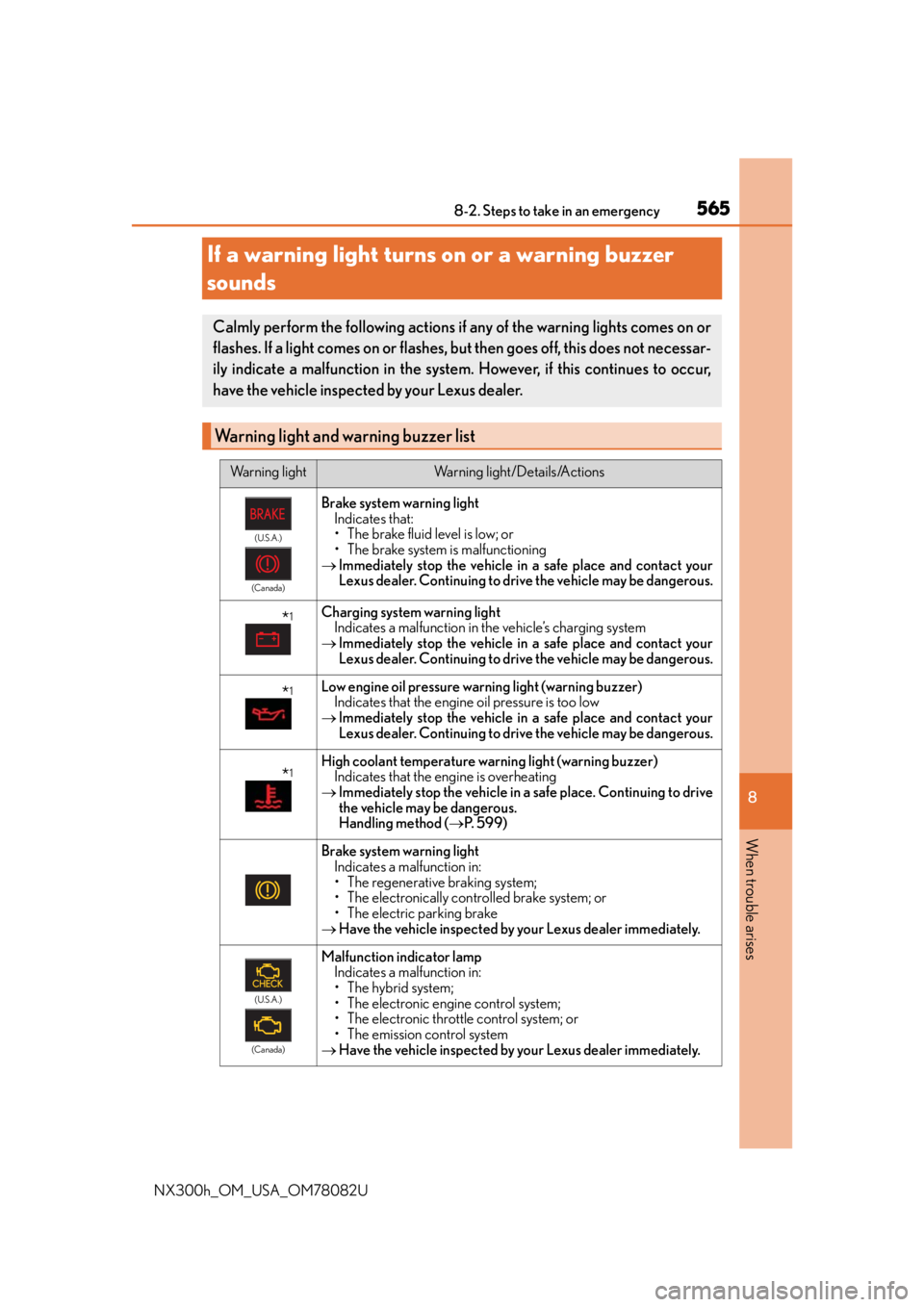
Warning light and warning buzzer list
Warning lightWarning light/Details/Actions
(U.S.A.)
(Canada)
Brake system warning light Indicates that:
• The brake fluid level is low; or
• The brake system is malfunctioning
Immediately stop the vehicle in a safe place and contact your
Lexus dealer. Continuing to drive the vehicle may be dangerous.
*1Charging system warning light
Indicates a malfunction in the vehicle’s charging system
Immediately stop the vehicle in a safe place and contact your
Lexus dealer. Continuing to drive the vehicle may be dangerous.
*1Low engine oil pressure warning light (warning buzzer)
Indicates that the engine oil pressure is too low
Immediately stop the vehicle in a safe place and contact your
Lexus dealer. Continuing to drive the vehicle may be dangerous.
*1High coolant temperature warning light (warning buzzer)
Indicates that the engine is overheating
Immediately stop the vehicle in a safe place. Continuing to drive
the vehicle may be dangerous.
Handling method ( P. 5 9 9 )
Brake system warning light
Indicates a malfunction in:
• The regenerative braking system;
• The electronically controlled brake system; or
• The electric parking brake
Have the vehicle inspected by your Lexus dealer immediately.
(U.S.A.)
(Canada)
Malfunction indicator lamp Indicates a malfunction in:
• The hybrid system;
• The electronic engine control system;
• The electronic throttle control system; or
• The emission control system
Have the vehicle inspected by your Lexus dealer immediately.
Page 570 of 680
5708-2. Steps to take in an emergency
NX300h_OM_USA_OM78082U
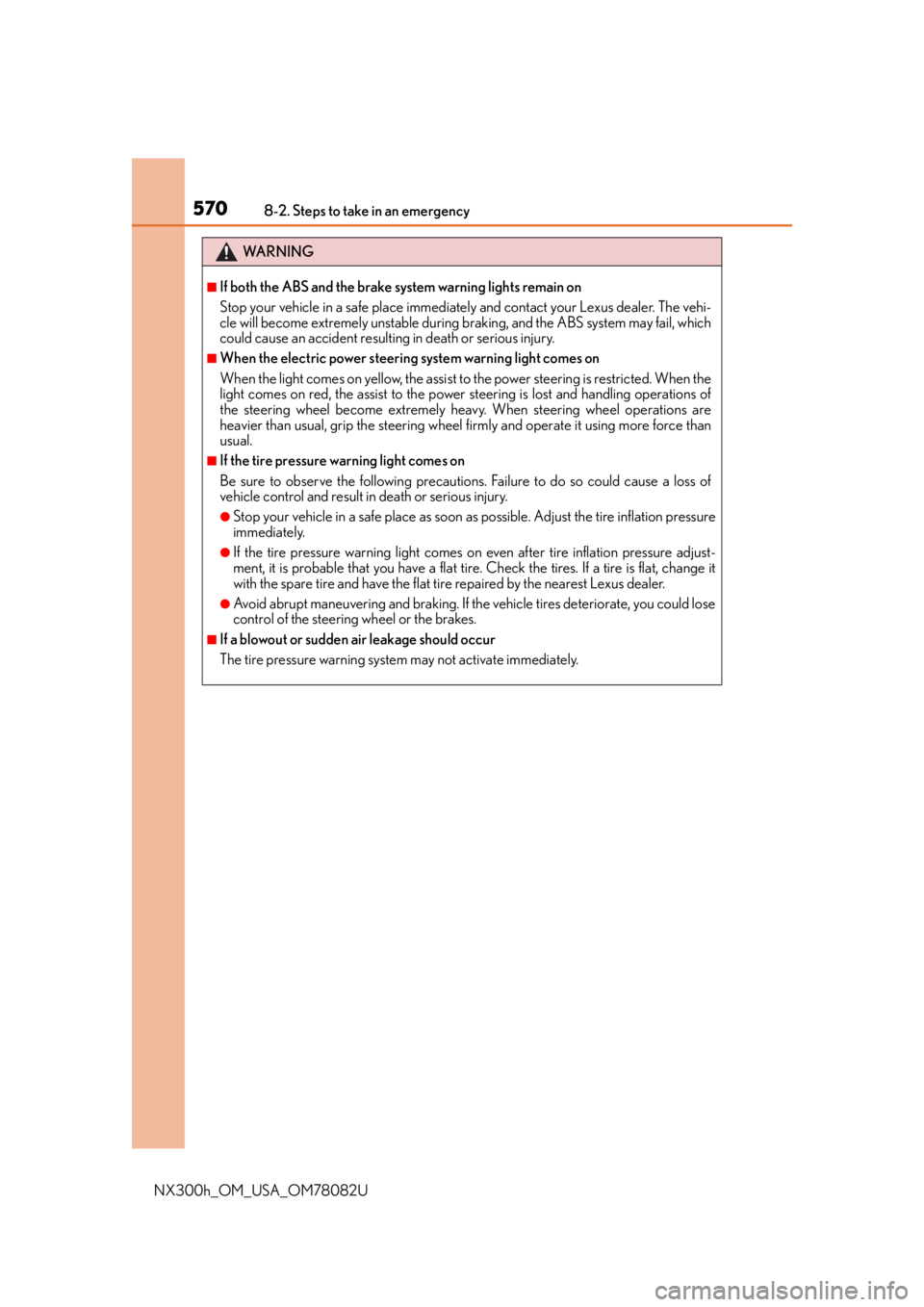
WA R N I N G
■If both the ABS and the brake system warning lights remain on
Stop your vehicle in a safe place immediately and contact your Lexus dealer. The vehi-
cle will become extremely unstable during braking, and the ABS system may fail, which
could cause an accident resulting in death or serious injury.
■When the electric power steering system warning light comes on
When the light comes on yellow, the assist to the power steering is restricted. When the
light comes on red, the assist to the power steering is lost and handling operations of
the steering wheel become extremely heavy. When steering wheel operations are
heavier than usual, grip the steering wheel firmly and operate it using more force than
usual.
■If the tire pressure warning light comes on
Be sure to observe the following precautions. Failure to do so could cause a loss of
vehicle control and result in death or serious injury.
●Stop your vehicle in a safe place as soon as possible. Adjust the tire inflation pressure
immediately.
●If the tire pressure warning light comes on even after tire inflation pressure adjust-
ment, it is probable that you have a flat tire. Check the tires. If a tire is flat, change it
with the spare tire and have the flat tire repaired by the nearest Lexus dealer.
●Avoid abrupt maneuvering and braking. If the vehicle tires deteriorate, you could lose
control of the steering wheel or the brakes.
■If a blowout or sudden air leakage should occur
The tire pressure warning system may not activate immediately.