ECU LEXUS NX300H 2016 Service Manual
[x] Cancel search | Manufacturer: LEXUS, Model Year: 2016, Model line: NX300H, Model: LEXUS NX300H 2016Pages: 680, PDF Size: 10.23 MB
Page 86 of 680

861-3. Theft deterrent system
NX300h_OM_USA_OM78082U
Immobilizer system
The indicator light flashes after the
power switch has been turned off to
indicate that the system is operating.
The indicator light stops flashing after
the power switch has been turned to
ACCESSORY or ON mode to indi-
cate that the system has been canceled.
■System maintenance
The vehicle has a maintenance-free type immobilizer system.
■Conditions that may cause the system to malfunction
●If the grip portion of the key is in contact with a metallic object
●If the key is in close proximity to or touching a key registered to the security system (key
with a built-in transponder chip) of another vehicle
■Certification for the immobilizer system
For vehicles sold in the U.S.A.
FCC ID: NI4TMIMB-3
This device complies with part 15 of the FC C Rules. Operation is subject to the following
two conditions: (1) This device may not caus e harmful interference; and (2) This device
must accept any interference received, incl uding interference that may cause undesired
operation.
Changes or modifications not expressly approved by the party responsible for compli-
ance could void the user’s authority to operate the equipment.
For vehicles sold in Canada
This device complies with Industry Canada licence-exempt RSSs. Operation is subject
to the following two conditions: (1) This de vice may not cause interference; and (2) This
device must accept any interference, includ ing interference that may cause undesired
operation of the device.
The vehicle’s keys have built-in transponder chips that prevent the hybrid sys-
tem from starting if a key has not been previously registered in the vehicle’s
on-board computer.
Never leave the keys inside the vehicle when you leave the vehicle.
This system is designed to help prevent vehicle theft but does not guarantee
absolute security against all vehicle thefts.
Page 87 of 680

871-3. Theft deterrent system
1
For safety and security
NX300h_OM_USA_OM78082U
WA R N I N G
■Certifications for the immobilizer system
Changes or modifications not expressly approved by the party responsible for compli-
ance could void the user’s authority to operate the equipment.
NOTICE
■To ensure the system operates correctly
Do not modify or remove the system. If modified or removed, the proper operation of
the system cannot be guaranteed.
Page 89 of 680
891-3. Theft deterrent system
1
For safety and security
NX300h_OM_USA_OM78082U
■System maintenance
The vehicle has a maintenance-free type alarm system.
■Items to check before locking the vehicle
To prevent unexpected triggering of the alarm and vehicle theft, make sure of the follow-
ing:
●Nobody is in the vehicle.
●The windows and moon roof (if equipped) are closed before the alarm is set.
●No valuables or other personal items are left in the vehicle.
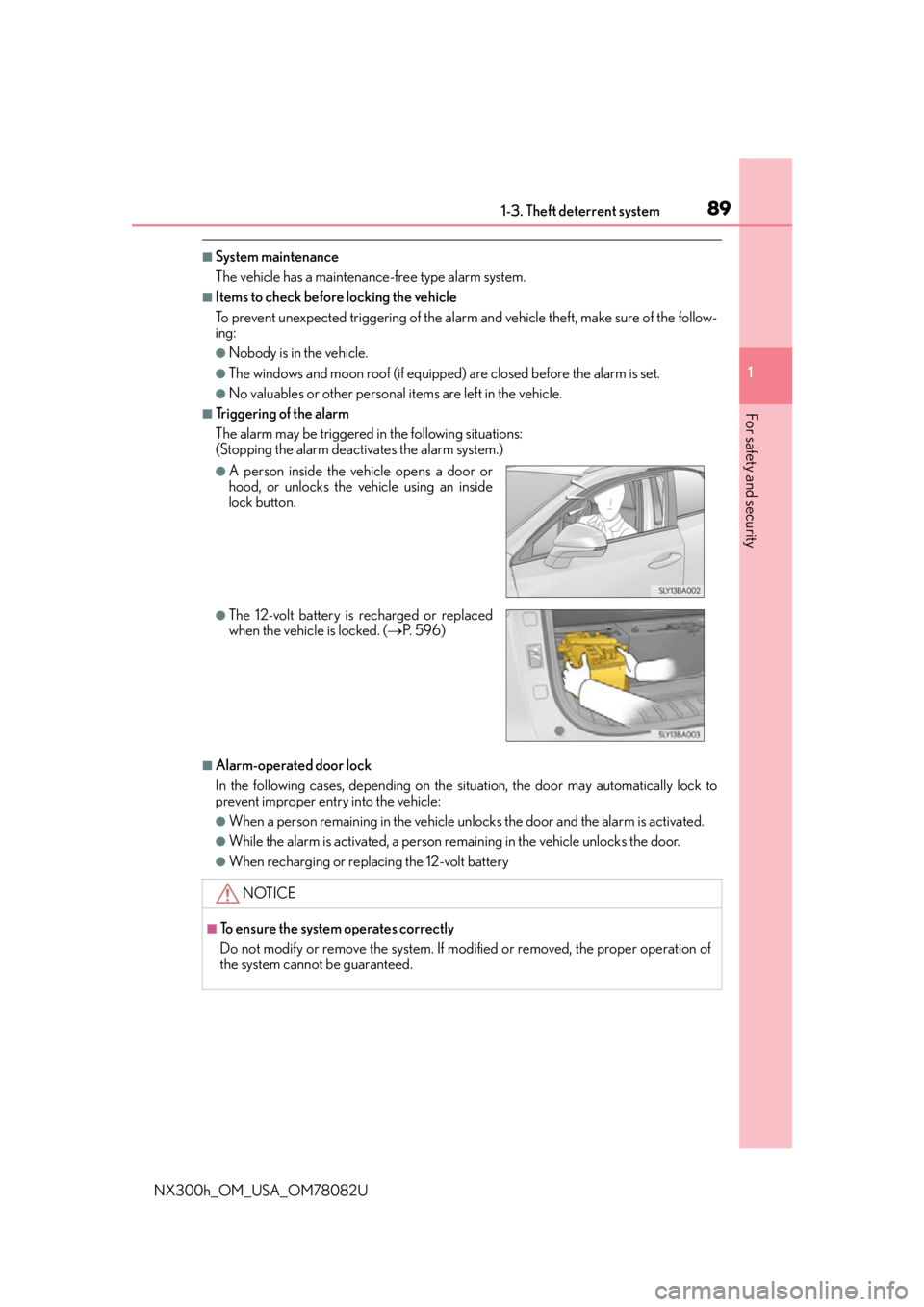
■Triggering of the alarm
The alarm may be triggered in the following situations:
(Stopping the alarm deactivates the alarm system.)
■Alarm-operated door lock
In the following cases, depending on the situation, the door may automatically lock to
prevent improper entry into the vehicle:
●When a person remaining in the vehicle unlocks the door and the alarm is activated.
●While the alarm is activated, a person re maining in the vehicle unlocks the door.
●When recharging or replacing the 12-volt battery
●A person inside the vehicle opens a door or
hood, or unlocks the vehicle using an inside
lock button.
●The 12-volt battery is recharged or replaced
when the vehicle is locked. (P. 5 9 6 )
NOTICE
■To ensure the system operates correctly
Do not modify or remove the system. If modified or removed, the proper operation of
the system cannot be guaranteed.
Page 95 of 680
952. Instrument cluster
2
Instrument cluster
NX300h_OM_USA_OM78082U
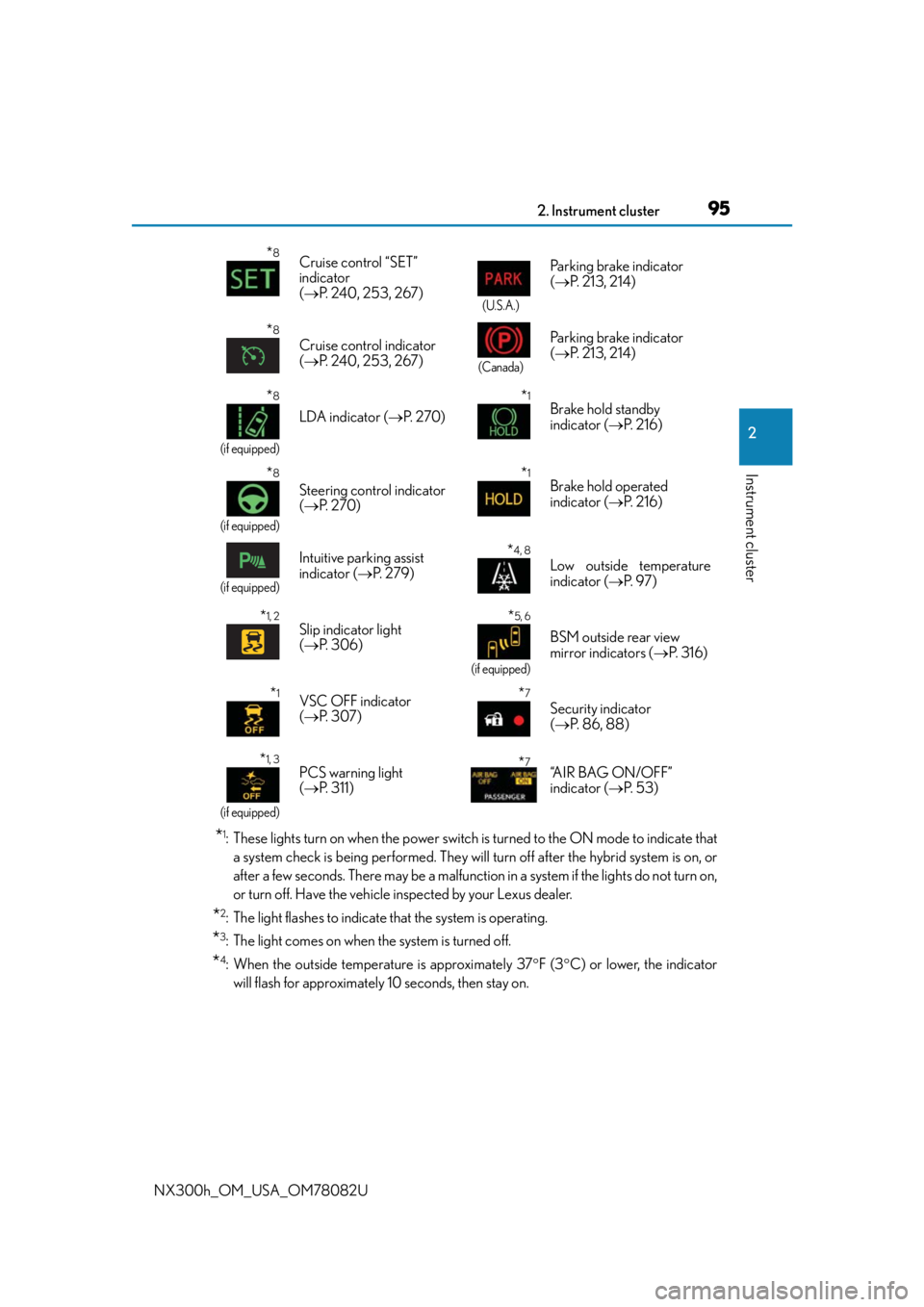
*1: These lights turn on when the power switch is turned to the ON mode to indicate thata system check is being performed. They will turn off after the hybrid system is on, or
after a few seconds. There may be a malfunction in a system if the lights do not turn on,
or turn off. Have the vehicle inspected by your Lexus dealer.
*2: The light flashes to indicate that the system is operating.
*3: The light comes on when the system is turned off.
*4: When the outside temperature is approximately 37 F (3 C) or lower, the indicator
will flash for approximately 10 seconds, then stay on.
*8Cruise control “SET”
indicator
( P. 240, 253, 267)
(U.S.A.)
Parking brake indicator
( P. 213, 214)
*8
Cruise control indicator
( P. 240, 253, 267)
(Canada)
Parking brake indicator
( P. 213, 214)
*8
(if equipped)
LDA indicator ( P. 2 7 0 )
*1Brake hold standby
indicator ( P. 2 1 6 )
*8
(if equipped)
Steering control indicator
( P. 2 7 0 )
*1Brake hold operated
indicator ( P. 2 1 6 )
(if equipped)
Intuitive parking assist
indicator ( P. 2 7 9 )*4, 8
Low outside temperature
indicator ( P. 9 7 )
*1, 2Slip indicator light
( P. 3 0 6 )*5, 6
(if equipped)
BSM outside rear view
mirror indicators ( P. 3 1 6 )
*1VSC OFF indicator
( P. 3 0 7 )*7
Security indicator
( P. 86, 88)
*1, 3
(if equipped)
PCS warning light
( P. 311) *7“A I R B A G O N / O F F ”
indicator ( P. 5 3 )
Page 124 of 680
1243-2. Opening, closing and locking the doors
NX300h_OM_USA_OM78082U
Side doors
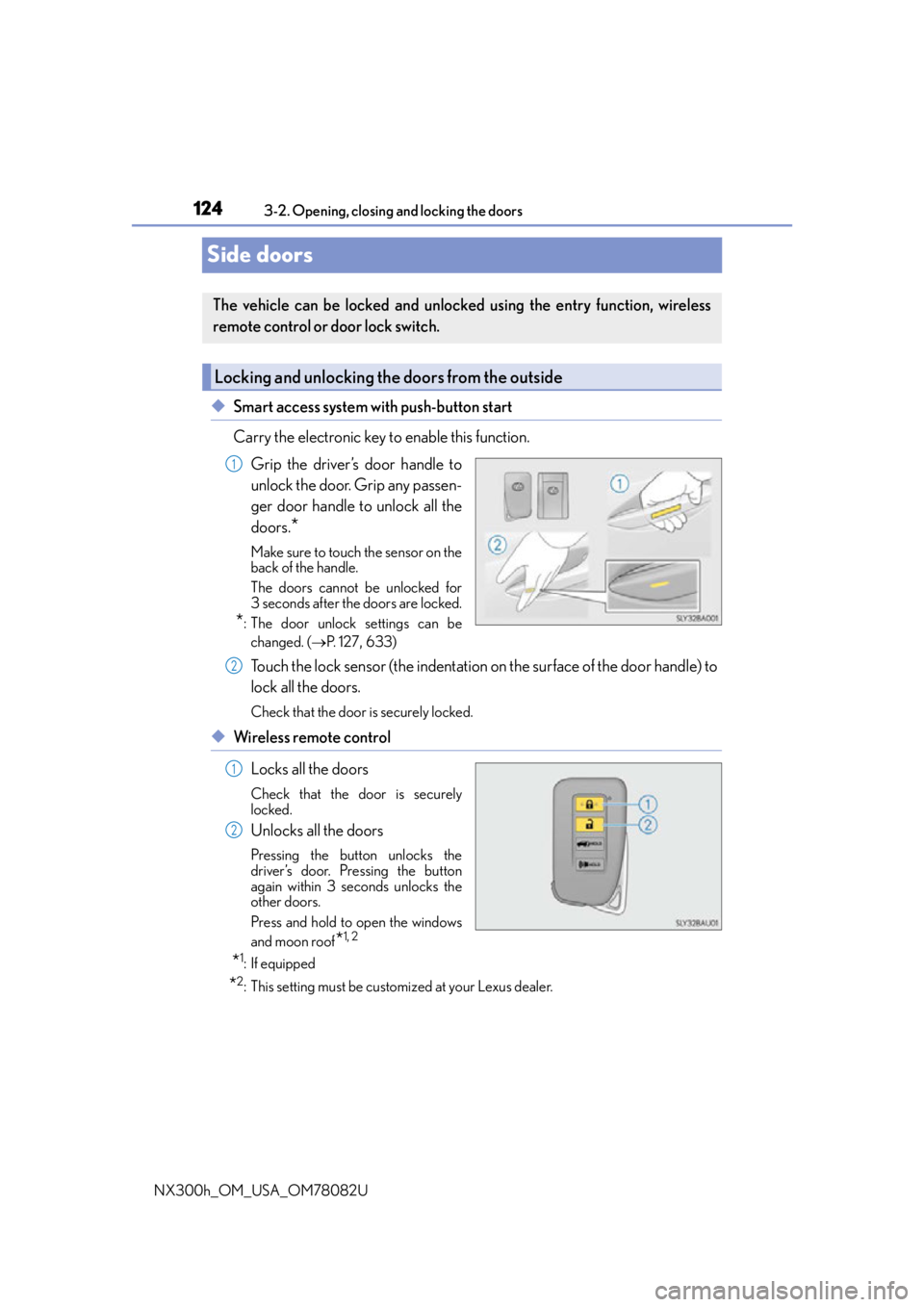
◆Smart access system with push-button start
Carry the electronic key to enable this function. Grip the driver’s door handle to
unlock the door. Grip any passen-
ger door handle to unlock all the
doors.
*
Make sure to touch the sensor on the
back of the handle.
The doors cannot be unlocked for
3 seconds after the doors are locked.
*: The door unlock settings can bechanged. ( P. 1 2 7 , 633)
Touch the lock sensor (the indentation on the surface of the door handle) to
lock all the doors.
Check that the door is securely locked.
◆Wireless remote control
Locks all the doors
Check that the door is securely
locked.
Unlocks all the doors
Pressing the button unlocks the
driver’s door. Pressing the button
again within 3 seconds unlocks the
other doors.
Press and hold to open the windows
and moon roof
*1, 2
*1:If equipped
*2: This setting must be customized at your Lexus dealer.
The vehicle can be locked and unlock ed using the entry function, wireless
remote control or door lock switch.
Locking and unlocking the doors from the outside
1
2
1
2
Page 125 of 680
1253-2. Opening, closing and locking the doors
3
Operation of each component
NX300h_OM_USA_OM78082U
■Operation signals
Doors:
A buzzer sounds and the emergency flashers flash to indicate that the doors have been
locked/unlocked. (Locked: Once; Unlocked: Twice)
Windows:
A buzzer sounds to indicate that all windows are opening.
■Security feature
If a door is not opened within approximately 60 seconds after the vehicle is unlocked, the
security feature automatically locks the vehicle again.
■Welcome light illumination control
The side marker, parking, tail and license plat e lights automatically turn on at night when
the doors are unlocked using the entry functi on or wireless remote control if the light
switch is in the “AUTO” position.
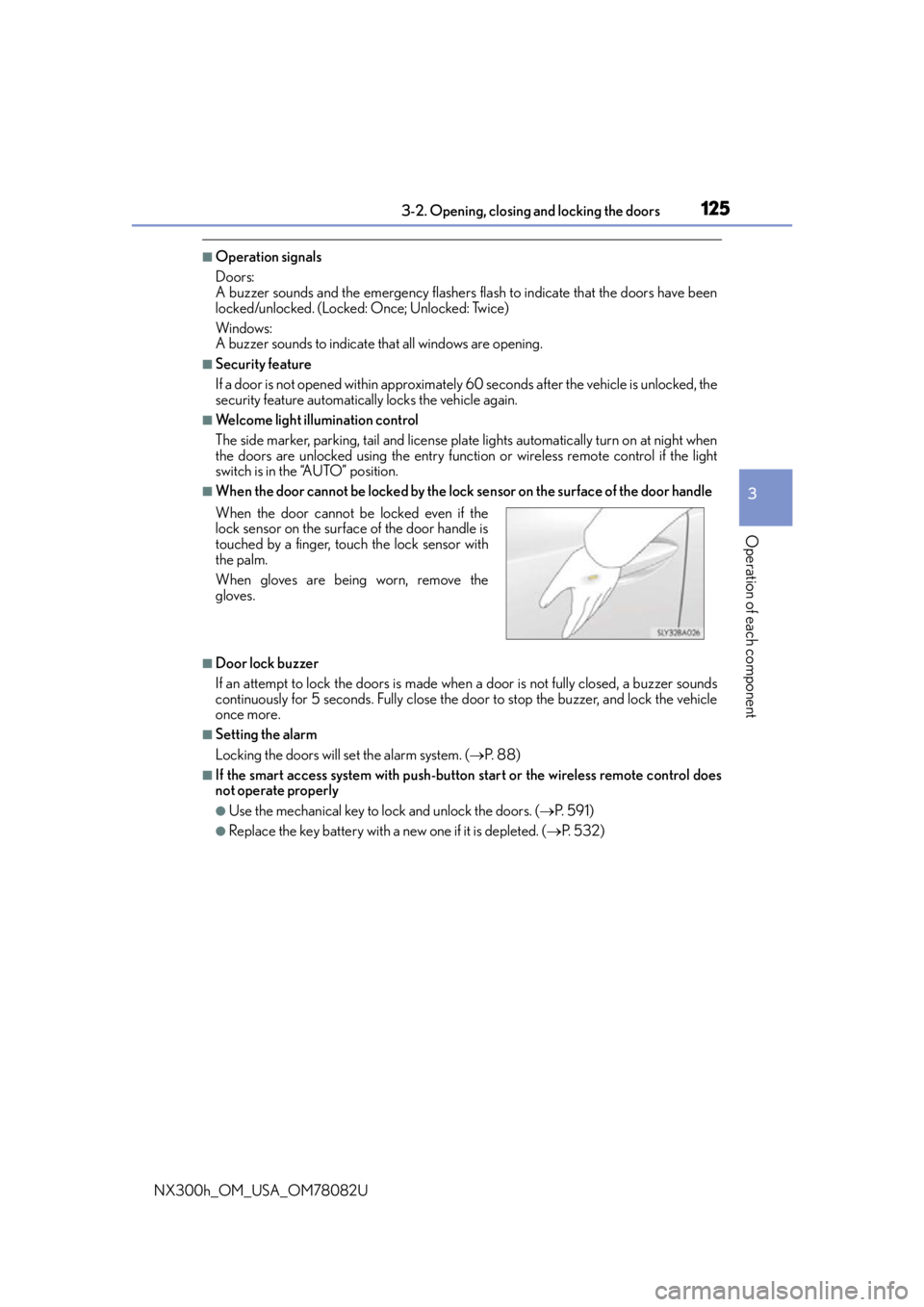
■When the door cannot be locked by the lock sensor on the surface of the door handle
■Door lock buzzer
If an attempt to lock the doors is made when a door is not fully closed, a buzzer sounds
continuously for 5 seconds. Fully close the door to stop the buzzer, and lock the vehicle
once more.
■Setting the alarm
Locking the doors will set the alarm system. ( P. 88)
■If the smart access system with push-butto n start or the wireless remote control does
not operate properly
●Use the mechanical key to lock and unlock the doors. ( P. 5 9 1 )
●Replace the key battery with a new one if it is depleted. ( P. 5 3 2 )
When the door cannot be locked even if the
lock sensor on the surfac
e of the door handle is
touched by a finger, touch the lock sensor with
the palm.
When gloves are being worn, remove the
gloves.
Page 129 of 680
1293-2. Opening, closing and locking the doors
3
Operation of each component
NX300h_OM_USA_OM78082U
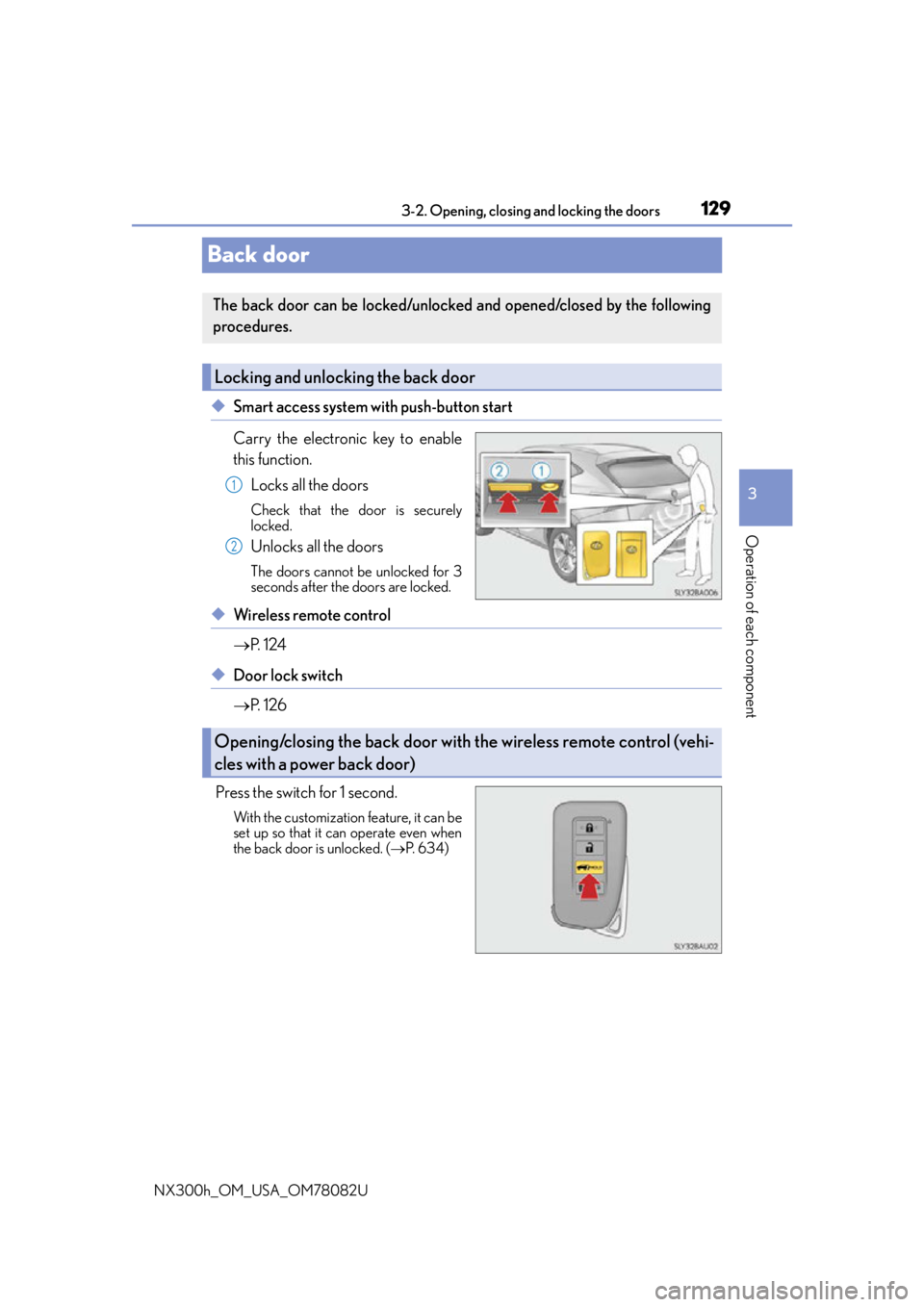
Back door
◆Smart access system with push-button start
Carry the electronic key to enable
this function.
Locks all the doors
Check that the door is securely
locked.
Unlocks all the doors
The doors cannot be unlocked for 3
seconds after the doors are locked.
◆Wireless remote control
P. 1 2 4
◆Door lock switch
P. 1 2 6
Press the switch for 1 second.
With the customization feature, it can be
set up so that it can operate even when
the back door is unlocked. ( P. 6 3 4 )
The back door can be locked/unlocked and opened/closed by the following
procedures.
Locking and unlocking the back door
1
2
Opening/closing the back door with the wireless remote control (vehi-
cles with a power back door)
Page 136 of 680
1363-2. Opening, closing and locking the doors
NX300h_OM_USA_OM78082U
WA R N I N G
■Operating the back door
Observe the following precautions.
Failure to do so may cause parts of the body to be caught, resulting in death or serious
injury.
●Remove any heavy loads, such as snow and ice, from the back door before opening it.
Failure to do so may cause the back door to suddenly shut again after it is opened.
●When opening or closing the back door, thoroughly check to make sure the sur-
rounding area is safe.
●If anyone is in the vicinity, make sure they are safe and let them know that the back
door is about to open or close.
●Use caution when opening or closing the ba ck door in windy weather as it may move
abruptly in strong wind.
●Do not pull on the back door damper st ay (vehicles without a power back door)
( P. 138) or back door spindle (vehicles with a power back door) ( P. 1 3 9 ) t o
close the back door, and do not hang on t he back door damper stay (vehicles with-
out a power back door) or back door spin dle (vehicles with a power back door).
Doing so may cause hands to be caught or the back door damper stay (vehicles
without a power back door) or back d oor spindle (vehicles with a power back
door) to break, causing an accident.
●If a bicycle carrier or similar heavy object is attached to the back door, it may sud-
denly shut closed again after being opened, causing someone’s hands, head or neck
to be caught and injured. Wh en installing an accessory part to the back door, using a
genuine Lexus part is recommended.
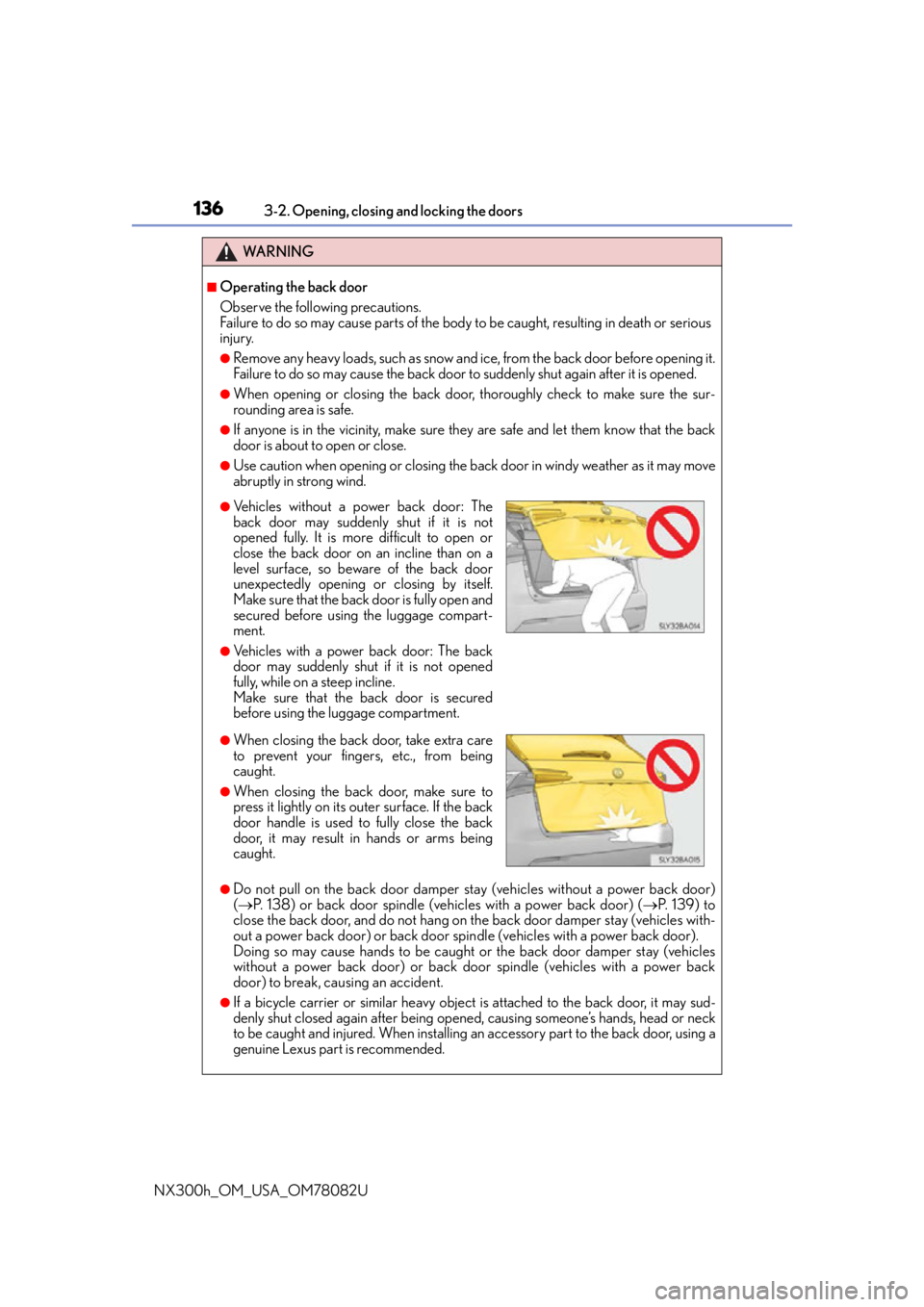
●Vehicles without a power back door: The
back door may suddenly shut if it is not
opened fully. It is more difficult to open or
close the back door on an incline than on a
level surface, so beware of the back door
unexpectedly opening or closing by itself.
Make sure that the back door is fully open and
secured before using the luggage compart-
ment.
●Vehicles with a power back door: The back
door may suddenly shut if it is not opened
fully, while on a steep incline.
Make sure that the back door is secured
before using the lu ggage compartment.
●When closing the back door, take extra care
to prevent your fingers, etc., from being
caught.
●When closing the back door, make sure to
press it lightly on its ou ter surface. If the back
door handle is used to fully close the back
door, it may result in hands or arms being
caught.
Page 137 of 680

1373-2. Opening, closing and locking the doors
3
Operation of each component
NX300h_OM_USA_OM78082U
WA R N I N G
■Back door closer (vehicles with a power back door)
●Use caution when using the back door closer as it still operates when the power back
door system is canceled.
■Power back door (if equipped)
Observe the following precautions when operating the power back door.
Failure to do so may cause death or serious injury.
●Check the safety of the surrounding area to make sure there are no obstacles or any-
thing that could cause any of your belongings to get caught.
●If anyone is in the vicinity, make sure they are safe and let them know that the back
door is about to open or close.
●If the power back door system is canceled while the back door is operating during
automatic operation, the back door stops operating. Take extra care when on an
incline, as the back door may open or close suddenly.
●If the operating conditions of the power back door are no longer met, a buzzer may
sound and the back door may stop opening or closing. The back door then has to be
operated manually. Take extra care in this situation, as the back door may move
abruptly.
●On an incline, the back door may sudden ly shut after it opens automatically. Make
sure the back door is secured.
●In the following situations, the power back door may detect an abnormality and auto-
matic operation may be stopped. In this case, the back door has to be operated man-
ually. Take extra care in this situation, as the stopped back door may suddenly open or
close, causing an accident.
• When the back door contacts an obstacle
• When the 12-volt battery voltage suddenly drops, such as when the power switch is turned to ON mode or the engine is started during automatic operation
●If a bicycle carrier or similar heavy object is attached to the back door, the power
back door may not operate, causing itself to malfunction, or the back door may move
slightly in the closing direction after bein g opened, causing someone’s hands, head or
neck to be caught and injured. When installing an accessory part to the back door,
ask your Lexus dealer for details.
●In the event that the back door is left slightly
open, the back door closer will automatically
close it to the fully closed position. It takes
several seconds before the back door closer
begins to operate. Be careful not to get fin-
gers caught or anything else in the back door,
as this may cause bone fractures or other
serious injuries.
Page 143 of 680

1433-2. Opening, closing and locking the doors
3
Operation of each component
NX300h_OM_USA_OM78082U
■Note for the entry function
●Even when the electronic key is within the effective range (detection areas), the system
may not operate properly in the following cases:
• The electronic key is too close to the window or outside door handle, near the
ground, or in a high place when the doors are locked or unlocked.
• The electronic key is near the ground or in a high place, or too close to the rear
bumper center when the back door is opened.
• The electronic key is on the instrument panel, luggage room, floor, or in the door
pockets or glove box when the hybrid system is started or power switch modes are
changed.
●Do not leave the electronic key on top of th e instrument panel or near the door pockets
when exiting the vehicle. Depending on the radio wave reception conditions, it may be
detected by the antenna outs ide the cabin and the door will become lockable from the
outside, possibly trapping the el ectronic key inside the vehicle.
●As long as the electronic key is within the effective range, the doors may be locked or
unlocked by anyone.
●Even if the electronic key is not inside the ve hicle, it may be possible to start the hybrid
system if the electronic key is near the window.
●The doors may unlock if a large amount of wa ter splashes on the door handle, such as in
the rain or in a car wash when the electronic key is within the effective range. (The door
will automatically be locked after approximately 60 seconds if the doors are not
opened and closed.)
●If the wireless remote control is used to lo ck the doors when the electronic key is near
the vehicle, there is a possibility that the door may not be unlocked by the entry func-
tion. (Use the wireless remote control to unlock the doors.)
●Touching the door lock sensor while wearin g gloves may delay or prevent lock opera-
tion. Remove the gloves and touch the lock sensor again.
●When the lock operation is performed using the lock sensor, recognition signals will be
shown up to two consecutive times. After th is, no recognition signals will be given.
●If the door handle becomes wet while the el ectronic key is within the effective range,
the door may lock and unlock repeatedly. In that case, follow the following correction
procedures to wash the vehicle:
• Place the electronic key in a location 6 ft. (2 m) or more away from the vehicle. (Take
care to ensure that the key is not stolen.)
• Set the electronic key to battery-saving mode to disable the smart access system with push-button start. ( P. 1 4 2 )
●If the electronic key is insi de the vehicle and a door handle becomes wet during a car
wash, a message may be shown on the mult i-information display and a buzzer will
sound outside the vehicle. To turn off the alarm, lock all the doors.
●The lock sensor may not work properly if it comes into contact with ice, snow, mud, etc.
Clean the lock sensor and attempt to operate it again.