ECO mode LEXUS NX300H 2016 Workshop Manual
[x] Cancel search | Manufacturer: LEXUS, Model Year: 2016, Model line: NX300H, Model: LEXUS NX300H 2016Pages: 680, PDF Size: 10.23 MB
Page 438 of 680

4386-1. Using the air conditioning system and defogger
NX300h_OM_USA_OM78082U
■Fogging up of the windows
●The windows will easily fog up when the humidity in the vehicle is high. Pressing “A/C”
button or selecting “A/C” will dehumidify th e air from the outlets and defog the wind-
shield effectively.
●If you turn “A/C” off, the windows may fog up more easily.
●The windows may fog up if the recirculated air mode is used.
■Windshield fog detection function
When automatic mode is set, the humidity sensor ( P. 4 3 9 ) d e t e c t s f o g o n t h e w i n d -
shield and controls the air conditioning system to prevent fog.
■Outside/recirculated air mode
●When driving on dusty roads such as tunnels or in heavy traffic, set to
the recirculated air mode. This is effective in preventing outside air from entering the
vehicle interior. During cooling operation, setting the recirculated air mode will also
cool the vehicle interior effectively.
●Outside/recirculated air mode may automa tically switch depending on the tempera-
ture setting or the inside temperature.
■When the outside temperature is low
The dehumidification function may not operat e even when “A/C” is pressed or “A/C” is
selected.
■Operation of the air conditioning system in Eco drive mode
●In the Eco drive mode, the air conditioning sy stem is controlled as follows to prioritize
fuel efficiency
• Engine speed and compressor operation controlled to restrict heating/cooling capacity
• Fan speed restricted when automatic mode is selected
●To improve air conditioning performa nce, perform the following operations
• Adjust the fan speed
• Turn off Eco drive mode
■Ventilation and air conditioning odors
●To let fresh air in, set the air conditio ning system to the outside air mode.
●During use, various odors from inside and outside the vehicle may enter into and accu-
mulate in the air conditioning system. This may then cause odor to be emitted from the
vents.
●To reduce potential odors from occurring:
• It is recommended that the air conditioning system be set to outside air mode prior to turning the vehicle off.
• The start timing of the blower may be dela yed for a short period of time immediately
after the air conditioning system is started in automatic mode.
■Air conditioning filter
P. 5 3 0
■Customization
Settings (e.g. A/C automatic mode switch operation) can be changed.
(Customizable features: P. 6 3 7 )
Page 460 of 680

4606-4. Other interior features
NX300h_OM_USA_OM78082U
■Lighting conditions of operation indicator light
*: Depending on the portable device, there are cases where the operation indicator light will continue being lit up orange even after the charging is complete.
●When the operation indicator light flashes
When an error occurs, the operation in dicator light flashes an orange color.
Handle the error based on the following table.
■The wireless charger can be operated when
The power switch is in ACCESSORY or ON mode.
■Usable portable devices
Qi standard wireless charge standard can be used on compatible devices.
However, not all Qi standard devi ces and compatibility are guaranteed.
Starting with mobile phones and smart phones , it is aimed for low power electrically sup-
plied portable devices of no more than 5W.
■When covers and accessories are attached to portable devices
Do not charge in situations where cover an d accessories not able to handle Qi are
attached to the portable devi ce. Depending on the type of cover and accessory, it may
not be possible to charge. When charging is not performed even with the portable
device placed on the charge area, remove the cover and accessories.
Operation indicator lightConditions
Tu r n i n g o f fWhen the Wireless charger power supply is off
Green (comes on)On Standby (charging possible state)
When charging is complete*
Orange (comes on)
When placing the portable device on the charging
area (detecting the portable device)
Charging
Operation indicator lightSuspected causesHandling method
Flashing repeatedly once
every second (Orange)Vehicle to charger commu-
nication failure.Contact your Lexus dealer.
Repeatedly flashes
3 times continuously
(Orange)
A foreign substance is
between the portable device
and charge area.Remove the foreign sub-
stance from between por-
table device and the
charge area.
The portable device is out of
sync due to the device being
shifted from its position.Place the portable device
near the center of the
charge area.
Repeatedly flashes
4 times continuously
(Orange)Te m p e r a t u r e r i s i n g w i t h i n
the wireless charger.Stop charging at once and
start charging again after
for a while.
Page 479 of 680
4796-4. Other interior features
6
Interior features
NX300h_OM_USA_OM78082U
■Safety Connect Services Information
●Phone calls using the vehicles Bluetooth® technology will not be possible during Safety
Connect.
●Safety Connect is available beginning Fall 2009 on select Lexus models. Contact with
the Safety Connect response center is dependent upon the telematics device being in
operative condition, cellular connection ava ilability, and GPS satellite signal reception,
which can limit the ability to reach the resp onse center or receive emergency service
support. Enrollment and Telematics Subscr iption Service Agreement required. A vari-
ety of subscription terms is available; ch arges vary by subscription term selected.
●Automatic Collision Notification, Emergency Assistance and Stolen Vehicle Location
will function in the United States, including Hawaii and Alaska, and in Canada, and
Enhanced Roadside Assistance will function in the United States (except Hawaii) and in
Canada. No Safety Connect services will function outside of the United States in coun-
tries other than Canada.
●Safety Connect services are not subject to section 255 of the Telecommunications Act
and the device is not TTY compatible.
■Languages
The Safety Connect resp onse center will offer support in multiple languages. The Safety
Connect system will offer voice prompts in English and Spanish. Please indicate your lan-
guage of choice when enrolling.
■When contacting the response center
You may be unable to contact the resp onse center if the network is busy.
When the power switch is turned to ON mode, the red indicator light comes on
for 2 seconds then turns off. Afterward, the green indicator light comes on, indi-
cating that the service is active.
The following indicator light patterns indicate specific system usage conditions:
●Green indicator light on = Active service
●Green indicator light flashing = Safety Connect call in process
●Red indicator light (except at vehicle start-up) = System malfunction (contact
your Lexus dealer)
●No indicator light (off) = Safety Connect service not active
Safety Connect LED light Indicators
Page 485 of 680

4857-1. Maintenance and care
7
Maintenance and care
NX300h_OM_USA_OM78082U
■Note for a smart access system with push-button start
●If the door handle becomes wet while the electronic key is within the effective range,
the door may lock and unlock repeatedly. Place the key in a position 6 ft. (2 m) or more
separate from the vehicle while the vehicle is being washed. (Take care to ensure that
the key is not stolen.)
●If the electronic key is insi de the vehicle and a door handle becomes wet during a car
wash, a buzzer will sound outside the vehicle. To turn off the alarm, lock all the doors.
●Set the electronic key to battery-saving mode to disable the smart access system with
push-button start. ( P. 1 4 1 )
■Aluminum wheels
●Remove any dirt immediately by using a neutral detergent. Do not use hard brushes or
abrasive cleaners. Do not use strong or harsh chemical cleaners.
Use the same mild detergent and wax as used on the paint.
●Do not use detergent on the wheels when they are hot, for example after driving for
long distance in the hot weather.
●Wash detergent from the wheels immediately after use.
■Bumpers
Do not scrub with abrasive cleaners.
■Front side windows water-repellent coatin g (vehicles with water-repellent coating)
●The following precautions can extend the effectiveness of the water-repellent coating.
• Remove any dirt, etc. from the front side windows regularly.
• Do not allow dirt and dust to accumulate on the windows for a long period.
Clean the windows with a soft, da mp cloth as soon as possible.
• Do not use wax or glass cleaners that co ntain abrasives when cleaning the windows.
• Do not use any metallic objects to remove condensation build up.
●When the water-repellent performance has become insufficient, the coating can be
repaired. Contact your Lexus dealer.
Page 499 of 680
4997-3. Do-it-yourself maintenance
7
Maintenance and care
NX300h_OM_USA_OM78082U
WA R N I N G
The engine compartment contains many mechanisms and fluids that may move suddenly,
become hot, or become electrically energized. To avoid death or serious injury, observe
the following precautions.
■When working on the engine compartment
●Make sure that the indicator on the power switch and the “READY” indicator are
both off.
●Keep hands, clothing and tools away from the moving fan and engine drive belt.
●Be careful not to touch the engine, power control unit, radiator, exhaust manifold, etc.
right after driving as they may be hot. Oil and other fluids may also be hot.
●Do not leave anything that may burn easily, such as paper and rags, in the engine
compartment.
●Do not smoke, cause sparks or expose an open flame to fuel. Fuel fumes are flamma-
ble.
■When working near the electric cooling fans or radiator grille
Be sure the power switch is off.
With the power switch in ON mode, the electric cooling fans may automatically start to
run if the air conditioning is on and/or the coolant temperature is high. ( P. 5 0 9 )
■Safety glasses
Wear safety glasses to prevent flying or fallin g material, fluid spray, etc. from getting in
your eyes.
NOTICE
■If you remove the air cleaner filter
Driving with the air cleaner filter removed may cause excessive engine wear due to dirt
in the air.
Page 513 of 680
5137-3. Do-it-yourself maintenance
7
Maintenance and care
NX300h_OM_USA_OM78082U
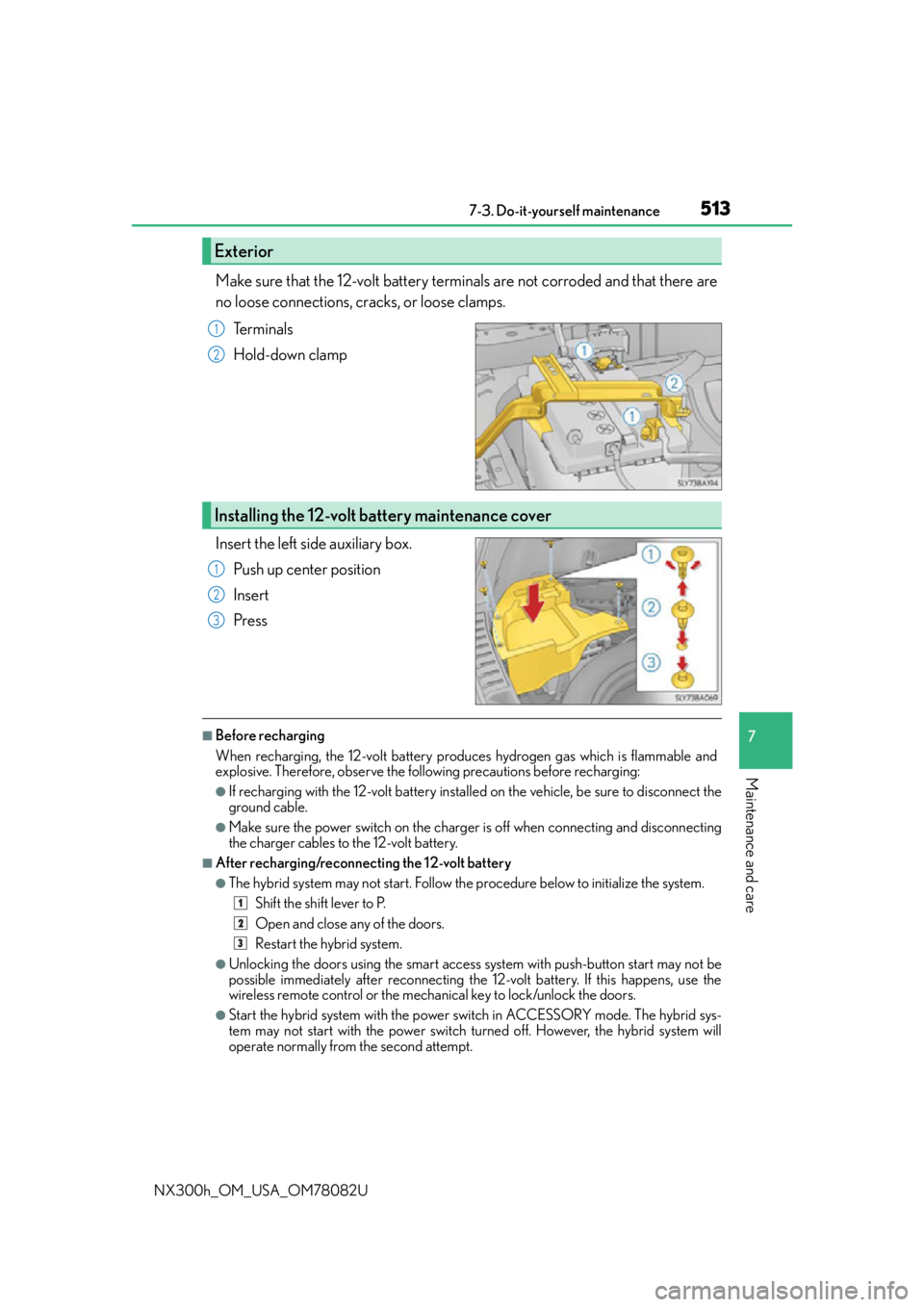
Make sure that the 12-volt battery terminals are not corroded and that there are
no loose connections, cracks, or loose clamps.Te r m i n a l s
Hold-down clamp
Insert the left side auxiliary box. Push up center position
Insert
Press
■Before recharging
When recharging, the 12-volt battery produces hydrogen gas which is flammable and
explosive. Therefore, observe the following precautions before recharging:
●If recharging with the 12-volt battery installe d on the vehicle, be sure to disconnect the
ground cable.
●Make sure the power switch on the charger is off when connecting and disconnecting
the charger cables to the 12-volt battery.
■After recharging/reconnecting the 12-volt battery
●The hybrid system may not start. Follow the procedure below to initialize the system.
Shift the shift lever to P.
Open and close any of the doors.
Restart the hybrid system.
●Unlocking the doors using the smart access system with push-button start may not be
possible immediately after reconnecting the 12-volt battery. If this happens, use the
wireless remote control or the mech anical key to lock/unlock the doors.
●Start the hybrid system with the power switch in ACCESSORY mode. The hybrid sys-
tem may not start with the power switch turned off. However, the hybrid system will
operate normally from the second attempt.
Exterior
1
2
Installing the 12-volt battery maintenance cover
1
2
3
1
2
3
Page 514 of 680
5147-3. Do-it-yourself maintenance
NX300h_OM_USA_OM78082U
●The power switch mode is recorded by the vehicle. If the 12-volt battery is reconnected,
the vehicle will return the power switch mode to the status it was in before the 12-volt
battery was disconnected. Make sure to turn off the power before disconnect the 12-
volt battery. Take extra care when connecting the 12-volt battery if the power switch
mode prior to discharge is unknown.
If the system will not start even after multiple attempts at all methods above, contact your
Lexus dealer.
WA R N I N G
■Chemicals in the 12-volt battery
The 12-volt battery contains poisonous and corrosive sulfuric acid and may produce
hydrogen gas which is flammable and explosive. To reduce the risk of death or serious
injury, take the following precautions while working on or near the 12-volt battery:
●Do not cause sparks by touching the 12-volt battery terminals with tools.
●Do not smoke or light a match near the 12-volt battery.
●Avoid contact with eyes, skin and clothes.
●Never inhale or swallow electrolyte.
●Wear protective safety glasses when working near the 12-volt battery.
●Keep children away from the 12-volt battery.
■Where to safely charge the 12-volt battery
Always charge the 12-volt battery in an open area. Do not charge the 12-volt battery in
a garage or closed room where there is insufficient ventilation.
■How to recharge the 12-volt battery
Only perform a slow charge (5 A or less). The 12-volt battery may explode if charged
at a quicker rate.
■Emergency measures regarding electrolyte
●If electrolyte gets in your eyes
Flush your eyes with clean water for at least 15 minutes and get immediate medical
attention. If possible, continue to apply water with a sponge or cloth while traveling to
the nearest medical facility.
●If electrolyte gets on your skin
Wash the affected area thoroughly. If you fe el pain or burning, get medical attention
immediately.
●If electrolyte gets on your clothes
It can soak through clothing on to your skin. Immediately take off the clothing and fol-
low the procedure above if necessary.
●If you accidentally swallow electrolyte
Drink a large quantity of water or milk. Get emergency medical attention immedi-
ately.
Page 521 of 680

5217-3. Do-it-yourself maintenance
7
Maintenance and care
NX300h_OM_USA_OM78082U
■Situations in which the tire pressure warning system may not operate properly
●In the following cases, the tire pressure warning system may not operate properly.
• If non-genuine Lexus wheels are used.
• A tire has been replaced with a tire that is not an OE (Original Equipment) tire.
• A tire has been replaced with a tire that is not of the specified size.
• Tire chains etc. are equipped.
• An auxiliary-supported run-flat tire is equipped.
• If a window tint that affects the radio wave signals is installed.
• If there is a lot of snow or ice on the vehicle, particularly around the wheels or wheelhousings.
• If the tire inflation pressure is extremely higher than the specified level.
• If wheel without the tire pressure warning valve and transmitter is used.
• If the ID code on the tire pressure warning valves and transmitters is not registered in the tire pressure warning computer.
●Performance may be affected in the following situations.
• Near a TV tower, electric power plant, gas station, radio station, large display, air- port or other facility th at generates strong radio waves or electrical noise
• When carrying a portable radio, cellular phone, cordless phone or other wireless
communication device
●When the vehicle is parked, the time taken for the warning to start or go off could be
extended.
●When tire inflation pressure declines rapidly for example when a tire has burst, the
warning may not function.
■The initialization operation
●Make sure to carry out initialization af ter adjusting the tire inflation pressure.
Also, make sure the tires are cold before carry ing out initialization or tire inflation pres-
sure adjustment.
●If you have accidentally turned the power swit ch off during initialization, it is not neces-
sary to press the reset switch again as init ialization will restart automatically when the
power switch has been turned to ON mode for the next time.
●If you accidentally press the reset switch when initialization is not necessary, adjust the
tire inflation pressure to the specified level when the tires are co ld, and conduct initial-
ization again.
■Warning performance of the tire pressure warning system
The warning of the tire pressure warning syst em will change in accordance with the con-
ditions under which it was initialized. For this reason, the system may give a warning even
if the tire pressure does not reach a low enough level, or if the pressure is higher than the
pressure that was adjusted to when the system was initialized.
■When initialization of the tire pressure warning system has failed
Initialization can be completed in a few minutes. However, in the following cases, the set-
tings have not been recorded and the system will not operate properly. If repeated
attempts to record tire inflation pressure settings are unsuccessful, have the vehicle
inspected by your Lexus dealer.
●When operating the tire pressure warning reset switch, the tire pressure warning light
does not blink 3 times.
●After carrying out the initializ ation procedure, the tire pressure warning light blinks for
1 minute then stays on after driving for 20 minutes.
Page 523 of 680
5237-3. Do-it-yourself maintenance
7
Maintenance and care
NX300h_OM_USA_OM78082U
WA R N I N G
■When inspecting or replacing tires
Observe the following precautions to prevent accidents.
Failure to do so may cause damage to parts of the drive train as well as dangerous han-
dling characteristics, which may lead to an accident resulting in death or serious injury.
●Do not mix tires of different makes, models or tread patterns.
Also, do not mix tires of remarkably different treadwear.
●Do not use tire sizes other than those recommended by Lexus.
●Do not mix differently constructed tires (radial, bias-belted or bias-ply tires).
●Do not mix summer, all season and snow tires.
●Do not use tires that have been used on another vehicle.
Do not use tires if you do not know how they were used previously.
●Vehicles with a compact spare tire: Do not tow if your vehicle has a compact spare
tire installed.
■When initializing the tire pressure warning system
Do not initializing tire inflation pressure wi thout first adjusting the tire inflation pressure
to the specified level. Otherwise, the tire pressure warning light may not come on even
if the tire inflation pressure is low, or it may come on when the tire inflation pressure is
actually normal.
■Caution regarding interference with electronic devices
●Users of any electrical medical device other than implantable cardiac pacemakers,
cardiac resynchronization therapy-pacemakers or implantable cardioverter defibril-
lators should consult the ma nufacturer of the device for information about its opera-
tion under the influence of radio waves.
Radio waves could have unexpected effe cts on the operation of such medical
devices.
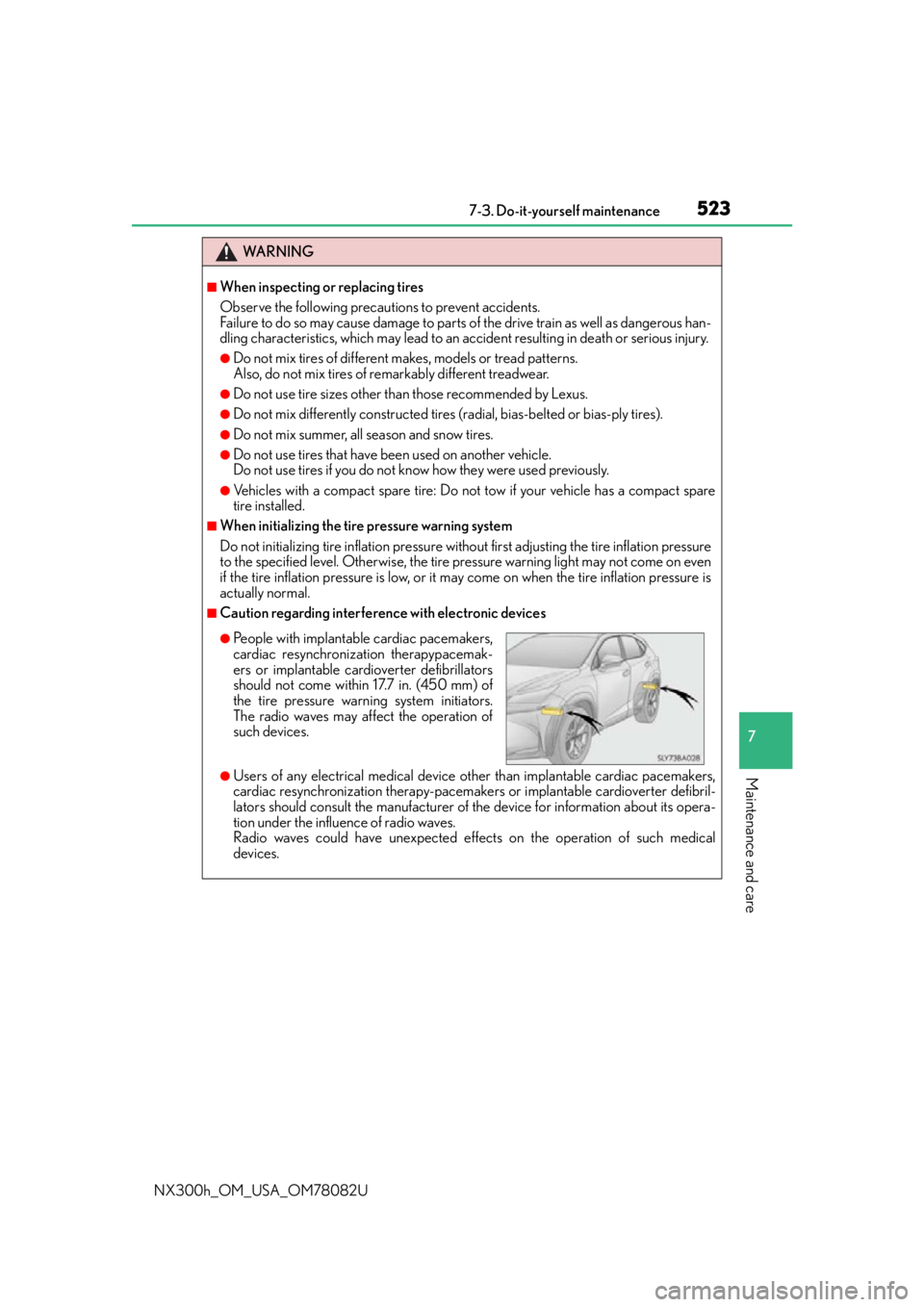
●People with implantable cardiac pacemakers,
cardiac resynchronization therapypacemak-
ers or implantable cardioverter defibrillators
should not come within 17.7 in. (450 mm) of
the tire pressure warning system initiators.
The radio waves may affect the operation of
such devices.
Page 558 of 680
5588-2. Steps to take in an emergency
NX300h_OM_USA_OM78082U
If your vehicle needs to be towed
The following may indicate a problem with your hybrid transmission. Contact
your Lexus dealer or commercial towing service before towing. ( P. 5 6 2 )
●The hybrid warning message shows on the multi-information display and the
vehicle does not move.
●The vehicle makes an abnormal sound.
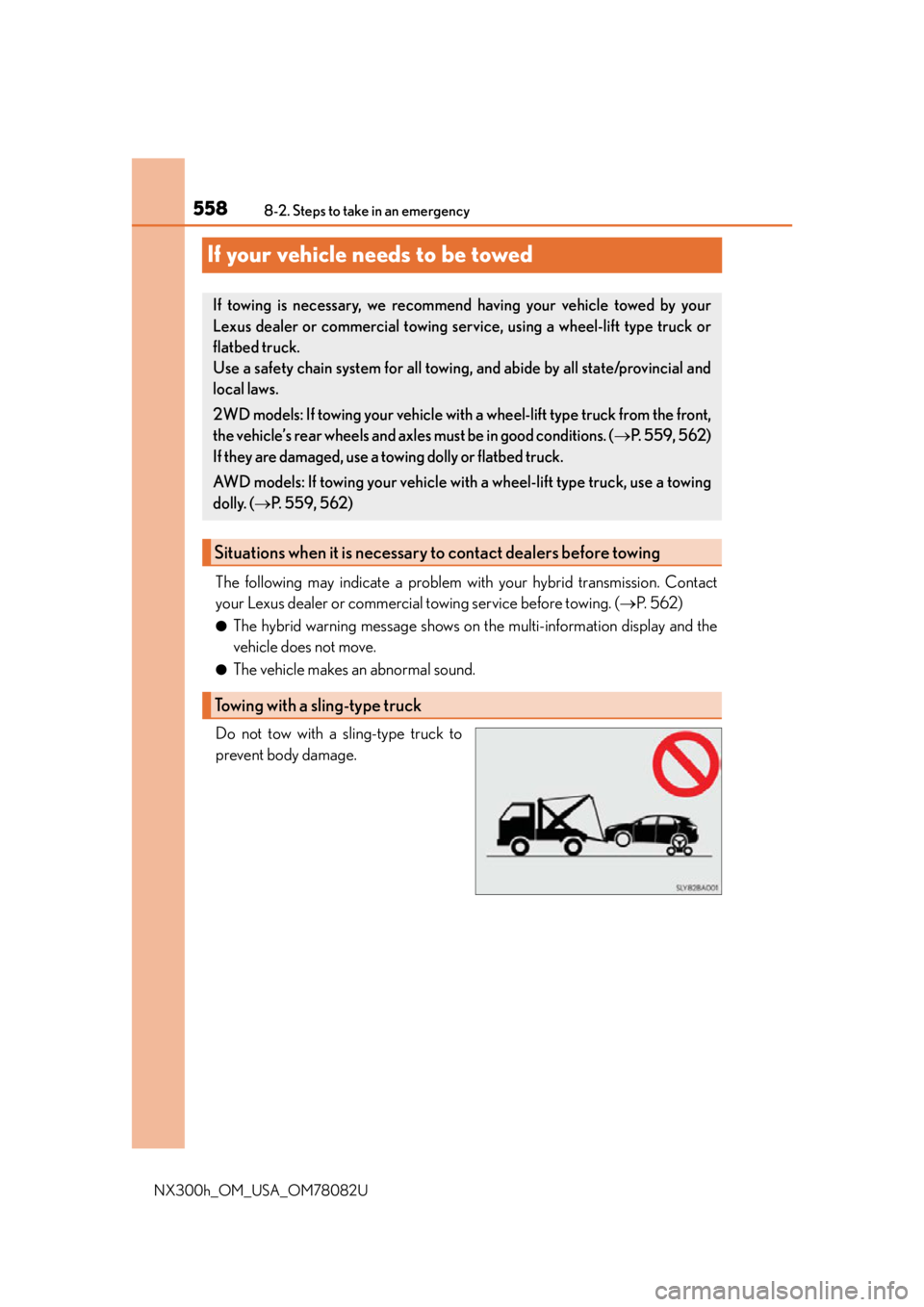
Do not tow with a sling-type truck to
prevent body damage.
If towing is necessary, we recommend having your vehicle towed by your
Lexus dealer or commercial towing se rvice, using a wheel-lift type truck or
flatbed truck.
Use a safety chain system for all towing, and abide by all state/provincial and
local laws.
2WD models: If towing your vehicle with a wheel-lift type truck from the front,
the vehicle’s rear wheels and axles must be in good conditions. (P. 559, 562)
If they are damaged, use a towing dolly or flatbed truck.
AWD models: If towing your vehicle with a wheel-lift type truck, use a towing
dolly. ( P. 559, 562)
Situations when it is necessary to contact dealers before towing
Towing with a sling-type truck