high beam LEXUS NX300H 2016 Owners Manual
[x] Cancel search | Manufacturer: LEXUS, Model Year: 2016, Model line: NX300H, Model: LEXUS NX300H 2016Pages: 680, PDF Size: 10.23 MB
Page 3 of 680

3
1
9 8
7
6 4 3
2
10
5
NX300h_OM_USA_OM78082U
3-4. Adjusting the steering wheel and mirrors
Steering wheel ............................. 160
Inside rear view mirror................ 161
Outside rear view mirrors........163
3-5. Opening, closing the windows and moon roof
Power windows .............................166
Moon roof .......................................169
4-1. Before driving Driving the vehicle .......................174
Cargo and luggage.................... 182
Vehicle load limits ....................... 186
Trailer towing (vehicles with towing package) .......................187
Trailer towing (vehicles without towing package) ...... 199
Dinghy towing .............................200
4-2. Driving procedures Power (ignition) switch ............. 201
EV drive mode ............................ 206
Hybrid transmission ..................208
Turn signal lever ............................ 212
Parking brake ................................213
Brake Hold .....................................216
ASC (Active Sound Control) ....................................... 218 4-3. Operating the lights
and wipers
Headlight switch ..........................219
Automatic High Beam............. 223
Fog light switch ............................227
Windshield wipers and washer ......................................... 228
Rear window wiper and washer ......................................... 234
4-4. Refueling Opening the fuel tank cap ..... 236
4-5. Using the driving support systems
Dynamic radar cruise control ......................................... 240
Dynamic radar cruise control with full-speed
range ............................................ 253
Cruise control .............................. 267
LDA (Lane Departure Alert with steering co ntrol) .............270
Intuitive parking assist ...............279
Lexus parking assist monitor.........................................287
Driving mode select switch ........................................... 303
Driving assist systems ..............305
PCS (Pre-Collision System) ........................................ 310
BSM (Blind Spot Monitor).......316
4-6. Driving tips Hybrid vehicle driving tips ................................................. 324
Winter driving tips ..................... 326
Utility vehicle precautions...... 330
4Driving
Page 20 of 680
20Pictorial index
NX300h_OM_USA_OM78082U
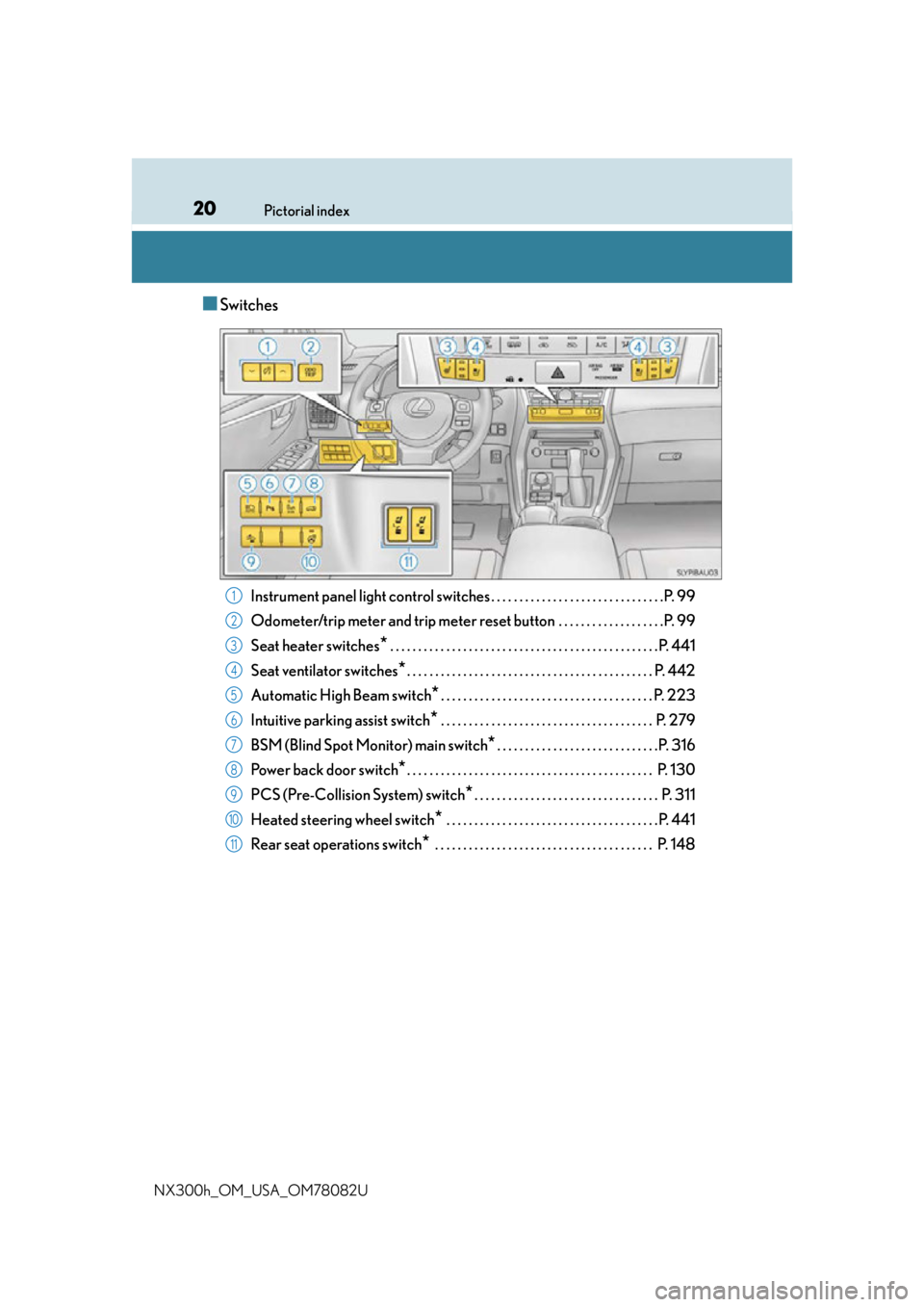
■Switches
Instrument panel light control swit ches . . . . . . . . . . . . . . . . . . . . . . . . . . . . . . .P. 99
Odometer/trip meter and trip meter reset button . . . . . . . . . . . . . . . . . . .P. 99
Seat heater switches
* . . . . . . . . . . . . . . . . . . . . . . . . . . . . . . . . . . . . . . . . . . . . . . . .P. 441
Seat ventilator switches
*. . . . . . . . . . . . . . . . . . . . . . . . . . . . . . . . . . . . . . . . . . . . P. 442
Automatic High Beam switch
*. . . . . . . . . . . . . . . . . . . . . . . . . . . . . . . . . . . . . . P. 223
Intuitive parking assist switch
* . . . . . . . . . . . . . . . . . . . . . . . . . . . . . . . . . . . . . . P. 279
BSM (Blind Spot Monitor) main switch
*. . . . . . . . . . . . . . . . . . . . . . . . . . . . .P. 316
Power back door switch
*. . . . . . . . . . . . . . . . . . . . . . . . . . . . . . . . . . . . . . . . . . . . P. 130
PCS (Pre-Collision System) switch
*. . . . . . . . . . . . . . . . . . . . . . . . . . . . . . . . . P. 311
Heated steering wheel switch
* . . . . . . . . . . . . . . . . . . . . . . . . . . . . . . . . . . . . . .P. 441
Rear seat operations switch
* . . . . . . . . . . . . . . . . . . . . . . . . . . . . . . . . . . . . . . . P. 148
1
2
3
4
5
6
7
8
9
10
11
Page 94 of 680
942. Instrument cluster
NX300h_OM_USA_OM78082U
*1: These lights turn on when the power switch is turned to ON mode to indicate that a system check is being performed. They will turn off after the hybrid system is on, or
after a few seconds. There may be a malfunction in a system if the lights do not turn on,
or turn off. Have the vehicle inspected by your Lexus dealer.
*2: This light illuminates on the multi-information display.
*3: The light flashes to indicate a malfunction.
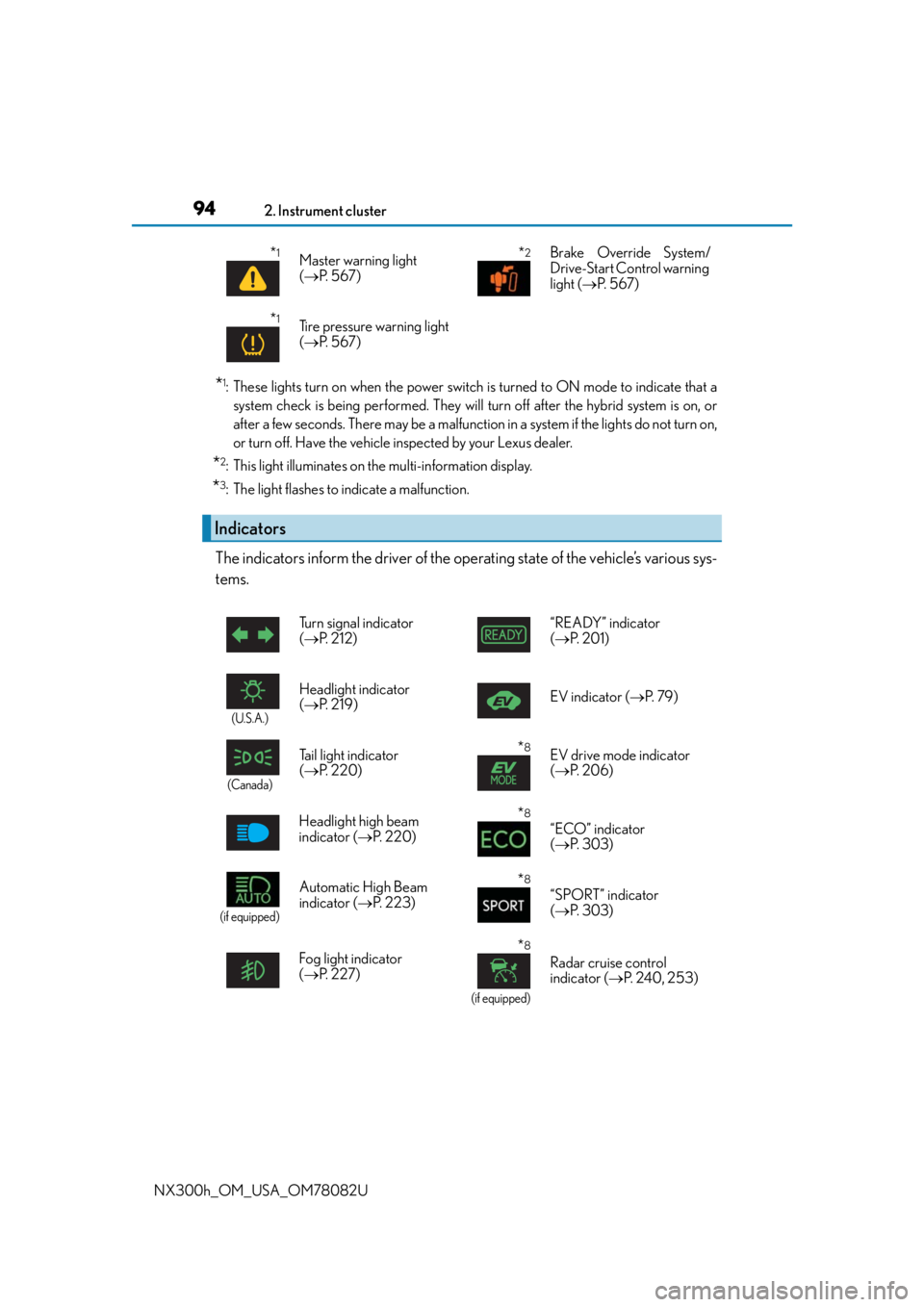
The indicators inform the driver of the operating state of the vehicle’s various sys-
tems.
*1Master warning light
( P. 5 6 7 )*2Brake Override System/
Drive-Start Control warning
light ( P. 5 6 7 )
*1Tire pressure warning light
( P. 5 6 7 )
Indicators
Turn signal indicator
( P. 212) “READY” indicator
(
P. 2 0 1 )
(U.S.A.)
Headlight indicator
( P. 2 1 9 ) EV indicator (
P. 7 9 )
(Canada)
Tail light indicator
( P. 220)*8EV drive mode indicator
( P. 2 0 6 )
Headlight high beam
indicator ( P. 220)
*8
“ECO” indicator
( P. 303)
(if equipped)
Automatic High Beam
indicator ( P. 223)*8
“SPORT” indicator
( P. 303)
Fog light indicator
( P. 2 2 7 )
*8
(if equipped)
Radar cruise control
indicator ( P. 2 4 0 , 2 5 3 )
Page 173 of 680

173
4Driving
NX300h_OM_USA_OM78082U
4-1. Before drivingDriving the vehicle ....................... 174
Cargo and luggage .................... 182
Vehicle load limits ....................... 186
Trailer towing (vehicles with towing package) ....................... 187
Trailer towing (vehicles without towing package) ...... 199
Dinghy towing............................. 200
4-2. Driving procedures Power (ignition) switch.............. 201
EV drive mode ........................... 206
Hybrid transmission ................. 208
Turn signal lever ........................... 212
Parking brake ................................ 213
Brake Hold ..................................... 216
ASC (Active Sound Control) ......... 218
4-3. Operating the lights and wipers
Headlight switch .......................... 219
Automatic High Beam .............223
Fog light switch............................ 227
Windshield wipers and washer..........................................228
Rear window wiper and washer..........................................234 4-4. Refueling
Opening the fuel tank cap ..... 236
4-5. Using the driving support systems
Dynamic radar cruise control ......................................... 240
Dynamic radar cruise control with full-speed
range ............................................ 253
Cruise control ..............................267
LDA (Lane Departure Alert with steering control) ............ 270
Intuitive parking assist .............. 279
Lexus parking assist monitor ........................................ 287
Driving mode select switch ...........................................303
Driving assist systems...............305
PCS (Pre-Collision System)........... 310
BSM (Blind Spot Monitor) ...... 316
4-6. Driving tips Hybrid vehicle driving tips ................................................. 324
Winter driving tips ..................... 326
Utility vehicle precautions ......330
Page 220 of 680
2204-3. Operating the lights and wipers
NX300h_OM_USA_OM78082U
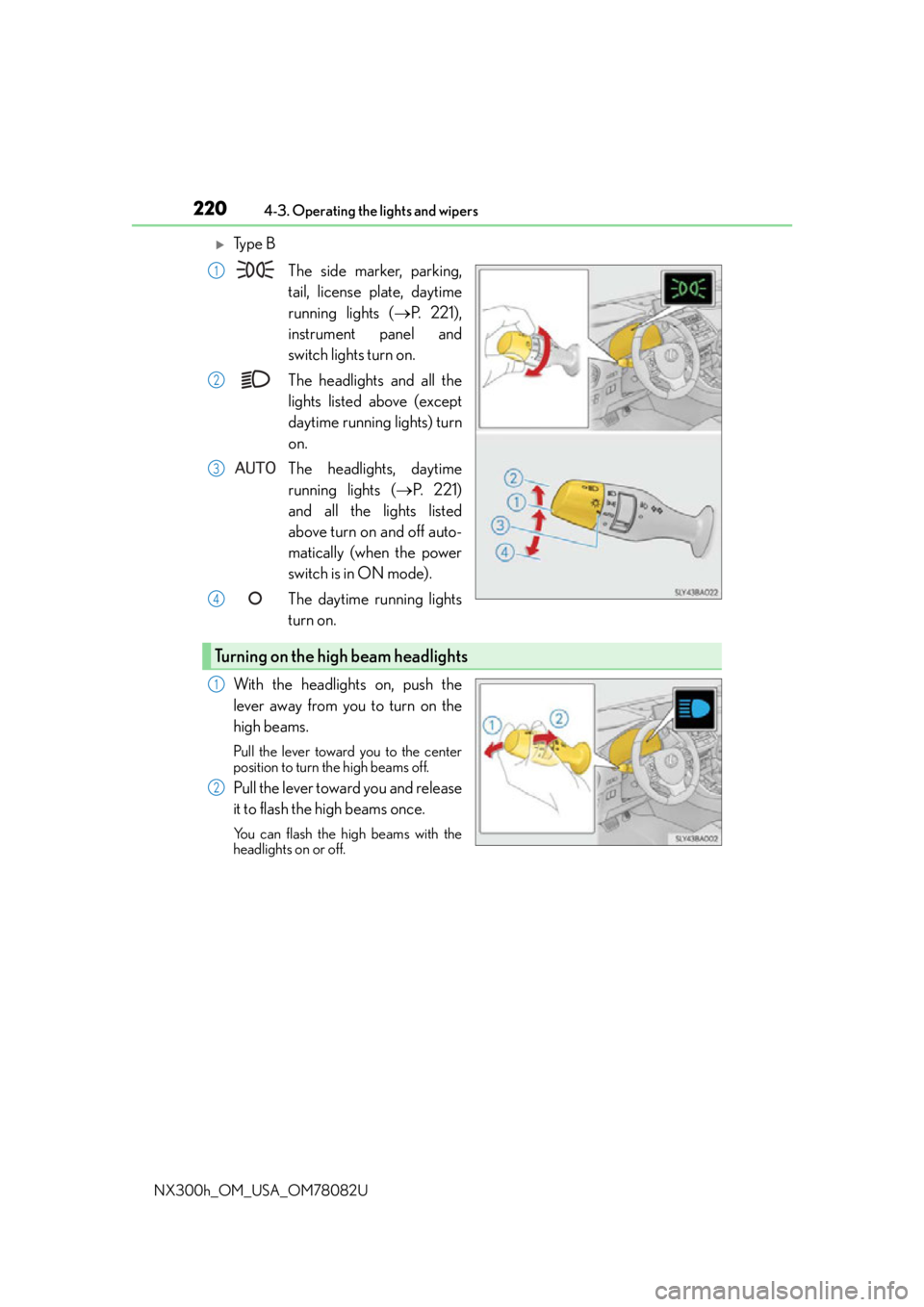
Ty p e B The side marker, parking,
tail, license plate, daytime
running lights ( P. 221),
instrument panel and
switch lights turn on.
The headlights and all the
lights listed above (except
daytime running lights) turn
on.
The headlights, daytime
running lights ( P. 221)
and all the lights listed
above turn on and off auto-
matically (when the power
switch is in ON mode).
The daytime running lights
turn on.
With the headlights on, push the
lever away from you to turn on the
high beams.
Pull the lever toward you to the center
position to turn the high beams off.
Pull the lever toward you and release
it to flash the high beams once.
You can flash the high beams with the
headlights on or off.
1
2
3
4
Turning on the high beam headlights
1
2
Page 223 of 680
2234-3. Operating the lights and wipers
4
Driving
NX300h_OM_USA_OM78082U
Automatic High Beam
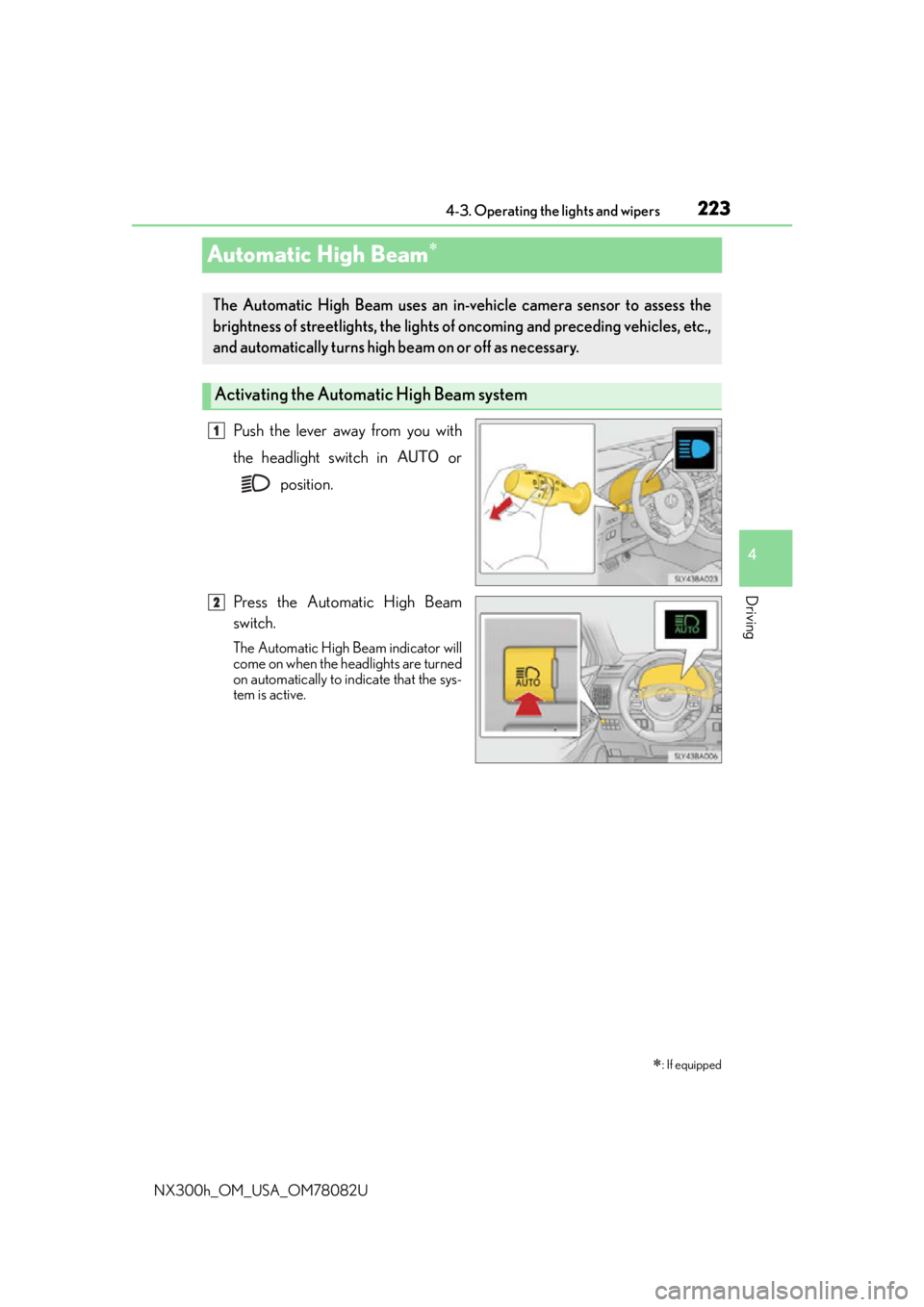
Push the lever away from you with
the headlight switch in or position.
Press the Automatic High Beam
switch.
The Automatic High Beam indicator will
come on when the headlights are turned
on automatically to indicate that the sys-
tem is active.
: If equipped
The Automatic High Beam uses an in-v ehicle camera sensor to assess the
brightness of streetlights, the lights of oncoming and preceding vehicles, etc.,
and automatically turns high be am on or off as necessary.
Activating the Automatic High Beam system
1
2
Page 224 of 680
2244-3. Operating the lights and wipers
NX300h_OM_USA_OM78082U
When all of the following conditions are fulfilled, high beam will be automatically
turned on:
●Vehicle speed is above approximately 21 mph (34 km/h).
●The area ahead of the vehicle is dark.
●There are no oncoming or preceding vehicles with headlights or tail lights
turned on.
●There are few streetlights on the road ahead.
If any of the following conditions are fulfilled, high beam will be automatically
turned off:
●Vehicle speed drops below approximately 17 mph (27 km/h).
●The area ahead of the vehicle is not dark.
●Oncoming or preceding vehicles have headlights or tail lights turned on.
●There are many streetlights on the road ahead.
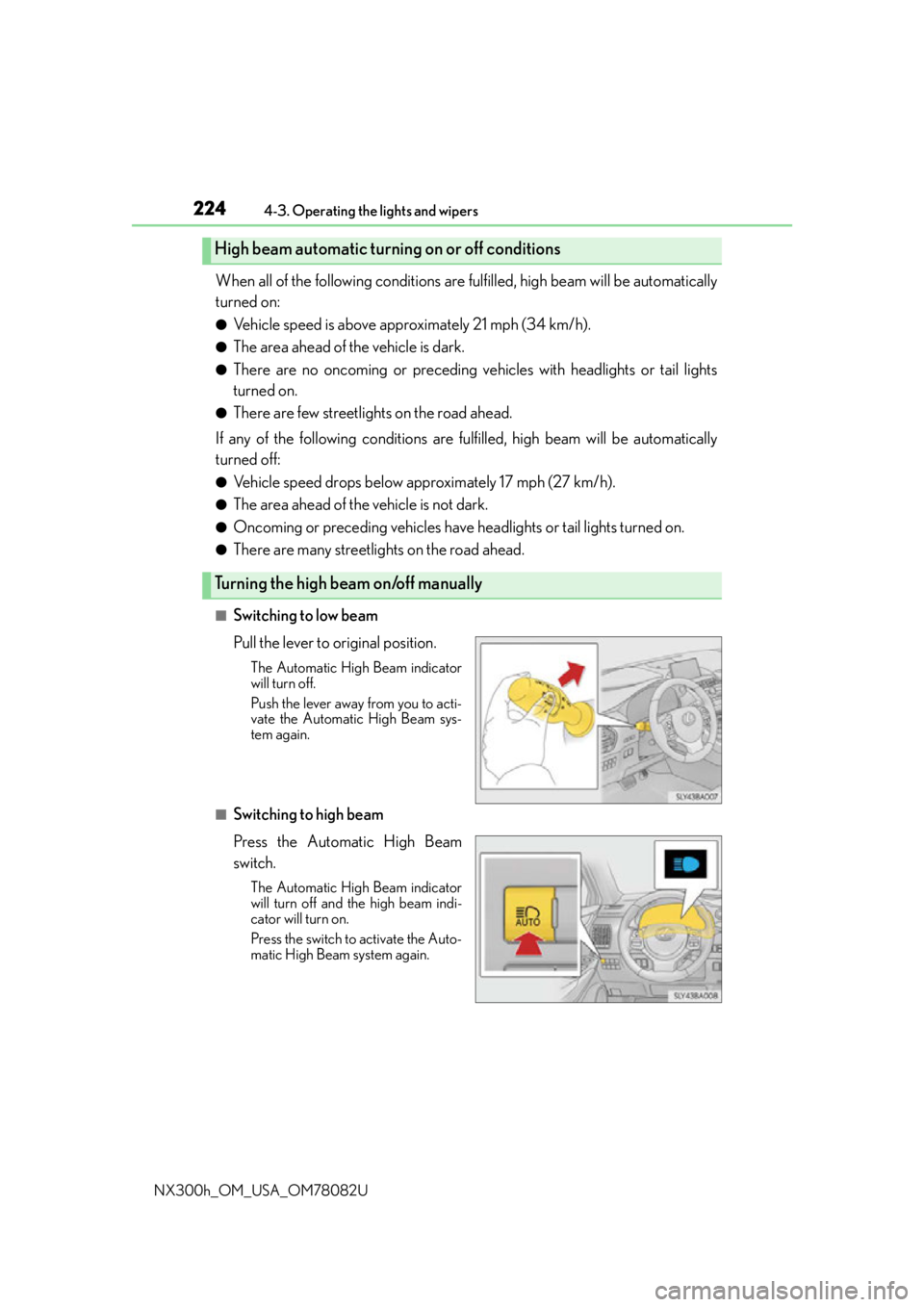
■Switching to low beam
Pull the lever to original position.
The Automatic High Beam indicator
will turn off.
Push the lever away from you to acti-
vate the Automatic High Beam sys-
tem again.
■Switching to high beam
Press the Automatic High Beam
switch.
The Automatic High Beam indicator
will turn off and the high beam indi-
cator will turn on.
Press the switch to activate the Auto-
matic High Beam system again.
High beam automatic turning on or off conditions
Turning the high beam on/off manually
Page 225 of 680

2254-3. Operating the lights and wipers
4
Driving
NX300h_OM_USA_OM78082U
■The Automatic High Beam can be operated when
The power switch is in ON mode.
■Camera sensor detection information
●High beam may not be automatically tu rned off in the following situations:
• When oncoming vehicles sudd enly appear from a curve
• When the vehicle is cut in front of by another
• When oncoming or preceding vehicles are hidden from sight due to repeated
curves, road dividers or roadside trees
●High beam may be turned off if an oncoming vehicle that is using fog lights without
using the headlights is detected.
●House lights, street lights, red traffic signals, and illuminated billboards or signs may
cause the high beam to turn off.
●The following factors may affect the amount of time taken to turn high beam on or off:
• The brightness of headlights, fog lights, and tail lights of oncoming and preceding
vehicles
• The movement and direction of oncoming and preceding vehicles
• When a oncoming or preceding vehicle on ly has operational lights on one side
• When a oncoming or preceding vehicle is a two-wheeled vehicle
• The condition of the road (gradient, curve, condition of the road surface, etc.)
• The number of passengers and amount of luggage
●High beam may be turned on or off when unexpected by the driver.
●In the situations below, the system may not be able to correctly detect the surrounding
brightness levels, and may flash or expose nearby pedestrians to the high beam. There-
fore, you should consider turning the high be ams on or off manually rather than relying
on the Automatic High Beam system.
• In bad weather (rain, snow , fog, sandstorms, etc.)
• The windshield is obscured by fog, mist, ice, dirt, etc.
• The windshield is cracked or damaged.
• The camera sensor is deformed or dirty.
• The camera sensor temperature is extremely high.
• Surrounding brightness levels are equal to those of headlights, tail lights or fog lights.
• Vehicles ahead have headlights or tail lights that are either switched off, dirty, are
changing color, or are not aimed properly.
• When driving through an area of intermit tently changing brightness and darkness.
• When frequently and repeatedly driving ascending/descending roads, or roads with
rough, bumpy or uneven surfaces (such as stone-paved roads, gravel tracks, etc.).
• When frequently and repeat edly taking curves or driving on a winding road.
• There is a highly reflective object ahead of the vehicle, such as a sign or a mirror.
• The back of a vehicle ahead is highly reflective, such as a container on a truck.
• The vehicle’s headlights are damaged or dirty.
• The vehicle is listing or titling, due to a flat tire, a trailer being towed, etc.
• The driver believes that the high beam may be causing problems or distress to other
drivers or pedestrians nearby.
Page 226 of 680
2264-3. Operating the lights and wipers
NX300h_OM_USA_OM78082U
WA R N I N G
■Limitations of the Automatic High Beam
Do not rely on the Automatic High Beam. Always drive safely, taking care to observe
your surroundings and turning high be am on or off manually if necessary.
NOTICE
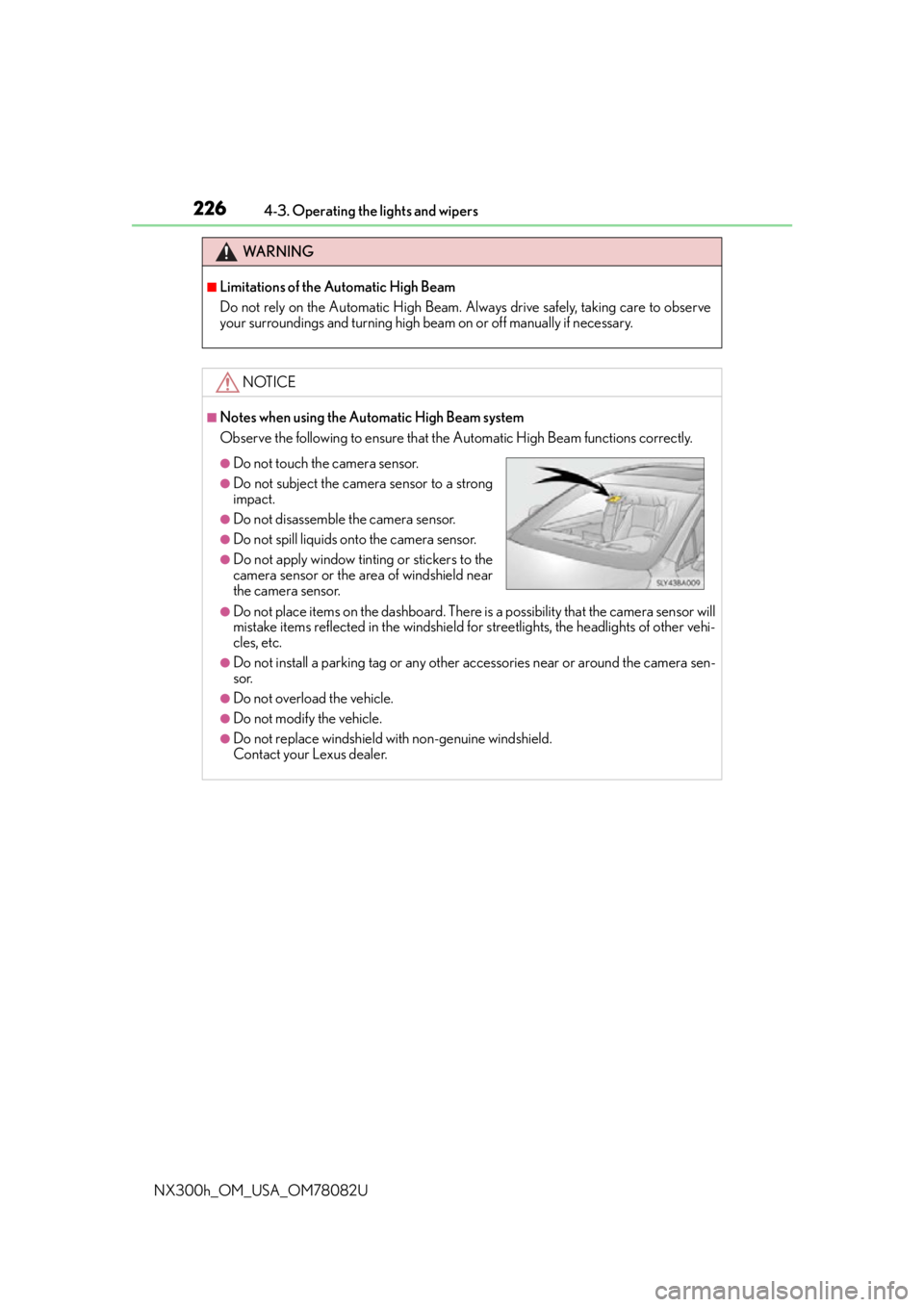
■Notes when using the Automatic High Beam system
Observe the following to ensure that the Automatic High Beam functions correctly.
●Do not place items on the dashboard. There is a possibility that the camera sensor will
mistake items reflected in the windshield for streetlights, the headlights of other vehi-
cles, etc.
●Do not install a parking tag or any other accessories near or around the camera sen-
sor.
●Do not overload the vehicle.
●Do not modify the vehicle.
●Do not replace windshield with non-genuine windshield.
Contact your Lexus dealer.
●Do not touch the camera sensor.
●Do not subject the camera sensor to a strong
impact.
●Do not disassemble the camera sensor.
●Do not spill liquids onto the camera sensor.
●Do not apply window tinting or stickers to the
camera sensor or the area of windshield near
the camera sensor.
Page 490 of 680

4907-1. Maintenance and care
NX300h_OM_USA_OM78082U
NOTICE
■Cleaning detergents
●Do not use the following types of detergent, as they may discolor the vehicle interior
or cause streaks or damage to painted surfaces:
• Non-seat portions: Organic substances su ch as benzene or gasoline, alkaline or
acidic solutions, dye, and bleach
• Seats: Alkaline or acidic solutions, such as thinner, benzene, and alcohol
●Do not use polish wax or polish cleaner. The instrument panel’s or other interior part’s
painted surface may be damaged.
■Preventing damage to leather surfaces
Observe the following precautions to avoid damage to and deterioration of leather
surfaces:
●Remove any dust or dirt from leather surfaces immediately.
●Do not expose the vehicle to direct sunlight for extended periods of time. Park the
vehicle in the shade, especially during summer.
●Do not place items made of vinyl, plastic, or containing wax on the upholstery, as they
may stick to the leather su rface if the vehicle interior heats up significantly.
■Water on the floor
Do not wash the vehicle floor with water.
Vehicle systems such as the audio system may be damaged if water comes into contact
with electrical components such as the au dio system above or under the floor of the
vehicle. Water may also cause the body to rust.
■When cleaning the inside of the windshield (vehicles with LDA [Lane Departure
Alert] or Automatic High Beam)
Be careful not to touch the camera sensor ( P. 2 7 0 ) .
If the camera is accidentally scratched or hit, LDA and Automatic High Beam may not
operate properly or may cause a malfunction.
■Cleaning the inside of the rear window
●Do not use glass cleaner to clean the rear window, as this may cause damage to the
rear window defogger heater wires or antenna. Use a cloth dampened with luke-
warm water to gently wipe the window cl ean. Wipe the window in strokes running
parallel to the heater wires or antenna.
●Be careful not to scratch or damage the heater wires or antenna.
■Cleaning the front side windows
Do not use any compound or abrasive product (e.g., glass cleaner, detergent, wax) to
clean the windows. It may damage the coating.