maintenance LEXUS NX300H 2016 Owners Manual
[x] Cancel search | Manufacturer: LEXUS, Model Year: 2016, Model line: NX300H, Model: LEXUS NX300H 2016Pages: 680, PDF Size: 10.23 MB
Page 1 of 680

NX300h_OM_USA_OM78082U
Pictorial indexSearch by illustration
1For safety
and securityMake sure to read through them
2Instrument clusterHow to read the gauges and meters, the variety of
warning lights and indicators, etc.
3Operation of
each componentOpening and closing the doors and windows,
adjustment before driving, etc.
4DrivingOperations and advices which are necessary for
driving
5Lexus Display
Audio systemOperating the Lexus Display Audio system
6Interior featuresUsage of the interior features, etc.
7Maintenance
and careCaring for your vehicle and maintenance procedures
8When trouble
arisesWhat to do in case of malfunction or emergency
9Vehicle
specificationsVehicle specifications, customizable features, etc.
10For ownersReporting safety defects for US owners, and seat belt
and SRS airbag instructions for Canadian owners
IndexSearch by symptom
Search alphabetically
Page 6 of 680

TABLE OF CONTENTS6
NX300h_OM_USA_OM78082U
6-4. Other interior featuresOther interior features ............ 455
• Sun visors ................................ 455
• Vanity mirrors ........................ 455
• Clock ........................................ 456
• Power outlet (12 VDC)...... 456
• Power outlet (120 VAC) ....457
• Wireless charger.................. 458
• Armrest.................................... 465
• Assist grips ............................. 465
• Coat hooks ............................. 466
Garage door opener ................467
Compass ........................................473
Safety Connect............................ 477
7-1. Maintenance and care Cleaning and protecting the vehicle exterior ................ 484
Cleaning and protecting the vehicle inte rior..................488
7-2. Maintenance Maintenance requirements ..............................491
General maintenance.............. 494
Emission inspection and maintenance (I/M)
programs .....................................497 7-3. Do-it-yourself maintenance
Do-it-yourself service precautions................................ 498
Hood ...............................................500
Positioning a floor jack.............. 501
Engine compartment ............... 502
12-volt battery ...............................512
Tires....................................................516
Tire inflation pressure ............... 525
Wheels ........................................... 528
Air conditio ning filter ............... 530
Electronic key battery.............. 532
Checking and replacing fuses.............................................. 534
Light bulbs .................................... 538
8-1. Essential information Emergency flashers .................. 556
If your vehicle has to be stopped in an
emergency .................................557
7Maintenance and care8When trouble arises
Page 7 of 680
7
1
9 8
7
6 4 3
2
10
5
NX300h_OM_USA_OM78082U
8-2. Steps to take in an emergency If your vehicle needs to be towed .....................................558
If you think something is wrong ........................................... 564
If a warning light turns on or a warning buzzer
sounds ......................................... 565
If a warning message is displayed .....................................572
If you have a flat tire ...................575
If the hybrid system will not start .............................................. 588
If the shift lever cannot be shifted from P ........................... 590
If the electronic key does not operate properly ...................... 591
If the 12-volt battery is discharged ................................. 594
If your vehicle overheats ......... 599
If the vehicle becomes stuck ............................................. 603 9-1. Specifications
Maintenance data (fuel, oil level, etc.) .................. 606
Fuel information ........................... 616
Tire information............................. 619
9-2. Customization Customizable features ..............631
9-3. Initialization Items to initialize...........................641
Reporting safety defects for U.S. owners............................................ 644
Seat belt instructions for Canadian owners (in French) ........ 645
SRS airbag instructions for Canadian owners (in French) .........647
What to do if... (Troubleshooting) ............................... 656
Alphabetical index ................................ 6609Vehicle specifications
10For owners
Index
For vehicles with a navigation system, refer to the “NAVIGATION SYSTEM
OWNER’S MANUAL” for information rega rding the equipment listed below.
• Navigation system
• Lexus parking assist monitor• Audio/visual system
• Lexus Enform with Safety Con-
nect
Page 80 of 680

801-2. Hybrid system
NX300h_OM_USA_OM78082U
■Sounds and vibrations specific to a hybrid vehicle
There may be no engine sound or vibration even though the vehicle is able to move with
the “READY” indicator is illuminated. For safety, make sure to shift the shift lever to P and
apply the parking brake when parked.
The following sounds or vibrat ions may occur when the hybrid system is operating and
are not a malfunction:
●Motor sounds may be heard from the engine compartment.
●Sounds may be heard from the hybrid battery (traction battery) behind the rear seats
when the hybrid system starts or stops.
●Relay operating sounds such as a snap or soft clank will be emitted from the hybrid bat-
tery (traction battery), behind the rear seats, when the hybrid system is started or
stopped.
●Sounds from the hybrid system may be heard when the back door is open.
●Sounds may be heard from the transmission wh en the gasoline engine starts or stops,
when driving at low speeds, or during idling.
●Engine sounds may be heard when accelerating sharply.
●Sounds may be heard due to regenerative braking when the brake pedal is depressed
or as the accelerator pedal is released.
●Vibration may be felt when the gasoline engine starts or stops.
●Cooling fan sounds may be heard from the air intake vents under the rear seats.
■Vehicle proximity notification system
In the following cases, the ve hicle proximity notification system may be difficult for sur-
rounding people to hear.
●In very noisy areas
●In the wind or the rain
Also, as the vehicle proximity notification system is installed on the front of the vehicle, it
may be more difficult to hear from the re ar of the vehicle compared to the front.
■Maintenance, repair, recycling, and disposal
Contact your Lexus dealer regarding maintenance, repair, recycling and disposal. Do
not dispose of the vehicle yourself.
■Customization
Settings (e.g. on/off operation of the EV indicator) can be changed.
(Customizable features: P. 6 3 1 )
Page 86 of 680

861-3. Theft deterrent system
NX300h_OM_USA_OM78082U
Immobilizer system
The indicator light flashes after the
power switch has been turned off to
indicate that the system is operating.
The indicator light stops flashing after
the power switch has been turned to
ACCESSORY or ON mode to indi-
cate that the system has been canceled.
■System maintenance
The vehicle has a maintenance-free type immobilizer system.
■Conditions that may cause the system to malfunction
●If the grip portion of the key is in contact with a metallic object
●If the key is in close proximity to or touching a key registered to the security system (key
with a built-in transponder chip) of another vehicle
■Certification for the immobilizer system
For vehicles sold in the U.S.A.
FCC ID: NI4TMIMB-3
This device complies with part 15 of the FC C Rules. Operation is subject to the following
two conditions: (1) This device may not caus e harmful interference; and (2) This device
must accept any interference received, incl uding interference that may cause undesired
operation.
Changes or modifications not expressly approved by the party responsible for compli-
ance could void the user’s authority to operate the equipment.
For vehicles sold in Canada
This device complies with Industry Canada licence-exempt RSSs. Operation is subject
to the following two conditions: (1) This de vice may not cause interference; and (2) This
device must accept any interference, includ ing interference that may cause undesired
operation of the device.
The vehicle’s keys have built-in transponder chips that prevent the hybrid sys-
tem from starting if a key has not been previously registered in the vehicle’s
on-board computer.
Never leave the keys inside the vehicle when you leave the vehicle.
This system is designed to help prevent vehicle theft but does not guarantee
absolute security against all vehicle thefts.
Page 89 of 680
891-3. Theft deterrent system
1
For safety and security
NX300h_OM_USA_OM78082U
■System maintenance
The vehicle has a maintenance-free type alarm system.
■Items to check before locking the vehicle
To prevent unexpected triggering of the alarm and vehicle theft, make sure of the follow-
ing:
●Nobody is in the vehicle.
●The windows and moon roof (if equipped) are closed before the alarm is set.
●No valuables or other personal items are left in the vehicle.
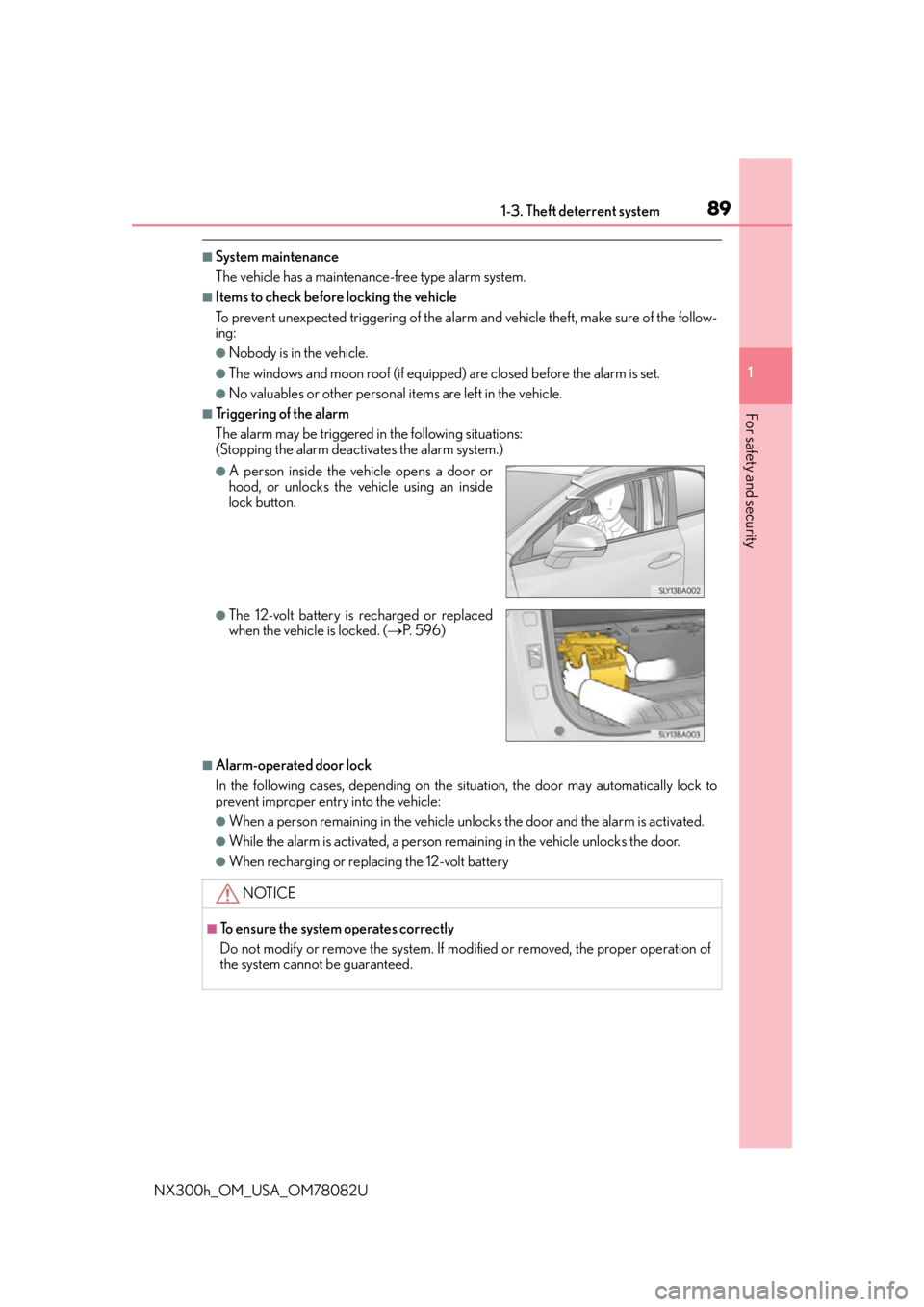
■Triggering of the alarm
The alarm may be triggered in the following situations:
(Stopping the alarm deactivates the alarm system.)
■Alarm-operated door lock
In the following cases, depending on the situation, the door may automatically lock to
prevent improper entry into the vehicle:
●When a person remaining in the vehicle unlocks the door and the alarm is activated.
●While the alarm is activated, a person re maining in the vehicle unlocks the door.
●When recharging or replacing the 12-volt battery
●A person inside the vehicle opens a door or
hood, or unlocks the vehicle using an inside
lock button.
●The 12-volt battery is recharged or replaced
when the vehicle is locked. (P. 5 9 6 )
NOTICE
■To ensure the system operates correctly
Do not modify or remove the system. If modified or removed, the proper operation of
the system cannot be guaranteed.
Page 98 of 680

982. Instrument cluster
NX300h_OM_USA_OM78082U
Background color of drive mode
Background color changes according to the drive mode. ( P. 303)
• Sport mode: Red
• Eco drive mode: Blue
When in Normal mode, the background color is Black.
Outside temperature
Displays the outside temperature within the range of -40 F (-40 C) to 122 F
(50 C). Low outside temperature indicator comes on when the ambient temperature
is 37 F (3 C) or lower.
Shift position and shift range
Displays the selected shift posi tion or selected shift range (P. 2 0 8 )
Speedometer
Displays the vehicle speed
Fuel gauge
Displays the quantity of fuel remaining in the tank
Multi-information display
Presents the driver with a variety of vehicle data ( P. 1 0 2 )
Displays warning messages in case of a malfunction ( P. 5 7 2 )
Odometer, trip meter and maintena nce required information display
Odometer:
Displays the total distance the vehicle has been driven
Tr i p m e t e r :
Displays the distance the vehicle has been driven since the meter was last reset.
Trip meters “A” and “B” can be used to record and display different distances indepen-
dently.
Maintenance required information:
Displays the remaining distance until the engine oil should be changed.
• Displays the maintenance required information when the power switch is ON mode.
• It can be reset from the “settings display” of the multi-information display. ( P. 1 0 2 )
Tachometer
Displays the engine speed in revolutions per minute
3
4
5
6
7
8
9
10
Page 99 of 680
992. Instrument cluster
2
Instrument cluster
NX300h_OM_USA_OM78082U
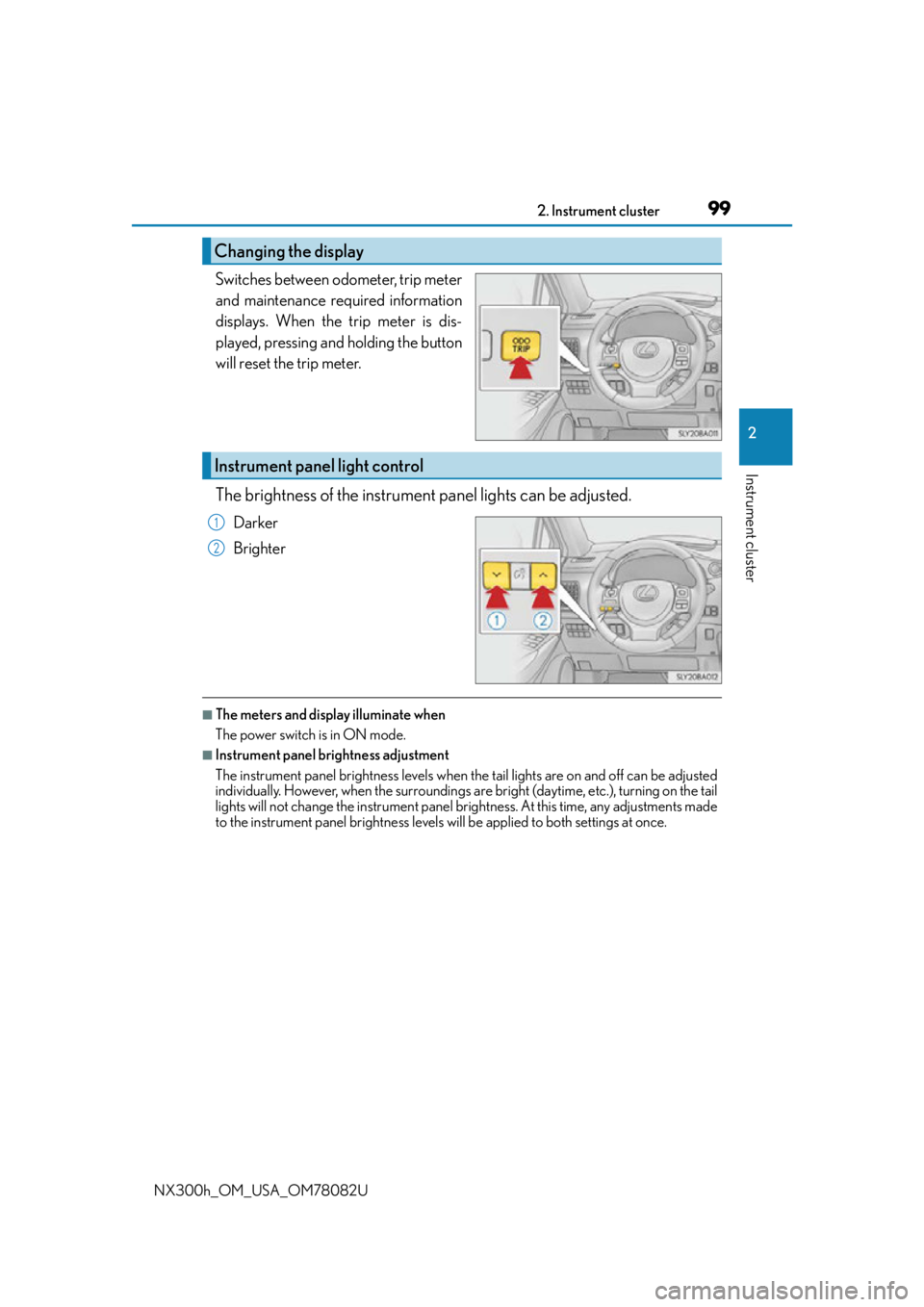
Switches between odometer, trip meter
and maintenance required information
displays. When the trip meter is dis-
played, pressing and holding the button
will reset the trip meter.
The brightness of the instrument panel lights can be adjusted.
Darker
Brighter
■The meters and display illuminate when
The power switch is in ON mode.
■Instrument panel brightness adjustment
The instrument panel brightness levels when the tail ligh ts are on and off can be adjusted
individually. However, when the surroundings ar e bright (daytime, etc.), turning on the tail
lights will not change the instru ment panel brightness. At this time, any adjustments made
to the instrument panel bright ness levels will be applied to both settings at once.
Changing the display
Instrument panel light control
1
2
Page 101 of 680

1012. Instrument cluster
2
Instrument cluster
NX300h_OM_USA_OM78082U
■Outside temperature display
●In the following situations, the correct outside temperature may not be displayed, or the
display may take longer than normal to change.
• When stopped, or driving at low speeds (less than 12 mph [20 km/h])
• When the outside temperature has changed suddenly (at the entrance/exit of agarage, tunnel, etc.)
●When “--” or “E” is displayed, the system may be malfunctioning.
Take your vehicle to your Lexus dealer.
■ Pop-up display
In some situations, a pop-up display will be temporarily displayed on the multi-informa-
tion display or the odometer/trip meter/ maintenance required information screen.
The pop-up display function can be set on/off. ( P. 636)
■ Liquid crystal display
Small spots or light spots may appear on the display. This phenomenon is characteristic
of liquid crystal displays, and there is no problem continuing to use the display.
■Customization
The meter display can be customized on the multi-information display.
(Customizable features: P. 6 3 1 )
WA R N I N G
■The information display at low temperatures
Allow the interior of the vehicle to warm up before using the liquid crystal information
display. At extremely low temperatures, th e information display monitor may respond
slowly, and display changes may be delayed.
For example, there is a lag between the driver's shifting and the new gear number
appearing on the display. This lag could cau se the driver to downshift again, causing
rapid and excessive engine braking and po ssibly an accident resulting in personal
death or injury.
NOTICE
■To prevent damage to the engine and its components
●When the tachometer is displayed, do not let the indicator needle of the tachometer
enter the red zone, which indicates the maximum engine speed.
●The engine may be overheating if the engine coolant temperature gauge is in the red
zone (H); or “Engine Coolant Temp High” or “Hybrid System Overheated” is shown
on the multi-information display. In this case, immediately stop the vehicle in a safe
place, and check the engine or hybrid system after it has cooled completely.
( P. 599)
Page 196 of 680

1964-1. Before driving
NX300h_OM_USA_OM78082U
■Break-in schedule
If your vehicle is new or equipped with any new power train components (such as an
engine, transmission, differential or wheel bearing), Lexus recommends that you do not
tow a trailer until the vehicle has been driven for over 500 miles (800 km).
After the vehicle has been driven for over 500 miles (800 km), you can start towing.
However, for the next 500 miles (800 km), drive the vehicle at a speed of less than
50 mph (80 km/h) when towing a trailer, and avoid full throttle acceleration.
■Maintenance
●If you tow a trailer, your vehicle will require more frequent maintenance due to the addi-
tional load. (See “Warranty and Services Guide”, “Owner’s Manual Supplement” or
“Scheduled Maintenance”.)
●Retighten the fixing bolts of the towing ba ll and bracket after approximately 600 miles
(1000 km) of trailer towing.
■If trailer sway occurs
One or more factors (crosswinds, passing vehicles, rough roads, etc.) can adversely
affect handling of your vehicle and trailer, causing instability.
●If trailer swaying occurs:
• Firmly grip the steering wheel. Steer straight ahead.
Do not try to control trailer sway ing by turning the steering wheel.
• Begin releasing the accelerator pedal i mmediately but very gradually to reduce
speed.
Do not increase speed. Do not apply vehicle brakes.
If you make no extreme correction with the steering or brakes, your vehicle and trailer
should stabilize.
●After the trailer sw aying has stopped:
• Stop in a safe place. Get all occupants out of the vehicle.
• Check the tires of the vehicle and the trailer.
• Check the load in the trailer. Make sure the load has not shifted.
Make sure the tongue weight is appropriate, if possible.
• Check the load in the vehicle. Make sure the vehicle is not overloaded after occupants get in.
If you cannot find any problems, the speed at which trailer swaying occurred is beyond
the limit of your particular vehicle-trailer combination. Drive at a lower speed to pre-
vent instability. Remember that swaying of the towing vehicle-trailer increases as
speed increases.