remote control LEXUS NX300h 2018 Owner's Manual
[x] Cancel search | Manufacturer: LEXUS, Model Year: 2018, Model line: NX300h, Model: LEXUS NX300h 2018Pages: 460, PDF Size: 13.57 MB
Page 148 of 460
148 3-5. Opening, closing the windows and moon roof
LEXUS NX300h Owners Manu-
al_USA_OM78212U After that tilt up once again and stop at the
completely closed position.
4 Confirm that moon roof has completely
stopped and release the switch.●
If the moon roof can only be closed when
the moon roof is partially opened
3 Press and hold the “DOWN” or
“CLOSE” switch.
Fully close the moon roof, tilt up and open it
close to the fully open position. After that,
fully close the moon r oof and tilt up once
again, then stop the mo on roof in the fully
closed position.
4 Confirm that moon roof has completely
stopped and release the switch.●
When tilt up/down or moon roof opening
and closing can be done but automatic
full opening and closing cannot be done
3 Press the “OPEN” switch and fully
open.
4 Press the “CLOSE” switch and fully
close.
5 Press the “UP” switch and tilt up until
the tilt up stop position.
6 Press the “DOWN” switch and tilt
down.
If the switch is releas ed before any step is
completes, the proced ure will have to be
performed again from the beginning.
If the opening and closing operations or
automatic opening function does not move
as normal, even after performing the above
mentioned operations, have the vehicle
inspected by your Lexus dealer. ■
Moon roof open warning buzzer
The buzzer sounds and a message is shown
on the multi-information display in the
instrument cluster when the power switch is
turned off and the driver’s door is opened
with the moon roof open.
■
Door lock linked moon roof operation
●
The moon roof can be opened and
closed using the mechanical key. *
( → P.388)
●
The moon roof can be opened using the
wireless remote control. *
( → P.106)*
: These settings must be customized at
your Lexus dealer. WARNING
Observe the following precautions.
Failing to do so may cause death or seri-
ous injury. ■
Closing the moon roof ●
The driver is responsible for moon roof
opening and closing operations.
In order to prevent accidental opera-
tion, especially by a child, do not let a
child operate the moon roof. It is possi-
ble for children and other passengers
to have body parts caught in the moon
roof. ●
Check to make sure that all passen-
gers do not have any part of their body
in a position where it could be caught
when the moon roof is being operated.●
When using the wireless remote con-
trol or mechanical key and operating
the moon roof, oper ate the moon roof
after checking to make sure that there
is no possibility of any passenger hav-
ing any of their body parts caught in
the moon roof. Also, do not let a child
operate moon roof by the mechanical
key. It is possible for children and other
passengers to get caught in the moon
roof.
●
When exiting the vehicle, turn the
power switch off, carry the key and exit
the vehicle along with the child. There
may be accidental operation, due to
mischief, etc., that may possibly lead to
an accident.
■
Jam protection function
●
Never use any part of your body to
intentionally activa te the jam protec-
tion function.
●
The jam protection function may not
work if something gets caught just
before the moon roof is fully closed.
Also, the jam protection function is not
designed to operate while the moon
roof switch is being pressed. Take care
so that your fingers, etc. do not get
caught.
Page 266 of 460
266 5-1. Remote Touch
LEXUS NX300h Owners Manu-
al_USA_OM78212U
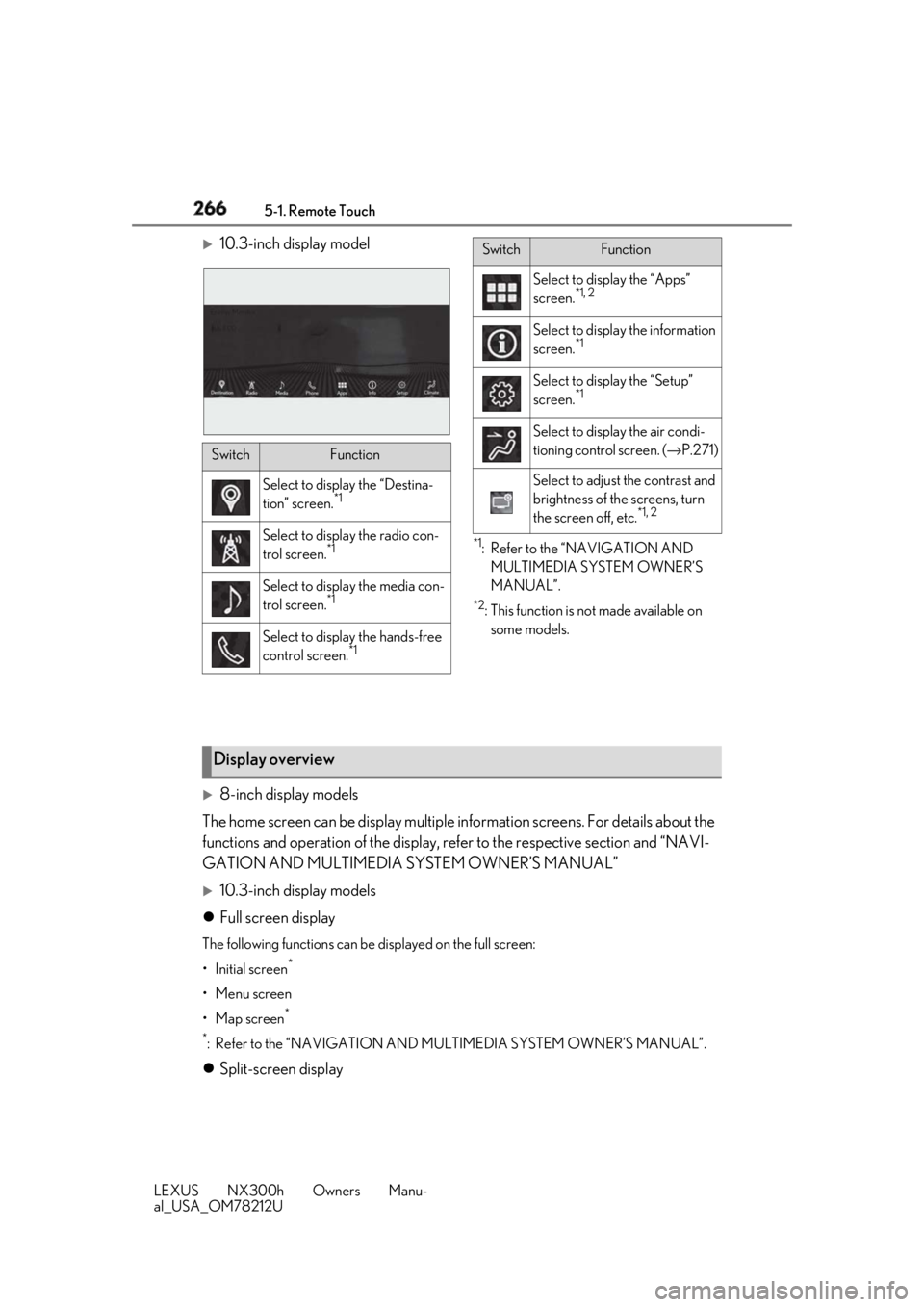
10.3-inch display model
*1
: Refer to the “NAVIGATION AND
MULTIMEDIA SYSTEM OWNER’S
MANUAL”. *2
: This function is not made available on
some models.
8-inch display models
The home screen can be display multiple information screens. For details about the
functions and operation of the display, re fer to the respective section and “NAVI-
GATION AND MULTIMEDIA SYSTEM OWNER’S MANUAL”
10.3-inch display models
Full screen display The following functions can be displayed on the full screen:
•Initial screen *
• Menu screen
•Map screen *
*
: Refer to the “NAVIGATION AND MULTIMEDIA SYSTEM OWNER’S MANUAL”.
Split-screen display Switch Function
Select to displa y the “Destina-
tion” screen. *1
Select to display the radio con-
trol screen. *1
Select to display the media con-
trol screen. *1
Select to display the hands-free
control screen. *1 Select to display the “Apps”
screen. *1, 2
Select to display the information
screen. *1
Select to display the “Setup”
screen. *1
Select to display the air condi-
tioning control screen. ( → P.271)
Select to adjust the contrast and
brightness of the screens, turn
the screen off, etc. *1, 2Switch Function
Display overview
Page 268 of 460
268 5-2. Using the air conditio ning system and defogger
LEXUS NX300h Owners Manu-
al_USA_OM78212U 5-2.Using the air conditioning system and defogger
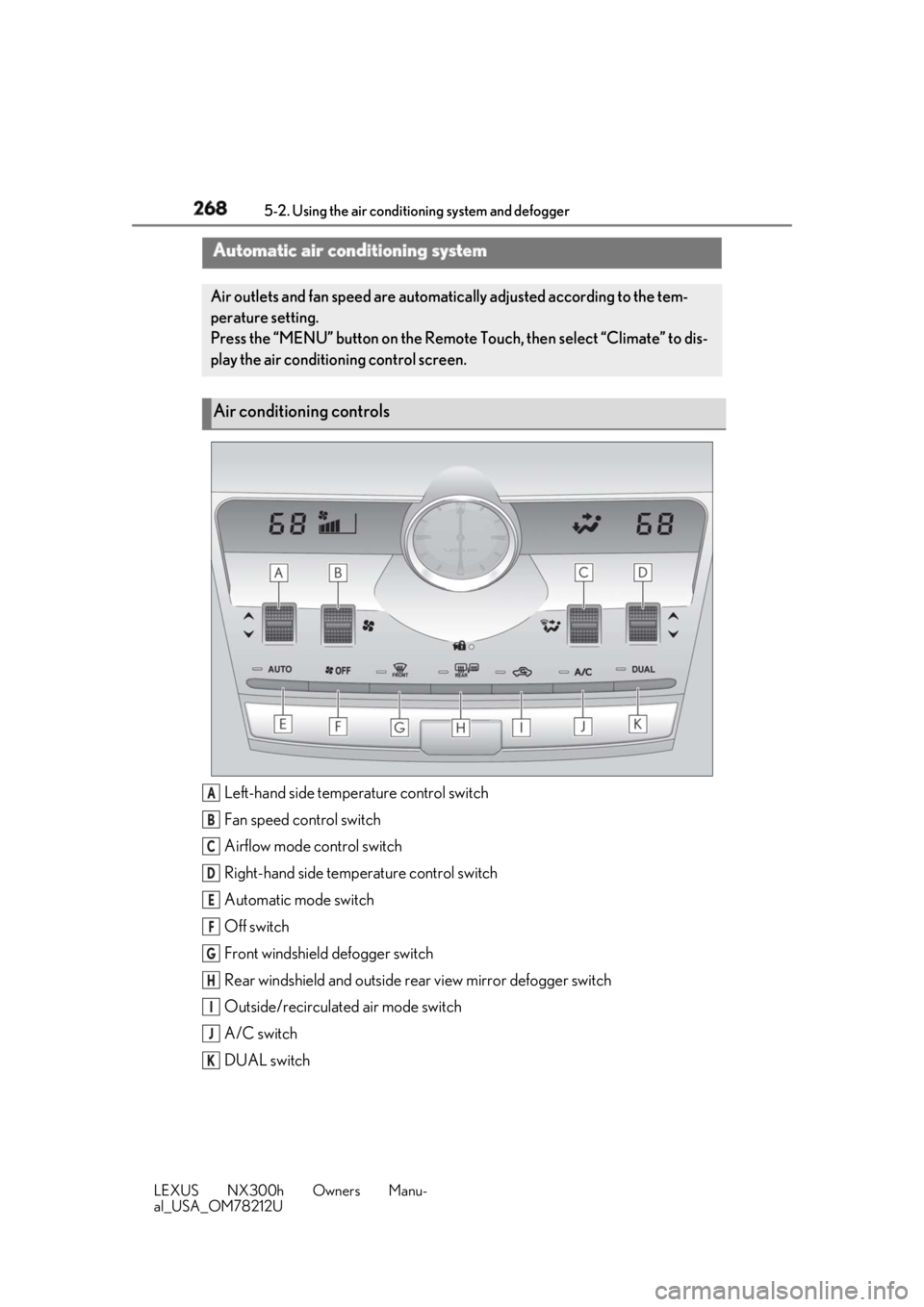
Left-hand side temperature control switch
Fan speed control switch
Airflow mode control switch
Right-hand side temp erature control switch
Automatic mode switch
Off switch
Front windshield defogger switch
Rear windshield and outside rear view mirror defogger switch
Outside/recirculated air mode switch
A/C switch
DUAL switchAutomatic air conditioning system Air outlets and fan speed are automati cally adjusted according to the tem-
perature setting.
Press the “MENU” button on the Remote Touch, then select “Climate” to dis-
play the air conditioning control screen.
Air conditioning controls
A
B
C
D
E
F
G
H
I
J
K
Page 271 of 460
2715-2. Using the air conditio ning system and defogger
LEXUS NX300h Owners Manu-
al_USA_OM78212U 5
Interior features ■
Air conditioning filter
→ P.346■
Customization
Settings (e.g. A/C automatic mode switch
operation) can be changed.
(Customizable features: → P.424)
■
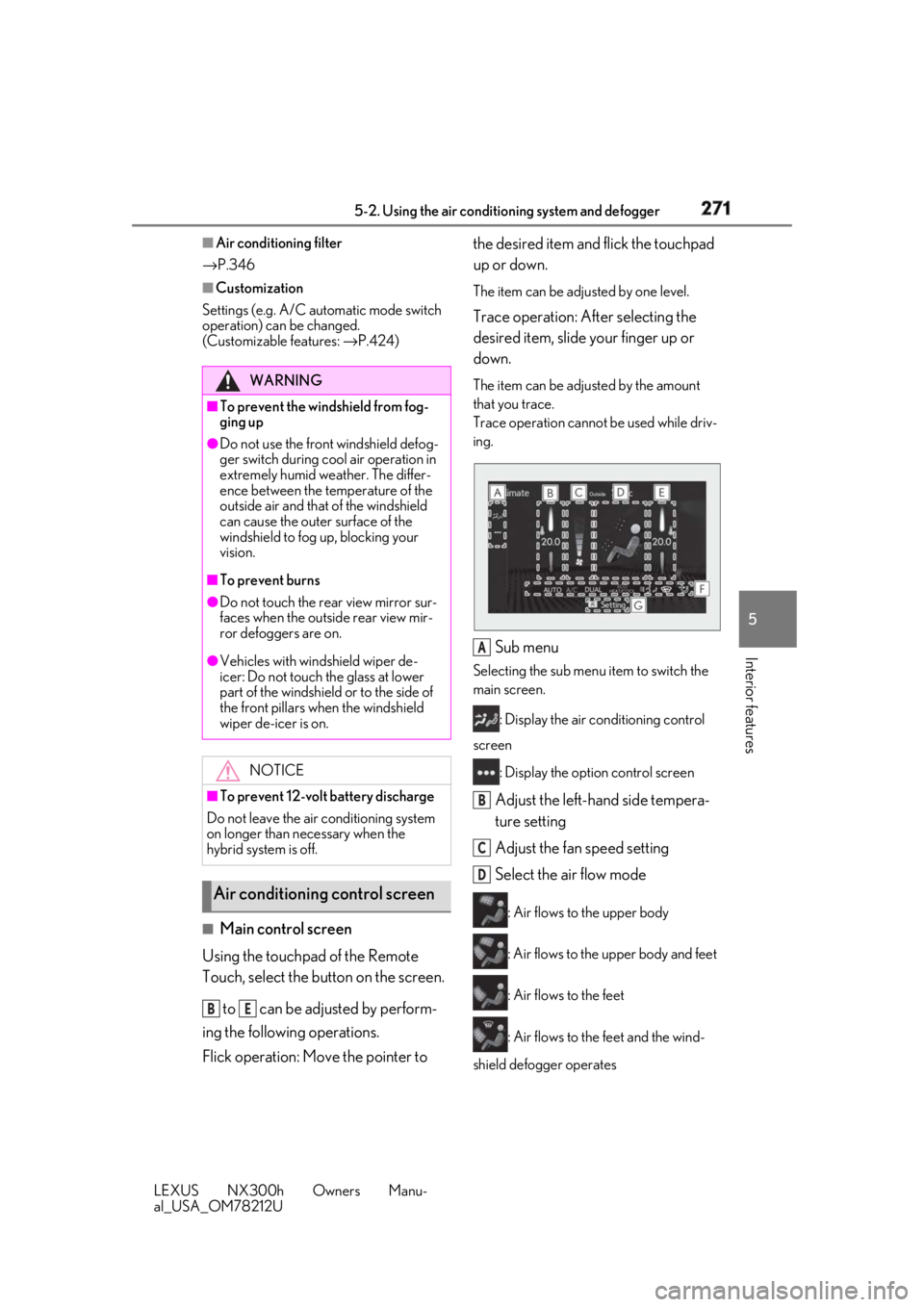
Main control screen
Using the touchpad of the Remote
Touch, select the button on the screen.
to can be adjusted by perform-
ing the following operations.
Flick operation: Move the pointer to the desired item and flick the touchpad
up or down. The item can be adjusted by one level.
Trace operation: After selecting the
desired item, slide your finger up or
down. The item can be adjusted by the amount
that you trace.
Trace operation cannot be used while driv-
ing.
Sub menu Selecting the sub menu item to switch the
main screen.
: Display the air conditioning control
screen
: Display the option control screen
Adjust the left-hand side tempera-
ture setting
Adjust the fan speed setting
Select the air flow mode : Air flows to the upper body
: Air flows to the upper body and feet
: Air flows to the feet
: Air flows to the feet and the wind-
shield defogger operatesWARNING■
To prevent the windshield from fog-
ging up●
Do not use the front windshield defog-
ger switch during cool air operation in
extremely humid weather. The differ-
ence between the temperature of the
outside air and that of the windshield
can cause the outer surface of the
windshield to fog up, blocking your
vision.■
To prevent burns●
Do not touch the rear view mirror sur-
faces when the outside rear view mir-
ror defoggers are on.●
Vehicles with windshield wiper de-
icer: Do not touch the glass at lower
part of the windshield or to the side of
the front pillars wh en the windshield
wiper de-icer is on.
NOTICE
■
To prevent 12-volt battery discharge
Do not leave the air conditioning system
on longer than necessary when the
hybrid system is off.
Air conditioning control screen
B E A
B
C
D
Page 272 of 460
272 5-2. Using the air conditio ning system and defogger
LEXUS NX300h Owners Manu-
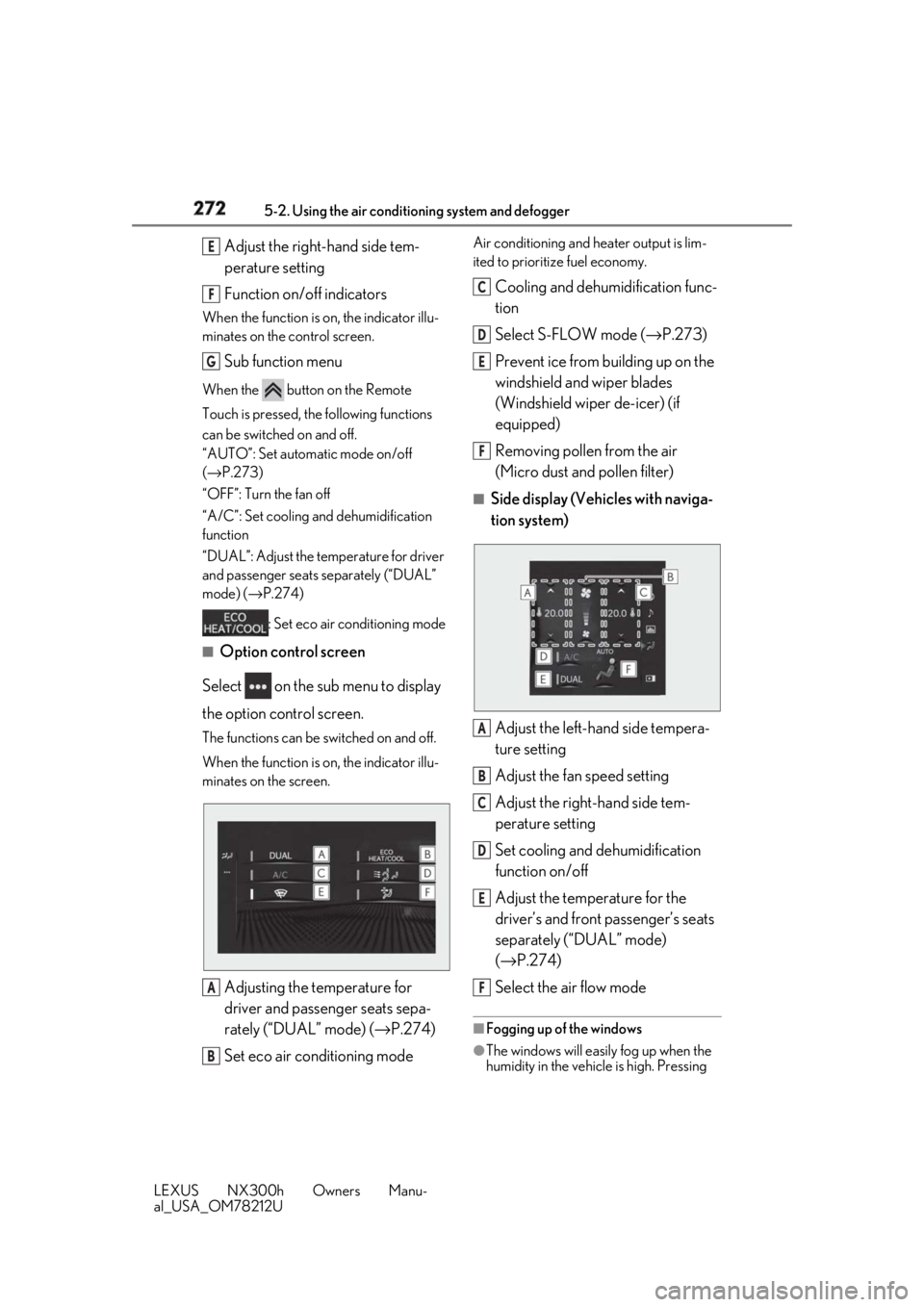
al_USA_OM78212U Adjust the right-hand side tem-
perature setting
Function on/off indicatorsWhen the function is on, the indicator illu-
minates on the control screen.
Sub function menuWhen the button on the Remote
Touch is pressed, the following functions
can be switched on and off.
“AUTO”: Set automatic mode on/off
( → P.273)
“OFF”: Turn the fan off
“A/C”: Set cooling and dehumidification
function
“DUAL”: Adjust the temperature for driver
and passenger seats separately (“DUAL”
mode) ( → P.274)
: Set eco air conditioning mode■
Option control screen
Select on the sub menu to display
the option control screen. The functions can be switched on and off.
When the function is on, the indicator illu-
minates on the screen.
Adjusting the temperature for
driver and passenger seats sepa-
rately (“DUAL” mode) ( → P.274)
Set eco air conditioning mode Air conditioning and heater output is lim-
ited to prioritize fuel economy.
Cooling and dehumidification func-
tion
Select S-FLOW mode ( → P.273)
Prevent ice from building up on the
windshield and wiper blades
(Windshield wiper de-icer) (if
equipped)
Removing pollen from the air
(Micro dust and pollen filter) ■
Side display (Vehicles with naviga-
tion system)
Adjust the left-hand side tempera-
ture setting
Adjust the fan speed setting
Adjust the right-hand side tem-
perature setting
Set cooling and dehumidification
function on/off
Adjust the temperature for the
driver’s and front passenger’s seats
separately (“DUAL” mode)
( → P.274)
Select the air flow mode ■
Fogging up of the windows
●
The windows will easily fog up when the
humidity in the vehicle is high. Pressing E
F
G
A
B C
D
E
F
A
B
C
D
E
F
Page 299 of 460
2995-5. Using the other interior features
LEXUS NX300h Owners Manu-
al_USA_OM78212U 5
Interior features
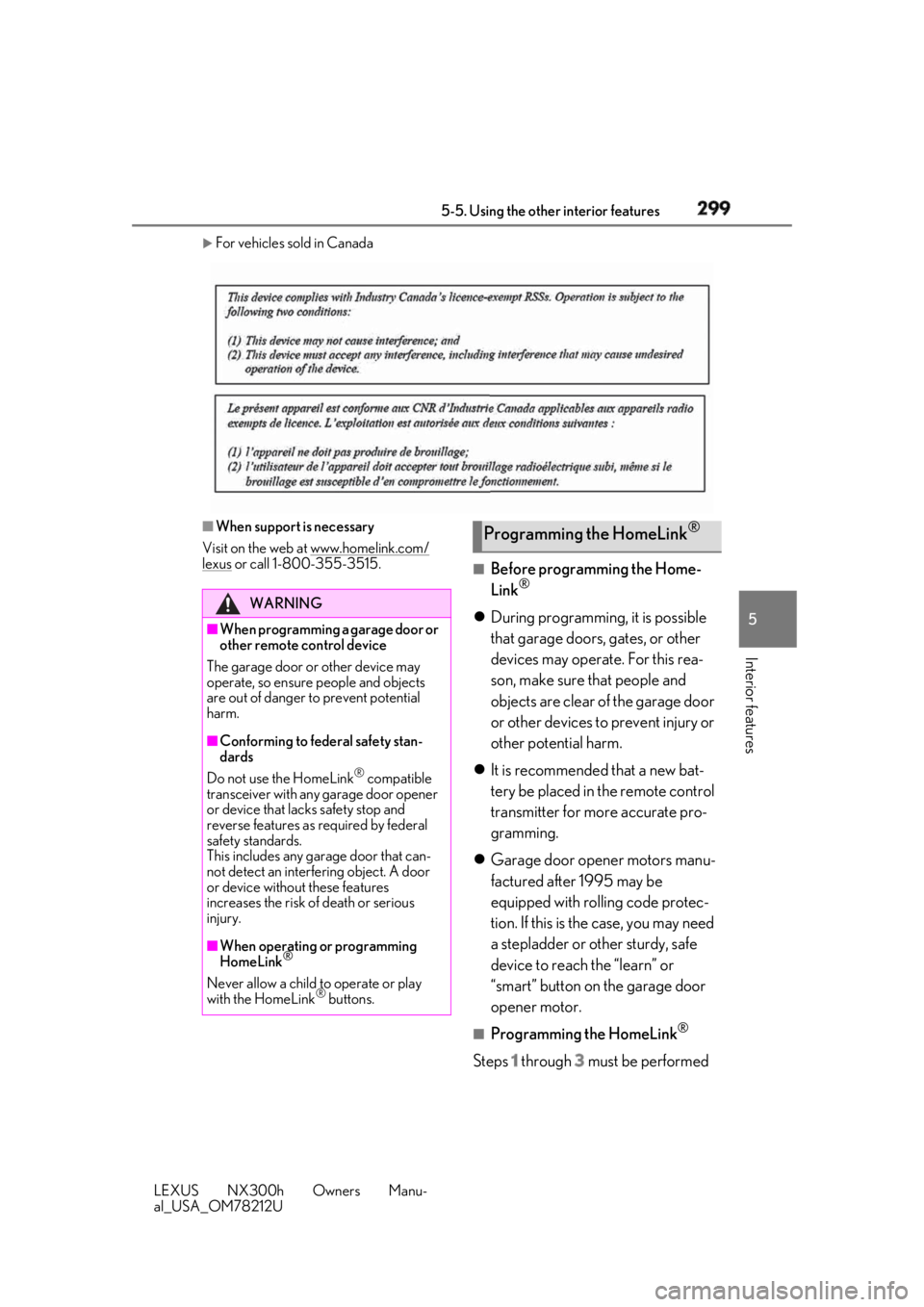
For vehicles sold in Canada
■
When support is necessary
Visit on the web at www.homelink.com/
lexus or call 1-800-355-3515. ■
Before programming the Home-
Link ®
During programming, it is possible
that garage doors, gates, or other
devices may operate. For this rea-
son, make sure that people and
objects are clear of the garage door
or other devices to prevent injury or
other potential harm.
It is recommended that a new bat-
tery be placed in the remote control
transmitter for more accurate pro-
gramming.
Garage door opener motors manu-
factured after 1995 may be
equipped with rolling code protec-
tion. If this is the case, you may need
a stepladder or other sturdy, safe
device to reach the “learn” or
“smart” button on the garage door
opener motor. ■
Programming the HomeLink ®
Steps 1 through 3 must be performed WARNING■
When programming a garage door or
other remote control device
The garage door or other device may
operate, so ensure people and objects
are out of danger to prevent potential
harm. ■
Conforming to federal safety stan-
dards
Do not use the HomeLink ®
compatible
transceiver with any garage door opener
or device that lacks safety stop and
reverse features as required by federal
safety standards.
This includes any garage door that can-
not detect an interfering object. A door
or device without these features
increases the risk of death or serious
injury.
■
When operating or programming
HomeLink ®
Never allow a child to operate or play
with the HomeLink ®
buttons. Programming the HomeLink ®
Page 300 of 460
300 5-5. Using the other interior features
LEXUS NX300h Owners Manu-
al_USA_OM78212U within 60 seconds, otherwise the indi-
cator light will stop flashing and pro-
gramming will not be able to be
completed.
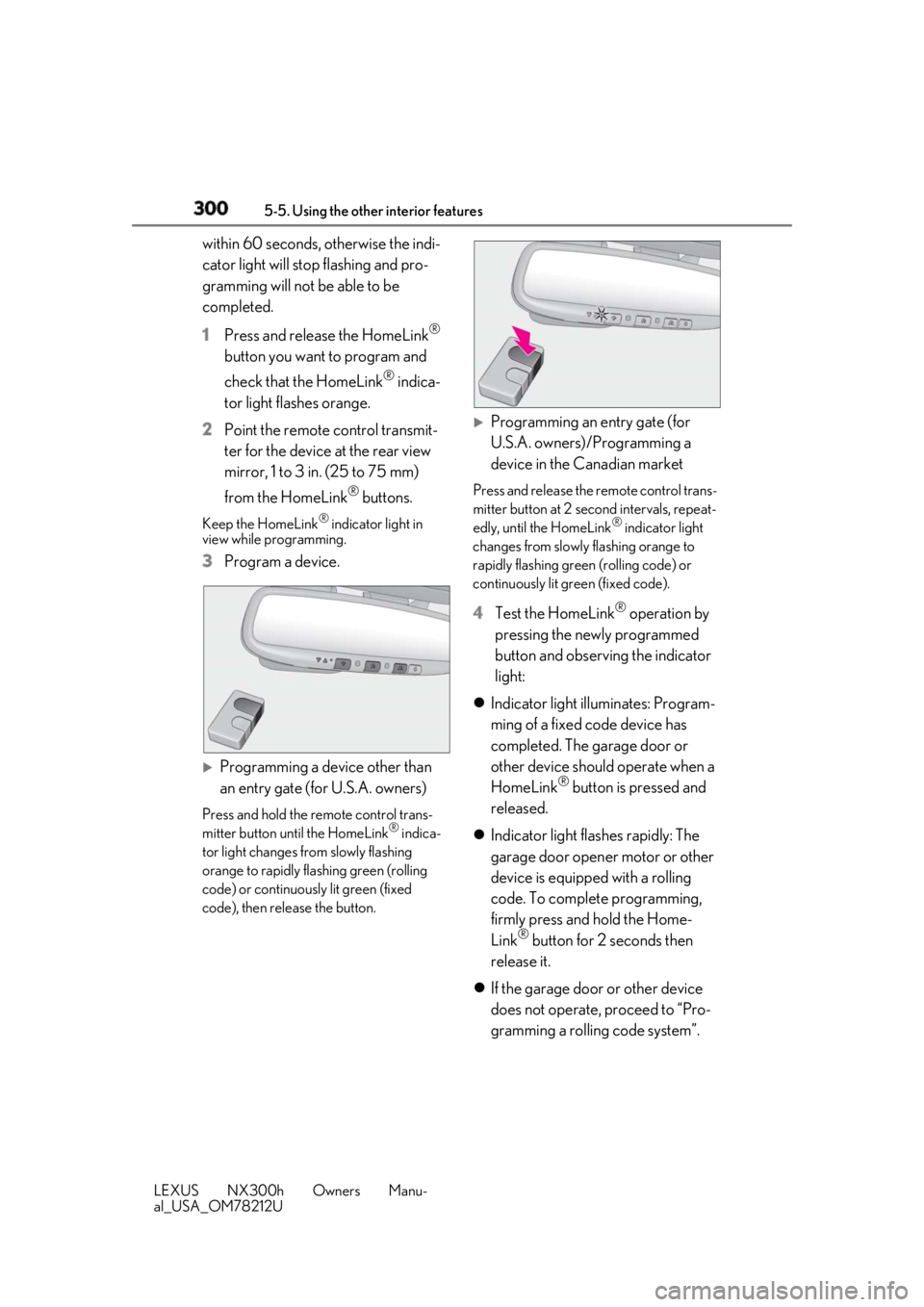
1 Press and release the HomeLink ®
button you want to program and
check that the HomeLink ®
indica-
tor light flashes orange.
2 Point the remote control transmit-
ter for the device at the rear view
mirror, 1 to 3 in. (25 to 75 mm)
from the HomeLink ®
buttons.Keep the HomeLink ®
indicator light in
view while programming.
3 Program a device.
Programming a device other than
an entry gate (for U.S.A. owners) Press and hold the remote control trans-
mitter button until the HomeLink ®
indica-
tor light changes from slowly flashing
orange to rapidly flashing green (rolling
code) or continuously lit green (fixed
code), then release the button.
Programming an entry gate (for
U.S.A. owners)/Programming a
device in the Canadian market Press and release the remote control trans-
mitter button at 2 second intervals, repeat-
edly, until the HomeLink ®
indicator light
changes from slowly flashing orange to
rapidly flashing green (rolling code) or
continuously lit green (fixed code).
4 Test the HomeLink ®
operation by
pressing the newly programmed
button and observing the indicator
light:
Indicator light illuminates: Program-
ming of a fixed code device has
completed. The garage door or
other device should operate when a
HomeLink ®
button is pressed and
released.
Indicator light flashes rapidly: The
garage door opener motor or other
device is equipped with a rolling
code. To complete programming,
firmly press and hold the Home-
Link ®
button for 2 seconds then
release it.
If the garage door or other device
does not operate, proceed to “Pro-
gramming a rolling code system”.
Page 311 of 460
3115-5. Using the other interior features
LEXUS NX300h Owners Manu-
al_USA_OM78212U 5
Interior features *
:If equipped
After you sign the Telematics Subscrip-
tion Service Agreement, download the
Lexus Enform Remote app from your
cellular phone’s app store, and register
within the app (or enroll and complete
registration at the dealer), you can
begin using these services. ( → P.306)
A variety of subscription terms are
available. Contact your Lexus dealer,
or call 1-800-25-LEXUS (1-800-
255-3987) for further subscription
details. ■
Availability of service
Lexus Enform Remote is not available in
some countries or areas.
■
Lexus Enform Remo te Information
●
Lexus Enform Remote should only be
used by authorized users.
●
Laws in some communities may require
that the vehicle be within view of the user
when operating Lexus Enform Remote. In some states, use of Lexus Enform
Remote may violate state or local laws.
Before using Lexus Enform Remote,
check your state and local laws. ●
Any malfunction of the Lexus should be
repaired by your Lexus dealer. ●
Lexus Enform Remote is designed to
work at temperatures above -22°F (-
30°C). This specification is related to the
Lexus Enform Remote operation, but is
dependent on the vehicle’s operating
temperature range which may be differ-
ent. ●
Content is subject to change without
notice. ●
Some features of the Lexus Enform
Remote may not be available on some
models. ●
Additional information can be found at
www.lexus.com/enform/ .●
Availability of functions of the Lexus
Enform service is de pendent on network
reception level. ■
Safety information for Lexus Enform
Remote
Refer to the safety information for Safety
Connect: → P.310Lexus Enform Remote *
Lexus Enform Remote is a cellular
phone application that lets you view
and remotely control certain
aspects of your vehicle.
For details about the functions and
services of this application, refer to
http://www.lexus.com/enform/
.
Function of the Lexus Enform
Remote is achieved by using an
embedded cellular device in the
vehicle (DCM: Data Communica-
tion Module).
Subscription
Page 333 of 460

3336-3. Do-it-yourself maintenance
LEXUS NX300h Owners Manu-
al_USA_OM78212U 6
Maintenance and care The 12-volt battery is located in the left-
hand side of luggage compartment.
■
Before recharging
When recharging, the 12-volt battery pro-
duces hydrogen gas which is flammable
and explosive. Therefore, observe the fol-
lowing precautions before recharging: ●
If recharging with the 12-volt battery
installed on the vehicle, be sure to discon-
nect the ground cable. ●
Make sure the power switch on the char-
ger is off when connecting and discon-
necting the charger cables to the 12-volt
battery. ■
After recharging/reconnecting the 12-
volt battery ●
The hybrid system may not start. Follow
the procedure below to initialize the sys-
tem.
1 Shift the shift lever to P.
2 Open and close any of the doors.
3 Restart the hybrid system.
●
Unlocking the doors using the smart
access system with pu sh-button start may
not be possible immediately after recon-
necting the 12-volt battery. If this hap-
pens, use the wireless remote control or
the mechanical key to lock/unlock the
doors.
●
Start the hybrid system with the power
switch in ACCESSORY mode. The WARNING■
When adding washer fluid
Do not add washer fluid when the hybrid
system is hot or operating as washer fluid
contains alcohol and may catch fire if
spilled on the engine etc.
NOTICE■
Do not use any fluid other than
washer fluid
Do not use soapy water or engine anti-
freeze instead of washer fluid.
Doing so may cause streaking on the
vehicle’s painted surfaces, as well as
damaging the pump leading to problems
of the washer fluid not spraying. ■
Diluting washer fluid
Dilute washer fluid with water as neces-
sary.
Refer to the freezing temperatures listed
on the label of the washer fluid bottle. 12-volt battery
Location
Page 348 of 460

348 6-3. Do-it-yourself maintenance
LEXUS NX300h Owners Manu-
al_USA_OM78212U of the flathead screwdriver with a tape.
3 Remove the depleted battery.Insert a new battery with the “+” terminal
facing up.
■
When the card key battery needs to be
replaced (if equipped)
The battery for th e card key is available only
at Lexus dealers. Your Lexus dealer can
replace the battery for you. ■
If the electronic key battery is depleted
The following symptoms may occur: ●
The smart access syst em with push-but-
ton start and wireless remote control will
not function properly.
●
The operational rang e will be reduced.
WARNING
■
Removed battery and other parts
These parts are small and if swallowed by
a child, they can cause choking. Keep
away from children. Failure to do so
could result in death or serious injury. NOTICE■
For normal operation after replacing
the battery
Observe the following precautions to
prevent accidents: ●
Always work with dry hands.
Moisture may cause the battery to
rust. ●
Do not touch or move any other com-
ponent inside the remote control. ●
Do not bend either of the battery ter-
minals.