seats LEXUS NX300h 2018 Owner's Guide
[x] Cancel search | Manufacturer: LEXUS, Model Year: 2018, Model line: NX300h, Model: LEXUS NX300h 2018Pages: 460, PDF Size: 13.57 MB
Page 136 of 460

136 3-3. Adjusting the seats
LEXUS NX300h Owners Manu-
al_USA_OM78212U driving position cannot be recorded
properly.
1 Check that the shift lever is in P.
2 Turn the power switch to ON
mode.
3 Recall the driving position that you
want to record.
4 While pressing the recalled button,
press and hold the door lock switch
(either lock or unlock) until the
buzzer sounds.If the button could not be registered, the
buzzer sounds continuously for approxi-
mately 3 seconds.
■
Cancelation procedure
1 Carry only the key you want to can-
cel and then close the driver’s door.
If 2 or more keys are in the vehicle,
the driving position cannot be can-
celed properly.
2 Turn the power switch to ON
mode.
3 While pressing the “SET” button,
press and hold the door lock switch
(either lock or unlock) until the
buzzer sounds twice.If it could not be canceled, the buzzer
sounds continuously for approximately 3
seconds. ■
Recall procedure
1 Make sure that the doors are
locked before recalling the driving
position. Carry the electronic key
that has been registered to the driv-
ing position, and then unlock and
open the driver’s door using the
smart access system with push-but-
ton start or wireless remote control. The driving position will move to the
recorded position (not including the steer-
ing wheel). However, th e seat will move to
a position slightly behind the recorded
position in order to make entering the vehi-
cle easier.
If the driving position is in a position that
has already been recorded, the seat and
outside rear view mirrors will not move.
2 Turn the power switch to ACCES-
SORY mode or ON mode, or fas-
ten a seat belt. The seat and steering wheel will move to
the recorded position.
■
Recalling the driving position using the
memory recall function ●
Different driving positions can be regis-
tered for each electronic key. Therefore,
the driving position that is recalled may
be different depending on the key being
carried. ●
If a door other than the driver’s door is
unlocked with the smart access system
with push-button start, the driving posi-
tion cannot be recalled. In this case, press
the driving position button which has
been set.
■
Customization
The unlock door sett ings of the memory
recall function can be customized. (Cus-
tomizable features: → P.419)
Page 137 of 460
1373-3. Adjusting the seats
LEXUS NX300h Owners Manu-
al_USA_OM78212U 3
Before driving
■
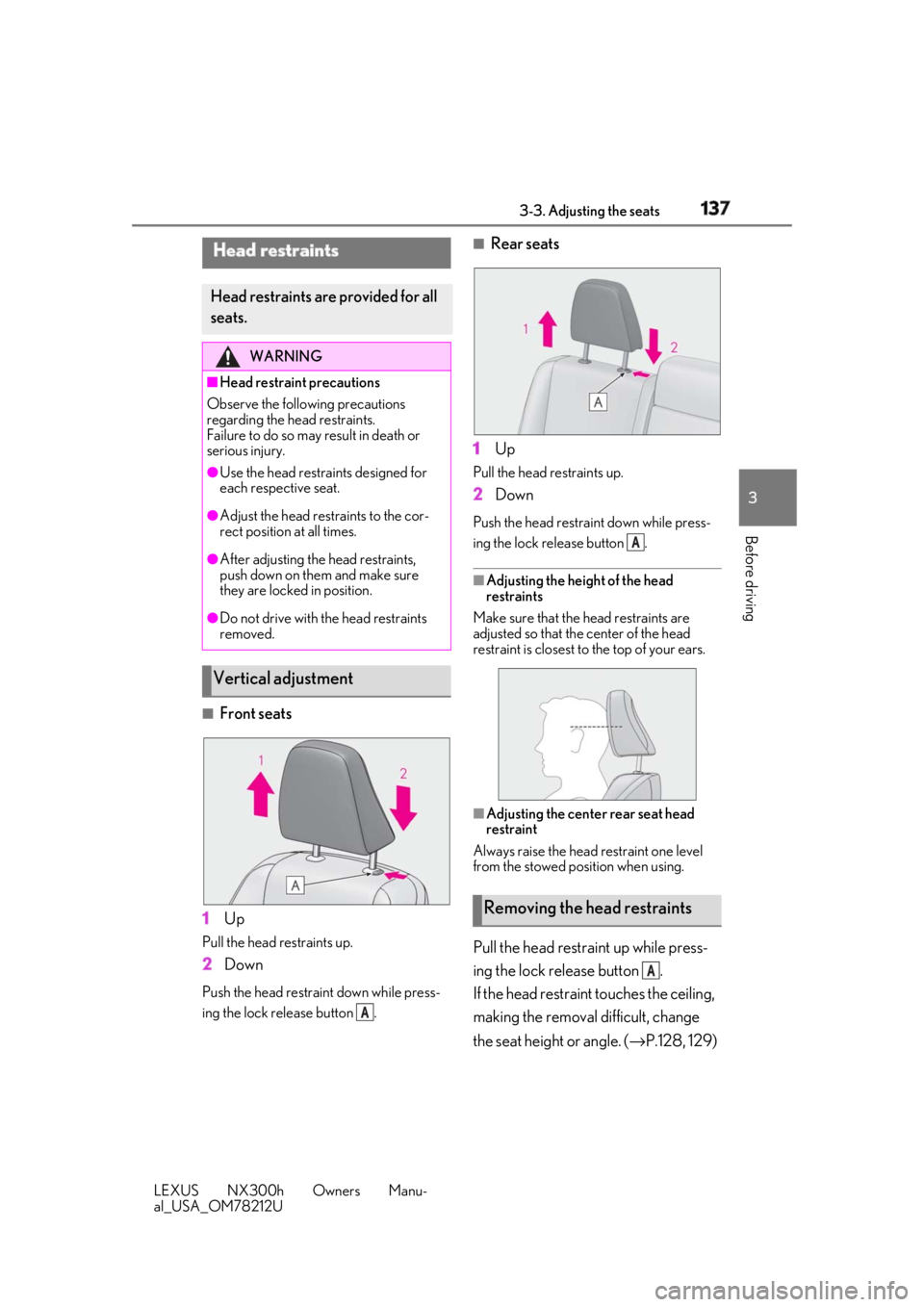
Front seats
1 UpPull the head restraints up.
2 DownPush the head restraint down while press-
ing the lock release button . ■
Rear seats
1 Up Pull the head restraints up.
2 Down Push the head restra int down while press-
ing the lock release button .
■
Adjusting the heig ht of the head
restraints
Make sure that the head restraints are
adjusted so that the center of the head
restraint is closest to the top of your ears.
■
Adjusting the center rear seat head
restraint
Always raise the head restraint one level
from the stowed position when using.
Pull the head restraint up while press-
ing the lock release button .
If the head restraint touches the ceiling,
making the removal difficult, change
the seat height or angle. ( → P.128, 129)Head restraints Head restraints are provided for all
seats. WARNING■
Head restraint precautions
Observe the following precautions
regarding the head restraints.
Failure to do so may result in death or
serious injury. ●
Use the head restraints designed for
each respective seat.●
Adjust the head restraints to the cor-
rect position at all times.●
After adjusting the head restraints,
push down on them and make sure
they are locked in position.●
Do not drive with the head restraints
removed.
Vertical adjustment
ARemoving the head restraints A
A
Page 138 of 460
138 3-3. Adjusting the seats
LEXUS NX300h Owners Manu-
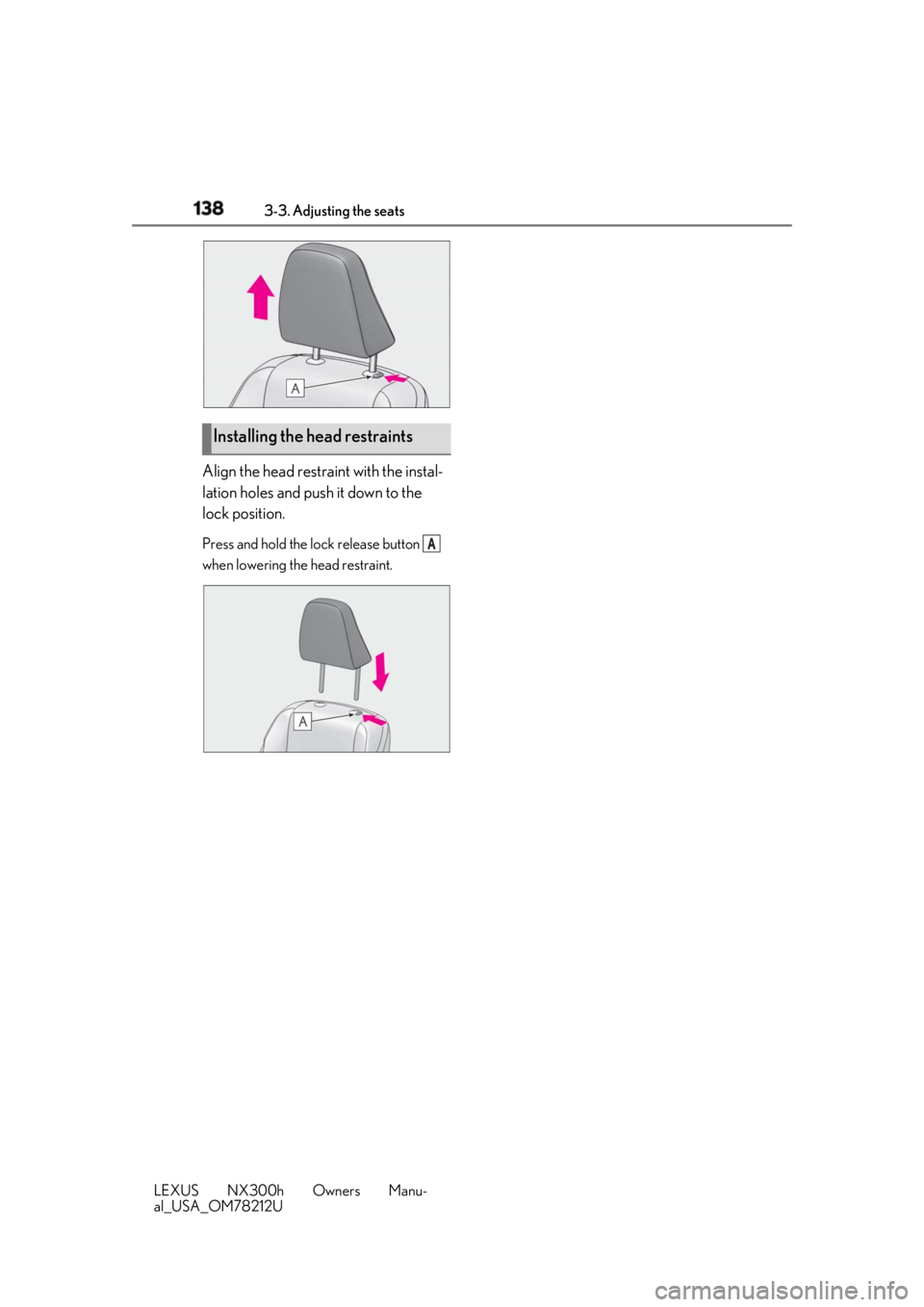
al_USA_OM78212U Align the head restraint with the instal-
lation holes and push it down to the
lock position. Press and hold the lo ck release button
when lowering th e head restraint.
Installing the head restraints A
Page 155 of 460
1554-1. Before driving
LEXUS NX300h Owners Manu-
al_USA_OM78212U 4
Driving NOTICE●
The vehicle will make abnormal
sounds or vibrations.●
The vehicle will lean abnormally.
Information on what to do in case of a flat
tire ( → P.377)■
When encountering flooded roads
Do not drive on a road that has flooded
after heavy rain, etc. Doing so may cause
the following serious damage to the vehi-
cle: ●
Engine stalling●
Short in electrical components●
Engine damage caused by water
immersion
In the event that you drive on a flooded
road and the vehicle is flooded, be sure
to have your Lexus dealer check the fol-
lowing: ●
Brake function●
Changes in quantity and quality of oil
and fluid used for the engine, hybrid
transmission, etc.●
Lubricant condition for the bearings
and suspension joints (where possi-
ble), and the function of all joints, bear-
ings, etc.
■
When parking the vehicle
Always set the parking brake, and shift
the shift lever to P. Failure to do so may
cause the vehicle to move or the vehicle
may accelerate sudden ly if the accelera-
tor pedal is accidentally depressed. Cargo and luggage Take notice of the following infor-
mation about storage precautions,
cargo capacity and load. WARNING■
Things that must not be carried in the
luggage compartment
The following things may cause a fire if
loaded in the luggage compartment: ●
Receptacles containing gasoline ●
Aerosol cans ■
Storage precautions
Observe the following precautions.
Failure to do so may prevent the pedals
from being depressed properly, may
block the driver’s vision, or may result in
items hitting the driver or passengers,
possibly causing an accident. ●
Stow cargo and luggage in the lug-
gage compartment whenever possi-
ble. ●
Do not stack cargo and luggage in the
luggage compartment higher than the
seatbacks.
●
When you fold down the rear seats,
long items should not be placed
directly behind the front seats.
●
Never allow anyone to ride in the lug-
gage compartment. It is not designed
for passengers. They should ride in
their seats with thei r seat belts prop-
erly fastened.
●
Do not place cargo or luggage in or on
the following locations.
• At the feet of the driver
• On the front passenger or rear seats
(when stacking items)
•On the luggage cover
• On the instrument panel
•On the dashboard
Page 261 of 460
2614-6. Driving tips
LEXUS NX300h Owners Manu-
al_USA_OM78212U 4
Driving WARNING●
Always check your brakes for effec-
tiveness immediately after driving in
sand, mud, water or snow.●
After driving through tall grass, mud,
rock, sand, water, etc., check that there
is no grass, bush, paper, rags, stone,
sand, etc. adhering or trapped to the
underbody. Clear off any such matter
from the underbody. If the vehicle is
used with these materials trapped or
adhering to the underbody, a break-
down or fire could occur.●
When driving off-road or in rugged
terrain, do not drive at excessive
speeds, jump, make sh arp turns, strike
objects, etc. This may cause loss of
control or vehicle rollover causing
death or serious injury. You are also
risking expensive damage to your
vehicle’s suspension and chassis.
NOTICE■
To prevent water damage
Take all necessary sa fety measures to
ensure that water da mage to the hybrid
battery (traction battery), hybrid system
or other components does not occur. ●
Water entering the engine compart-
ment may cause severe damage to the
hybrid system. Water entering the inte-
rior may cause the hybrid battery
stowed under the rear seats to short
circuit.
●
Water entering the hybrid transmis-
sion and rear electr ic motor (traction
motor) will cause deterioration in
transmission quality. The malfunction
indicator may come on, and the vehi-
cle may not be drivable.
●
Water can wash the grease from wheel
bearings, causing rusting and prema-
ture failure, and may also enter the
hybrid transmission case, reducing the
gear oil’s lubricating qualities. ■
When you drive through water
If driving through water, such as when
crossing shallow streams, first check the
depth of the water and the bottom of the
riverbed for firmness. Drive slowly and
avoid deep water. ■
Inspection after off-road driving ●
Sand and mud that has accumulated
around brake discs may affect braking
efficiency and may damage brake sys-
tem components. ●
Always perform a maintenance
inspection after each day of off-road
driving that has taken you through
rough terrain, sand, mud, or water. For
scheduled maintena nce information,
refer to the “Warranty and Services
Guide/Owner’s Manual Supplement/
Scheduled Maintenance”.
Page 272 of 460
272 5-2. Using the air conditio ning system and defogger
LEXUS NX300h Owners Manu-
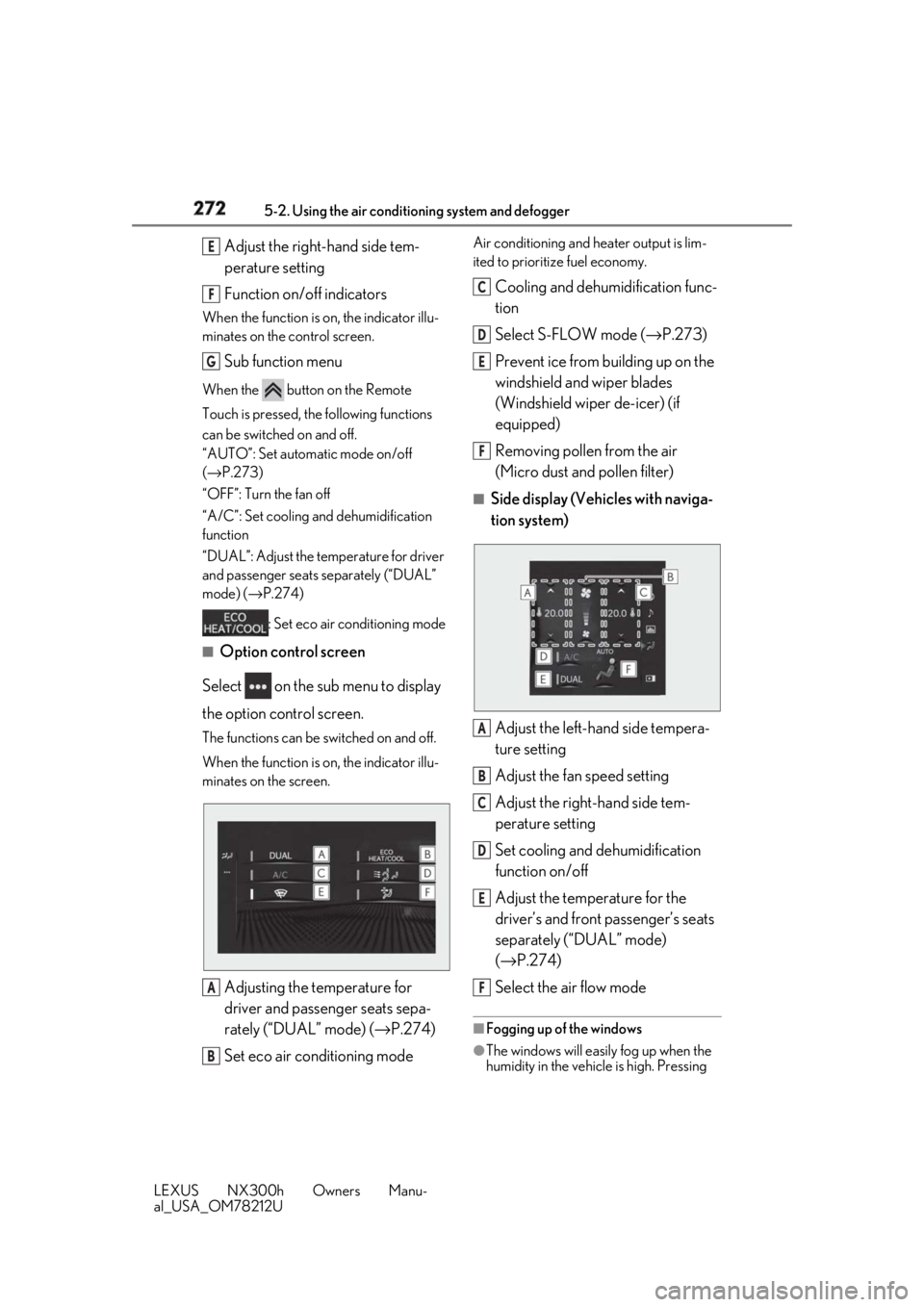
al_USA_OM78212U Adjust the right-hand side tem-
perature setting
Function on/off indicatorsWhen the function is on, the indicator illu-
minates on the control screen.
Sub function menuWhen the button on the Remote
Touch is pressed, the following functions
can be switched on and off.
“AUTO”: Set automatic mode on/off
( → P.273)
“OFF”: Turn the fan off
“A/C”: Set cooling and dehumidification
function
“DUAL”: Adjust the temperature for driver
and passenger seats separately (“DUAL”
mode) ( → P.274)
: Set eco air conditioning mode■
Option control screen
Select on the sub menu to display
the option control screen. The functions can be switched on and off.
When the function is on, the indicator illu-
minates on the screen.
Adjusting the temperature for
driver and passenger seats sepa-
rately (“DUAL” mode) ( → P.274)
Set eco air conditioning mode Air conditioning and heater output is lim-
ited to prioritize fuel economy.
Cooling and dehumidification func-
tion
Select S-FLOW mode ( → P.273)
Prevent ice from building up on the
windshield and wiper blades
(Windshield wiper de-icer) (if
equipped)
Removing pollen from the air
(Micro dust and pollen filter) ■
Side display (Vehicles with naviga-
tion system)
Adjust the left-hand side tempera-
ture setting
Adjust the fan speed setting
Adjust the right-hand side tem-
perature setting
Set cooling and dehumidification
function on/off
Adjust the temperature for the
driver’s and front passenger’s seats
separately (“DUAL” mode)
( → P.274)
Select the air flow mode ■
Fogging up of the windows
●
The windows will easily fog up when the
humidity in the vehicle is high. Pressing E
F
G
A
B C
D
E
F
A
B
C
D
E
F
Page 273 of 460
2735-2. Using the air conditio ning system and defogger
LEXUS NX300h Owners Manu-
al_USA_OM78212U 5
Interior features “A/C” button or selecting “A/C” will
dehumidify the air from the outlets and
defog the windshield effectively.●
If you turn “A/C” off, the windows may
fog up more easily.●
The windows may fog up if the recircu-
lated air mode is used.■
Windshield wiper de-icer (if equipped)
This feature is used to prevent ice from
building up on the wi ndshield and wiper
blades.
Select on the option control screen.
When the windshield wiper de-icer on,
is displayed on the air conditioning
control screen.
The windshield wiper de-icer will automati-
cally turn off after a period of time. ■
Eco air conditioning mode
When Eco mode is selected using the drive
mode select switch, eco air conditioning
mode turns on. When a drive mode other
than Eco mode is selected, eco air condi-
tioning mode may turn off. ■
S-FLOW mode
Priority for airflow is given to the front seats,
and the airflow and air conditioning for the
rear seats is effectively controlled.
Select on the option control screen.
The indicator comes on when S-FLOW
mode is on.
Press again to return to the previ-
ous mode. ■
Micro dust and pollen filter
Pollen is removed from the air and the air
flows to the upper part of the body.
Select on the option control screen.
When the micro dust and pollen filter is on,
is displayed on the air conditioning
control screen.
In order to prevent the windshield from fog-
ging up when the outside air is cold, the
dehumidification function may operate.
The pollens are filtered out even if the micro
dust and pollen filter is turned off. 1 Press the “AUTO” button.
2 Adjust the temperature setting.
3 To stop the operation, press the
“OFF” button.
If the fan speed setting or air flow
modes are operated, the automatic
mode indicator goes off. However,
automatic mode for functions other
than that operated is maintained. ■
Using automatic mode
Fan speed is adjusted automatically accord-
ing to the temperature setting and the
ambient conditions.
Therefore, the fan may stop for a while until
warm or cool air is ready to flow immedi-
ately after the “AUTO” button is pressed or
“AUTO” is selected. ■
Windshield fog detection function
When automatic mode is set, the humidity
sensor ( → P.274) detects fog on the wind-
shield and controls the air conditioning sys-
tem to prevent fog.
■
Air conditioning filter
→ P.346
■
Customization
Settings (e.g. A/C automatic mode switch
operation) can be changed.
(Customizable features: → P.424)WARNING■
To prevent burns (vehicles with wind-
shield wiper de-icer)
Do not touch the glass at lower part of
the windshield or to the side of the front
pillars when the windshield wiper de-icer
is on.
Using automatic mode
Page 274 of 460
274 5-2. Using the air conditio ning system and defogger
LEXUS NX300h Owners Manu-
al_USA_OM78212U To turn on the “DUAL” mode, perform
any of the following procedures:
Press the “DUAL” button.
Select “DUAL” on the option con-
trol screen.
Adjust the temperature setting of
the passenger side with the passen-
ger side temperature adjustment
button. The indicator comes on when the “DUAL”
mode is on. ■
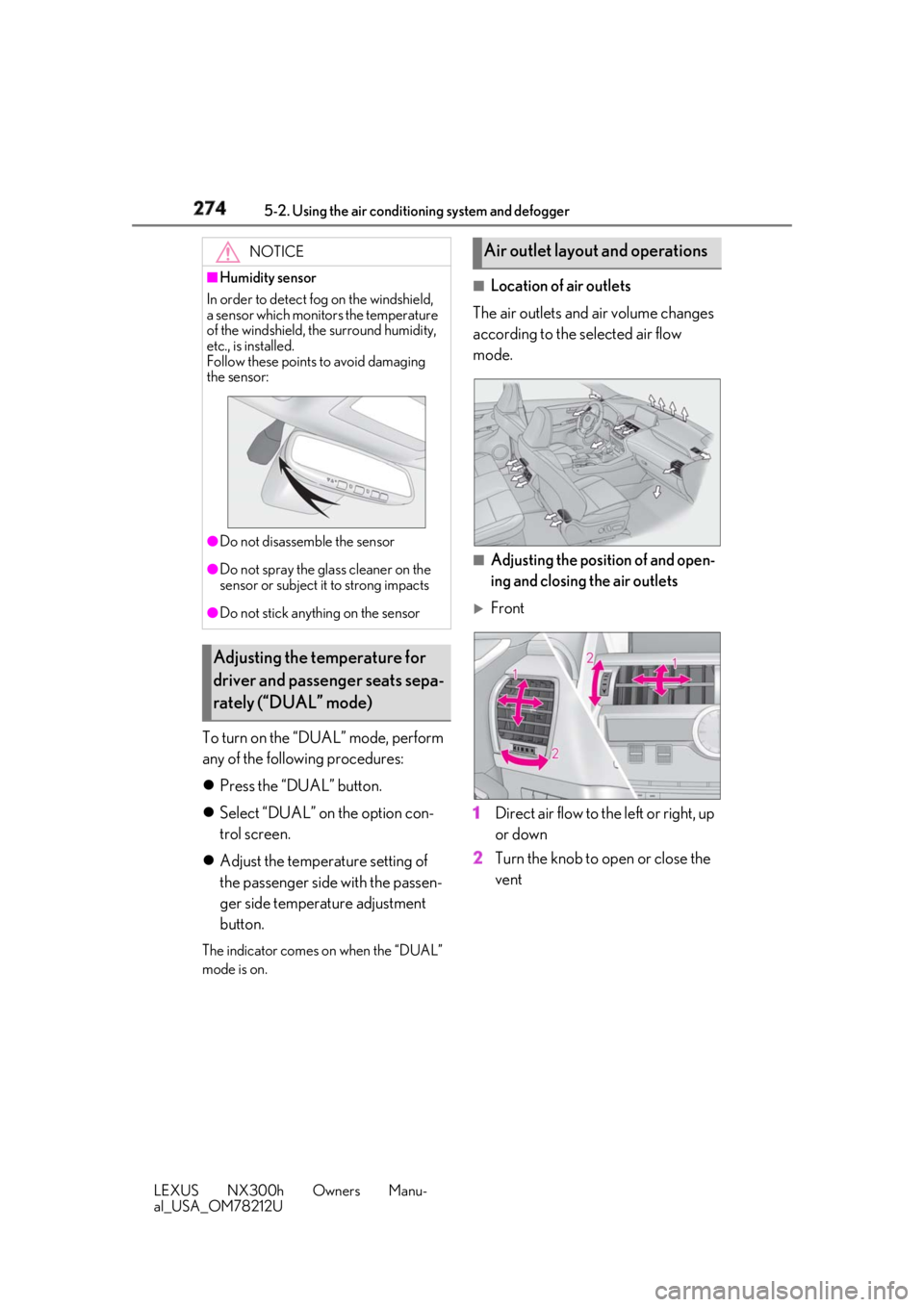
Location of air outlets
The air outlets and air volume changes
according to the selected air flow
mode.
■
Adjusting the position of and open-
ing and closing the air outlets
Front
1 Direct air flow to the left or right, up
or down
2 Turn the knob to open or close the
ventNOTICE■
Humidity sensor
In order to detect fog on the windshield,
a sensor which monitors the temperature
of the windshield, the surround humidity,
etc., is installed.
Follow these points to avoid damaging
the sensor:
●
Do not disassemb le the sensor●
Do not spray the glass cleaner on the
sensor or subject it to strong impacts●
Do not stick anything on the sensor
Adjusting the temperature for
driver and passenger seats sepa-
rately (“DUAL” mode) Air outlet layout and operations
Page 275 of 460
2755-2. Using the air conditio ning system and defogger
LEXUS NX300h Owners Manu-
al_USA_OM78212U 5
Interior features
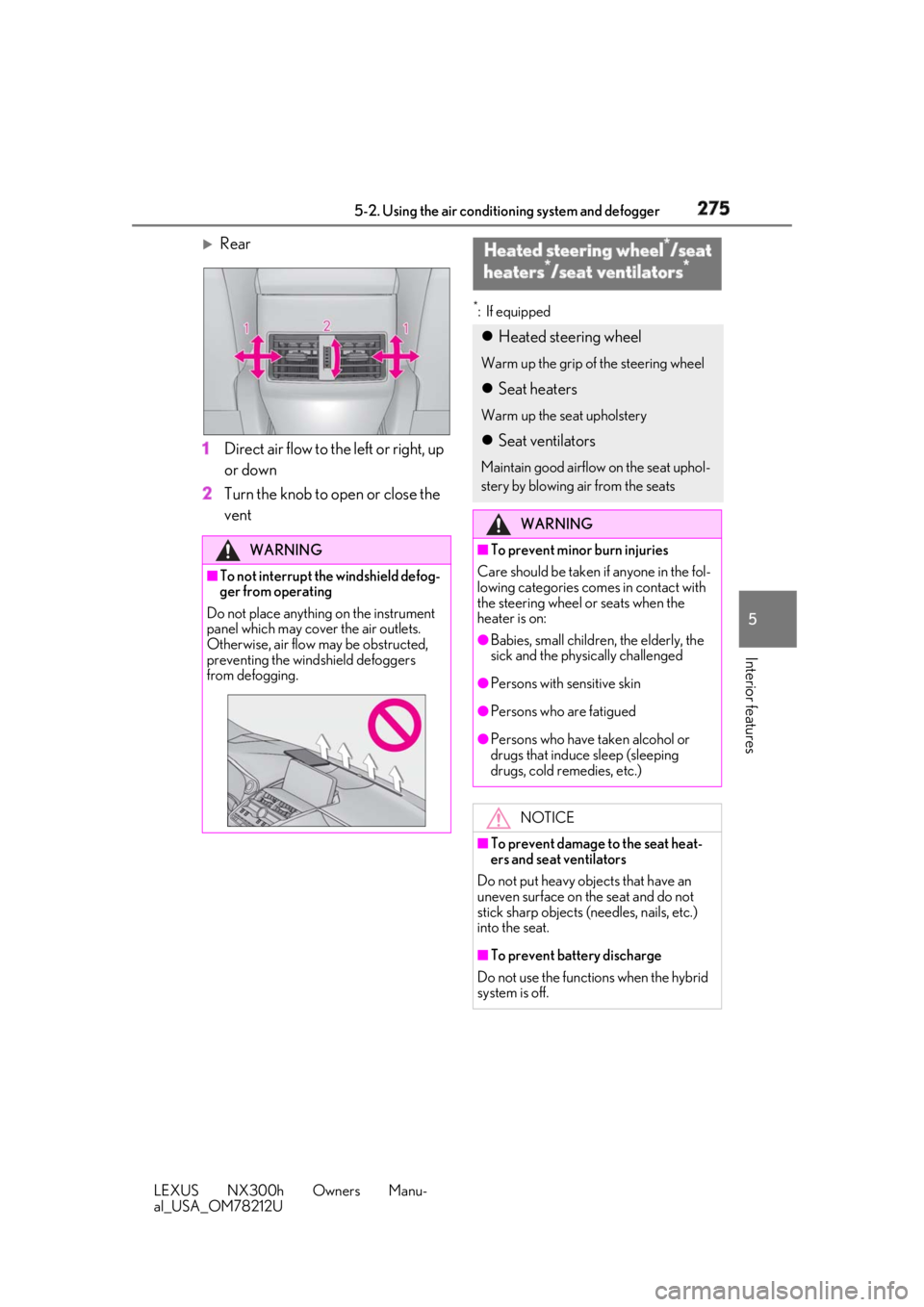
Rear
1 Direct air flow to the left or right, up
or down
2 Turn the knob to open or close the
vent *
: If equipped
WARNING■
To not interrupt the windshield defog-
ger from operating
Do not place anything on the instrument
panel which may cover the air outlets.
Otherwise, air flow may be obstructed,
preventing the windshield defoggers
from defogging. Heated steering wheel *
/seat
heaters *
/seat ventilators *
Heated steering wheel Warm up the grip of the steering wheel
Seat heaters Warm up the seat upholstery
Seat ventilators Maintain good airflow on the seat uphol-
stery by blowing air from the seats
WARNING■
To prevent minor burn injuries
Care should be taken if anyone in the fol-
lowing categories comes in contact with
the steering wheel or seats when the
heater is on: ●
Babies, small children, the elderly, the
sick and the physically challenged ●
Persons with sensitive skin ●
Persons who are fatigued ●
Persons who have taken alcohol or
drugs that induce sleep (sleeping
drugs, cold remedies, etc.)
NOTICE
■
To prevent damage to the seat heat-
ers and seat ventilators
Do not put heavy objects that have an
uneven surface on the seat and do not
stick sharp objects (n eedles, nails, etc.)
into the seat.
■
To prevent battery discharge
Do not use the functions when the hybrid
system is off.
Page 317 of 460
3176-1. Maintenance and care
LEXUS NX300h Owners Manu-
al_USA_OM78212U 6
Maintenance and care Remove dirt and dust using a vac-
uum cleaner. Wipe dirty surfaces
with a cloth dampened with luke-
warm water.
If dirt cannot be removed, wipe it off
with a soft cloth dampened with
neutral detergent diluted to approx-
imately 1%. Wring out any excess
water from the cloth and thoroughly
wipe off remaining traces of deter-
gent and water. ■
Shampooing the carpets
There are several commercial foaming-type
cleaners available. Use a sponge or brush
to apply the foam. Rub in overlapping cir-
cles. Do not use water. Wipe dirty surfaces
and let them dry. Excellent results are
obtained by keeping the carpet as dry as
possible. ■
Handling the seat belts
Clean with mild soap and lukewarm water
using a cloth or spon ge. Also check the
belts periodically for excessive wear, fraying
or cuts.
■
Front side windows with UV protective
coating (vehicles with UV protective
coating)
The front side windows have UV protective
coating. To prevent any damage to the UV
protective coating, observe the following:
●
If the windows are dirty, gently wipe them
with a cloth soaked in water or lukewarm
water as soon as possible. ●
If the windows are very dirty, do not open
and close them repeatedly.
Cleaning and protecting the
vehicle interior Perform cleaning in a manner
appropriate to each component
and its material.
Protecting the vehicle interior WARNING■
Water in the vehicle ●
Do not splash or spill liquid in the vehi-
cle, such as on the floor, in the hybrid
battery (traction battery) air vents, and
in the luggage compartment.
Doing so may cause the hybrid battery,
electrical components, etc. to mal-
function or catch fire. ●
Do not get any of the SRS components
or wiring in the vehicle interior wet.
( → P.32)
An electrical malfunction may cause
the airbags to deploy or not function
properly, resulting in death or serious
injury. ■
Cleaning the interior (especially
instrument panel)
Do not use polish wax or polish cleaner.
The instrument panel may reflect off the
windshield, obstructin g the driver’s view
and leading to an accident, resulting in
death or serious injury.
NOTICE■
Cleaning detergents ●
Do not use the following types of
detergent, as they may discolor the
vehicle interior or cause streaks or
damage to painted surfaces:
• Non-seat portions: Organic sub-
stances such as benzene or gasoline,
alkaline or acidic solutions, dye, and
bleach
• Seats: Alkaline or acidic solutions,
such as thinner, benzene, and alcohol
●
Do not use polish wax or polish
cleaner. The instrument panel’s or
other interior part’s painted surface
may be damaged.