ECO mode LEXUS NX300h 2018 Service Manual
[x] Cancel search | Manufacturer: LEXUS, Model Year: 2018, Model line: NX300h, Model: LEXUS NX300h 2018Pages: 460, PDF Size: 13.57 MB
Page 272 of 460
272 5-2. Using the air conditio ning system and defogger
LEXUS NX300h Owners Manu-
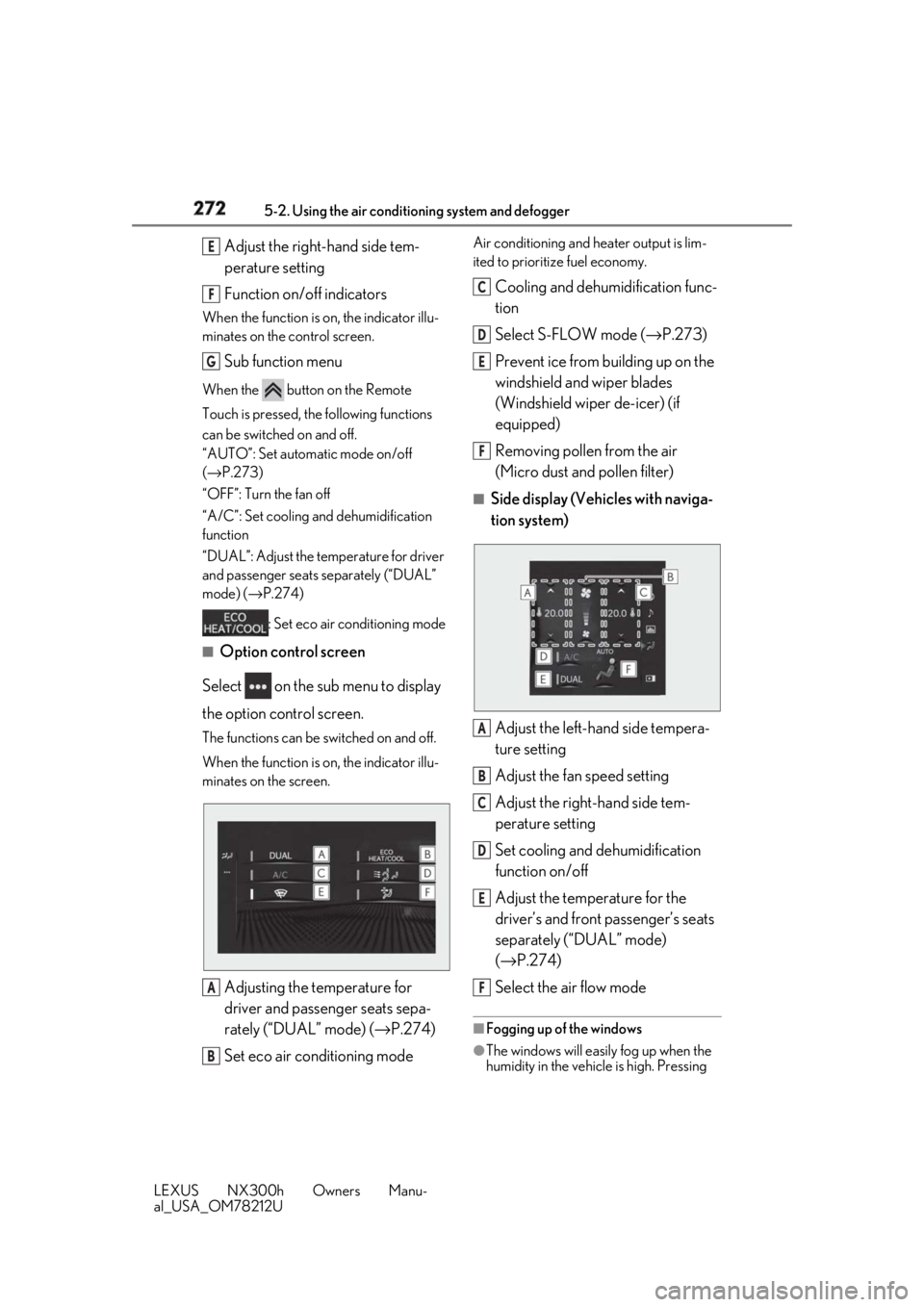
al_USA_OM78212U Adjust the right-hand side tem-
perature setting
Function on/off indicatorsWhen the function is on, the indicator illu-
minates on the control screen.
Sub function menuWhen the button on the Remote
Touch is pressed, the following functions
can be switched on and off.
“AUTO”: Set automatic mode on/off
( → P.273)
“OFF”: Turn the fan off
“A/C”: Set cooling and dehumidification
function
“DUAL”: Adjust the temperature for driver
and passenger seats separately (“DUAL”
mode) ( → P.274)
: Set eco air conditioning mode■
Option control screen
Select on the sub menu to display
the option control screen. The functions can be switched on and off.
When the function is on, the indicator illu-
minates on the screen.
Adjusting the temperature for
driver and passenger seats sepa-
rately (“DUAL” mode) ( → P.274)
Set eco air conditioning mode Air conditioning and heater output is lim-
ited to prioritize fuel economy.
Cooling and dehumidification func-
tion
Select S-FLOW mode ( → P.273)
Prevent ice from building up on the
windshield and wiper blades
(Windshield wiper de-icer) (if
equipped)
Removing pollen from the air
(Micro dust and pollen filter) ■
Side display (Vehicles with naviga-
tion system)
Adjust the left-hand side tempera-
ture setting
Adjust the fan speed setting
Adjust the right-hand side tem-
perature setting
Set cooling and dehumidification
function on/off
Adjust the temperature for the
driver’s and front passenger’s seats
separately (“DUAL” mode)
( → P.274)
Select the air flow mode ■
Fogging up of the windows
●
The windows will easily fog up when the
humidity in the vehicle is high. Pressing E
F
G
A
B C
D
E
F
A
B
C
D
E
F
Page 273 of 460
2735-2. Using the air conditio ning system and defogger
LEXUS NX300h Owners Manu-
al_USA_OM78212U 5
Interior features “A/C” button or selecting “A/C” will
dehumidify the air from the outlets and
defog the windshield effectively.●
If you turn “A/C” off, the windows may
fog up more easily.●
The windows may fog up if the recircu-
lated air mode is used.■
Windshield wiper de-icer (if equipped)
This feature is used to prevent ice from
building up on the wi ndshield and wiper
blades.
Select on the option control screen.
When the windshield wiper de-icer on,
is displayed on the air conditioning
control screen.
The windshield wiper de-icer will automati-
cally turn off after a period of time. ■
Eco air conditioning mode
When Eco mode is selected using the drive
mode select switch, eco air conditioning
mode turns on. When a drive mode other
than Eco mode is selected, eco air condi-
tioning mode may turn off. ■
S-FLOW mode
Priority for airflow is given to the front seats,
and the airflow and air conditioning for the
rear seats is effectively controlled.
Select on the option control screen.
The indicator comes on when S-FLOW
mode is on.
Press again to return to the previ-
ous mode. ■
Micro dust and pollen filter
Pollen is removed from the air and the air
flows to the upper part of the body.
Select on the option control screen.
When the micro dust and pollen filter is on,
is displayed on the air conditioning
control screen.
In order to prevent the windshield from fog-
ging up when the outside air is cold, the
dehumidification function may operate.
The pollens are filtered out even if the micro
dust and pollen filter is turned off. 1 Press the “AUTO” button.
2 Adjust the temperature setting.
3 To stop the operation, press the
“OFF” button.
If the fan speed setting or air flow
modes are operated, the automatic
mode indicator goes off. However,
automatic mode for functions other
than that operated is maintained. ■
Using automatic mode
Fan speed is adjusted automatically accord-
ing to the temperature setting and the
ambient conditions.
Therefore, the fan may stop for a while until
warm or cool air is ready to flow immedi-
ately after the “AUTO” button is pressed or
“AUTO” is selected. ■
Windshield fog detection function
When automatic mode is set, the humidity
sensor ( → P.274) detects fog on the wind-
shield and controls the air conditioning sys-
tem to prevent fog.
■
Air conditioning filter
→ P.346
■
Customization
Settings (e.g. A/C automatic mode switch
operation) can be changed.
(Customizable features: → P.424)WARNING■
To prevent burns (vehicles with wind-
shield wiper de-icer)
Do not touch the glass at lower part of
the windshield or to the side of the front
pillars when the windshield wiper de-icer
is on.
Using automatic mode
Page 292 of 460
292 5-5. Using the other interior features
LEXUS NX300h Owners Manu-
al_USA_OM78212U ■
Lighting conditions of operation
indicator light
*
: Depending on the portable device, there
are cases where the operation indicator
light will continue being lit up orange
even after the char ging is complete.
When the operation indicator light
flashes When an error occurs , the operation indi-
cator light flashes an orange color. Handle
the error based on the following tables.
• Flashing repeatedly once every second
(Orange)
• Repeatedly flashes 3 times continuously
(Orange) • Repeatedly flashes 4 times continuously
(Orange)
■
The wireless charger can be operated
when
The power switch is in ACCESSORY or
ON mode. ■
Usable portable devices ●
Qi standard wireless charge standard
can be used on compatible devices.
However, not all Qi standard devices and
compatibility ar e guaranteed.●
Starting with mobile phones and smart
phones, it is aimed for low power electri-
cally supplied portable devices of no
more than 5W.
■
When covers and accessories are
attached to po rtable devices
Do not charge in situations where cover
and accessories not able to handle Qi are
attached to the portable device. Depending
on the type of cover and accessory, it may
not be possible to charge. When charging is
not performed even with the portable
device placed on the charge area, remove
the cover and accessories.Operation
indicator
light Conditions
Turning off When the Wireless charger
power supply is off
Green
(comes on) On Standby (charging pos-
sible state)
When charging is complete *
Orange
(comes on) When placing the portable
device on the charging area
(detecting the portable
device)
Charging
Suspected causes Handling method
Vehicle to charger
communication fail-
ure. Contact your Lexus
dealer. Suspected causes Handling method
A foreign substance
is between the por-
table device and
charge area. Remove the foreign
substance from
between portable
device and the
charge area.
The portable device
is out of sync due to
the device being
shifted from the cen-
ter of the charge
area. Place the portable
device near the cen-
ter of the charge
area.
Suspected causes Handling method
Temperature rising
within the wireless
charger. Stop charging at
once and start
charging again after
for a while.
Page 308 of 460
308 5-5. Using the other interior features
LEXUS NX300h Owners Manu-
al_USA_OM78212U Subscribers have the following Safety
Connect services available:
Automatic Collision Notification *
Helps drivers receive necessary
response from emergency service
providers. ( → P.309)*
: U.S. Patent No. 7,508,298 B2
Stolen Vehicle Location
Helps drivers in the event of vehicle
theft. ( → P.309)
Emergency Assistance Button
(“SOS”)
Connects drivers to response-cen-
ter support. ( → P.309)
Enhanced Roadside Assistance
Provides drivers various on-road
assistance. ( → P.309)
After you have signed the Telematics
Subscription Service Agreement and
are enrolled, you can begin receiving
services.
A variety of subscription terms is avail-
able for purchase. Contact your Lexus
dealer, call 1-800-25-LEXUS (1-800-
255-3987) in the Unites States (1-
800-26-LEXUS in Canada), (1-877-
539-8777 in Puerto Rico), or push the
“SOS” button in your vehicle for fur-
ther subscription details. ■
Safety Connect Serv ices Information
●
Phone calls using the vehicles Blue-
tooth ®
technology will not be possible
during Safety Connect. ●
Safety Connect is available beginning Fall
2009 on select Le xus models (in the
contiguous United States only). Contact
with the Safety Connect response center
is dependent upon the telematics device
being in operative condition, cellular con-
nection availability, and GPS satellite sig-
nal reception, which ca n limit the ability to
reach the response center or receive
emergency service su pport. Enrollment
and Telematics Subscription Service
Agreement required. A variety of sub-
scription terms is available; charges vary
by subscription term selected and loca-
tion. ●
Automatic Collision Notification, Emer-
gency Assistance and Stolen Vehicle
Location will function in the United
States, including Hawaii and Alaska,
Puerto Rico and in Canada, and
Enhanced Roadside Assistance will func-
tion in the United States, Puerto Rico and
in Canada. ●
Automatic Collision Notification, Emer-
gency Assistance and Stolen Vehicle
Location will not function in the United
States Virgin Islands, and Enhanced
Roadside Assistance will not function in
the United States Virgin Islands. No
Safety Connect services will function
outside of the United States in countries
other than Canada. For vehicles first sold
in the USVI, no Safety Connect services
will function in and outside the United
States Virgin Islands. ●
Safety Connect services are not subject
to section 255 of the Telecommunica-
tions Act and the device is not TTY com-
patible.
■
Languages
The Safety Connect re sponse center will
offer support in mult iple languages. The
Safety Connect system will offer voice
prompts in English, French and Spanish.
Please indicate your language of choice
when enrolling.
■
When contacting the response center
You may be unable to contact the response
center if the network is busy.Services
Subscription
Page 309 of 460
3095-5. Using the other interior features
LEXUS NX300h Owners Manu-
al_USA_OM78212U 5
Interior features When the power switch is turned to
ON mode, the red indicator light
comes on for 2 seconds then turns off.
Afterward, the gree n indicator light
comes on, indicating that the service is
active.
The following indicator light patterns
indicate specific system usage condi-
tions:
Green indicator light on = Active
service
Green indicator light flashing =
Safety Connect call in process
Red indicator light (except at vehi-
cle start-up) = System malfunction
(contact your Lexus dealer)
No indicator light (off) = Safety
Connect service not active ■
Automatic Collision Notification
In case of either airbag deployment or
severe rear-end collision, the system is
designed to automatically call the
response center. The responding agent
receives the vehicle’s location and
attempts to speak with the vehicle
occupants to assess the level of emer-
gency. If the occupants are unable to
communicate, the ag ent automatically
treats the call as an emergency, con-
tacts the nearest emergency services
provider to describe the situation, and
requests that assistance be sent to the
location. ■
Stolen Vehicle Location
If your vehicle is stolen, Safety Connect
can work with local authorities to assist
them in locating and recovering the
vehicle. After filing a police report, call
the Safety Connect response center at
1-800-25-LEXUS (1-800-255-
3987) and follow the prompts for
Safety Connect to initiate this service.
In addition to assisting law enforce-
ment with recovery of a stolen vehicle,
Safety-Connect-equipped vehicle
location data may, under certain cir-
cumstances, be shared with third par-
ties to locate your vehicle. Further
information is available at Lexus.com. ■
Emergency Assistance Button
(“SOS”)
In the event of an emergency on the
road, push the “SOS” button to reach
the Safety Connect response center.
The answering agent will determine
your vehicle’s location, assess the
emergency, and dispatch the neces-
sary assistance required. If you accidentally press the “SOS” button,
tell the response-center agent that you are
not experiencing an emergency.
■
Enhanced Roadside Assistance
Enhanced Roadside Assistance adds
GPS data to the already included war-
ranty- based Lexus roadside service.
Subscribers can press the “SOS” but-
ton to reach a Safety Connect respon-
secenter agent, who can help with a
wide range of needs, such as: towing,
flat tire, fuel delivery, etc. For a descrip-
tion of the Roadside Assistance ser-Safety Connect LED light Indi-
cators
Safety Connect services
Page 314 of 460
314 6-1. Maintenance and care
LEXUS NX300h Owners Manu-
al_USA_OM78212U 6-1.Maintenance and care
Working from top to bottom, liber-
ally apply water to the vehicle body,
wheel wells and underside of the
vehicle to remove any dirt and dust.
Wash the vehicle body using a
sponge or soft cloth, such as a
chamois.
For hard-to-remove marks, use car
wash soap and rinse thoroughly with
water.
Wipe away any water.
Wax the vehicle when the water-
proof coating deteriorates. If water does not bead on a clean surface,
apply wax when the vehicle body is cool.
■
Self-restoring coat
The vehicle body has a self-restoring coat-
ing that is resistant to small surface
scratches caused in a car wash etc.
●
The coating lasts for 5 to 8 years from
when the vehicle is delivered from the
plant.
●
The restoration time differs depending on
the depth of the scratch and outside tem-
perature. The restoration time may
become shorter when the coating is
warmed by applying warm water.
●
Deep scratches caused by keys, coins,
etc. cannot be restored.
●
Do not use wax that contain abrasives. ■
Automatic car washes ●
Before washing the vehicle:
• Fold the mirrors
• Turn off the power back door (if
equipped)
Start washing from the front of the vehicle.
Extend the mirrors before driving.●
Brushes used in automatic car washes
may scratch the vehicl e surface and harm
your vehicle’s paint. ●
Rear spoiler may not be washable in
some automatic car washes. There may
also be an increased risk of damage to
vehicle. ■
High pressure car washes ●
Do not allow the nozzles of the car wash
to come within close proximity of the win-
dows. ●
Before using the car wash, check that the
fuel filler door on your vehicle is closed
properly. ■
Note for a smart access system with
push-button start ●
If the door handle becomes wet while the
electronic key is within the effective
range, the door may lock and unlock
repeatedly. Place the key in a position 6
ft. (2 m) or more separate from the vehi-
cle while the vehicle is being washed.
(Take care to ensure that the key is not
stolen.) ●
If the electronic key is inside the vehicle
and a door handle becomes wet during a
car wash, a buzzer will sound outside the
vehicle. To turn off the alarm, lock all the
doors.
●
Set the electronic key to battery-saving
mode to disable the smart access system
with push-button start. ( → P.123)
■
Aluminum wheels
●
Remove any dirt immediately by using a
neutral detergent.
●
Wash detergent off with water immedi-
ately after use.
●
To protect the paint from damage, make
sure to observe the following precau-
tions.Cleaning and protecting the
vehicle exterior Perform cleaning in a manner
appropriate to each component
and its material.
Cleaning instructions
Page 333 of 460

3336-3. Do-it-yourself maintenance
LEXUS NX300h Owners Manu-
al_USA_OM78212U 6
Maintenance and care The 12-volt battery is located in the left-
hand side of luggage compartment.
■
Before recharging
When recharging, the 12-volt battery pro-
duces hydrogen gas which is flammable
and explosive. Therefore, observe the fol-
lowing precautions before recharging: ●
If recharging with the 12-volt battery
installed on the vehicle, be sure to discon-
nect the ground cable. ●
Make sure the power switch on the char-
ger is off when connecting and discon-
necting the charger cables to the 12-volt
battery. ■
After recharging/reconnecting the 12-
volt battery ●
The hybrid system may not start. Follow
the procedure below to initialize the sys-
tem.
1 Shift the shift lever to P.
2 Open and close any of the doors.
3 Restart the hybrid system.
●
Unlocking the doors using the smart
access system with pu sh-button start may
not be possible immediately after recon-
necting the 12-volt battery. If this hap-
pens, use the wireless remote control or
the mechanical key to lock/unlock the
doors.
●
Start the hybrid system with the power
switch in ACCESSORY mode. The WARNING■
When adding washer fluid
Do not add washer fluid when the hybrid
system is hot or operating as washer fluid
contains alcohol and may catch fire if
spilled on the engine etc.
NOTICE■
Do not use any fluid other than
washer fluid
Do not use soapy water or engine anti-
freeze instead of washer fluid.
Doing so may cause streaking on the
vehicle’s painted surfaces, as well as
damaging the pump leading to problems
of the washer fluid not spraying. ■
Diluting washer fluid
Dilute washer fluid with water as neces-
sary.
Refer to the freezing temperatures listed
on the label of the washer fluid bottle. 12-volt battery
Location
Page 334 of 460
334 6-3. Do-it-yourself maintenance
LEXUS NX300h Owners Manu-
al_USA_OM78212U hybrid system may not start with the
power switch turned off. However, the
hybrid system will operate normally from
the second attempt.●
The power switch mode is recorded by
the vehicle. If the 12-volt battery is recon-
nected, the vehicle will return the power
switch mode to the status it was in before
the 12-volt battery was disconnected.
Make sure to turn off the power before
disconnect the 12- volt battery. Take extra
care when connecting the 12-volt battery
if the power switch mode prior to dis-
charge is unknown.
If the system will not st art even after multiple
attempts at all methods above, contact your
Lexus dealer.
WARNING■
Chemicals in the 12-volt battery
The 12-volt battery contains poisonous
and corrosive sulfuric acid and may pro-
duce hydrogen gas which is flammable
and explosive. To reduce the risk of death
or serious injury, take the following pre-
cautions while working on or near the 12-
volt battery: ●
Do not cause sparks by touching the
12-volt battery terminals with tools.●
Do not smoke or light a match near the
12-volt battery.
●
Avoid contact with eyes, skin and
clothes.
●
Never inhale or swallow electrolyte.
●
Wear protective safety glasses when
working near the 12-volt battery.
●
Keep children away from the 12-volt
battery.
■
Where to safely charge the 12-volt
battery
Always charge the 12-volt battery in an
open area. Do not charge the 12-volt bat-
tery in a garage or closed room where
there is insuffic ient ventilation. ■
Emergency measures regarding
electrolyte ●
If electrolyte gets in your eyes
Flush your eyes with clean water for at
least 15 minutes and get immediate
medical attention. If possible, continue
to apply water with a sponge or cloth
while traveling to the nearest medical
facility. ●
If electrolyte gets on your skin
Wash the affected area thoroughly. If
you feel pain or burning, get medical
attention immediately. ●
If electrolyte gets on your clothes
It can soak through clothing on to your
skin. Immediately take off the clothing
and follow the procedure above if nec-
essary. ●
If you accidentally swallow electrolyte
Drink a large quantity of water or milk.
Get emergency medical attention
immediately. ■
When handling the 12-volt battery
→ P.393 ■
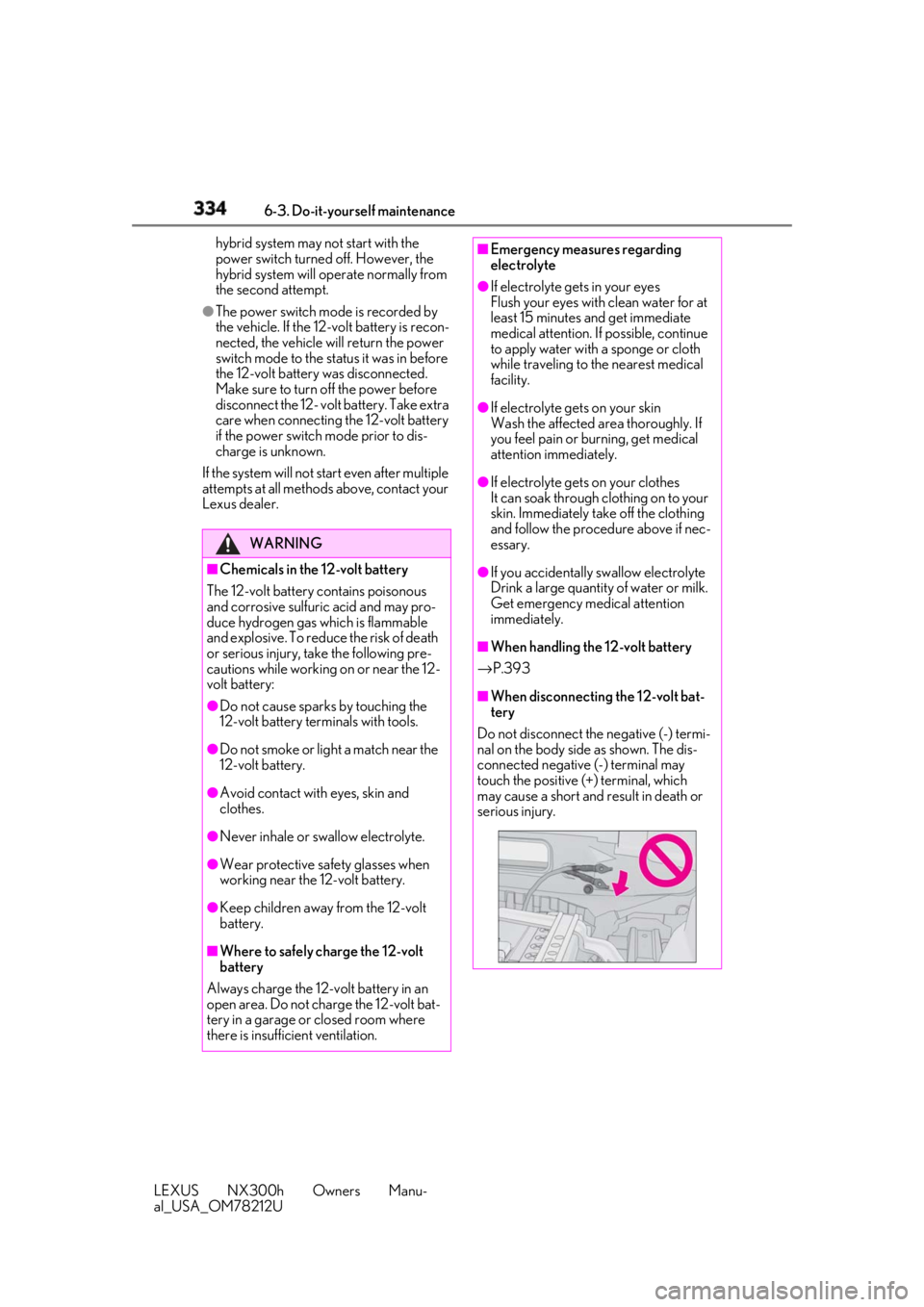
When disconnecting the 12-volt bat-
tery
Do not disconnect the negative (-) termi-
nal on the body side as shown. The dis-
connected negative (-) terminal may
touch the positive (+) terminal, which
may cause a short and result in death or
serious injury.
Page 337 of 460
3376-3. Do-it-yourself maintenance
LEXUS NX300h Owners Manu-
al_USA_OM78212U 6
Maintenance and care tires, be sure to replace all four tires.●
All season tires
All season tires are designed to provide
better traction in snow and to be ade-
quate for driving in most winter condi-
tions as well as for use year-round. All
season tires, however, do not have ade-
quate traction performance compared
with snow tires in heavy or loose snow.
Also, all season tires fall short in accelera-
tion and handling performance com-
pared with summer tires in highway
driving.●
Snow tires
For driving on snow-covered roads or icy
roads, we recommend using snow tires. If
you need snow tires, select tires of the
same size, construction and load capacity
as the originally insta lled tires. Since your
vehicle has radial tires as original equip-
ment, make sure your snow tires also
have radial construction. Do not install
studded tires without first checking local
regulations for possible restrictions.
Snow tires should be installed on all
wheels. ( → P.257)■
If the tread on snow tires wears down
below 0.16 in. (4 mm)
The effectiveness of the tires as snow tires is
lost.
Rotate the tires in the order shown. To equalize tire wear and extend tire life,
Lexus recommends that tire rotation is car-
ried out at the same in terval as tire inspec-
tion.
Do not fail to initialize the tire pressure
warning system after tire rotation.WARNING■
When inspecting or replacing tires
Observe the following precautions to
prevent accidents.
Failure to do so may cause damage to
parts of the drive train as well as danger-
ous handling characteristics, which may
lead to an accident resulting in death or
serious injury.
●
Do not mix tires of different makes,
models or tread patterns.
Also, do not mix tires of remarkably
different treadwear.
●
Do not use tire sizes other than those
recommended by Lexus. ●
Do not mix differently constructed
tires (radial, bias-belted or bias-ply
tires). ●
Do not mix summer, all season and
snow tires. ●
Do not use tires that have been used
on another vehicle.
Do not use tires if you do not know
how they were used previously. ●
Do not tow if your vehicle has a com-
pact spare tire installed.
NOTICE■
Driving on rough roads
Take particular care when driving on
roads with loose surfaces or potholes.
These conditions may cause losses in tire
inflation pressure, reducing the cushion-
ing ability of the tires. In addition, driving
on rough roads may cause damage to
the tires themselves, as well as the vehi-
cle’s wheels and body. ■
If tire inflation pressure of each tire
becomes low while driving
Do not continue driving, or your tires
and/or wheels may be ruined.
Tire rotation
Page 342 of 460
342 6-3. Do-it-yourself maintenance
LEXUS NX300h Owners Manu-
al_USA_OM78212U specified cold tire infl ation pressure level.
The tire pressure warning system will oper-
ate based on this pressure level.
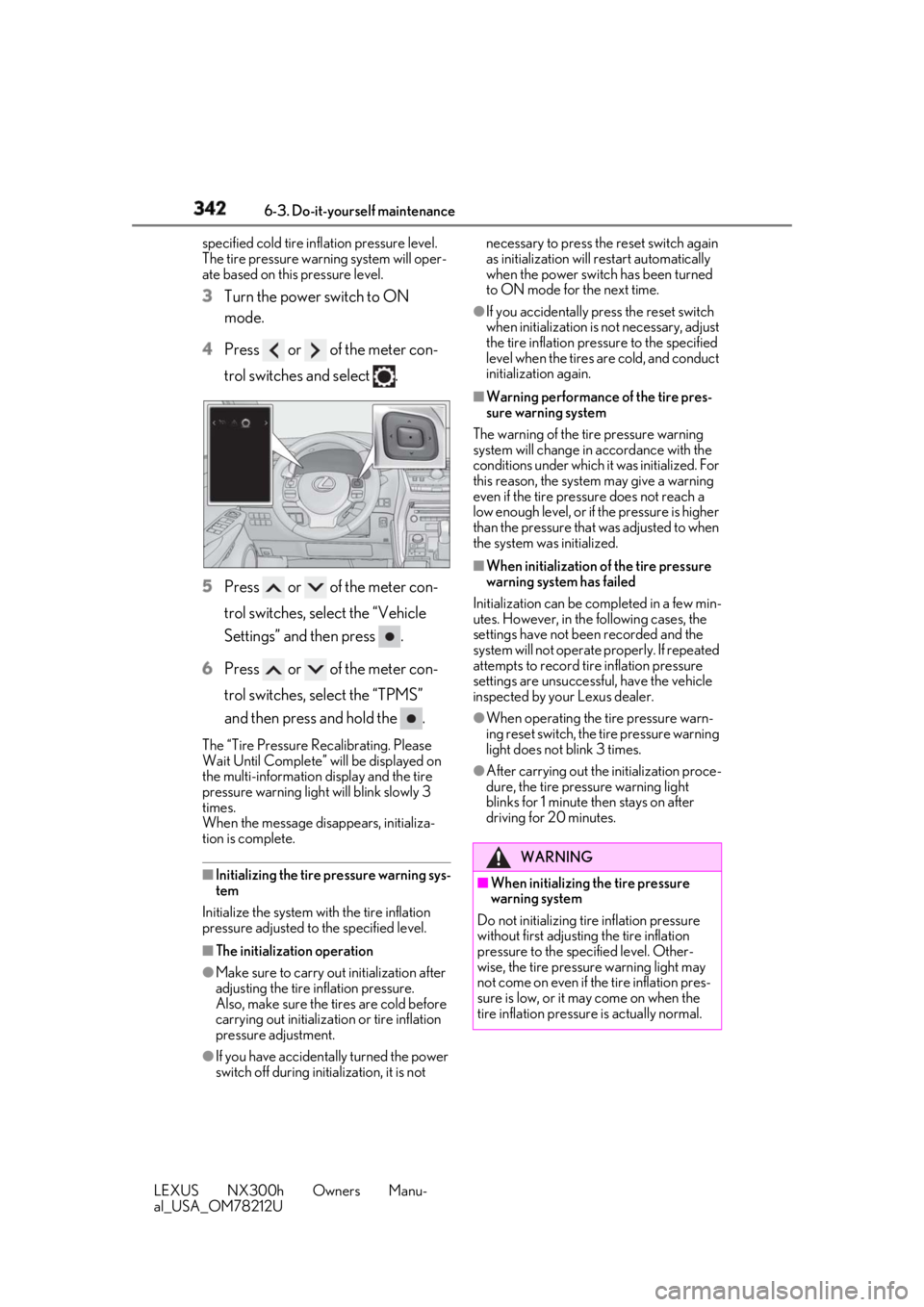
3 Turn the power switch to ON
mode.
4 Press or of the meter con-
trol switches and select .
5 Press or of the meter con-
trol switches, select the “Vehicle
Settings” and then press .
6 Press or of the meter con-
trol switches, select the “TPMS”
and then press and hold the .The “Tire Pressure Re calibrating. Please
Wait Until Complete” will be displayed on
the multi-information display and the tire
pressure warning light will blink slowly 3
times.
When the message disappears, initializa-
tion is complete.
■
Initializing the tire pressure warning sys-
tem
Initialize the system with the tire inflation
pressure adjusted to the specified level.
■
The initialization operation
●
Make sure to carry ou t initialization after
adjusting the tire inflation pressure.
Also, make sure the tires are cold before
carrying out initializat ion or tire inflation
pressure adjustment.
●
If you have accidenta lly turned the power
switch off during initialization, it is not necessary to press the reset switch again
as initialization will restart automatically
when the power switch has been turned
to ON mode for the next time. ●
If you accidentally press the reset switch
when initialization is not necessary, adjust
the tire inflation pressure to the specified
level when the tires are cold, and conduct
initialization again. ■
Warning performance of the tire pres-
sure warning system
The warning of the tire pressure warning
system will change in accordance with the
conditions under which it was initialized. For
this reason, the system may give a warning
even if the tire pressure does not reach a
low enough level, or if the pressure is higher
than the pressure that was adjusted to when
the system was initialized. ■
When initialization of the tire pressure
warning system has failed
Initialization ca n be completed in a few min-
utes. However, in the following cases, the
settings have not been recorded and the
system will not operate properly. If repeated
attempts to record tire inflation pressure
settings are unsuccessf ul, have the vehicle
inspected by your Lexus dealer. ●
When operating the tire pressure warn-
ing reset switch, the tire pressure warning
light does not blink 3 times. ●
After carrying out the initialization proce-
dure, the tire pressure warning light
blinks for 1 minute then stays on after
driving for 20 minutes.
WARNING
■
When initializing the tire pressure
warning system
Do not initializing tire inflation pressure
without first adjusting the tire inflation
pressure to the spec ified level. Other-
wise, the tire pressu re warning light may
not come on even if the tire inflation pres-
sure is low, or it may come on when the
tire inflation pressure is actually normal.