speed warning LEXUS NX300h 2018 Owners Manual
[x] Cancel search | Manufacturer: LEXUS, Model Year: 2018, Model line: NX300h, Model: LEXUS NX300h 2018Pages: 460, PDF Size: 13.57 MB
Page 24 of 460
24 1-1. For safe use
LEXUS NX300h Owners Manu-
al_USA_OM78212U 1-1.For safe use
Use only floor mats designed specifi-
cally for vehicles of the same model
and model year as your vehicle. Fix
them securely in place onto the carpet.
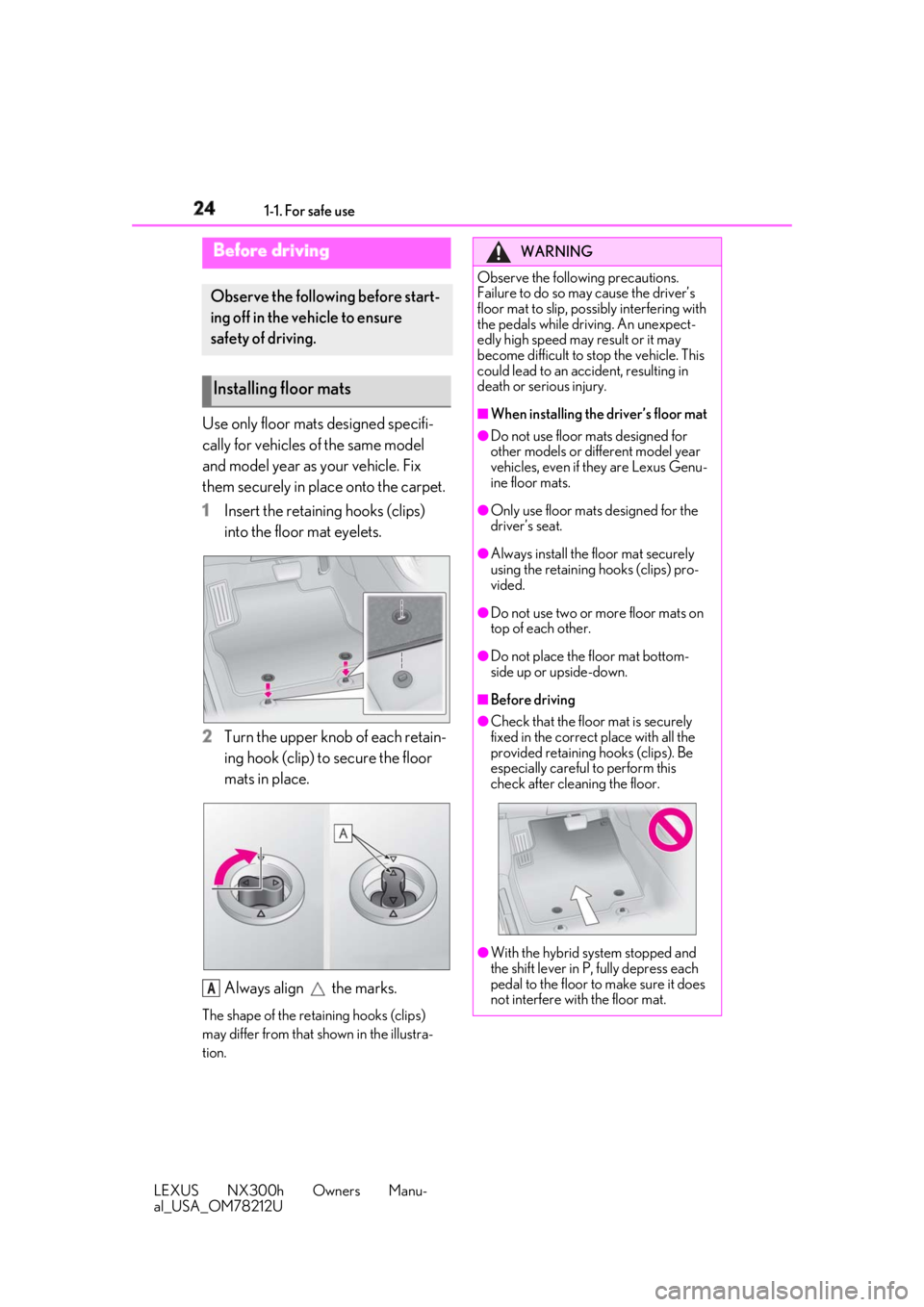
1 Insert the retaining hooks (clips)
into the floor mat eyelets.
2 Turn the upper knob of each retain-
ing hook (clip) to secure the floor
mats in place.
Always align the marks.The shape of the reta ining hooks (clips)
may differ from that shown in the illustra-
tion.Before driving Observe the following before start-
ing off in the vehicle to ensure
safety of driving.
Installing floor mats
A WARNING
Observe the following precautions.
Failure to do so may cause the driver’s
floor mat to slip, poss ibly interfering with
the pedals while driv ing. An unexpect-
edly high speed may result or it may
become difficult to stop the vehicle. This
could lead to an accident, resulting in
death or serious injury. ■
When installing the driver’s floor mat ●
Do not use floor mats designed for
other models or different model year
vehicles, even if they are Lexus Genu-
ine floor mats. ●
Only use floor mats designed for the
driver’s seat. ●
Always install the floor mat securely
using the retaining hooks (clips) pro-
vided. ●
Do not use two or more floor mats on
top of each other. ●
Do not place the floor mat bottom-
side up or upside-down. ■
Before driving ●
Check that the floor mat is securely
fixed in the correct place with all the
provided retaining hooks (clips). Be
especially careful to perform this
check after cleaning the floor.
●
With the hybrid system stopped and
the shift lever in P, fully depress each
pedal to the floor to make sure it does
not interfere with the floor mat.
Page 25 of 460
251-1. For safe use
LEXUS NX300h Owners Manu-
al_USA_OM78212U 1
For safety and security
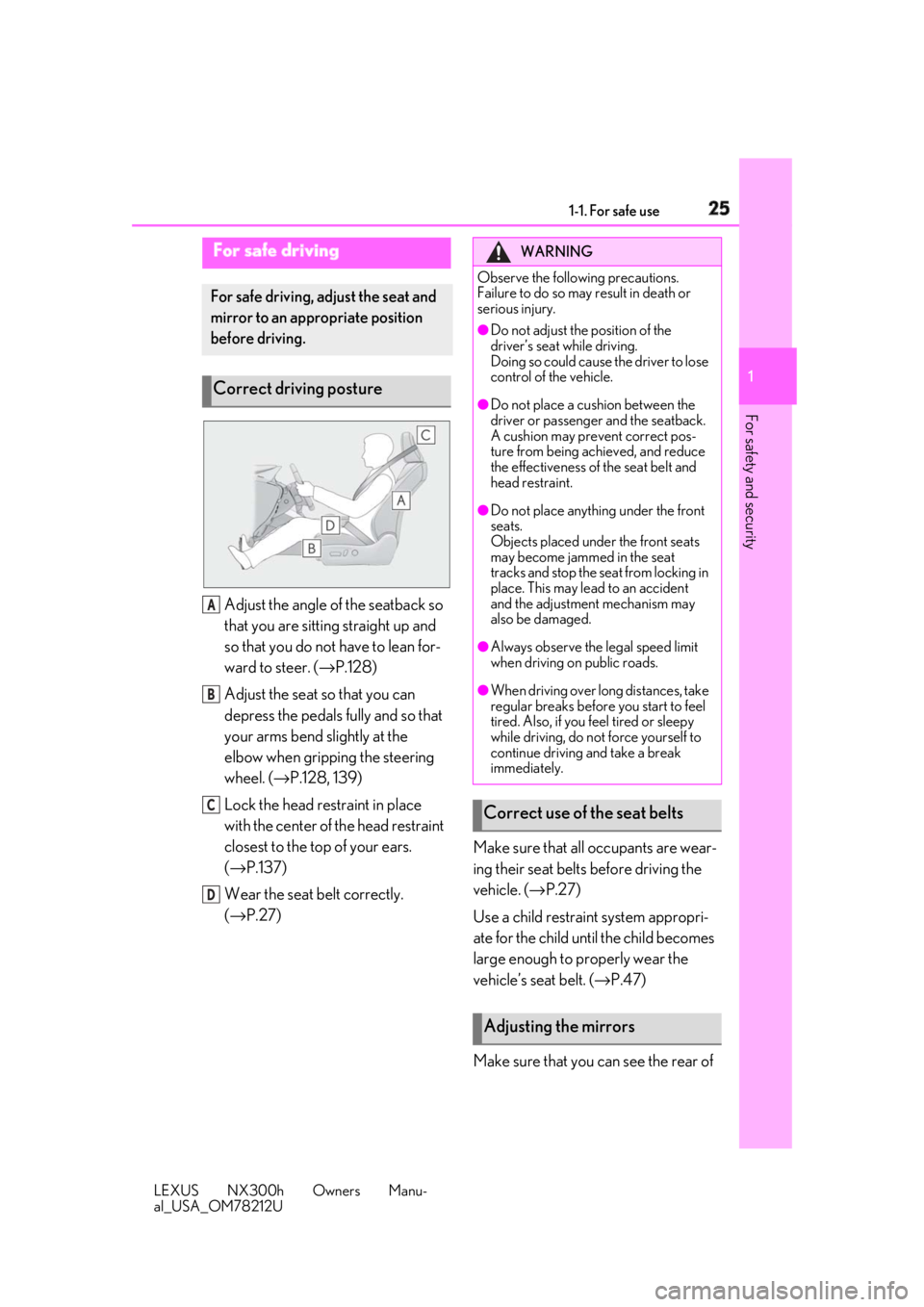
Adjust the angle of the seatback so
that you are sitting straight up and
so that you do not have to lean for-
ward to steer. ( → P.128)
Adjust the seat so that you can
depress the pedals fully and so that
your arms bend slightly at the
elbow when gripping the steering
wheel. ( → P.128, 139)
Lock the head restraint in place
with the center of the head restraint
closest to the top of your ears.
( → P.137)
Wear the seat belt correctly.
( → P.27) Make sure that all occupants are wear-
ing their seat belts before driving the
vehicle. ( → P.27)
Use a child restraint system appropri-
ate for the child until the child becomes
large enough to properly wear the
vehicle’s seat belt. ( → P.47)
Make sure that you can see the rear of For safe driving For safe driving, adjust the seat and
mirror to an appropriate position
before driving.
Correct driving posture
A
B
C
D WARNING
Observe the following precautions.
Failure to do so may result in death or
serious injury. ●
Do not adjust the position of the
driver’s seat while driving.
Doing so could cause the driver to lose
control of the vehicle. ●
Do not place a cushion between the
driver or passenger and the seatback.
A cushion may prevent correct pos-
ture from being achieved, and reduce
the effectiveness of the seat belt and
head restraint. ●
Do not place anything under the front
seats.
Objects placed under the front seats
may become jammed in the seat
tracks and stop the seat from locking in
place. This may lead to an accident
and the adjustment mechanism may
also be damaged. ●
Always observe the legal speed limit
when driving on public roads. ●
When driving over long distances, take
regular breaks before you start to feel
tired. Also, if you feel tired or sleepy
while driving, do not force yourself to
continue driving and take a break
immediately.
Correct use of the seat belts
Adjusting the mirrors
Page 50 of 460
50 1-1. For safe use
LEXUS NX300h Owners Manu-
al_USA_OM78212U ■
When installing a child restraint
system to a passenger seat
For the safety of a child, install child
restraint systems to a rear seats. When
installing child restraint system to a
front passenger seat is unavoidable,
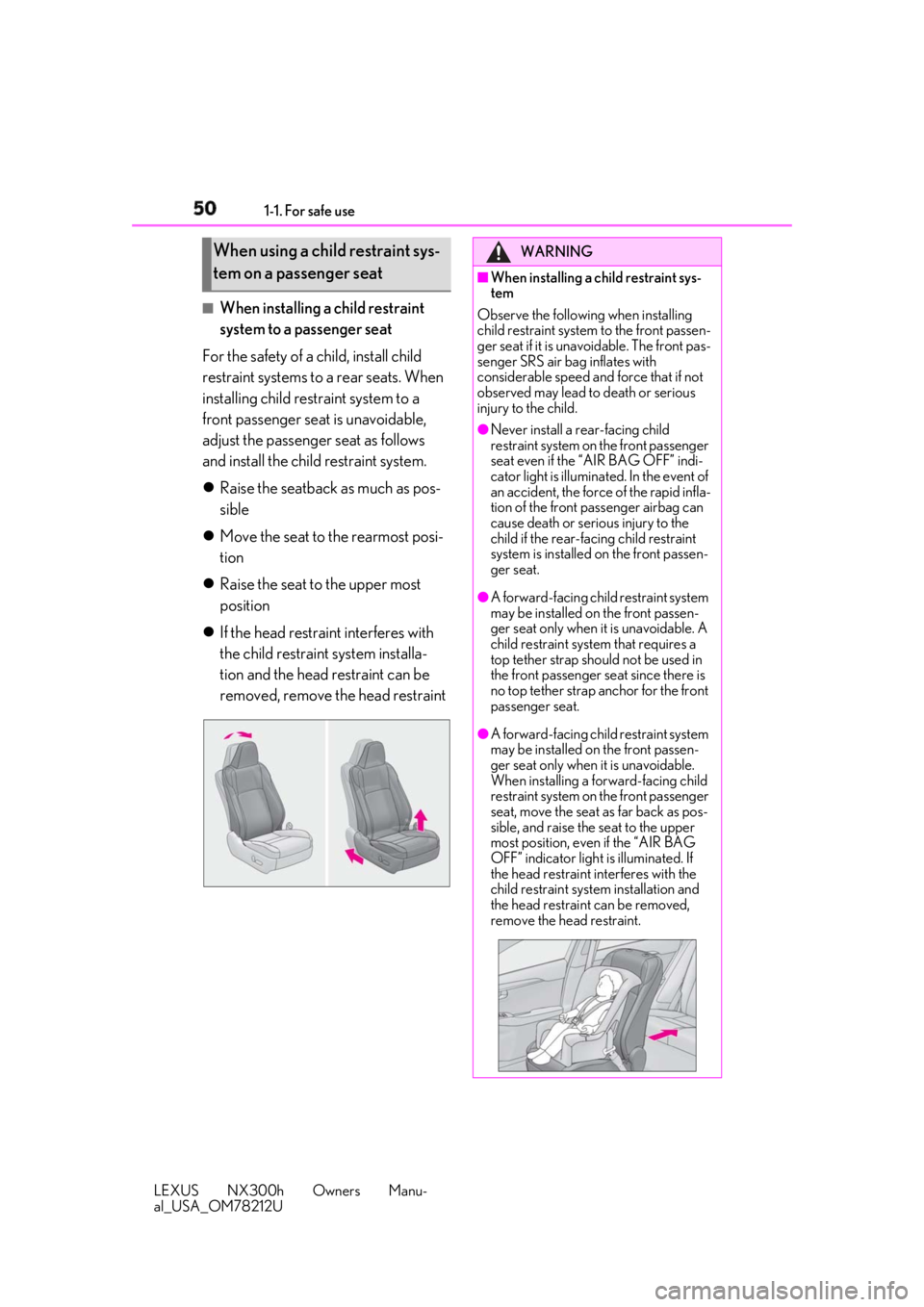
adjust the passenger seat as follows
and install the child restraint system.
Raise the seatback as much as pos-
sible
Move the seat to the rearmost posi-
tion
Raise the seat to the upper most
position
If the head restraint interferes with
the child restraint system installa-
tion and the head restraint can be
removed, remove the head restraintWhen using a child restraint sys-
tem on a passenger seat WARNING■
When installing a child restraint sys-
tem
Observe the following when installing
child restraint system to the front passen-
ger seat if it is unavoidable. The front pas-
senger SRS air bag inflates with
considerable speed and force that if not
observed may lead to death or serious
injury to the child. ●
Never install a rear-facing child
restraint system on the front passenger
seat even if the “AIR BAG OFF” indi-
cator light is illuminated. In the event of
an accident, the force of the rapid infla-
tion of the front passenger airbag can
cause death or serious injury to the
child if the rear-fac ing child restraint
system is installed on the front passen-
ger seat. ●
A forward-facing child restraint system
may be installed on the front passen-
ger seat only when it is unavoidable. A
child restraint system that requires a
top tether strap should not be used in
the front passenger seat since there is
no top tether strap anchor for the front
passenger seat. ●
A forward-facing child restraint system
may be installed on the front passen-
ger seat only when it is unavoidable.
When installing a forward-facing child
restraint system on the front passenger
seat, move the seat as far back as pos-
sible, and raise the seat to the upper
most position, even if the “AIR BAG
OFF” indicator light is illuminated. If
the head restraint interferes with the
child restraint system installation and
the head restraint can be removed,
remove the head restraint.
Page 80 of 460

80 2-1. Instrument cluster
LEXUS NX300h Owners Manu-
al_USA_OM78212U Displays warning messages in case of a malfunction ( → P.374)
SpeedometerDisplays the vehicle speed
Fuel gaugeDisplays the quantity of fuel remaining in the tank
Shift position and shift rangeDisplays the selected shift posi tion or selected shift range ( → P.173)
Odometer, trip meter and maintena nce required information displayOdometer:
Displays the total distance the vehicle has been driven
Trip meter:
Displays the distance the vehicle has been driven since the meter was last reset.
Trip meters “A” and “B” can be used to record and display different distances inde-
pendently.
Maintenance required information:
Displays the remaining distance unt il the engine oil sh ould be changed.
• Displays the maintenance requ ired information when the power switch is ON mode.
• It can be reset on of the multi-information display.
When driving mode is in sport mode ( → P.249)
The units used on the meters may differ depending on the target region.
Engine coolant temperature gaugeDisplays the engine coolant temperature
TachometerDisplays the engine speed in revolutions per minute
Outside temperatureDisplays the outside temperature within the range of -40°F (-40°C) to 122°F (50°C). Low G
H
I
J
A
B
C
Page 81 of 460

812-1. Instrument cluster
LEXUS NX300h Owners Manu-
al_USA_OM78212U 2
Vehicle status information and indicators outside temperature indicator comes on when the ambient temperature is 37°F (3°C) or
lower.
Background color of drive modeBackground color changes according to the drive mode. ( → P.249)
•Sport mode: Red
•Eco mode: Blue
When in Normal mode, the background color is Black.
ClockTime displayed is linked to the analog clock on the instrument panel. ( → P.288)
Multi-information displayPresents the driver with a variety of vehicle data ( → P.85)
Displays warning messages in case of a malfunction ( → P.374)
SpeedometerDisplays the vehicle speed
Fuel gaugeDisplays the quantity of fuel remaining in the tank
Shift position and shift rangeDisplays the selected shift posi tion or selected shift range ( → P.173)
Odometer, trip meter and maintena nce required information displayOdometer:
Displays the total distance the vehicle has been driven
Trip meter:
Displays the distance the vehicle has been driven since the meter was last reset.
Trip meters “A” and “B” can be used to record and display different distances inde-
pendently.
Maintenance required information:
Displays the remaining distance unt il the engine oil sh ould be changed.
• Displays the maintenance requ ired information when the power switch is ON mode.
• It can be reset on of the multi-information display. D
E
F
G
H
I
J
Page 83 of 460

832-1. Instrument cluster
LEXUS NX300h Owners Manu-
al_USA_OM78212U 2
Vehicle status information and indicators ■
Customization
The meter display can be customized on
the multi-information display.
(Customizable features: → P.419)
WARNING■
The information display at low tem-
peratures
Allow the interior of the vehicle to warm
up before using the liquid crystal infor-
mation display. At extremely low tem-
peratures, the in formation display
monitor may respond slowly, and display
changes may be delayed.
For example, there is a lag between the
driver's shifting and the new gear num-
ber appearing on the display. This lag
could cause the driver to downshift
again, causing rapid and excessive
engine braking and possibly an accident
resulting in personal death or injury.
NOTICE■
To prevent damage to the engine and
its components●
When the tachometer is displayed, do
not let the indicator needle of the
tachometer enter the red zone, which
indicates the maximum engine speed.
●
The engine may be overheating if the
engine coolant temperature gauge is
in the red zone (H); or “Engine Cool-
ant Temp High” or “Hybrid System
Overheated” is shown on the multi-
information display. In this case, imme-
diately stop the vehicle in a safe place,
and check the engine or hybrid system
after it has cooled completely.
( → P.394)
Page 86 of 460

86 2-1. Instrument cluster
LEXUS NX300h Owners Manu-
al_USA_OM78212U ■
Content displayed as drive infor-
mation
Select to display various drive data.
Items displayed can be switched by
pressing or of the meter con-
trol switches to select and pressing
or .
Current fuel consumption *1
Displays the current rate of fuel consump-
tion
Average fuel consumption (after
reset *2
/after start/after refuel) *1
Displays the average fuel consumption
since the function was reset, the hybrid sys-
tem was started, and the vehicle was refu-
eled, respectively
Use the displayed average fuel consump-
tion as a reference.
Average vehicle speed (after
reset *2
/after start) *1
Displays the average vehicle speed since
the function was reset and the hybrid sys-
tem was started, respectively
Elapsed time (after reset *2
/after
start) *1
Displays the elapsed time since the func-
tion was reset and the hybrid system was
started, respectively
Distance (driving range/after start) *1
Displays the estimated maximum distance
that can be driven with the quantity of fuel
remaining and the distance driven after the
hybrid system was st arted respectively.
• This distance is computed based on your
average fuel consumption. As a result, the actual distance that can be driven
may differ from that displayed.
• When only a small amount of fuel is
added to the tank, the display may not be
updated.
When refueling, turn the power switch
off. If the vehicle is refueled without turn-
ing the power switch off, the display may
not be updated. *1
: Displayed when the it em is set in “Drive
Info 1”, “Drive Info 2” and “Drive Info 3”. *2
: The function can be reset by pressing
the of the meter control switches
for longer than 1 second when the item
to reset is displayed.
If there is more than one item that can
be reset, the item selection screen will
appear. ■
Energy monitor
→ P.94 ■
Speedometer
Displays the vehicle speed. ■
Tire inflation pressure
Displays inflation pressure of each tire. The inflation pressure of the spare tire will
not be displayed.
■
Sway warning
Detects the sway of the vehicle within a
lane, which is often associated with a
decrease in the driver's attention level,
and displays the decrease in attention
using a bar display.
The shorter the bar length, the more
the driver may need to rest.
This display is a part of the LDA (Lane
Departure Alert with steering control)
system. The display is enabled when
the operating conditions of the vehicle Drive information
Page 87 of 460

872-1. Instrument cluster
LEXUS NX300h Owners Manu-
al_USA_OM78212U 2
Vehicle status information and indicators sway warning are met. ( → P.211)■
Display off
A blank screen is displayed ■
Tire inflation pressure●
It may take a few minutes to display the
tire inflation pressure after the power
switch is turned to ON mode. It may also
take a few minutes to display the tire infla-
tion pressure after inflation pressure has
been adjusted.●
“---” may be displayed if the tire informa-
tion cannot be determined due to unfa-
vorable radio wave conditions.●
Tire inflation pressu re changes with tem-
perature. The displayed values may also
be different from the values measured
using a tire pressure gauge.■
When disconnecting and reconnecting
12-volt battery terminals
The drive information will be reset.
Select to display the following naviga-
tion system-linked information.
Route guidance
Compass display (north-up display/
heading-up display)
Select to enable selection of an audio
source or track on the display using the
meter control switches.
Select to display the operational status
of the following systems: LDA (Lane Departure Alert with
steering control) ( → P.210)
Dynamic radar cruise control with
full-speed range ( → P.217)
The displayed icon changes depending
on the system used.
Select to display warning messages
and measures to be taken if a malfunc-
tion is detected. ( → P.374)
The settings of the following items can
be changed using the meter control
switches.
For functions that can be enabled or
disabled, the function switches
between on and off each time is
pressed. ■
LDA (Lane Departure Alert
with steering control) ( → P.210)
Select to set up the following items.
Steering Assist Select to enable/dis able steering wheel
assistance.
Alert Select to set a vibrator or buzzer as the
notification method used to warn the
driver.
Alert sensitivity Select to set the warning sensitivity.
Sway warning
Select to enable/disable the vehicle sway Navigation system-linked dis-
play (if equipped)
Audio system-linked display (if
equipped)
Driving assist system information Warning message display
Settings display
Page 90 of 460
90 2-1. Instrument cluster
LEXUS NX300h Owners Manu-
al_USA_OM78212U *
:If equipped
■
Head-up display
The head-up display may seem dark and
hard to see when viewed through sun-
glasses, especially polarized sunglasses.
Adjust the brightness of the head-up display
or remove your sunglasses.Head-up display *
The head-up display can be used to
project vehicle speed and other
information onto the windshield.
WARNING■
Before using the head-up display
Check that the position and brightness of
the head-up display image does not
interfere with safe driving. Incorrect
adjustment of the image’s position or
brightness may obstruct the driver’s view
and lead to an accident, resulting in
death or serious injury. ■
Caution for changing settings of the
head-up display
As the hybrid system needs to be operat-
ing while changing th e settings of the
head-up display, ensure that the vehicle
is parked in a place with adequate venti-
lation. In a closed area such as a garage,
exhaust gases includ ing harmful carbon
monoxide (CO) may collect and enter
the vehicle. This may lead to death or a
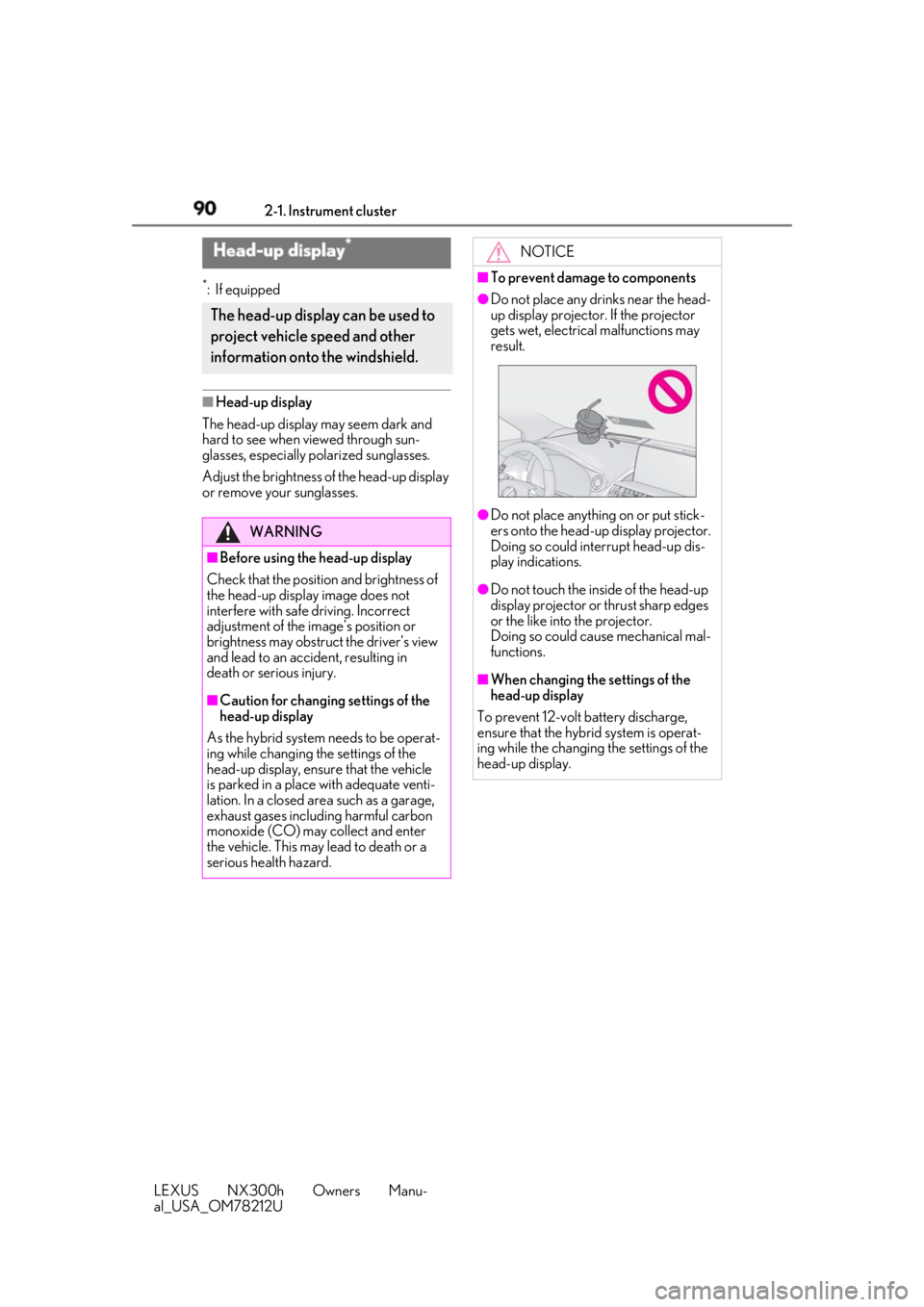
serious health hazard. NOTICE■
To prevent damage to components ●
Do not place any drinks near the head-
up display projector. If the projector
gets wet, electrical malfunctions may
result.
●
Do not place anything on or put stick-
ers onto the head-up display projector.
Doing so could interrupt head-up dis-
play indications. ●
Do not touch the inside of the head-up
display projector or thrust sharp edges
or the like into the projector.
Doing so could cause mechanical mal-
functions. ■
When changing the settings of the
head-up display
To prevent 12-volt battery discharge,
ensure that the hybrid system is operat-
ing while the changing the settings of the
head-up display.
Page 91 of 460

912-1. Instrument cluster
LEXUS NX300h Owners Manu-
al_USA_OM78212U 2
Vehicle status information and indicators
Head-up displayDisplay brightness will change automati-
cally according to the brightness of the sur-
rounding area.
Display position adjustment switch
Display brightness adjustment
switchDisplay brightness can be adjusted to the
desired level.
“HUD” button
“DISP” button
Vehicle speed
Hybrid System Indicator ( → P.93)
Tachometer
Shift position and shift range
Displays the selected shift position or
selected shift range ( → P.173) Audio display Displays audio information for approxi-
mately 3 seconds when the audio system is
operated
Route guidance display (vehicles
with navigation system) ( → P.93)When approaching an intersection while
the navigation system is giving route guid-
ance, an arrow will automatically be dis-
played to indicate the direction of travel.
Lane departure warning display
(LDA [Lane Departure Alert with
steering control]) ( → P.210)
Approach warning display
(Dynamic radar cruise control with
full speed range) ( → P.217)
Pre-collision warning message (Pre-
Collision System) ( → P.203)
Speed limit display (vehicles with
navigation system) ( → P.93)
Parking Support Brake (for static
objects) ( → P.239)
■
“HUD” button
Pressing the switch turns the head-up
display on/off and changes the vehicle
speed display units as follows:
U.S.A.
OFF → ON (MPH) → ON (km/
h) → OFF
Canada
OFF → ON (km/h) → ON
(MPH) → OFFSummary of functions
Head-up display contents A
B
C
D
E Switching the head-up display