brake sensor LEXUS NX300H 2019 User Guide
[x] Cancel search | Manufacturer: LEXUS, Model Year: 2019, Model line: NX300H, Model: LEXUS NX300H 2019Pages: 460, PDF Size: 6.82 MB
Page 229 of 460
2294-5. Using the driving support systems
LEXUS NX300h Owners Manu-
al_USA_M78287_en
4
Driving
■Sensor detectio n information
●The sensor’s detection areas are limited
to the areas around the vehicle’s bumper.
●Certain vehicle conditions and the sur-
rounding environment may affect the
ability of a sensor to correctly detect an
obstacle. Particular instances where this
may occur are listed below.
• There is dirt, snow or ice on the sensor. (Wiping the sensors will resolve this
problem.)
• The sensor is frozen. (Thawing the area will resolve this problem.)
In especially cold weather, if a sensor is
frozen the screen may show an abnormal
display, or obstacles may not be
detected.
• The sensor is covered in any way.
• The vehicle is leaning considerably to one side.
• On an extremely bumpy road, on an incline, on gravel, or on grass.
• The vicinity of the vehicle is noisy due to vehicle horns, motorcycle engines, air
brakes of large vehicles, or other loud
noises producing ultrasonic waves.
• There is another vehicle equipped with parking assist sensors in the vicinity.
• The sensor is coated with a sheet of spray or heavy rain.
• The vehicle is equipped with a fender
pole or wireless antenna.
• Towing eyelets are installed.
• The bumper or sensor receives a strong impact.
• A backlit license plate, license plate holder, etc., are installed.
• The vehicle is approaching a tall or curved curb.
• In harsh sunlight or intense cold weather.
• The area directly under the bumpers is
not detected.
• If obstacles draw too close to the sensor.
• A non-genuine Lexus suspension (low- ered suspension etc.) is installed.
• People may not be detected if they are wearing certain types of clothing.
In addition to the examples above, there are
instances in which, because of their shape,
signs and other objects may be judged by a
sensor to be closer than they are.
●The shape of the obstacle may prevent a sensor from detecting it. Pay particular
attention to the following obstacles:
• Wires, fences, ropes, etc.
• Cotton, snow and other materials that
absorb sound waves
• Sharply-angled objects
• Low obstacles
• Tall obstacles with upper sections pro- jecting outwards in the direction of your
vehicle
●The following situations may occur
during use.
• Depending on the shape of the obstacle and other factors, the detection distance
may shorten, or detection may be impos-
sible.
• Obstacles may not be detected if they
are too close to the sensor.
• There will be a short delay between obstacle detection and display. Even at
slow speeds, there is a possibility that the
obstacle will come within the sensor’s
detection areas befo re the display is
shown and the buzzer sounds.
• Thin posts or object s lower than the sen-
sor may not be detected when
approached, even if they have been
detected once.
• It might be difficult to hear beeps due to
the volume of audio system or air flow
noise of the air conditioning system.
■Customization
Some functions can be customized.
(Customizable features: P.421)
■Certification
For vehicles sold in the U.S.A.
This device complies with Part 15 of the
FCC Rules. Operation is subject to the fol-
lowing two conditions; (1) this device may
not cause harmful interference, and (2) this
device must accept any interference
received, including in terference that may
cause undesired operation.
For vehicles sold in Canada
This ISM device complies with Canadian
ICES-001.
Cet appareil ISM est conforme a la norme
NMB-001 du Canada.
Page 230 of 460
2304-5. Using the driving support systems
LEXUS NX300h Owners Manu-
al_USA_M78287_en
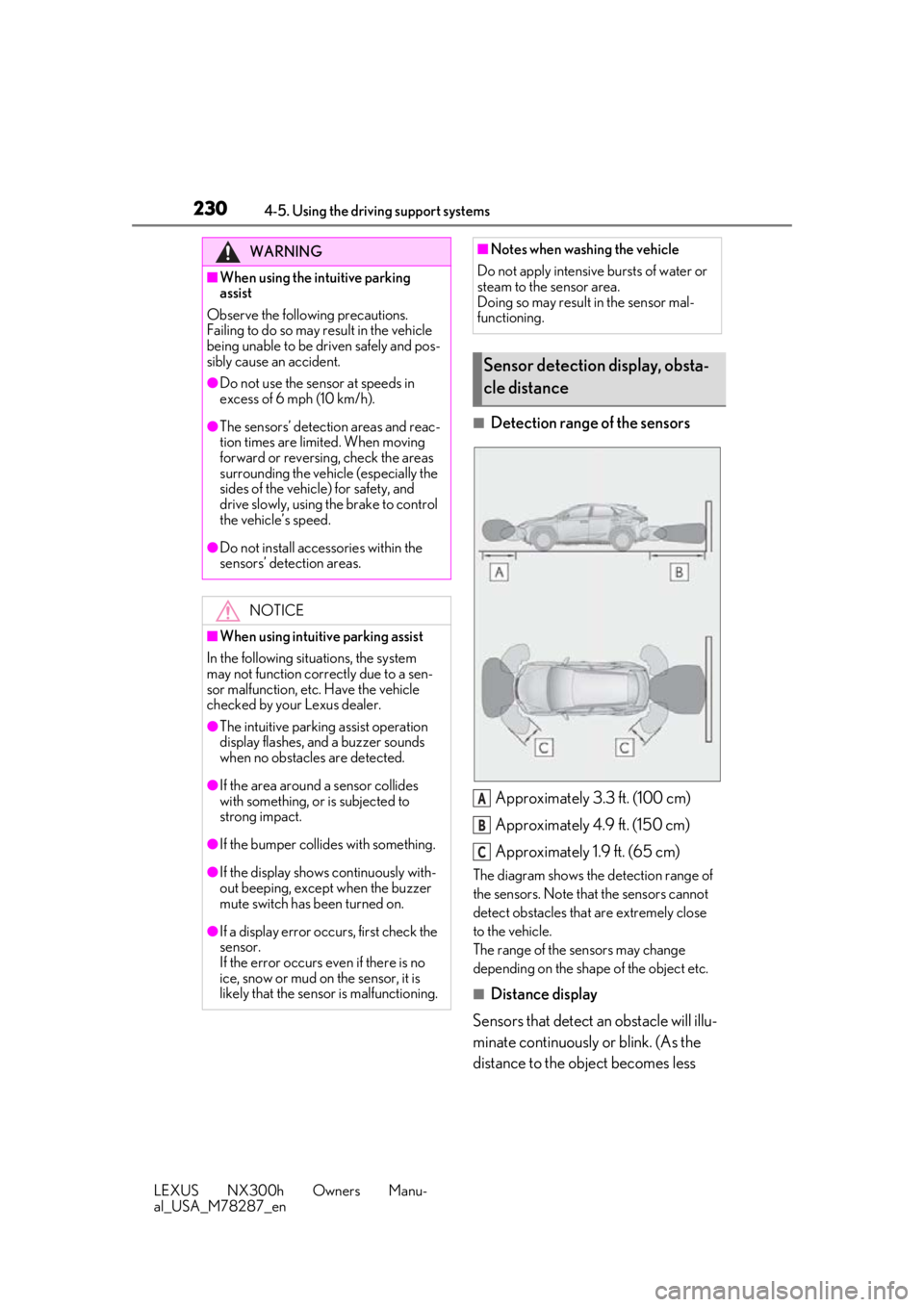
■Detection range of the sensorsApproximately 3.3 ft. (100 cm)
Approximately 4.9 ft. (150 cm)
Approximately 1.9 ft. (65 cm)
The diagram shows the detection range of
the sensors. Note that the sensors cannot
detect obstacles that are extremely close
to the vehicle.
The range of the sensors may change
depending on the shape of the object etc.
■Distance display
Sensors that detect an obstacle will illu-
minate continuously or blink. (As the
distance to the object becomes less
WARNING
■When using the intuitive parking
assist
Observe the following precautions.
Failing to do so may result in the vehicle
being unable to be driven safely and pos-
sibly cause an accident.
●Do not use the sensor at speeds in
excess of 6 mph (10 km/h).
●The sensors’ detection areas and reac-
tion times are limited. When moving
forward or reversing, check the areas
surrounding the vehicle (especially the
sides of the vehicle) for safety, and
drive slowly, using the brake to control
the vehicle’s speed.
●Do not install accessories within the
sensors’ detection areas.
NOTICE
■When using intuitive parking assist
In the following situations, the system
may not function correctly due to a sen-
sor malfunction, etc. Have the vehicle
checked by your Lexus dealer.
●The intuitive parking assist operation
display flashes, and a buzzer sounds
when no obstacles are detected.
●If the area around a sensor collides
with something, or is subjected to
strong impact.
●If the bumper collides with something.
●If the display shows continuously with-
out beeping, except when the buzzer
mute switch has been turned on.
●If a display error occurs, first check the
sensor.
If the error occurs even if there is no
ice, snow or mud on the sensor, it is
likely that the sensor is malfunctioning.
■Notes when washing the vehicle
Do not apply intensive bursts of water or
steam to the sensor area.
Doing so may result in the sensor mal-
functioning.
Sensor detection display, obsta-
cle distance
A
B
C
Page 232 of 460
2324-5. Using the driving support systems
LEXUS NX300h Owners Manu-
al_USA_M78287_en
*:If equipped
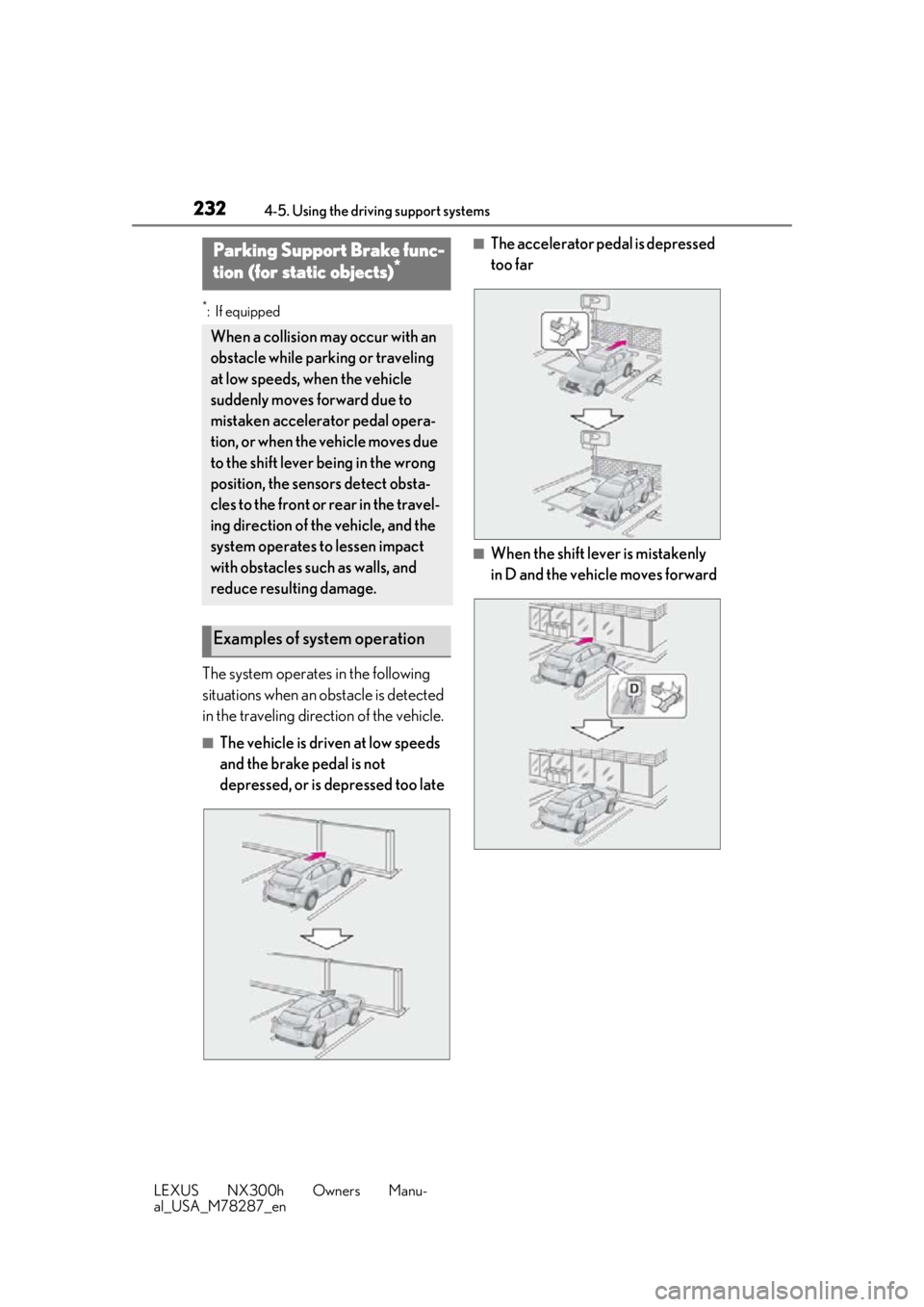
The system operates in the following
situations when an obstacle is detected
in the traveling direction of the vehicle.
■The vehicle is driven at low speeds
and the brake pedal is not
depressed, or is depressed too late
■The accelerator pedal is depressed
too far
■When the shift lever is mistakenly
in D and the vehicle moves forward
Parking Support Brake func-
tion (for static objects)*
When a collision may occur with an
obstacle while parking or traveling
at low speeds, when the vehicle
suddenly moves forward due to
mistaken accelerator pedal opera-
tion, or when the vehicle moves due
to the shift lever being in the wrong
position, the sensors detect obsta-
cles to the front or rear in the travel-
ing direction of the vehicle, and the
system operates to lessen impact
with obstacles such as walls, and
reduce resulting damage.
Examples of system operation
Page 233 of 460
2334-5. Using the driving support systems
LEXUS NX300h Owners Manu-
al_USA_M78287_en
4
Driving
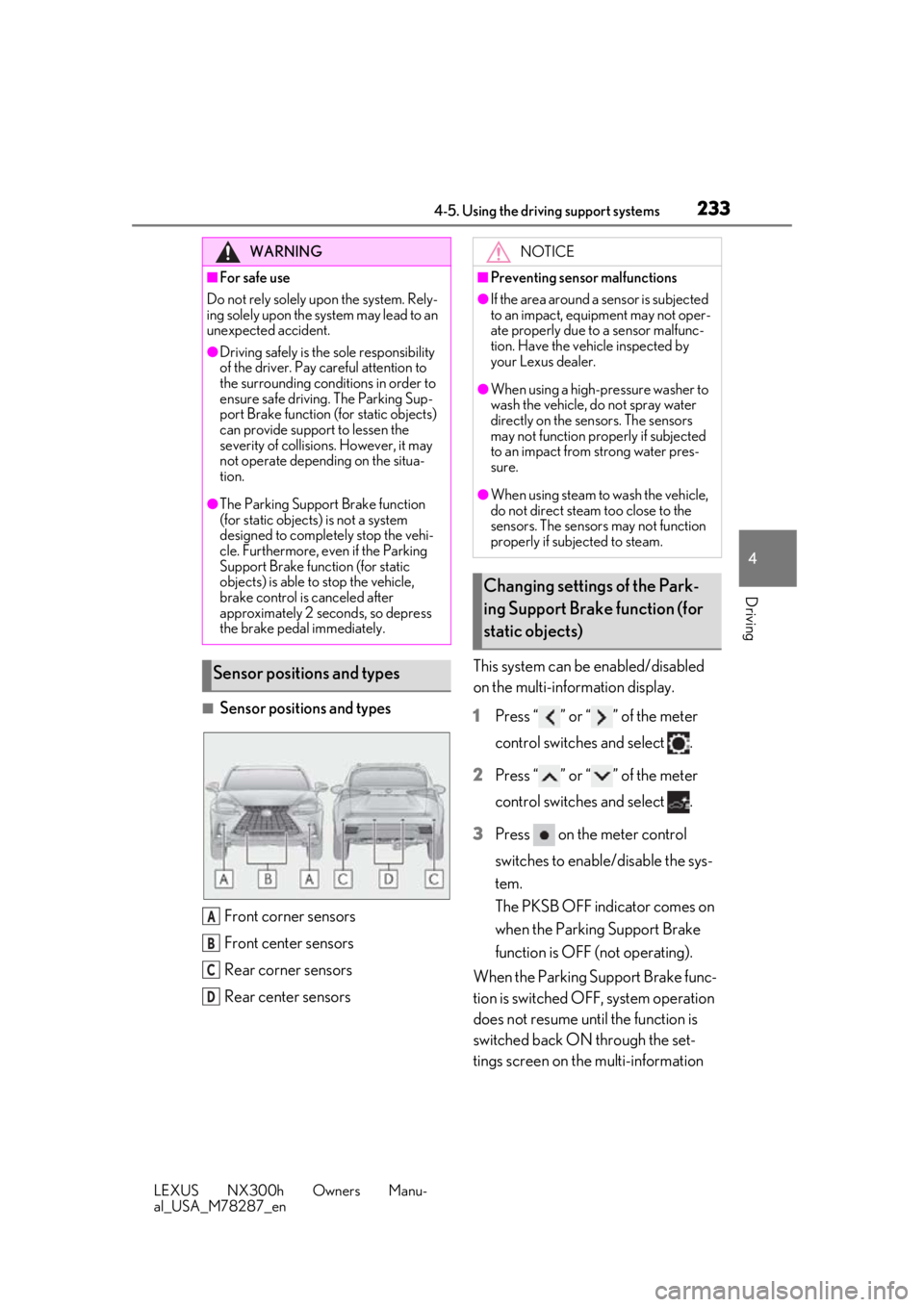
■Sensor positions and types Front corner sensors
Front center sensors
Rear corner sensors
Rear center sensors This system can be enabled/disabled
on the multi-information display.
1
Press “ ” or “ ” of the meter
control switches and select .
2 Press “ ” or “ ” of the meter
control switches and select .
3 Press on the meter control
switches to enable/disable the sys-
tem.
The PKSB OFF indicator comes on
when the Parking Support Brake
function is OFF (not operating).
When the Parking Support Brake func-
tion is switched OFF, system operation
does not resume until the function is
switched back ON through the set-
tings screen on the multi-information
WARNING
■For safe use
Do not rely solely upon the system. Rely-
ing solely upon the sy stem may lead to an
unexpected accident.
●Driving safely is the sole responsibility
of the driver. Pay careful attention to
the surrounding conditions in order to
ensure safe driving. The Parking Sup-
port Brake function (f or static objects)
can provide support to lessen the
severity of collisions. However, it may
not operate depending on the situa-
tion.
●The Parking Support Brake function
(for static objects) is not a system
designed to completely stop the vehi-
cle. Furthermore, even if the Parking
Support Brake function (for static
objects) is able to stop the vehicle,
brake control is canceled after
approximately 2 seco nds, so depress
the brake pedal immediately.
Sensor positions and types
A
B
C
D
NOTICE
■Preventing sensor malfunctions
●If the area around a sensor is subjected
to an impact, equipment may not oper-
ate properly due to a sensor malfunc-
tion. Have the vehicle inspected by
your Lexus dealer.
●When using a high-pressure washer to
wash the vehicle, do not spray water
directly on the sensors. The sensors
may not function properly if subjected
to an impact from strong water pres-
sure.
●When using steam to wash the vehicle,
do not direct steam too close to the
sensors. The sensor s may not function
properly if subjected to steam.
Changing settings of the Park-
ing Support Brake function (for
static objects)
Page 236 of 460
2364-5. Using the driving support systems
LEXUS NX300h Owners Manu-
al_USA_M78287_en
UP
“BRAKE!” is displayed in the multi-information display
“Switch to Brake” is displayed in the multi-information display
■Operation starting conditions
When the PKSB OFF indicator is not illumi-
nated or flashing ( P.233, 370) and all of
the following conditions are met, the system
operates.
●Hybrid system output restriction control
• The Parking Support Brake function (for static objects) is on.
• The vehicle speed is 10 mph (15 km/h) or
less.
• There is an obstacle in the traveling direc- tion of the vehicle (6 to 13 ft. [2 to 4 m]
ahead).
• The system determined that a stronger- than-normal brake operation was neces-
sary to avoid a collision.
●Brake control
• Hybrid system output restriction control is being performed.
• The system determined that an emer-
gency brake operation was necessary to
avoid a collision.
■Operation ending conditions
In any of the following situations, the system
stops operating.
●Hybrid system output restriction control
• The Parking Support Brake function (for static objects) ha s been turned off
(stopped).
• The collision became avoidable with nor- mal brake operation.
• The obstacle is no longer in the traveling direction of the vehicle (6 to 13 ft. [2 to 4
m] ahead).
●Brake control
• The Parking Support Brake function (for
static objects) ha s been turned off
(stopped).
• Approximately 2 seconds elapsed after the vehicle was stopped by brake control.
• The brake pedal was depressed after the vehicle was stopped by brake control.
• The obstacle is no longer in the traveling
direction of the vehicle (6 to 13 ft. [2 to 4
m] ahead).
■Sensor detection range
The detection range of the Parking Support
Brake function (for static objects) differs
from the detection range of the clearance
sonar ( P.230).
Therefore, even if the clearance sonar
detects an obstacle and provides a warning,
the Parking Support Brake function (for
static objects) may not start operating.
■Obstacles not detect ed by the sensors
The following obstacles may not be
detected by the sensors.
●Objects such as people, cloth and snow,
that are difficult for sonic waves to reflect
off of. (In particular, people may also not
be detected depending on the type of
clothing they are wearing.)
●Objects not perpendicular with the
ground, objects not at a right angle to the
traveling direction of the vehicle, uneven
objects or waving objects
●Low objects
●Thin objects such as wires, fences, ropes
and signposts
●Objects that are extremely close to the
bumper
■Situations when the system may operate
even though there is no possibility of a
collision
In the following situations, the system may
operate even though there is no possibility
of a collision.
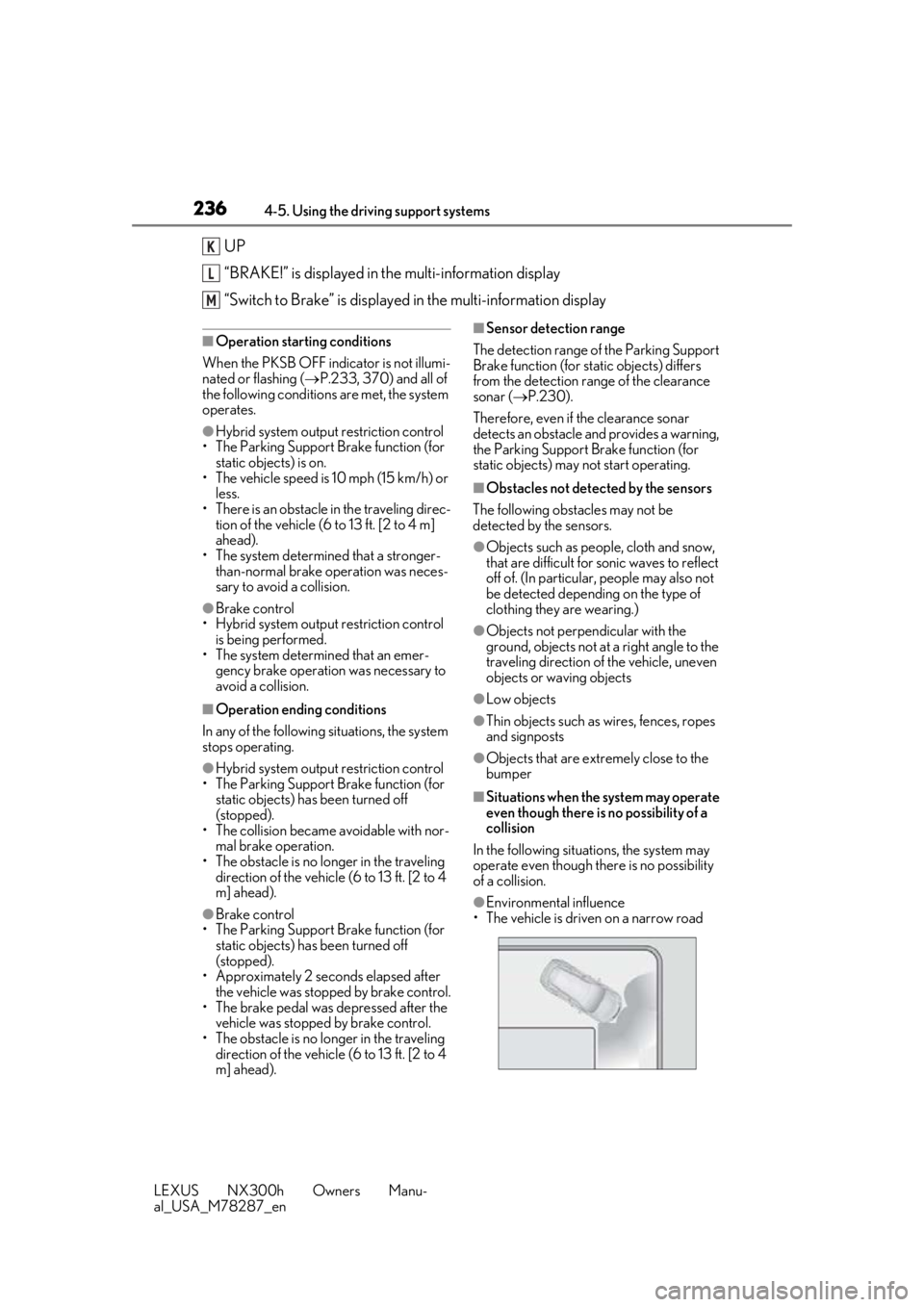
●Environmental influence
• The vehicle is driven on a narrow road
K
L
M
Page 237 of 460
2374-5. Using the driving support systems
LEXUS NX300h Owners Manu-
al_USA_M78287_en
4
Driving
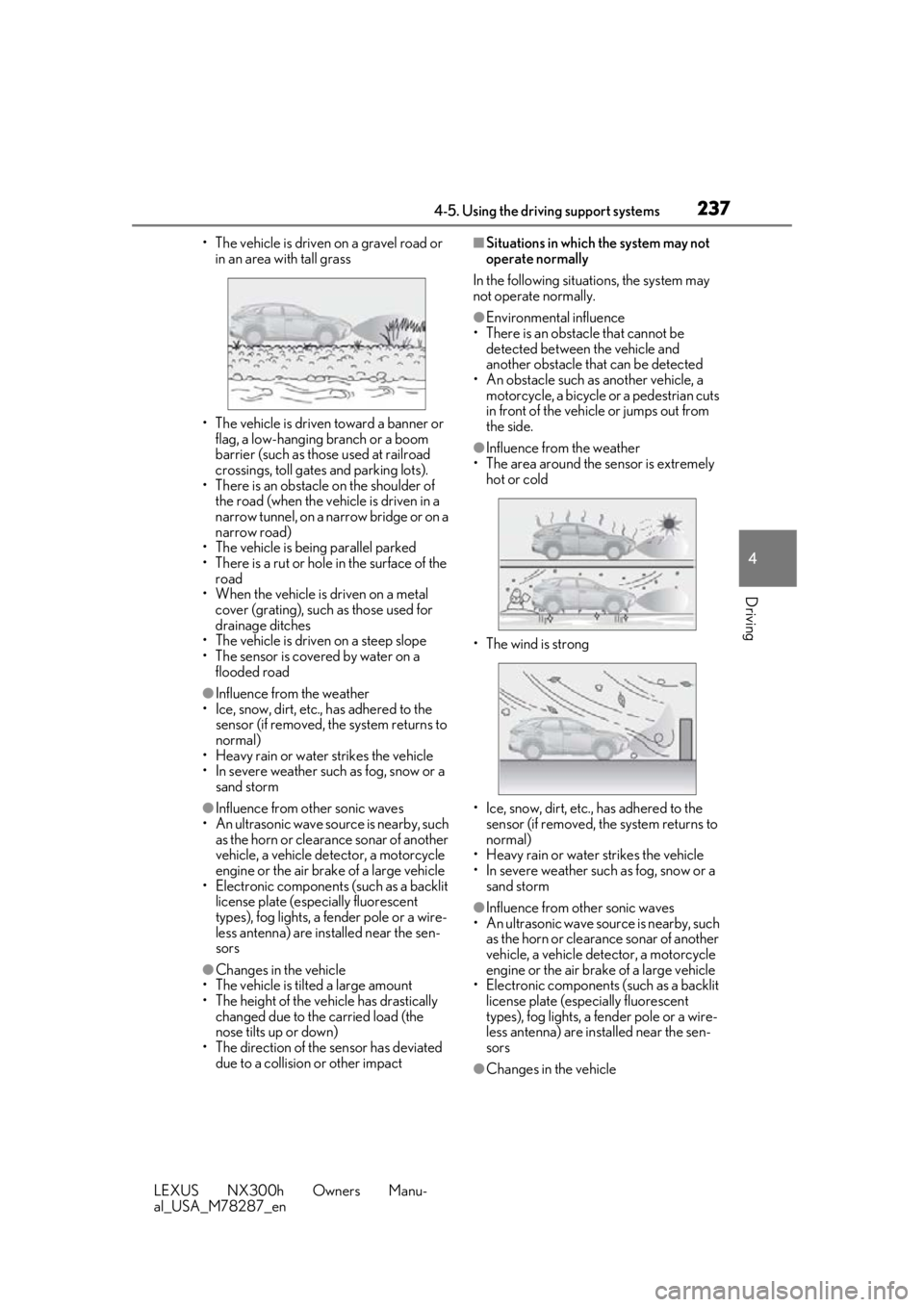
• The vehicle is driven on a gravel road or in an area with tall grass
• The vehicle is driven toward a banner or flag, a low-hanging branch or a boom
barrier (such as those used at railroad
crossings, toll gates and parking lots).
• There is an obstacle on the shoulder of the road (when the vehicle is driven in a
narrow tunnel, on a narrow bridge or on a
narrow road)
• The vehicle is being parallel parked
• There is a rut or hole in the surface of the
road
• When the vehicle is driven on a metal
cover (grating), such as those used for
drainage ditches
• The vehicle is driven on a steep slope
• The sensor is covered by water on a
flooded road
●Influence from the weather
• Ice, snow, dirt, etc., has adhered to the sensor (if removed, the system returns to
normal)
• Heavy rain or water strikes the vehicle
• In severe weather such as fog, snow or a sand storm
●Influence from other sonic waves
• An ultrasonic wave source is nearby, such as the horn or clearance sonar of another
vehicle, a vehicle detector, a motorcycle
engine or the air brake of a large vehicle
• Electronic components (such as a backlit license plate (especially fluorescent
types), fog lights, a fender pole or a wire-
less antenna) are inst alled near the sen-
sors
●Changes in the vehicle
• The vehicle is tilted a large amount
• The height of the vehicle has drastically changed due to the carried load (the
nose tilts up or down)
• The direction of the sensor has deviated
due to a collision or other impact
■Situations in which the system may not
operate normally
In the following situations, the system may
not operate normally.
●Environmental influence
• There is an obstacle that cannot be detected between the vehicle and
another obstacle that can be detected
• An obstacle such as another vehicle, a motorcycle, a bicycle or a pedestrian cuts
in front of the vehicle or jumps out from
the side.
●Influence from the weather
• The area around the sensor is extremely hot or cold
• The wind is strong
• Ice, snow, dirt, etc., has adhered to the sensor (if removed, the system returns to
normal)
• Heavy rain or water strikes the vehicle
• In severe weather such as fog, snow or a sand storm
●Influence from other sonic waves
• An ultrasonic wave source is nearby, such
as the horn or clearance sonar of another
vehicle, a vehicle detector, a motorcycle
engine or the air brake of a large vehicle
• Electronic components (such as a backlit license plate (especially fluorescent
types), fog lights, a fe nder pole or a wire-
less antenna) are installed near the sen-
sors
●Changes in the vehicle
Page 238 of 460
2384-5. Using the driving support systems
LEXUS NX300h Owners Manu-
al_USA_M78287_en• The vehicle is tilted a large amount
• The height of the vehicle has drastically
changed due to the carried load (the
nose tilts up or down)
• The direction of the sensor has deviated due to a collision or other impact
■When “Parking Support Brake Unavail-
able” is displayed on the multi-informa-
tion display and the PKSB OFF indicator
flashes
●Ice, snow, dirt, etc., may have adhered to
the sensor. If this occurs, remove the ice,
snow, dirt, etc., from the sensor to return
the system to normal.
Also, a warning message may be dis-
played at low temperatures due to ice
forming on the sensor, and the sensor
may not detect obstac les. Once the ice
melts, the system will return to normal.
●If this message is shown even after
removing dirt from the sensor, or shown
when the sensor was not dirty to begin
with, have the vehicle inspected by your
Lexus dealer.
●System initialization may not have been
performed after remova l and installation
of the 12-volt battery. Perform system ini-
tialization.
■When removing and installing the 12-
volt battery
The system needs to be initialized.
The system can be initialized by driving the
vehicle straight ahead for 5 seconds or
more at a speed of approximately 22 mph
(35 km/h) or higher.
■When “Parking Support Brake Mal-
function Visit Your Dealer” is displayed
on the multi-information display, the
PKSB OFF indicator flashes and the
buzzer sounds
The system may not be operating properly.
Have the vehicle inspected by your Lexus
dealer.
WARNING
■In order for the system to operate
properly
Make sure to observe the following pre-
cautions regarding the sensors
( P.230). Failure to observe these pre-
cautions may cause the sensors not to
operate properly, and may result in an
unexpected accident.
●Do not perform work such as modifi-
cation, disassembly or painting
●Only perform replacements using
genuine parts
●Do not subject the area around the
sensors to any impacts
●Do not damage the sensors, and
always keep them clean
■Handling the suspension
Do not modify the suspension, as
changes to the height or incline of the
vehicle may prevent the sensors from
correctly detecting obstacles, may cause
the system not operate, or may cause the
system to operate unnecessarily.
NOTICE
■Preventing unnecessary operation
In the following situations, turn the Park-
ing Support Brake func tion (for static
objects) OFF. The system may operate
even though there is no possibility of a
collision.
●A chassis roller, chassis dynamo, free
roller or similar equipment is being
used for an inspection, etc.
●The vehicle is being loaded onto a ship,
truck or other transport vessel
●The suspension has been lowered or
tires that have a different size than the
genuine tires are equipped
●The height of the vehicle has drastically
changed due to the carried load (the
nose tilts up or down).
Page 240 of 460
2404-5. Using the driving support systems
LEXUS NX300h Owners Manu-
al_USA_M78287_en
■The vehicle is stopped by system
operation
*: If the accelerator pedal is not depressed, “Press Brake Pedal” will be displayed.
■System operation
When the vehicle is stopped by system
operation, the Parking Support Brake func-
tion (for static objects) stops and the PKSB
OFF indicator illuminates.
■System recovery
When the Parking Support Brake function
(for static objects) is stopped by system
operation and you would like to resume
operation, either turn the Parking Support
Brake function (for static objects) ON again
( P.233), or turn the power switch off and
then back on. Furthermore, when the vehi-
cle moves with an obstacle no longer in the
traveling direction of the vehicle, or when
the traveling direction of the vehicle
changes (such as when switching from
moving forward to backing up, and vice
versa), system operation automatically
resumes.
■Clearance sonar buzzer
Regardless of whether the clearance sonar
is on or off, if the Parking Support Brake
function (for static ob jects) is not stopped
( P.233), when the front or rear sensors
detect an obstacle and brake control is per- formed, the clearance sonar buzzer also
sounds and a notification of the approxi-
mate distance to the obstacle is provided.
■In the unlikely event that the Parking
Support Brake function (for static
objects) mistakenly operates at a cross-
ing or elsewhere
Even in the unlikely event that the Parking
Support Brake function (for static objects)
mistakenly operates at a crossing or else-
where, brake control is canceled after
approximately 2 seconds, allowing you to
proceed forward and leave the area. Fur-
thermore, brake control is also canceled
when the brake pedal is depressed.
Depressing the accelerator pedal again
allows you to proceed forward and leave
the area.
Situation
The vehicle is stopped
after brake control oper- ation
Multi-informa-tion display/
Head-up dis- play
“Switch to Brake”*
Navigation/
multimedia sys- tem screen
“Press Brake Pedal”
PKSB OFF IndicatorIlluminated
BuzzerShort beep
Page 370 of 460
3707-2. Steps to take in an emergency
LEXUS NX300h Owners Manu-
al_USA_M78287_en
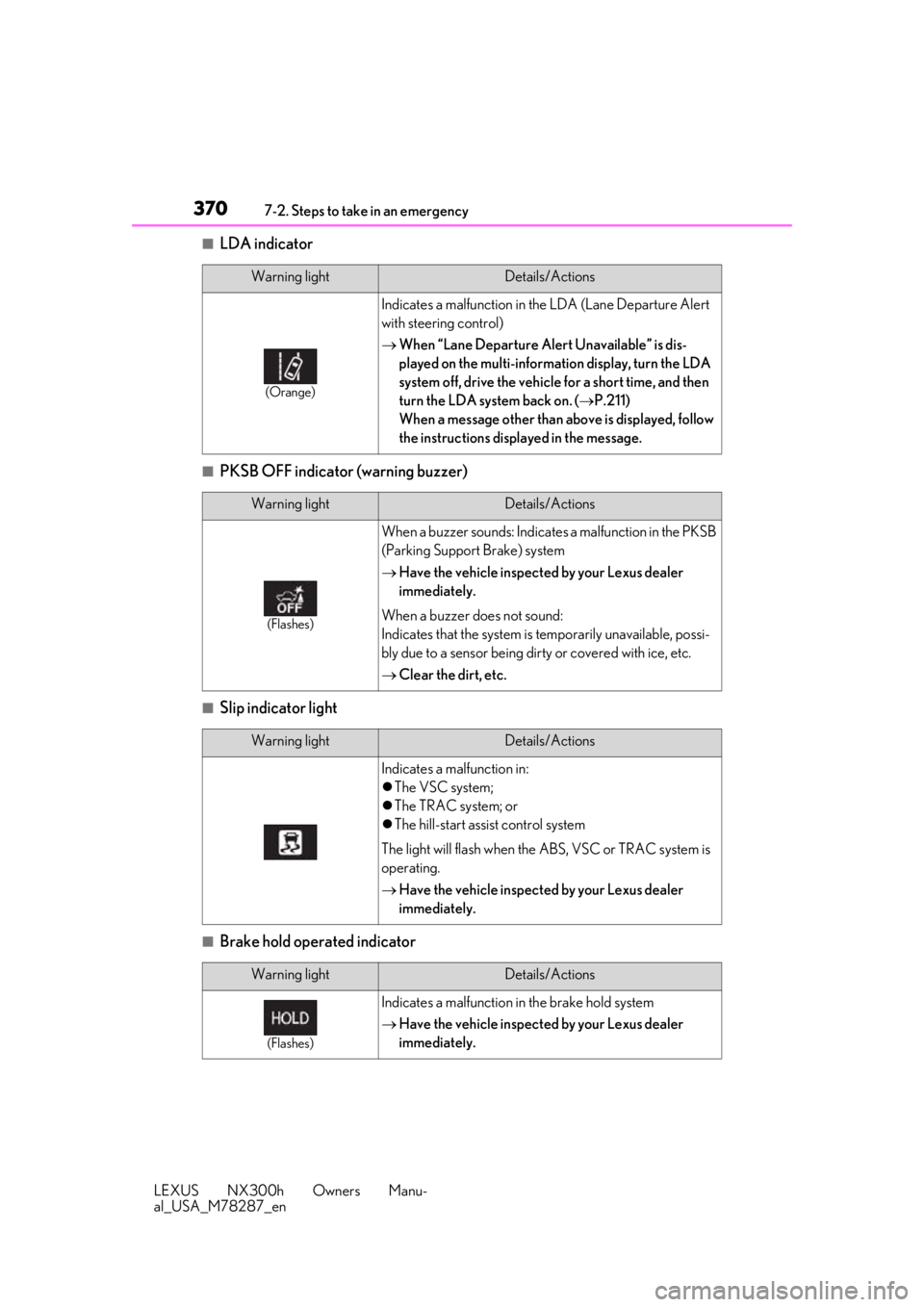
■LDA indicator
■PKSB OFF indicator (warning buzzer)
■Slip indicator light
■Brake hold operated indicator
Warning lightDetails/Actions
(Orange)
Indicates a malfunction in the LDA (Lane Departure Alert
with steering control)
When “Lane Departure Alert Unavailable” is dis-
played on the multi-information display, turn the LDA
system off, drive the vehicle for a short time, and then
turn the LDA system back on. ( P.211)
When a message other than above is displayed, follow
the instructions displayed in the message.
Warning lightDetails/Actions
(Flashes)
When a buzzer sounds: Indicates a malfunction in the PKSB
(Parking Support Brake) system
Have the vehicle inspected by your Lexus dealer
immediately.
When a buzzer does not sound:
Indicates that the system is temporarily unavailable, possi-
bly due to a sensor being dirty or covered with ice, etc.
Clear the dirt, etc.
Warning lightDetails/Actions
Indicates a malfunction in:
The VSC system;
The TRAC system; or
The hill-start assist control system
The light will flash when the ABS, VSC or TRAC system is
operating.
Have the vehicle inspected by your Lexus dealer
immediately.
Warning lightDetails/Actions
(Flashes)
Indicates a malfunction in the brake hold system
Have the vehicle inspected by your Lexus dealer
immediately.
Page 373 of 460
3737-2. Steps to take in an emergency
LEXUS NX300h Owners Manu-
al_USA_M78287_en
7
When trouble arises
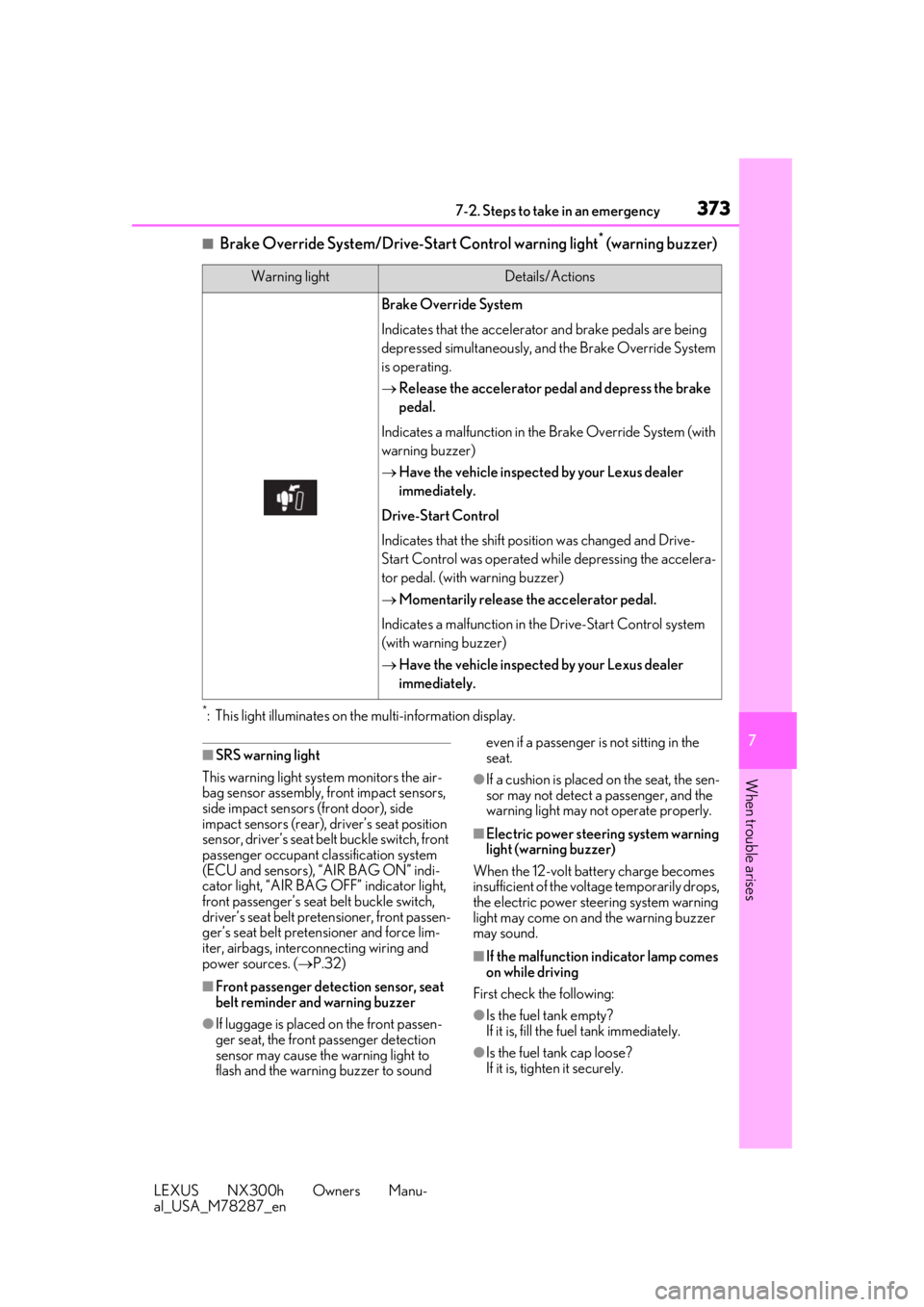
■Brake Override System/Drive-S tart Control warning light* (warning buzzer)
*: This light illuminates on the multi-information display.
■SRS warning light
This warning light system monitors the air-
bag sensor assembly, fr ont impact sensors,
side impact sensors (front door), side
impact sensors (rear), driver’s seat position
sensor, driver’s seat be lt buckle switch, front
passenger occupant cl assification system
(ECU and sensors), “AIR BAG ON” indi-
cator light, “AIR BAG OFF” indicator light,
front passenger’s seat belt buckle switch,
driver’s seat belt pretensioner, front passen-
ger’s seat belt pretensioner and force lim-
iter, airbags, interconnecting wiring and
power sources. ( P.32)
■Front passenger detection sensor, seat
belt reminder and warning buzzer
●If luggage is placed on the front passen-
ger seat, the front passenger detection
sensor may cause th e warning light to
flash and the warning buzzer to sound even if a passenger is not sitting in the
seat.
●If a cushion is placed on the seat, the sen-
sor may not detect a passenger, and the
warning light may not operate properly.
■Electric power steering system warning
light (warning buzzer)
When the 12-volt battery charge becomes
insufficient of the voltage temporarily drops,
the electric power steering system warning
light may come on and the warning buzzer
may sound.
■If the malfunction indicator lamp comes
on while driving
First check the following:
●Is the fuel tank empty?
If it is, fill the fuel tank immediately.
●Is the fuel tank cap loose?
If it is, tighten it securely.
Warning lightDetails/Actions
Brake Override System
Indicates that the accelerato r and brake pedals are being
depressed simultaneously, and the Brake Override System
is operating.
Release the accelerator pedal and depress the brake
pedal.
Indicates a malfunction in the Brake Override System (with
warning buzzer)
Have the vehicle inspected by your Lexus dealer
immediately.
Drive-Start Control
Indicates that the shift position was changed and Drive-
Start Control was operated wh ile depressing the accelera-
tor pedal. (with warning buzzer)
Momentarily release th e accelerator pedal.
Indicates a malfunction in th e Drive-Start Control system
(with warning buzzer)
Have the vehicle inspected by your Lexus dealer
immediately.