fuel LEXUS NX300H 2019 User Guide
[x] Cancel search | Manufacturer: LEXUS, Model Year: 2019, Model line: NX300H, Model: LEXUS NX300H 2019Pages: 460, PDF Size: 6.82 MB
Page 67 of 460
671-2. Hybrid system
LEXUS NX300h Owners Manu-
al_USA_M78287_en
1
For safety and security
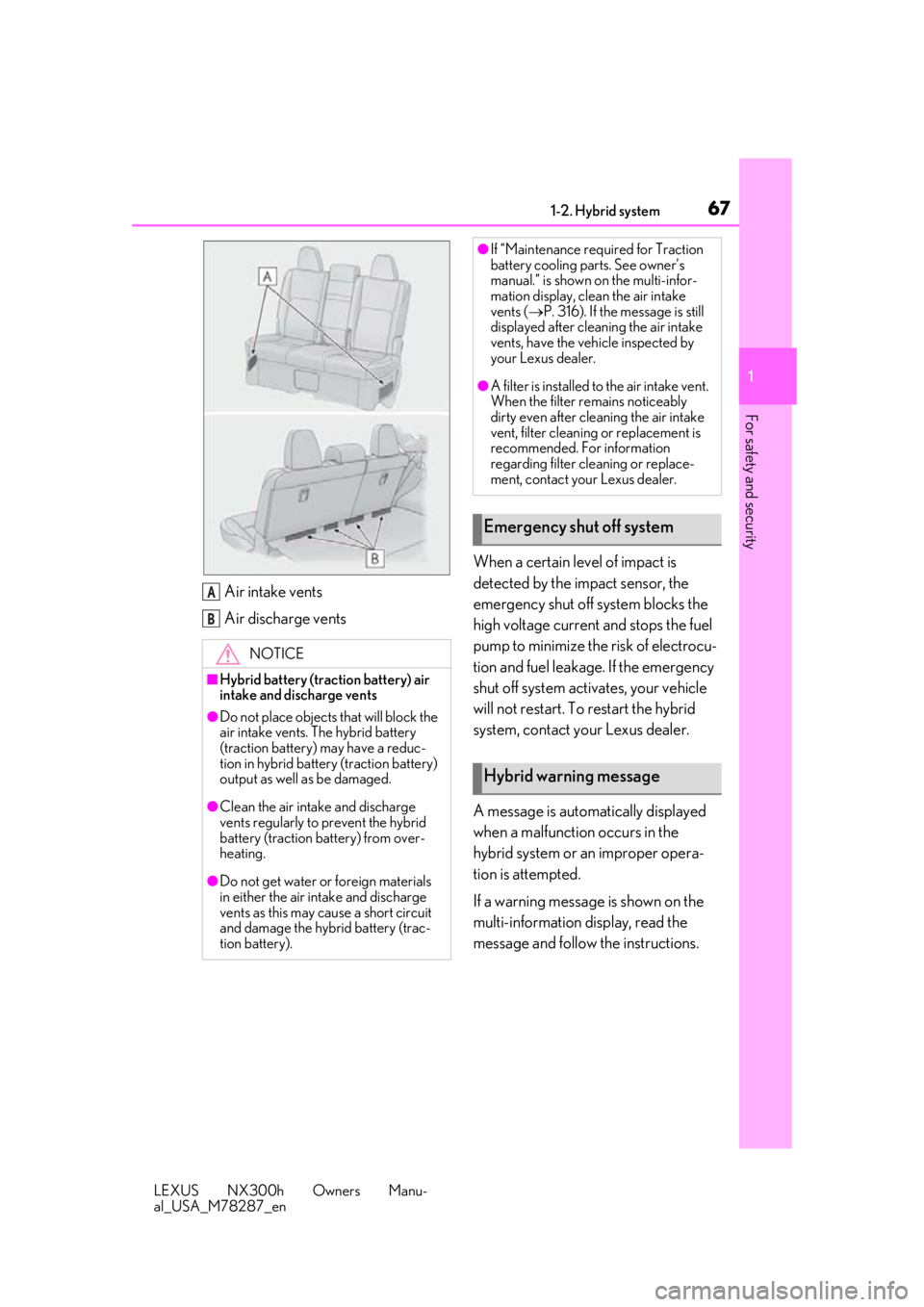
Air intake vents
Air discharge vents When a certain level of impact is
detected by the impact sensor, the
emergency shut off system blocks the
high voltage current and stops the fuel
pump to minimize the risk of electrocu-
tion and fuel leakage. If the emergency
shut off system activates, your vehicle
will not restart. To restart the hybrid
system, contact your Lexus dealer.
A message is automatically displayed
when a malfunction occurs in the
hybrid system or an improper opera-
tion is attempted.
If a warning message is shown on the
multi-information display, read the
message and follow the instructions.
NOTICE
■Hybrid battery (traction battery) air
intake and discharge vents
●Do not place objects
that will block the
air intake vents. The hybrid battery
(traction battery) may have a reduc-
tion in hybrid battery (traction battery)
output as well as be damaged.
●Clean the air intake and discharge
vents regularly to prevent the hybrid
battery (traction battery) from over-
heating.
●Do not get water or foreign materials
in either the air intake and discharge
vents as this may cause a short circuit
and damage the hybrid battery (trac-
tion battery).
A
B
●If “Maintenance required for Traction
battery cooling parts. See owner’s
manual.” is shown on the multi-infor-
mation display, clean the air intake
vents ( P. 316). If the message is still
displayed after cleaning the air intake
vents, have the vehicle inspected by
your Lexus dealer.
●A filter is installed to the air intake vent.
When the filter re mains noticeably
dirty even after cleaning the air intake
vent, filter cleaning or replacement is
recommended. For information
regarding filter cleaning or replace-
ment, contact your Lexus dealer.
Emergency shut off system
Hybrid warning message
Page 73 of 460
73
LEXUS NX300h Owners Manu-
al_USA_M78287_en
2
2
Vehicle status information and indicators
Vehicle status informationand indicators
2-1. Instrument cluster
Warning lights and indicators . 74
Gauges and meters .................... 79
Multi-information display.......... 84
Head-up display ........................... 89
Energy monitor/fuel consumption screen ............................................ 93
Page 75 of 460
752-1. Instrument cluster
LEXUS NX300h Owners Manu-
al_USA_M78287_en
2
Vehicle status information and indicators
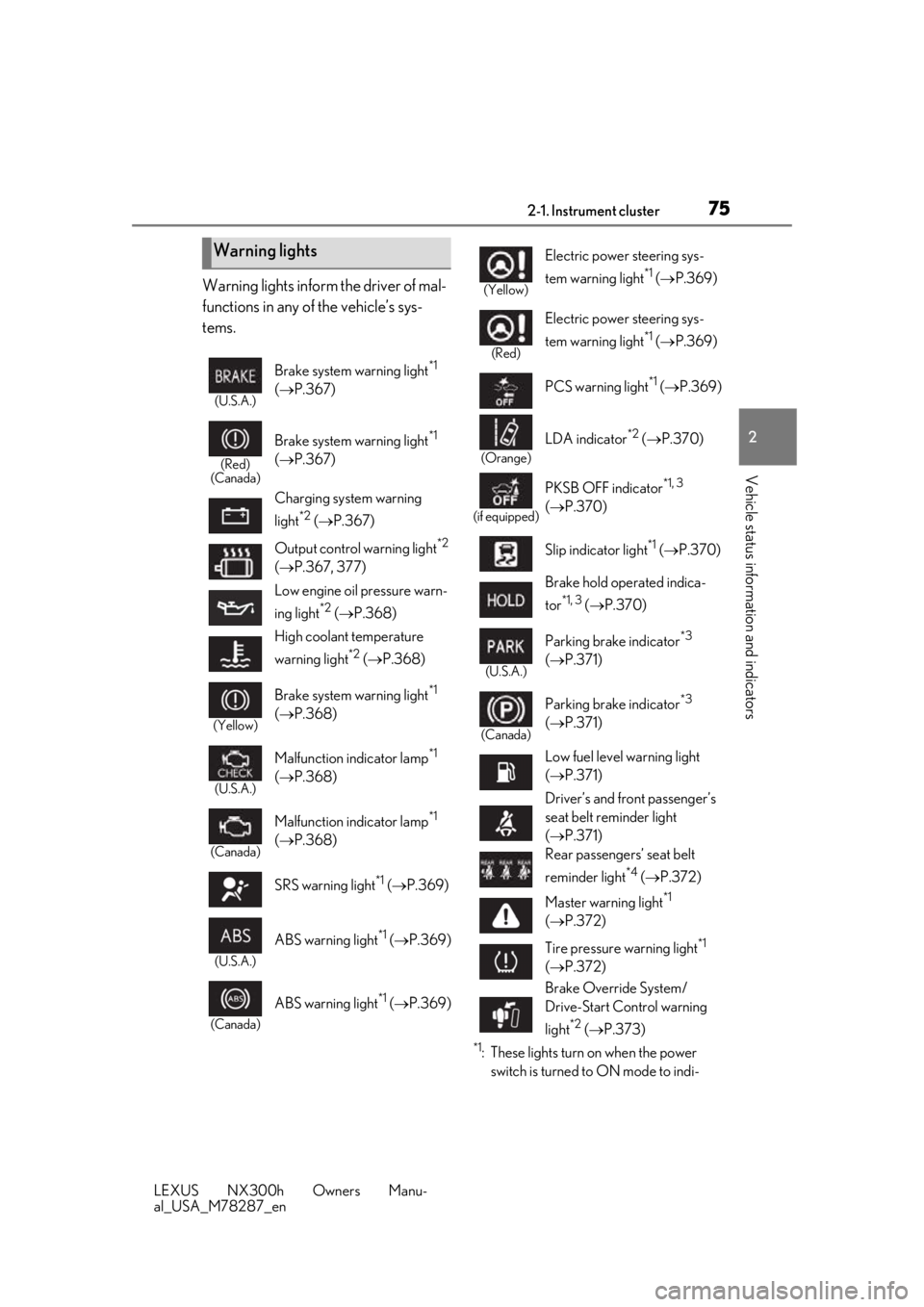
Warning lights inform the driver of mal-
functions in any of the vehicle’s sys-
tems.
*1: These lights turn on when the power switch is turned to ON mode to indi-
Warning lights
(U.S.A.)
Brake system warning light*1
( P.367)
(Red)
(Canada)
Brake system warning light*1
( P.367)
Charging system warning
light
*2 ( P.367)
Output control warning light
*2
( P.367, 377)
Low engine oil pressure warn-
ing light
*2 ( P.368)
High coolant temperature
warning light
*2 ( P.368)
(Yellow)
Brake system warning light*1
( P.368)
(U.S.A.)
Malfunction indicator lamp*1
( P.368)
(Canada)
Malfunction indicator lamp*1
( P.368)
SRS warning light
*1 ( P.369)
(U.S.A.)
ABS warning light*1 ( P.369)
(Canada)
ABS warning light*1 ( P.369)
(Yellow)
Electric power steering sys-
tem warning light
*1 ( P.369)
(Red)
Electric power steering sys-
tem warning light
*1 ( P.369)
PCS warning light
*1 ( P.369)
(Orange)
LDA indicator*2 ( P.370)
(if equipped)
PKSB OFF indicator*1, 3
( P.370)
Slip indicator light
*1 ( P.370)
Brake hold operated indica-
tor
*1, 3 ( P.370)
(U.S.A.)
Parking brake indicator*3
( P.371)
(Canada)
Parking brake indicator*3
( P.371)
Low fuel level warning light
( P.371)
Driver’s and front passenger’s
seat belt reminder light
( P.371)
Rear passengers’ seat belt
reminder light
*4 ( P.372)
Master warning light
*1
( P.372)
Tire pressure warning light
*1
( P.372)
Brake Override System/
Drive-Start Control warning
light
*2 ( P.373)
Page 80 of 460
802-1. Instrument cluster
LEXUS NX300h Owners Manu-
al_USA_M78287_enDisplays warning messages in
case of a malfunction (P.376)
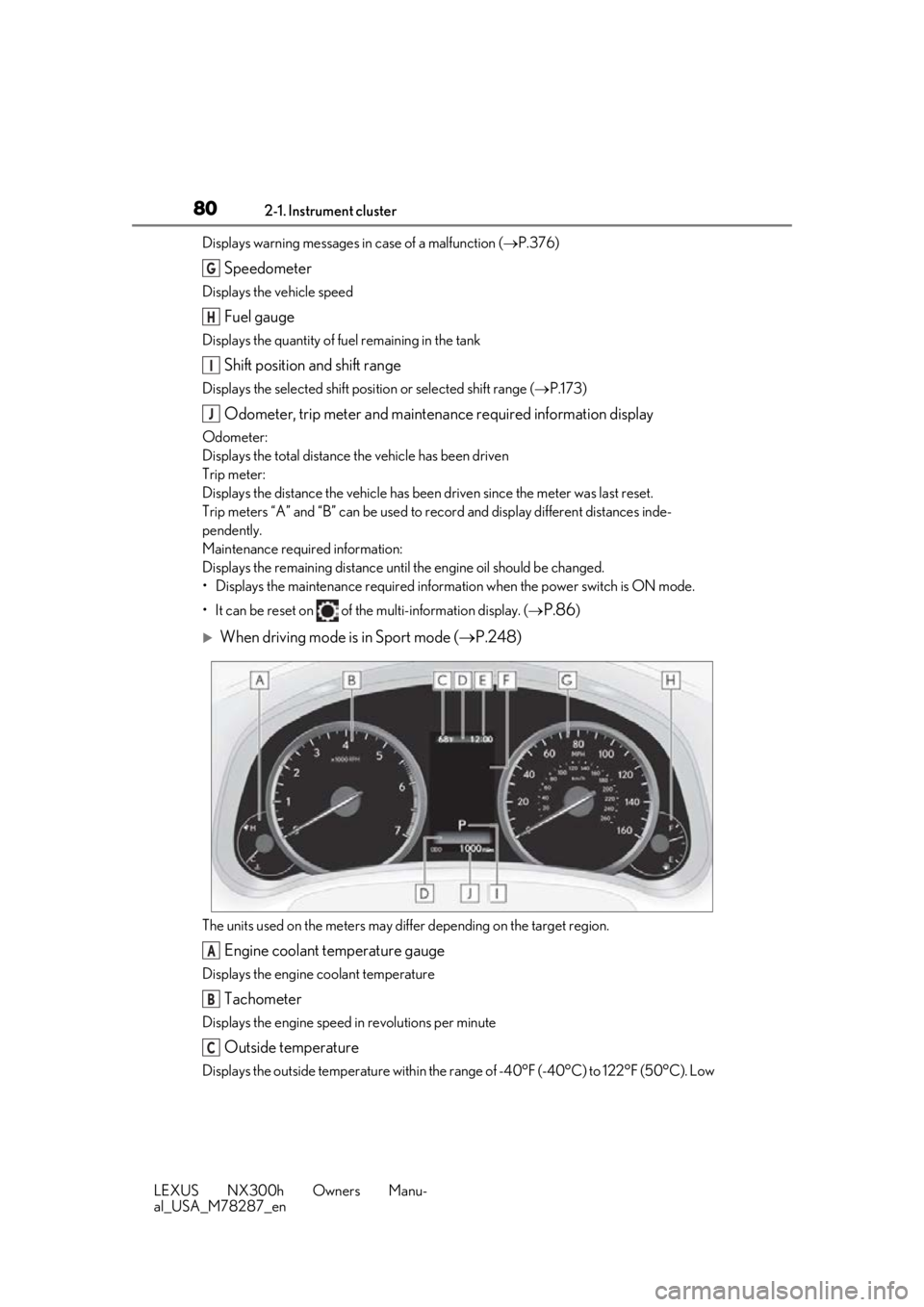
Speedometer
Displays the vehicle speed
Fuel gauge
Displays the quantity of fuel remaining in the tank
Shift position and shift range
Displays the selected shift posi tion or selected shift range (P.173)
Odometer, trip meter and maintena nce required information display
Odometer:
Displays the total distance the vehicle has been driven
Trip meter:
Displays the distance the vehicle has been driven since the meter was last reset.
Trip meters “A” and “B” can be used to record and display different distances inde-
pendently.
Maintenance required information:
Displays the remaining distance until the engine oil should be changed.
• Displays the maintenance requ ired information when the power switch is ON mode.
• It can be reset on of the multi-information display. (
P.86)
When driving mode is in Sport mode (P.248)
The units used on the meters may differ depending on the target region.
Engine coolant temperature gauge
Displays the engine coolant temperature
Tachometer
Displays the engine speed in revolutions per minute
Outside temperature
Displays the outside temperature within the range of -40°F (-40°C) to 122°F (50°C). Low
G
H
I
J
A
B
C
Page 81 of 460

812-1. Instrument cluster
LEXUS NX300h Owners Manu-
al_USA_M78287_en
2
Vehicle status information and indicators
outside temperature indicator comes on when the ambient temperature is 37°F (3°C) or
lower.
Background color of driving mode
Background color changes acco rding to the driving mode. (P.248)
•Sport mode: Red
•Eco mode: Blue
When in Normal mode, the background color is black.
Clock
Time displayed is linked to the analog clock on the instrument panel. (P.286)
Multi-information display
Presents the driver with a variety of vehicle data ( P.84)
Displays warning messages in case of a malfunction (P.376)
Speedometer
Displays the vehicle speed
Fuel gauge
Displays the quantity of fuel remaining in the tank
Shift position and shift range
Displays the selected shift posi tion or selected shift range (P.173)
Odometer, trip meter and maintena nce required information display
Odometer:
Displays the total distance the vehicle has been driven
Trip meter:
Displays the distance the vehicle has been driven since the meter was last reset.
Trip meters “A” and “B” can be used to record and display different distances inde-
pendently.
Maintenance required information:
Displays the remaining distance until the engine oil should be changed.
• Displays the maintenance requ ired information when the power switch is ON mode.
•It can be reset on
of the multi-information display. ( P.86)
D
E
F
G
H
I
J
Page 82 of 460
822-1. Instrument cluster
LEXUS NX300h Owners Manu-
al_USA_M78287_en
■Operating condition
The power switch is in ON mode.
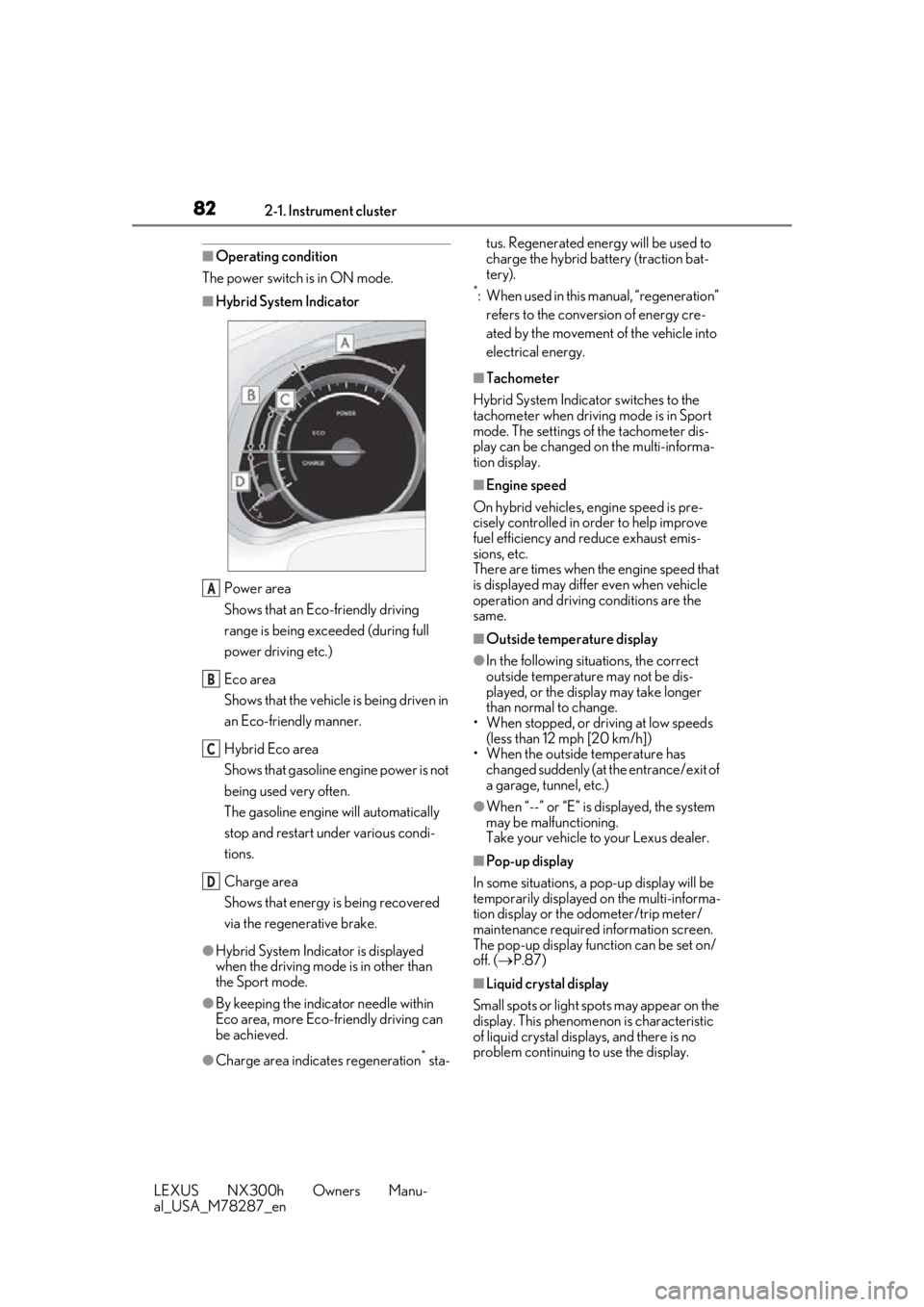
■Hybrid System Indicator
Power area
Shows that an Eco-friendly driving
range is being exceeded (during full
power driving etc.)
Eco area
Shows that the vehicle is being driven in
an Eco-friendly manner.
Hybrid Eco area
Shows that gasoline engine power is not
being used very often.
The gasoline engine will automatically
stop and restart under various condi-
tions.
Charge area
Shows that energy is being recovered
via the regenerative brake.
●Hybrid System Indicator is displayed
when the driving mode is in other than
the Sport mode.
●By keeping the indicator needle within
Eco area, more Eco-friendly driving can
be achieved.
●Charge area indicates regeneration* sta- tus. Regenerated energy will be used to
charge the hybrid battery (traction bat-
tery).
*: When used in this manual, “regeneration”
refers to the conversion of energy cre-
ated by the movement of the vehicle into
electrical energy.
■Tachometer
Hybrid System Indicator switches to the
tachometer when drivin g mode is in Sport
mode. The settings of the tachometer dis-
play can be changed on the multi-informa-
tion display.
■Engine speed
On hybrid vehicles, engine speed is pre-
cisely controlled in order to help improve
fuel efficiency and reduce exhaust emis-
sions, etc.
There are times when the engine speed that
is displayed may differ even when vehicle
operation and driving conditions are the
same.
■Outside temperature display
●In the following situations, the correct
outside temperature may not be dis-
played, or the display may take longer
than normal to change.
• When stopped, or driving at low speeds (less than 12 mph [20 km/h])
• When the outside temperature has
changed suddenly (at the entrance/exit of
a garage, tunnel, etc.)
●When “--” or “E” is displayed, the system
may be malfunctioning.
Take your vehicle to your Lexus dealer.
■Pop-up display
In some situations, a pop-up display will be
temporarily displayed on the multi-informa-
tion display or the odometer/trip meter/
maintenance required information screen.
The pop-up display function can be set on/
off. ( P.87)
■Liquid crystal display
Small spots or light sp ots may appear on the
display. This phenomen on is characteristic
of liquid crystal disp lays, and there is no
problem continuing to use the display.
A
B
C
D
Page 85 of 460
852-1. Instrument cluster
LEXUS NX300h Owners Manu-
al_USA_M78287_en
2
Vehicle status information and indicators
■Content displayed as drive infor-
mation
Select to display various drive data.
Items displayed can be switched by
pressing or of the meter con-
trol switches to select and pressing or .
Current fuel consumption
*1
Displays the current rate of fuel consump-
tion
Average fuel consumption (after
reset
*2/after start/after refuel)*1
Displays the average fuel consumption
since the function was reset, the hybrid sys-
tem was started, and the vehicle was refu-
eled, respectively
Use the displayed average fuel consump-
tion as a reference.
Average vehicle speed (after
reset
*2/after start)*1
Displays the average vehicle speed since
the function was reset and the hybrid sys-
tem was started, respectively
Elapsed time (after reset*2/after
start)
*1
Displays the elapsed time since the func-
tion was reset and the hybrid system was
started, respectively
Distance (driving range/after start)*1
Displays the estimated maximum distance
that can be driven with the quantity of fuel
remaining and the distance driven after the
hybrid system was st arted respectively.
• This distance is computed based on your average fuel consumption. As a result,
the actual distance that can be driven
may differ from that displayed.
• When only a small amount of fuel is added to the tank, the display may not be
updated.
When refueling, turn the power switch
off. If the vehicle is refueled without turn-
ing the power switch off, the display may
not be updated.
*1: Displayed when the it em is set in “Drive
Info 1”, “Drive Info 2” and “Drive Info 3”.
*2: The function can be reset by pressing
the of the meter control switches
for longer than 1 second when the item
to reset is displayed.
If there is more than one item that can
be reset, the item selection screen will
appear.
■Energy monitor
P.93
■Speedometer
Displays the vehicle speed.
■Tire inflation pressure
Displays inflation pressure of each tire.
The inflation pressure of the spare tire will
not be displayed.
■Vehicle sway warning
Detects the sway of the vehicle within a
lane, which is often associated with a
decrease in the driver’s attention level,
and displays the decrease in attention
using a bar display.
The shorter the bar length, the more
the driver may need to rest.
This display is a part of the LDA (Lane
Departure Alert with steering control)
system. The display is enabled when
Drive information
Page 87 of 460

872-1. Instrument cluster
LEXUS NX300h Owners Manu-
al_USA_M78287_en
2
Vehicle status information and indicators
warning.
Sway sensitivity
Select to set the vehicle sway warning sen-
sitivity.
■ PCS (Pre-Collision System)
( P.202)
Select to set up the following items.
PCS on/off
Select to enable/dis able the pre-collision
system.
PCS sensitivity
Select to change the warning timing.
■PKSA (Parking Support Alert) (if
equipped) ( P.226)
Select to set up the following items.
Intuitive parking assist sensor
Select to enable/disab le the intuitive park-
ing assist sensor.
Volume
Select to set the volume of the buzzer
which sounds when the parking support
alert is operated.
■ PKSB (Parking Support
Brake System) (if equipped)
( P.232)
PKSB on/off
Select to enable/dis able the parking sup-
port brake function (for static objects).
■Clock
Select to switch between 12-hour dis-
play and 24-hour display.
■Vehicle Settings
PBD (Power Back Door)
( P.108)
*1
Select to set up the following items.
•System settings
Select to enable/disable the power back
door system.
•Volume
Select to set the volume of the buzzer
which sounds when the power back door
system.
• Kick Sensor
*2
Select to enable/dis able the kick sensor.
*1: Vehicles with power back door
*2:Vehicles with hands free power back
door
TPMS (Tire Pressure Warning Sys-
tem) ( P.339)
Select to initialize the tire pressure warning
system.
Scheduled Maintenance ( P.319)
Select to initialize the scheduled mainte-
nance.
Oil maintenance ( P.330)
Select to reset the engine oil maintenance
information (message indicating mainte-
nance is required and distance until the
next oil change) after engine oil mainte-
nance is performed.
■Meter settings
Language
Select to change the language on the dis-
play.
Units
Select to change the unit of measure for
fuel consumption.
EV Indicator ( P.62)
Select to set the EV indicator on/off.
Switch settings ( P.84)
Page 93 of 460
932-1. Instrument cluster
LEXUS NX300h Owners Manu-
al_USA_M78287_en
2
Vehicle status information and indicators
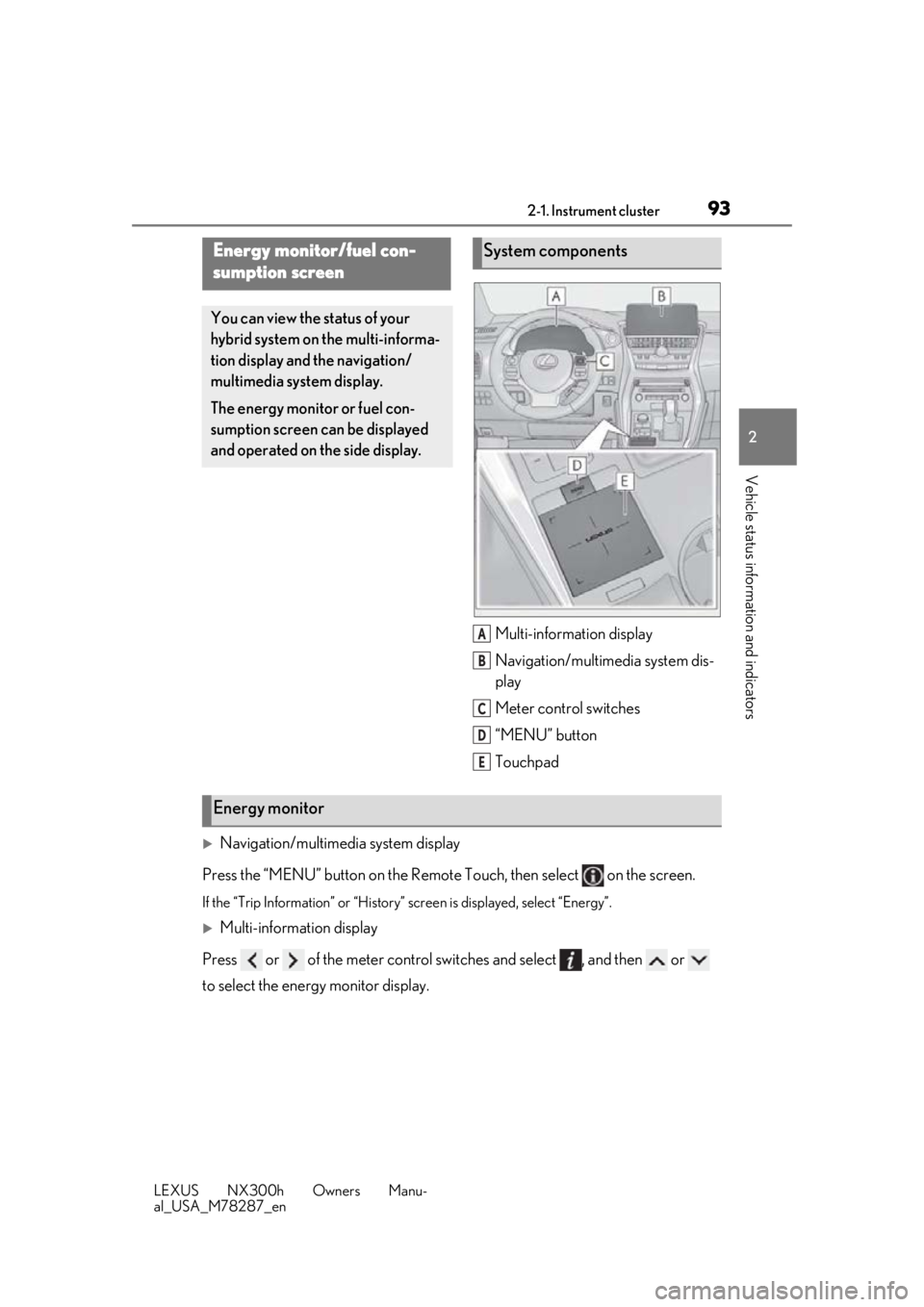
Multi-information display
Navigation/multimedia system dis-
play
Meter control switches
“MENU” button
Touchpad
Navigation/multimedia system display
Press the “MENU” button on the Remote Touch, then select on the screen.
If the “Trip Information” or “History” screen is displayed, select “Energy”.
Multi-information display
Press or of the meter control swit ches and select , and then or
to select the energy monitor display.
Energy monitor/fuel con-
sumption screen
You can view the status of your
hybrid system on the multi-informa-
tion display and the navigation/
multimedia system display.
The energy monitor or fuel con-
sumption screen can be displayed
and operated on the side display.
System components
A
B
C
D
E
Energy monitor
Page 95 of 460
952-1. Instrument cluster
LEXUS NX300h Owners Manu-
al_USA_M78287_en
2
Vehicle status information and indicators
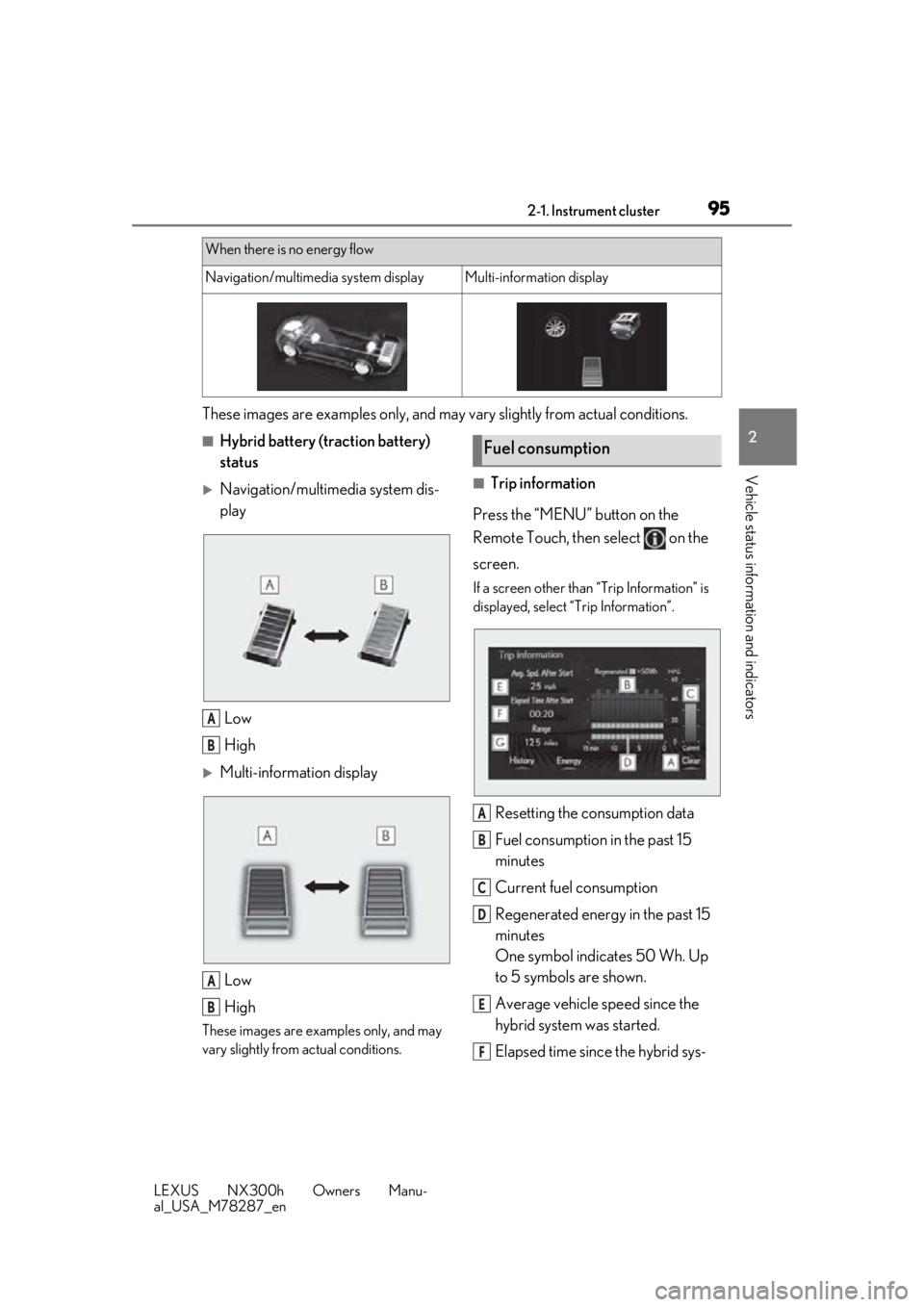
These images are examples only, and may vary slightly from actual conditions.
■Hybrid battery (traction battery)
status
Navigation/multimedia system dis-
play
Low
High
Multi-information displayLow
High
These images are examples only, and may
vary slightly from actual conditions.
■Trip information
Press the “MENU” button on the
Remote Touch, then select on the
screen.
If a screen other than “Trip Information” is
displayed, select “Trip Information”.
Resetting the consumption data
Fuel consumption in the past 15
minutes
Current fuel consumption
Regenerated energy in the past 15
minutes
One symbol indicates 50 Wh. Up
to 5 symbols are shown.
Average vehicle speed since the
hybrid system was started.
Elapsed time since the hybrid sys-
When there is no energy flow
Navigation/multimedia system displayMulti-information display
A
B
A
B
Fuel consumption
A
B
C
D
E
F