ESP LEXUS NX300H 2019 Owner's Guide
[x] Cancel search | Manufacturer: LEXUS, Model Year: 2019, Model line: NX300H, Model: LEXUS NX300H 2019Pages: 460, PDF Size: 6.82 MB
Page 219 of 460
2194-5. Using the driving support systems
LEXUS NX300h Owners Manu-
al_USA_M78287_en
4
Driving
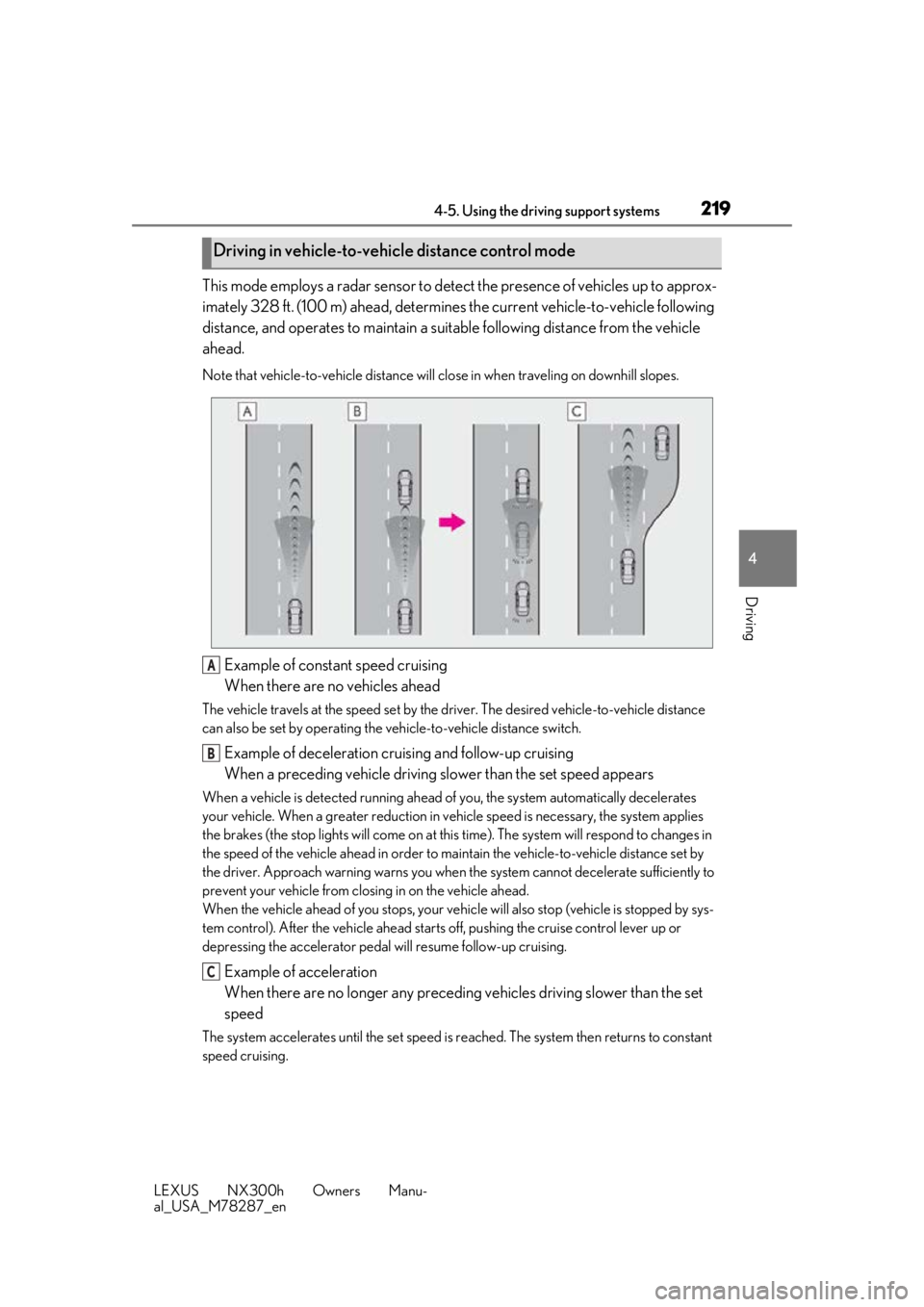
This mode employs a radar sensor to detect the presence of vehicles up to approx-
imately 328 ft. (100 m) ahead, determines the current vehicle-to-vehicle following
distance, and operates to maintain a suit able following distance from the vehicle
ahead.
Note that vehicle-to-vehicle distance will close in when traveling on downhill slopes.
Example of constant speed cruising
When there are no vehicles ahead
The vehicle travels at the speed set by the driver. The desired vehicle-to-vehicle distance
can also be set by operating the vehicle-to-vehicle distance switch.
Example of deceleration cruising and follow-up cruising
When a preceding vehicle driving slower than the set speed appears
When a vehicle is detected running ahead of you, the system automatically decelerates
your vehicle. When a greater reduction in vehicle speed is necessary, the system applies
the brakes (the stop lights will come on at this time). The sy stem will respond to changes in
the speed of the vehicle ahead in order to maintain the vehicle-to-vehicle distance set by
the driver. Approach warning warns you when th e system cannot decelerate sufficiently to
prevent your vehicle from closing in on the vehicle ahead.
When the vehicle ahead of you stops, your vehi cle will also stop (vehicle is stopped by sys-
tem control). After the vehicle ahead starts off, pushing the cruise control lever up or
depressing the accelerator pedal will resume follow-up cruising.
Example of acceleration
When there are no longer any preceding vehicles driving slower than the set
speed
The system accelerates until the set speed is re ached. The system then returns to constant
speed cruising.
Driving in vehicle-to-vehicle distance control mode
A
B
C
Page 229 of 460
2294-5. Using the driving support systems
LEXUS NX300h Owners Manu-
al_USA_M78287_en
4
Driving
■Sensor detectio n information
●The sensor’s detection areas are limited
to the areas around the vehicle’s bumper.
●Certain vehicle conditions and the sur-
rounding environment may affect the
ability of a sensor to correctly detect an
obstacle. Particular instances where this
may occur are listed below.
• There is dirt, snow or ice on the sensor. (Wiping the sensors will resolve this
problem.)
• The sensor is frozen. (Thawing the area will resolve this problem.)
In especially cold weather, if a sensor is
frozen the screen may show an abnormal
display, or obstacles may not be
detected.
• The sensor is covered in any way.
• The vehicle is leaning considerably to one side.
• On an extremely bumpy road, on an incline, on gravel, or on grass.
• The vicinity of the vehicle is noisy due to vehicle horns, motorcycle engines, air
brakes of large vehicles, or other loud
noises producing ultrasonic waves.
• There is another vehicle equipped with parking assist sensors in the vicinity.
• The sensor is coated with a sheet of spray or heavy rain.
• The vehicle is equipped with a fender
pole or wireless antenna.
• Towing eyelets are installed.
• The bumper or sensor receives a strong impact.
• A backlit license plate, license plate holder, etc., are installed.
• The vehicle is approaching a tall or curved curb.
• In harsh sunlight or intense cold weather.
• The area directly under the bumpers is
not detected.
• If obstacles draw too close to the sensor.
• A non-genuine Lexus suspension (low- ered suspension etc.) is installed.
• People may not be detected if they are wearing certain types of clothing.
In addition to the examples above, there are
instances in which, because of their shape,
signs and other objects may be judged by a
sensor to be closer than they are.
●The shape of the obstacle may prevent a sensor from detecting it. Pay particular
attention to the following obstacles:
• Wires, fences, ropes, etc.
• Cotton, snow and other materials that
absorb sound waves
• Sharply-angled objects
• Low obstacles
• Tall obstacles with upper sections pro- jecting outwards in the direction of your
vehicle
●The following situations may occur
during use.
• Depending on the shape of the obstacle and other factors, the detection distance
may shorten, or detection may be impos-
sible.
• Obstacles may not be detected if they
are too close to the sensor.
• There will be a short delay between obstacle detection and display. Even at
slow speeds, there is a possibility that the
obstacle will come within the sensor’s
detection areas befo re the display is
shown and the buzzer sounds.
• Thin posts or object s lower than the sen-
sor may not be detected when
approached, even if they have been
detected once.
• It might be difficult to hear beeps due to
the volume of audio system or air flow
noise of the air conditioning system.
■Customization
Some functions can be customized.
(Customizable features: P.421)
■Certification
For vehicles sold in the U.S.A.
This device complies with Part 15 of the
FCC Rules. Operation is subject to the fol-
lowing two conditions; (1) this device may
not cause harmful interference, and (2) this
device must accept any interference
received, including in terference that may
cause undesired operation.
For vehicles sold in Canada
This ISM device complies with Canadian
ICES-001.
Cet appareil ISM est conforme a la norme
NMB-001 du Canada.
Page 230 of 460
2304-5. Using the driving support systems
LEXUS NX300h Owners Manu-
al_USA_M78287_en
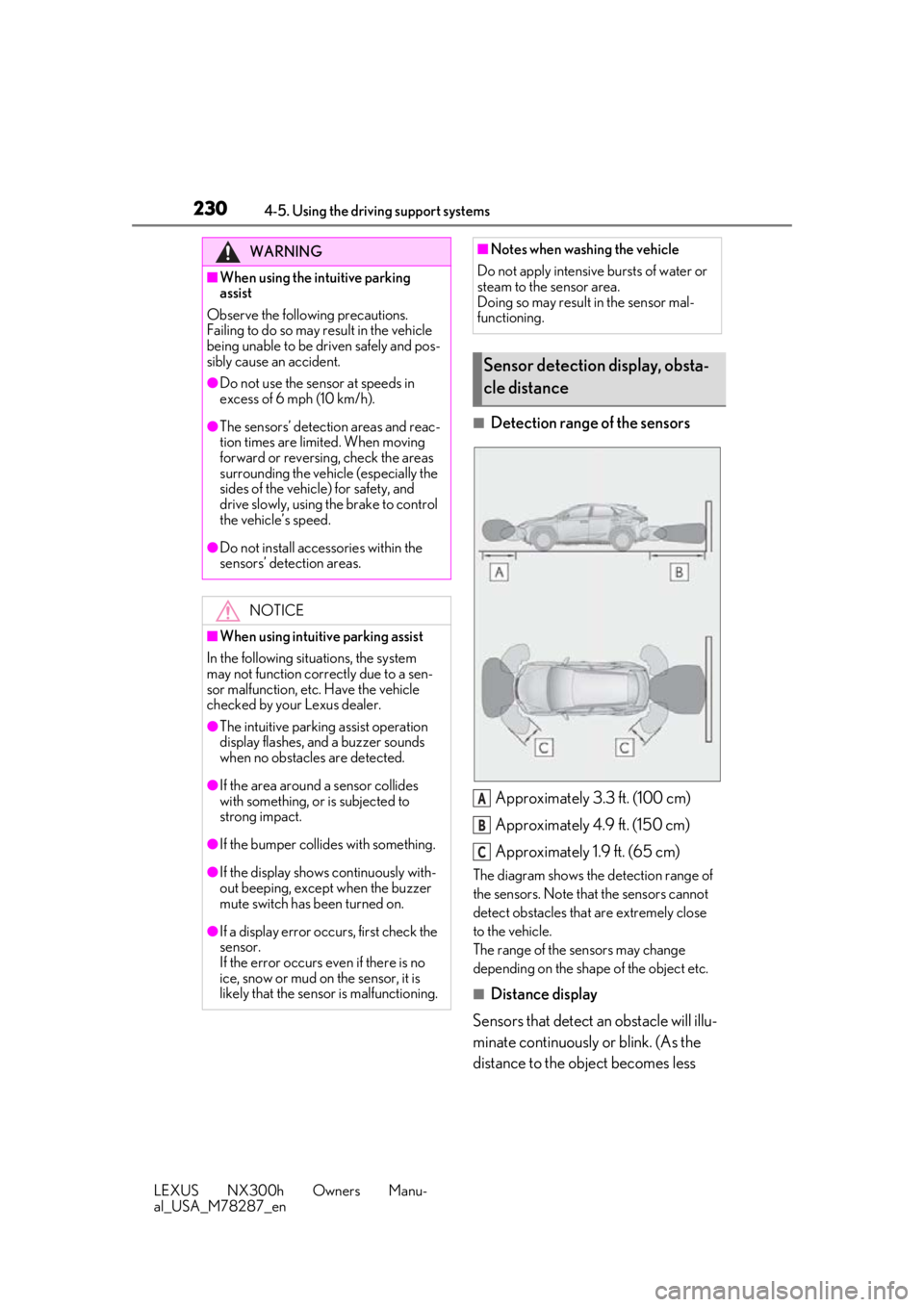
■Detection range of the sensorsApproximately 3.3 ft. (100 cm)
Approximately 4.9 ft. (150 cm)
Approximately 1.9 ft. (65 cm)
The diagram shows the detection range of
the sensors. Note that the sensors cannot
detect obstacles that are extremely close
to the vehicle.
The range of the sensors may change
depending on the shape of the object etc.
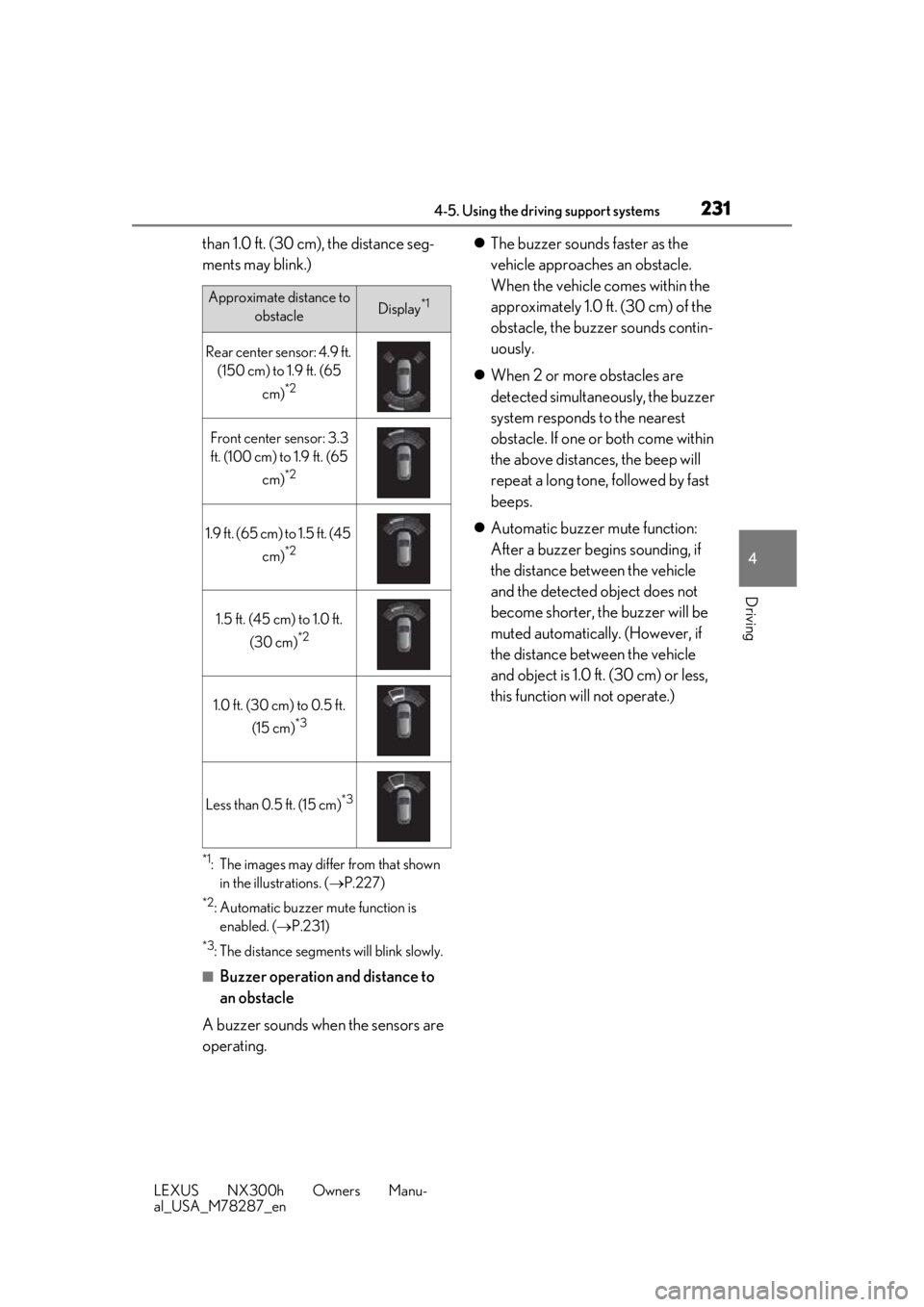
■Distance display
Sensors that detect an obstacle will illu-
minate continuously or blink. (As the
distance to the object becomes less
WARNING
■When using the intuitive parking
assist
Observe the following precautions.
Failing to do so may result in the vehicle
being unable to be driven safely and pos-
sibly cause an accident.
●Do not use the sensor at speeds in
excess of 6 mph (10 km/h).
●The sensors’ detection areas and reac-
tion times are limited. When moving
forward or reversing, check the areas
surrounding the vehicle (especially the
sides of the vehicle) for safety, and
drive slowly, using the brake to control
the vehicle’s speed.
●Do not install accessories within the
sensors’ detection areas.
NOTICE
■When using intuitive parking assist
In the following situations, the system
may not function correctly due to a sen-
sor malfunction, etc. Have the vehicle
checked by your Lexus dealer.
●The intuitive parking assist operation
display flashes, and a buzzer sounds
when no obstacles are detected.
●If the area around a sensor collides
with something, or is subjected to
strong impact.
●If the bumper collides with something.
●If the display shows continuously with-
out beeping, except when the buzzer
mute switch has been turned on.
●If a display error occurs, first check the
sensor.
If the error occurs even if there is no
ice, snow or mud on the sensor, it is
likely that the sensor is malfunctioning.
■Notes when washing the vehicle
Do not apply intensive bursts of water or
steam to the sensor area.
Doing so may result in the sensor mal-
functioning.
Sensor detection display, obsta-
cle distance
A
B
C
Page 231 of 460
2314-5. Using the driving support systems
LEXUS NX300h Owners Manu-
al_USA_M78287_en
4
Driving
than 1.0 ft. (30 cm), the distance seg-
ments may blink.)
*1: The images may differ from that shown in the illustrations. ( P.227)
*2: Automatic buzzer mute function is
enabled. ( P.231)
*3: The distance segments will blink slowly.
■Buzzer operation and distance to
an obstacle
A buzzer sounds when the sensors are
operating.
The buzzer sounds faster as the
vehicle approaches an obstacle.
When the vehicle comes within the
approximately 1.0 ft. (30 cm) of the
obstacle, the buzze r sounds contin-
uously.
When 2 or more obstacles are
detected simultaneously, the buzzer
system responds to the nearest
obstacle. If one or both come within
the above distances, the beep will
repeat a long tone, followed by fast
beeps.
Automatic buzzer mute function:
After a buzzer begins sounding, if
the distance between the vehicle
and the detected object does not
become shorter, the buzzer will be
muted automatically. (However, if
the distance between the vehicle
and object is 1.0 ft. (30 cm) or less,
this function will not operate.)
Approximate distance to
obstacleDisplay*1
Rear center sensor: 4.9 ft. (150 cm) to 1.9 ft. (65
cm)
*2
Front center sensor: 3.3 ft. (100 cm) to 1.9 ft. (65
cm)
*2
1.9 ft. (65 cm) to 1.5 ft. (45 cm)
*2
1.5 ft. (45 cm) to 1.0 ft.
(30 cm)
*2
1.0 ft. (30 cm) to 0.5 ft. (15 cm)
*3
Less than 0.5 ft. (15 cm)*3
Page 233 of 460
2334-5. Using the driving support systems
LEXUS NX300h Owners Manu-
al_USA_M78287_en
4
Driving
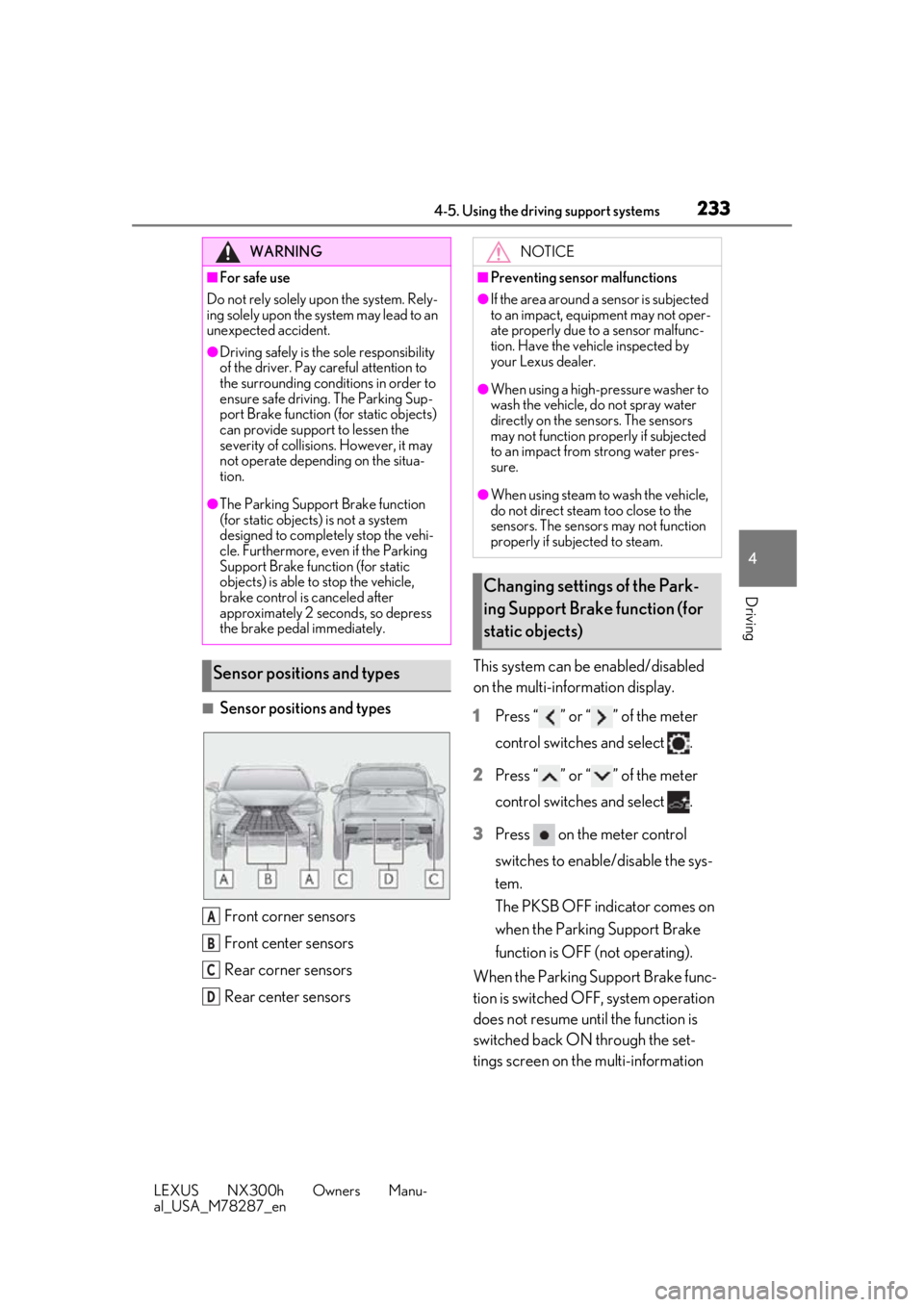
■Sensor positions and types Front corner sensors
Front center sensors
Rear corner sensors
Rear center sensors This system can be enabled/disabled
on the multi-information display.
1
Press “ ” or “ ” of the meter
control switches and select .
2 Press “ ” or “ ” of the meter
control switches and select .
3 Press on the meter control
switches to enable/disable the sys-
tem.
The PKSB OFF indicator comes on
when the Parking Support Brake
function is OFF (not operating).
When the Parking Support Brake func-
tion is switched OFF, system operation
does not resume until the function is
switched back ON through the set-
tings screen on the multi-information
WARNING
■For safe use
Do not rely solely upon the system. Rely-
ing solely upon the sy stem may lead to an
unexpected accident.
●Driving safely is the sole responsibility
of the driver. Pay careful attention to
the surrounding conditions in order to
ensure safe driving. The Parking Sup-
port Brake function (f or static objects)
can provide support to lessen the
severity of collisions. However, it may
not operate depending on the situa-
tion.
●The Parking Support Brake function
(for static objects) is not a system
designed to completely stop the vehi-
cle. Furthermore, even if the Parking
Support Brake function (for static
objects) is able to stop the vehicle,
brake control is canceled after
approximately 2 seco nds, so depress
the brake pedal immediately.
Sensor positions and types
A
B
C
D
NOTICE
■Preventing sensor malfunctions
●If the area around a sensor is subjected
to an impact, equipment may not oper-
ate properly due to a sensor malfunc-
tion. Have the vehicle inspected by
your Lexus dealer.
●When using a high-pressure washer to
wash the vehicle, do not spray water
directly on the sensors. The sensors
may not function properly if subjected
to an impact from strong water pres-
sure.
●When using steam to wash the vehicle,
do not direct steam too close to the
sensors. The sensor s may not function
properly if subjected to steam.
Changing settings of the Park-
ing Support Brake function (for
static objects)
Page 237 of 460
2374-5. Using the driving support systems
LEXUS NX300h Owners Manu-
al_USA_M78287_en
4
Driving
• The vehicle is driven on a gravel road or in an area with tall grass
• The vehicle is driven toward a banner or flag, a low-hanging branch or a boom
barrier (such as those used at railroad
crossings, toll gates and parking lots).
• There is an obstacle on the shoulder of the road (when the vehicle is driven in a
narrow tunnel, on a narrow bridge or on a
narrow road)
• The vehicle is being parallel parked
• There is a rut or hole in the surface of the
road
• When the vehicle is driven on a metal
cover (grating), such as those used for
drainage ditches
• The vehicle is driven on a steep slope
• The sensor is covered by water on a
flooded road
●Influence from the weather
• Ice, snow, dirt, etc., has adhered to the sensor (if removed, the system returns to
normal)
• Heavy rain or water strikes the vehicle
• In severe weather such as fog, snow or a sand storm
●Influence from other sonic waves
• An ultrasonic wave source is nearby, such as the horn or clearance sonar of another
vehicle, a vehicle detector, a motorcycle
engine or the air brake of a large vehicle
• Electronic components (such as a backlit license plate (especially fluorescent
types), fog lights, a fender pole or a wire-
less antenna) are inst alled near the sen-
sors
●Changes in the vehicle
• The vehicle is tilted a large amount
• The height of the vehicle has drastically changed due to the carried load (the
nose tilts up or down)
• The direction of the sensor has deviated
due to a collision or other impact
■Situations in which the system may not
operate normally
In the following situations, the system may
not operate normally.
●Environmental influence
• There is an obstacle that cannot be detected between the vehicle and
another obstacle that can be detected
• An obstacle such as another vehicle, a motorcycle, a bicycle or a pedestrian cuts
in front of the vehicle or jumps out from
the side.
●Influence from the weather
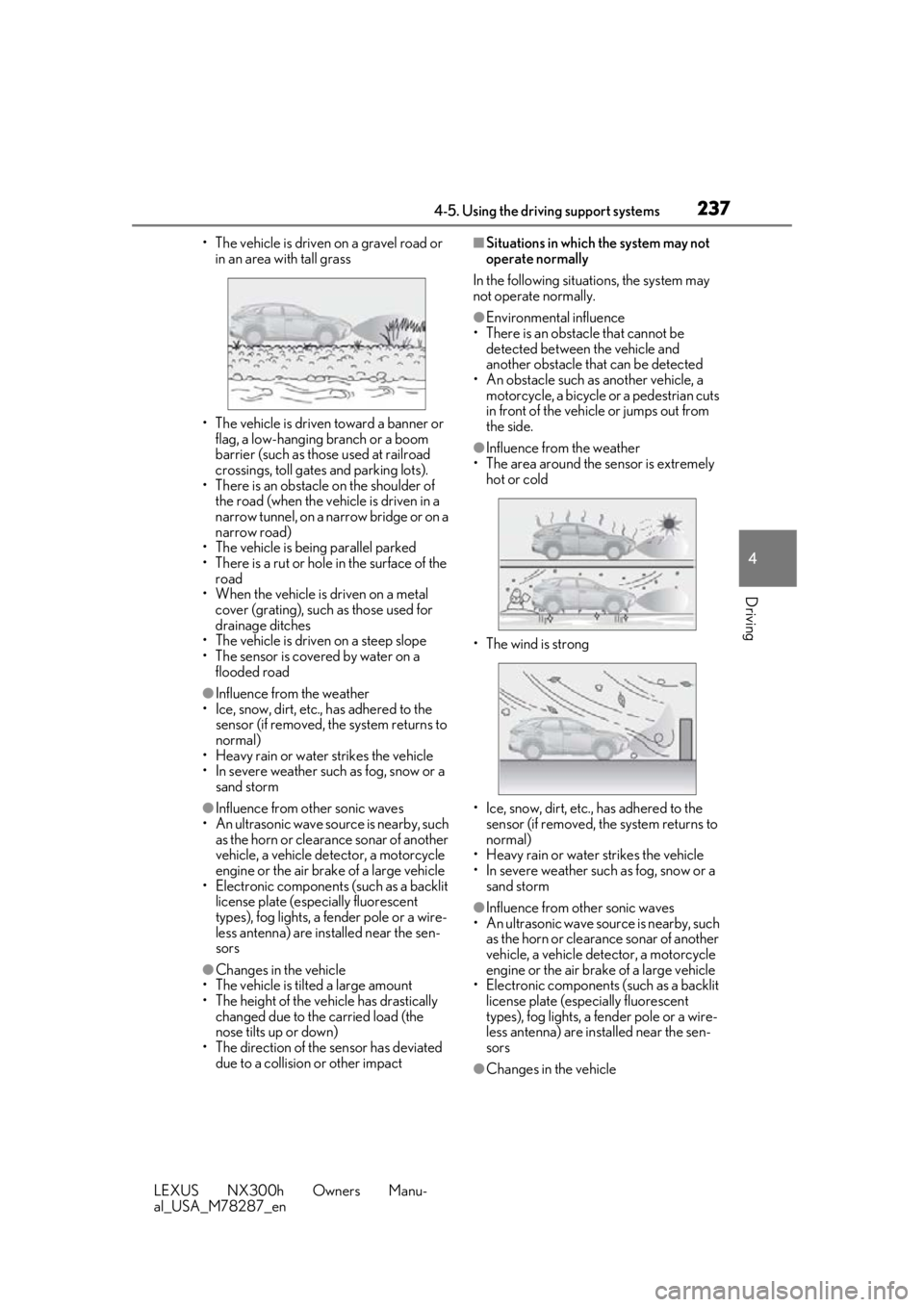
• The area around the sensor is extremely hot or cold
• The wind is strong
• Ice, snow, dirt, etc., has adhered to the sensor (if removed, the system returns to
normal)
• Heavy rain or water strikes the vehicle
• In severe weather such as fog, snow or a sand storm
●Influence from other sonic waves
• An ultrasonic wave source is nearby, such
as the horn or clearance sonar of another
vehicle, a vehicle detector, a motorcycle
engine or the air brake of a large vehicle
• Electronic components (such as a backlit license plate (especially fluorescent
types), fog lights, a fe nder pole or a wire-
less antenna) are installed near the sen-
sors
●Changes in the vehicle
Page 243 of 460
2434-5. Using the driving support systems
LEXUS NX300h Owners Manu-
al_USA_M78287_en
4
Driving
The Blind Spot Monitor function uses
radar sensors to detect vehicles that
are traveling in an adjacent lane in the
area that is not reflected in the outside rear view mirror (the blind spot), and
advises the driver of the vehicles exis-
tence via the BSM outside rear view
mirror indicator.
■The Blind Spot Monitor function
detection areas
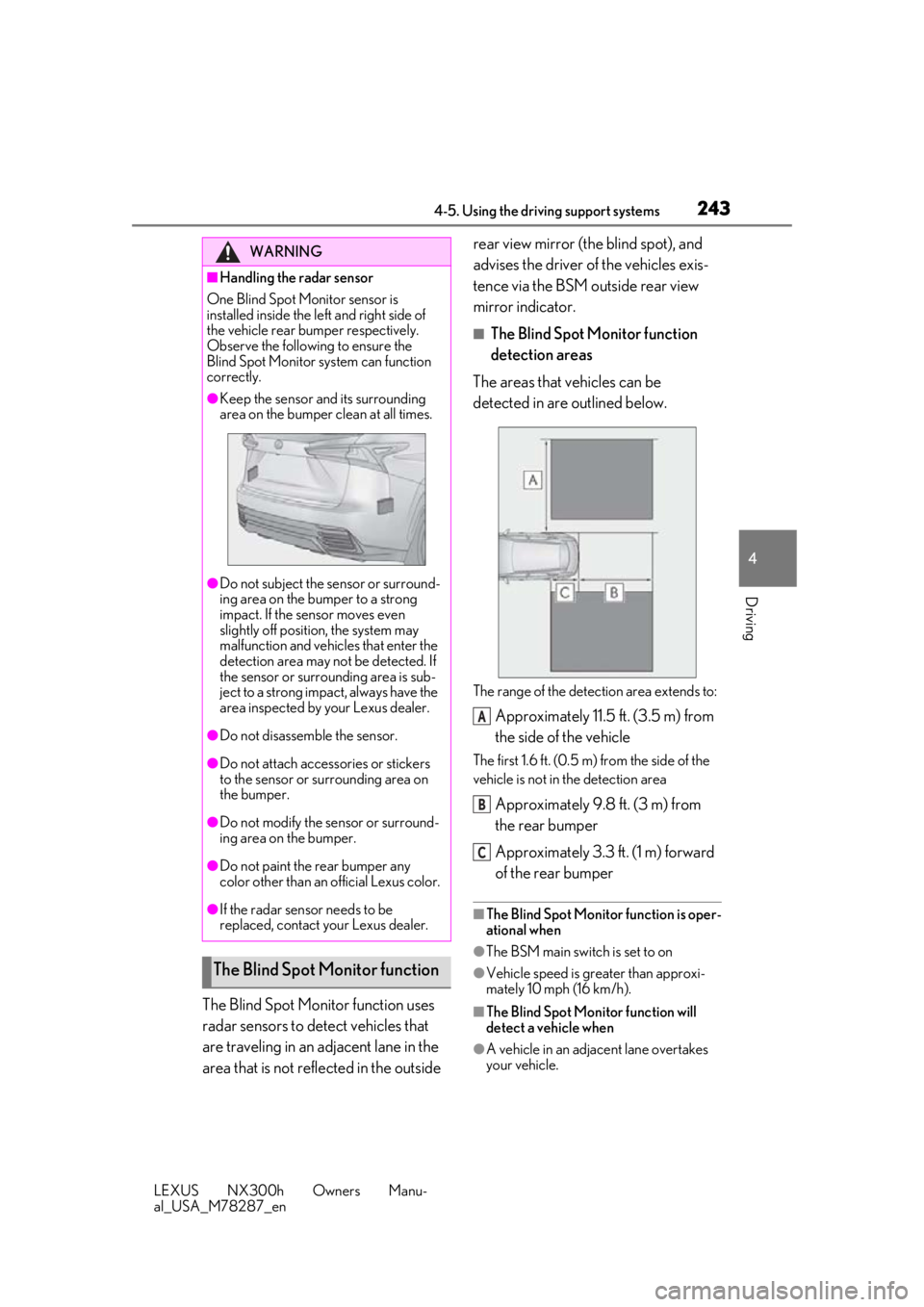
The areas that vehicles can be
detected in are outlined below.
The range of the detection area extends to:
Approximately 11.5 ft. (3.5 m) from
the side of the vehicle
The first 1.6 ft. (0.5 m) from the side of the
vehicle is not in the detection area
Approximately 9.8 ft. (3 m) from
the rear bumper
Approximately 3.3 ft. (1 m) forward
of the rear bumper
■The Blind Spot Monitor function is oper-
ational when
●The BSM main switch is set to on
●Vehicle speed is greater than approxi-
mately 10 mph (16 km/h).
■The Blind Spot Monitor function will
detect a vehicle when
●A vehicle in an adjacent lane overtakes
your vehicle.
WARNING
■Handling the radar sensor
One Blind Spot Monitor sensor is
installed inside the le ft and right side of
the vehicle rear bumper respectively.
Observe the following to ensure the
Blind Spot Monitor system can function
correctly.
●Keep the sensor an d its surrounding
area on the bumper clean at all times.
●Do not subject the sensor or surround-
ing area on the bumper to a strong
impact. If the sensor moves even
slightly off position, the system may
malfunction and vehicles that enter the
detection area may not be detected. If
the sensor or surrounding area is sub-
ject to a strong impact, always have the
area inspected by your Lexus dealer.
●Do not disassemb le the sensor.
●Do not attach accessories or stickers
to the sensor or surrounding area on
the bumper.
●Do not modify the sensor or surround-
ing area on the bumper.
●Do not paint the rear bumper any
color other than an official Lexus color.
●If the radar sensor needs to be
replaced, contact your Lexus dealer.
The Blind Spot Monitor function
A
B
C
Page 245 of 460
2454-5. Using the driving support systems
LEXUS NX300h Owners Manu-
al_USA_M78287_en
4
Driving
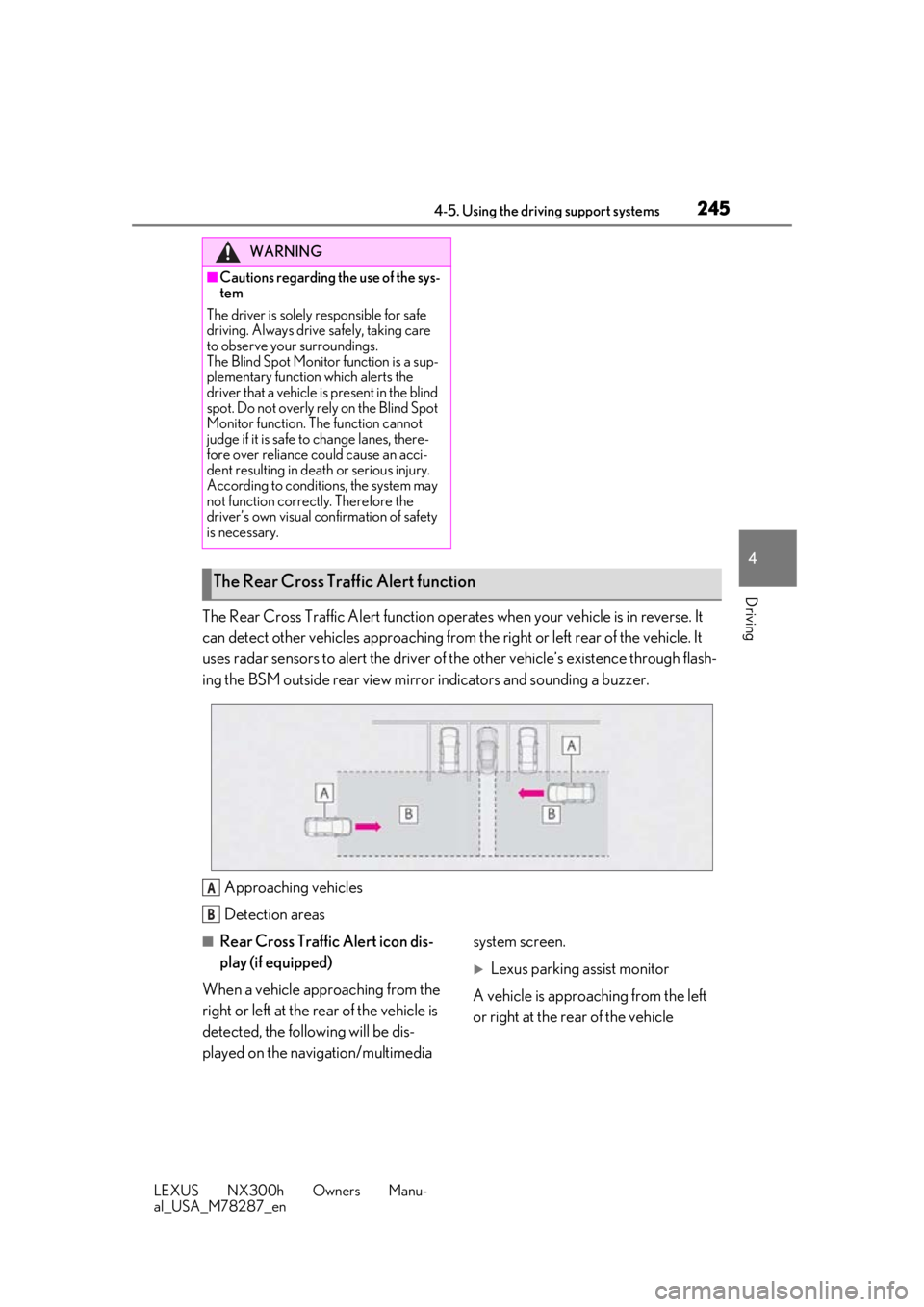
The Rear Cross Traffic Alert function operat es when your vehicle is in reverse. It
can detect other vehicles approaching from th e right or left rear of the vehicle. It
uses radar sensors to alert the driver of the other vehicle’s existence through flash-
ing the BSM outside rear view mirror indicators and sounding a buzzer.
Approaching vehicles
Detection areas
■Rear Cross Traffic Alert icon dis-
play (if equipped)
When a vehicle approaching from the
right or left at the rear of the vehicle is
detected, the following will be dis-
played on the navigation/multimedia system screen.
Lexus parking assist monitor
A vehicle is approaching from the left
or right at the rear of the vehicle
WARNING
■Cautions regarding the use of the sys-
tem
The driver is solely responsible for safe
driving. Always driv e safely, taking care
to observe your surroundings.
The Blind Spot Monitor function is a sup-
plementary function which alerts the
driver that a vehicle is present in the blind
spot. Do not overly rely on the Blind Spot
Monitor function. The function cannot
judge if it is safe to change lanes, there-
fore over reliance could cause an acci-
dent resulting in death or serious injury.
According to conditions, the system may
not function correctly. Therefore the
driver’s own visual confirmation of safety
is necessary.
The Rear Cross Traffic Alert function
A
B
Page 246 of 460
2464-5. Using the driving support systems
LEXUS NX300h Owners Manu-
al_USA_M78287_en
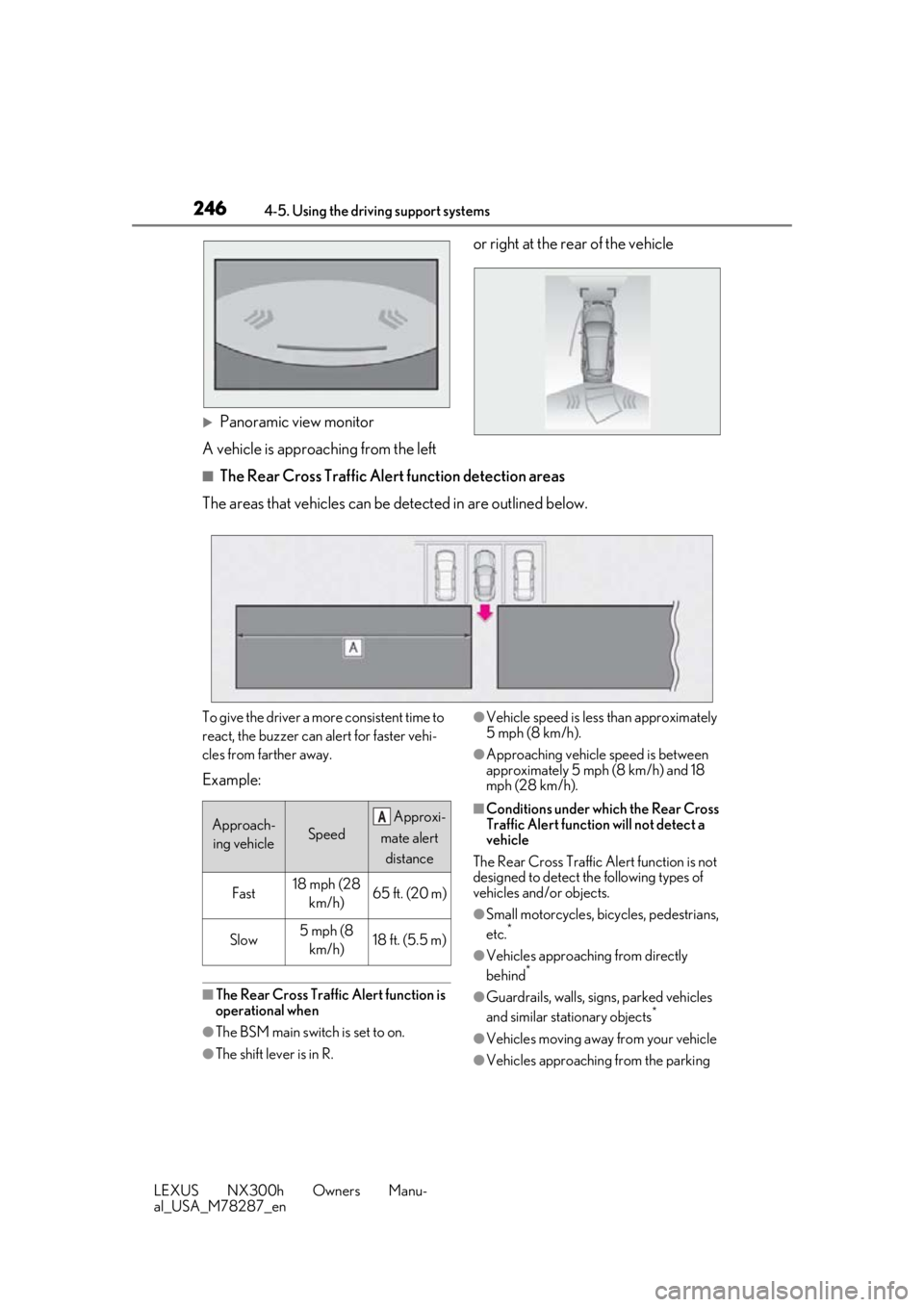
Panoramic view monitor
A vehicle is approaching from the left or right at the rear of the vehicle
■The Rear Cross Traffic Alert function detection areas
The areas that vehicles can be detected in are outlined below.
To give the driver a more consistent time to
react, the buzzer can alert for faster vehi-
cles from farther away.
Example:
■The Rear Cross Traffic Alert function is
operational when
●The BSM main switch is set to on.
●The shift lever is in R.
●Vehicle speed is less than approximately
5 mph (8 km/h).
●Approaching vehicle speed is between
approximately 5 mph (8 km/h) and 18
mph (28 km/h).
■Conditions under which the Rear Cross
Traffic Alert function will not detect a
vehicle
The Rear Cross Traffic Alert function is not
designed to detect the following types of
vehicles and/or objects.
●Small motorcycles, bicycles, pedestrians,
etc.*
●Vehicles approaching from directly
behind*
●Guardrails, walls, signs, parked vehicles
and similar stationary objects*
●Vehicles moving away from your vehicle
●Vehicles approaching from the parking
Approach- ing vehicleSpeed
Approxi-
mate alert distance
Fast18 mph (28 km/h)65 ft. (20 m)
Slow5 mph (8 km/h)18 ft. (5.5 m)
A
Page 248 of 460
2484-5. Using the driving support systems
LEXUS NX300h Owners Manu-
al_USA_M78287_en
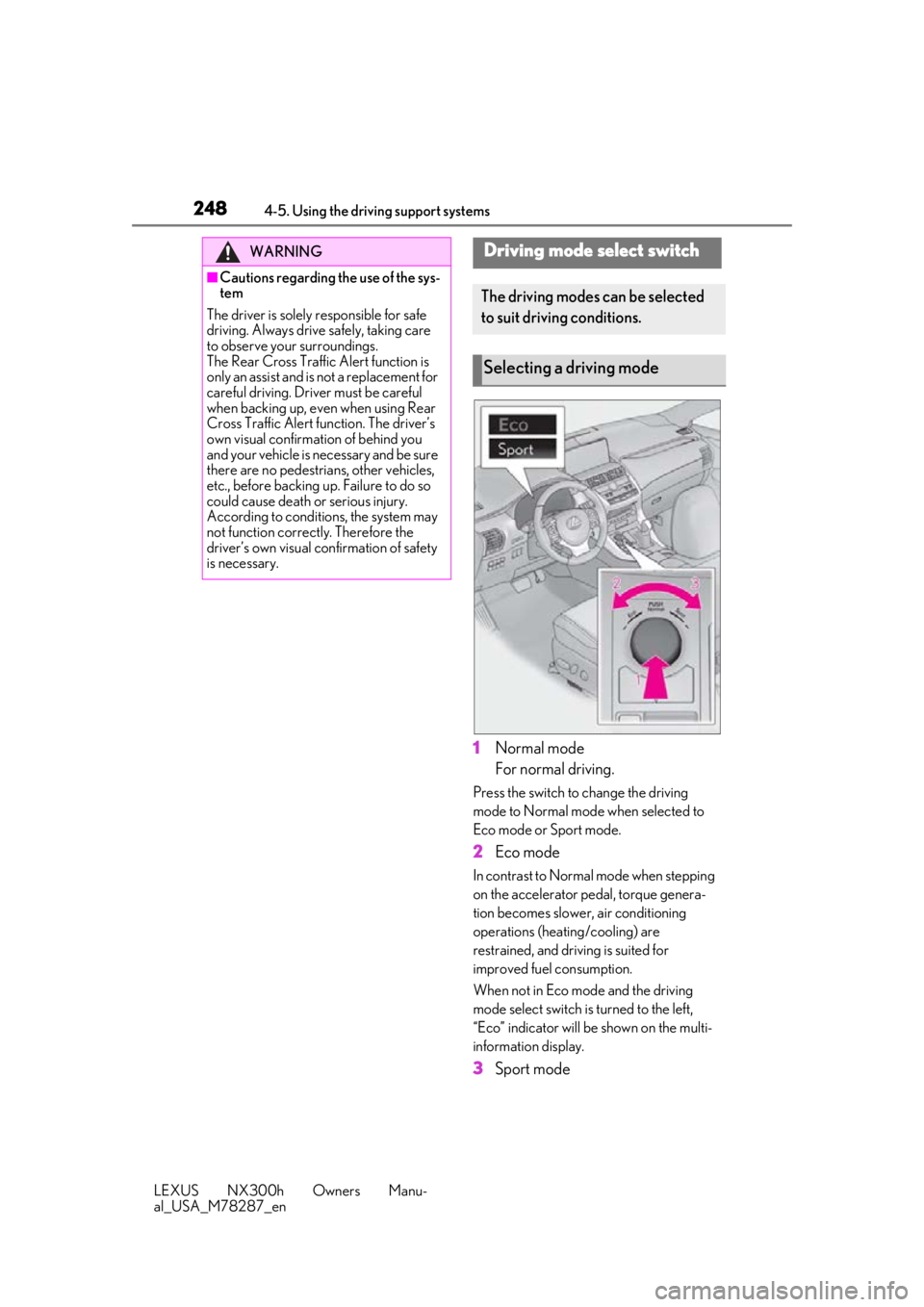
1Normal mode
For normal driving.
Press the switch to change the driving
mode to Normal mode when selected to
Eco mode or Sport mode.
2Eco mode
In contrast to Normal mode when stepping
on the accelerator pedal, torque genera-
tion becomes slower, air conditioning
operations (heating/cooling) are
restrained, and driving is suited for
improved fuel consumption.
When not in Eco mode and the driving
mode select switch is turned to the left,
“Eco” indicator will be shown on the multi-
information display.
3Sport mode
WARNING
■Cautions regarding the use of the sys-
tem
The driver is solely responsible for safe
driving. Always driv e safely, taking care
to observe your surroundings.
The Rear Cross Traffic Alert function is
only an assist and is not a replacement for
careful driving. Driver must be careful
when backing up, even when using Rear
Cross Traffic Alert function. The driver’s
own visual confirmation of behind you
and your vehicle is necessary and be sure
there are no pedestrians, other vehicles,
etc., before backing up. Failure to do so
could cause death or serious injury.
According to conditions, the system may
not function correctly. Therefore the
driver’s own visual confirmation of safety
is necessary.
Driving mode select switch
The driving modes can be selected
to suit driving conditions.
Selecting a driving mode