change time LEXUS NX300H 2019 Owner's Guide
[x] Cancel search | Manufacturer: LEXUS, Model Year: 2019, Model line: NX300H, Model: LEXUS NX300H 2019Pages: 460, PDF Size: 6.82 MB
Page 269 of 460
2695-2. Using the air conditioning system and defogger
LEXUS NX300h Owners Manu-
al_USA_M78287_en
5
Interior features
emitted from the vents.
●To reduce potential odors from occur-
ring:
• It is recommended that the air condition- ing system be set to outside air mode
prior to turning the vehicle off.
• The start timing of the blower may be delayed for a short period of time imme-
diately after the air conditioning system is
started in automatic mode.
■Air conditioning filter
P.348
■Customization
Settings (e.g. A/C automatic mode switch
operation) can be changed.
(Customizable features: P. 421)
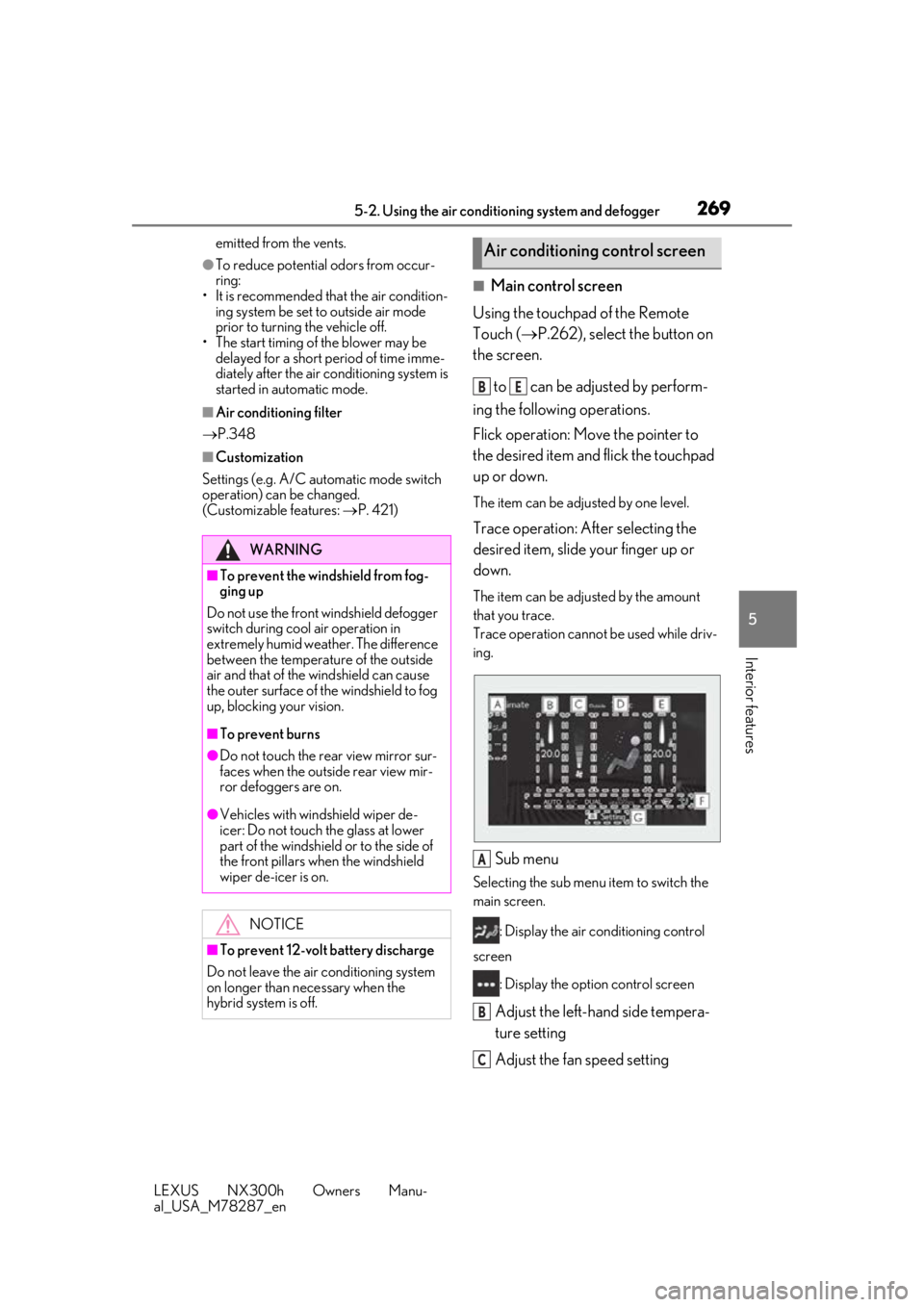
■Main control screen
Using the touchpad of the Remote
Touch ( P.262), select the button on
the screen.
to can be adjusted by perform-
ing the following operations.
Flick operation: Move the pointer to
the desired item and flick the touchpad
up or down.
The item can be adjusted by one level.
Trace operation: After selecting the
desired item, slide your finger up or
down.
The item can be adjusted by the amount
that you trace.
Trace operation cannot be used while driv-
ing.
Sub menu
Selecting the sub menu item to switch the
main screen.
: Display the air conditioning control
screen
: Display the option control screen
Adjust the left-hand side tempera-
ture setting
Adjust the fan speed setting
WARNING
■To prevent the windshield from fog-
ging up
Do not use the front windshield defogger
switch during cool air operation in
extremely humid weather. The difference
between the temperature of the outside
air and that of the windshield can cause
the outer surface of the windshield to fog
up, blocking your vision.
■To prevent burns
●Do not touch the rear view mirror sur-
faces when the outside rear view mir-
ror defoggers are on.
●Vehicles with windshield wiper de-
icer: Do not touch the glass at lower
part of the windshield or to the side of
the front pillars wh en the windshield
wiper de-icer is on.
NOTICE
■To prevent 12-volt battery discharge
Do not leave the air conditioning system
on longer than necessary when the
hybrid system is off.
Air conditioning control screen
BE
A
B
C
Page 274 of 460
2745-2. Using the air conditioning system and defogger
LEXUS NX300h Owners Manu-
al_USA_M78287_en
Turns the heated steering wheel on/off
The indicator light comes on when the
heated steering wheel is operating.
■Operation condition
The power switch is in ON mode.
■Timer function
The heated steering wheel will automati-
cally turn off after about 30 minutes.
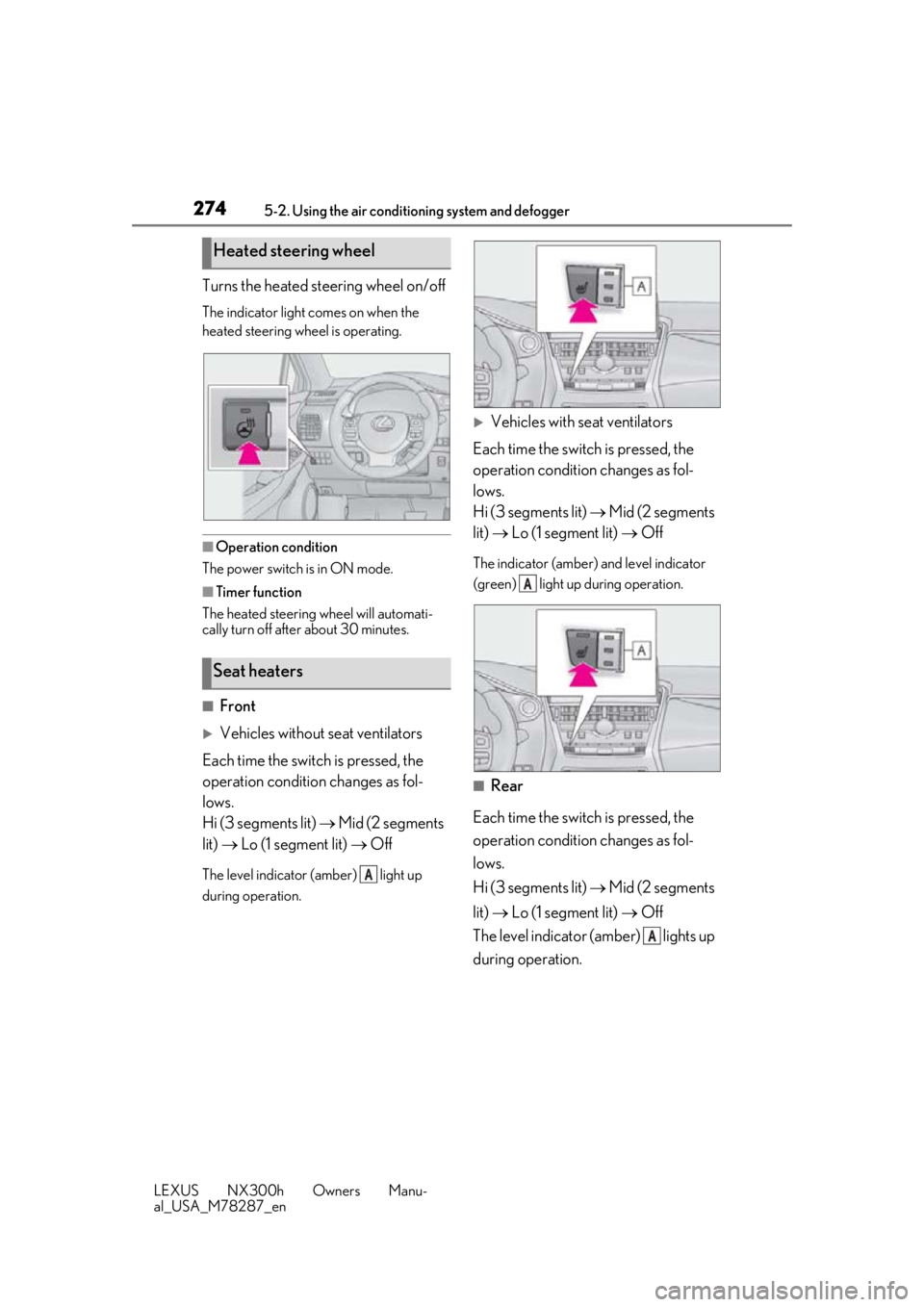
■Front
Vehicles without seat ventilators
Each time the switch is pressed, the
operation condition changes as fol-
lows.
Hi (3 segments lit) Mid (2 segments
lit) Lo (1 segment lit) Off
The level indicator (amber) light up
during operation.
Vehicles with seat ventilators
Each time the switch is pressed, the
operation condition changes as fol-
lows.
Hi (3 segments lit) Mid (2 segments
lit) Lo (1 segment lit) Off
The indicator (amber) and level indicator
(green) light up during operation.
■Rear
Each time the switch is pressed, the
operation condition changes as fol-
lows.
Hi (3 segments lit) Mid (2 segments
lit) Lo (1 segment lit) Off
The level indicator (amber) lights up
during operation.
Heated steering wheel
Seat heaters
A
A
A
Page 275 of 460
2755-2. Using the air conditioning system and defogger
LEXUS NX300h Owners Manu-
al_USA_M78287_en
5
Interior features
■Operation condition
The seat heaters can be used when the
power switch is in ON mode.
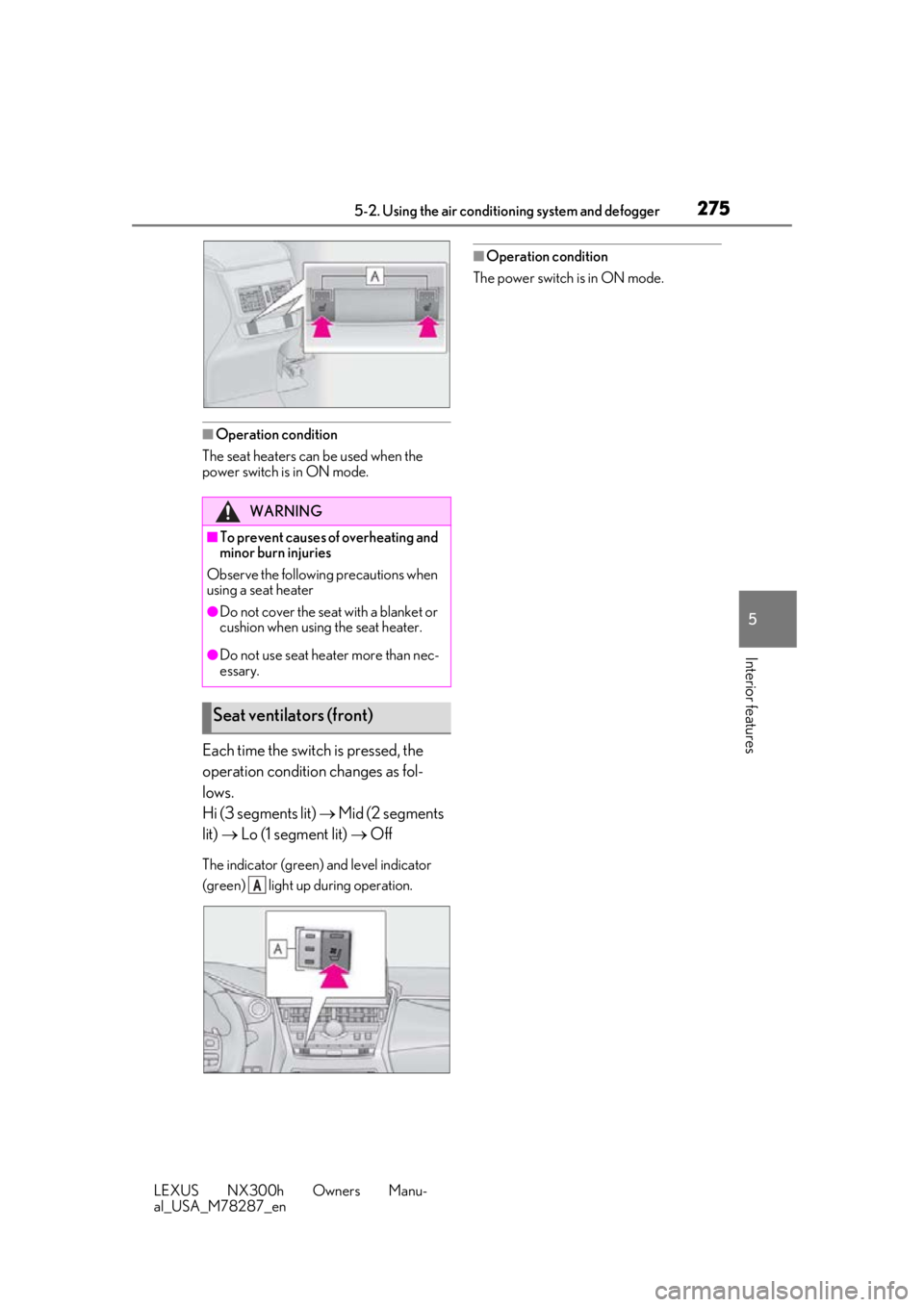
Each time the switch is pressed, the
operation condition changes as fol-
lows.
Hi (3 segments lit) Mid (2 segments
lit) Lo (1 segment lit) Off
The indicator (green) and level indicator
(green) light up during operation.
■Operation condition
The power switch is in ON mode.
WARNING
■To prevent causes of overheating and
minor burn injuries
Observe the following precautions when
using a seat heater
●Do not cover the seat with a blanket or
cushion when using the seat heater.
●Do not use seat heater more than nec-
essary.
Seat ventilators (front)
A
Page 277 of 460
2775-3. Using the interior lights
LEXUS NX300h Owners Manu-
al_USA_M78287_en
5
Interior features
■Customization
Setting (e.g. the time elapsed before lights
turn off) can be changed. (Customizable
features: P.421)
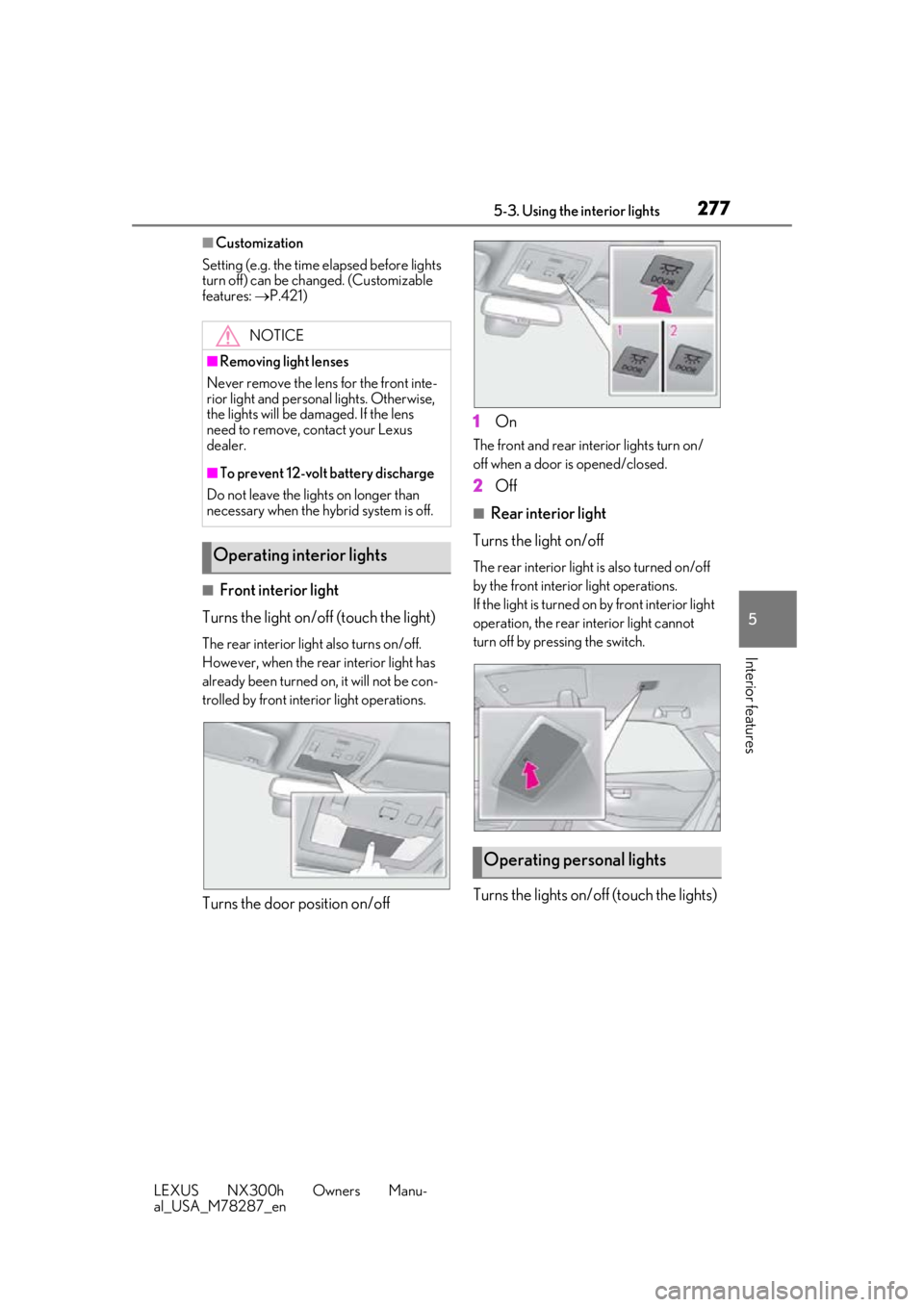
■Front interior light
Turns the light on/off (touch the light)
The rear interior light also turns on/off.
However, when the rear interior light has
already been turned on , it will not be con-
trolled by front interior light operations.
Turns the door position on/off 1
On
The front and rear interior lights turn on/
off when a door is opened/closed.
2Off
■Rear interior light
Turns the light on/off
The rear interior light is also turned on/off
by the front interior light operations.
If the light is turned on by front interior light
operation, the rear interior light cannot
turn off by pressing the switch.
Turns the lights on/off (touch the lights)
NOTICE
■Removing light lenses
Never remove the lens for the front inte-
rior light and personal lights. Otherwise,
the lights will be damaged. If the lens
need to remove, contact your Lexus
dealer.
■To prevent 12-volt battery discharge
Do not leave the lights on longer than
necessary when the hy brid system is off.
Operating interior lights
Operating personal lights
Page 291 of 460
2915-5. Using the other interior features
LEXUS NX300h Owners Manu-
al_USA_M78287_en
5
Interior features
■While charging, noise enters the AM
radio
Turn off the wireless charger and confirm
that the noise has decreased. If the noise
decreases, continuously pushing the power
supply switch of the wireless charger for 2
seconds, the frequency of the charger can
be changed and the noise can be reduced.
Also, on that occasion, the operation indi-
cator light will flash orange 2 times.
■Important points of the wireless charger
●If the electronic key cannot be detected
within the vehicle interior, charging can-
not be done. When the door is opened
and closed, charging may be temporarily
suspended.
●When charging, the wireless charging
device and portable device will get
warmer, however this is not a malfunction.
When a portable device gets warm while
charging, charging may stop due to the protection function on the portable
device side. In this case, when the tem-
perature of the port
able device drops
significantly, charge again.
■Operation sounds
When the power supply is turned on, while
searching for the portable device a sound
will be produced, however this is not a mal-
function.
■Certification for the wireless charger
FCC Note: This equipment has been tested
and found to comply with Part 18 of the
FCC Rules. These limits are designed to
provide reasonable protection against
harmful interference in a residential installa-
tion.
FCC Caution: Any changes or modifica-
tions not expressly approved by the party
responsible for compliance could void the
user’s authority to operate this equipment.
Page 343 of 460
3436-3. Do-it-yourself maintenance
LEXUS NX300h Owners Manu-
al_USA_M78287_en
6
Maintenance and care
■The tire pressure warning system
must be initialized in the following
circumstances:
When adjusting the tire inflation
pressure.
When the tire inflation pressure is
changed such as when changing
traveling speed.
When rotating the tires.
When changing the tire.
When the tire pressure warning system
is initialized, the cu rrent tire inflation
pressure is set as the benchmark pres-
sure.
■How to initialize the tire pressure
warning system
1 Park the vehicle in a safe place and
turn the power switch off.
Initialization cannot be performed while
the vehicle is moving.
2 Adjust the tire inflation pressure to
the specified cold tire inflation pres-
sure level.
Make sure to adjust th e tire pressure to the
specified cold tire infl ation pressure level.
The tire pressure warning system will oper-
ate based on this pressure level.
3 Turn the power switch to ON
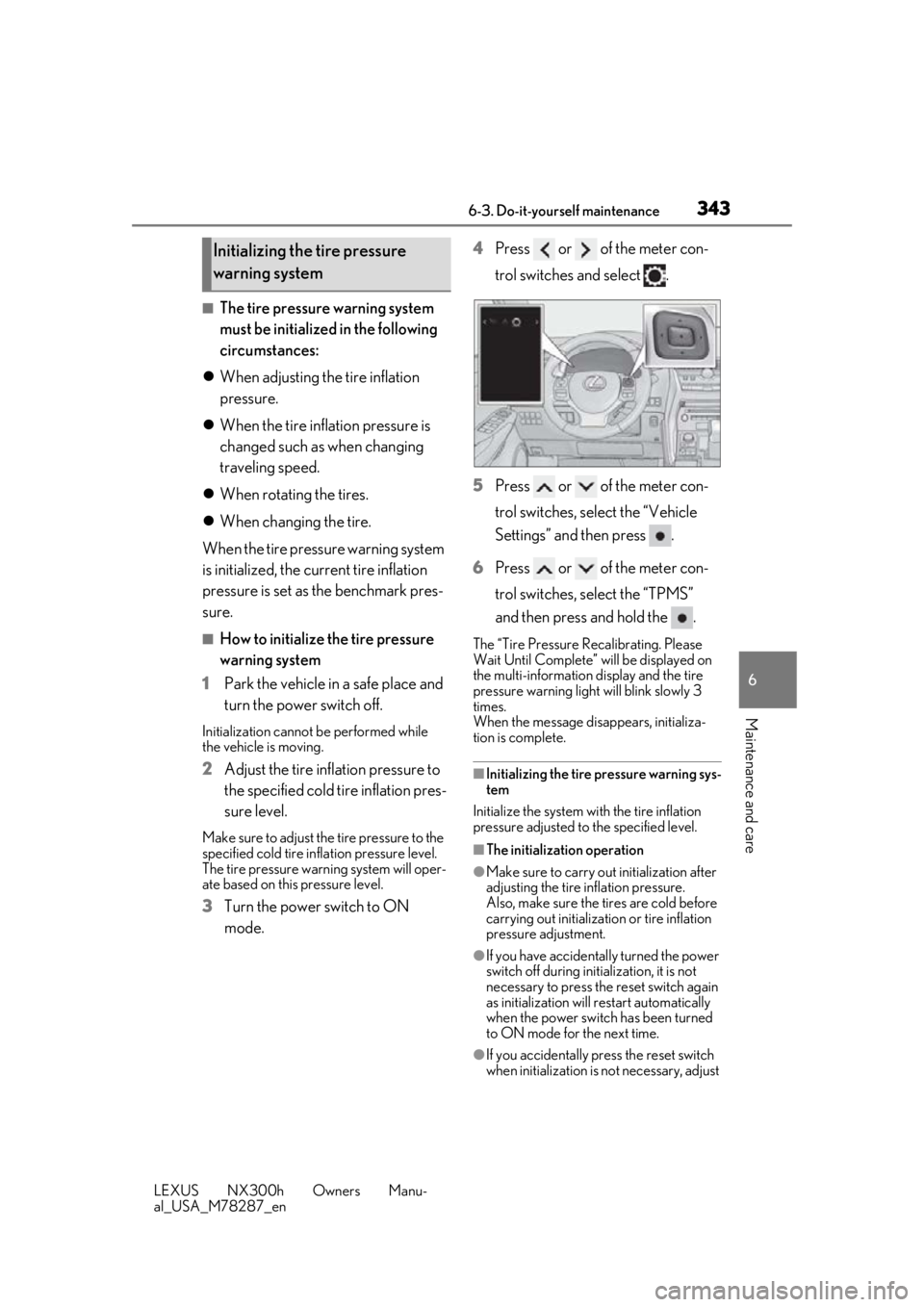
mode. 4
Press or of the meter con-
trol switches and select .
5 Press or of the meter con-
trol switches, select the “Vehicle
Settings” and then press .
6 Press or of the meter con-
trol switches, select the “TPMS”
and then press and hold the .
The “Tire Pressure Recalibrating. Please
Wait Until Complete” will be displayed on
the multi-information display and the tire
pressure warning light will blink slowly 3
times.
When the message di sappears, initializa-
tion is complete.
■Initializing the tire pressure warning sys-
tem
Initialize the system wi th the tire inflation
pressure adjusted to the specified level.
■The initialization operation
●Make sure to carry out initialization after
adjusting the tire inflation pressure.
Also, make sure the tires are cold before
carrying out initialization or tire inflation
pressure adjustment.
●If you have accidentally turned the power
switch off during initialization, it is not
necessary to press the reset switch again
as initialization will restart automatically
when the power switch has been turned
to ON mode for the next time.
●If you accidentally press the reset switch
when initialization is not necessary, adjust
Initializing the tire pressure
warning system
Page 344 of 460
3446-3. Do-it-yourself maintenance
LEXUS NX300h Owners Manu-
al_USA_M78287_enthe tire inflation pres
sure to the specified
level when the tires are cold, and conduct
initialization again.
■Warning performance of the tire pres-
sure warning system
The warning of the tire pressure warning
system will change in accordance with the
conditions under which it was initialized. For
this reason, the system may give a warning
even if the tire pressure does not reach a
low enough level, or if the pressure is higher
than the pressure that was adjusted to when
the system was initialized.
■When initialization of the tire pressure
warning system has failed
Initialization can be completed in a few min-
utes. However, in the following cases, the
settings have not been recorded and the
system will not operate properly. If repeated
attempts to record tire inflation pressure
settings are unsuccessful, have the vehicle
inspected by your Lexus dealer.
●When initializing the tire pressure warn-
ing system, the tire pressure warning light
does not blink 3 times.
●After carrying out the initialization proce-
dure, the tire pressure warning light
blinks for 1 minute then stays on after
driving for 20 minutes.
The tire pressure warning valve and
transmitter is equipped with a unique
ID code. When replacing a tire pres-
sure warning valve and transmitter, it is necessary to register the ID code.
Have the ID code registered by your
Lexus dealer.
WARNING
■When initializing the tire pressure
warning system
Do not initializing tire inflation pressure
without first adjusting the tire inflation
pressure to the spec ified level. Other-
wise, the tire pressure warning light may
not come on even if the tire inflation pres-
sure is low, or it may come on when the
tire inflation pressure is actually normal.
Registering ID codes
Page 378 of 460

3787-2. Steps to take in an emergency
LEXUS NX300h Owners Manu-
al_USA_M78287_en
■If “Traction Battery Needs to be Pro-
tected Refrain From the Use of N Posi-
tion” is shown
This message may be displayed when the
shift lever is in N.
As the hybrid battery (traction battery) can-
not be charged when the shift lever is in N,
when the vehicle is to be stopped for a long
period of time, shift the shift lever to P.
■If “Traction battery needs to be pro-
tected. Shift into P to restart.” is shown
Message is displayed when the remaining
charge for the hybrid battery (traction bat-
tery) is low, because vehicle has been
shifted N for a long period of time.
When operating the vehicle, restart the
hybrid system.
■If “Shift to P Before Exiting Vehicle” is
shown
Message is displayed when the driver’s
door is opened with out turning the power
switch to OFF with the shift lever in any
position other than P.
Shift the shift lever to P.
■If “Shift Is in N Release Accelerator
Before Shifting” is shown
Message is displayed when the accelerator
pedal has been depressed and the shift
lever is in N. Release the accelerator pedal
and shift the shift lever to D, S or R.
■If “Depress Brake When Vehicle Is
Stopped Hybrid Syst em May Overheat”
is shown
Message is displayed when the accelerator
pedal is depressed to maintain the vehicle
position when stopped on a upward slope,
etc.
If this continues, th e hybrid system may
overheat.
Release the accelerator pedal and depress
the brake pedal.
■If “Front Camera Unavailable” or “Front
Camera Unavailable Remove Debris
On Windshield” is shown
The following systems may be suspended
until the problem shown in the message is
resolved. ( P.208, 369)
●PCS (Pre-Collision System)
●LDA (Lane Departure Alert with steering
control)
●Dynamic radar cruise control with full-
speed range
●Adaptive High-beam System
●Automatic High Beam
■If “Oil Maintenance Required Soon” is
shown
Indicates that the engine oil is scheduled to
be changed. (The indicator will not work
properly unless the oil maintenance data
has been reset.)
Check the engine oil, and change if neces-
sary. After changing th e engine oil, the oil
change system should be reset. ( P.330)
■If “Oil Maintenance Required” is shown
Indicates that the engine oil should be
changed. (After the engine oil is changed
and the oil maintenance data has been
reset.)
Check and change the en gine oil, and oil fil-
ter by your Lexus dealer. After changing the
engine oil, the oil change system should be
reset. ( P.330)
■If “See Owner’s Manual” is shown
●If the following messages are shown, fol-
lowing the instruct ions, accordingly.
• “Engine Coolant Temp High” ( P.396)
• “Aux Battery Low” ( P.377)
●If the following messages are shown,
there may be a malfunction.
Immediately have the vehicle inspected
by your Lexus dealer.
• “Hybrid System Malfunction”
•“Check Engine”
• “Hybrid Battery System Malfunction”
• “Accelerator System Malfunction”
• “Braking Power Low”
• “Smart Access System Malfunction”
●If “Maintenance required for Traction bat-
tery cooling parts” is shown, the filters
may be clogged, the air intake vents may
be blocked, or there may be a gap in the
duct. Therefore, perform the following
correction procedure.
• If the air intake vents of the hybrid battery (traction battery) are dirty, perform the
procedure on P. 316 to clean them.
• If the warning message is shown when
Page 385 of 460
3857-2. Steps to take in an emergency
LEXUS NX300h Owners Manu-
al_USA_M78287_en
7
When trouble arises
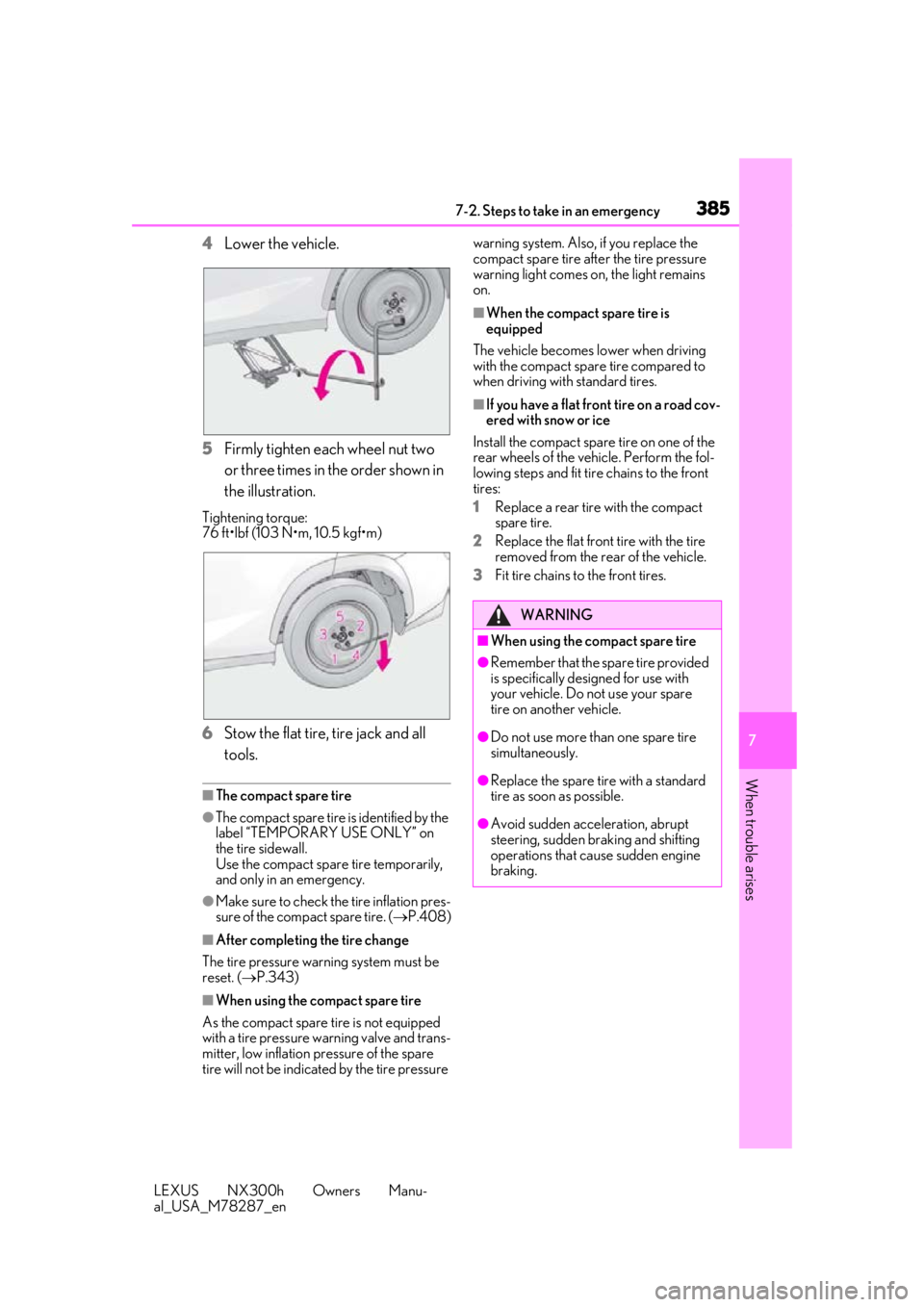
4 Lower the vehicle.
5 Firmly tighten each wheel nut two
or three times in the order shown in
the illustration.
Tightening torque:
76 ft•lbf (103 N•m, 10.5 kgf•m)
6Stow the flat tire, tire jack and all
tools.
■The compact spare tire
●The compact spare tire is identified by the
label “TEMPORARY USE ONLY” on
the tire sidewall.
Use the compact spare tire temporarily,
and only in an emergency.
●Make sure to check the tire inflation pres-
sure of the compact spare tire. ( P.408)
■After completing the tire change
The tire pressure warning system must be
reset. ( P.343)
■When using the compact spare tire
As the compact spare tire is not equipped
with a tire pressure warning valve and trans-
mitter, low inflation pressure of the spare
tire will not be indicated by the tire pressure warning system. Also, if you replace the
compact spare tire afte
r the tire pressure
warning light comes on, the light remains
on.
■When the compact spare tire is
equipped
The vehicle becomes lower when driving
with the compact spare tire compared to
when driving with standard tires.
■If you have a flat front tire on a road cov-
ered with snow or ice
Install the compact spare tire on one of the
rear wheels of the vehicle. Perform the fol-
lowing steps and fit tire chains to the front
tires:
1 Replace a rear tire with the compact
spare tire.
2 Replace the flat front tire with the tire
removed from the rear of the vehicle.
3 Fit tire chains to the front tires.
WARNING
■When using the compact spare tire
●Remember that the sp are tire provided
is specifically designed for use with
your vehicle. Do not use your spare
tire on another vehicle.
●Do not use more than one spare tire
simultaneously.
●Replace the spare tire with a standard
tire as soon as possible.
●Avoid sudden acceleration, abrupt
steering, sudden br aking and shifting
operations that cause sudden engine
braking.
Page 391 of 460
3917-2. Steps to take in an emergency
LEXUS NX300h Owners Manu-
al_USA_M78287_en
7
When trouble arises
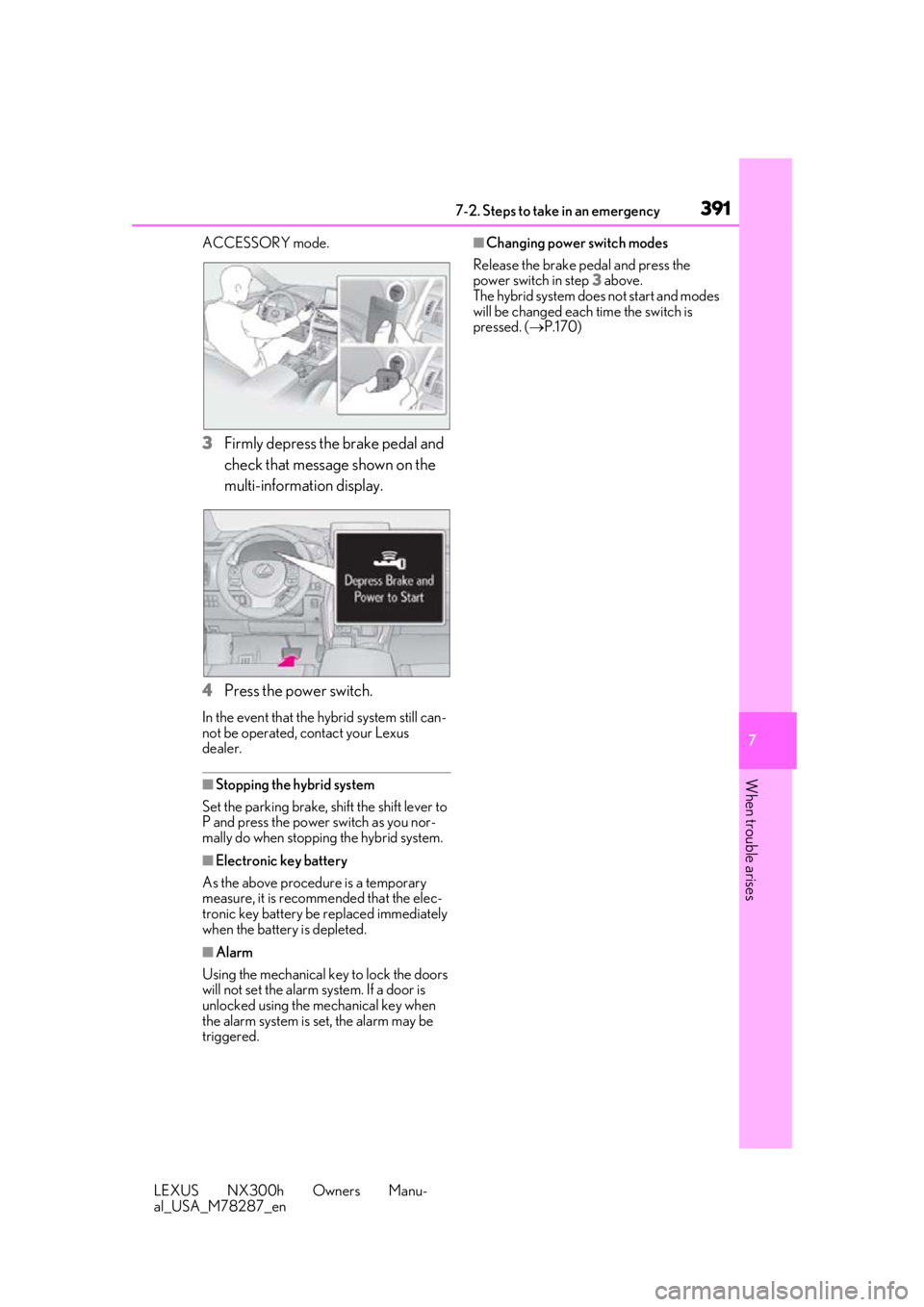
ACCESSORY mode.
3 Firmly depress the brake pedal and
check that message shown on the
multi-information display.
4 Press the power switch.
In the event that the hybrid system still can-
not be operated, contact your Lexus
dealer.
■Stopping the hybrid system
Set the parking brake, shift the shift lever to
P and press the power switch as you nor-
mally do when stopping the hybrid system.
■Electronic key battery
As the above procedure is a temporary
measure, it is recomme nded that the elec-
tronic key battery be replaced immediately
when the battery is depleted.
■Alarm
Using the mechanical key to lock the doors
will not set the alarm system. If a door is
unlocked using the mechanical key when
the alarm system is set, the alarm may be
triggered.
■Changing power switch modes
Release the brake pe dal and press the
power switch in step 3 above.
The hybrid system does not start and modes
will be changed each time the switch is
pressed. ( P.170)