With filter LEXUS NX300H 2019 Owners Manual
[x] Cancel search | Manufacturer: LEXUS, Model Year: 2019, Model line: NX300H, Model: LEXUS NX300H 2019Pages: 460, PDF Size: 6.82 MB
Page 269 of 460
2695-2. Using the air conditioning system and defogger
LEXUS NX300h Owners Manu-
al_USA_M78287_en
5
Interior features
emitted from the vents.
●To reduce potential odors from occur-
ring:
• It is recommended that the air condition- ing system be set to outside air mode
prior to turning the vehicle off.
• The start timing of the blower may be delayed for a short period of time imme-
diately after the air conditioning system is
started in automatic mode.
■Air conditioning filter
P.348
■Customization
Settings (e.g. A/C automatic mode switch
operation) can be changed.
(Customizable features: P. 421)
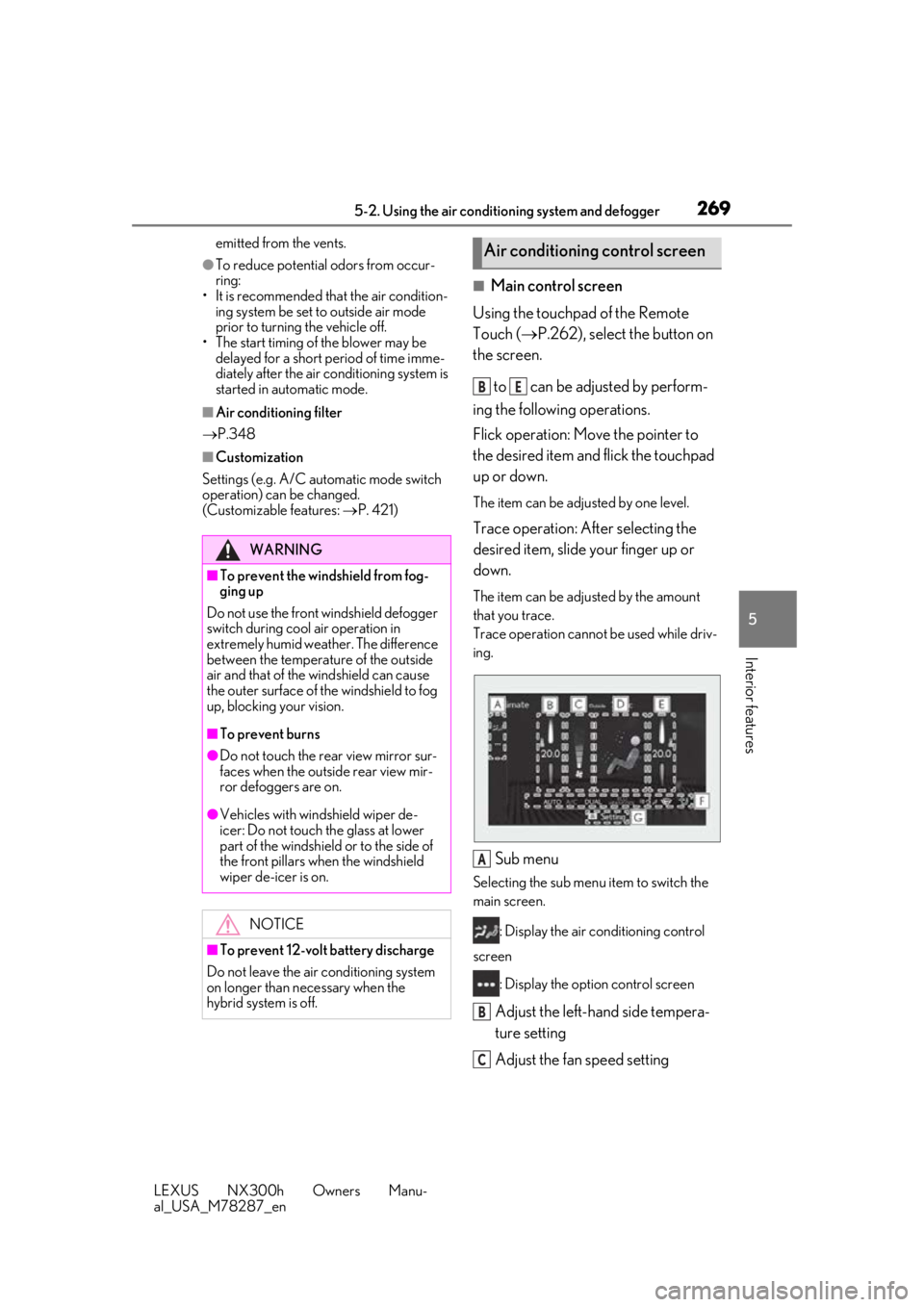
■Main control screen
Using the touchpad of the Remote
Touch ( P.262), select the button on
the screen.
to can be adjusted by perform-
ing the following operations.
Flick operation: Move the pointer to
the desired item and flick the touchpad
up or down.
The item can be adjusted by one level.
Trace operation: After selecting the
desired item, slide your finger up or
down.
The item can be adjusted by the amount
that you trace.
Trace operation cannot be used while driv-
ing.
Sub menu
Selecting the sub menu item to switch the
main screen.
: Display the air conditioning control
screen
: Display the option control screen
Adjust the left-hand side tempera-
ture setting
Adjust the fan speed setting
WARNING
■To prevent the windshield from fog-
ging up
Do not use the front windshield defogger
switch during cool air operation in
extremely humid weather. The difference
between the temperature of the outside
air and that of the windshield can cause
the outer surface of the windshield to fog
up, blocking your vision.
■To prevent burns
●Do not touch the rear view mirror sur-
faces when the outside rear view mir-
ror defoggers are on.
●Vehicles with windshield wiper de-
icer: Do not touch the glass at lower
part of the windshield or to the side of
the front pillars wh en the windshield
wiper de-icer is on.
NOTICE
■To prevent 12-volt battery discharge
Do not leave the air conditioning system
on longer than necessary when the
hybrid system is off.
Air conditioning control screen
BE
A
B
C
Page 270 of 460
2705-2. Using the air conditioning system and defogger
LEXUS NX300h Owners Manu-
al_USA_M78287_en
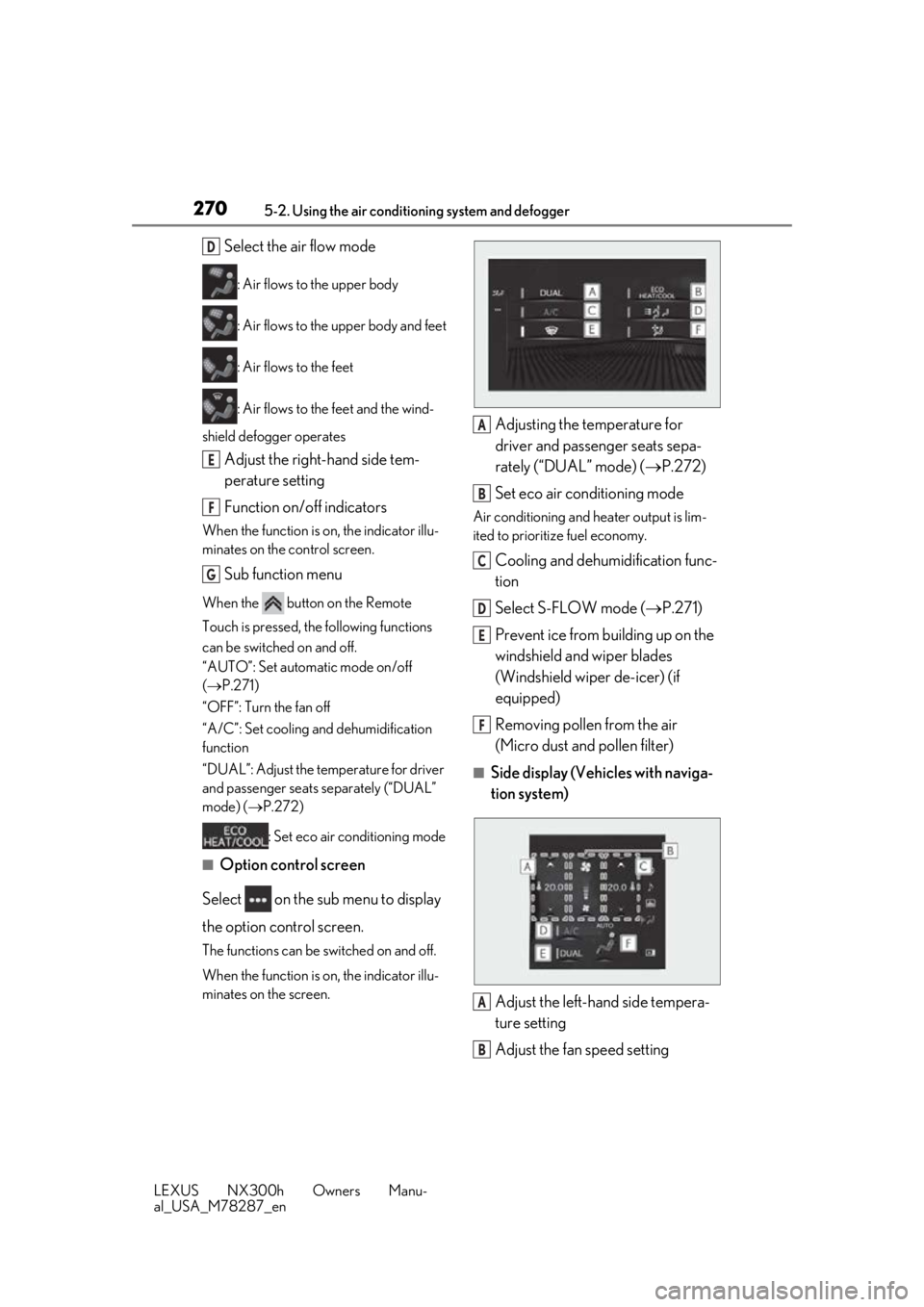
Select the air flow mode
: Air flows to the upper body
: Air flows to the upper body and feet
: Air flows to the feet
: Air flows to the feet and the wind-
shield defogger operates
Adjust the right-hand side tem-
perature setting
Function on/off indicators
When the function is on, the indicator illu-
minates on the control screen.
Sub function menu
When the button on the Remote
Touch is pressed, the following functions
can be switched on and off.
“AUTO”: Set automatic mode on/off
( P.271)
“OFF”: Turn the fan off
“A/C”: Set cooling and dehumidification
function
“DUAL”: Adjust the temperature for driver
and passenger seats separately (“DUAL”
mode) ( P.272)
: Set eco air conditioning mode
■Option control screen
Select on the sub menu to display
the option control screen.
The functions can be switched on and off.
When the function is on, the indicator illu-
minates on the screen.
Adjusting the temperature for
driver and passenger seats sepa-
rately (“DUAL” mode) ( P.272)
Set eco air conditioning mode
Air conditioning and heater output is lim-
ited to prioritize fuel economy.
Cooling and dehumidification func-
tion
Select S-FLOW mode ( P.271)
Prevent ice from building up on the
windshield and wiper blades
(Windshield wiper de-icer) (if
equipped)
Removing pollen from the air
(Micro dust and pollen filter)
■Side display (Vehicles with naviga-
tion system)
Adjust the left-hand side tempera-
ture setting
Adjust the fan speed setting
D
E
F
G
A
B
C
D
E
F
A
B
Page 271 of 460
2715-2. Using the air conditioning system and defogger
LEXUS NX300h Owners Manu-
al_USA_M78287_en
5
Interior features
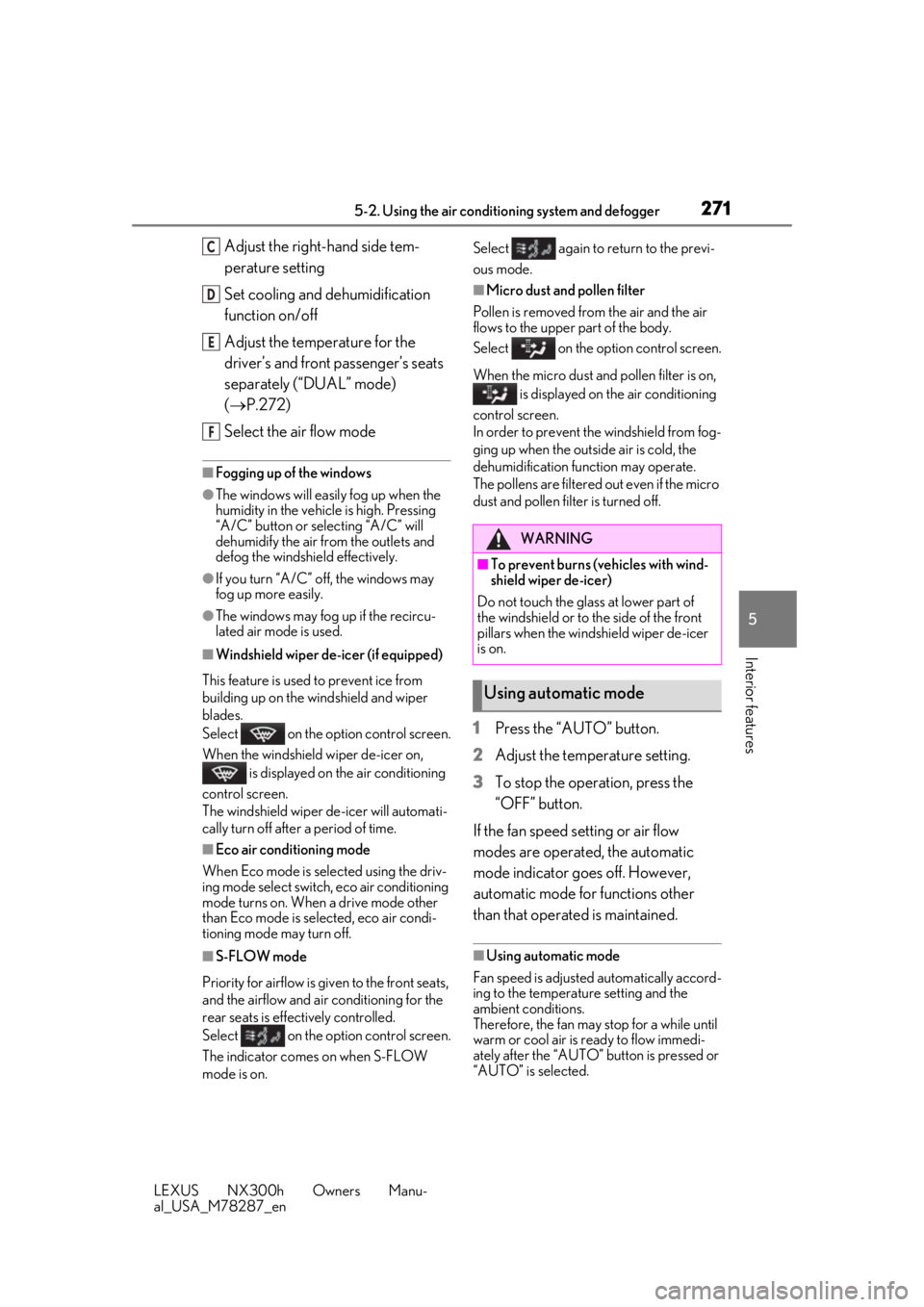
Adjust the right-hand side tem-
perature setting
Set cooling and dehumidification
function on/off
Adjust the temperature for the
driver’s and front passenger’s seats
separately (“DUAL” mode)
( P.272)
Select the air flow mode
■Fogging up of the windows
●The windows will easily fog up when the
humidity in the vehicle is high. Pressing
“A/C” button or selecting “A/C” will
dehumidify the air from the outlets and
defog the windshield effectively.
●If you turn “A/C” off, the windows may
fog up more easily.
●The windows may fog up if the recircu-
lated air mode is used.
■Windshield wiper de-icer (if equipped)
This feature is used to prevent ice from
building up on the wi ndshield and wiper
blades.
Select on the option control screen.
When the windshield wiper de-icer on,
is displayed on the air conditioning
control screen.
The windshield wiper de-icer will automati-
cally turn off after a period of time.
■Eco air conditioning mode
When Eco mode is selected using the driv-
ing mode select switch, eco air conditioning
mode turns on. When a drive mode other
than Eco mode is selected, eco air condi-
tioning mode may turn off.
■S-FLOW mode
Priority for airflow is given to the front seats,
and the airflow and air conditioning for the
rear seats is effectively controlled.
Select on the option control screen.
The indicator comes on when S-FLOW
mode is on. Select again to return to the previ-
ous mode.
■Micro dust and pollen filter
Pollen is removed from the air and the air
flows to the upper part of the body.
Select on the option control screen.
When the micro dust and pollen filter is on, is displayed on the air conditioning
control screen.
In order to prevent the windshield from fog-
ging up when the outside air is cold, the
dehumidification function may operate.
The pollens are filtered out even if the micro
dust and pollen filter is turned off.
1 Press the “AUTO” button.
2 Adjust the temperature setting.
3 To stop the operation, press the
“OFF” button.
If the fan speed setting or air flow
modes are operated, the automatic
mode indicator goes off. However,
automatic mode for functions other
than that operated is maintained.
■Using automatic mode
Fan speed is adjusted automatically accord-
ing to the temperature setting and the
ambient conditions.
Therefore, the fan may stop for a while until
warm or cool air is ready to flow immedi-
ately after the “AUTO” button is pressed or
“AUTO” is selected.
C
D
E
F
WARNING
■To prevent burns (vehicles with wind-
shield wiper de-icer)
Do not touch the glass at lower part of
the windshield or to the side of the front
pillars when the windshield wiper de-icer
is on.
Using automatic mode
Page 272 of 460
2725-2. Using the air conditioning system and defogger
LEXUS NX300h Owners Manu-
al_USA_M78287_en
■Windshield fog detection function
When automatic mode is set, the humidity
sensor ( P.272) detects fog on the wind-
shield and controls the air conditioning sys-
tem to prevent fog.
■Air conditioning filter
P.348
■Customization
Settings (e.g. A/C automatic mode switch
operation) can be changed.
(Customizable features: P.421)
To turn on the “DUAL” mode, perform
any of the following procedures:
Press the “DUAL” button.
Select “DUAL” on the option con-
trol screen.
Adjust the temperature setting of
the passenger side with the passen-
ger side temperature adjustment
button.
The indicator comes on when the “DUAL”
mode is on.
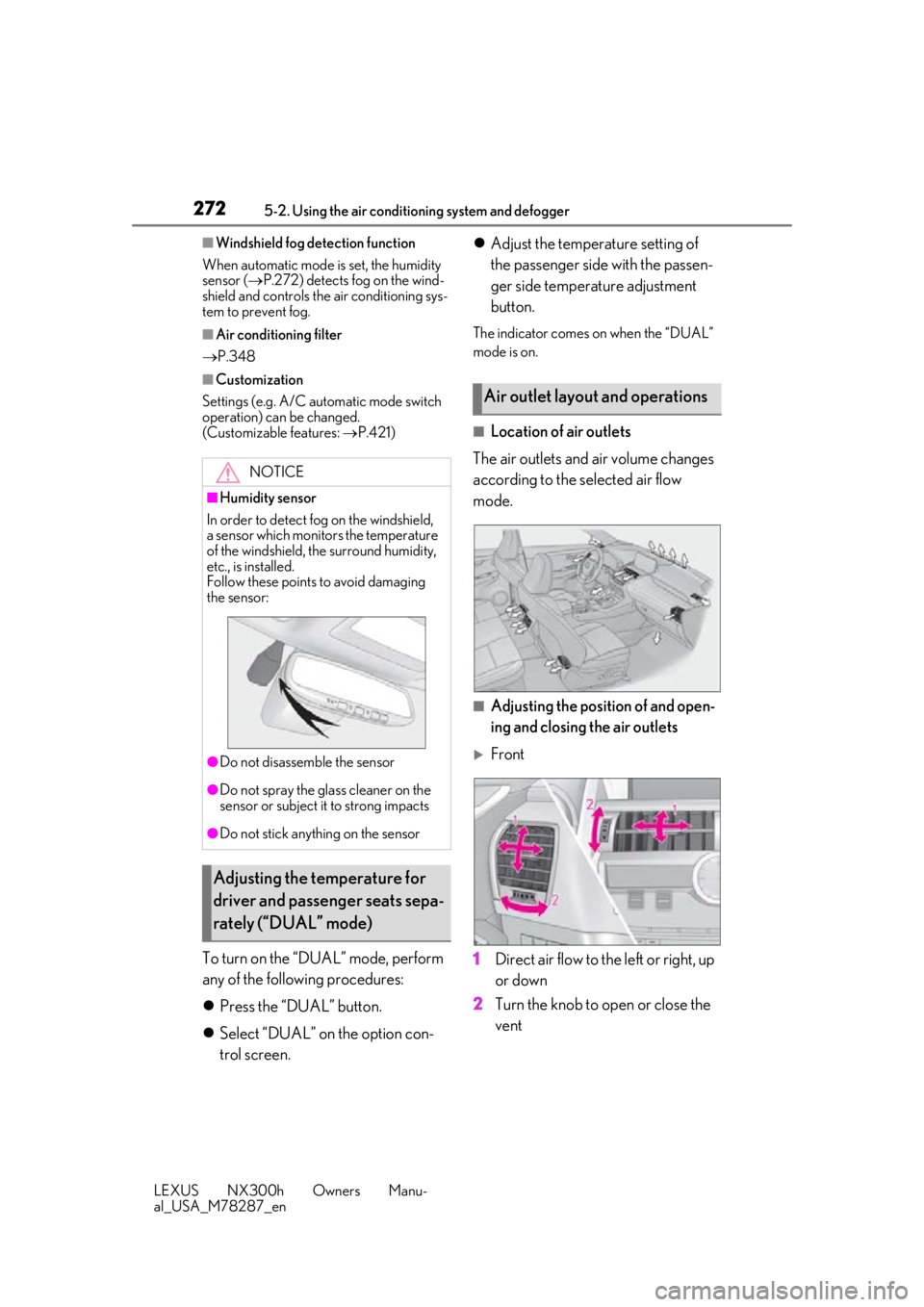
■Location of air outlets
The air outlets and air volume changes
according to the selected air flow
mode.
■Adjusting the position of and open-
ing and closing the air outlets
Front
1 Direct air flow to the left or right, up
or down
2 Turn the knob to open or close the
vent
NOTICE
■Humidity sensor
In order to detect fog on the windshield,
a sensor which monitors the temperature
of the windshield, the surround humidity,
etc., is installed.
Follow these points to avoid damaging
the sensor:
●Do not disassemb le the sensor
●Do not spray the glass cleaner on the
sensor or subject it to strong impacts
●Do not stick anything on the sensor
Adjusting the temperature for
driver and passenger seats sepa-
rately (“DUAL” mode)
Air outlet layout and operations
Page 317 of 460
3176-1. Maintenance and care
LEXUS NX300h Owners Manu-
al_USA_M78287_en
6
Maintenance and care
It may take several minutes before the
warning message disappears.
■Cleaning the air intake vents
●Dust on the air intake vents may inter-
feres cooling of the hybrid battery (trac-
tion battery) and results in poor fuel
consumption. Clean the air intake vents
periodically.
●If continuing to drive the vehicle with
“Maintenance required for Traction bat-
tery cooling parts See owner’s manual”
shown on the multi-information display,
the hybrid battery (traction battery) input
and output may be restricted, leading to a
reduction in hybrid battery (traction bat-
tery) output and a malfunction. It may
cause poor fuel consumption or a mal-
function. If the warning message is shown,
contact your Lexus dealer or clean the air
intake vents immediately.
●If the warning message on the multi-infor-
mation display does not disappear after
cleaning the air intake vents, have the
vehicle inspected by your Lexus dealer.
●Timing of cleaning air intake vents differs
depending on the use environment of the
vehicle.
Remove dirt and dust using a vac-
uum cleaner.
Wipe off any excess dirt and dust
with a soft cloth dampened with
diluted detergent.
Use a diluted water solution of approxi-
mately 5% neutral wool detergent.
Wring out any excess water from
the cloth and thoroughly wipe off all
remaining traces of detergent.
Wipe the surface with a dry, soft
cloth to remove any remaining
moisture. Allow the leather to dry in
a shaded and ventilated area.
■Caring for leather areas
Lexus recommends cleani ng the interior of
the vehicle at least twice a year to maintain
the quality of the vehicle’s interior.
Remove dirt and dust using a vac-
uum cleaner.
Wipe it off with a soft cloth damp-
ened with neutral detergent diluted
NOTICE
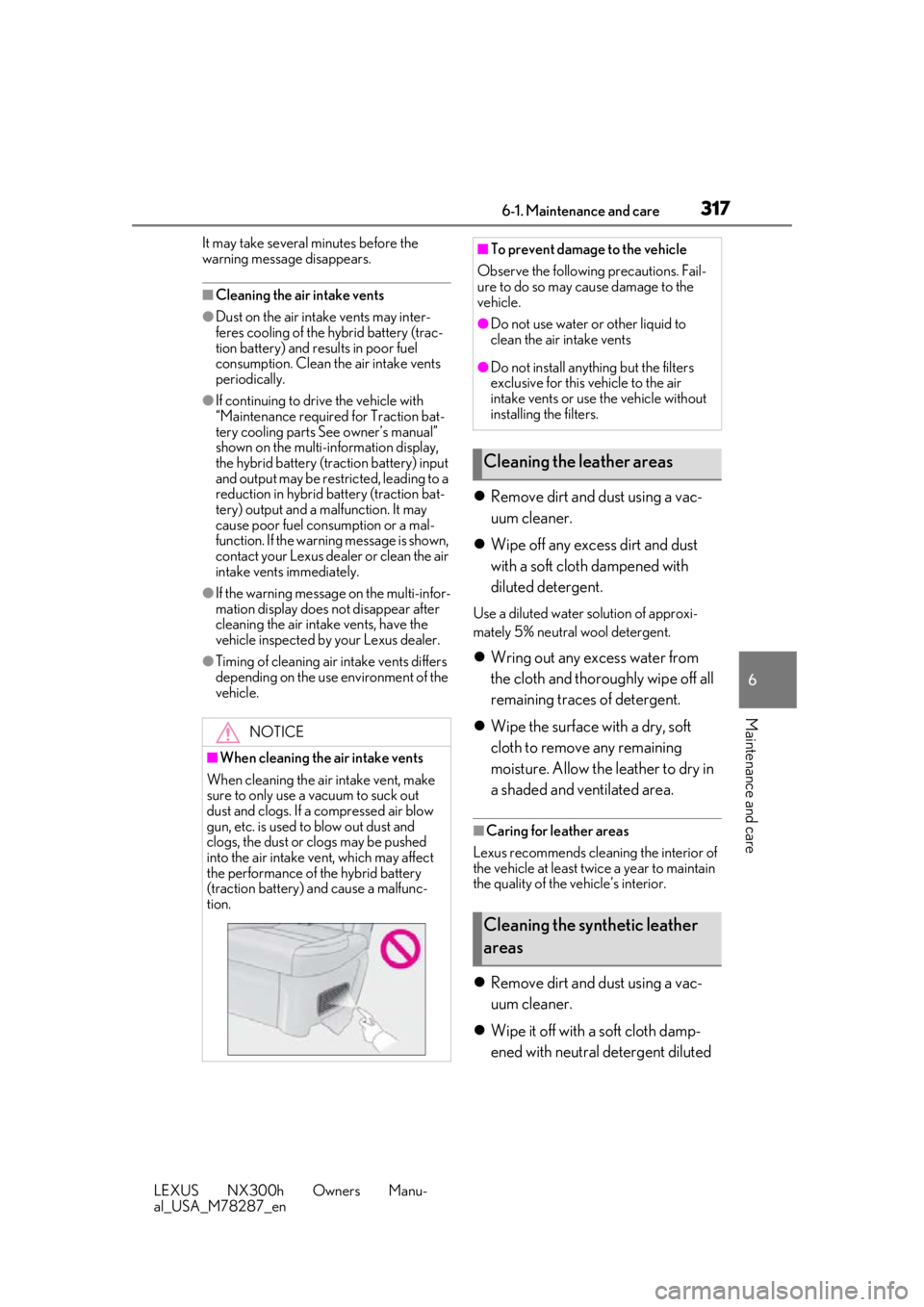
■When cleaning the air intake vents
When cleaning the air intake vent, make
sure to only use a vacuum to suck out
dust and clogs. If a compressed air blow
gun, etc. is used to blow out dust and
clogs, the dust or clogs may be pushed
into the air intake ve nt, which may affect
the performance of the hybrid battery
(traction battery) and cause a malfunc-
tion.
■To prevent damage to the vehicle
Observe the following precautions. Fail-
ure to do so may cause damage to the
vehicle.
●Do not use water or other liquid to
clean the air intake vents
●Do not install anything but the filters
exclusive for this vehicle to the air
intake vents or use the vehicle without
installing the filters.
Cleaning the leather areas
Cleaning the synthetic leather
areas
Page 325 of 460
3256-3. Do-it-yourself maintenance
LEXUS NX300h Owners Manu-
al_USA_M78287_en
6
Maintenance and care
Tire inflation
pressure
( P.345)• Tire pressure gauge
• Compressed air source
Washer fluid
( P.333)
• Water or washer fluid
containing antifreeze
(for winter use)
• Funnel (used only for adding water or washer
fluid)
WARNING
The engine compartment contains many
mechanisms and fluids that may move
suddenly, become hot, or become elec-
trically energized. To avoid death or seri-
ous injury, observe the following
precautions.
■When working on the engine com-
partment
●Make sure that the “IGNITION ON”
on the multi-information display and
the “READY” indicator are both off.
●Keep hands, clothi ng and tools away
from the moving fan and engine drive
belt.
●Be careful not to touch the engine,
power control unit, radiator, exhaust
manifold, etc. right after driving as they
may be hot. Oil and other fluids may
also be hot.
●Do not leave anything that may burn
easily, such as paper and rags, in the
engine compartment.
●Do not smoke, cause sparks or expose
an open flame to fuel. Fuel fumes are
flammable.
ItemsParts and tools■When working near the electric cool-
ing fans or radiator grille
Be sure the power switch is off.
With power switch in ON mode, the
electric cooling fans may automatically
start to run if the air conditioning is on
and/or the coolant temperature is high.
( P.332)
■Safety glasses
Wear safety glasses to prevent flying or
falling material, fluid spray, etc. from get-
ting in your eyes.
NOTICE
■If you remove the air cleaner filter
Driving with the air cleaner filter
removed may cause excessive engine
wear due to dirt in the air.
Page 331 of 460
3316-3. Do-it-yourself maintenance
LEXUS NX300h Owners Manu-
al_USA_M78287_en
6
Maintenance and care
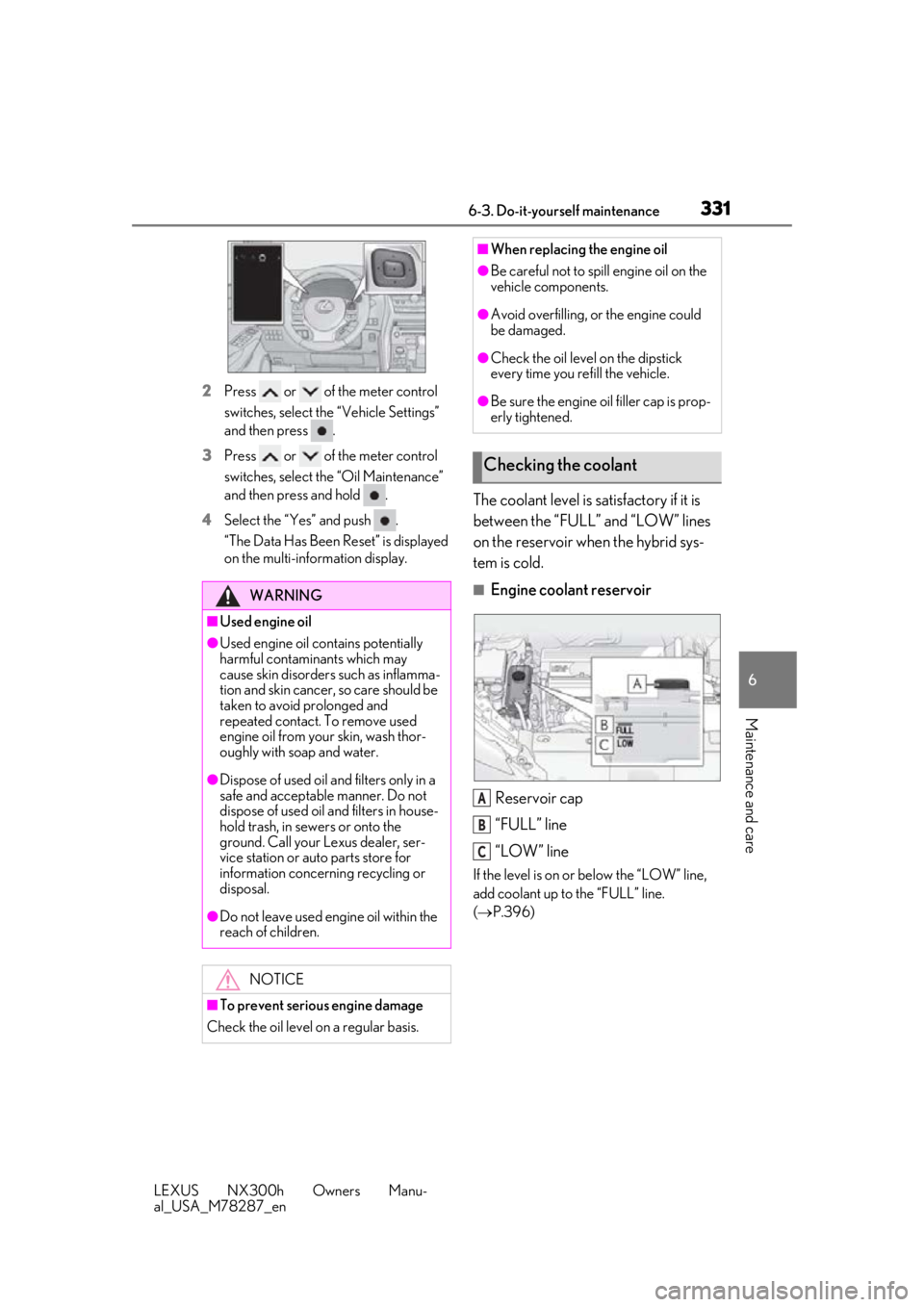
2 Press or of the meter control
switches, sele ct the “Vehicle Settings”
and then press .
3 Press or of the meter control
switches, select the “Oil Maintenance”
and then press and hold .
4 Select the “Yes” and push .
“The Data Has Been Reset” is displayed
on the multi-information display.
The coolant level is satisfactory if it is
between the “FULL” and “LOW” lines
on the reservoir when the hybrid sys-
tem is cold.
■Engine coolant reservoir
Reservoir cap
“FULL” line
“LOW” line
If the level is on or below the “LOW” line,
add coolant up to the “FULL” line.
( P.396)
WARNING
■Used engine oil
●Used engine oil contains potentially
harmful contaminants which may
cause skin disorders such as inflamma-
tion and skin cancer, so care should be
taken to avoid prolonged and
repeated contact. To remove used
engine oil from your skin, wash thor-
oughly with soap and water.
●Dispose of used oil and filters only in a
safe and acceptable manner. Do not
dispose of used oil and filters in house-
hold trash, in sewers or onto the
ground. Call your Lexus dealer, ser-
vice station or auto parts store for
information concerning recycling or
disposal.
●Do not leave used engine oil within the
reach of children.
NOTICE
■To prevent serious engine damage
Check the oil level on a regular basis.
■When replacing the engine oil
●Be careful not to spill engine oil on the
vehicle components.
●Avoid overfilling, or the engine could
be damaged.
●Check the oil level on the dipstick
every time you re fill the vehicle.
●Be sure the engine o il filler cap is prop-
erly tightened.
Checking the coolant
A
B
C
Page 348 of 460
3486-3. Do-it-yourself maintenance
LEXUS NX300h Owners Manu-
al_USA_M78287_en
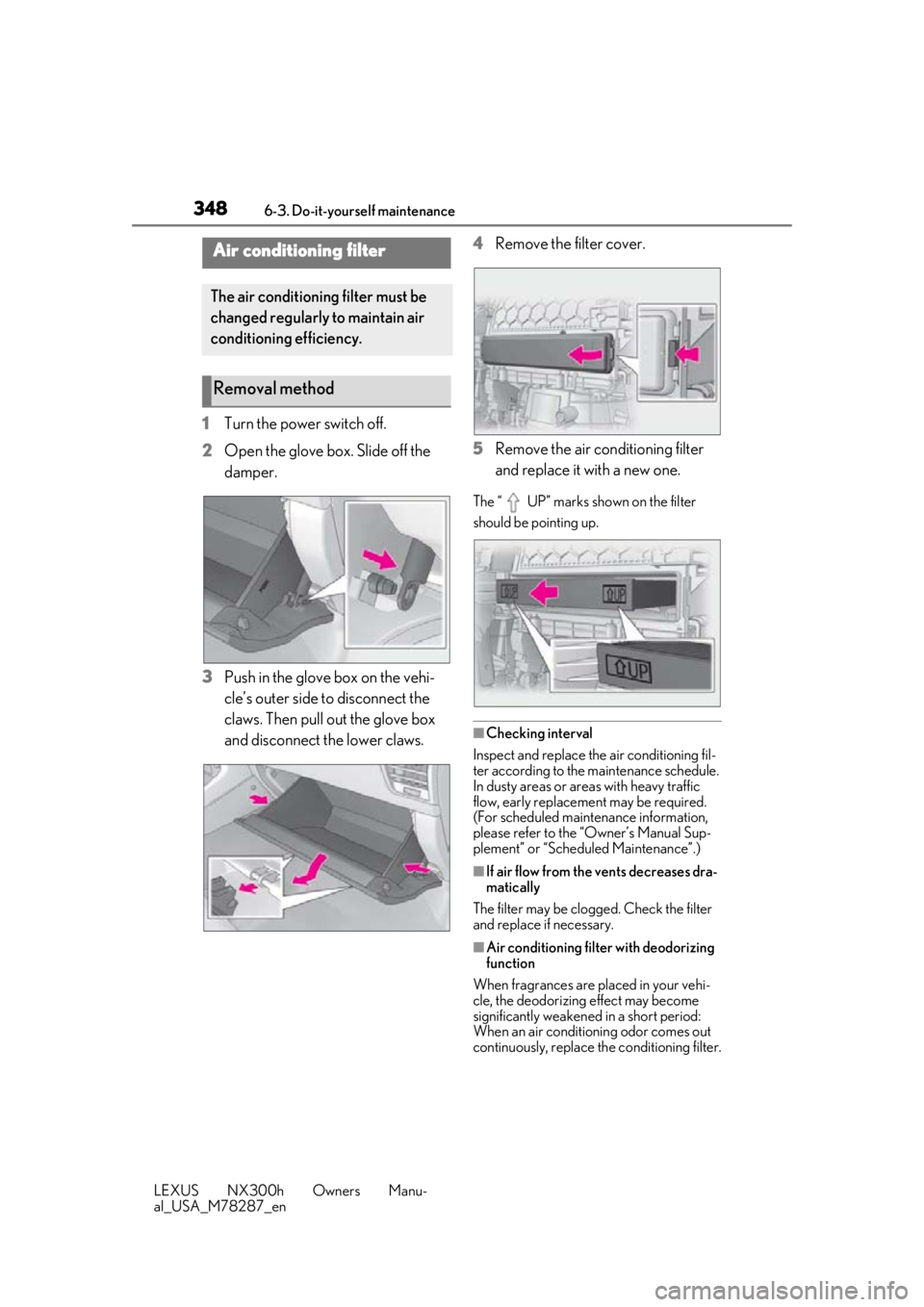
1Turn the power switch off.
2 Open the glove box. Slide off the
damper.
3 Push in the glove box on the vehi-
cle’s outer side to disconnect the
claws. Then pull out the glove box
and disconnect the lower claws. 4
Remove the filter cover.
5 Remove the air conditioning filter
and replace it with a new one.
The “ UP” marks shown on the filter
should be pointing up.
■Checking interval
Inspect and replace the air conditioning fil-
ter according to the maintenance schedule.
In dusty areas or areas with heavy traffic
flow, early replacement may be required.
(For scheduled maintenance information,
please refer to the “Owner’s Manual Sup-
plement” or “Scheduled Maintenance”.)
■If air flow from the vents decreases dra-
matically
The filter may be clogged. Check the filter
and replace if necessary.
■Air conditioning filt er with deodorizing
function
When fragrances are placed in your vehi-
cle, the deodorizing effect may become
significantly weakened in a short period:
When an air conditioning odor comes out
continuously, replace the conditioning filter.
Air conditioning filter
The air conditioning filter must be
changed regularly to maintain air
conditioning efficiency.
Removal method
Page 349 of 460
3496-3. Do-it-yourself maintenance
LEXUS NX300h Owners Manu-
al_USA_M78287_en
6
Maintenance and care
■When the card key battery needs to be
replaced (if equipped)
The battery for the card key is available only
at Lexus dealers. Your Lexus dealer can
replace the battery for you.
■If the electronic key battery is depleted
The following symptoms may occur:
●The smart access system with push-but-
ton start and wireless remote control will
not function properly.
●The operationa l range will be reduced.
Prepare the following before replacing
the battery:
Flathead screwdriver
Lithium battery CR2032
■Use a CR2032 lithium battery
●Batteries can be purchased at your Lexus
dealer, local electrical appliance shops or
camera stores.
●Replace only with the same or equivalent
type recommended by the manufacturer.
●Dispose of used batteries according to
the local laws.
NOTICE
■When using the air conditioning sys-
tem
Make sure that a filter is always installed.
Using the air conditioning system without
a filter may cause damage to the system.
Electronic key battery
Replace the battery with a new one
if it is depleted.
Items to prepare
Page 378 of 460

3787-2. Steps to take in an emergency
LEXUS NX300h Owners Manu-
al_USA_M78287_en
■If “Traction Battery Needs to be Pro-
tected Refrain From the Use of N Posi-
tion” is shown
This message may be displayed when the
shift lever is in N.
As the hybrid battery (traction battery) can-
not be charged when the shift lever is in N,
when the vehicle is to be stopped for a long
period of time, shift the shift lever to P.
■If “Traction battery needs to be pro-
tected. Shift into P to restart.” is shown
Message is displayed when the remaining
charge for the hybrid battery (traction bat-
tery) is low, because vehicle has been
shifted N for a long period of time.
When operating the vehicle, restart the
hybrid system.
■If “Shift to P Before Exiting Vehicle” is
shown
Message is displayed when the driver’s
door is opened with out turning the power
switch to OFF with the shift lever in any
position other than P.
Shift the shift lever to P.
■If “Shift Is in N Release Accelerator
Before Shifting” is shown
Message is displayed when the accelerator
pedal has been depressed and the shift
lever is in N. Release the accelerator pedal
and shift the shift lever to D, S or R.
■If “Depress Brake When Vehicle Is
Stopped Hybrid Syst em May Overheat”
is shown
Message is displayed when the accelerator
pedal is depressed to maintain the vehicle
position when stopped on a upward slope,
etc.
If this continues, th e hybrid system may
overheat.
Release the accelerator pedal and depress
the brake pedal.
■If “Front Camera Unavailable” or “Front
Camera Unavailable Remove Debris
On Windshield” is shown
The following systems may be suspended
until the problem shown in the message is
resolved. ( P.208, 369)
●PCS (Pre-Collision System)
●LDA (Lane Departure Alert with steering
control)
●Dynamic radar cruise control with full-
speed range
●Adaptive High-beam System
●Automatic High Beam
■If “Oil Maintenance Required Soon” is
shown
Indicates that the engine oil is scheduled to
be changed. (The indicator will not work
properly unless the oil maintenance data
has been reset.)
Check the engine oil, and change if neces-
sary. After changing th e engine oil, the oil
change system should be reset. ( P.330)
■If “Oil Maintenance Required” is shown
Indicates that the engine oil should be
changed. (After the engine oil is changed
and the oil maintenance data has been
reset.)
Check and change the en gine oil, and oil fil-
ter by your Lexus dealer. After changing the
engine oil, the oil change system should be
reset. ( P.330)
■If “See Owner’s Manual” is shown
●If the following messages are shown, fol-
lowing the instruct ions, accordingly.
• “Engine Coolant Temp High” ( P.396)
• “Aux Battery Low” ( P.377)
●If the following messages are shown,
there may be a malfunction.
Immediately have the vehicle inspected
by your Lexus dealer.
• “Hybrid System Malfunction”
•“Check Engine”
• “Hybrid Battery System Malfunction”
• “Accelerator System Malfunction”
• “Braking Power Low”
• “Smart Access System Malfunction”
●If “Maintenance required for Traction bat-
tery cooling parts” is shown, the filters
may be clogged, the air intake vents may
be blocked, or there may be a gap in the
duct. Therefore, perform the following
correction procedure.
• If the air intake vents of the hybrid battery (traction battery) are dirty, perform the
procedure on P. 316 to clean them.
• If the warning message is shown when