heating LEXUS NX300H 2019 Owners Manual
[x] Cancel search | Manufacturer: LEXUS, Model Year: 2019, Model line: NX300H, Model: LEXUS NX300H 2019Pages: 460, PDF Size: 6.82 MB
Page 67 of 460
671-2. Hybrid system
LEXUS NX300h Owners Manu-
al_USA_M78287_en
1
For safety and security
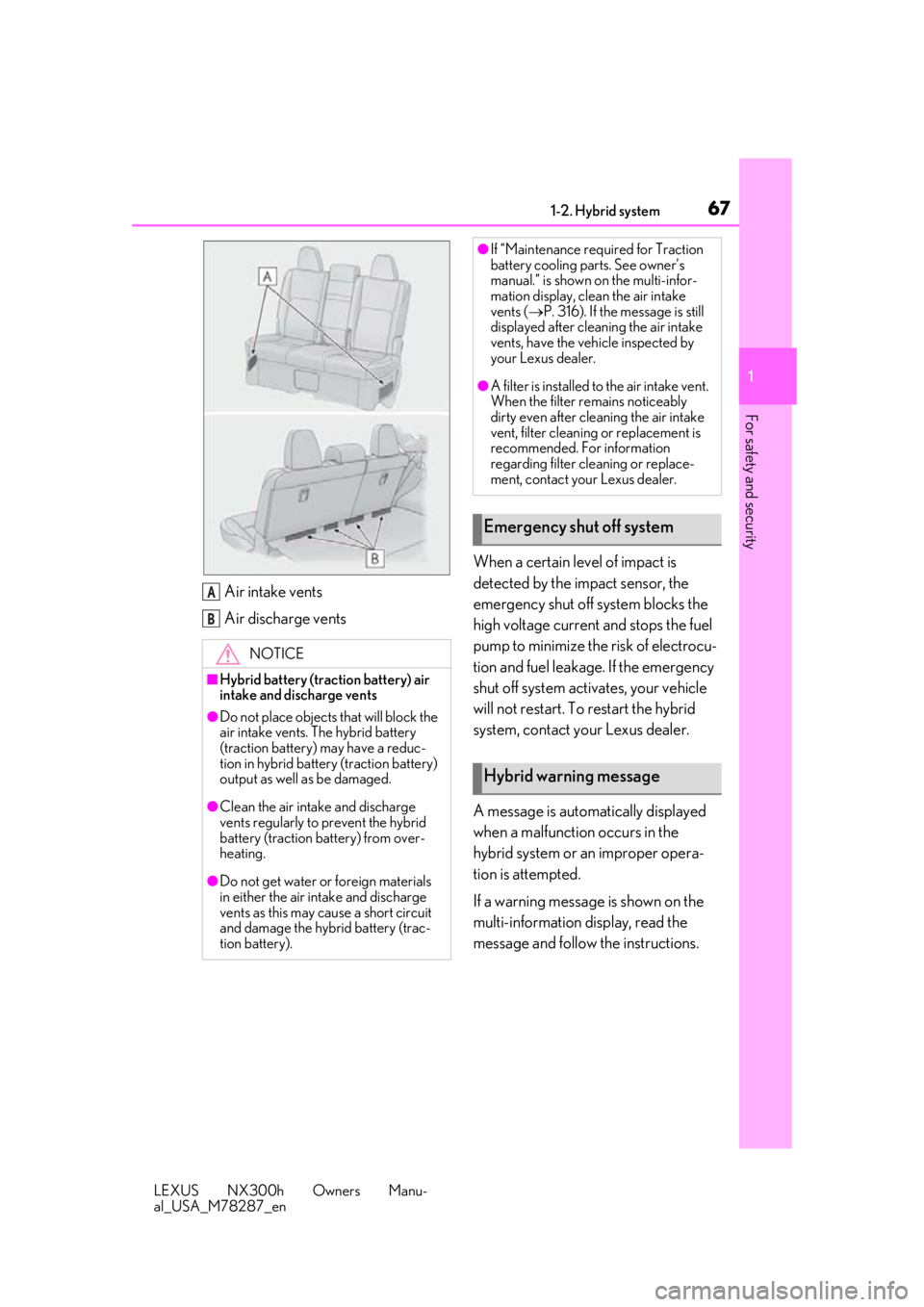
Air intake vents
Air discharge vents When a certain level of impact is
detected by the impact sensor, the
emergency shut off system blocks the
high voltage current and stops the fuel
pump to minimize the risk of electrocu-
tion and fuel leakage. If the emergency
shut off system activates, your vehicle
will not restart. To restart the hybrid
system, contact your Lexus dealer.
A message is automatically displayed
when a malfunction occurs in the
hybrid system or an improper opera-
tion is attempted.
If a warning message is shown on the
multi-information display, read the
message and follow the instructions.
NOTICE
■Hybrid battery (traction battery) air
intake and discharge vents
●Do not place objects
that will block the
air intake vents. The hybrid battery
(traction battery) may have a reduc-
tion in hybrid battery (traction battery)
output as well as be damaged.
●Clean the air intake and discharge
vents regularly to prevent the hybrid
battery (traction battery) from over-
heating.
●Do not get water or foreign materials
in either the air intake and discharge
vents as this may cause a short circuit
and damage the hybrid battery (trac-
tion battery).
A
B
●If “Maintenance required for Traction
battery cooling parts. See owner’s
manual.” is shown on the multi-infor-
mation display, clean the air intake
vents ( P. 316). If the message is still
displayed after cleaning the air intake
vents, have the vehicle inspected by
your Lexus dealer.
●A filter is installed to the air intake vent.
When the filter re mains noticeably
dirty even after cleaning the air intake
vent, filter cleaning or replacement is
recommended. For information
regarding filter cleaning or replace-
ment, contact your Lexus dealer.
Emergency shut off system
Hybrid warning message
Page 83 of 460
832-1. Instrument cluster
LEXUS NX300h Owners Manu-
al_USA_M78287_en
2
Vehicle status information and indicators
■Customization
The meter display can be customized on
the multi-information display.
(Customizable features: P.421)
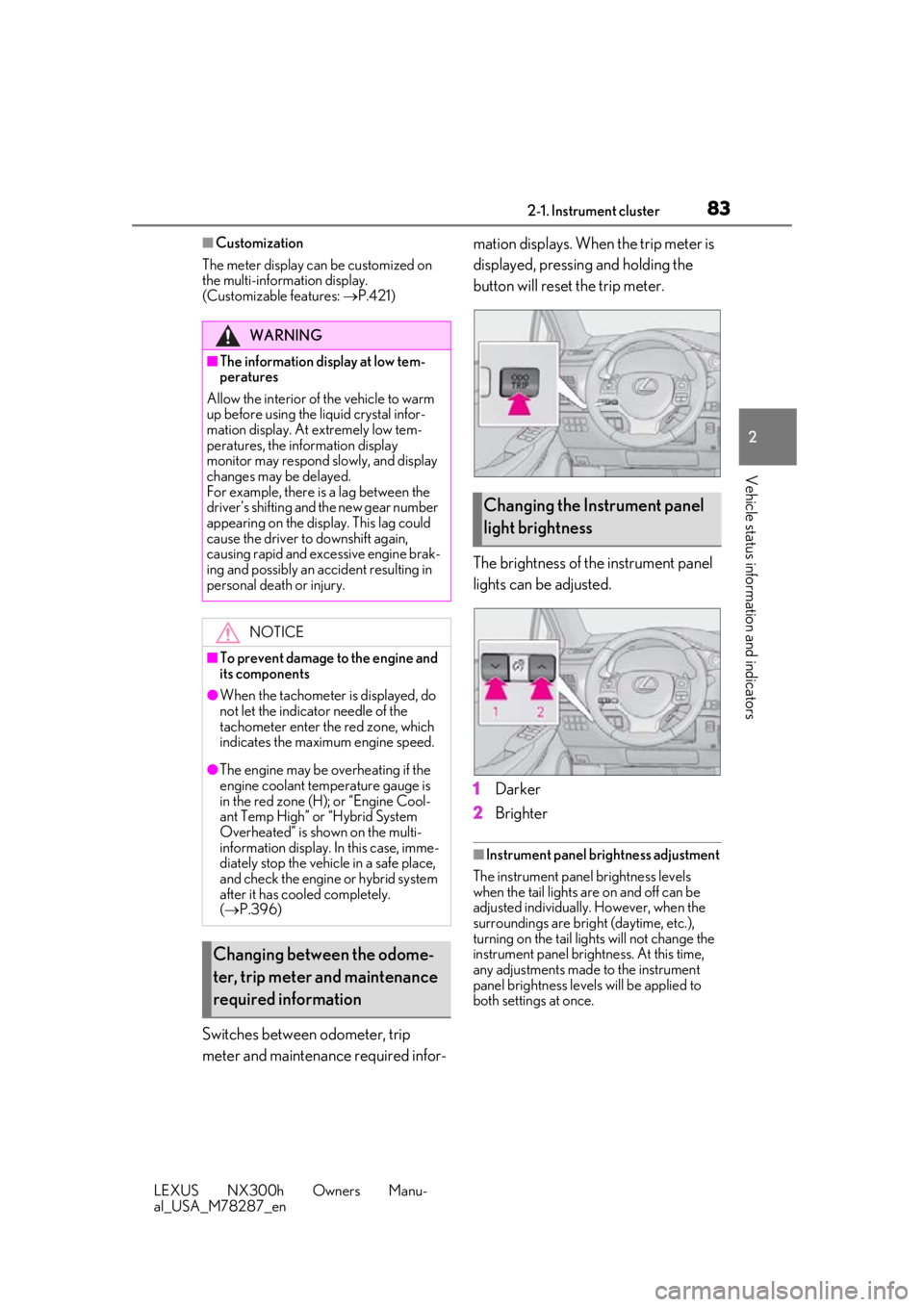
Switches between odometer, trip
meter and maintenance required infor- mation displays. When the trip meter is
displayed, pressing and holding the
button will reset the trip meter.
The brightness of the instrument panel
lights can be adjusted.
1
Darker
2 Brighter
■Instrument panel brightness adjustment
The instrument panel brightness levels
when the tail lights are on and off can be
adjusted individually. However, when the
surroundings are bright (daytime, etc.),
turning on the tail lights will not change the
instrument panel brightness. At this time,
any adjustments made to the instrument
panel brightness levels will be applied to
both settings at once.
WARNING
■The information display at low tem-
peratures
Allow the interior of the vehicle to warm
up before using the liquid crystal infor-
mation display. At extremely low tem-
peratures, the in formation display
monitor may respond slowly, and display
changes may be delayed.
For example, there is a lag between the
driver’s shifting and the new gear number
appearing on the display. This lag could
cause the driver to downshift again,
causing rapid and excessive engine brak-
ing and possibly an accident resulting in
personal death or injury.
NOTICE
■To prevent damage to the engine and
its components
●When the tachometer is displayed, do
not let the indicator needle of the
tachometer enter the red zone, which
indicates the maximum engine speed.
●The engine may be overheating if the
engine coolant temperature gauge is
in the red zone (H); or “Engine Cool-
ant Temp High” or “Hybrid System
Overheated” is shown on the multi-
information display. In this case, imme-
diately stop the vehicle in a safe place,
and check the engine or hybrid system
after it has cooled completely.
( P.396)
Changing between the odome-
ter, trip meter and maintenance
required information
Changing the Instrument panel
light brightness
Page 154 of 460
1544-1. Before driving
LEXUS NX300h Owners Manu-
al_USA_M78287_en
WARNING
●Always apply the parking brake, shift
the shift lever to P, stop the hybrid sys-
tem and lock the vehicle.
Do not leave the vehicle unattended
while the “READY” indicator is illumi-
nated.
If the vehicle is parked with the shift
lever in P but the parking brake is not
set, the vehicle may start to move, pos-
sibly leading to an accident.
●Do not touch the exhaust pipes while
the “READY” indicator is illuminated
or immediately after turning the hybrid
system off.
Doing so may cause burns.
■When taking a nap in the vehicle
Always turn the hybrid system off. Other-
wise, if you accidentally move the shift
lever or depress the accelerator pedal,
this could cause an accident or fire due
to hybrid system overheating. Addition-
ally, if the vehicle is parked in a poorly
ventilated area, exhaust gases may col-
lect and enter the ve hicle, leading to
death or a serious health hazard.
■When braking
●When the brakes are wet, drive more
cautiously.
Braking distance increases when the
brakes are wet, and this may cause one
side of the vehicle to brake differently
than the other side. Also, the parking
brake may not securely hold the vehi-
cle.
●If the electronically controlled brake
system does not operate, do not follow
other vehicles closely and avoid hills or
sharp turns that require braking.
In this case, braking is still possible, but
the brake pedal should be depressed
more firmly than usual. Also, the brak-
ing distance will increase. Have your
brakes fixed immediately.
●The brake system consists of 2 or more
individual hydraulic systems; if one of
the systems fails, the other(s) will still
operate. In this case, the brake pedal
should be depressed more firmly than
usual and the braking distance will
increase. Have your brakes fixed
immediately.
■If the vehicle becomes stuck
Do not spin the wheels excessively when
any of the tires is up in the air, or the vehi-
cle is stuck in sand, mud, etc. This may
damage the driveline components or
propel the vehicle forward or backward,
causing an accident.
NOTICE
■When driving the vehicle
●Do not depress the accelerator and
brake pedals at the same time during
driving, as this may restrain the hybrid
system output.
●Do not use the accelerator pedal or
depress the accelerator and brake
pedals at the same time to hold the
vehicle on a hill.
■Avoiding damage to vehicle parts
●Do not turn the steering wheel fully in
either direction and hold it there for an
extended period of time.
Doing so may damage the power
steering motor.
●When driving over bumps in the road,
drive as slowly as possible to avoid
damaging the wheels, underside of the
vehicle, etc.
■If you get a flat tire while driving
A flat or damaged tire may cause the fol-
lowing situations. Hold the steering
wheel firmly and gradually depress the
brake pedal to slow down the vehicle.
●It may be difficult to control your vehi-
cle.
Page 166 of 460

1664-1. Before driving
LEXUS NX300h Owners Manu-
al_USA_M78287_en
do not put the transmission in D.
( P.176)
Instability happens more frequently
when descending steep or long
downhill grades. Before descend-
ing, slow down and downshift. Do
not make sudden downshifts while
descending steep or long downhill
grades.
Avoid holding the brake pedal down
too long or applying the brakes too
frequently. This could cause the
brakes to overheat and result in
reduced braking efficiency.
Due to the added load of the trailer,
your vehicle’s engine may overheat
on hot days (at temperatures over
85°F [30°C]) when driving up a
long or steep grade. If the engine
coolant temperature gauge indi-
cates overheating, immediately turn
off the air conditioning (if in use),
pull your vehicle off the road and
stop in a safe spot. ( P.396)
Always place wheel blocks under
both the vehicle’s and the trailer’s
wheels when parking. Put the trans-
mission in P and apply the parking
brake. Avoid parking on a slope, but
if unavoidable, do so only after per-
forming the following:
1 Apply the brakes and keep them
applied.
2 Have someone place wheel blocks
under both the vehicle’s and trailer’s
wheels. 3
When the wheel blocks are in
place, release the brakes slowly
until the blocks absorb the load.
4 Shift into P and apply the parking
brake.
5 Turn off the hybrid system.
When restarting after parking on a
slope:
1 With the transmission in P, start the
hybrid system. Be sure to keep the
brake pedal depressed.
2 Shift into a forward gear. If revers-
ing, shift into R.
3 If the parking brake is in manual
mode, release the parking brake.
(P.178)
4 Release the brake pedal, and slowly
pull or back away from the wheel
blocks. Stop and apply the brakes.
5 Have someone retrieve the blocks.
Page 169 of 460
1694-2. Driving procedures
LEXUS NX300h Owners Manu-
al_USA_M78287_en
4
Driving
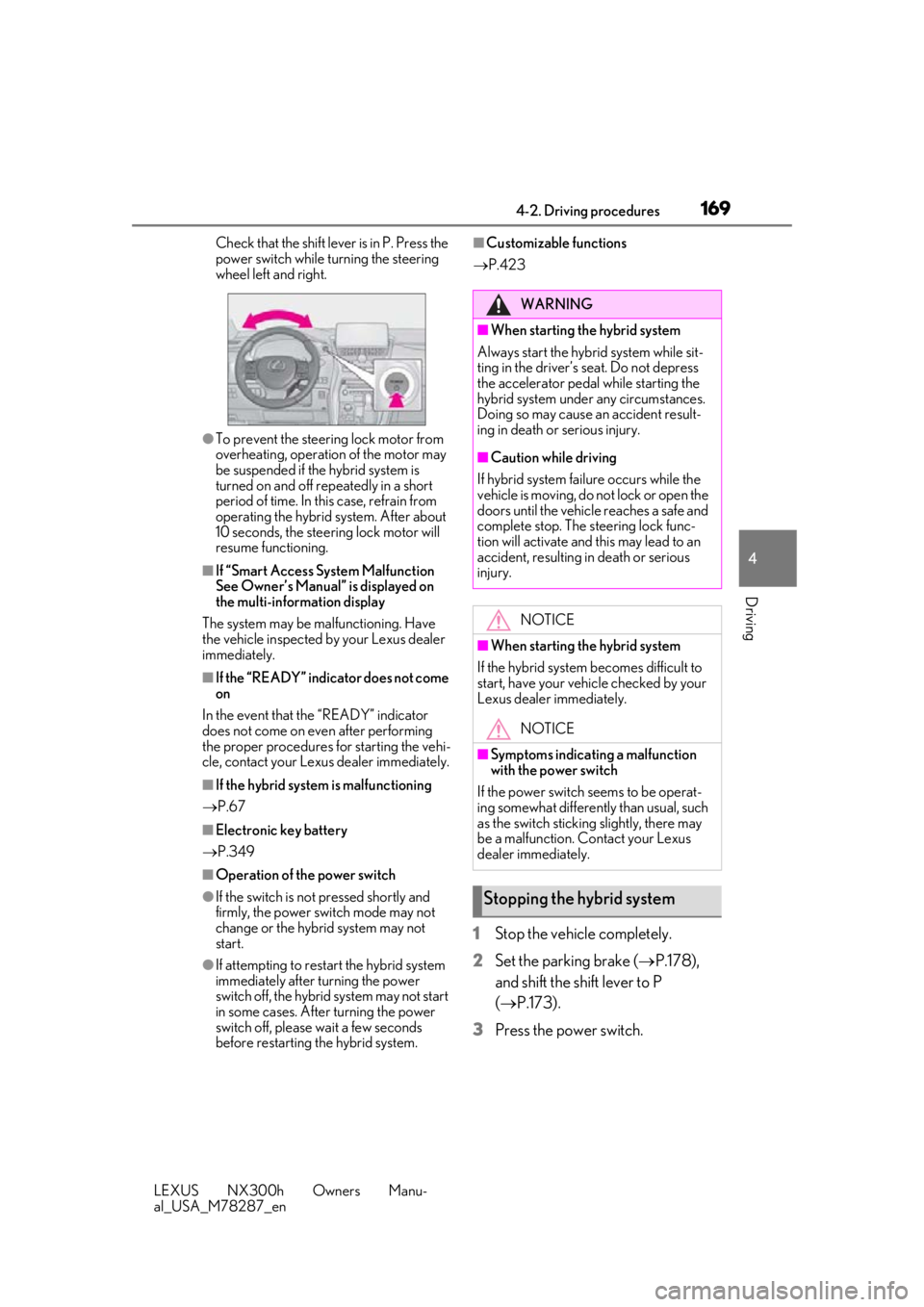
Check that the shift leve r is in P. Press the
power switch while turning the steering
wheel left and right.
●To prevent the steering lock motor from
overheating, operation of the motor may
be suspended if the hybrid system is
turned on and off repeatedly in a short
period of time. In this case, refrain from
operating the hybrid system. After about
10 seconds, the stee ring lock motor will
resume functioning.
■If “Smart Access System Malfunction
See Owner’s Manual” is displayed on
the multi-inform ation display
The system may be malfunctioning. Have
the vehicle inspected by your Lexus dealer
immediately.
■If the “READY” indicator does not come
on
In the event that the “READY” indicator
does not come on even after performing
the proper procedures for starting the vehi-
cle, contact your Lexus dealer immediately.
■If the hybrid system is malfunctioning
P.67
■Electronic key battery
P.349
■Operation of the power switch
●If the switch is not pressed shortly and
firmly, the power switch mode may not
change or the hybrid system may not
start.
●If attempting to restart the hybrid system
immediately after turning the power
switch off, the hybrid system may not start
in some cases. After turning the power
switch off, please wait a few seconds
before restarting the hybrid system.
■Customizable functions
P.423
1 Stop the vehicle completely.
2 Set the parking brake ( P.178),
and shift the shift lever to P
( P.173).
3 Press the power switch.
WARNING
■When starting the hybrid system
Always start the hybrid system while sit-
ting in the driver’s seat. Do not depress
the accelerator pedal while starting the
hybrid system under any circumstances.
Doing so may cause an accident result-
ing in death or serious injury.
■Caution while driving
If hybrid system failure occurs while the
vehicle is moving, do not lock or open the
doors until the vehicle reaches a safe and
complete stop. The steering lock func-
tion will activate and this may lead to an
accident, resulting in death or serious
injury.
NOTICE
■When starting the hybrid system
If the hybrid system becomes difficult to
start, have your vehicle checked by your
Lexus dealer immediately.
NOTICE
■Symptoms indicating a malfunction
with the power switch
If the power switch seems to be operat-
ing somewhat differently than usual, such
as the switch sticking slightly, there may
be a malfunction. Contact your Lexus
dealer immediately.
Stopping the hybrid system
Page 178 of 460
1784-2. Driving procedures
LEXUS NX300h Owners Manu-
al_USA_M78287_en
■Using the manual mode
The parking brake can be set and
released manually.
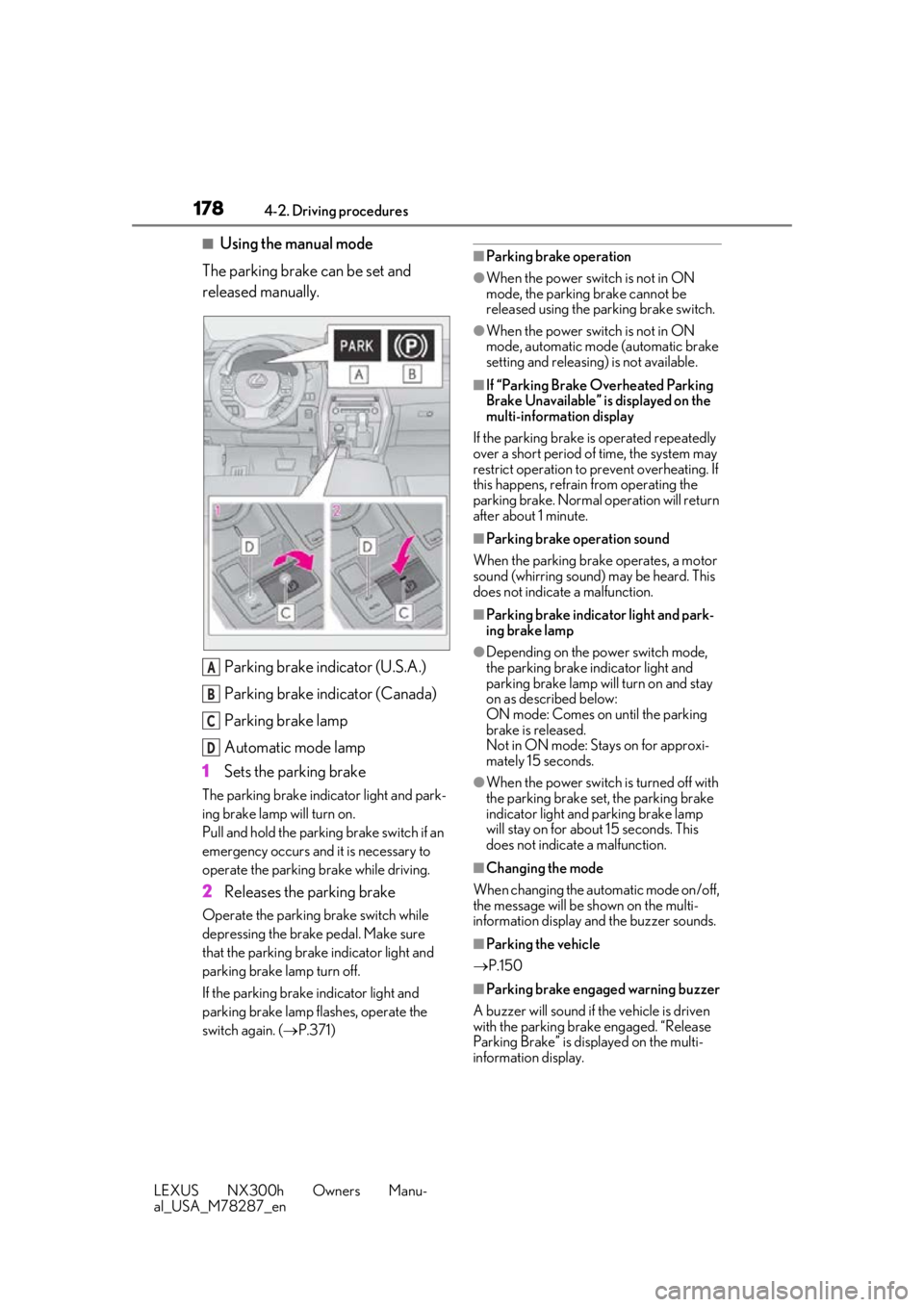
Parking brake indicator (U.S.A.)
Parking brake indicator (Canada)
Parking brake lamp
Automatic mode lamp
1 Sets the parking brake
The parking brake indicator light and park-
ing brake lamp will turn on.
Pull and hold the parking brake switch if an
emergency occurs and it is necessary to
operate the parking brake while driving.
2Releases the parking brake
Operate the parking brake switch while
depressing the brake pedal. Make sure
that the parking brake indicator light and
parking brake lamp turn off.
If the parking brake indicator light and
parking brake lamp flashes, operate the
switch again. ( P.371)
■Parking brake operation
●When the power swit ch is not in ON
mode, the parking brake cannot be
released using the parking brake switch.
●When the power swit ch is not in ON
mode, automatic mode (automatic brake
setting and releasing) is not available.
■If “Parking Brake Overheated Parking
Brake Unavailable” is displayed on the
multi-information display
If the parking brake is operated repeatedly
over a short period of time, the system may
restrict operation to prevent overheating. If
this happens, refrain from operating the
parking brake. Normal operation will return
after about 1 minute.
■Parking brake operation sound
When the parking brake operates, a motor
sound (whirring sound) may be heard. This
does not indicate a malfunction.
■Parking brake indicator light and park-
ing brake lamp
●Depending on the power switch mode,
the parking brake indicator light and
parking brake lamp will turn on and stay
on as described below:
ON mode: Comes on until the parking
brake is released.
Not in ON mode: Stays on for approxi-
mately 15 seconds.
●When the power switch is turned off with
the parking brake set, the parking brake
indicator light and parking brake lamp
will stay on for about 15 seconds. This
does not indicate a malfunction.
■Changing the mode
When changing the automatic mode on/off,
the message will be shown on the multi-
information display and the buzzer sounds.
■Parking the vehicle
P.150
■Parking brake engaged warning buzzer
A buzzer will sound if the vehicle is driven
with the parking brake engaged. “Release
Parking Brake” is displayed on the multi-
information display.
A
B
C
D
Page 179 of 460
1794-2. Driving procedures
LEXUS NX300h Owners Manu-
al_USA_M78287_en
4
Driving
■Warning messages and buzzers
Warning messages and buzzers are used to
indicate a system malfunction or to inform
the driver of the need for caution. If a warn-
ing message is shown on the multi-informa-
tion display, read the message and follow
the instructions.
■If the brake system warning light comes
on
P.368
■Usage in winter time
P.257
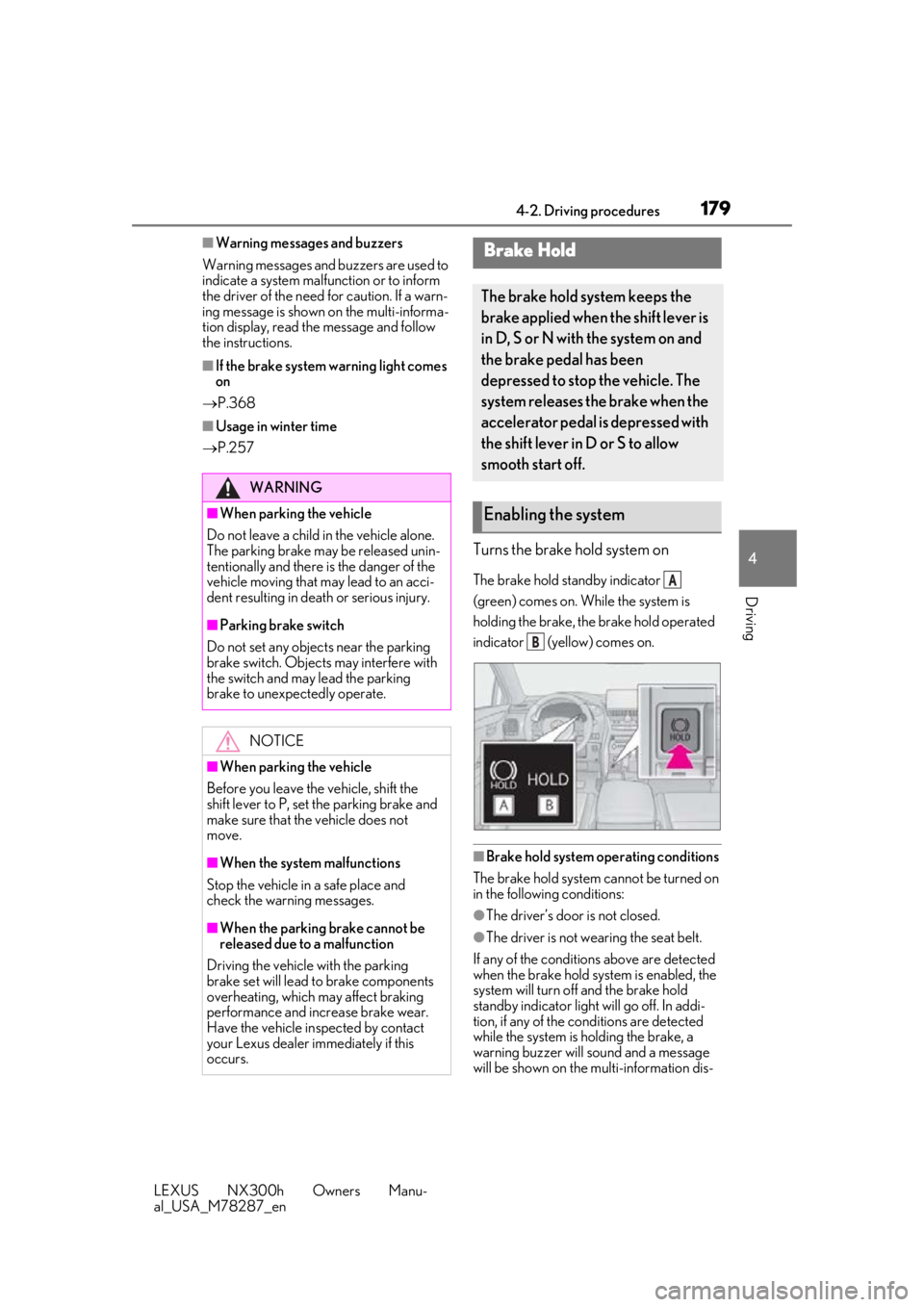
Turns the brake hold system on
The brake hold standby indicator
(green) comes on. While the system is
holding the brake, the brake hold operated
indicator (yellow) comes on.
■Brake hold system operating conditions
The brake hold system cannot be turned on
in the following conditions:
●The driver’s door is not closed.
●The driver is not wearing the seat belt.
If any of the conditions above are detected
when the brake hold system is enabled, the
system will turn off and the brake hold
standby indicator light will go off. In addi-
tion, if any of the co nditions are detected
while the system is holding the brake, a
warning buzzer will sound and a message
will be shown on the multi-information dis-
WARNING
■When parking the vehicle
Do not leave a child in the vehicle alone.
The parking brake may be released unin-
tentionally and there is the danger of the
vehicle moving that may lead to an acci-
dent resulting in death or serious injury.
■Parking brake switch
Do not set any objects near the parking
brake switch. Objects may interfere with
the switch and may lead the parking
brake to unexpectedly operate.
NOTICE
■When parking the vehicle
Before you leave the vehicle, shift the
shift lever to P, set the parking brake and
make sure that the vehicle does not
move.
■When the system malfunctions
Stop the vehicle in a safe place and
check the warning messages.
■When the parking brake cannot be
released due to a malfunction
Driving the vehicle with the parking
brake set will lead to brake components
overheating, which may affect braking
performance and increase brake wear.
Have the vehicle inspected by contact
your Lexus dealer immediately if this
occurs.
Brake Hold
The brake hold system keeps the
brake applied when the shift lever is
in D, S or N with the system on and
the brake pedal has been
depressed to stop the vehicle. The
system releases the brake when the
accelerator pedal is depressed with
the shift lever in D or S to allow
smooth start off.
Enabling the system
A
B
Page 248 of 460
2484-5. Using the driving support systems
LEXUS NX300h Owners Manu-
al_USA_M78287_en
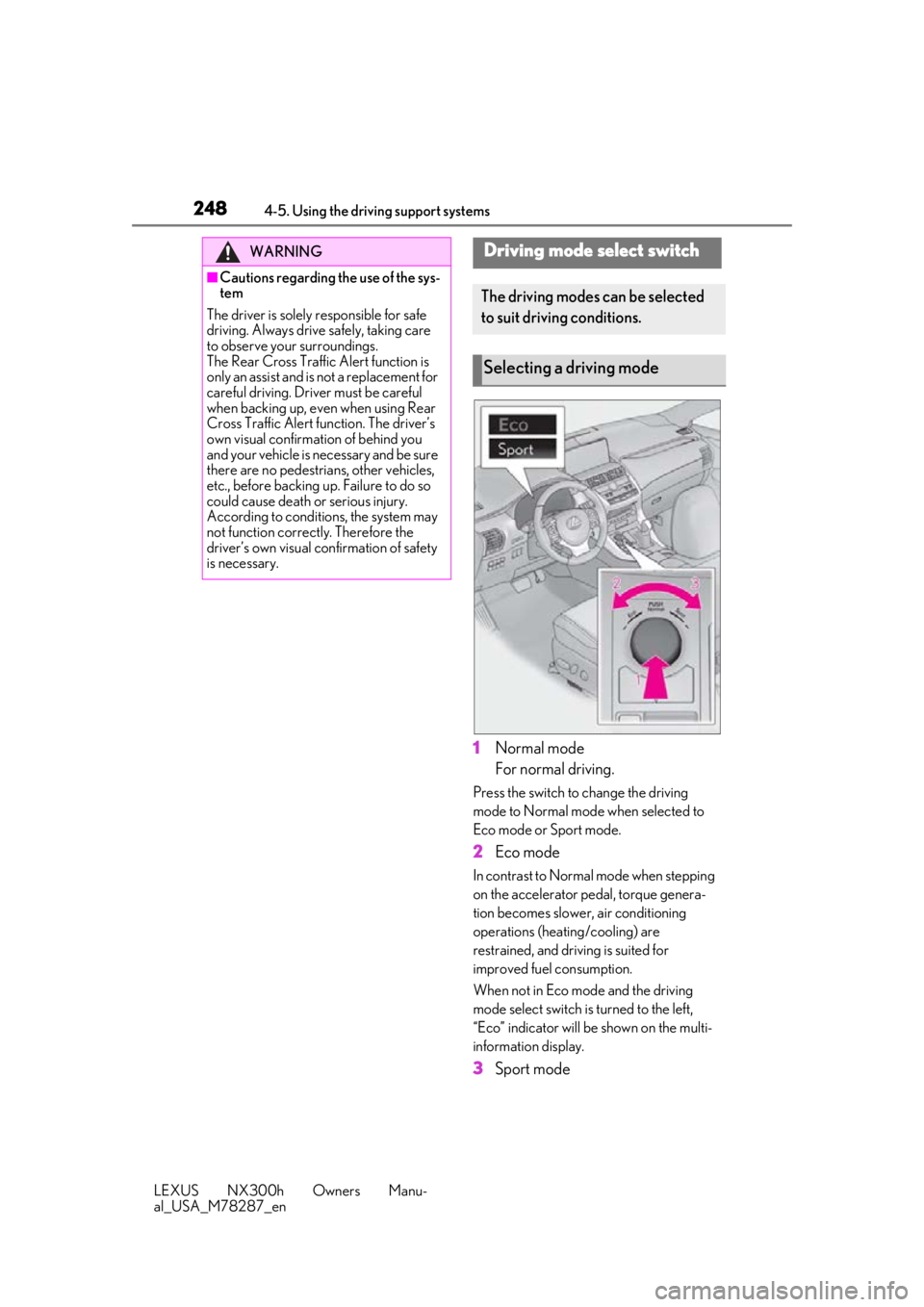
1Normal mode
For normal driving.
Press the switch to change the driving
mode to Normal mode when selected to
Eco mode or Sport mode.
2Eco mode
In contrast to Normal mode when stepping
on the accelerator pedal, torque genera-
tion becomes slower, air conditioning
operations (heating/cooling) are
restrained, and driving is suited for
improved fuel consumption.
When not in Eco mode and the driving
mode select switch is turned to the left,
“Eco” indicator will be shown on the multi-
information display.
3Sport mode
WARNING
■Cautions regarding the use of the sys-
tem
The driver is solely responsible for safe
driving. Always driv e safely, taking care
to observe your surroundings.
The Rear Cross Traffic Alert function is
only an assist and is not a replacement for
careful driving. Driver must be careful
when backing up, even when using Rear
Cross Traffic Alert function. The driver’s
own visual confirmation of behind you
and your vehicle is necessary and be sure
there are no pedestrians, other vehicles,
etc., before backing up. Failure to do so
could cause death or serious injury.
According to conditions, the system may
not function correctly. Therefore the
driver’s own visual confirmation of safety
is necessary.
Driving mode select switch
The driving modes can be selected
to suit driving conditions.
Selecting a driving mode
Page 249 of 460
2494-5. Using the driving support systems
LEXUS NX300h Owners Manu-
al_USA_M78287_en
4
Driving
Assists acceleration response by con-
trolling the hybrid system and steering.
Suitable for when precise handling is desir-
able, for example when driving on moun-
tain roads.
When not in Sport mode and the driving
mode select switch is turned to the right,
“Sport” indicator will be shown on the
multi-information display and the hybrid
system indicator changes to the tachome-
ter. ( P.79)
■Operation of the air conditioning sys-
tem in Eco mode
Eco mode controls the heating/cooling
operations and fan speed of the air condi-
tioning system to enhance fuel efficiency. To
improve air conditio ning performance,
adjust the fan speed or turn off Eco mode.
■When canceling Eco mode/Sport mode
●Select another driving mode. Also, Sport
mode will be canceled automatically
when the power switch is turned off.
●Normal mode and Eco mode will not be
canceled automatically until another driv-
ing mode is selected, even if the power
switch is turned off.
■ECB (Electronically Controlled
Brake System)
The electronically controlled system
generates braking force correspond-
ing to the brake operation
■ABS (Anti-lock Brake System)
Helps to prevent wheel lock when the
brakes are applied suddenly, or if the
brakes are applied while driving on a
slippery road surface
■Brake assist
Generates an increased level of brak-
ing force after the brake pedal is
depressed when the system detects a
panic stop situation
■VSC (Vehicle Stability Control)
Helps the driver to control skidding
when swerving sudden ly or turning on
slippery road surfaces
■Enhanced VSC (Enhanced Vehi-
cle Stability Control)
Provides cooperative control of the
ABS, TRAC, VSC and EPS.
Driving assist systems
To keep driving safety and perfor-
mance, the following systems oper-
ate automatically in response to
various driving situations. Be aware,
however, that these systems are
supplementary and should not be
relied upon too heavily when oper-
ating the vehicle.
Summary of the driving assist
systems
Page 251 of 460
2514-5. Using the driving support systems
LEXUS NX300h Owners Manu-
al_USA_M78287_en
4
Driving
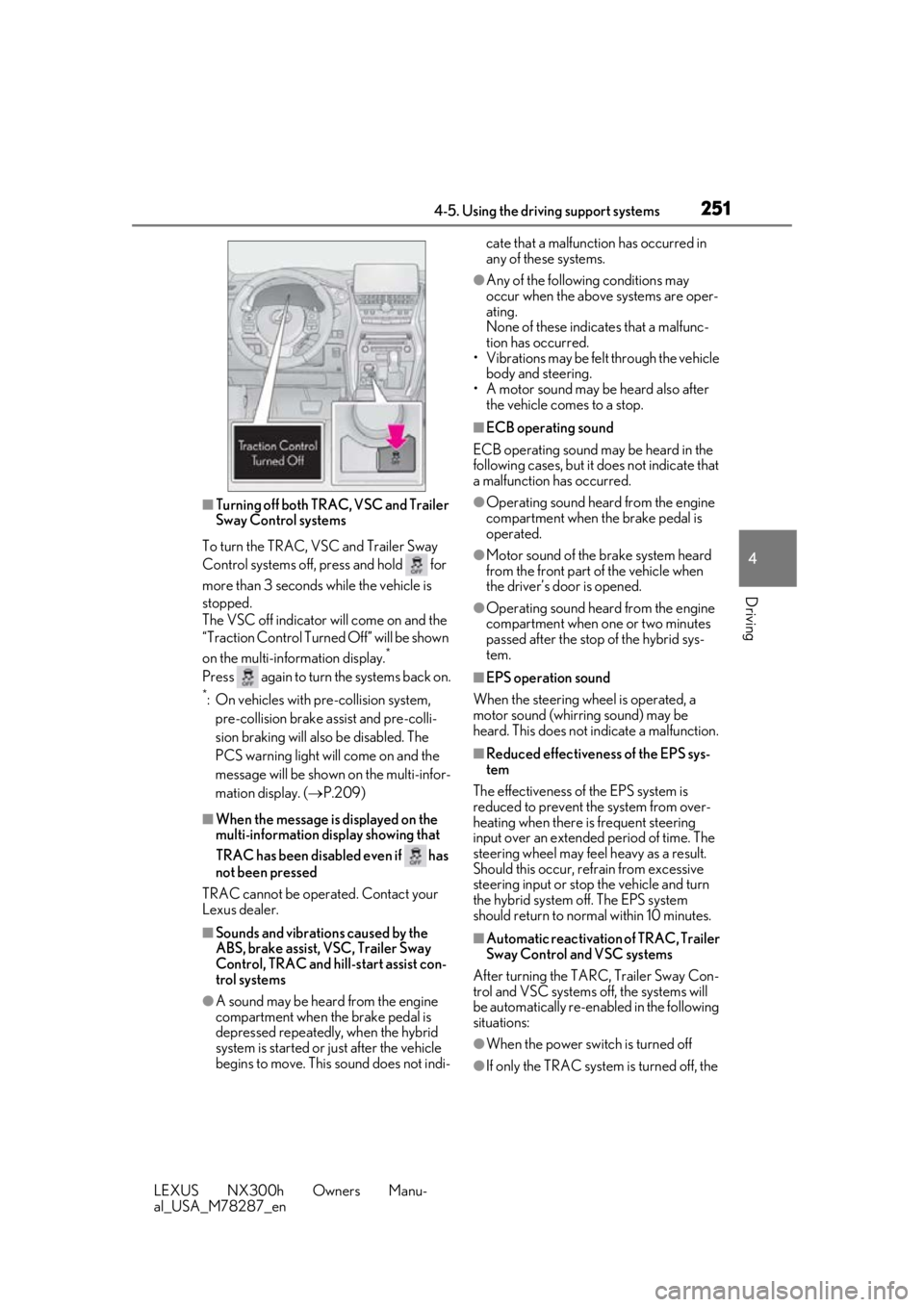
■Turning off both TR AC, VSC and Trailer
Sway Control systems
To turn the TRAC, VSC and Trailer Sway
Control systems off, press and hold for
more than 3 seconds while the vehicle is
stopped.
The VSC off indicator will come on and the
“Traction Control Turned Off” will be shown
on the multi-information display.
*
Press again to turn the systems back on.
*: On vehicles with pre-collision system,
pre-collision brake assist and pre-colli-
sion braking will also be disabled. The
PCS warning light will come on and the
message will be shown on the multi-infor-
mation display. ( P.209)
■When the message is displayed on the
multi-information display showing that
TRAC has been disabled even if has
not been pressed
TRAC cannot be operated. Contact your
Lexus dealer.
■Sounds and vibrations caused by the
ABS, brake assist, VSC, Trailer Sway
Control, TRAC and hi ll-start assist con-
trol systems
●A sound may be heard from the engine
compartment when the brake pedal is
depressed repeatedly, when the hybrid
system is started or just after the vehicle
begins to move. This sound does not indi- cate that a malfunction has occurred in
any of these systems.
●Any of the following conditions may
occur when the above systems are oper-
ating.
None of these indicates that a malfunc-
tion has occurred.
• Vibrations may be felt through the vehicle
body and steering.
• A motor sound may be heard also after the vehicle comes to a stop.
■ECB operating sound
ECB operating sound may be heard in the
following cases, but it does not indicate that
a malfunction has occurred.
●Operating sound heard from the engine
compartment when the brake pedal is
operated.
●Motor sound of the brake system heard
from the front part of the vehicle when
the driver’s door is opened.
●Operating sound heard from the engine
compartment when one or two minutes
passed after the stop of the hybrid sys-
tem.
■EPS operation sound
When the steering wheel is operated, a
motor sound (whirring sound) may be
heard. This does not indicate a malfunction.
■Reduced effectiveness of the EPS sys-
tem
The effectiveness of the EPS system is
reduced to prevent the system from over-
heating when there is frequent steering
input over an extended period of time. The
steering wheel may feel heavy as a result.
Should this occur, re frain from excessive
steering input or stop the vehicle and turn
the hybrid system off. The EPS system
should return to normal within 10 minutes.
■Automatic reactivation of TRAC, Trailer
Sway Control and VSC systems
After turning the TARC, Trailer Sway Con-
trol and VSC systems off, the systems will
be automatically re-enabled in the following
situations:
●When the power switch is turned off
●If only the TRAC system is turned off, the