lock LEXUS NX300h 2020 Owner's Manual
[x] Cancel search | Manufacturer: LEXUS, Model Year: 2020, Model line: NX300h, Model: LEXUS NX300h 2020Pages: 484, PDF Size: 15.45 MB
Page 77 of 484

771-5. Theft deterrent system
LEXUS NX300h Owners Manual_USA_M78530_en
1
For safety and security
■Items to check before locking the
vehicle
To prevent unexpected triggering of
the alarm and vehicle theft, make sure
of the following:
Nobody is in the vehicle.
The windows and moon roof (if
equipped) are closed before the
alarm is set.
No valuables or other personal
items are left in the vehicle.
■Setting
Close the doors and hood, and lock all
the doors. The system will be set auto-
matically after 30 seconds.
The indicator light changes from being on
to flashing when the system is set.
■Canceling or stopping
Do one of the following to deactivate
or stop the alarms:
Unlock the doors.
Turn the power switch to ACCES-
SORY or ON mode, or start the
hybrid system. (The alarm will be
deactivated or stopped after a few
seconds.)
■System maintenance
The vehicle has a maintenance-free type
alarm system.
■Triggering of the alarm
The alarm may be triggered in the following
situations:
(Stopping the alarm deactivates the alarm
system.)
●A person inside the vehicle opens a door
or hood, or unlocks the vehicle using an
inside lock button.
●The 12-volt battery is recharged or
replaced when the vehicle is locked.
( P.414)
Alarm
The alarm uses light and sound to
give an alert when an intrusion is
detected.
The alarm is triggered in the follow-
ing situations when the alarm is set:
A locked door is unlocked or
opened in any way other than
using the entry function, wireless
remote control or mechanical
key. (The doors will lock again
automatically.)
The hood is opened.
Setting/canceling/stopping the
alarm system
Page 78 of 484
781-5. Theft deterrent system
LEXUS NX300h Owners Manual_USA_M78530_en
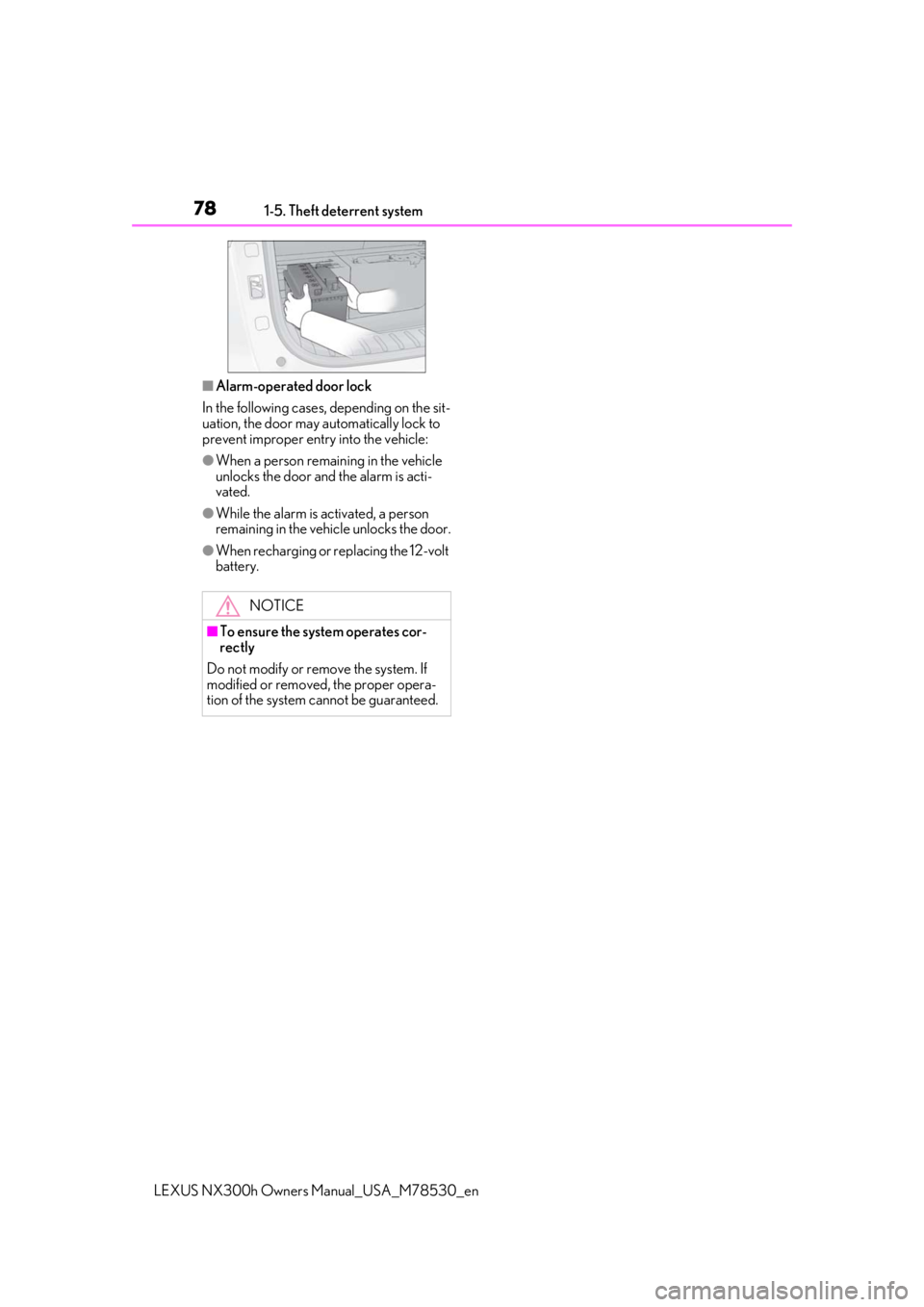
■Alarm-operated door lock
In the following cases, depending on the sit-
uation, the door may automatically lock to
prevent improper entry into the vehicle:
●When a person remaining in the vehicle
unlocks the door and the alarm is acti-
vated.
●While the alarm is activated, a person
remaining in the vehicle unlocks the door.
●When recharging or replacing the 12-volt
battery.
NOTICE
■To ensure the system operates cor-
rectly
Do not modify or remove the system. If
modified or removed, the proper opera-
tion of the system cannot be guaranteed.
Page 84 of 484

842-1. Instrument cluster
LEXUS NX300h Owners Manual_USA_M78530_en
When driving mode is in other than Sport mode (P.269)
The units used on the meters may differ depending on the target region.
Engine coolant temperature gauge
Displays the engine coolant temperature
Hybrid System Indicator
Displays hybrid system outp ut or regeneration level (P.87)
Outside temperature
Displays the outside temperature within the range of -40°F (-40°C) to 122°F (50°C). Low
outside temperature indicator comes on when the ambient temperature is 37°F (3°C) or
lower.
Background color of driving mode
Background color changes acco rding to the driving mode. (P.269)
•Sport mode: Red
•Eco mode: Blue
When in Normal mode, the background color is black.
Clock
Time displayed is linked to the analog clock on the instrument panel. (P.310)
Multi-information display
Gauges and meters
The meters display various drive information.
Meter display
A
B
C
D
E
F
Page 86 of 484

862-1. Instrument cluster
LEXUS NX300h Owners Manual_USA_M78530_en
Outside temperature
Displays the outside temperature within the range of -40°F (-40°C) to 122°F (50°C). Low
outside temperature indicator comes on when the ambient temperature is 37°F (3°C) or
lower.
Background color of driving mode
Background color changes according to the driving mode. (P.269)
•Sport mode: Red
•Eco mode: Blue
When in Normal mode, the background color is black.
Clock
Time displayed is linked to the analog clock on the instrument panel. (P.310)
Multi-information display
Presents the driver with a variety of vehicle data ( P.89)
Displays warning messages in case of a malfunction (P.396)
Speedometer
Displays the vehicle speed
Fuel gauge
Displays the quantity of fuel remaining in the tank
Shift position and shift range
Displays the selected shift posi tion or selected shift range (P.179)
Odometer, trip meter and maintena nce required information display
Odometer:
Displays the total distance the vehicle has been driven
Trip meter:
Displays the distance the vehicle has been driven since the meter was last reset.
Trip meters “A” and “B” can be used to record and display different distances inde-
pendently.
Maintenance required information:
Displays the remaining distance until the engine oil should be changed.
• Displays the maintenance requ ired information when the power switch is ON mode.
• It can be reset on of the multi-information display. ( P.91)
■Operating condition
The power switch is in ON mode.
C
D
E
F
G
H
I
J
Page 93 of 484

932-1. Instrument cluster
LEXUS NX300h Owners Manual_USA_M78530_en
2
Vehicle status information and indicators
Select to set the over speed alert on/off.
Level of Over Speed
Select to set the over speed alert level.
Others
Select to set the other road sign assist.
■Clock
Select to switch between 12-hour dis-
play and 24-hour display.
■Vehicle Settings
PBD (Power Back Door)
*1
( P.114)
Select to set up the following items.
•System settings
Select to enable/dis able the power back
door system.
•Volume
Select to set the volume of the buzzer
which sounds when the power back door
system.
• Kick Sensor
*2
Select to enable/dis able the kick sensor.
*1: Vehicles with power back door
*2: Vehicles with Hands Free Power Back
Door
TPMS (Tire Pressure Warning Sys-
tem) ( P.357)
Select to initialize the tire pressure warning
system.
Scheduled Maintenance ( P.337)
Select to initialize the scheduled mainte-
nance.
Oil maintenance ( P.348)
Select to reset the en gine oil maintenance
information (message indicating mainte-
nance is required and distance until the
next oil change) after engine oil mainte- nance is performed.
■Meter settings
Language
Select to change the language on the dis-
play.
Units
Select to change the unit of measure for
fuel consumption.
EV Indicator ( P.68)
Select to set the EV indicator on/off.
Switch settings ( P.89)
Displays a procedure to register a desired
screen to
.
You can register 1 screen as a shortcut,
which can be displayed by pressing
.
Drive information screen ( P.90)
Select to choose between 2 items that will
be displayed on each drive information
screen (“
Drive info 1”, “Drive info 2” and
“Drive info 3
”) respectively.
Pop-up display ( P.87)
Select to set the following pop-up displays,
which may appear in some situations,
on/off.
• Intersection guidance display of the nav-
igation system-linked system
• Incoming call display of the hands-free phone system
• Instrument panel brightness adjustment display
Accent color
Select to change the accent colors on the
screen, such as the cursor color.
Tachometer settings
Page 105 of 484

105
LEXUS NX300h Owners Manual_USA_M78530_en
3
3
Before driving
Before driving
3-1. Key informationKeys ................................................. 106
3-2. Opening, closing and locking the doors
Side doors ...................................... 110
Back door ....................................... 114
Smart access system with push- button start ................................. 126
3-3. Adjusting the seats Front seats ..................................... 132
Rear seats ...................................... 133
Driving position memory ........ 138
Head restraints............................. 141
3-4. Adjusting the steering wheel and mirrors
Steering wheel............................. 143
Inside rear view mirror............. 144
Outside rear view mirrors ...... 146
3-5. Opening, closing the windows and moon roof
Power windows........................... 148
Moon roof ..................................... 150
Page 108 of 484

1083-1. Key information
LEXUS NX300h Owners Manual_USA_M78530_en
the following wireless remote control:Locks all the doors ( P.110)
Unlocks all the doors ( P.110)
Opens the windows and moon
roof
*1, 2 ( P.110)
Opens and closes the power back
door
*1 ( P.117)
Sounds the alarm ( P.108)
*1: If equipped
*2: This setting must be customized at your
Lexus dealer.
■Theft deterrent panic mode
When is pressed for longer than
about 1 second, an alarm will sound inter-
mittently and the vehicle lights will flash to
deter any person from trying to break into
or damage your vehicle.
To stop the alarm, press any button on the
electronic key.
■Back door reserve lock function (vehi-
cles with power back door)
This function is a function which reserves
locking of all doors, beforehand, when the
back door is open. When the follow is done,
all the doors except the back door are
locked and then back door will also be
locked at the same time it is closed.
1 Close all doors, except the back door.
2 Push the wireless lock button during the
automatic closing operation of the back
door.
To take out the mechanical key, push
the release button and take the key out.
The mechanical key can only be inserted in
one direction, as the key only has grooves
on one side. If the key cannot be inserted in
a lock cylinder, turn it over and re-attempt
to insert it.
After using the mechanical key, store it in
the electronic key. Carry the mechanical
key together with the electronic key. If the
electronic key battery is depleted or the
entry function does not operate properly,
you will need the mechanical key.
( P.410)
A
B
C
D
E
Using the mechanical key
Page 109 of 484

1093-1. Key information
LEXUS NX300h Owners Manual_USA_M78530_en
3
Before driving
■When required to leave the vehicle’s
key with a parking attendant
Lock the glove box as circumstances
demand. ( P.304)
Remove the mechanical key for your own
use and provide the attendant with the elec-
tronic key only.
■If you lose your mechanical keys
P.409
■If a wrong key is used
The key cylinder rotates freely to isolate
inside mechanism.
■Card key
●If it is difficult to take out the mechanical
key, push down the release button using a
pen tip, etc. If it is still difficult to pull it out,
use a coin, etc.
●To store the mechanical key in the card
key, insert it while pressing the release
button.
NOTICE
■Handling the card key
Do not apply excess force when inserting
the mechanical key into the card key.
Doing so may damage the card key.
Page 110 of 484
1103-2. Opening, closing and locking the doors
LEXUS NX300h Owners Manual_USA_M78530_en
3-2.Opening, closing and locking the doors
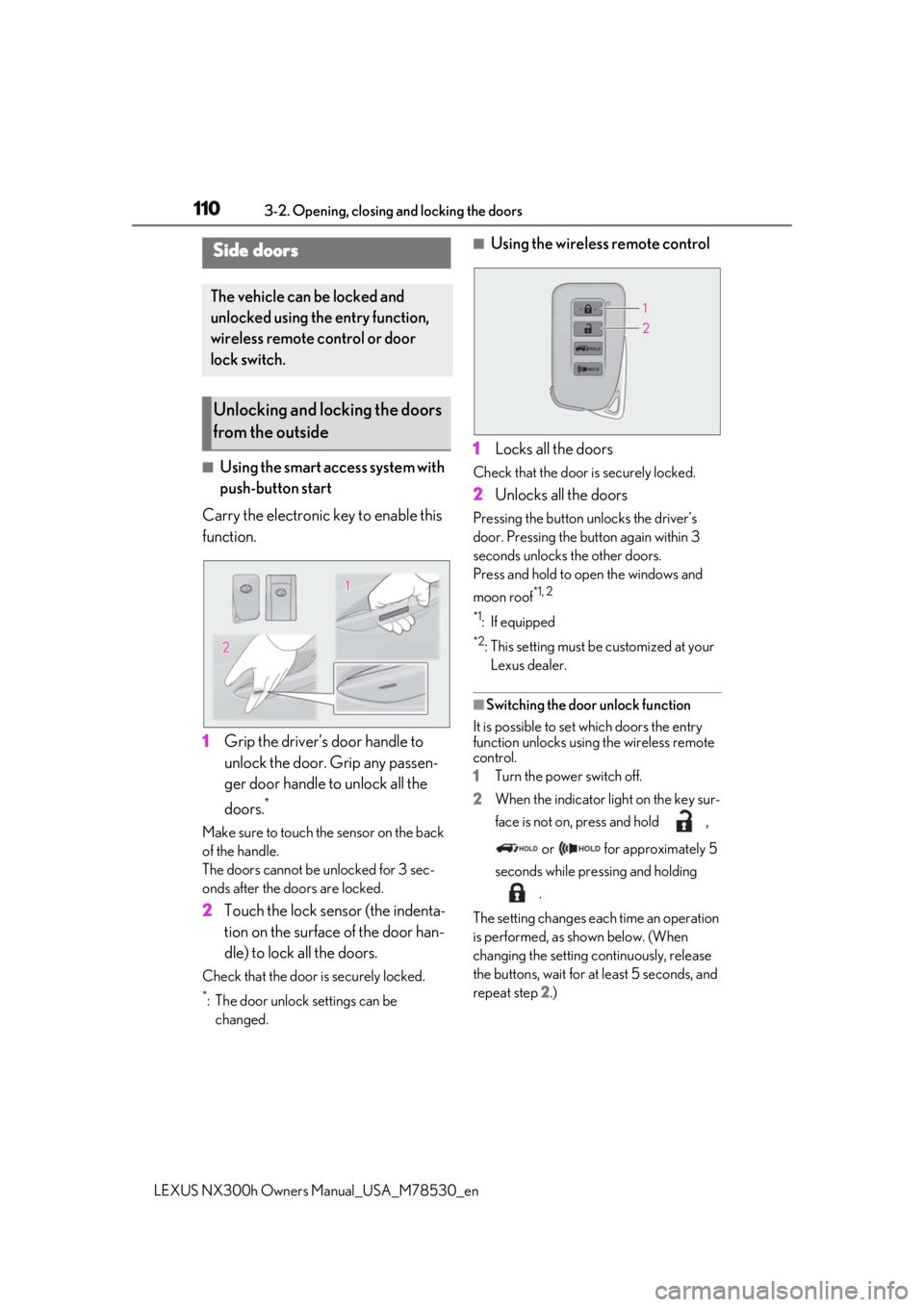
■Using the smart access system with
push-button start
Carry the electronic key to enable this
function.
1 Grip the driver’s door handle to
unlock the door. Grip any passen-
ger door handle to unlock all the
doors.
*
Make sure to touch the sensor on the back
of the handle.
The doors cannot be unlocked for 3 sec-
onds after the doors are locked.
2Touch the lock sensor (the indenta-
tion on the surface of the door han-
dle) to lock all the doors.
Check that the door is securely locked.
*: The door unlock settings can be
changed.
■Using the wireless remote control
1 Locks all the doors
Check that the door is securely locked.
2Unlocks all the doors
Pressing the button unlocks the driver’s
door. Pressing the button again within 3
seconds unlocks the other doors.
Press and hold to open the windows and
moon roof
*1, 2
*1
: If equipped
*2: This setting must be customized at your
Lexus dealer.
■Switching the door unlock function
It is possible to set which doors the entry
function unlocks using the wireless remote
control.
1 Turn the power switch off.
2 When the indicator light on the key sur-
face is not on, press and hold ,
or for approximately 5
seconds while pre ssing and holding
.
The setting changes each time an operation
is performed, as shown below. (When
changing the setting continuously, release
the buttons, wait for at least 5 seconds, and
repeat step 2 .)
Side doors
The vehicle can be locked and
unlocked using the entry function,
wireless remote control or door
lock switch.
Unlocking and locking the doors
from the outside
Page 111 of 484

1113-2. Opening, closing and locking the doors
LEXUS NX300h Owners Manual_USA_M78530_en
3
Before driving
For vehicles with alarm: To prevent unin-
tended triggering of the alarm, unlock the
doors using the wirele ss remote control and
open and close a door once after the set-
tings have been changed. (If a door is not
opened within 60 seconds after is
pressed, the doors will be locked again and
the alarm will automatically be set.)
In a case that the alarm is triggered, imme-
diately stop the alarm. ( P.77)
■Locking the doors from the outside with-
out a key
1 Move the inside lock button to the lock
position.
2 Close the door.
The door cannot be locked if the power
switch is in ACCESSORY or ON mode, or
the electronic key is le ft inside the vehicle.
The key may not be detected correctly and
the door may be locked.
■Impact detection door lock release sys-
tem
In the event that the vehicle is subject to a
strong impact, all the doors are unlocked.
Depending on the force of the impact or the type of accident, however, the system may
not operate.
■Operation signals
Doors:
A buzzer sounds and the emergency flash-
ers flash to indicate that the doors have
been locked/unlocked. (Locked: Once;
Unlocked: Twice)
Windows and moon roof:
A buzzer sounds to indicate that all win-
dows and moon roof are opening.
■Security feature
If a door is not opened within approximately
60 seconds after the vehicle is unlocked,
the security feature automatically locks the
vehicle again.
■Open door warning buzzer
If the vehicle speed reaches 3 mph (5
km/h), the master warning light flashes and
a buzzer sounds to indicate that door(s) or
the hood in not fully closed.
The open door(s) or hood is displayed on
the multi-information display.
■Welcome light illumination control
The side marker, parking, tail and license
plate lights automatically turn on at night
when the doors are unlocked using the
entry function or wireless remote control if
the light switch is in the position.
■When the door cannot be locked by the
lock sensor on the surface of the door
handle
When the door cannot be locked even if the
lock sensor on the surface of the door han-
dle is touched by a finger, touch the lock
sensor with the palm.
When gloves are being worn, remove the
gloves.
Multi-information display/BeepUnlocking function
Exterior: Beeps 3 times
Interior: Pings once
Holding the driver’s
door handle unlocks
only the driver’s door.
Holding any of the
passenger door han- dles unlocks all the doors.
Exterior: Beeps twice
Interior: Pings once
Holding a door han-dle unlocks all the doors.